
ESP32 C3 Super Mini - Control Fan
Learn how to control a DC cooling fan with your ESP32 C3 Super Mini using a relay module. This beginner-friendly project shows you how to turn a fan on and off automatically with simple Arduino code.
In this tutorial, you'll learn:
- What a DC fan is and how to control it with ESP32 C3 Super Mini
- How to wire a relay, fan, and power supply to ESP32 C3 Super Mini
- How to write code to turn the fan on/off
- How to build automatic cooling projects with temperature sensors
- How to use a MOSFET module instead of the relay, so you can also change the fan speed
There are two ways to switch the fan: a relay or a MOSFET module. A relay gives only two states, ON and OFF. A MOSFET module does ON and OFF too, and it can also run the fan slower or faster with PWM. This page shows both ways.
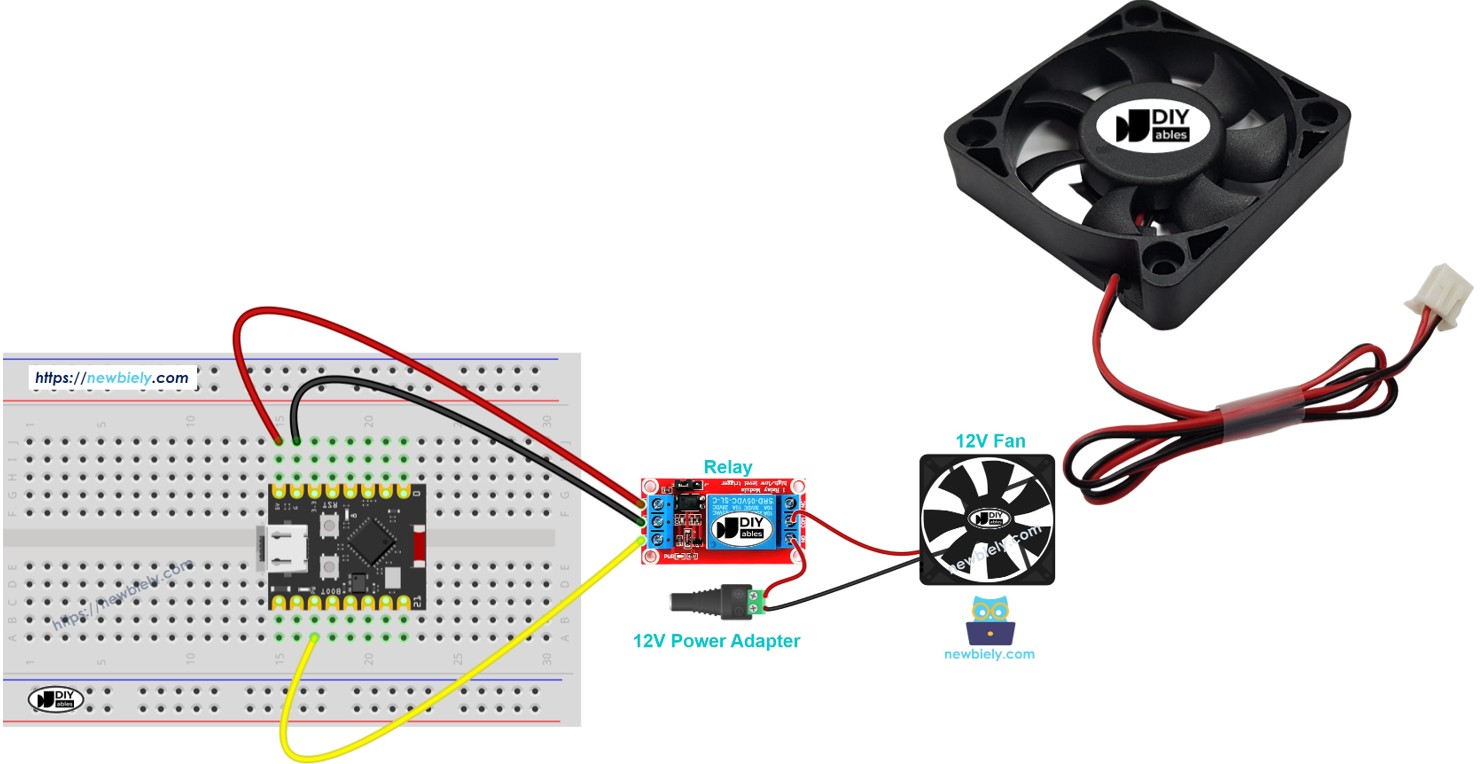
Hardware Preparation
Or you can buy the following kits:
| 1 | × | DIYables Sensor Kit (18 sensors/displays) |
Additionally, some of these links are for products from our own brand, DIYables .
Overview of DC Fan
A DC fan is an electric cooling device that runs on direct current power and moves air for ventilation or cooling.
Key features of DC fans:
- Run on DC voltage (common: 5V, 12V, or 24V)
- Two-wire connection: positive (red) and negative (black)
- Constant speed when powered with steady voltage
- Variable speed when powered with PWM signal
- Low power consumption and quiet operation
- Ideal for cooling electronics projects, computers, and small spaces
Why DC fans are great for beginners:
- Simple two-wire hookup
- Work with common power supplies
- Easy to control with relays or transistors
- Affordable and widely available
Pinout
A DC fan has two connection wires for power:
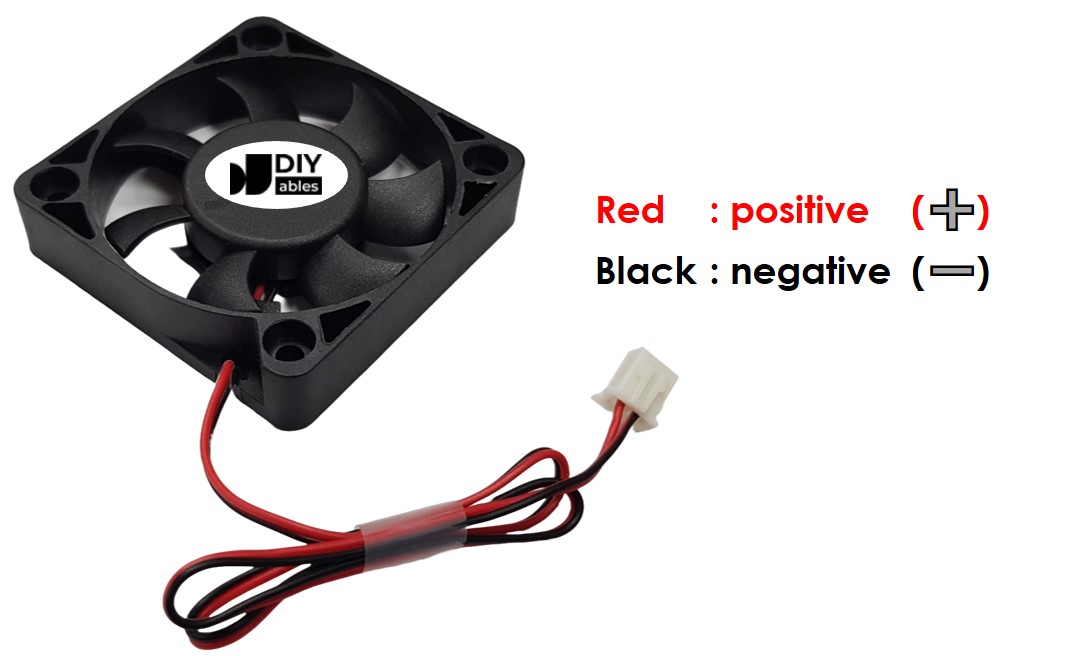
- Negative (-) pin (black wire): Connect to the negative/ground of your DC power supply
- Positive (+) pin (red wire): Connect to the positive of your DC power supply
Important voltage note:
- Always match the power supply voltage to your fan's rating (5V, 12V, or 24V)
- Using wrong voltage can damage the fan or cause poor performance
- Check the label on your fan for voltage specifications
How to Control Fan
Basic control methods:
- Full speed operation: Connect fan directly to its rated voltage (5V or 12V DC) - fan runs at maximum speed
- Speed control: Use PWM (Pulse Width Modulation) signal to vary fan speed from 0-100%
- On/Off control: Use a relay to switch fan power on and off (covered in this tutorial)
About this tutorial:
- This guide teaches on/off control using ESP32 C3 Super Mini and a relay module
- Speed control with PWM will be covered in a separate tutorial
- A relay is required because fans use higher voltage than ESP32 can handle directly
- Learn more about relays in our ESP32 C3 Super Mini - Relay tutorial
- New to the MOSFET module? Its pins and how it works are in the ESP32 C3 Super Mini - MOSFET Module tutorial
Relay or MOSFET Module for a DC Fan?
| Feature | Relay | MOSFET Module |
|---|---|---|
| What you can do with the fan | Start and stop only | Start, stop and set the speed (PWM) |
| Noise | A click each time it switches | No sound |
| How fast it switches | Slow, a few milliseconds | Very fast |
| Wear | The metal contacts wear out after many switches | No moving parts |
| Kind of power | AC or DC | DC only |
| Supply voltage for the fan | Any voltage the relay is rated for | About 6V or more |
| Isolation from the ESP32 | Yes, between coil and contacts | Yes, by a PC817 optocoupler |
| Good choice for | AC fans, plain ON/OFF | 12V DC fans with speed control, frequent switching |
For a 12V DC fan, the MOSFET module is the better pick, because a quiet fan with a speed you can set is often what you want. Keep the relay for an AC fan or a 5V fan, since the module needs at least about 6V on its power side.
Wiring Diagram
Connect your ESP32 C3 Super Mini, relay, fan, and power supply as shown below:
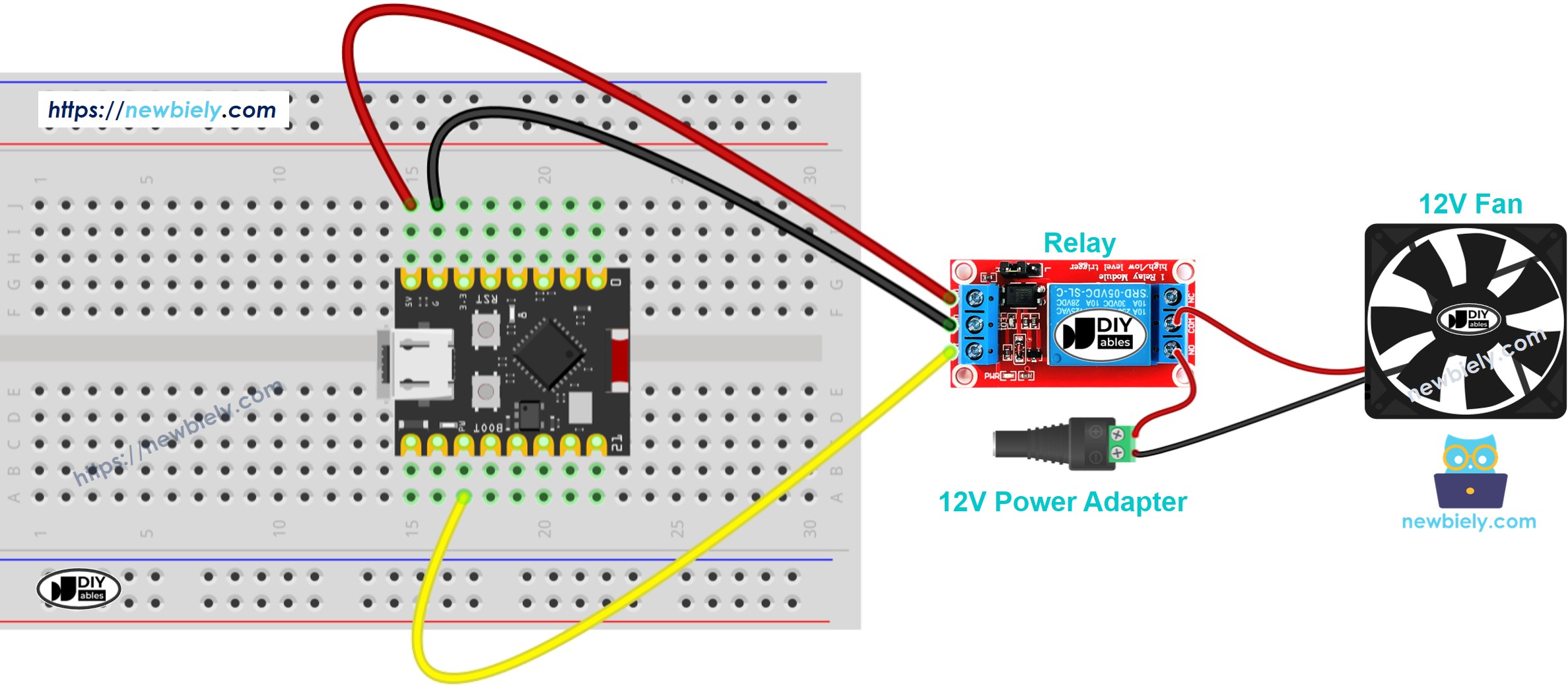
This image is created using Fritzing. Click to enlarge image
Important wiring notes:
- Power matching: If using a 5V fan, use a 5V power adapter; for 12V fan, use 12V adapter
- Safety warning: Never connect the fan's high voltage directly to ESP32 pins
- Relay protection: The relay isolates the ESP32 from the fan's power supply
| Component Pin | ESP32 C3 Super Mini Pin |
|---|---|
| Relay Signal (IN) | D7 |
| Relay VCC | 5V |
| Relay GND | GND |
| Fan Positive (+) | Relay COM (Common) |
| Fan Negative (-) | Power Supply Negative (-) |
| Relay NO (Normally Open) | Power Supply Positive (+) |
ESP32 C3 Super Mini Code
This code demonstrates how to control a fan with ESP32 C3 Super Mini by automatically turning it on and off.
What this code does:
- Turns the fan ON for 10 seconds
- Turns the fan OFF for 10 seconds
- Repeats this cycle continuously
- Uses a relay connected to GPIO pin D7 to control fan power
- Includes serial monitor output to track fan status
Detailed Instructions
- New to ESP32 C3 Mini? Complete our Getting Started with ESP32 C3 Mini tutorial first to set up your development environment.
- Setup your IDE: If you're new to ESP32 C3 Super Mini, follow our environment setup guide for ESP32 C3 Super Mini in Arduino IDE
- Wire the components: Connect the relay, fan, and power supply to ESP32 C3 Super Mini following the wiring diagram above
- Connect ESP32: Plug the ESP32 C3 Super Mini into your computer using the USB Type-C cable
- Open Arduino IDE: Launch the Arduino IDE application on your computer
- Select your board: Choose ESP32 C3 Super Mini and its COM port from the Arduino IDE
- Copy the code: Paste the provided code into a new Arduino IDE sketch
- Upload the code: Click the Upload button to compile and flash the code to your ESP32 C3 Super Mini
- Test the fan: Watch the fan turn on and off automatically in 10-second intervals
- Open Serial Monitor: View fan status messages in the Serial Monitor (set to 115200 baud)
- Pro Tip: Add an LED to the relay circuit to visually confirm relay switching without needing the fan connected
Line-by-line Code Explanation
The above ESP32 C3 Super Mini code contains line-by-line explanation. Please read the comments in the code!
Serial Monitor Output
Open the Serial Monitor in Arduino IDE to see the fan control status:
How to Control Fan Speed with MOSFET Module
Now let's swap the relay for a MOSFET module. The ESP32 C3 Super Mini sends a PWM signal on GPIO4, and the module turns it into fan speed.
Wiring Diagram with MOSFET Module
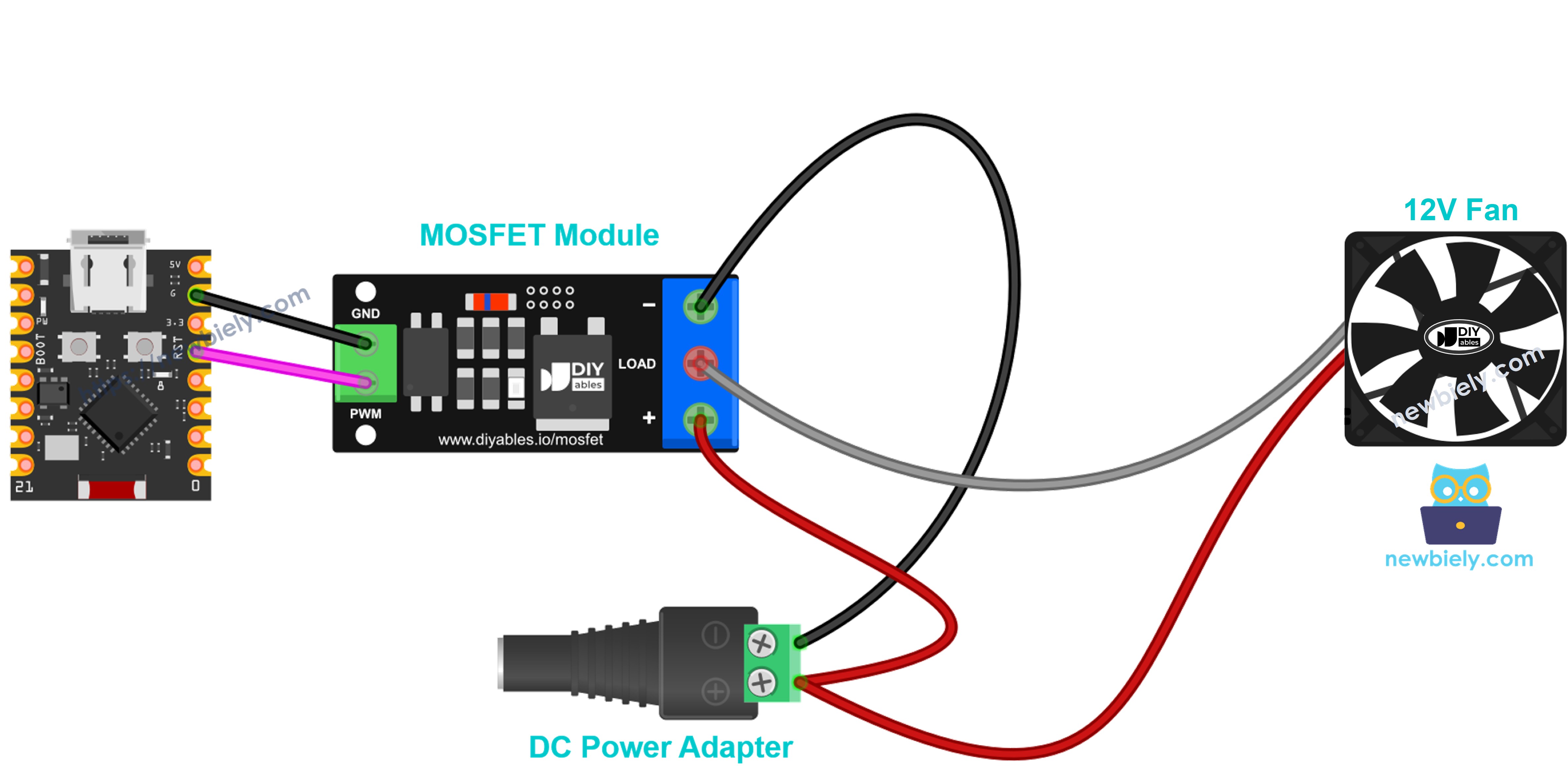
This image is created using Fritzing. Click to enlarge image
| From | To |
|---|---|
| ESP32 C3 Super Mini GPIO4 | Module PWM |
| ESP32 C3 Super Mini GND | Module GND |
| 12V adapter + | Module + |
| Fan red wire (+) | Module + (shared with the adapter +) |
| Fan black wire (−) | Module LOAD |
| 12V adapter − | Module − |
- Flyback diode: the fan has a motor coil, so put a 1N4007 or 1N5819 diode across the fan. The stripe (cathode) goes to the fan + wire, the other end to the fan − wire.
- Third wire: if your fan has a yellow wire, leave it free.
ESP32 C3 Super Mini Code - Fan Speed with MOSFET Module
What you will see:
- The fan runs at full speed for 2 seconds, then stops for 2 seconds
- Then it speeds up from 10% to 100%, and slows down again to 0%
- At low power (below about 30%), some fans do not spin. This is normal
Detailed Instructions
- Set up Arduino IDE and the board the same way as in the relay Quick Steps above
- Wire the fan and the MOSFET module as shown in the table and diagram
- Copy the code above, paste it into Arduino IDE and click Upload
- Plug in the 12V adapter
- Open the Serial Monitor at 9600 baud and listen to the fan change its speed
Tip: the MOSFET module works with DC only and needs a fan supply of about 6V or more. For an AC fan, use the relay.
Applications and Project Ideas
Use fan control with ESP32 C3 Super Mini to build practical cooling and automation projects:
- Temperature-controlled cooling system: Automatically turn fan on when temperature exceeds a threshold
- Humidity ventilation system: Activate fan when humidity is too high in a room
- Computer case cooling: Build a smart cooling system that adjusts to component temperatures
- Greenhouse climate control: Regulate air circulation for optimal plant growth
- Bathroom exhaust timer: Automatically run fan for set duration after detecting humidity
- IoT smart ventilation: Control fan remotely via WiFi using ESP32's built-in connectivity
Video Tutorial
Watch the video below for a visual walkthrough of this project.
Challenge Yourself
Try these modifications to expand your ESP32 C3 Super Mini fan control skills:
- Easy: Change the on/off timing to 5 seconds instead of 10 seconds
- Easy: Add a button to manually turn the fan on/off instead of automatic timing
- Medium: Add a DHT11 temperature sensor and turn the fan on only when temperature exceeds 25°C
- Medium: Control two fans independently with different relays and GPIO pins
- Advanced: Implement PWM speed control for variable fan speed (0-100%)
- Advanced: Create a web interface to control fan speed and monitor temperature remotely