
ESP32 C3 Super Mini - Control Pump
Learn how to control a 12V water pump with the ESP32 C3 Super Mini using a relay module. This tutorial walks you through the wiring, code, and quick steps to automate pump control for DIY projects.
In this tutorial, you'll learn:
- What a 12V pump is and how it connects to ESP32 C3 Super Mini
- How to wire the pump, relay, and ESP32 C3 Super Mini together
- How to program ESP32 C3 Super Mini to turn the pump on and off
- How to extend this for aquarium, irrigation, or cocktail machine projects
- How to run the pump from a MOSFET module and adjust its flow
The pump can be driven by either a relay or a MOSFET module. With the relay, the pump is simply running or stopped. The MOSFET module can start and stop it as well, and it can also slow the pump down or speed it up with PWM, which changes how much water flows. It makes no click, too. You will try both setups below.
Hardware Preparation
Or you can buy the following kits:
| 1 | × | DIYables Sensor Kit (18 sensors/displays) |
Additionally, some of these links are for products from our own brand, DIYables .
Overview of 12V Pump
A 12V pump is a small electric water pump that runs on 12V DC power and is commonly used for DIY water circulation projects.
- Operating Voltage: 12V DC
- Power Consumption: Typically 3-5W
- Flow Rate: Varies by model (usually 1-3 liters per minute)
- Perfect for: Aquariums, irrigation systems, coffee machines, and automated beverage dispensers
- Beginner-Friendly: Simple two-wire connection makes it easy to control with ESP32 C3 Super Mini
Pump Pinout
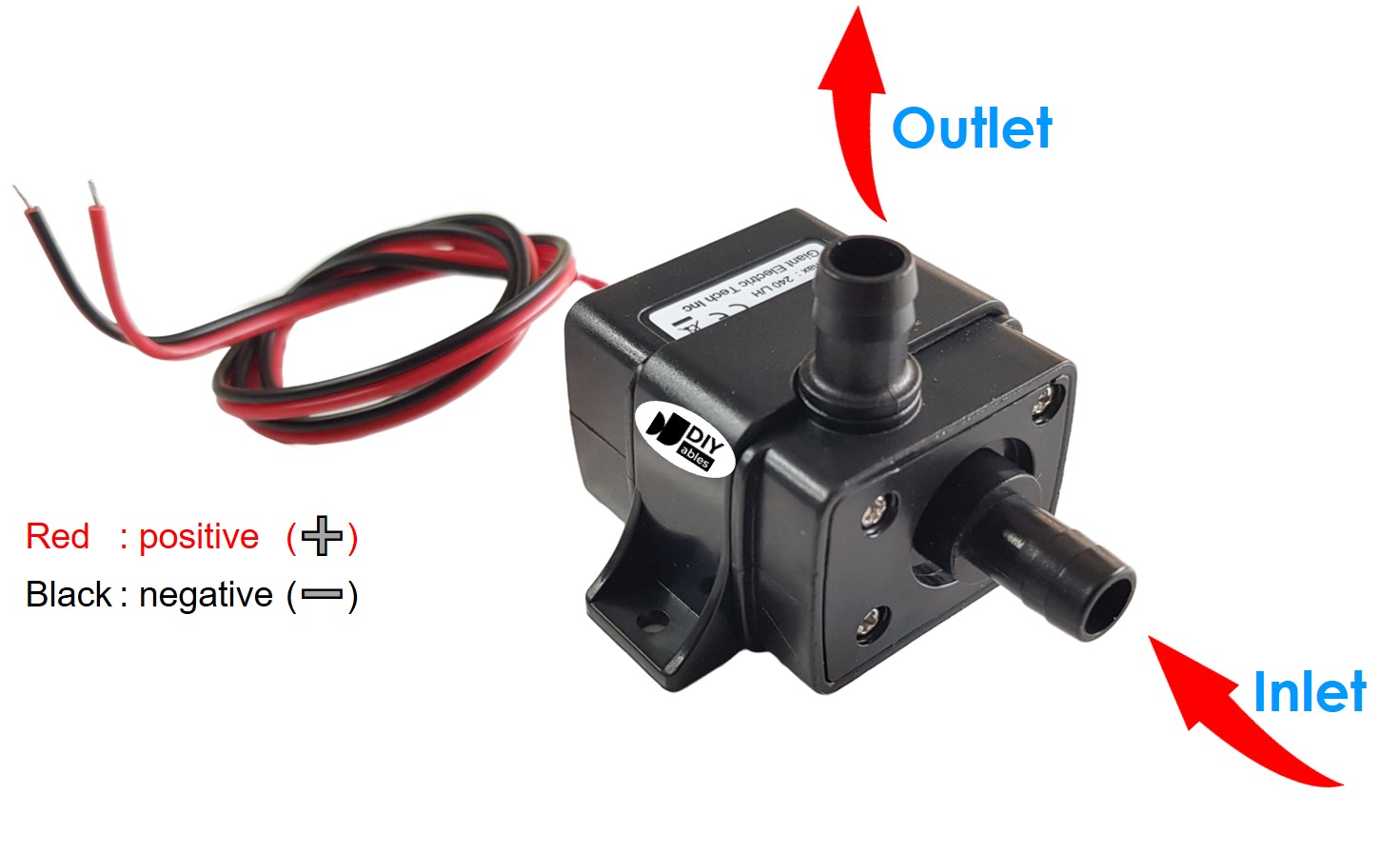
The 12V pump has two connection wires for easy hookup:
- Negative (-) wire (black): Connect to the negative terminal of 12V DC power supply
- Positive (+) wire (red): Connect to the positive terminal of 12V DC power supply
How to Control Pump using ESP32 C3 Super Mini
The ESP32 C3 Super Mini controls the pump by switching power through a relay module.
- The pump requires 12V DC power to operate
- ESP32 C3 Super Mini cannot directly power the pump (only provides 3.3V logic)
- A relay acts as an electronic switch controlled by the ESP32 C3 Super Mini
- When ESP32 sends a HIGH signal, the relay closes and powers the pump
- When ESP32 sends a LOW signal, the relay opens and stops the pump
- This setup protects the ESP32 C3 Super Mini from high voltage/current
- Learn more in our ESP32 C3 Super Mini - Relay tutorial
- A MOSFET module can do the same job and more. See how it works in the ESP32 C3 Super Mini - MOSFET Module tutorial
Pump Control: Relay or MOSFET Module
| Point | Relay Module | MOSFET Module |
|---|---|---|
| Pump control | Run or stop | Run, stop, or set the flow rate (PWM) |
| Sound when switching | Audible click | None |
| Reaction time | Slower (mechanical, milliseconds) | Very quick (electronic) |
| Life span | Contacts slowly wear out | No moving parts to wear |
| Supported current type | DC and AC | DC only |
| Pump supply needed | As the relay rating allows | 6V minimum |
| Electrical isolation | Yes, coil to contact | Yes, via PC817 optocoupler |
| Use it for | AC pumps or basic run/stop | 12V DC pumps with flow control, many on/off cycles |
If you only need to fill a glass now and then, the relay is enough. If you want a gentle flow for a fountain or a precise dose of liquid, choose the MOSFET module. An AC pump still needs the relay.
Wiring Diagram between ESP32, Relay and Pump
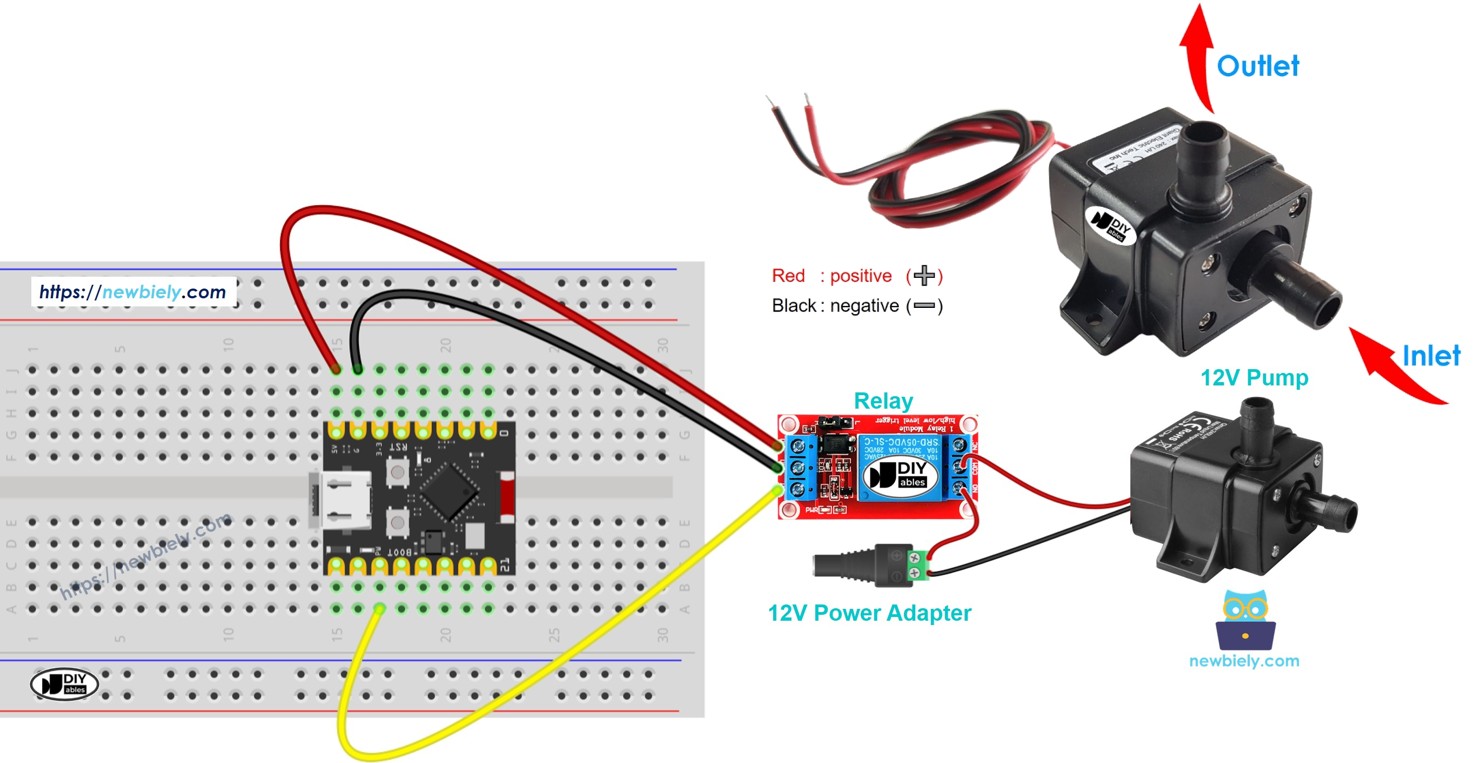
Follow this diagram to connect the ESP32 C3 Super Mini, relay module, and 12V pump together.
- Note: Always disconnect power before wiring components
- Note: Double-check polarity on the pump and power adapter before connecting
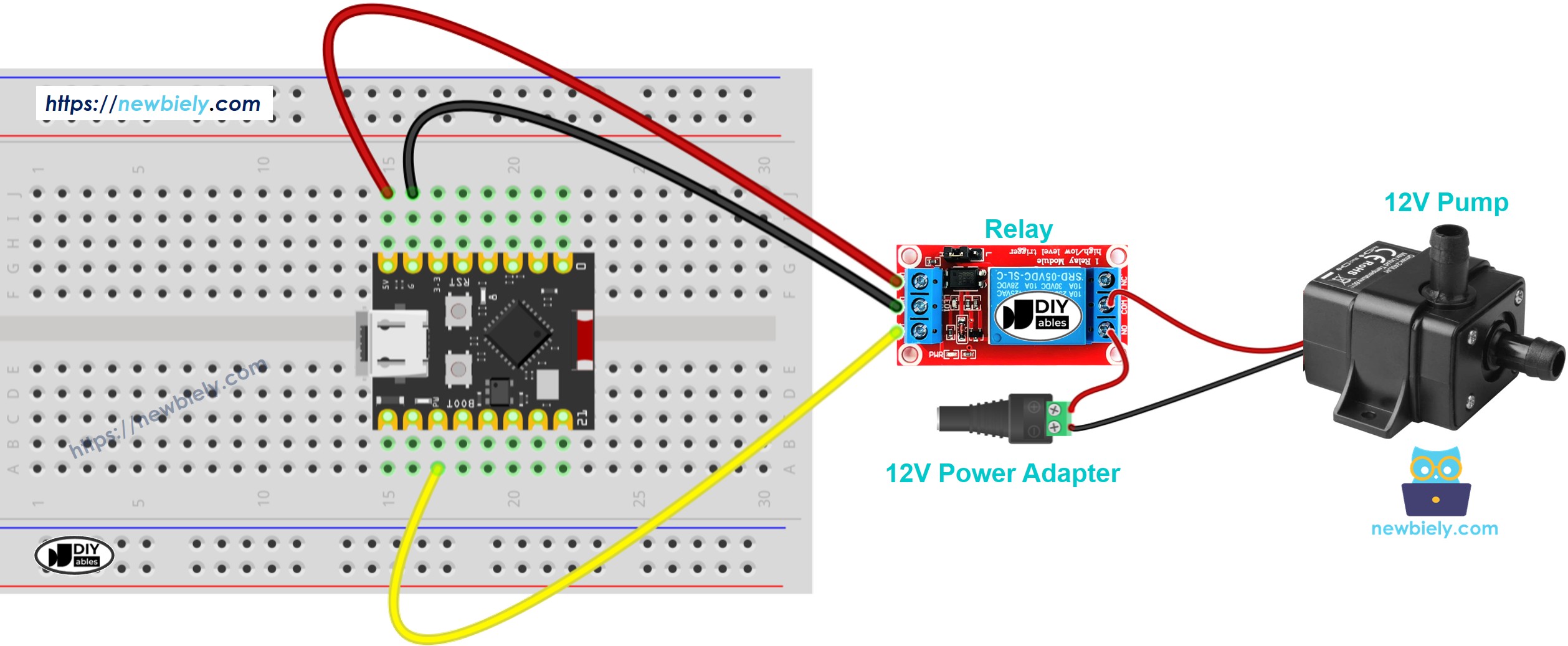
This image is created using Fritzing. Click to enlarge image
| ESP32 C3 Super Mini Pin | Relay Module Pin |
|---|---|
| D7 | IN |
| GND | GND |
| 3.3V | VCC |
| Relay Module Terminal | Connection |
|---|---|
| COM | 12V Power Adapter (+) Positive |
| NO | Pump (+) Red Wire |
| Ground Connections | Connection |
|---|---|
| 12V Power Adapter (-) | Pump (-) Black Wire |
ESP32 C3 Super Mini - Pump Code
This code section shows how to program the ESP32 C3 Super Mini to control the pump automatically.
What the code does:
- Sets up D7 as the relay control pin
- Turns the pump ON for 4 seconds
- Turns the pump OFF for 4 seconds
- Repeats the ON/OFF cycle continuously
- Prints pump status to Serial Monitor
Detailed Instructions
- New to ESP32 C3 Mini? Complete our Getting Started with ESP32 C3 Mini tutorial first to set up your development environment.
- Prepare Your Environment: Follow the ESP32 C3 Super Mini setup tutorial to configure Arduino IDE
- Wire the Components: Connect the relay, pump, and power adapter following the wiring diagram above
- Connect ESP32: Plug the ESP32 C3 Super Mini into your computer using the USB Type-C cable
- Open Arduino IDE: Launch the Arduino IDE software on your computer
- Select Your Board: Choose ESP32 C3 Super Mini from the board menu and select the correct COM port
- Upload the Code: Copy the code above, paste it into Arduino IDE, and click the Upload button
- Open Serial Monitor: Click the Serial Monitor icon (set baud rate to 115200) to view pump status
- Observe the Pump: Watch the pump turn ON and OFF every 4 seconds automatically
- Pro Tip: Use a clear vinyl tube so you can easily see water flowing when the pump activates
Line-by-line Code Explanation
The above ESP32 C3 Super Mini code contains line-by-line explanation. Please read the comments in the code!
Serial Monitor Output
Open the Serial Monitor to see the pump control status in real-time:
How to Control Pump Flow with MOSFET Module
In this setup, the relay is replaced by a MOSFET module. GPIO4 of the ESP32 C3 Super Mini drives the module, and the PWM duty cycle decides how fast the pump turns.
Wiring Diagram between ESP32, MOSFET Module and Pump
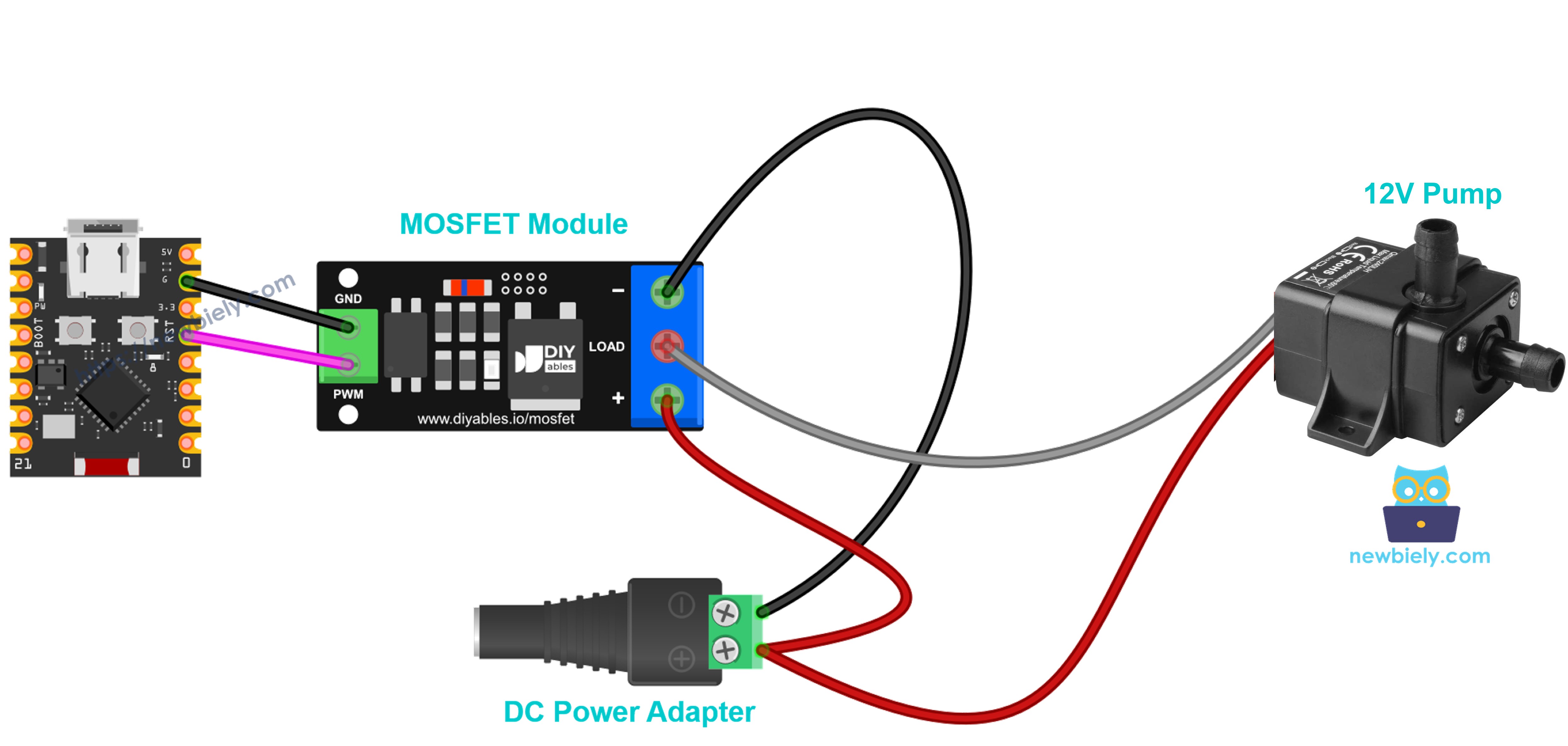
This image is created using Fritzing. Click to enlarge image
| ESP32 C3 Super Mini / Power | MOSFET Module |
|---|---|
| GPIO4 | PWM |
| GND | GND |
| 12V Power Adapter (+) | + |
| Pump (+) Red Wire | + (together with the adapter +) |
| Pump (-) Black Wire | LOAD |
| 12V Power Adapter (-) | − |
- Note: The pump motor is a coil. Add a flyback diode (1N4007 or 1N5819) across the pump wires: the striped end (cathode) to pump +, the plain end to pump −.
- Note: Keep the pump in water while it runs.
ESP32 C3 Super Mini - Pump Flow Code
What happens to the pump:
- Full flow for 2 seconds, then no flow for 2 seconds
- The flow then grows in 10% steps up to 100%, and drops back down to 0%
- At very low power, a small pump may stop pushing water. That is expected
Detailed Instructions
- Use the same Arduino IDE and board setup as in the relay Quick Steps
- Connect the pump, MOSFET module and 12V adapter as in the table above
- Upload the code to the ESP32 C3 Super Mini
- Power the module with the 12V adapter
- Watch the water stream grow and shrink, and check the Serial Monitor (9600 baud)
Tip: this works only with DC pumps on a supply of about 6V or higher. For an AC pump, keep using the relay.
Applications and Project Ideas
This ESP32 C3 Super Mini pump control setup can be used in many exciting DIY automation projects:
- Automated Aquarium: Control water circulation and filtration systems on a timer
- DIY Irrigation System: Water your plants automatically based on soil moisture or schedule
- Coffee Machine Automation: Build a programmable espresso or drip coffee maker
- Cocktail Dispenser: Create an automated bartender for parties and events
- Fountain Controller: Program decorative water fountain patterns and timing
- Hydroponic System: Manage nutrient solution circulation for indoor gardening
Video Tutorial
Watch the video below for a visual walkthrough of this project.
Challenge Yourself
Take your ESP32 C3 Super Mini pump control project to the next level with these challenges:
- Easy: Modify the code to change the ON/OFF timing intervals to 10 seconds each
- Easy: Add an LED indicator that lights up whenever the pump is running
- Medium: Add a push button to manually start/stop the pump independent of the timer
- Medium: Use a soil moisture sensor to activate the pump only when soil is dry
- Advanced: Create a web interface to control the pump remotely via WiFi using the ESP32's built-in connectivity
- Advanced: Build a complete irrigation system with multiple pumps controlled by different schedules