
ESP32 C3 Super Mini - LDR Module
The LDR light sensor module is a simple yet powerful component for detecting and measuring light levels with your ESP32 C3 Super Mini. This beginner-friendly tutorial will show you how to connect and program the LDR module to sense light in your projects.
In this tutorial, we will learn how to use an ESP32 C3 Super Mini and an LDR light sensor module together to detect and measure the amount of light. Here's what we'll cover:
- What an LDR light sensor module is and how it works
- How to wire the LDR light sensor module to ESP32 C3 Super Mini
- How to program ESP32 C3 Super Mini to detect light using digital output
- How to program ESP32 C3 Super Mini to measure light levels using analog output
- How to read and display both digital and analog sensor values
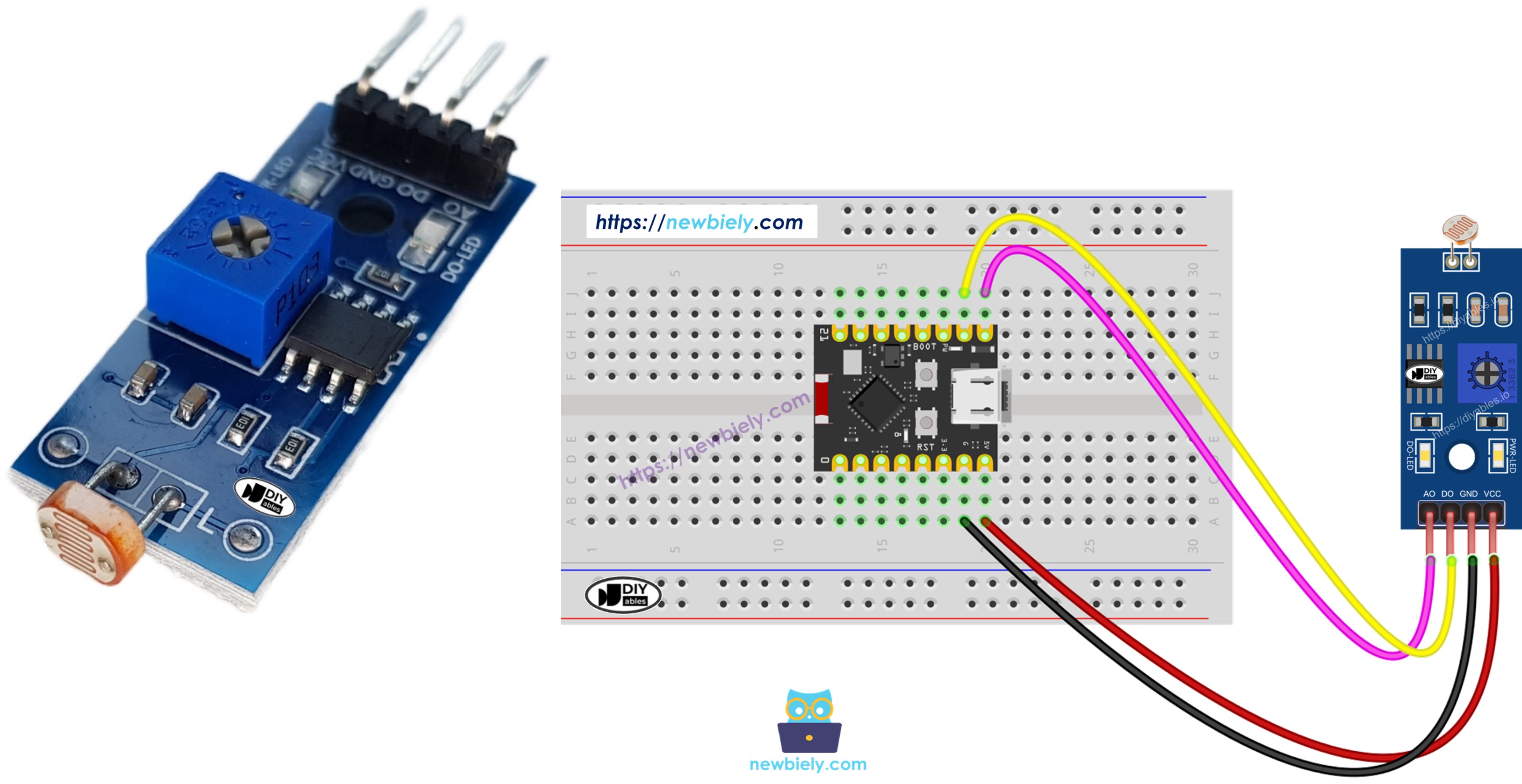
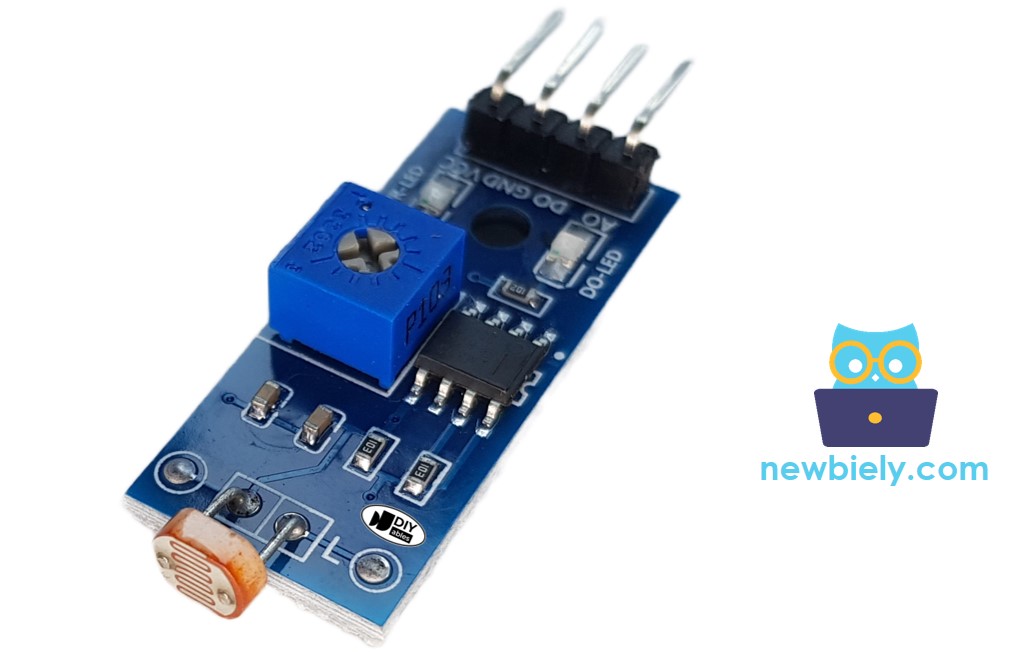
Afterward, you can change the code to make an LED or a light bulb turn on (using a relay) when it senses light.
If you're interested in a light sensor in its raw form, I suggest exploring the tutorial for the ESP32 C3 Super Mini - Light Sensor.
Hardware Preparation
| 1 | × | ESP32 C3 Super Mini | |
| 1 | × | USB Cable Type-A to Type-C (for USB-A PC) | |
| 1 | × | USB Cable Type-C to Type-C (for USB-C PC) | |
| 1 | × | LDR Light Sensor Module | |
| 1 | × | Breadboard | |
| 1 | × | Jumper Wires |
Or you can buy the following kits:
| 1 | × | DIYables Sensor Kit (18 sensors/displays) |
Additionally, some of these links are for products from our own brand, DIYables .
Overview of LDR Light Sensor Module
The LDR light sensor module is a digital and analog sensor that detects and measures ambient light intensity in your environment.
- Operating Voltage: 3.3V to 5V (compatible with ESP32 C3 Super Mini)
- Output Types: Digital (DO) and Analog (AO) outputs available
- Built-in Potentiometer: Adjustable sensitivity threshold for digital output
- LED Indicators: Power LED and status LED for easy monitoring
- Beginner-Friendly: Easy to connect and program with simple Arduino code
- Versatile Applications: Perfect for light-activated switches, automatic lighting, and environmental monitoring
- Compact Design: Small module fits easily on breadboards
Pinout
The LDR light sensor module includes four connection pins for interfacing with your ESP32 C3 Super Mini:
- VCC: Power supply pin - connect to 3.3V or 5V on ESP32 C3 Super Mini
- GND: Ground pin - connect to GND on ESP32 C3 Super Mini
- DO: Digital output pin - outputs HIGH when dark, LOW when bright (threshold adjustable via potentiometer)
- AO: Analog output pin - outputs variable voltage proportional to light intensity (lower value = brighter light)
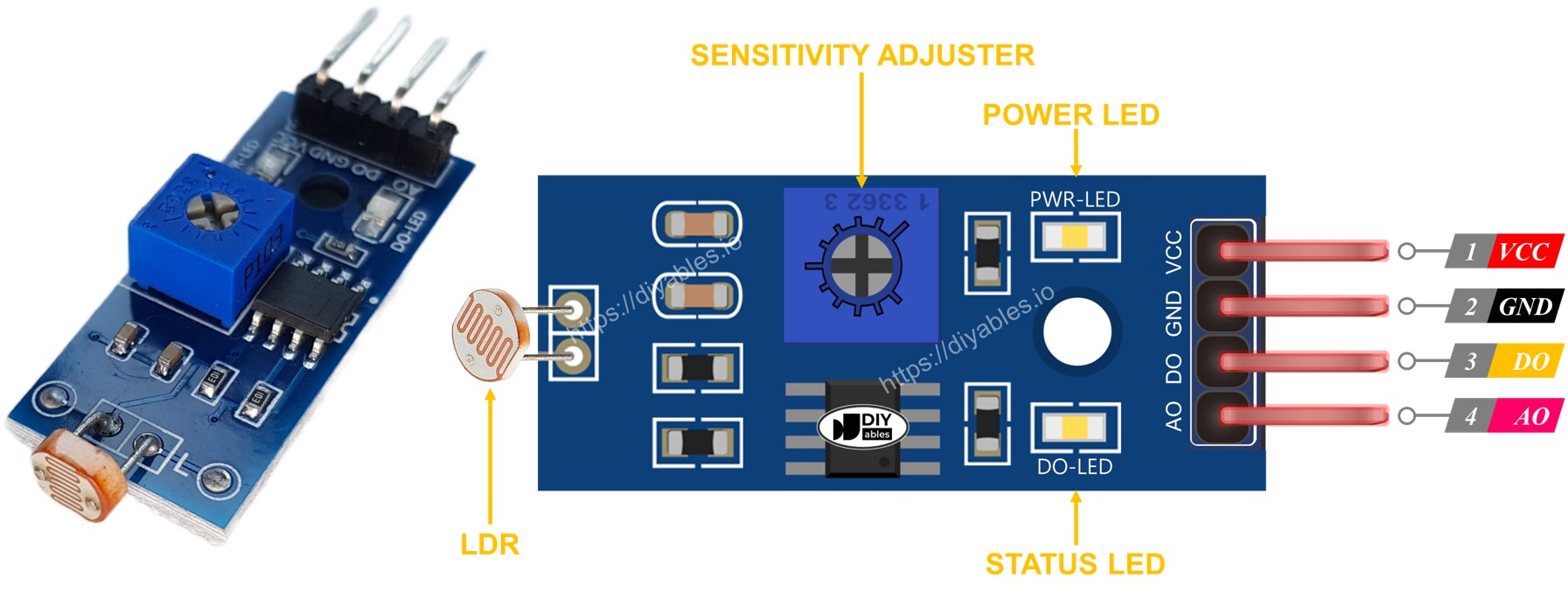
Additionally, the LDR light sensor module is equipped with two LED indicators:
- The PWR-LED indicator shows the power status.
- The DO-LED indicator reflects the state of light on the DO pin: it illuminates when there is light and remains off when it is dark.
How It Works
Regarding the DO pin:
- The LDR light sensor module has a potentiometer that allows you to adjust the sensitivity or threshold for detecting light.
- When the light intensity in the surrounding environment is above the set threshold (considered as light), the output of the sensor on the DO pin becomes LOW, and the DO-LED turns on.
- When the light intensity in the surrounding environment is below the set threshold (considered as dark), the output of the sensor on the DO pin becomes HIGH, and the DO-LED turns off.
Regarding the AO pin:
- The value read from the AO pin is inversely proportional to the light intensity in the surrounding environment. In other words, as the light intensity increases (brighter), the value on the AO pin decreases.
- Similarly, as the light intensity decreases (darker), the value on the AO pin increases.
It's important to note that adjusting the potentiometer does not affect the value on the AO pin.
Wiring Diagram
This section shows how to connect the LDR light sensor module to your ESP32 C3 Super Mini.
- Note: You can use the digital output (DO), analog output (AO), or both depending on your project needs.
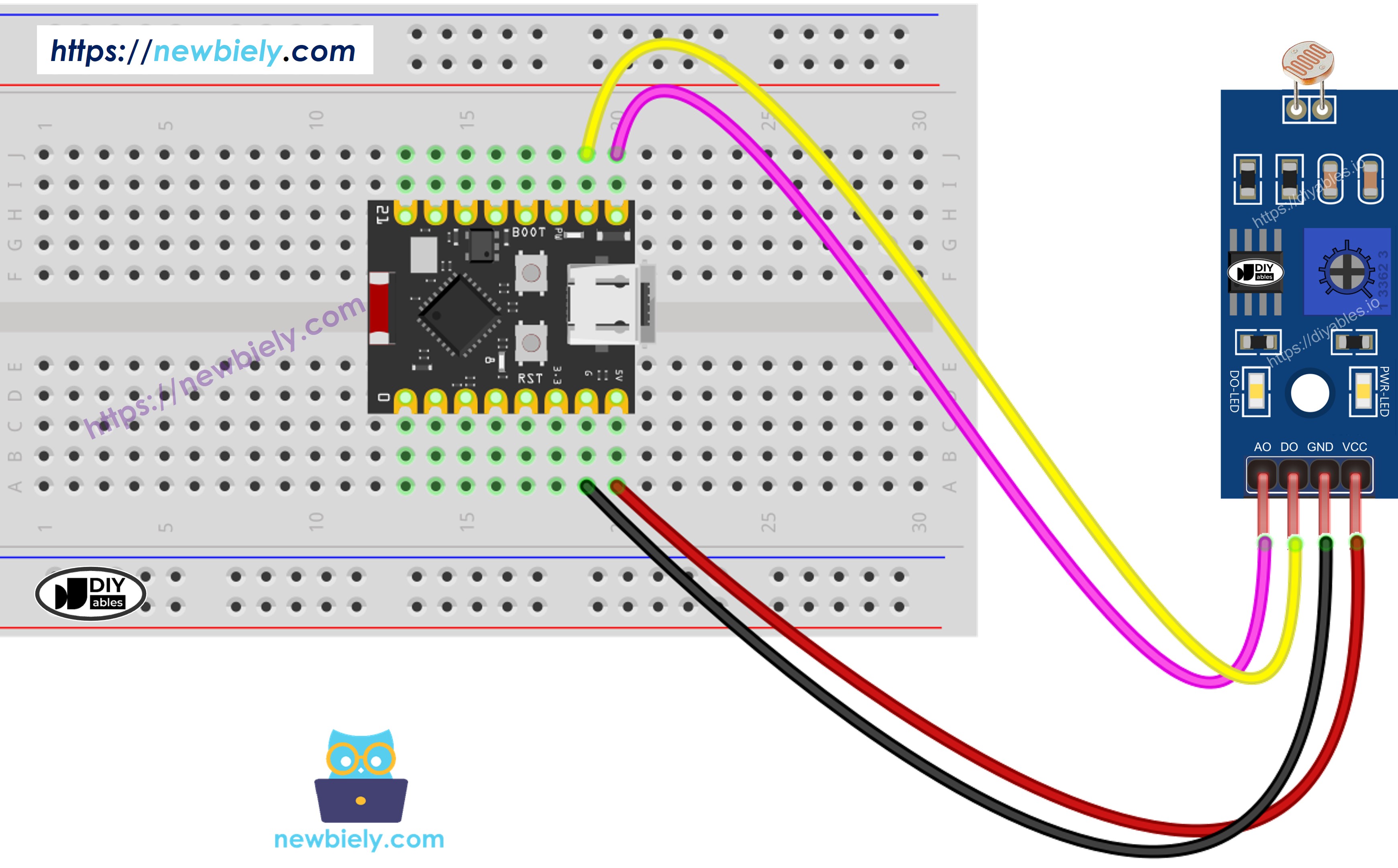
This image is created using Fritzing. Click to enlarge image
- The wiring diagram between ESP32 C3 Super Mini and the LDR light sensor module when using both AO an DO.
| LDR Module Pin | ESP32 C3 Super Mini Pin |
|---|---|
| VCC | 3.3V |
| GND | GND |
| DO | GPIO6 |
| AO | A5 (GPIO5 / ADC1_CH5) |
ESP32 C3 Super Mini Code - Read value from DO pin
This code demonstrates how to use the ESP32 C3 Super Mini to read the digital output from the LDR light sensor module.
- Configures GPIO8 as digital input for the DO pin
- Reads HIGH or LOW signal from the sensor
- Detects light or dark conditions based on threshold
- Displays light status on Serial Monitor
- Adjustable sensitivity using onboard potentiometer
Detailed Instructions
- New to ESP32 C3 Mini? Complete our Getting Started with ESP32 C3 Mini tutorial first to set up your development environment.
- Setup Arduino IDE: If you are new to ESP32 C3 Super Mini, refer to the tutorial on how to set up the environment for ESP32 C3 Super Mini in the Arduino IDE.
- Wire the components: Connect the LDR light sensor module to ESP32 C3 Super Mini according to the wiring diagram shown above.
- Connect ESP32: Plug the ESP32 C3 Super Mini into your computer using a USB Type-C cable.
- Select board: Open Arduino IDE and select the ESP32 C3 Super Mini board and its corresponding COM port.
- Upload code: Copy the above code and open with Arduino IDE, then click Upload button to upload code to ESP32 C3 Super Mini.
- Test the sensor: Cover and uncover the LDR light sensor module with your hand or an object to test light detection.
- View results: Open the Serial Monitor to see the light detection status in real-time.
- Adjust sensitivity: If needed, turn the potentiometer on the module to adjust the light detection threshold.
- Pro Tip: Mark the potentiometer position once you find the perfect sensitivity setting for your lighting conditions.
If you observe that the LED status remains constantly on or off, regardless of the presence of light, you have the option to adjust the potentiometer. This adjustment allows you to finely tune the light sensitivity of the sensor.
Furthermore, the code can be modified according to your requirements. For instance, you can program the LED to activate or the light to turn on when light is detected. Additionally, you have the flexibility to make a servo motor rotate. Detailed instructions and tutorials on these customization options can be found at the end of this guide.
ESP32 C3 Super Mini Code - Read value from AO pin
This code shows how to read analog values from the LDR light sensor module for precise light measurements.
- Configures GPIO3 (A0) as analog input for the AO pin
- Reads analog values from 0 to 4095 (12-bit ADC)
- Measures continuous light intensity levels
- Lower values indicate brighter light
- Higher values indicate darker conditions
Detailed Instructions
- New to ESP32 C3 Mini? Complete our Getting Started with ESP32 C3 Mini tutorial first to set up your development environment.
- Upload code: Copy the above code and open with Arduino IDE, then click Upload button.
- Test the sensor: Cover and uncover the LDR light sensor module with your hand or move it to different lighting conditions.
- Monitor values: Open the Serial Monitor to see the analog light level readings.
- Observe changes: Notice how values increase when you block light and decrease when you add light.
- Pro Tip: Record the minimum and maximum values in your environment to map them to meaningful ranges like percentages or lux levels.
※ NOTE THAT:
This tutorial uses the analogRead() function to read values from an ADC (Analog-to-Digital Converter) connected to a sensor or component. The ESP32 C3 Super Mini's ADC is suitable for projects that do not require high accuracy. However, for projects needing precise measurements, keep the following in mind:
- The ESP32 C3 Super Mini's ADC is not perfectly accurate and might require calibration for correct results. Each ESP32 C3 Super Mini board can vary slightly, so calibration is necessary for each individual board.
- Calibration can be challenging, especially for beginners, and might not always yield the exact results you want.
For projects requiring high precision, consider using an external ADC (e.g ADS1115) with the ESP32 C3 Super Mini or using another Arduino, such as the Arduino Uno R4 WiFi, which has a more reliable ADC. If you still want to calibrate the ESP32 C3 Super Mini's ADC, refer to the ESP32 ADC Calibration Driver.
Application Ideas
Here are some practical projects you can build using the ESP32 C3 Super Mini and LDR light sensor module:
- Automatic Night Light: Turn on lights automatically when it gets dark in your room
- Smart Curtain Controller: Open or close curtains based on sunlight intensity
- Solar Panel Tracker: Optimize solar panel position to face the brightest light source
- Energy-Saving System: Automatically turn off unnecessary lights when natural light is sufficient
- Plant Growth Monitor: Track light exposure for indoor plants and gardens
- Security System: Detect when lights are turned on or off in monitored areas
- Photography Light Meter: Measure ambient light for camera settings
Video Tutorial
Watch the video below for a visual walkthrough of this project.
Challenge Yourself
Try these challenges to expand your skills with the ESP32 C3 Super Mini and LDR light sensor module:
- Easy: Add an LED that turns on when the room is dark and off when it's bright
- Easy: Display "Bright", "Medium", or "Dark" based on different analog value ranges
- Medium: Control a servo motor to rotate based on light intensity levels
- Medium: Create a light-activated alarm that triggers a buzzer when light is detected
- Advanced: Build a data logger that records light levels with timestamps to an SD card
- Advanced: Create an automatic plant watering system that only waters when light levels are optimal