
ESP32 C3 Super Mini - Rain Sensor
Learn how to use an ESP32 C3 Super Mini with a rain sensor to detect rainfall and measure moisture levels. This beginner-friendly tutorial covers both digital and analog rain detection methods with simple wiring and code examples.
In this tutorial, you'll learn:
- What a rain sensor is and how it detects rainfall
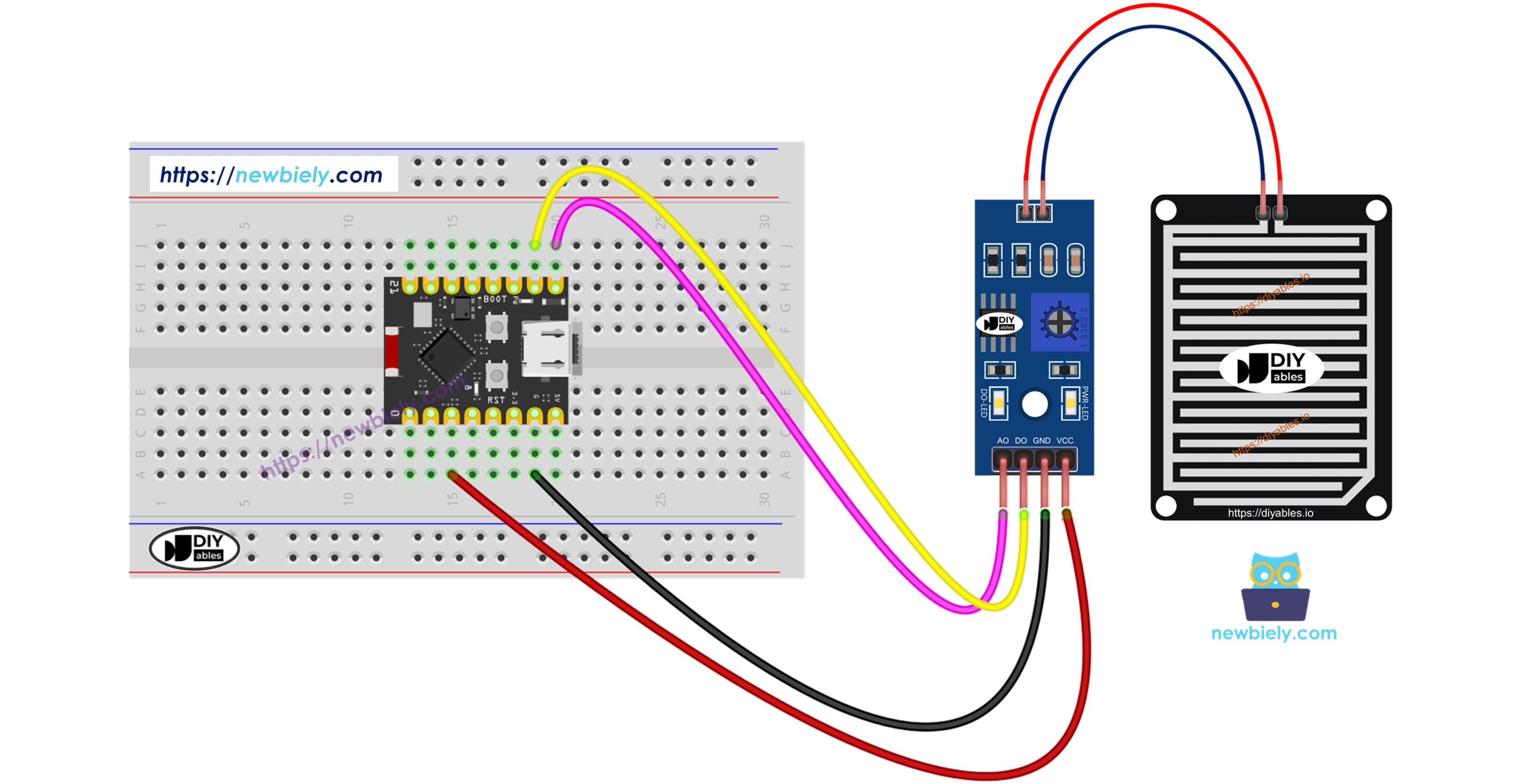
- How to wire a rain sensor to ESP32 C3 Super Mini
- How to program ESP32 C3 Super Mini to detect rain using digital signals
- How to measure rain intensity using analog readings
- How to extend corrosion-free lifespan with smart power control
After completing this tutorial, you can modify the code to activate alarms, motors, or automated systems when rain is detected.
Hardware Preparation
| 1 | × | ESP32 C3 Super Mini | |
| 1 | × | USB Cable Type-A to Type-C (for USB-A PC) | |
| 1 | × | USB Cable Type-C to Type-C (for USB-C PC) | |
| 1 | × | Rain Sensor | |
| 1 | × | Breadboard | |
| 1 | × | Jumper Wires |
Or you can buy the following kits:
| 1 | × | DIYables Sensor Kit (18 sensors/displays) |
Additionally, some of these links are for products from our own brand, DIYables .
Overview of Rain Sensor
A rain sensor is an electronic module that detects and measures rainfall or snow levels through moisture detection on a sensing pad.
Key Features:
- Dual output modes: digital (rain/no rain) and analog (intensity level)
- Adjustable sensitivity via built-in potentiometer
- Works with both rain and snow detection
- Operating voltage: 3.3V to 5V
- Quick response time for real-time detection
- Perfect for weather stations and automated systems
Two Main Components:
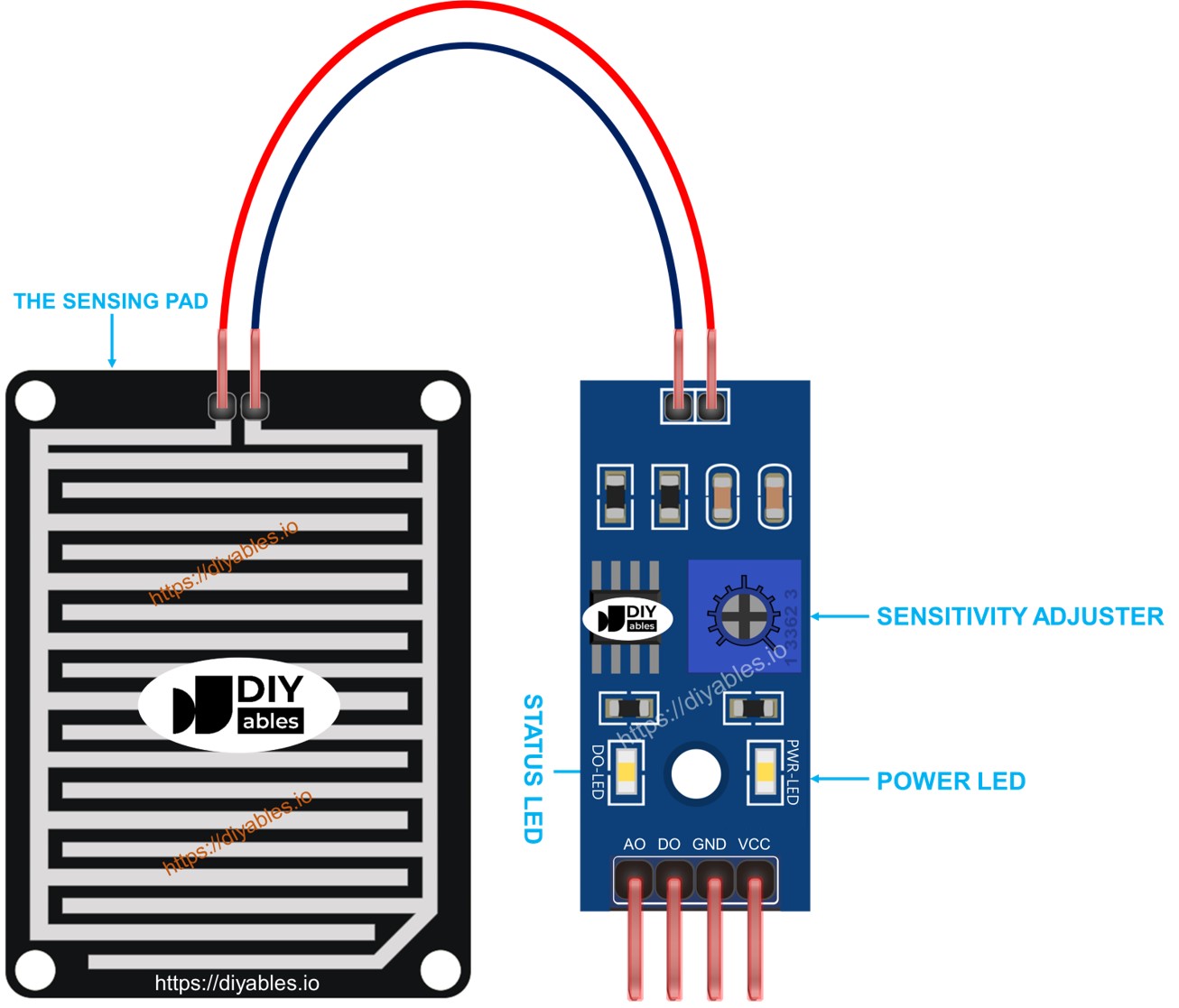
- Sensing Pad: Outdoor detection surface with exposed copper traces
- Electronic Module: Signal processor with analog and digital outputs
The Sensing Pad
The sensing pad is designed for outdoor placement where it faces rainfall or snow.
How it works:
- Contains exposed copper traces divided into two groups
- Power traces and sense traces remain separated when dry
- Water or snow bridges the traces, completing the circuit
- Either group can serve as power or sense trace
- Larger surface area provides better detection accuracy
The Electronic Module
The electronic module processes signals from the sensing pad and converts them to ESP32-compatible outputs.
Pin Configuration:
- VCC pin: Power supply connection (3.3V to 5V)
- GND pin: Ground connection (0V)
- DO pin: Digital output (HIGH when dry, LOW when wet)
- AO pin: Analog output (varies with moisture intensity)
LED Indicators:
- PWR-LED: Power indicator (always on when powered)
- DO-LED: Rain detection indicator (on when rain detected)
Sensitivity Adjustment:
- Built-in potentiometer adjusts digital threshold
- Turn clockwise to increase sensitivity
- Turn counter-clockwise to decrease sensitivity
- Only affects DO pin, not AO pin readings
How It Works
Digital Output (DO Pin):
- Potentiometer sets the rain detection threshold
- When moisture exceeds threshold: DO pin goes LOW, LED turns on
- When moisture below threshold: DO pin stays HIGH, LED turns off
- Ideal for simple rain/no-rain detection projects
Analog Output (AO Pin):
- Provides continuous moisture level readings
- More water on pad = lower AO value
- Less water on pad = higher AO value
- Unaffected by potentiometer settings
- Best for measuring rainfall intensity
Important Note: Using an ESP32 GPIO pin to power the sensor (instead of constant 5V/3.3V) significantly extends sensor lifespan by reducing electrochemical corrosion between readings.
Wiring Diagram
The rain sensor module offers flexible wiring options depending on whether you need digital detection, analog measurement, or both.
Power Connection Best Practice:
- Connect VCC to an ESP32 GPIO pin (not direct 5V/3.3V)
- Power the sensor only during readings
- This minimizes electrochemical corrosion and extends sensor life
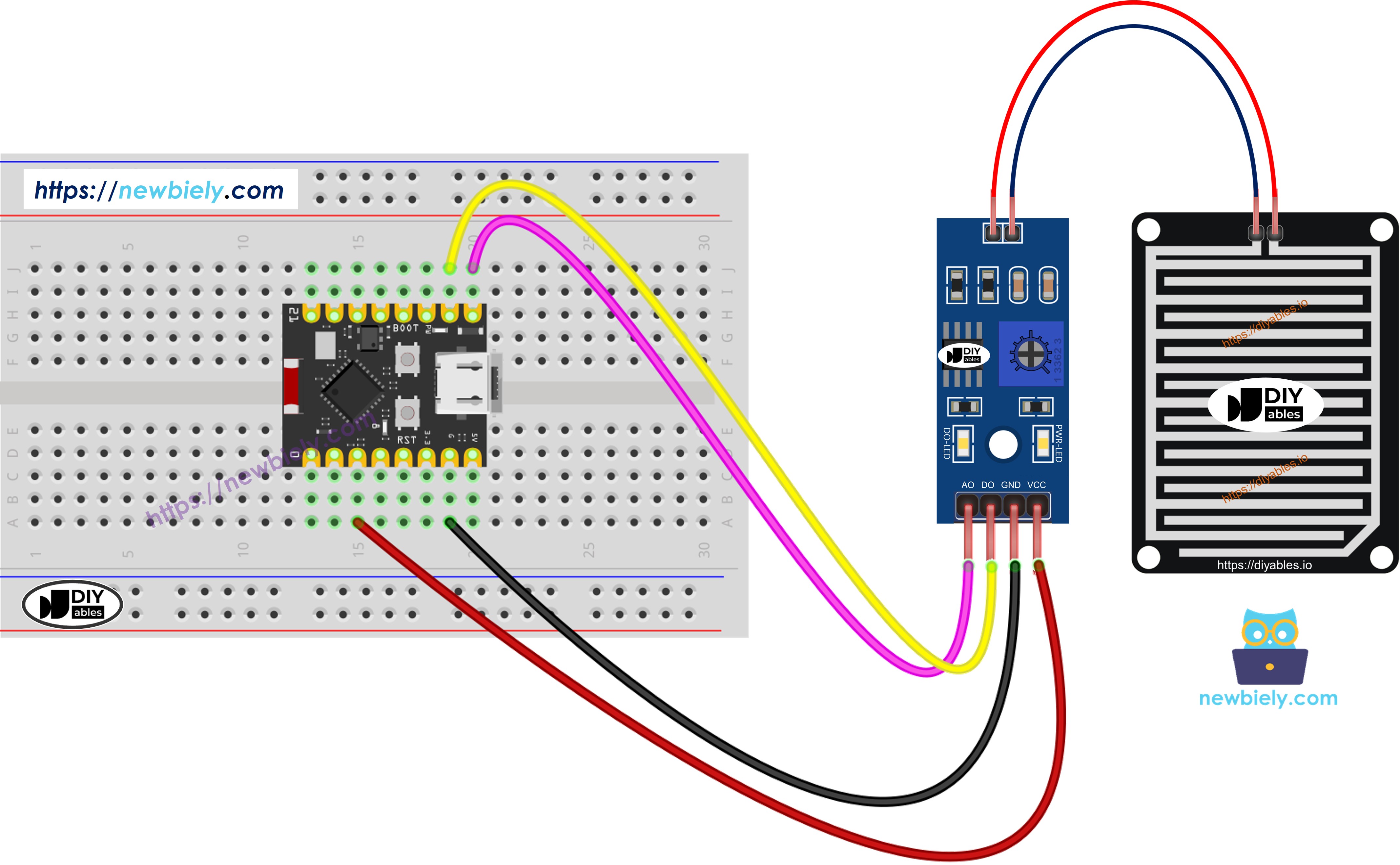
This image is created using Fritzing. Click to enlarge image
| Rain Sensor Pin | ESP32 C3 Super Mini Pin |
|---|---|
| VCC | GPIO2 |
| GND | GND |
| DO | GPIO6 |
| AO | A5 (GPIO5 / ADC1_CH5) |
ESP32 C3 Super Mini Code - Read value from DO pin
This code demonstrates how to detect rain using the digital output from the rain sensor.
What the code does:
- Powers the rain sensor through GPIO2 only when reading
- Reads digital signal from DO pin to detect rain presence
- Displays rain detection status on Serial Monitor
- Minimizes sensor corrosion with smart power control
- Provides real-time rain/no-rain alerts
Detailed Instructions
- New to ESP32 C3 Mini? Complete our Getting Started with ESP32 C3 Mini tutorial first to set up your development environment.
- Upload the Code: Copy the code above and open it in Arduino IDE
- Select Your Board: Choose ESP32 C3 Super Mini from the board menu
- Connect ESP32: Plug in your ESP32 C3 Super Mini via USB-C cable
- Upload: Click the Upload button to transfer code to ESP32
- Test the Sensor: Drop water onto the rain sensor pad
- Open Serial Monitor: Set baud rate to 115200 to view results
- Adjust Sensitivity: If needed, turn the potentiometer to fine-tune detection
- Pro Tip: Test sensitivity adjustment with different water amounts to find the perfect threshold for your application
If the DO-LED stays constantly on or off regardless of water presence, adjust the potentiometer clockwise or counter-clockwise to calibrate the sensitivity threshold for your environment.
ESP32 C3 Super Mini Code - Read value from AO pin
This code shows how to measure rain intensity using the analog output from the rain sensor.
What the code does:
- Powers the sensor only during readings via GPIO2
- Reads analog values from AO pin to measure moisture levels
- Displays numerical rain intensity on Serial Monitor
- Lower values indicate more water on the sensor pad
- Higher values indicate drier conditions
Detailed Instructions
- New to ESP32 C3 Mini? Complete our Getting Started with ESP32 C3 Mini tutorial first to set up your development environment.
- Upload the Code: Copy the code above and open it in Arduino IDE
- Select Your Board: Choose ESP32 C3 Super Mini from the board menu
- Connect ESP32: Plug in your ESP32 C3 Super Mini via USB-C cable
- Upload: Click the Upload button to transfer code to ESP32
- Test with Water: Gradually add water drops to the sensor pad
- Open Serial Monitor: Set baud rate to 115200 to view analog readings
- Observe Changes: Watch values decrease as moisture increases
- Pro Tip: Record your sensor's dry and wet values to create custom rain intensity ranges (light rain, moderate rain, heavy rain)
※ NOTE THAT:
This tutorial uses the analogRead() function to read values from an ADC (Analog-to-Digital Converter) connected to a sensor or component. The ESP32 C3 Super Mini's ADC is suitable for projects that do not require high accuracy. However, for projects needing precise measurements, keep the following in mind:
- The ESP32 C3 Super Mini's ADC is not perfectly accurate and might require calibration for correct results. Each ESP32 C3 Super Mini board can vary slightly, so calibration is necessary for each individual board.
- Calibration can be challenging, especially for beginners, and might not always yield the exact results you want.
For projects requiring high precision, consider using an external ADC (e.g ADS1115) with the ESP32 C3 Super Mini or using another Arduino, such as the Arduino Uno R4 WiFi, which has a more reliable ADC. If you still want to calibrate the ESP32 C3 Super Mini's ADC, refer to the ESP32 ADC Calibration Driver.
Application and Project Ideas
Here are practical ways to use your ESP32 C3 Super Mini rain sensor in real-world projects:
- Smart Home Automation: Automatically close windows and skylights when rain is detected
- Garden Watering System: Disable automatic sprinklers during rainfall to save water
- Weather Station: Build a complete weather monitoring system with rainfall data logging
- Car Alert System: Notify you via smartphone when rain starts and car windows are open
- Clothes Drying Monitor: Alert when outdoor laundry needs to be brought inside
- Greenhouse Controller: Adjust ventilation and irrigation based on rain detection
- Smart Umbrella Reminder: Send reminders to take an umbrella when rain is detected
Video Tutorial
Watch the video below for a visual walkthrough of this ESP32 C3 Super Mini rain sensor project.
Challenge Yourself
Take your ESP32 C3 Super Mini rain sensor skills to the next level with these challenges:
- Easy: Add an LED that lights up when rain is detected using the digital output
- Easy: Create different alert messages for light rain vs heavy rain using analog thresholds
- Medium: Log rainfall data to an SD card with timestamps for long-term weather tracking
- Medium: Send email or push notifications when rain is detected using WiFi connectivity
- Advanced: Build a complete weather station combining rain sensor with temperature and humidity sensors
- Advanced: Create a predictive system that tracks rainfall patterns and forecasts using machine learning