
ESP32 C3 Super Mini - Relay
Learn how to control high-voltage devices safely with your ESP32 C3 Super Mini using a relay module. This tutorial shows you how to switch high-power devices like lamps, pumps, and motors using simple Arduino code.
In this tutorial, you'll learn:
- What a relay module is and why it's essential for controlling high-voltage devices
- How to wire a relay to your ESP32 C3 Super Mini safely
- How to program ESP32 C3 Super Mini to control relay switching
- The difference between normally open and normally closed modes
- How to read relay states and control external devices
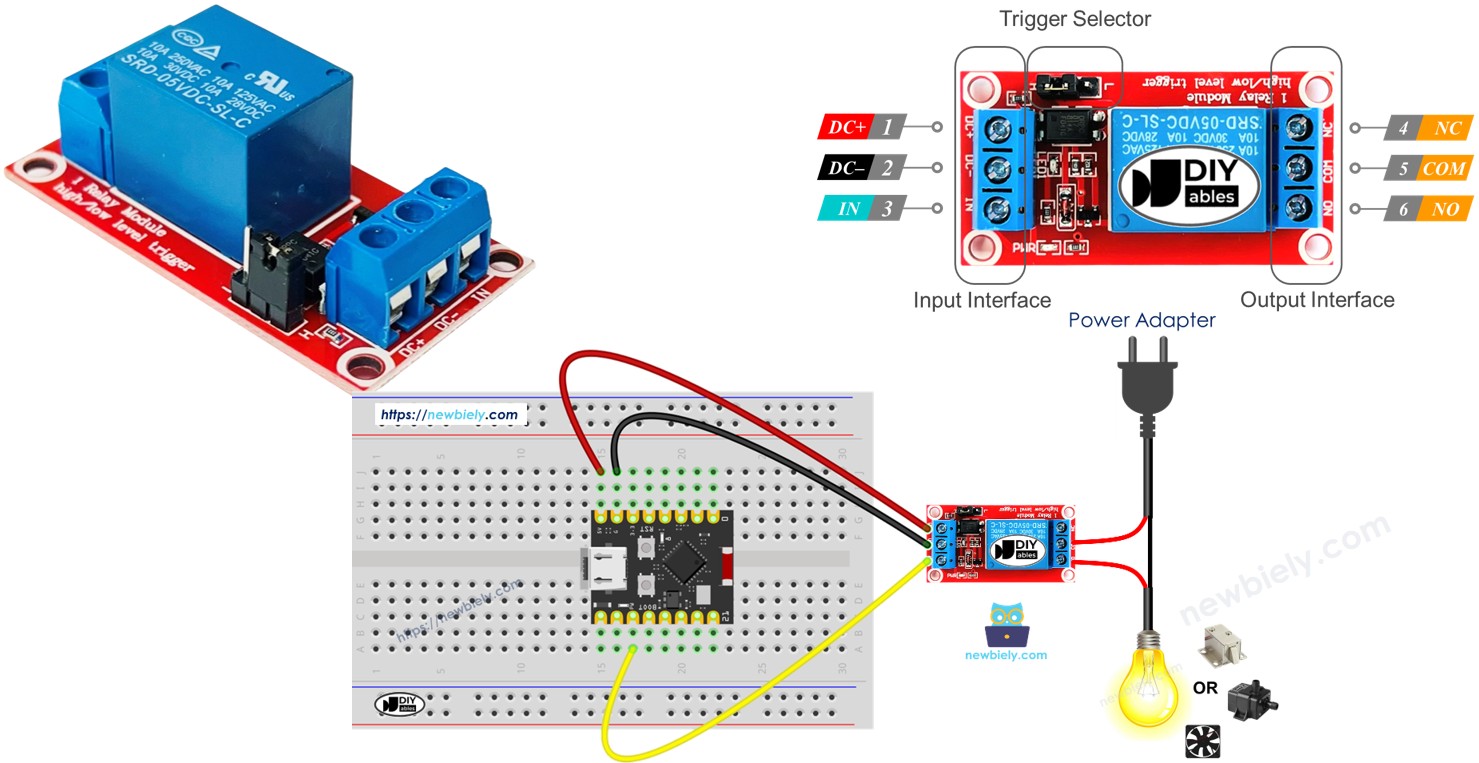
Why You Need a Relay with ESP32 C3 Super Mini
- Direct LED control: You can connect an LED directly to ESP32 C3 Super Mini because LEDs work with 3.3V or lower
- High-voltage devices: You CANNOT connect devices like electric lamps, pumps, electromagnetic locks, linear actuators, or machines directly to ESP32 C3 Super Mini
- Relay protection: Without a relay, high voltage will destroy your ESP32 C3 Super Mini board
The common between controlling a LED and an electric lamp:
- ESP32 C3 Super Mini code programs the output pin to HIGH/LOW to turn devices on/off
The difference between controlling a LED and an electric lamp:
- Controlling LED: Works with 3.3V or lower → can connect directly to ESP32 pin
- Controlling electric lamp: Works with high voltage (e.g. 12V, 24V) → MUST use a relay between ESP32 pin and the lamp to prevent damage
Hardware Preparation
Or you can buy the following kits:
| 1 | × | DIYables Sensor Kit (18 sensors/displays) |
Additionally, some of these links are for products from our own brand, DIYables .
Overview of Relay
A relay is a programmable electromechanical switch that controls ON/OFF states of electrical devices.
- Primary function: Acts as an electrically controlled switch for high-voltage devices
- ESP32 compatibility: Can be controlled directly by ESP32 C3 Super Mini digital pins
- Voltage isolation: Separates low-voltage control circuit (ESP32) from high-voltage device circuit
- Common applications: Controlling lamps, motors, pumps, locks, and other high-power devices
- Beginner-friendly: Simple HIGH/LOW programming makes it easy to use
- Safety feature: Protects your ESP32 C3 Super Mini from dangerous voltages
WARNING
Safety first! Safety first!
- Please be careful when working with high voltage. Seriously, it may shock you or even take your life. If you're NOT 100% sure what you are doing, do yourself a favor and don't touch anything. Ask someone who knows!
- Some relays can work with both DC and AC voltage, we extremely recommend you NOT to use AC voltage. Use a DC device (≤24V) only.
Relay Pinout
The relay module has input pins (low voltage) and output pins (high voltage).
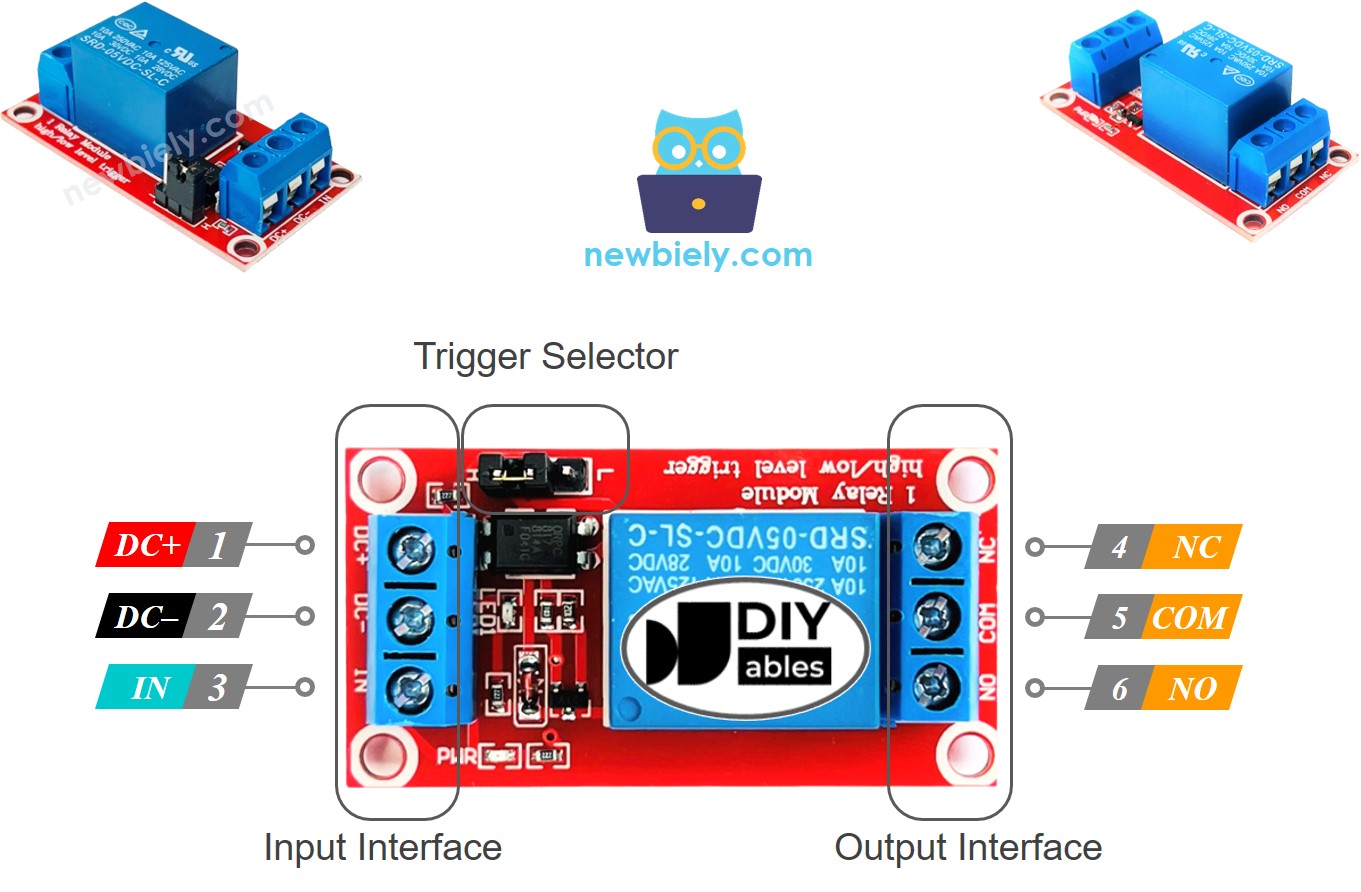
Input Pins (connect to ESP32 C3 Super Mini):
- DC- pin: Connect to GND (0V)
- DC+ pin: Connect to VCC (5V)
- IN pin: Receives control signal from ESP32 C3 Super Mini
Output Pins (connect to high-voltage device):
- COM pin: Common pin - connects to one wire of the device
- NO pin: Normally Open pin - used for normally open mode
- NC pin: Normally Closed pin - used for normally closed mode
Additional Features:
- Trigger jumper: Some modules have a jumper to select LOW or HIGH level trigger mode
※ NOTE THAT:
The pin order of the relay can be different between manufacturers. Please check the labels printed on the relay carefully!
How to Connect the High-Voltage Device to Relay
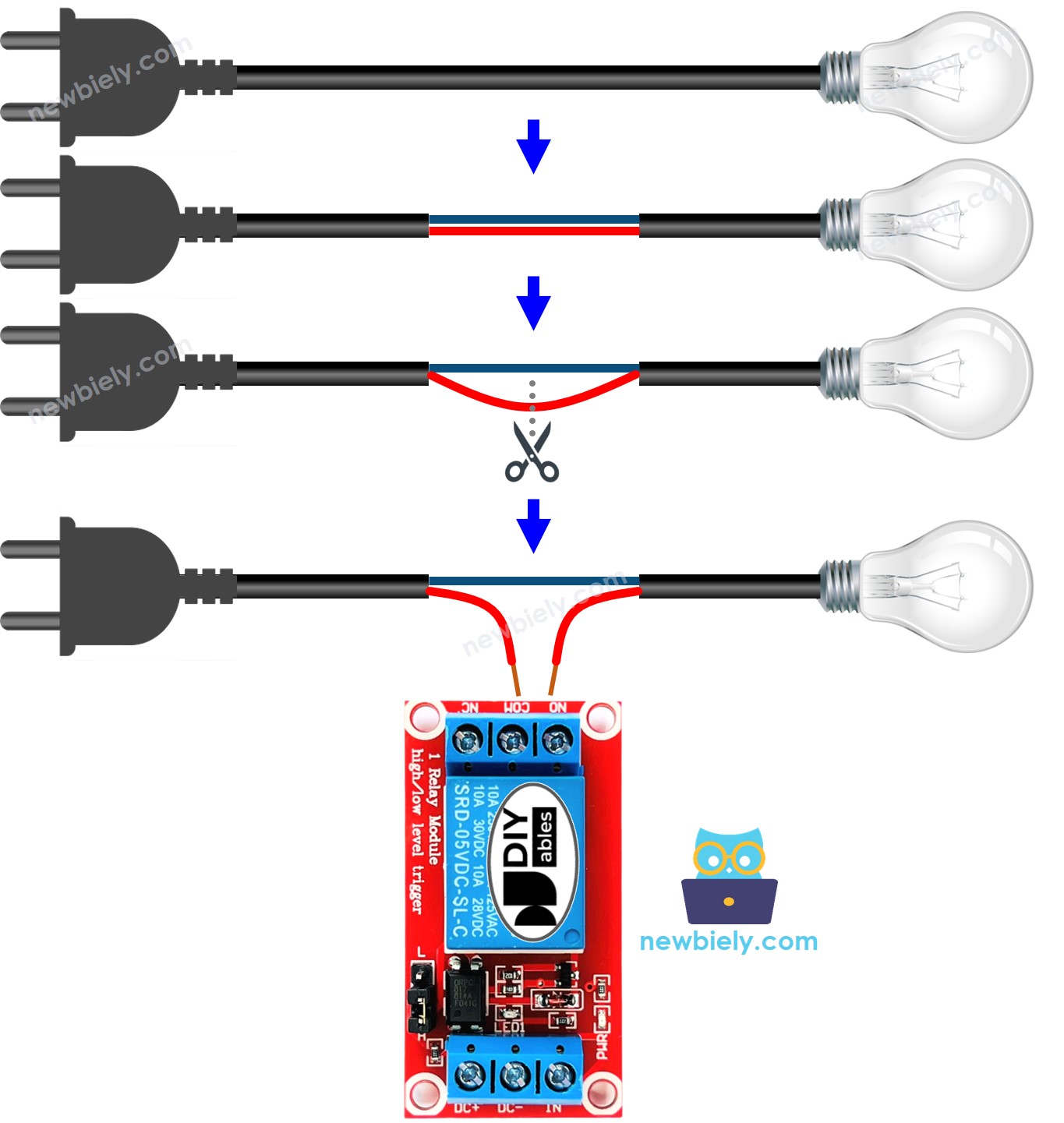
- Normally open mode: Use COM pin and NO pin only
- Normally closed mode: Use COM pin and NC pin only
- Device wiring: Connect one device wire to COM, the other to NO or NC
- Power source: Connect the device to its appropriate power supply
How Relay Works
The relay module offers different operating modes based on your project needs.
Input Modes (select one):
- LOW level trigger mode: Relay activates when IN pin receives LOW (0V)
- HIGH level trigger mode: Relay activates when IN pin receives HIGH (3.3V/5V)
Output Modes (select one):
- Normally open mode: Circuit is open (OFF) when IN pin is LOW
- Normally closed mode: Circuit is closed (ON) when IN pin is LOW
Important Notes:
- The normally open and normally closed modes work oppositely
- Most relay modules support both output modes
- NOT all relay modules support both input trigger modes
- You can only use one input mode at a time (select via jumper if available)
- The "normally" term means "when IN pin is connected to LOW (0V)"
Beginner Recommendation:
- Use HIGH level trigger mode with normally open mode for easiest understanding
HIGH Level Trigger - Normally Open Mode
Connect the high-voltage device to COM pin and NO pin.
- IN pin = LOW (0V): Switch is open → Device is OFF (deactivated)
- IN pin = HIGH (5V or 3.3V): Switch is closed → Device is ON (activated)
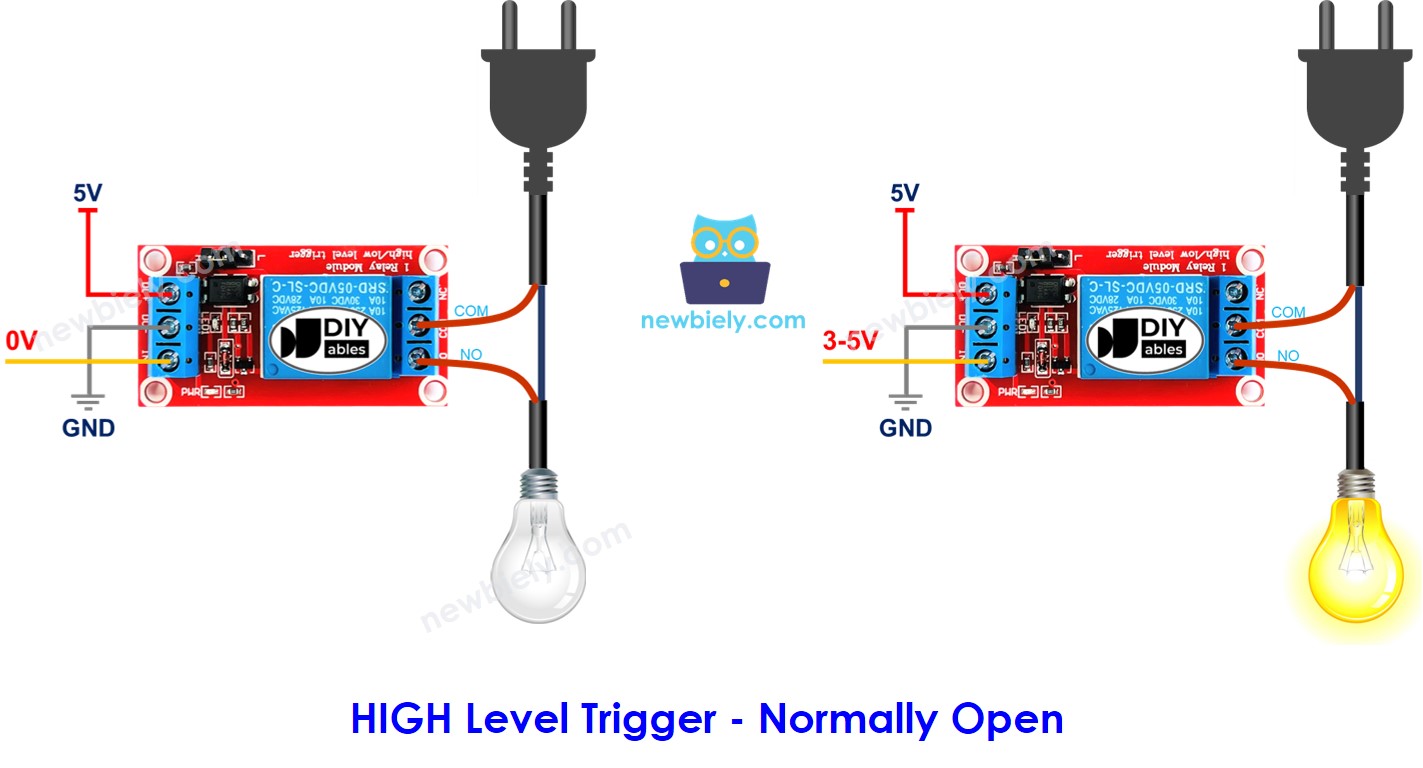
How it works:
- Like a standard switch that closes when you send HIGH signal
- Device only runs when ESP32 C3 Super Mini sends HIGH to IN pin
- Most intuitive mode for beginners
HIGH Level Trigger - Normally Closed Mode
Connect the high-voltage device to COM pin and NC pin.
- IN pin = LOW (0V): Switch is closed → Device is ON (activated)
- IN pin = HIGH (5V or 3.3V): Switch is open → Device is OFF (deactivated)
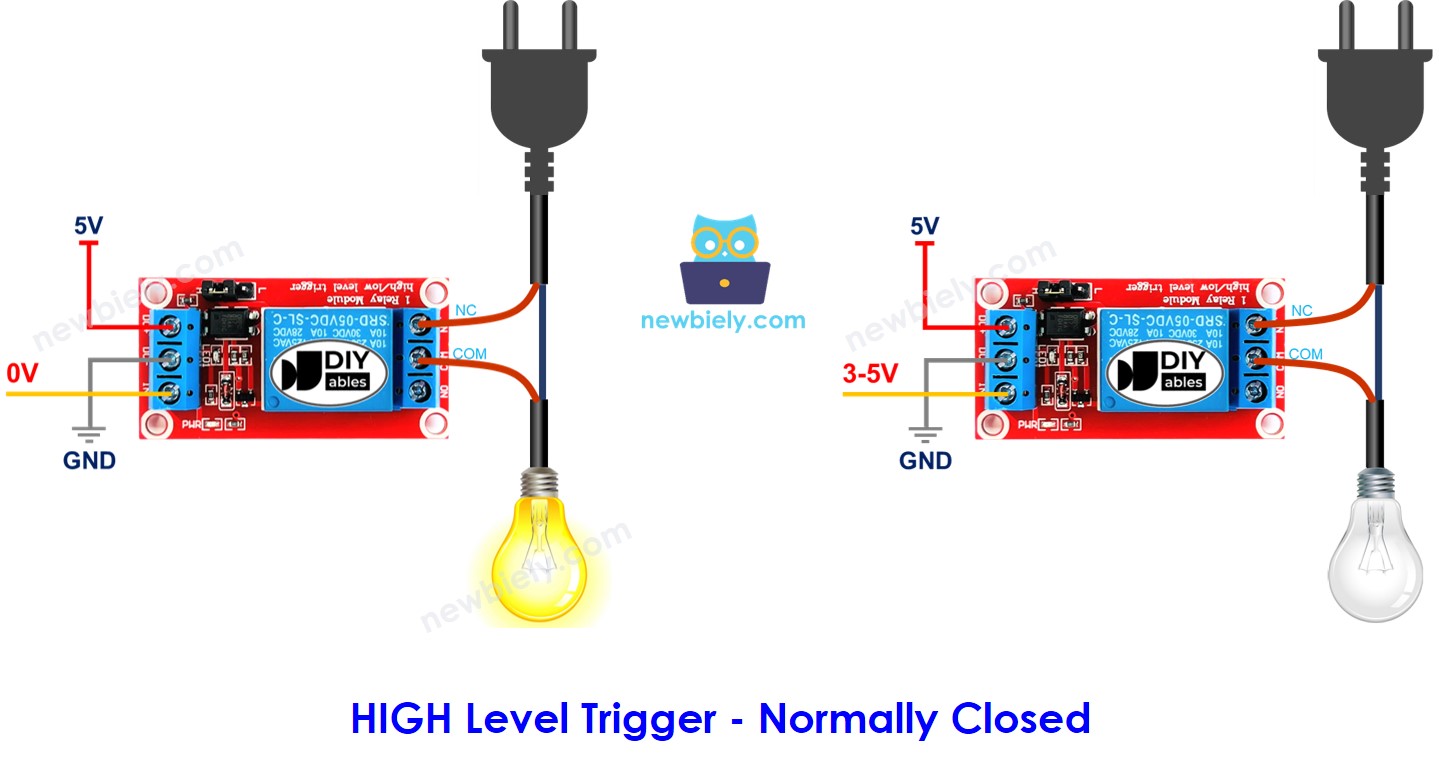
How it works:
- Works opposite of normally open mode
- Device runs by default until ESP32 C3 Super Mini sends HIGH to IN pin
- Useful for fail-safe applications
Normally Open Mode vs Normally Closed Mode
This table compares both modes when using HIGH Level Trigger:
| Mode | Pins Used | IN Pin State | Relay State | Device State |
|---|---|---|---|---|
| Normally Open | COM and NO | LOW | Open | OFF |
| Normally Open | COM and NO | HIGH | Closed | ON |
| Normally Closed | COM and NC | LOW | Closed | ON |
| Normally Closed | COM and NC | HIGH | Open | OFF |
Which mode should you use?
- Depends on your application requirements
- Normally open is more common for standard on/off control
- Normally closed is used for safety applications where device should run by default
ESP32 C3 Super Mini - Relay
Controlling a relay with ESP32 C3 Super Mini is straightforward.
All you need to do:
- Connect an ESP32 C3 Super Mini digital pin to the IN pin of the relay module
- Program the ESP32 pin to output LOW or HIGH to control the relay state
- The relay switches the high-voltage circuit based on your code
Wiring Diagram
Here are two wiring options for powering your ESP32 C3 Super Mini relay project.
Option 1: Powering ESP32 C3 Super Mini via USB port
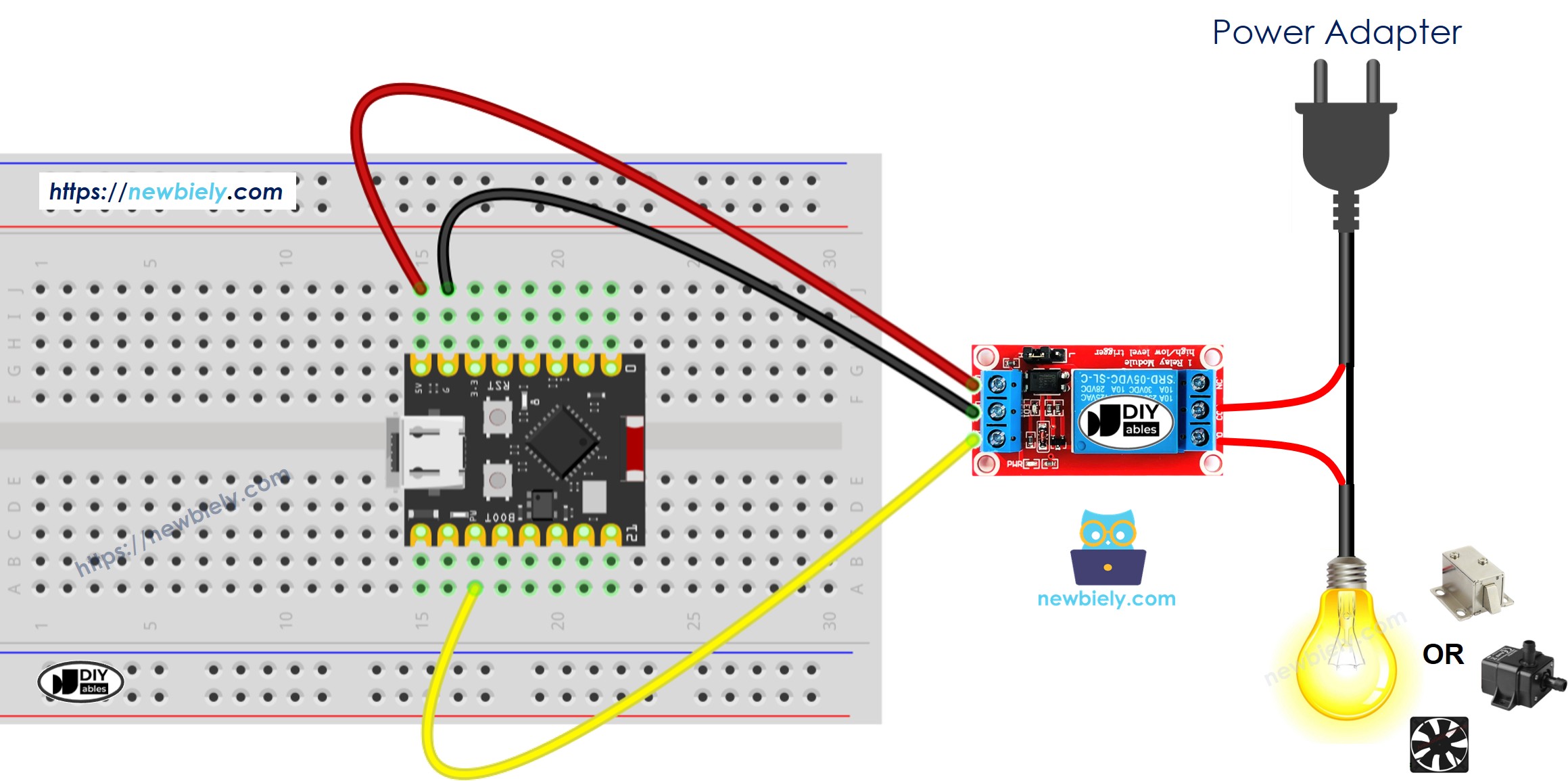
This image is created using Fritzing. Click to enlarge image
| Relay Pin | ESP32 C3 Super Mini Pin |
|---|---|
| DC- | GND |
| DC+ | 5V |
| IN | D7 |
| LED Strip Connection | Relay Pin |
|---|---|
| Positive (+) wire | COM |
| Negative (-) wire | NO pin |
- Note: The LED strip also requires connection to its 12V power adapter
Option 2: Powering ESP32 C3 Super Mini via Vin pin
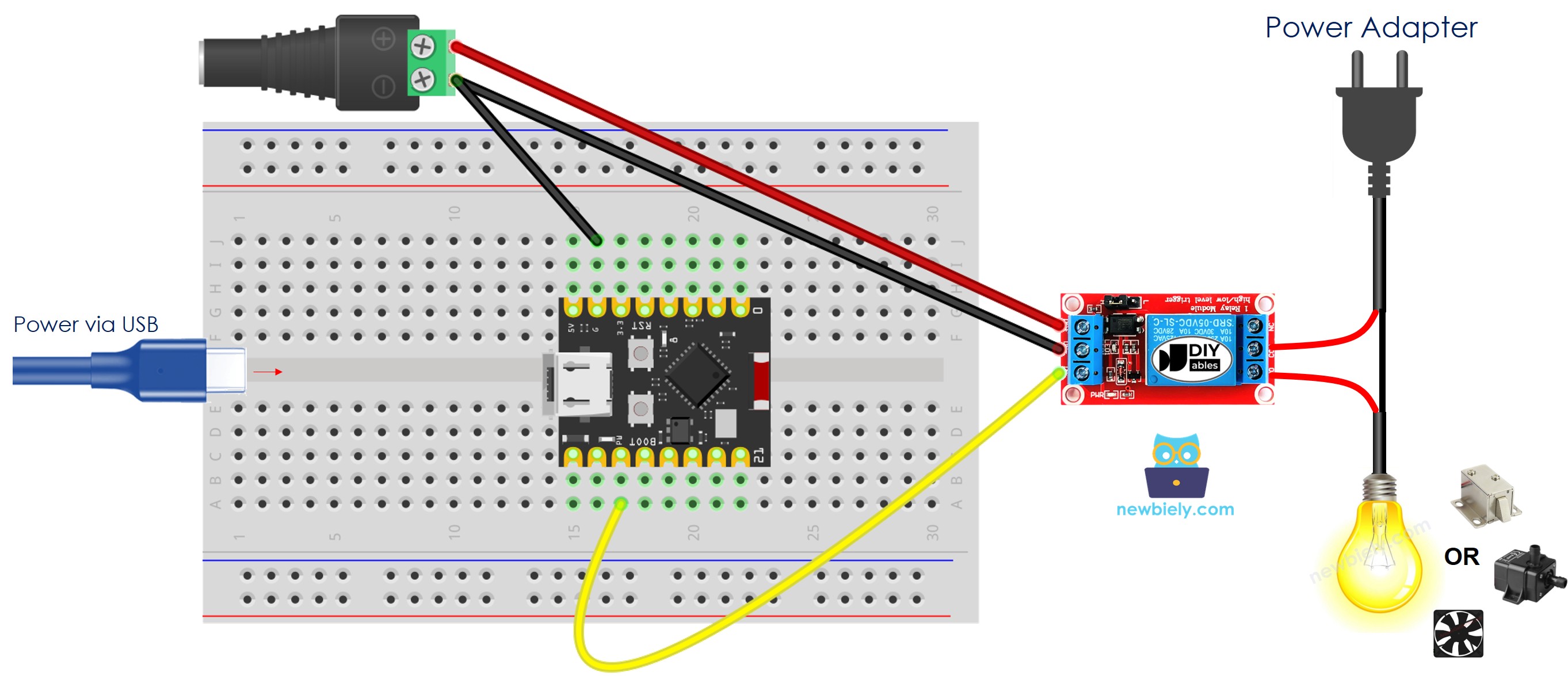
This image is created using Fritzing. Click to enlarge image
| Relay Pin | ESP32 C3 Super Mini Pin |
|---|---|
| DC- | GND |
| DC+ | 5V |
| IN | D7 |
- Note: Use external 12V power adapter for both ESP32 C3 Super Mini (via Vin) and LED strip
- Safety: Double-check all connections before applying power
How To Program Relay using ESP32 C3 Super Mini
Follow these simple steps to control a relay with ESP32 C3 Super Mini code.
Step 1: Configure the pin as digital output
- Use pinMode() function to set the ESP32 pin mode
- Example using pin D7:
Step 2: Turn relay OFF (normally open mode)
- Set the pin to LOW (0V) using digitalWrite()
- This opens the relay switch and turns device OFF:
Step 3: Turn relay ON (normally open mode)
- Set the pin to HIGH (3.3V) using digitalWrite()
- This closes the relay switch and turns device ON:
What the code does:
- Configures D7 as an output pin for relay control
- Sends HIGH/LOW signals to switch the relay on and off
- Creates blinking effect by alternating relay states with delays
ESP32 C3 Super Mini Code
This code demonstrates basic relay control with ESP32 C3 Super Mini to blink an LED strip.
What this code does:
- Sets up pin D7 to control the relay module
- Turns the relay (and LED strip) ON for 1 second
- Turns the relay (and LED strip) OFF for 1 second
- Repeats the on/off cycle continuously
- Creates a blinking effect for the connected high-voltage device
Detailed Instructions
- New to ESP32 C3 Mini? Complete our Getting Started with ESP32 C3 Mini tutorial first to set up your development environment.
- Upload the code: Copy the code above and paste it into Arduino IDE
- Select your board: Choose ESP32 C3 Dev Module from Tools > Board menu
- Choose your port: Select the correct COM port from Tools > Port menu
- Compile and upload: Click the Upload button on Arduino IDE
- Observe the result: Watch your LED strip blink on and off every second
- Verify wiring: If nothing happens, double-check your relay connections
- Pro Tip: Add a Serial.println() statement to monitor relay states in the Serial Monitor for debugging
Serial Monitor Output
The relay control code doesn't produce Serial Monitor output by default. To monitor relay states, you can modify the code to include serial debugging:
Application and Project Ideas
Once you master relay control with ESP32 C3 Super Mini, you can build many practical projects.
- Smart home lighting: Control room lights, lamps, or LED strips automatically based on time or sensors
- Automated irrigation system: Turn water pumps on/off based on soil moisture sensor readings
- Temperature-controlled fan: Activate cooling fans when temperature exceeds a threshold
- Smart door lock: Control electromagnetic locks for home security applications
- Automatic pet feeder: Schedule feeding times by controlling a food dispenser motor
- Garden automation: Control grow lights, ventilation fans, and watering systems
- Remote appliance control: Turn coffee makers, heaters, or other devices on/off via WiFi
Video Tutorial
Watch the video below for a visual walkthrough of this project.
Challenge Yourself
Enhance your ESP32 C3 Super Mini relay skills with these progressively challenging projects.
- Easy: Modify the blink interval to 5 seconds on and 2 seconds off
- Easy: Add a button to manually control the relay state instead of automatic blinking
- Medium: Control two relays simultaneously to switch two different devices independently
- Medium: Use a temperature sensor to automatically turn a fan on when temperature exceeds 25°C
- Advanced: Build a WiFi-controlled relay system that you can control from your smartphone
- Advanced: Create a weekly schedule system that turns devices on/off at specific times each day