
ESP32 C3 Super Mini - Mini Mp3 Player Module
The ESP32 C3 Super Mini is a compact 3.3V development board perfect for audio projects. In this tutorial, you'll learn how to build a complete mp3 player system using the DIYables Mini Mp3 Player module with your ESP32 C3 Super Mini board.
What you'll learn:
- What the Mini Mp3 Player module is and how it works
- How to wire the mp3 module to ESP32 C3 Super Mini (no resistor needed)
- How to prepare your SD card with properly named mp3 files
- How to write code for playback, volume, looping, and folder control
- How to read module status and control playback via serial commands
Hardware Preparation
| 1 | × | ESP32 C3 Super Mini | |
| 1 | × | USB Cable Type-A to Type-C (for USB-A PC) | |
| 1 | × | USB Cable Type-C to Type-C (for USB-C PC) | |
| 1 | × | DIYables Mini Mp3 Player module | |
| 1 | × | Micro SD Card | |
| 1 | × | Speaker | |
| 1 | × | Breadboard | |
| 1 | × | Jumper Wires |
Or you can buy the following kits:
| 1 | × | DIYables Sensor Kit (18 sensors/displays) |
Additionally, some of these links are for products from our own brand, DIYables .
Overview of the Mini Mp3 Player Module
The DIYables Mini Mp3 Player is a YX5200-24SS mp3 decoder module that plays audio files from a micro SD card through a built-in amplifier.
Key features:
- Operates at 3.3V–5V (perfect for ESP32 C3 Super Mini's 3.3V logic)
- Controls via UART serial at 115200 baud
- Built-in 3W amplifier for direct speaker connection
- Supports up to 255 tracks and 99 folders
- 31 volume levels (0–30)
- 6 equalizer presets (Normal, Pop, Rock, Jazz, Classic, Bass)
- Multiple repeat and shuffle modes
- Status query capabilities for volume, track number, and playback state
- No external decoder or amplifier IC required
- Beginner-friendly with simple serial commands
Pinout
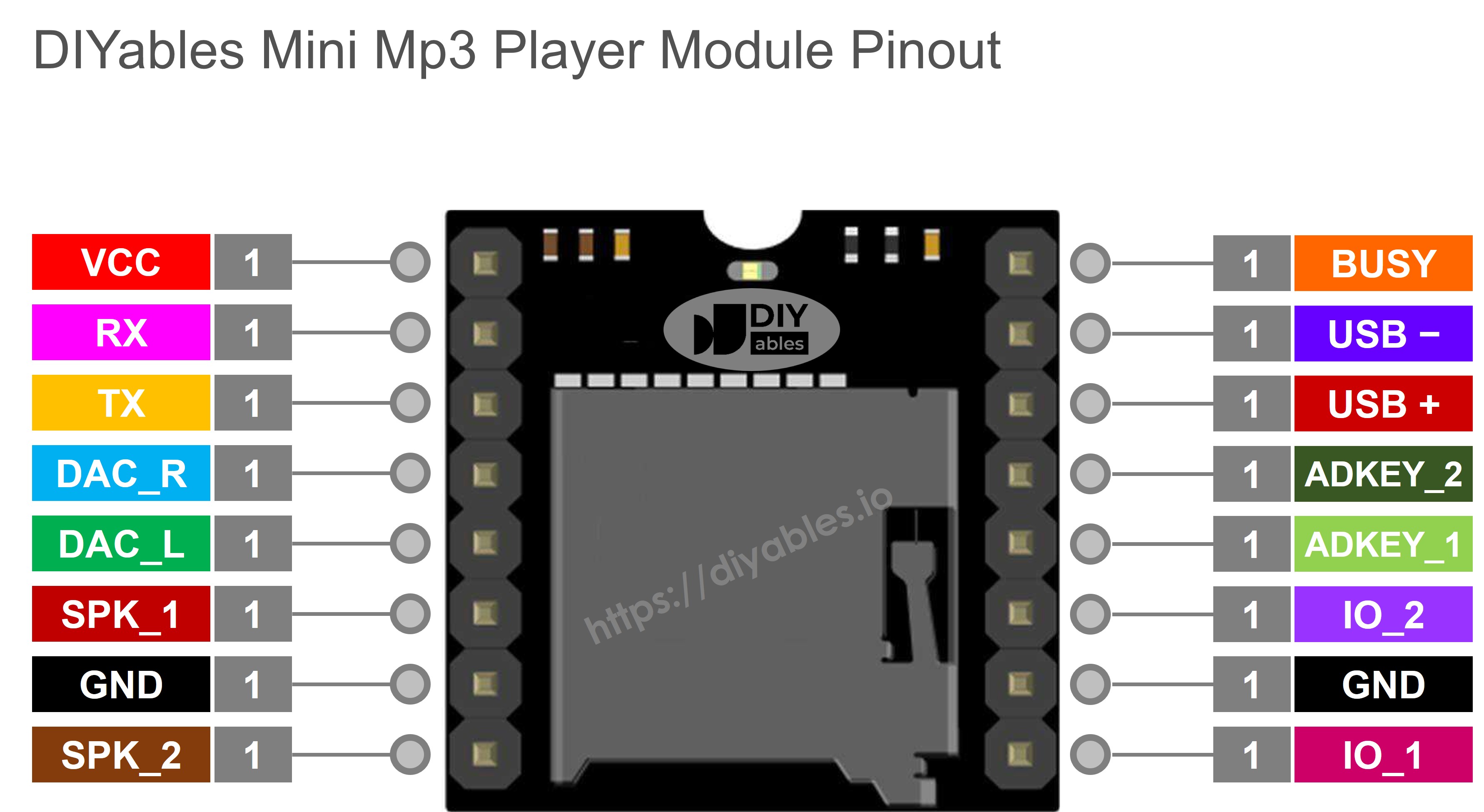
The Mini Mp3 Player module has 11 pins for power, communication, audio output, and control.
- VCC: Power supply (3.2V–5.0V)
- GND: Ground connection
- RX: UART receive (connect to ESP32 TX pin)
- TX: UART transmit (connect to ESP32 RX pin)
- SPK_1: Speaker positive terminal (built-in 3W amplifier)
- SPK_2: Speaker negative terminal
- DAC_R: Right channel line-level audio output
- DAC_L: Left channel line-level audio output
- BUSY: Status pin (LOW when playing, HIGH when idle)
- IO_1: Button input (short press = previous, long press = volume down)
- IO_2: Button input (short press = next, long press = volume up)
Wiring Diagram
Here's how to connect the Mini Mp3 Player to your ESP32 C3 Super Mini using hardware Serial1.
- Important: The ESP32 C3 Super Mini uses 3.3V logic, matching the module perfectly—no resistor needed for TX/RX lines
- Serial1 pins: TX1 is GPIO5 (D5), RX1 is GPIO4 (D4)
- Power options: Use 3.3V pin or 5V (VBUS) depending on your speaker requirements
| Mini Mp3 Player | ESP32 C3 Super Mini | Notes |
|---|---|---|
| VCC | 3.3V | Module also accepts 5V from VBUS if needed |
| GND | GND | Common ground |
| RX | TX1 (D5) | Direct connection — no resistor needed |
| TX | RX1 (D4) | Direct connection — 3.3V logic compatible |
| SPK_1 | Speaker + | Amplified output |
| SPK_2 | Speaker − | Amplified output |
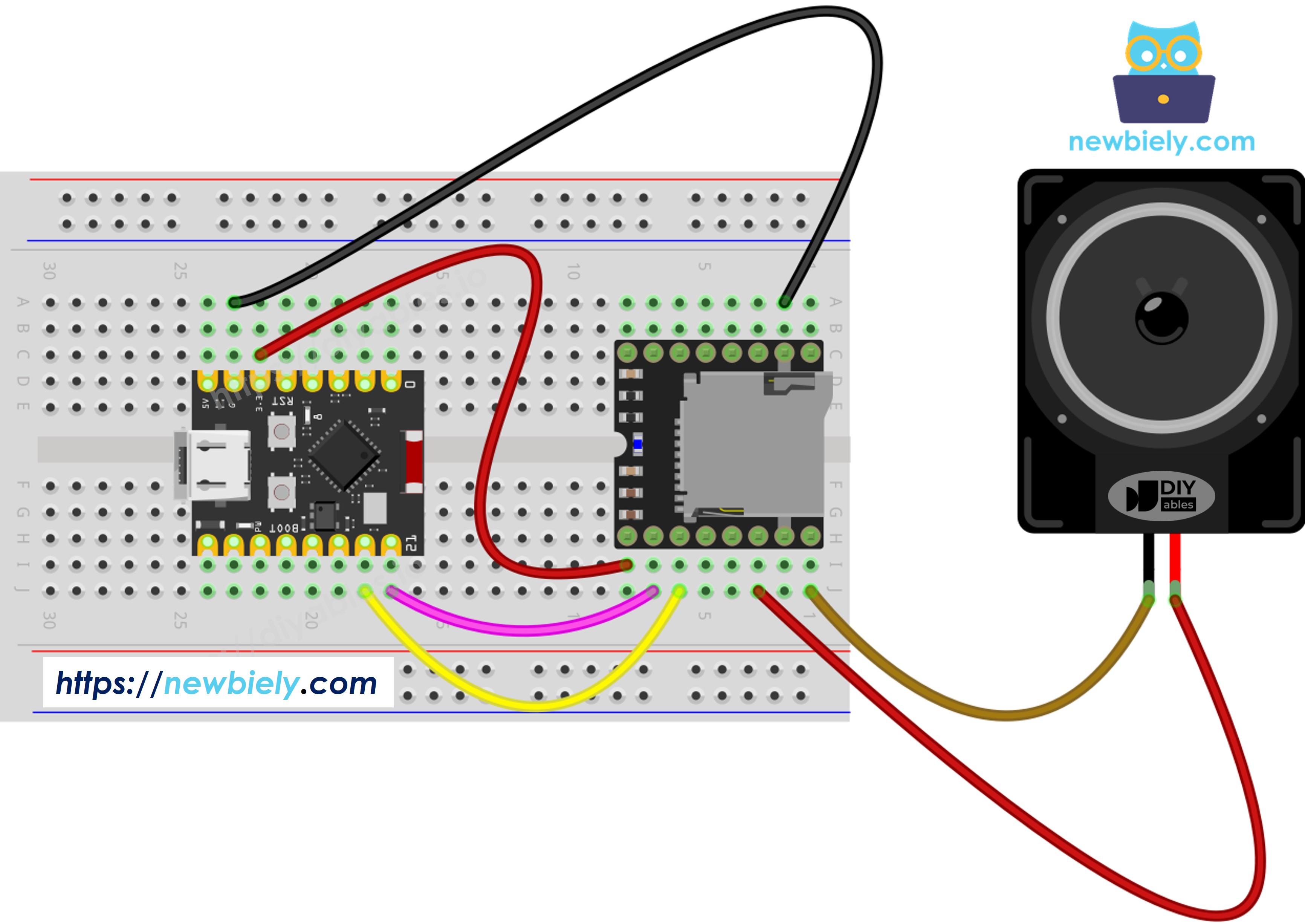
This image is created using Fritzing. Click to enlarge image
SD Card Setup
The Mini Mp3 Player requires properly formatted and named files on your micro SD card.
Formatting requirements:
- File system: FAT16 or FAT32
- Card size: Up to 32GB recommended
Basic file naming (root directory):
Folder-based naming (organized playback):
Critical naming rules:
- Track numbering starts at 1 (not 0)
- Root files: 3-digit zero-padded names (001–255)
- Folder names: 2-digit zero-padded (01–99)
- Files in folders: 3-digit zero-padded (001–255)
- Copy order matters: The module determines playback order from the sequence files were copied, not alphabetical naming
- Best practice: Format card first, then copy files one by one in your desired playback order
Library Installation
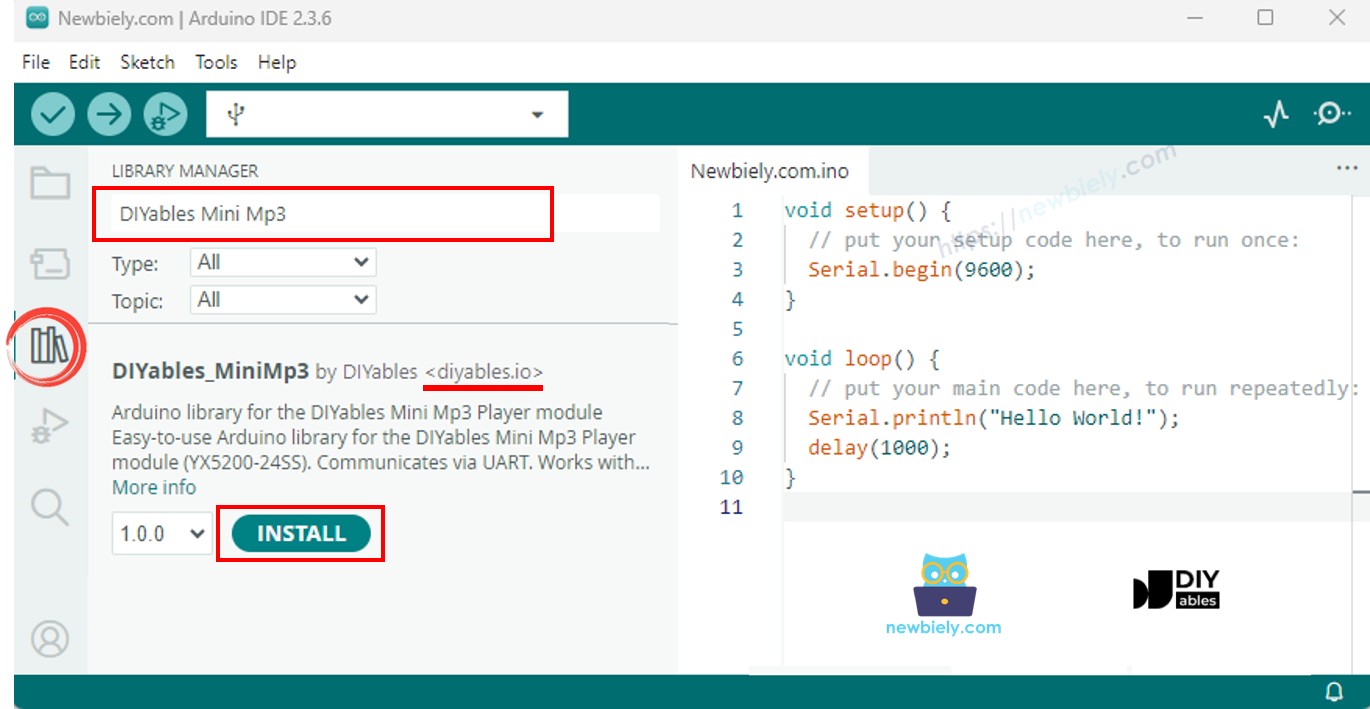
The DIYables_MiniMp3 library simplifies control of the mp3 module for ESP32 C3 Super Mini projects.
- Connect your ESP32 C3 Super Mini to your computer via USB-C cable
- Open the Arduino IDE
- Select ESP32 C3 Super Mini as your board
- Choose the correct COM port
- Click the Libraries icon in the left sidebar
- Search for "DIYables_MiniMp3"
- Find the library by DIYables
- Click Install
Library benefits:
- Zero external dependencies
- Simple command functions for all playback features
- Works perfectly with ESP32 hardware serial
ESP32 C3 Super Mini Code — Basic Setup
This code shows the basic template for controlling the Mini Mp3 Player with ESP32 C3 Super Mini using hardware Serial1.
What this code does:
- Initializes Serial1 for mp3 module communication at 115200 baud
- Sets up the mp3 player object
- Waits for module boot-up
- Sets initial volume to level 25
Why hardware serial?
- ESP32 C3 Super Mini has dedicated UART hardware
- More reliable than software serial
- No timing issues at 115200 baud
- Leaves USB serial free for debugging
ESP32 C3 Super Mini Code — Play a Single Track
Detailed Instructions
- New to ESP32 C3 Mini? Complete our Getting Started with ESP32 C3 Mini tutorial first to set up your development environment.
- Prepare SD card: Format as FAT32 and copy mp3 files with names 001.mp3, 002.mp3, etc.
- Insert SD card: Place the micro SD card into the module's slot
- Connect wiring: Follow the wiring diagram above (VCC, GND, TX1, RX1, speaker)
- Connect speaker: Attach your speaker to SPK_1 and SPK_2 terminals
- Open Arduino IDE: Launch the IDE on your computer
- Select board: Choose ESP32 C3 Super Mini from the board menu
- Select port: Choose the correct COM port for your board
- Upload code: Copy the code above and upload to your ESP32 C3 Super Mini
- Listen: Track 001.mp3 should play through the speaker
- Pro Tip: If you hear no sound, check the SD card format and file naming—the module is very sensitive to naming conventions
Playback Commands
| Method | Purpose | Example |
|---|---|---|
| play(trackNum) | Start a specific track | mp3.play(1) |
| playNext() | Advance to the next track | mp3.playNext() |
| playPrevious() | Go to the previous track | mp3.playPrevious() |
| pause() | Pause the active track | mp3.pause() |
| resume() | Unpause the track | mp3.resume() |
| stop() | Halt playback | mp3.stop() |
ESP32 C3 Super Mini Code — Play Multiple Tracks
Detailed Instructions
- Prepare SD card: Ensure you have at least 3 mp3 files named 001.mp3, 002.mp3, 003.mp3
- Wire module: Use the same wiring from the previous example
- Upload code: Copy and upload the sketch above
- Listen: Tracks will rotate every 5 seconds automatically
- Watch serial: Open Serial Monitor at 115200 baud to see track changes
- Pro Tip: Adjust the delay(5000) value to change how long each track plays before advancing
Serial Monitor Output
ESP32 C3 Super Mini Code — Volume Control
Detailed Instructions
- Add buttons: Wire two buttons to GPIO6 and GPIO7 (plus GND)
- Upload code: Copy the sketch above to Arduino IDE and upload
- Test buttons: Press the buttons while music plays to adjust volume
- Watch serial: Serial Monitor displays current volume level
- Pro Tip: Volume range is 0–30, with 15 being a good starting point for most speakers
Volume Commands
| Method | Purpose | Example |
|---|---|---|
| setVolume(v) | Jump to a specific volume level | mp3.setVolume(20) |
| volumeUp() | Increase by 1 step | mp3.volumeUp() |
| volumeDown() | Decrease by 1 step | mp3.volumeDown() |
| getVolume() | Query the current level | mp3.getVolume() |
Serial Monitor Output
ESP32 C3 Super Mini Code — Pause/Resume Toggle
Detailed Instructions
- Wire button: Connect pause/resume button to GPIO6 and GND
- Upload code: Load the sketch to your board
- Start playback: Music begins automatically
- Toggle pause: Press button to pause, press again to resume
- Check status: Serial Monitor displays playback state
- Pro Tip: The BUSY pin on the module can also indicate play/pause state for visual feedback with an LED
Serial Monitor Output
ESP32 C3 Super Mini Code — Loop a Track
Detailed Instructions
- Upload sketch: Load the code above
- Listen: Track 1 will repeat continuously
- Pro Tip: Use loopAll() for background music projects that need continuous playback
Repeat & Shuffle Commands
| Method | Purpose | Example |
|---|---|---|
| loopTrack(t) | Keep replaying one track | mp3.loopTrack(1) |
| loopFolder(f) | Replay all tracks in a folder | mp3.loopFolder(1) |
| loopAll() | Replay everything on the card | mp3.loopAll() |
| stopLoop() | End the current repeat mode | mp3.stopLoop() |
| shuffle() | Randomize playback order | mp3.shuffle() |
ESP32 C3 Super Mini Code — Play from Folder
Detailed Instructions
- Create folders: On your SD card, create folders named 01, 02, etc.
- Add files: Place mp3 files in each folder (001.mp3, 002.mp3, etc.)
- Upload code: Load the sketch to ESP32 C3 Super Mini
- Test playback: Code plays the first track from folder 01
- Pro Tip: Organize sound effects, music genres, or languages into separate folders for easy project organization
Folder Methods
| Method | Purpose | Example |
|---|---|---|
| playFolder(f, t) | Select track t from folder f | mp3.playFolder(1, 1) |
| playLargeFolder(f, t) | Large folder mode (up to 3000 tracks) | mp3.playLargeFolder(1, 1500) |
| playFromMP3Folder(t) | Access the special /mp3 folder | mp3.playFromMP3Folder(1) |
ESP32 C3 Super Mini Code — Serial Monitor Control
Detailed Instructions
- Upload code: Load the sketch to your ESP32 C3 Super Mini
- Open Serial Monitor: Set baud rate to 115200
- Send commands: Type commands from the table below
- Control playback: Use keyboard to test all mp3 player features
- Pro Tip: This is perfect for testing your mp3 module before building it into a larger project
Serial Commands
| Input | Result |
|---|---|
| 1–9 | Play that track |
| + / − | Volume up / down |
| p | Pause |
| r | Resume |
| s | Stop |
| n | Next track |
| b | Previous track |
| ? | Display status |
Serial Monitor Output
Equalizer Presets
The Mini Mp3 Player offers six built-in equalizer modes to enhance audio quality for different music genres.
Available EQ presets:
| Constant | ID | Tone |
|---|---|---|
| DIYables_MiniMp3::EQ_NORMAL | 0 | Neutral |
| DIYables_MiniMp3::EQ_POP | 1 | Pop |
| DIYables_MiniMp3::EQ_ROCK | 2 | Rock |
| DIYables_MiniMp3::EQ_JAZZ | 3 | Jazz |
| DIYables_MiniMp3::EQ_CLASSIC | 4 | Classical |
| DIYables_MiniMp3::EQ_BASS | 5 | Bass boost |
Example usage:
Tips:
- EQ_NORMAL works well for voice recordings and podcasts
- EQ_BASS enhances small speakers with limited low-frequency response
- Try different presets to match your speaker characteristics
Status Query Functions
The library provides functions to read the current state of the Mini Mp3 Player module in real-time.
Important notes:
- Each query blocks execution for up to 100 milliseconds
- Functions return −1 on timeout or communication error
- Use these sparingly in time-critical applications
Available status functions:
| Method | Returns | Info |
|---|---|---|
| isPlaying() | bool | Whether a track is active |
| getVolume() | int16_t | Volume (0–30) |
| getEQ() | int16_t | EQ preset (0–5) |
| getTrackCount() | int16_t | Total tracks on card |
| getCurrentTrack() | int16_t | Currently playing track |
| getFolderCount() | int16_t | Number of folders |
| getTrackCountInFolder(f) | int16_t | Tracks in folder f |
Example code:
Application & Project Ideas
Here are some creative ways to use the ESP32 C3 Super Mini with the Mini Mp3 Player module in your projects.
- Build a WiFi-controlled home audio player with web interface
- Create a talking alarm clock with scheduled announcements
- Design a museum exhibit guide with automatic audio descriptions
- Make an interactive toy with sound effects triggered by sensors
- Build a language learning device with folder-organized lessons
- Create a doorbell with customizable mp3 chimes
- Design a meditation timer with background music and voice prompts
- Build a retail product demo with looping advertisement audio
Video Tutorial
Watch the video below for a visual walkthrough of this project.
Challenge Yourself
Test your skills with these progressively challenging ESP32 C3 Super Mini mp3 player modifications.
- Easy: Add an LED that lights up when music is playing using the BUSY pin
- Easy: Create a 3-button jukebox (play track 1, 2, or 3)
- Medium: Build a web interface to control playback over WiFi
- Medium: Add an LCD display showing current track name and volume
- Advanced: Create a voice-activated mp3 player using a microphone module
- Advanced: Build a multi-room audio system with multiple ESP32 boards synced over WiFi