
ESP32 C3 Super Mini - Water/Liquid Valve
Learn how to control water flow, beer dispensing, oil flow, or any liquid/gas valve using the ESP32 C3 Super Mini and a solenoid valve. This beginner-friendly tutorial shows you how to automate liquid control for irrigation, dispensing systems, and flow management projects.
In this tutorial, you'll learn:
- What a liquid solenoid valve is and how it controls flow
- How to wire a solenoid valve to ESP32 C3 Super Mini using a relay
- How to program ESP32 C3 Super Mini to open and close the valve
- How to test your automated water valve system
- How to switch the same valve with a MOSFET module instead of a relay
A relay or a MOSFET module can open and close the valve. Both give you only ON and OFF here, because a solenoid valve is either open or closed. The MOSFET module, however, switches without a click, reacts faster, and has no contacts that wear out. This tutorial covers the two options.
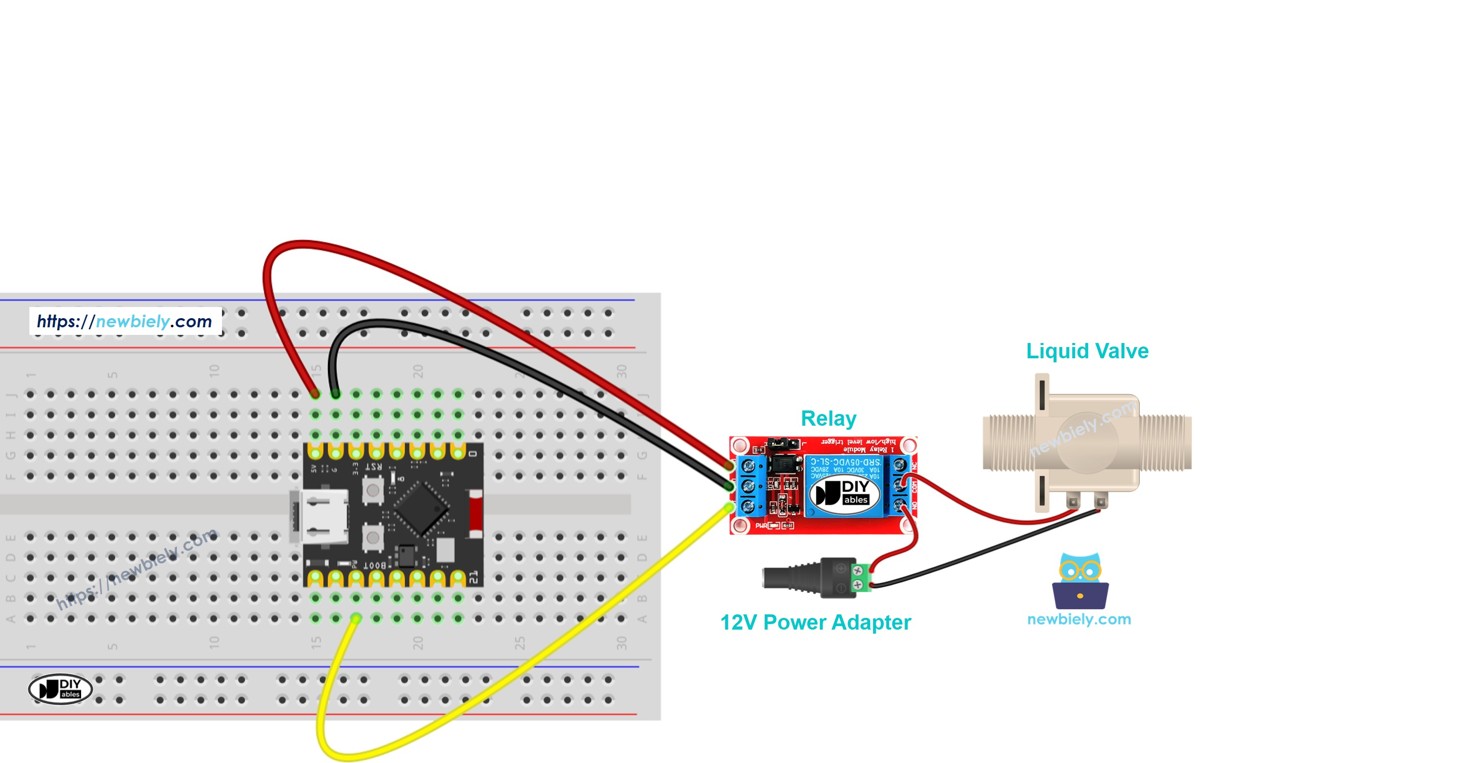
Hardware Preparation
Or you can buy the following kits:
| 1 | × | DIYables Sensor Kit (18 sensors/displays) |
Additionally, some of these links are for products from our own brand, DIYables .
Overview of Water/Liquid Valve
A solenoid valve is an electromechanical device that controls the flow of liquids or gases using an electric signal.
- Operating Voltage: Typically 12V DC (some models use 5V or 24V)
- Flow Control: Opens when powered, closes when power is removed
- Applications: Water dispensing, irrigation, gas control, beverage systems
- Flow Direction: Some valves are unidirectional (check valve specifications)
- Pressure Requirements: Some models need minimum pressure to fully open
- Perfect for beginners: Simple on/off control makes automation projects easy
Pinout
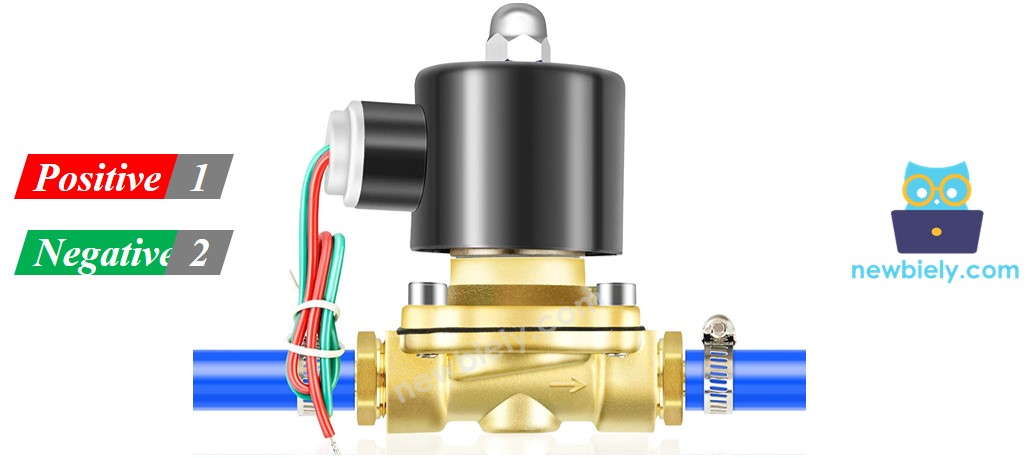
The solenoid valve has two connection terminals:
- Positive (+) pin (red): Connect to 12V DC power supply positive terminal
- Negative (-) pin (black): Connect to 12V DC power supply ground (via relay control)
How Water/Liquid Valve Works
The valve operates on a simple electromagnetic principle:
- Default State: Valve is normally closed, blocking liquid/gas flow
- Powered State: When 12V DC is applied, electromagnet pulls valve open
- Flow Control: Liquid/gas flows freely when valve is open
- Return to Closed: Removing power closes the valve automatically
※ NOTE THAT:
- Some valves require minimum water pressure to fully open after power is applied - the pressure is created by the liquid flow itself
- Many solenoid valves are directional - liquid can only flow one way (check the arrow marking on valve body)
- Always verify the voltage rating before connecting power to avoid damaging the valve
How to Control Water/Liquid Solenoid Valve
Controlling a solenoid valve with ESP32 C3 Super Mini requires a relay module:
- Why Relay is Needed: ESP32 pins output 3.3V at low current, but valves need 12V at higher current
- Relay Function: Acts as an electronic switch controlled by ESP32 C3 Super Mini
- Control Logic: ESP32 sends signal to relay, relay switches 12V power to valve
- Safety: Relay isolates ESP32 from high-voltage/high-current valve circuit
- Learn More: Check our ESP32 C3 Super Mini - Relay tutorial for detailed relay operation
- Other Option: A MOSFET module can switch the valve too. The ESP32 C3 Super Mini - MOSFET Module tutorial shows its pins and how it works
Relay vs MOSFET Module for a Solenoid Valve
| Item | Relay | MOSFET Module |
|---|---|---|
| Valve control | Open / closed | Open / closed (no PWM for a valve) |
| Noise | The relay clicks, plus the valve click | Only the valve itself clicks |
| Speed | A few milliseconds | Much faster |
| Durability | Relay contacts wear with use | No moving contacts |
| Valve power | AC or DC valves | DC valves only |
| Minimum valve voltage | No limit, within the relay rating | About 6V |
| Isolation | Yes, coil vs. contacts | Yes, PC817 optocoupler |
| Best for | AC solenoid valves, rare switching | 12V DC valves that open and close often |
A 12V DC valve in an irrigation or dosing system opens and closes many times, so the MOSFET module lasts longer there. It does not give you a half-open valve, though. For an AC valve, use the relay.
Wiring Diagram
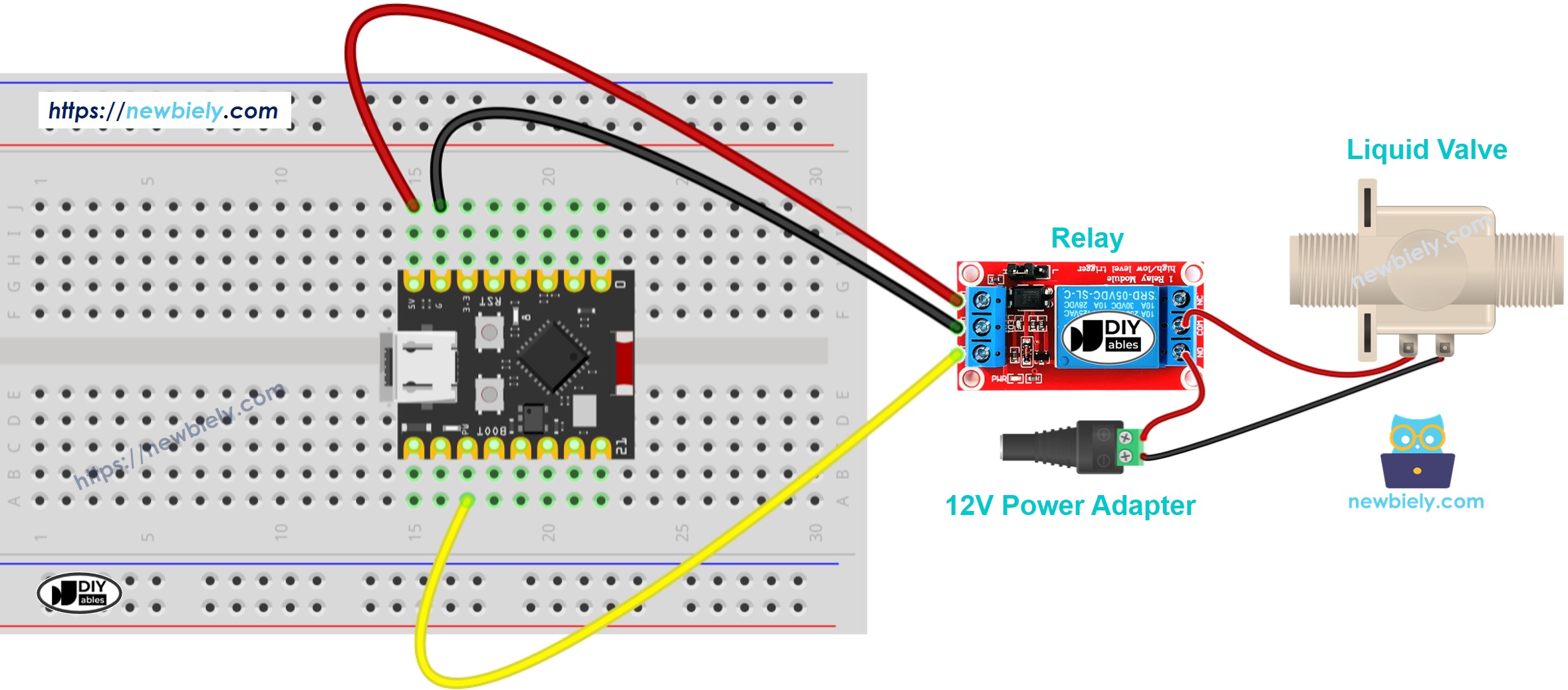
This image is created using Fritzing. Click to enlarge image
Follow the wiring diagram above to connect your ESP32 C3 Super Mini to the relay and solenoid valve.
※ NOTE THAT:
- Safety First: Never connect the 12V power supply directly to ESP32 C3 Super Mini pins
- Double Check Polarity: Verify positive and negative connections on both relay and valve before powering on
- Secure Connections: Ensure all wire connections are tight to prevent intermittent operation
Wiring Connections:
| Component Pin | Arduino Pin | Notes |
|---|---|---|
| Relay Signal Pin | D7 | Control signal from ESP32 |
| Relay VCC | 5V | Power for relay module |
| Relay GND | GND | Common ground |
| Relay COM | 12V Power (+) | 12V input to relay switch |
| Relay NO | Valve (+) | Normally Open to valve positive |
| Valve (-) | 12V Power GND | Valve negative to power ground |
ESP32 C3 Super Mini Code
The code below demonstrates automatic valve control - it opens the solenoid valve for 5 seconds, then closes it for 5 seconds in a continuous cycle.
What the code does:
- Configures D7 as the relay control pin
- Turns the valve ON (opens) for 5 seconds
- Turns the valve OFF (closes) for 5 seconds
- Repeats the cycle continuously for automated flow control
- Provides serial output to monitor valve state
Detailed Instructions
- New to ESP32 C3 Mini? Complete our Getting Started with ESP32 C3 Mini tutorial first to set up your development environment.
- Install Arduino IDE: If you haven't already, follow the ESP32 C3 Super Mini software installation guide
- Wire the components: Connect the relay and solenoid valve to ESP32 C3 Super Mini following the wiring diagram above
- Connect USB cable: Plug your ESP32 C3 Super Mini into your computer using a USB Type-C cable
- Open Arduino IDE: Launch the Arduino IDE application on your computer
- Select your board: Choose ESP32 C3 Super Mini from the board menu
- Select COM port: Pick the correct COM port that your ESP32 is connected to
- Copy the code: Copy the provided code and paste it into a new Arduino IDE sketch
- Upload the code: Click the Upload button to compile and upload code to your ESP32 C3 Super Mini
- Test the valve: Observe the valve opening and closing every 5 seconds, and check water flow if connected
- Pro Tip: Open the Serial Monitor (115200 baud) to see real-time valve status messages and troubleshoot your setup
Code Explanation
The ESP32 C3 Super Mini code includes detailed line-by-line comments explaining each function. Read through the code comments to understand how valve control works!
Key code concepts:
- Pin Configuration: Sets up D7 as an output pin to control the relay
- digitalWrite() Function: Sends HIGH or LOW signals to open/close the valve
- delay() Function: Creates 5-second timing intervals between valve operations
- Serial Monitor: Prints valve status for debugging and monitoring
Serial Monitor Output
Open the Serial Monitor at 115200 baud rate to see the valve operation status:
How to Control Water Valve with MOSFET Module
You can take out the relay and put a MOSFET module in its place. The valve still only opens and closes, but now silently on the switching side and with no relay contacts to wear.
On this page, the relay and the MOSFET module use different pins: the relay uses D7, and the MOSFET module uses GPIO4. So each wiring has its own code.
Wiring Diagram with MOSFET Module
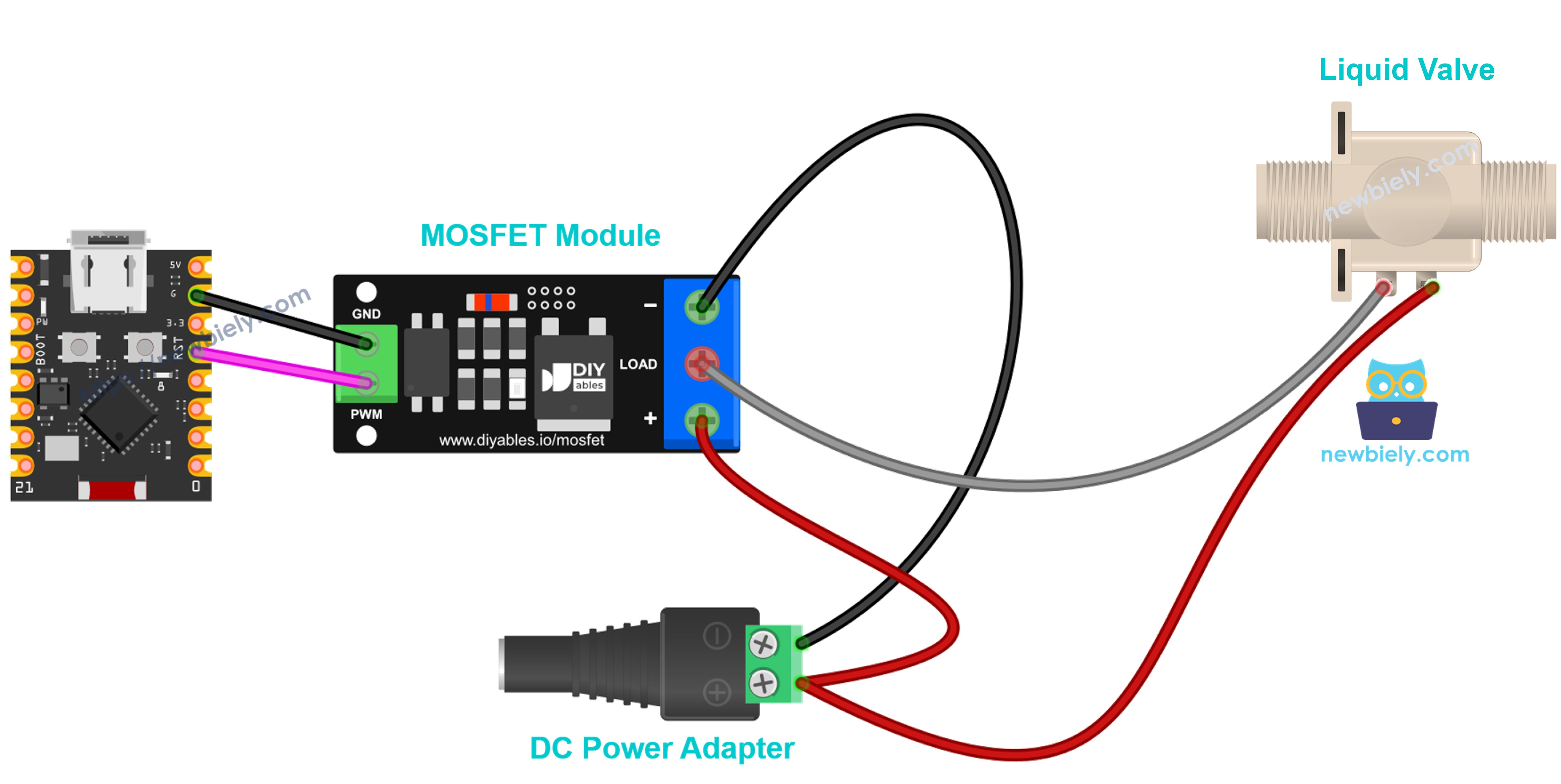
This image is created using Fritzing. Click to enlarge image
Use pin GPIO4 for the module's PWM input:
| From | To | Notes |
|---|---|---|
| ESP32 C3 Super Mini GPIO4 | Module PWM | Control pin for the MOSFET module |
| ESP32 C3 Super Mini GND | Module GND | Signal ground |
| 12V Power (+) | Module + | Load supply |
| Valve (+) | Module + | Shares the terminal with 12V (+) |
| Valve (-) | Module LOAD | Switched side |
| 12V Power GND | Module − | Load ground |
※ NOTE THAT:
- Flyback Diode: The valve is a coil. Place a 1N4007 or 1N5819 diode across the valve, with the stripe (cathode) on valve + and the other end on valve −
- No PWM: Do not send a PWM signal to a solenoid valve. Use only HIGH (open) and LOW (closed)
Code for MOSFET Module
The code is the same idea as the relay code: HIGH opens the valve, LOW closes it. It opens the valve for 5 seconds, then closes it for 5 seconds, again and again. It does not print to the Serial Monitor.
A valve must only get full ON or full OFF, never PWM. That is why this page does not use the fade code from the MOSFET module tutorial.
Detailed Instructions
- Wire the components: Connect the MOSFET module and the valve as shown in the diagram above
- Connect USB cable: Plug your ESP32 C3 Super Mini into your computer
- Open Arduino IDE: Select the board and COM port, as in the relay Quick Steps above
- Upload the code: Copy the code above and click the Upload button
- Test the valve: Plug in the 12V power. The valve opens for 5 seconds and closes for 5 seconds, over and over
Tip: the MOSFET module needs a valve supply of at least about 6V and works with DC only. An AC valve must stay on the relay.
Application and Project Ideas
Use your ESP32 C3 Super Mini water valve control skills to build these practical automation projects:
- Smart Garden Irrigation: Automate watering schedules based on soil moisture or time intervals
- Pet Water Dispenser: Create an automatic water bowl refill system for pets
- Coffee Machine Automation: Control water flow for DIY espresso or drip coffee makers
- Aquarium Auto-Fill System: Maintain constant water levels in fish tanks automatically
- Homebrew Beer Dispenser: Build a controlled beer tap system with precise flow control
- Car Wash System: Automate water spray timing for DIY vehicle cleaning stations
- Hydroponics Nutrient Feeder: Control nutrient solution flow in soilless growing systems
Video Tutorial
Watch the video below for a visual walkthrough of this project.
...VIDEO /videos/placeholder.mp4
...VIDEO
Challenge Yourself
Take your ESP32 C3 Super Mini valve control project to the next level with these challenges:
- Easy: Add a push button to manually open/close the valve instead of automatic timing
- Easy: Change the timing - make the valve open for 10 seconds and close for 3 seconds
- Medium: Add a soil moisture sensor to open the valve only when soil is dry (smart irrigation)
- Medium: Use a potentiometer to adjust how long the valve stays open (variable flow duration)
- Advanced: Build a web server so you can control the valve remotely from your phone browser
- Advanced: Create a scheduled watering system using ESP32 real-time clock (RTC) for specific times each day