
ESP32 C3 Super Mini - Solenoid Lock
Learn how to control a solenoid lock (electric strike lock) with your ESP32 C3 Super Mini to create electronic locking systems for cabinets, drawers, or doors. This beginner-friendly tutorial shows you everything from wiring to coding.
In this tutorial, you'll learn:
- What a solenoid lock is and how it works with the ESP32 C3 Super Mini
- How to wire a solenoid lock through a relay to your ESP32
- How to write code to lock and unlock automatically
- How to integrate button controls for manual operation
Alternative option: Need a different lock type? Check out our ESP32 C3 Super Mini - Electromagnetic Lock tutorial for another approach to electronic access control.
Hardware Preparation
Or you can buy the following kits:
| 1 | × | DIYables Sensor Kit (18 sensors/displays) |
Additionally, some of these links are for products from our own brand, DIYables .
Overview of Solenoid Lock
A solenoid lock (also called electric strike lock) is an electromagnetic locking device that uses electrical current to control a mechanical bolt or strike.
Key Features:
- Operates on 12V, 24V, or 48V DC power (most common: 12V)
- Two-wire connection: positive (red) and negative (black)
- Locked when powered, unlocked when unpowered
- Ideal for automated access control in cabinets, doors, and drawers
- Requires relay control with microcontrollers like ESP32 C3 Super Mini
- Quick response time - locks/unlocks instantly
Why use it for ESP32 projects:
- Simple two-state operation (locked/unlocked)
- Perfect for DIY security and automation projects
- Low cost and widely available
Pinout
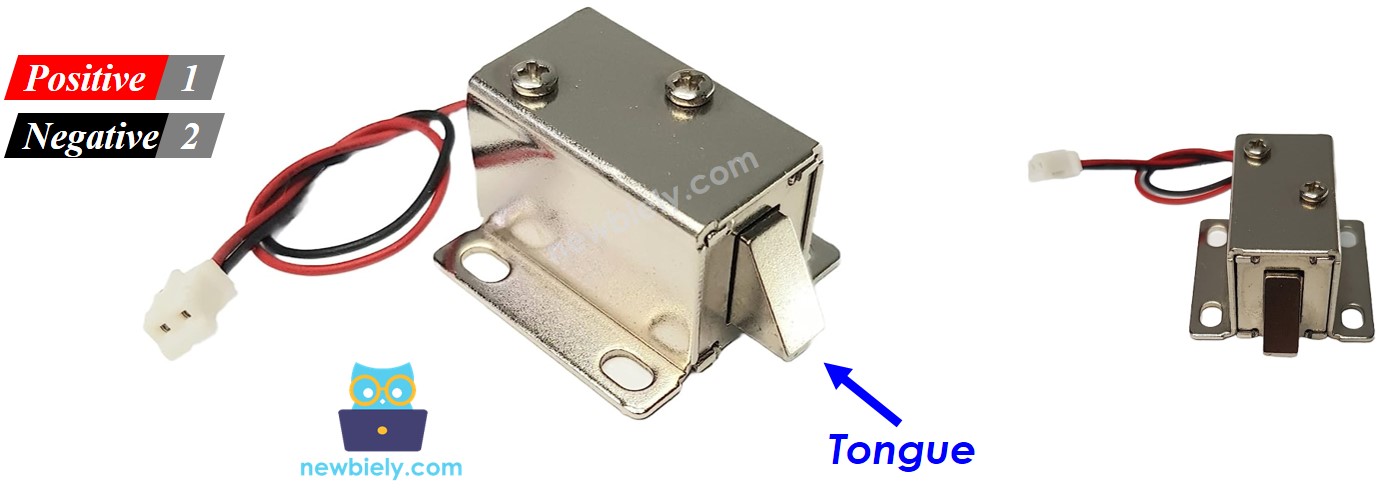
The solenoid lock has two connection wires:
- Positive (+) wire (red): Connect to 12V of DC power supply
- Negative (-) wire (black): Connect to GND of DC power supply
How It Works
- When the solenoid lock receives power, the lock tongue (strike) extends outward → door is locked
- When power is removed, the lock tongue retracts inward → door is unlocked
Operating Principle:
- Electromagnetic coil inside creates magnetic field when powered
- Magnetic field pulls the metal strike into locked position
- Spring mechanism returns strike to unlocked position when power is off
※ NOTE THAT:
Important: The solenoid lock requires 12V, 24V, or 48V power supply. You CANNOT connect it directly to ESP32 C3 Super Mini pins (which only output 3.3V). You MUST use a relay as an intermediary to control the high-voltage power to the lock.
Relay Connection Logic (Normally Open Mode):
- When relay is OPEN → solenoid lock is unpowered → door is unlocked
- When relay is CLOSED → solenoid lock is powered → door is locked
By connecting the ESP32 C3 Super Mini to the relay, you can program automated or button-triggered lock control. Learn more about relay basics in our ESP32 C3 Super Mini - Relay tutorial.
Wiring Diagram
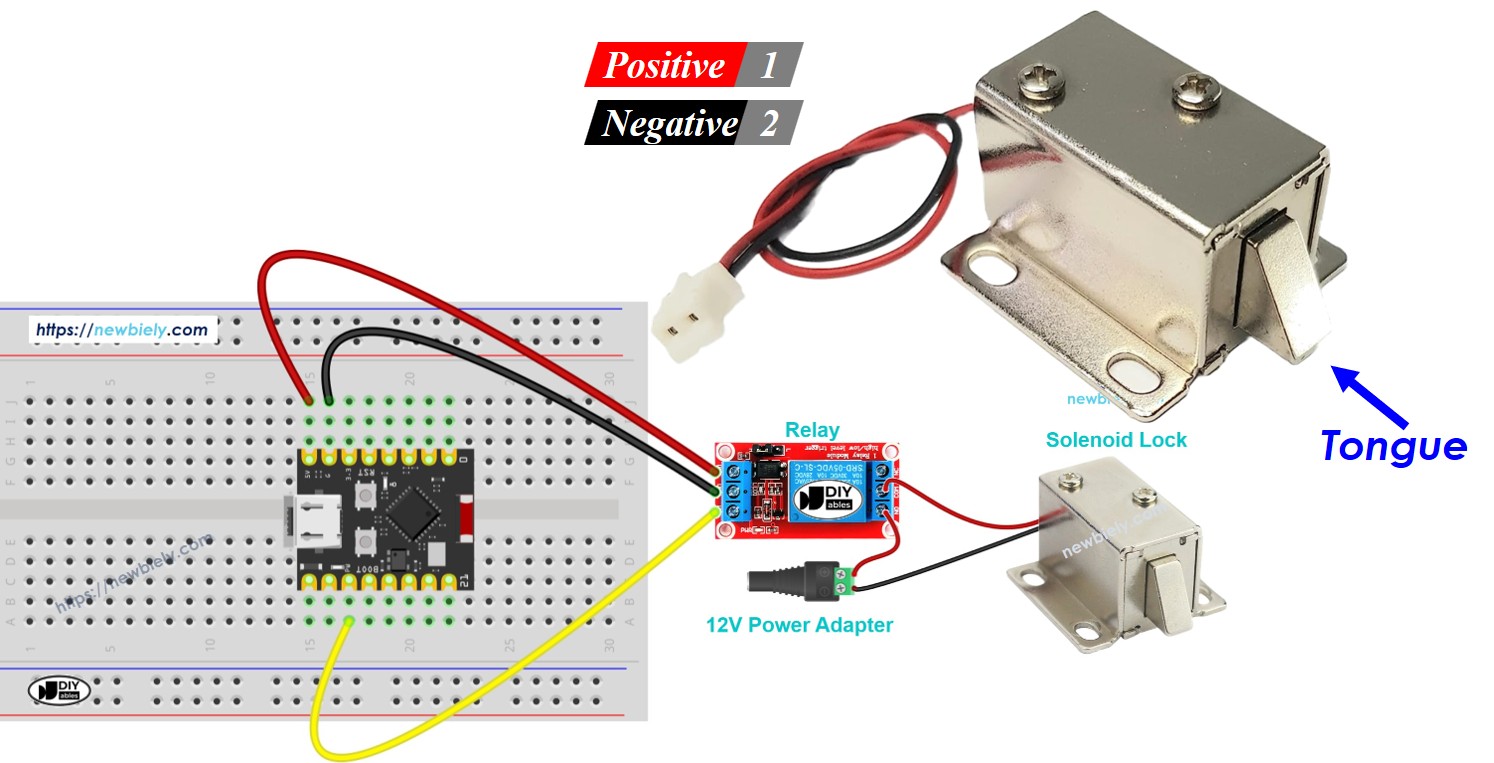
Follow this wiring diagram to connect your solenoid lock to the ESP32 C3 Super Mini through a relay module:
| Component Pin | ESP32 C3 Super Mini Pin | Notes |
|---|---|---|
| Relay Signal | D7 | Control signal from ESP32 |
| Relay VCC | 5V | Power for relay module |
| Relay GND | GND | Ground connection |
| Solenoid Lock (+) | 12V Power Supply (+) | Via relay COM and NO |
| Solenoid Lock (-) | 12V Power Supply (-) | Direct to power supply GND |
| 12V Power GND | ESP32 GND | Common ground required |
Safety Notes:
- Double-check all connections before applying power
- Ensure 12V power supply matches your solenoid lock specifications
- Keep high-voltage wiring away from low-voltage ESP32 connections
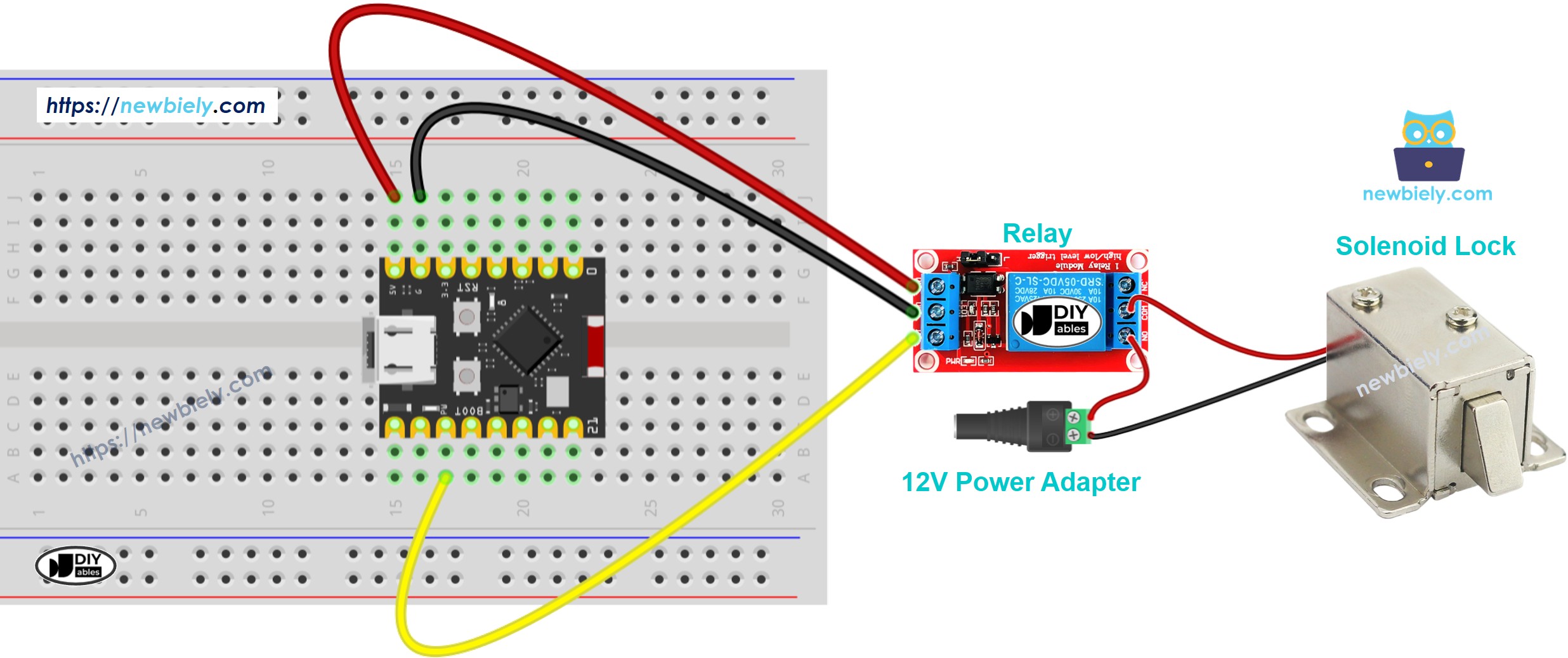
This image is created using Fritzing. Click to enlarge image
ESP32 C3 Super Mini Code
Here's the code to automatically lock and unlock the door every 5 seconds using your ESP32 C3 Super Mini:
What this code does:
- Defines D7 as the relay control pin
- Alternates between locked and unlocked states
- Uses 5-second intervals for demonstration
- Provides clear Serial Monitor feedback for each state change
- Easy to modify for custom timing or trigger conditions
Code Explanation
Key code sections:
- #define RELAY_PIN 7 - Sets D7 as the control pin for the relay
- pinMode(RELAY_PIN, OUTPUT) - Configures the pin as an output
- digitalWrite(RELAY_PIN, HIGH) - Closes relay, powers lock (locked state)
- digitalWrite(RELAY_PIN, LOW) - Opens relay, unpowers lock (unlocked state)
- delay(5000) - Creates 5-second pause between state changes
Detailed Instructions
- New to ESP32 C3 Mini? Complete our Getting Started with ESP32 C3 Mini tutorial first to set up your development environment.
- Wire the components: Follow the wiring diagram above carefully, ensuring proper relay and power connections
- Connect ESP32: Plug your ESP32 C3 Super Mini into your computer using the USB Type-C cable
- Open Arduino IDE: Launch the Arduino IDE on your computer
- Select board and port: Choose ESP32 C3 Super Mini and its corresponding COM port
- Copy the code: Copy the solenoid lock code provided above
- Upload code: Paste into Arduino IDE and click the Upload button
- Observe operation: Watch the lock tongue extend and retract every 5 seconds
- Pro Tip: Start with longer intervals (10-15 seconds) to clearly observe the lock mechanism and verify proper operation before adjusting timing for your specific application.
Serial Monitor Output
Open the Serial Monitor at 115200 baud to see the lock status:
Project Ideas
Here are some practical applications for your ESP32 C3 Super Mini solenoid lock projects:
- Smart cabinet lock - Secure storage with remote unlock via WiFi or Bluetooth
- Password-protected door - Use keypad input to control entry access
- RFID access control - Unlock with authorized RFID cards or tags
- Time-based security - Automatically lock/unlock at scheduled times
- Motion-activated lock - Lock doors automatically when motion is detected
- IoT smart locker - Control multiple locks through a web interface
- Pet door with timer - Allow pet access only during specific hours
Video Tutorial
Watch the video below for a visual walkthrough of this project.
Challenge Yourself
Take your ESP32 C3 Super Mini solenoid lock project to the next level:
- Easy: Modify the code to keep the door locked for 10 seconds and unlocked for 2 seconds
- Easy: Add an LED indicator that shows lock status (red = locked, green = unlocked)
- Medium: Create a toggle system where pressing a button locks/unlocks the door alternately
- Medium: Add a buzzer that beeps once when locking and twice when unlocking
- Advanced: Build a keypad-based security system with password verification before unlocking
- Advanced: Create a WiFi-enabled lock system controllable from your smartphone app