
ESP32 C3 Super Mini - Motion Sensor
Learn how to detect motion with your ESP32 C3 Super Mini and HC-SR501 motion sensor. This beginner-friendly tutorial covers everything you need to build motion detection projects with ESP32 C3 Super Mini.
In this tutorial, you'll learn:
- What the HC-SR501 motion sensor is and how it detects movement
- How to wire the HC-SR501 motion sensor to ESP32 C3 Super Mini
- How to program ESP32 C3 Super Mini to read motion sensor data
- How to detect when motion starts and stops
- How to display motion detection results in Serial Monitor
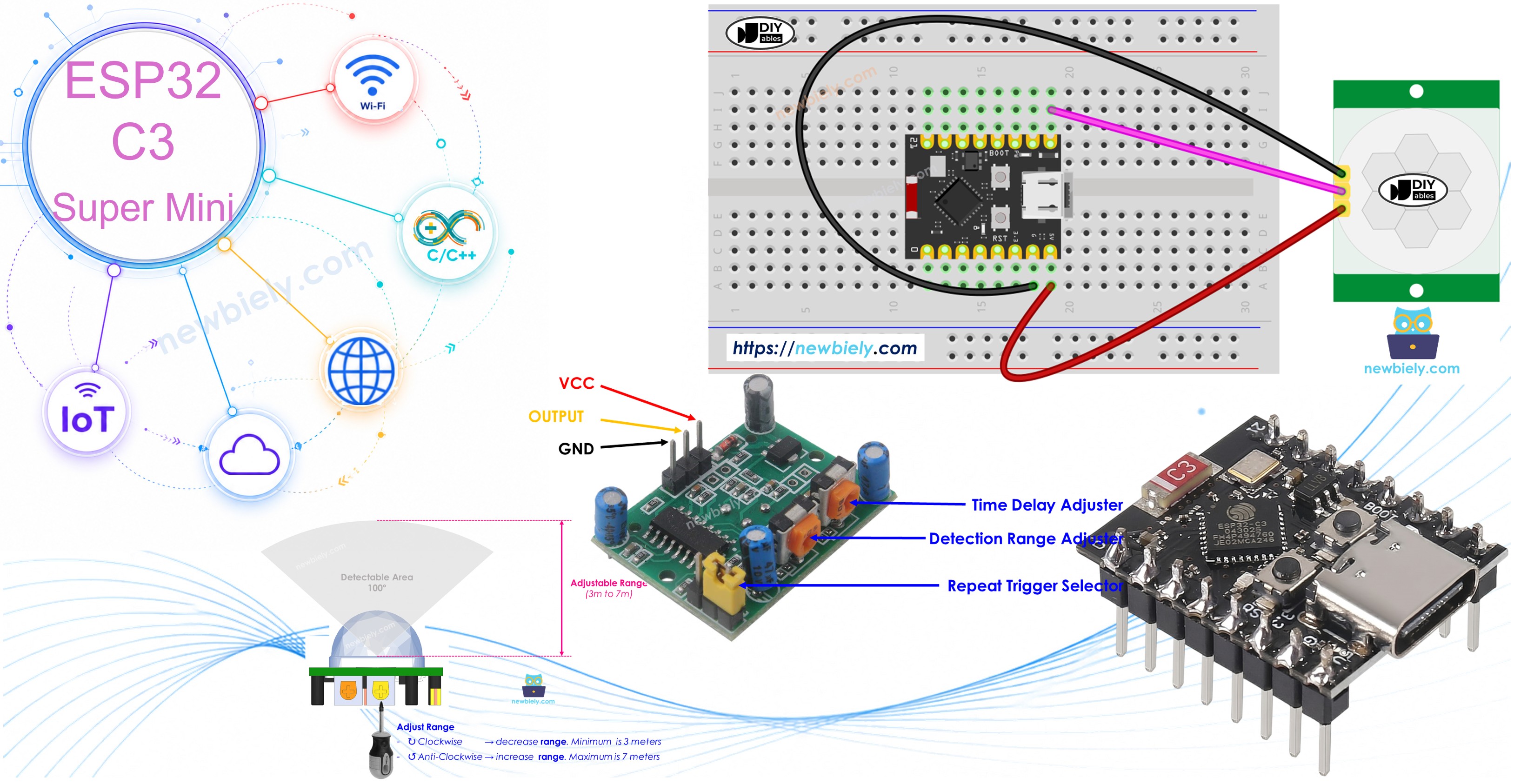
Hardware Preparation
Or you can buy the following kits:
| 1 | × | DIYables Sensor Kit (18 sensors/displays) |
Additionally, some of these links are for products from our own brand, DIYables .
Overview of HC-SR501 Motion Sensor
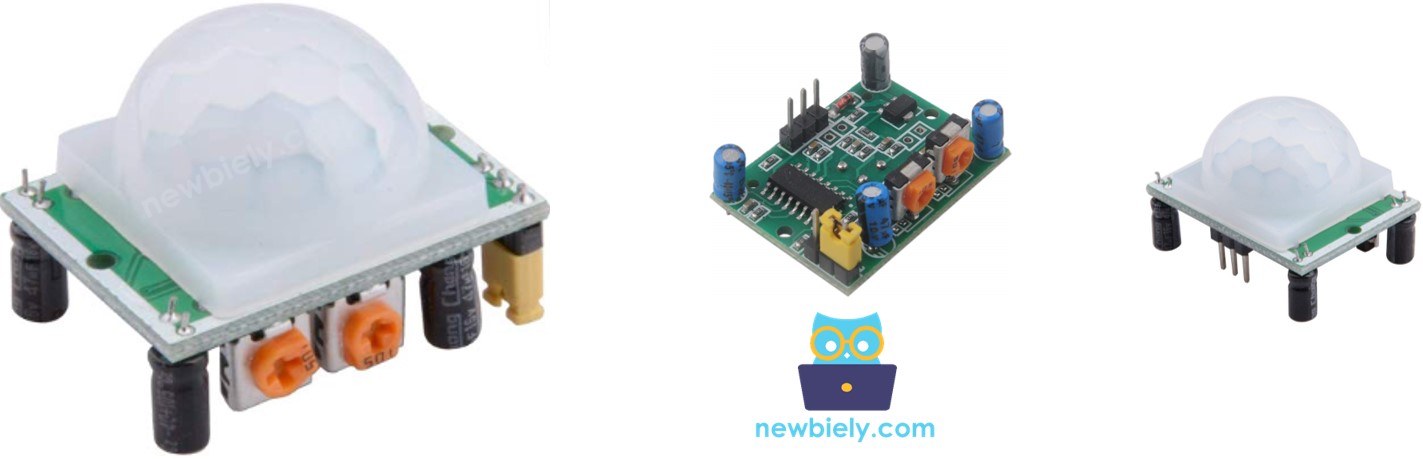
The HC-SR501 is a PIR (Passive Infrared) sensor that detects motion by sensing changes in infrared radiation.
Key Features:
- Detects human and animal movement automatically
- Works with 5V power supply
- Outputs digital signal (HIGH/LOW)
- Adjustable sensitivity and time delay
- Wide detection range (up to 7 meters)
- Low cost and beginner-friendly
Common Applications:
- Automatic light control systems
- Security and intruder detection
- Automatic door openers
- Energy-saving devices
- Smart home automation projects
HC-SR501 Motion Sensor Pinout
The HC-SR501 has a simple 3-pin interface for easy connections.
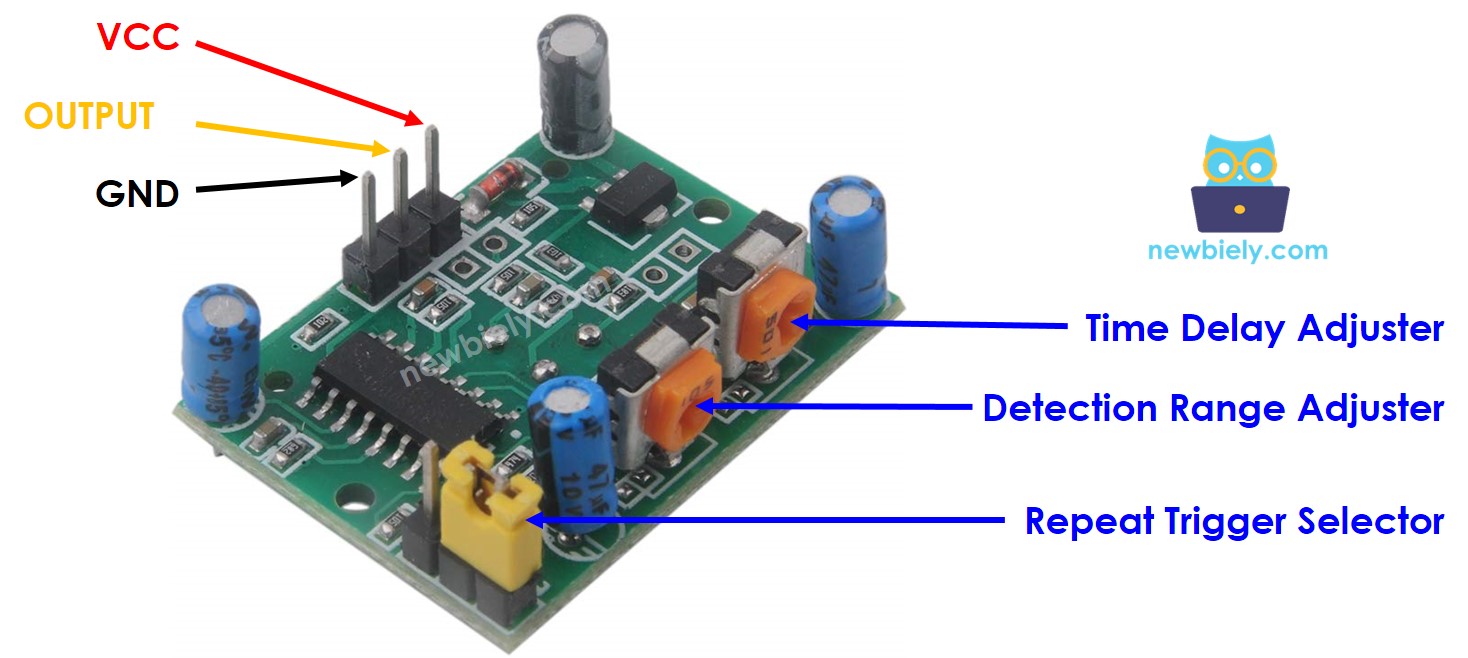
- VCC: Connect to 5V power supply
- GND: Connect to ground (0V)
- OUTPUT: Connect to ESP32 C3 Super Mini digital input pin - outputs LOW when no motion detected, HIGH when motion detected
Additional Components:
- Detection Range Adjuster: Potentiometer to adjust sensing distance
- Time Delay Adjuster: Potentiometer to set how long output stays HIGH after detection
- Repeat Trigger Selector: Jumper to choose between single or repeatable trigger modes
How HC-SR501 Motion Sensor Works
The HC-SR501 detects motion by sensing changes in infrared radiation emitted by warm objects.
Detection Requirements:
- Object must emit infrared radiation (like humans and animals)
- Object must be moving or changing position
Detection Scenarios:
- ✓ Detected: Person walking in sensor range
- ✓ Detected: Animal moving nearby
- ✗ Not Detected: Person standing completely still
- ✗ Not Detected: Moving robot or vehicle (no infrared emission)
Important Notes:
- The sensor detects motion, not presence directly
- Stationary humans may not be detected even if present
- Works best for detecting active movement
The video above demonstrates how the HC-SR501 motion sensor responds to movement in real-time.
Detecting the Presence of Humans
The HC-SR501 infers human presence based on motion detection rather than direct sensing.
Detection Logic:
- Motion detected = Human likely present
- No motion detected = Human likely not present
Practical Limitation:
- If a person is present but not moving, the sensor won't detect them
- This can cause false negatives in some applications
Why It's Still Popular:
- Very affordable compared to other sensors
- Works well for most practical applications
- Good enough for automatic lighting, alarms, and energy-saving projects
ESP32 C3 Super Mini and HC-SR501 Motion Sensor
By connecting the motion sensor to ESP32 C3 Super Mini, you can create smart motion-responsive projects.
How It Works:
- ESP32 C3 Super Mini pin reads digital input (HIGH or LOW)
- Motion sensor OUTPUT pin sends signal to ESP32 C3 Super Mini
- ESP32 C3 Super Mini code interprets the signal and triggers actions
- You can control lights, alarms, or any device based on motion
Wiring Diagram
Connect the HC-SR501 motion sensor to your ESP32 C3 Super Mini following the diagram below.
- Note: The HC-SR501 requires 5V power supply for reliable operation
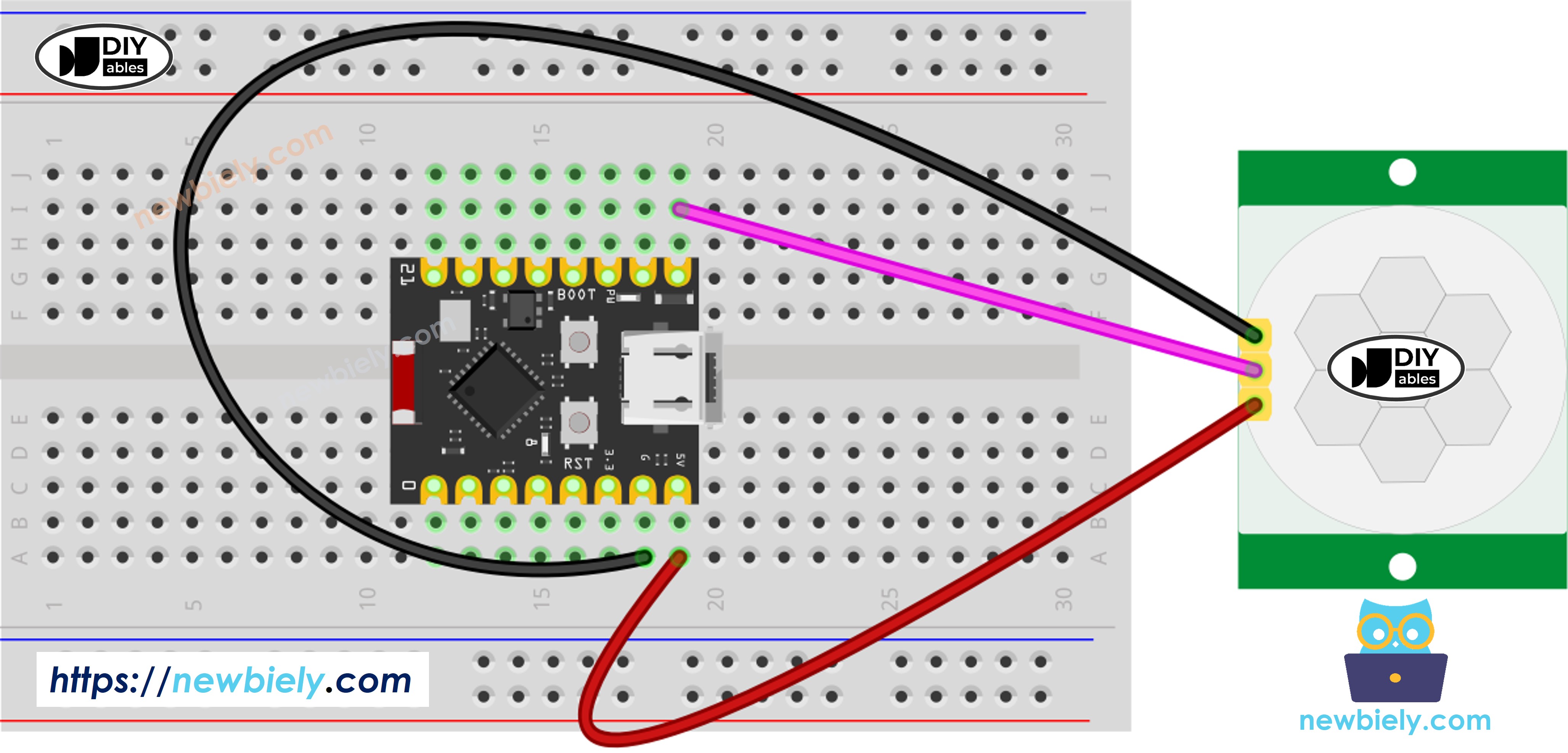
This image is created using Fritzing. Click to enlarge image
No breadboard? The same circuit can be wired without one, as shown below:
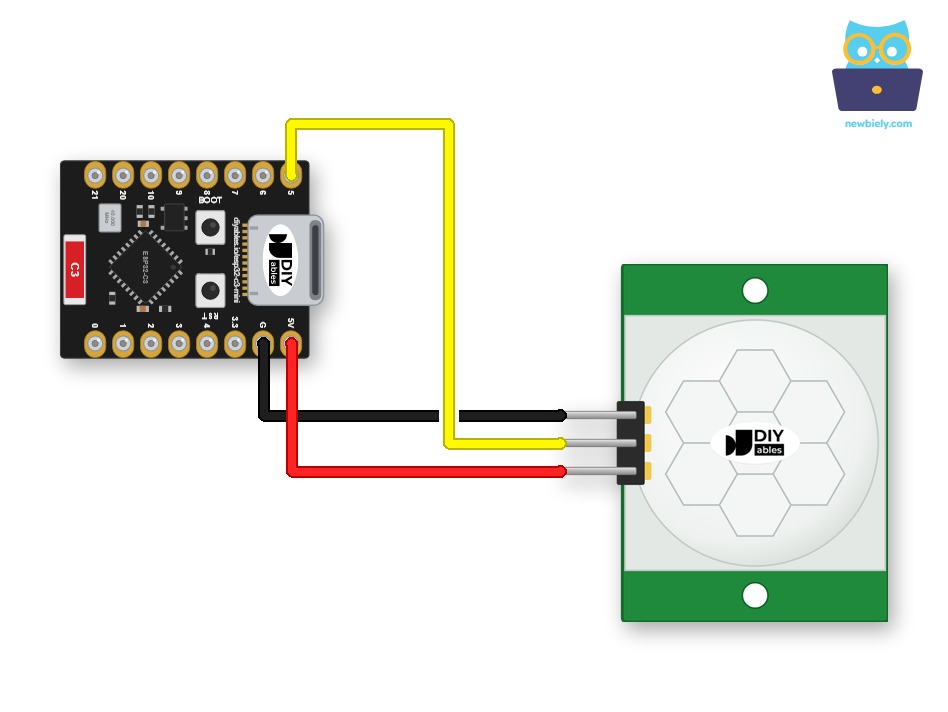
This image is created using Fritzing. Click to enlarge image
| HC-SR501 Pin | ESP32 C3 Super Mini Pin |
|---|---|
| VCC | 5V |
| GND | GND |
| OUTPUT | D5 |
Initial Sensor Settings
Before using the HC-SR501, configure these settings for optimal performance.
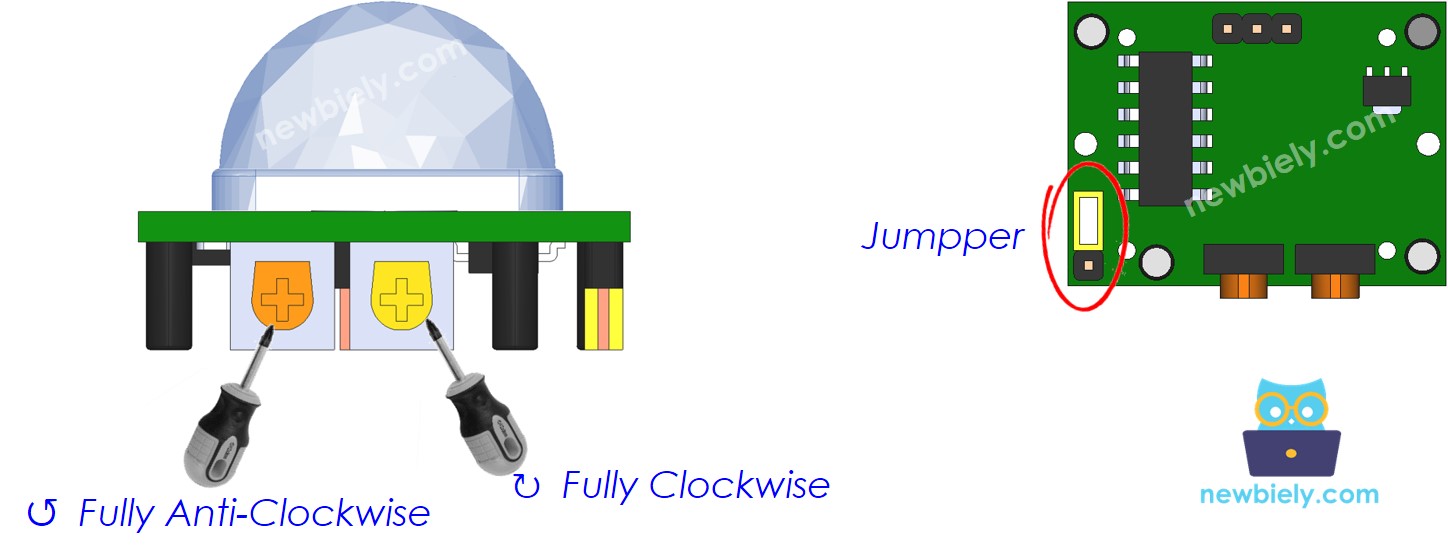
| Setting | Configuration |
|---|---|
| Detection Range Adjuster | Fully screw clockwise (minimum range for testing) |
| Time Delay Adjuster | Fully screw counter-clockwise (minimum delay) |
| Repeat Trigger Selector | Position jumper as shown in image above |
How To Program Motion Sensor
Follow these steps to read motion sensor data with ESP32 C3 Super Mini.
Step 1: Configure ESP32 C3 Super Mini Pin as Input
Step 2: Read the Sensor Output State
Step 3: Detect Motion Start (LOW to HIGH)
Step 4: Detect Motion Stop (HIGH to LOW)
ESP32 C3 Super Mini Code
This code monitors the HC-SR501 motion sensor and reports motion events.
What the code does:
- Configures pin D5 as digital input for reading sensor data
- Continuously monitors the motion sensor state
- Detects when motion starts (LOW to HIGH transition)
- Detects when motion stops (HIGH to LOW transition)
- Outputs motion events to Serial Monitor
- Ready for you to add custom actions (lights, alarms, etc.)
Detailed Instructions
- New to ESP32 C3 Mini? Complete our Getting Started with ESP32 C3 Mini tutorial first to set up your development environment.
- Upload the Code: Copy the code above and paste it into Arduino IDE
- Select Your Board: Choose ESP32 C3 Super Mini from Tools > Board menu
- Connect ESP32: Plug your ESP32 C3 Super Mini into your computer via USB
- Upload: Click the Upload button in Arduino IDE to transfer the code
- Open Serial Monitor: Click the Serial Monitor icon (top-right corner) or press Ctrl+Shift+M
- Set Baud Rate: Select 115200 baud in Serial Monitor dropdown
- Test Motion Detection: Wave your hand in front of the HC-SR501 sensor
- Observe Results: Watch the Serial Monitor display motion events
- Pro Tip: Start with minimum sensitivity and delay settings, then adjust the potentiometers to find your ideal detection range and timing.
Serial Monitor Output
When you move in front of the sensor, you'll see output like this:
Project Ideas
Here are some practical projects you can build with ESP32 C3 Super Mini and the HC-SR501 motion sensor.
- Automatic Room Light: Turn lights on when motion detected, off after no motion
- Security Alert System: Send notifications or trigger alarm when intruder detected
- Energy Saver: Automatically power down displays or devices when no one is present
- Smart Pet Feeder: Detect when your pet approaches and dispense food
- Visitor Counter: Log the number of people entering a room or building
- Halloween Props: Trigger scary sounds or moving decorations when someone approaches
Video Tutorial
Watch the video below for a visual walkthrough of this project.
Challenge Yourself
Take your ESP32 C3 Super Mini motion sensor skills to the next level with these challenges.
- Easy: Add an LED that turns on when motion is detected and off when motion stops
- Easy: Count and display the total number of motion events detected
- Medium: Add a buzzer that sounds an alarm for 3 seconds when motion is detected
- Medium: Use the sensor to control a relay that switches a desk lamp on/off
- Advanced: Combine motion sensor with OLED display to show last detection time and date
- Advanced: Create a smart security system that sends email alerts when motion detected at night