
ESP32 C3 Super Mini - Joystick
Learn how to connect and program a joystick module with your ESP32 C3 Super Mini board. This beginner-friendly tutorial covers everything from wiring to reading analog values and converting them to control commands.
In this ESP32 C3 Super Mini joystick tutorial, you'll learn:
- What a joystick sensor is and how it outputs X/Y coordinates
- How to wire the joystick module to ESP32 C3 Super Mini
- How to program ESP32 C3 Super Mini to read joystick analog values
- How to convert joystick readings to directional commands
- How to read the built-in pushbutton state
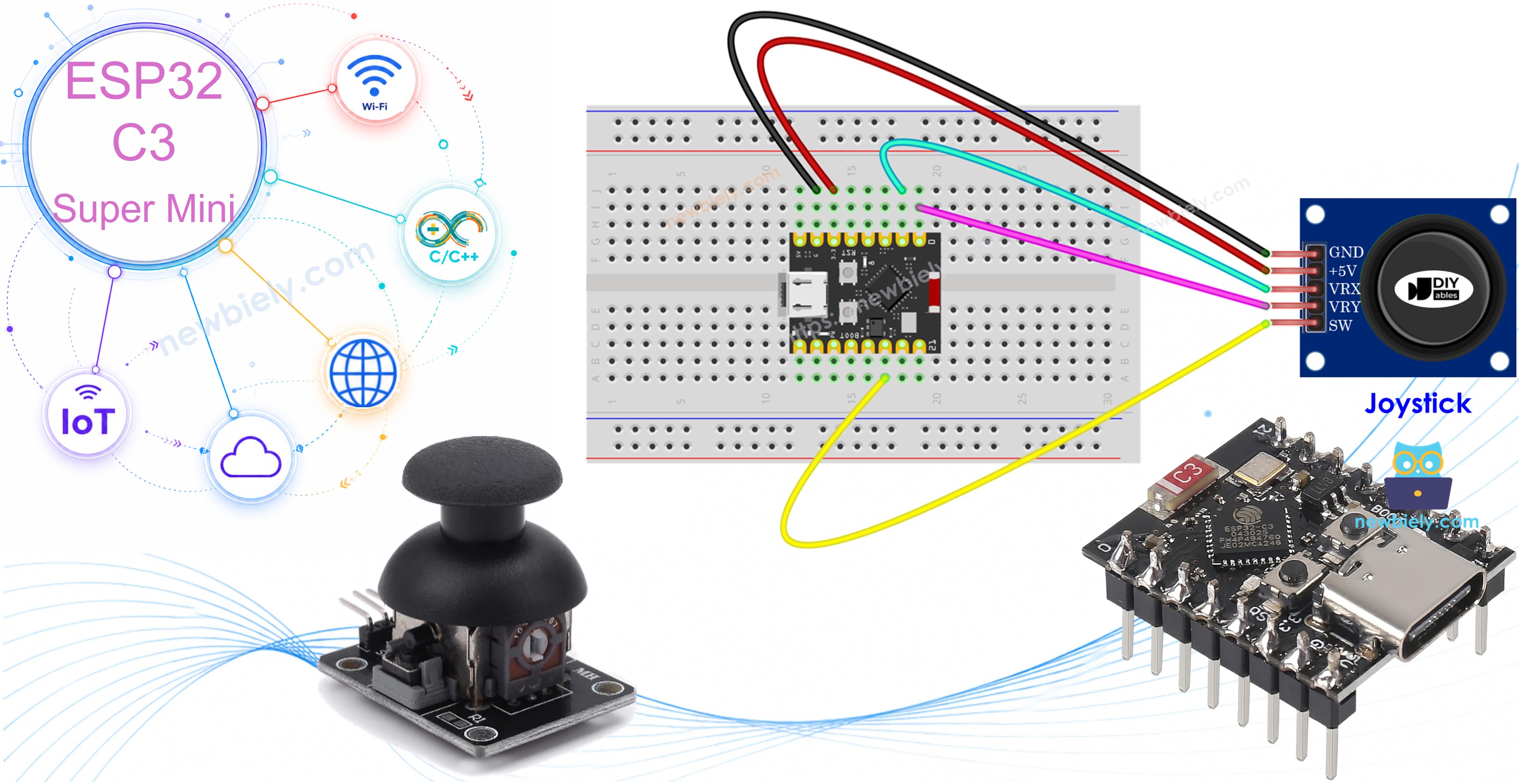
Hardware Preparation
| 1 | × | ESP32 C3 Super Mini | |
| 1 | × | USB Cable Type-A to Type-C (for USB-A PC) | |
| 1 | × | USB Cable Type-C to Type-C (for USB-C PC) | |
| 1 | × | Joystick | |
| 1 | × | Breadboard | |
| 1 | × | Jumper Wires | |
| 1 | × | Optionally, DC Power Jack |
Or you can buy the following kits:
| 1 | × | DIYables Sensor Kit (18 sensors/displays) |
Additionally, some of these links are for products from our own brand, DIYables .
Overview of Joystick Sensor
The joystick sensor is an analog input module that detects position in two dimensions and includes a built-in pushbutton.
Key features of the joystick module:
- Two internal potentiometers positioned perpendicular to each other
- Outputs X-coordinate as analog value (0 to 4095 on ESP32)
- Outputs Y-coordinate as analog value (0 to 4095 on ESP32)
- Built-in pushbutton for click detection
- Creates 2D coordinates based on joystick position
- Center position values represent the rest state
- Commonly used in game controllers, RC toys, and machine controls
- Perfect for directional input in Arduino and ESP32 projects
- Beginner-friendly with simple analog reading functions
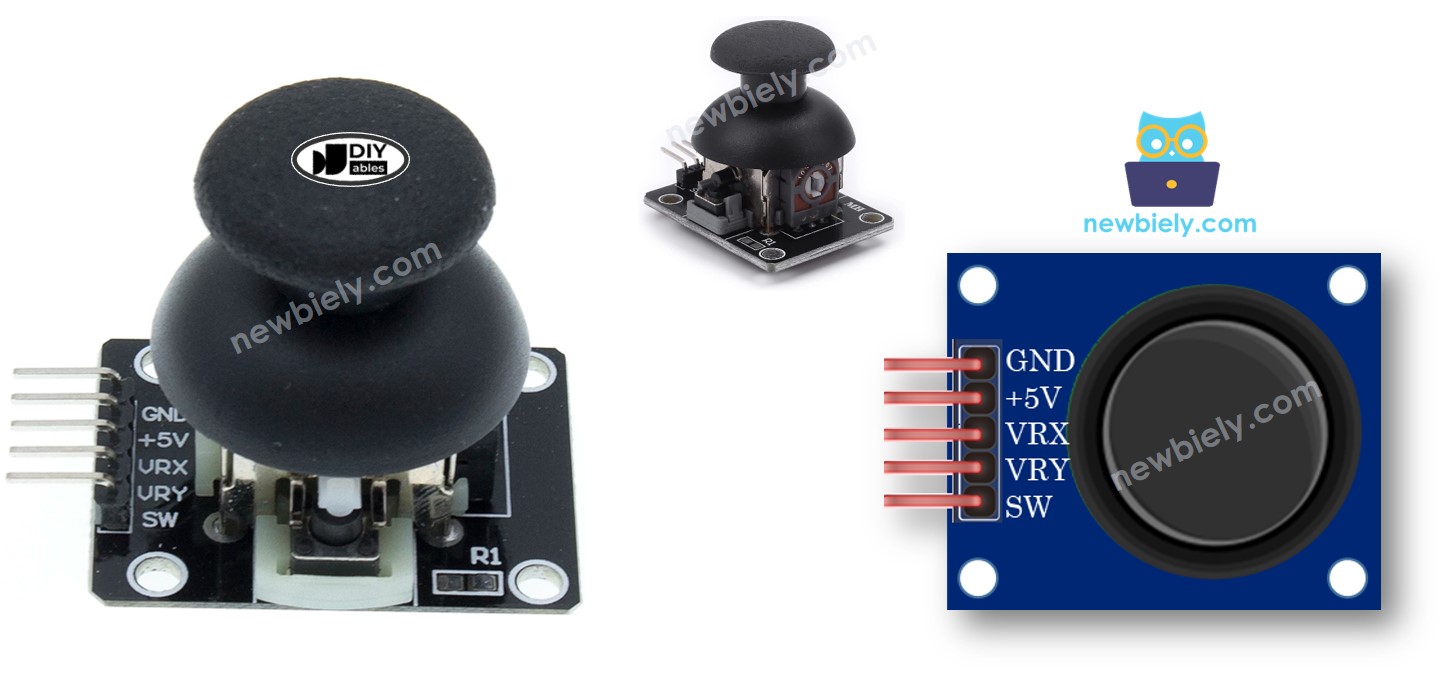
Pinout
The joystick module has 5 pins for connecting to your ESP32 C3 Super Mini:
- GND: Connect to ground (0V)
- VCC: Connect to power supply (3.3V)
- VRX: Analog output for horizontal position (X-axis)
- VRY: Analog output for vertical position (Y-axis)
- SW: Digital output from internal pushbutton (normally HIGH with pull-up resistor, LOW when pressed)
How It Works
X-axis movement (left/right):
- Moving joystick left/right changes voltage on VRX pin
- Voltage ranges from 0V (left) to 3.3V (right)
- ESP32 C3 Super Mini reads analog values from 0 to 4095
- Value is proportional to horizontal thumb position
Y-axis movement (up/down):
- Moving joystick up/down changes voltage on VRY pin
- Voltage ranges from 0V (up) to 3.3V (down)
- ESP32 C3 Super Mini reads analog values from 0 to 4095
- Value is proportional to vertical thumb position
Diagonal movement:
- Both VRX and VRY voltages change simultaneously
- Each axis outputs proportional to position projection
- Creates smooth 2D coordinates for any direction
Pushbutton function:
- Press joystick down to activate internal button
- With pull-up resistor, SW pin outputs 3.3V normally
- Pressing button pulls SW pin to 0V (GND)
- ESP32 reads HIGH when released, LOW when pressed
Wiring Diagram
Connect your joystick module to the ESP32 C3 Super Mini following this wiring diagram:
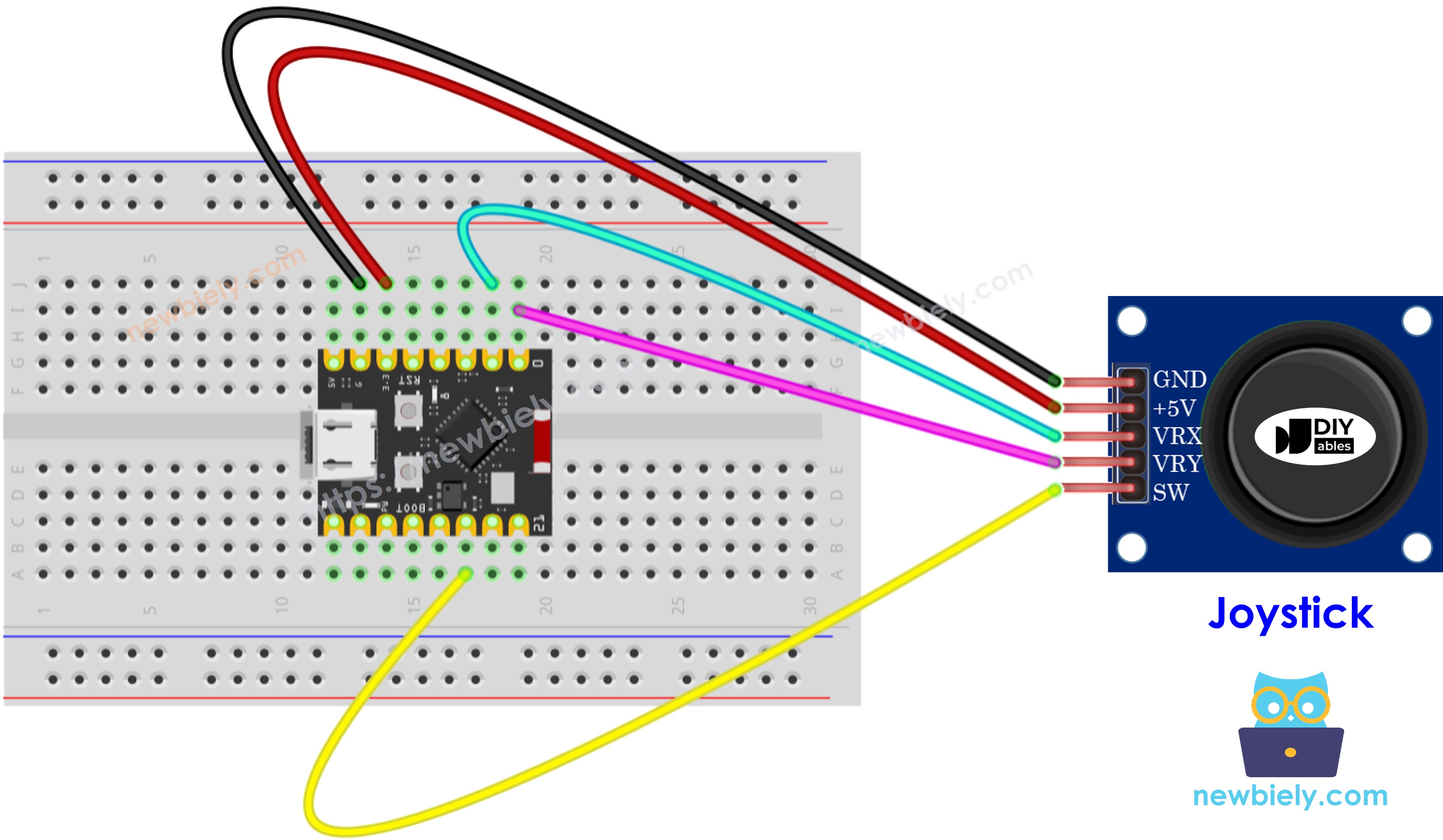
This image is created using Fritzing. Click to enlarge image
Connection table:
| Joystick Pin | ESP32 C3 Super Mini Pin |
|---|---|
| GND | GND |
| VCC | 3.3V |
| VRX | A1 |
| VRY | A0 |
| SW | D10 |
How To Program For Joystick
The joystick has two programming components to handle with your ESP32 C3 Super Mini:
Reading analog axes (X, Y coordinates):
- Use analogRead() function for VRX and VRY pins
- Returns values from 0 to 4095 on ESP32 C3 Super Mini
- Simple one-line read for each axis
Reading digital button (SW pin):
- Treat as standard pushbutton input
- Use ezButton library for easy debouncing
- Library enables internal pull-up resistor automatically
- See ESP32 C3 Super Mini - Button tutorial for details
- Button code examples provided in following sections
Converting values to commands:
- Raw analog values may need conversion for control applications
- Convert to directional commands (UP, DOWN, LEFT, RIGHT)
- Map to servo angles for pan-tilt mechanisms
- Scale to motor speed values
- Example conversion codes provided below
ESP32 C3 Super Mini Code
This section provides multiple ESP32 C3 Super Mini joystick examples:
What these code examples demonstrate:
- Reading X and Y analog values from joystick
- Reading analog values plus pushbutton state
- Converting analog readings to directional commands
- Mapping joystick position to servo motor angles
- Practical applications for game and robot control
Reads analog values from joystick
Detailed Instructions
- New to ESP32 C3 Mini? Complete our Getting Started with ESP32 C3 Mini tutorial first to set up your development environment.
- Wire the components: Follow the wiring diagram shown above to connect the joystick to your ESP32 C3 Super Mini.
- Connect the board: Plug your ESP32 C3 Super Mini into your computer using a USB Type-C cable.
- Open Arduino IDE: Launch the Arduino IDE on your computer.
- Select board and port: Choose ESP32 C3 Super Mini from the board menu and select the correct COM port.
- Upload the code: Copy the code above, paste it into Arduino IDE, and click the Upload button.
- Test the joystick: Push the joystick's thumb maximally to its limits in all directions.
- Rotate the joystick: Move the thumb in a complete circle (clockwise or counterclockwise).
- Open Serial Monitor: Check the output to see X and Y coordinate values.
- Identify directions: Watch the Serial Monitor while rotating to identify which positions correspond to left/right/up/down (X=0 is left, Y=0 is up).
- Pro Tip: Mark the joystick base with arrows showing the coordinate directions for easy reference in future projects.
※ NOTE THAT:
You may notice the analog values are not perfectly linear with joystick movement. This is due to the ESP32 C3 Super Mini's ADC characteristics, not the joystick itself. See the ADC calibration note at the end of this tutorial for more information.
Reads analog values and reads the button state from a joystick
Detailed Instructions
- Install ezButton library: Click the Library Manager icon in the left navigation bar of Arduino IDE.
- Search for library: Type "ezButton" in the search box.
- Find the library: Locate the button library by ArduinoGetStarted.com.
- Install: Click the Install button to add ezButton library to your Arduino IDE.
- Search for ezButton created by ArduinoGetStarted.com and click the Install button.
- Upload the code: Copy the code above into Arduino IDE and click Upload.
- Test X/Y movement: Push the joystick thumb left, right, up, and down.
- Test button: Press the joystick thumb down from the top to activate the button.
- View results: Open Serial Monitor to see X, Y values and button state changes.
- Pro Tip: The ezButton library automatically handles debouncing, giving you clean button press detection without extra code.
Converts analog value to MOVE LEFT/RIGHT/UP/DOWN commands
Detailed Instructions
- Upload the code: Copy the command conversion code into Arduino IDE and click Upload.
- Move the joystick: Push the thumb in different directions - left, right, up, down, and diagonal.
- Check Serial Monitor: Open Serial Monitor to see directional command outputs.
- Test diagonals: Move to corners to see multiple simultaneous commands (e.g., "UP + LEFT").
- Pro Tip: Adjust the threshold values in the code to make the joystick more or less sensitive to your movements.
※ NOTE THAT:
The joystick can output zero, one, or two commands simultaneously. For example, when pushed to upper-left corner, it outputs both "MOVE UP" and "MOVE LEFT" at the same time, perfect for diagonal movement in games and robots.
Converts analog values to angles to control two servo motors
For detailed instructions on controlling servo motors with your ESP32 C3 Super Mini joystick, see the complete tutorial: ESP32 C3 Super Mini - Joystick controls Servo Motor
What you'll learn in the servo tutorial:
- Mapping joystick X/Y values to servo angles (0-180 degrees)
- Controlling pan-tilt camera mechanisms
- Building interactive robotic arm controls
- Real-time servo response to joystick movement
※ NOTE THAT:
Important ADC Accuracy Information:
This tutorial uses the analogRead() function to read values from an ADC (Analog-to-Digital Converter) connected to a sensor or component. The ESP32 C3 Super Mini's ADC is suitable for projects that do not require high accuracy. However, for projects needing precise measurements, keep the following in mind:
- The ESP32 C3 Super Mini's ADC is not perfectly accurate and might require calibration for correct results. Each ESP32 C3 Super Mini board can vary slightly, so calibration is necessary for each individual board.
- Calibration can be challenging, especially for beginners, and might not always yield the exact results you want.
For projects requiring high precision, consider using an external ADC (e.g ADS1115) with the ESP32 C3 Super Mini or using another Arduino, such as the Arduino Uno R4 WiFi, which has a more reliable ADC. If you still want to calibrate the ESP32 C3 Super Mini's ADC, refer to the ESP32 ADC Calibration Driver.
Application and Project Ideas
Use your ESP32 C3 Super Mini joystick setup in these exciting projects:
- Build a wireless RC car with directional control
- Create a pan-tilt camera system for video tracking
- Design a game controller for Arduino-based games
- Control a robot arm with intuitive joystick movements
- Make a drone flight controller interface
- Build an electric wheelchair joystick control system
- Create an arcade-style gaming console
- Design a camera slider with precise positioning control
Video Tutorial
Watch the video below for a visual walkthrough of this project.
Challenge Yourself
Test your ESP32 C3 Super Mini joystick skills with these challenges:
- Easy: Add LED indicators that light up based on joystick direction (4 LEDs for up/down/left/right).
- Easy: Display joystick X and Y values on an OLED or LCD screen instead of Serial Monitor.
- Medium: Create a drawing program that plots joystick movement on an OLED display in real-time.
- Medium: Add speed control by mapping joystick distance from center to motor speed values.
- Advanced: Build a wireless joystick controller using ESP-NOW to control another ESP32 remotely.
- Advanced: Implement gesture recognition that detects specific joystick movement patterns (circles, figure-8s, etc.).