
ESP32 C3 Super Mini - DRV8825 Stepper Motor Driver
#NOTE: REWRITTEN | CHECKED_PIN
Learn how to control stepper motors with your ESP32 C3 Super Mini using the powerful DRV8825 stepper motor driver module. This beginner-friendly tutorial covers everything from wiring to code for precise motor control.
In this guide, you'll learn:
- What the DRV8825 stepper motor driver is and how it works
- How to wire the DRV8825 driver to ESP32 C3 Super Mini and a stepper motor
- How to program ESP32 C3 Super Mini to control motor speed and direction
- How to configure microstepping for smoother motor operation
- How to adjust current limits to prevent overheating
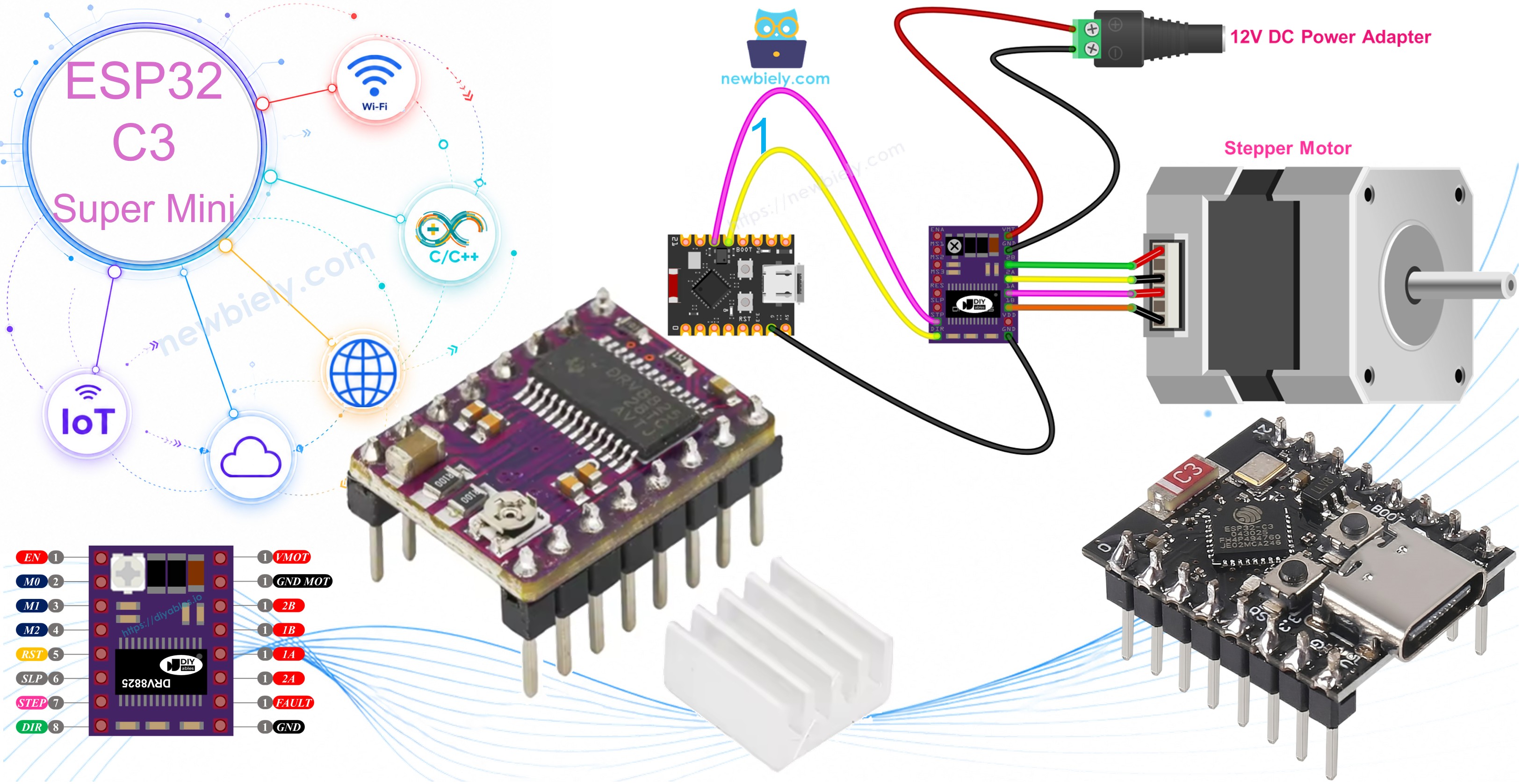
Hardware Preparation
Or you can buy the following kits:
| 1 | × | DIYables Sensor Kit (18 sensors/displays) |
Additionally, some of these links are for products from our own brand, DIYables .
Overview of DRV8825 Stepper Motor Driver
The DRV8825 is a stepper motor driver module that controls bipolar stepper motors with high precision and efficiency.
- Voltage range: 8.2V to 45V motor power supply
- Current capacity: Up to 2.2A per coil with proper cooling
- Microstepping: Supports full-step down to 1/32 step resolution
- Built-in protection: Over-current and thermal shutdown features
- Adjustable current limit: Potentiometer for easy adjustment
- Compact design: Perfect for 3D printers, CNC machines, and robotics
- Low pin count: Control with just 2 ESP32 C3 Super Mini pins
- Built-in regulator: 3.3V logic power from motor supply
- Beginner-friendly: Simple interface with step and direction control
To understand stepper motor concepts such as full-step, microstepping, unipolar stepper, and bipolar stepper, check out the ESP32 C3 Super Mini - Stepper Motor guide.
DRV8825 Stepper Motor Driver Pinout
The DRV8825 module has 16 pins for motor control, power, and configuration.
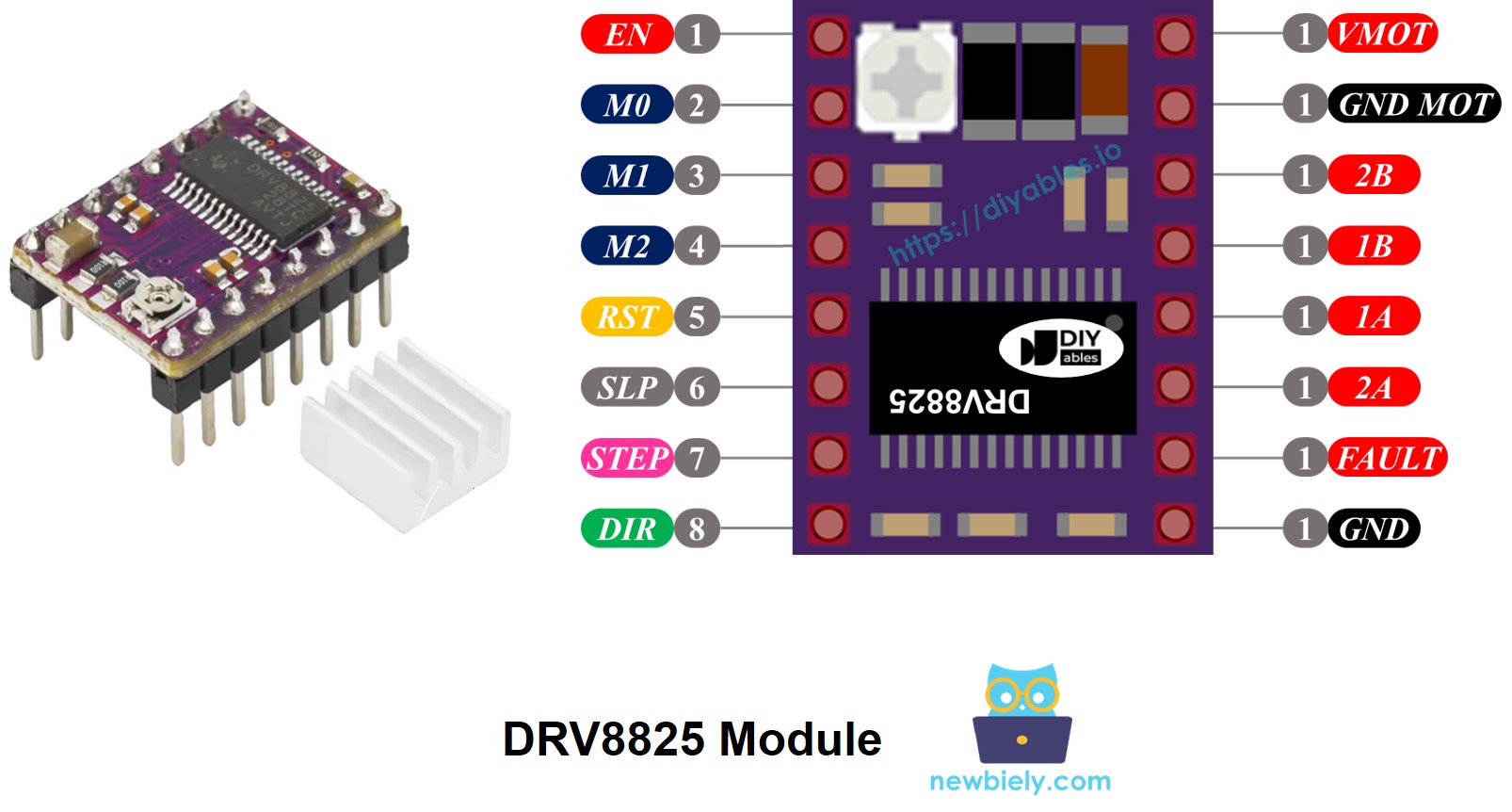
Pin descriptions:
- VMOT: Motor power supply input (8.2V to 45V)
- GND (for Motor): Ground for motor power supply
- 2B, 2A: Output connections to stepper motor Coil B
- 1A, 1B: Output connections to stepper motor Coil A
- FAULT: Fault detection output (goes LOW on over-current or thermal shutdown)
- GND (for Logic): Ground reference for control signals (connect to ESP32 C3 Super Mini GND)
- ENABLE: Active-LOW enable pin (LOW = motor enabled, HIGH = motor disabled)
- M1, M2, M3: Microstepping resolution selector pins
- RESET: Active-LOW reset pin (LOW = reset driver)
- SLEEP: Active-LOW sleep mode pin (LOW = low-power sleep mode)
- STEP: Step input pin (rising edge advances motor one step)
- DIR: Direction control pin (sets rotation direction)
- Potentiometer: Adjustable current limit control
Pin grouping by function:
- Motor connections: 1A, 1B, 2A, 2B
- Motor control: DIR, STEP
- Driver configuration: ENABLE, M1, M2, M3, RESET, SLEEP
- Status output: FAULT
- Motor power: VMOT, GND (motor)
- Logic ground: GND (logic)
Important: Always connect ESP32 C3 Super Mini GND to the DRV8825 GND (logic) pin for proper operation and common ground reference. The DRV8825 powers its logic circuitry from the motor supply through its built-in 3.3V regulator.
Microstep Configuration
The DRV8825 driver enables microstepping by dividing each full step into smaller increments for smoother motor operation.
Example microstep resolutions for NEMA 17 motor (1.8° step angle, 200 steps/revolution):
- Full-step mode: 200 steps per revolution
- Half-step mode: 400 steps per revolution
- Quarter-step mode (1/4): 800 steps per revolution
- Eighth-step mode (1/8): 1,600 steps per revolution
- Sixteenth-step mode (1/16): 3,200 steps per revolution
- Thirty-second-step mode (1/32): 6,400 steps per revolution
Benefits of higher microstepping:
- Smoother motor movement with less vibration
- Higher positioning accuracy
- Quieter operation
- More steps required per revolution (slower speed at same pulse rate)
Speed considerations:
- Higher microstepping requires more step pulses per revolution
- Motor speed depends on your ESP32 C3 Super Mini pulse rate
- Faster pulse rates maintain speed with higher microstepping
- Maximum speed limited by driver and microcontroller capabilities
DRV8825 Microstep Selection Pins
Configure microstepping resolution using the M0, M1, and M2 pins on the DRV8825 driver.
Microstepping selection table:
| M0 Pin | M1 Pin | M2 Pin | Microstep Resolution |
|---|---|---|---|
| Low | Low | Low | Full step |
| High | Low | Low | Half step |
| Low | High | Low | 1/4 step |
| High | High | Low | 1/8 step |
| Low | Low | High | 1/16 step |
| High | Low | High | 1/32 step |
| Low | High | High | 1/32 step |
| High | High | High | 1/32 step |
Default behavior: All three pins have internal pull-down resistors and default to LOW. If left unconnected, the driver operates in full-step mode.
How it Works
The DRV8825 stepper motor driver controls motor movement using simple digital signals from your ESP32 C3 Super Mini.
Basic operation:
- STEP Pin: Each pulse moves the motor one microstep (or full step depending on configuration)
- DIR Pin: Controls rotation direction (HIGH or LOW)
- Driver logic: Converts step and direction signals into proper coil currents
- Motor outputs: Pins 1A, 1B, 2A, 2B deliver controlled current to motor coils
Minimum control setup:
- Connect just 2 ESP32 C3 Super Mini pins: one for STEP, one for DIR
- Motor speed controlled by STEP pulse frequency
- Motor direction controlled by DIR pin logic level
Optional pin configurations:
You can configure additional DRV8825 pins (ENABLE, M1, M2, M3, RESET, SLEEP) in three ways:
- Leave unconnected: Driver uses default settings (full-step, enabled)
- Connect to GND or VCC: Fixed configuration (e.g., always enabled or specific microstep mode)
- Connect to ESP32 C3 Super Mini pins: Dynamic control through your code
Wiring Diagram
Connect your ESP32 C3 Super Mini, DRV8825 stepper motor driver, and NEMA 17 stepper motor following this wiring diagram.
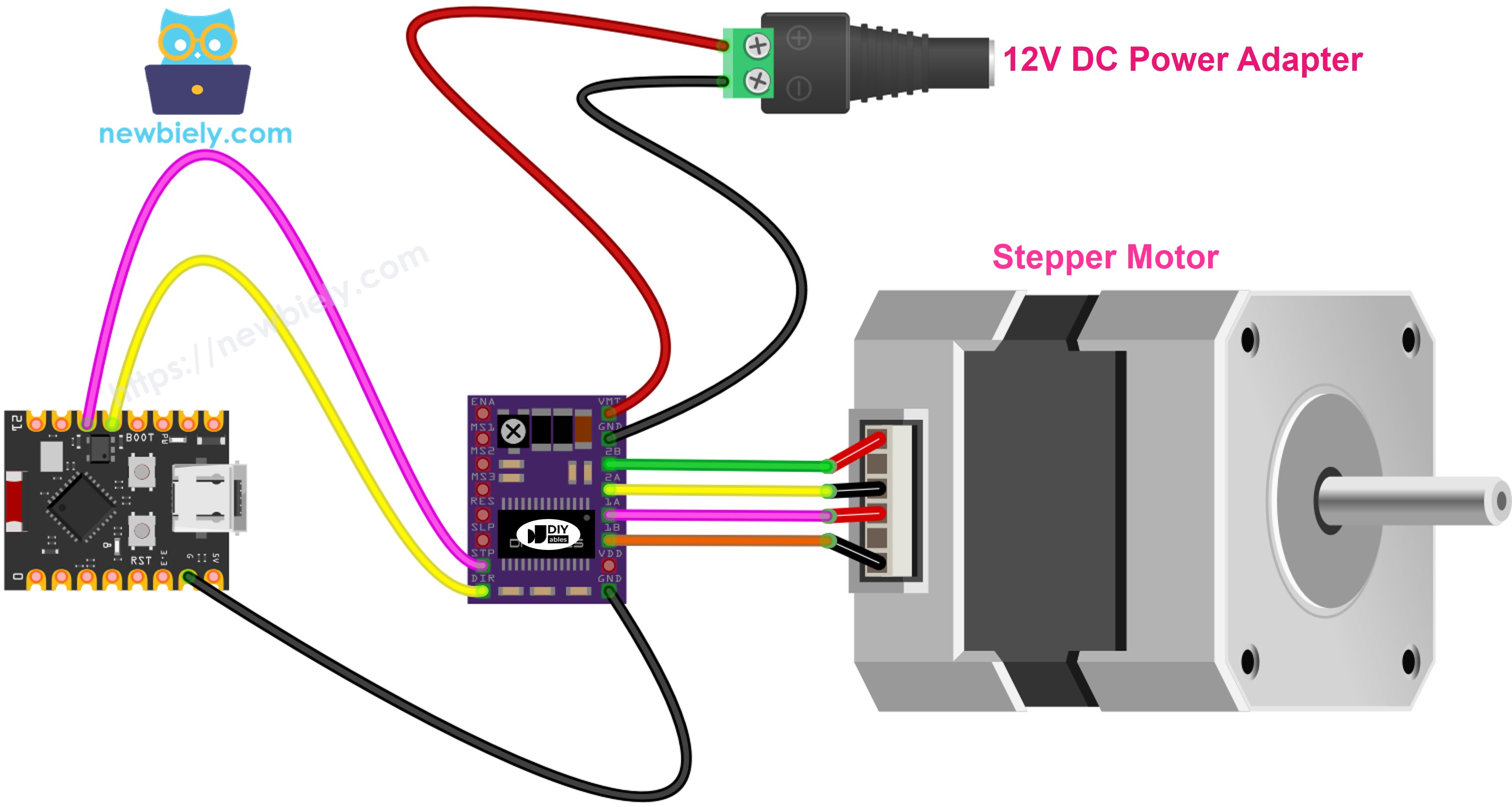
This image is created using Fritzing. Click to enlarge image
Safety notes:
- Note: Ensure motor power supply voltage matches your stepper motor specifications (typically 12V for NEMA 17)
- Note: Never connect or disconnect the stepper motor while power is on to avoid damaging the driver
- Note: Connect ESP32 C3 Super Mini GND to DRV8825 GND (logic) for proper operation
Connection table:
| DRV8825 Pin | Connection | Notes |
|---|---|---|
| VMOT | 12V Power Supply (+) | Motor power input |
| GND (Motor) | 12V Power Supply (-) | Motor power ground |
| 1A | Stepper Motor Coil A Wire 1 | Coil A connection |
| 1B | Stepper Motor Coil A Wire 2 | Coil A connection |
| 2A | Stepper Motor Coil B Wire 1 | Coil B connection |
| 2B | Stepper Motor Coil B Wire 2 | Coil B connection |
| STEP | ESP32 C3 Super Mini Pin D10 | Step control signal |
| DIR | ESP32 C3 Super Mini Pin D9 | Direction control signal |
| GND (Logic) | ESP32 C3 Super Mini GND | Common ground reference |
| ENABLE | Not connected | Default enabled |
| M1 | Not connected | Full-step mode |
| M2 | Not connected | Full-step mode |
| M3 | Not connected | Full-step mode |
| RESET | Not connected | Normal operation |
| SLEEP | Not connected | Normal operation |
This basic configuration runs the stepper motor in full-step mode with default settings.
ESP32 C3 Super Mini Code
The following code demonstrates how to control a stepper motor with the ESP32 C3 Super Mini and DRV8825 driver using the AccelStepper library.
What this code does:
- Initializes the DRV8825 driver with STEP and DIR pins
- Sets maximum motor speed and acceleration values
- Rotates the stepper motor 200 steps forward
- Rotates the stepper motor 200 steps backward
- Repeats continuously for smooth back-and-forth motion
- Uses the AccelStepper library for easy motor control
Detailed Instructions
New to ESP32 C3 Mini? Complete our Getting Started with ESP32 C3 Mini tutorial first to set up your development environment.
- Check your environment: Make sure you have the Arduino IDE installed and configured for ESP32 C3 Super Mini
- Wire the components: Follow the wiring diagram to connect the DRV8825, stepper motor, and power supply
- Connect USB: Plug the ESP32 C3 Super Mini into your computer with a USB Type-C cable
- Open Arduino IDE: Launch the Arduino IDE on your computer
- Select board and port: Choose ESP32 C3 Super Mini board and its corresponding COM port
- Install AccelStepper library: Go to Libraries icon, search "AccelStepper", find the library by Mike McCauley, and click Install
- Search for AccelStepper created by Mike McCauley
- Copy the code: Copy the provided code and paste it into a new Arduino IDE sketch
- Upload the code: Click the Upload button to transfer the code to your ESP32 C3 Super Mini
- Observe motor movement: The stepper motor will rotate back and forth continuously
- Pro Tip: For smoother motor operation, enable microstepping by connecting M1, M2, and M3 pins to ESP32 C3 Super Mini pins and configure them in your code
Note: Full-step mode produces visible stepping motion. Enable microstepping for smoother, quieter operation by configuring the M1, M2, and M3 pins.
Serial Monitor Output
After uploading the code, open the Serial Monitor at 115200 baud rate to see the motor status:
Applications and Project Ideas
The ESP32 C3 Super Mini with DRV8825 stepper motor driver opens up exciting possibilities for precision motion control projects.
- 3D Printer: Build a custom 3D printer with precise X, Y, and Z axis control
- CNC Machine: Create a mini CNC router or engraver for PCBs and small parts
- Camera Slider: Design an automated camera slider for smooth time-lapse videos
- Robotic Arm: Build a multi-axis robotic arm with precise joint positioning
- Automated Curtain Opener: Make smart curtains that open and close on schedule
- Pan-Tilt Camera Mount: Create a motorized camera mount for video surveillance or photography
- Automatic Pet Feeder: Design a timed pet feeder with portion control
- Solar Panel Tracker: Build a sun-tracking system for maximum solar panel efficiency
Video Tutorial
Watch the video below for a visual walkthrough of this project.
[VIDEO ESP32 C3 Super Mini - DRV8825 Stepper Motor Driver Tutorial]
Challenge Yourself
Take your ESP32 C3 Super Mini and DRV8825 stepper motor skills to the next level with these challenges.
- Easy: Add a potentiometer to control motor speed in real-time by reading analog input
- Easy: Add LED indicators to show motor direction (forward = green LED, backward = red LED)
- Medium: Implement microstepping by connecting M1, M2, M3 pins and switch between different resolutions
- Medium: Add a push button to start and stop motor movement, and another button to change direction
- Advanced: Create a motor position control system using Serial Monitor commands to move to specific positions
- Advanced: Build a two-axis motion control system using two DRV8825 drivers and stepper motors for X-Y plotting
- Advanced: Implement acceleration and deceleration profiles for smooth starts and stops at high speeds