
ESP32 C3 Super Mini - Soil Moisture Sensor
Learn how to interface a soil moisture sensor with your ESP32 C3 Super Mini to monitor soil water levels for your plant projects. This beginner-friendly guide covers wiring, calibration, and reading sensor data.
In this tutorial, you'll learn:
- What capacitive and resistive moisture sensors are and how they differ
- How to wire a capacitive soil moisture sensor to ESP32 C3 Super Mini
- How to read analog moisture values from the sensor
- How to calibrate the sensor for accurate wet/dry detection
- How to determine if soil is wet or dry using threshold values
Hardware Preparation
| 1 | × | ESP32 C3 Super Mini | |
| 1 | × | USB Cable Type-A to Type-C (for USB-A PC) | |
| 1 | × | USB Cable Type-C to Type-C (for USB-C PC) | |
| 1 | × | Capacitive Soil Moisture Sensor | |
| 1 | × | Breadboard | |
| 1 | × | Jumper Wires | |
| 1 | × | Optionally, DC Power Jack |
Or you can buy the following kits:
| 1 | × | DIYables Sensor Kit (18 sensors/displays) |
Additionally, some of these links are for products from our own brand, DIYables .
Buy Note: Many soil moisture sensors available in the market are unreliable, regardless of their version. We strongly recommend buying the sensor with TLC555I Chip from the DIYables brand using the link provided above. We tested it, and it worked reliably.
Overview of Soil Moisture Sensor
Soil moisture sensors measure the water content in soil by outputting an analog voltage signal.
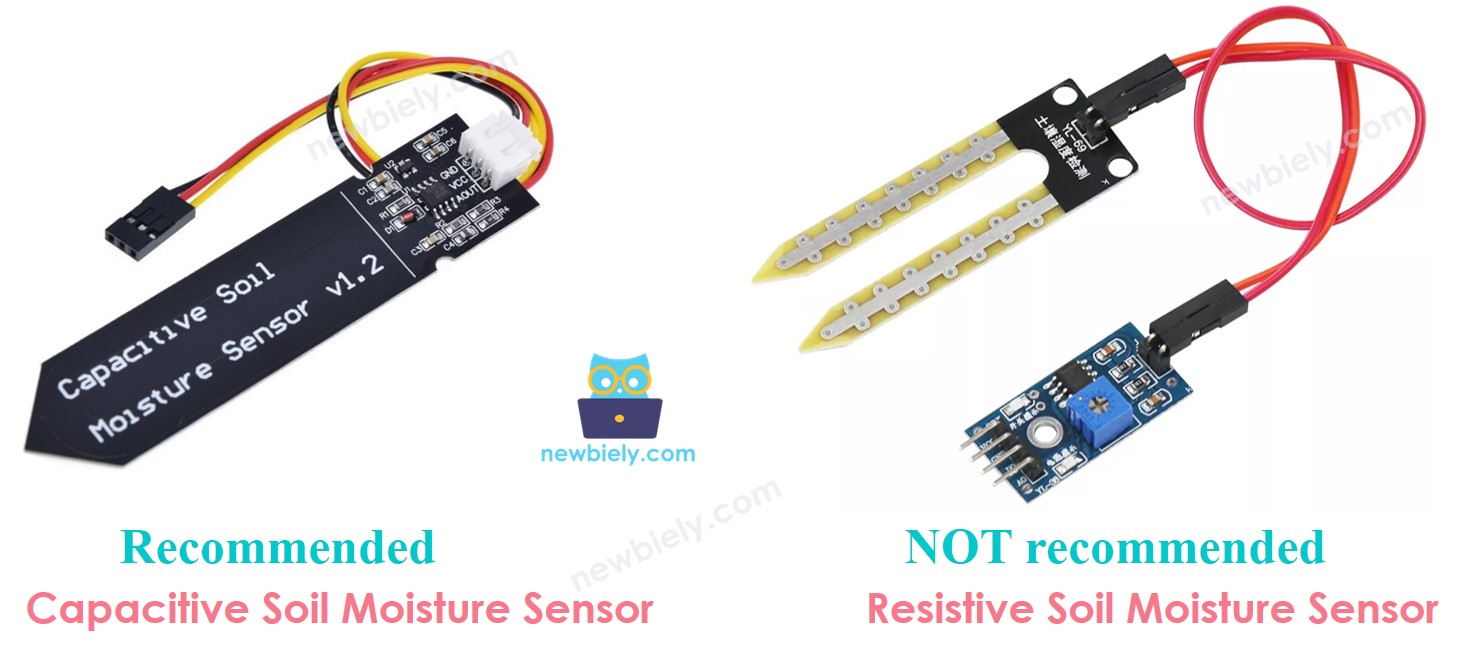
Two Types of Soil Moisture Sensors:
- Resistive Moisture Sensor: Uses electrical current between two probes to measure resistance
- Capacitive Moisture Sensor: Measures soil moisture through capacitance changes without exposed electrodes
Why We Recommend Capacitive Sensors:
- Longer lifespan - no corrosion issues
- No exposed electrodes that degrade over time
- More accurate readings in the long term
- Better for permanent installations
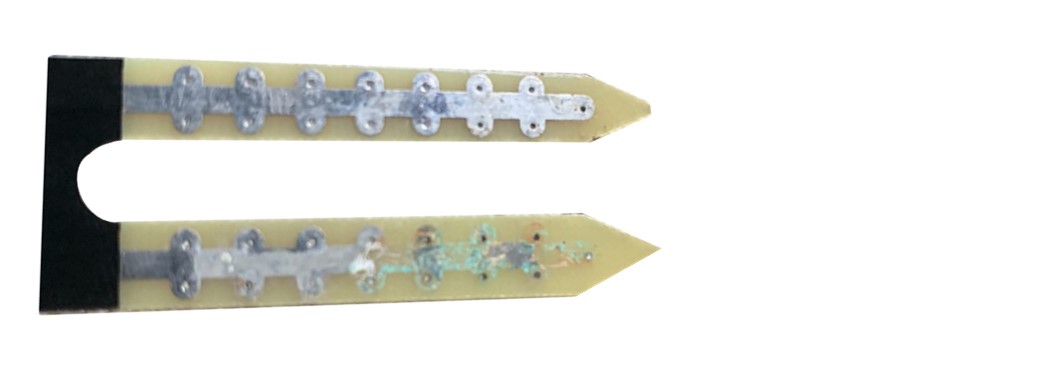
Resistive Sensor Problems:
- Electrochemical corrosion from current flow between probes
- Degraded accuracy over time
- Requires frequent replacement
Note: The rest of this ESP32 C3 Super Mini soil moisture sensor tutorial focuses on the capacitive type for reliability.
Capacitive Soil Moisture Sensor Pinout
The capacitive soil moisture sensor has a simple three-pin interface for easy connection to your ESP32 C3 Super Mini.
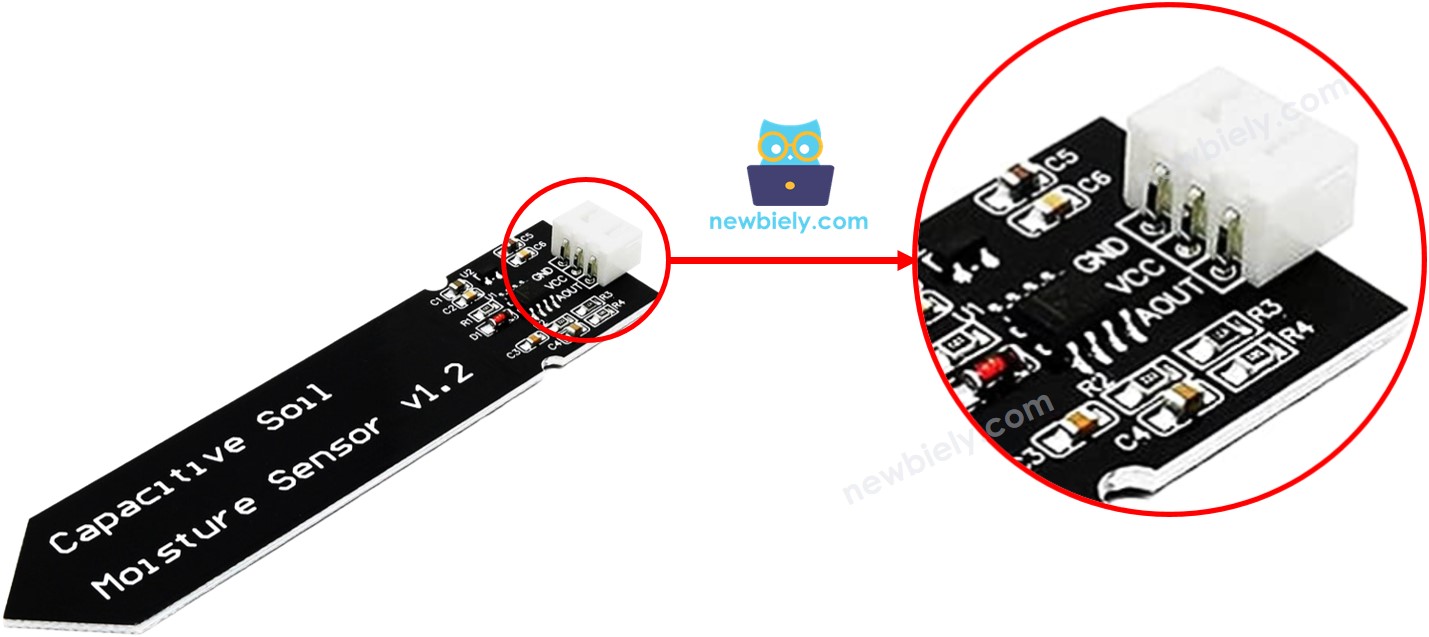
- GND: Ground connection - connect to GND (0V)
- VCC: Power supply - connect to 5V or 3.3V
- AOUT: Analog output pin - outputs voltage inversely proportional to moisture level (higher moisture = lower voltage)
How the Capacitive Moisture Sensor Works
- Higher water content in soil = lower voltage on AOUT pin
- Drier soil = higher voltage on AOUT pin
- ESP32 C3 Super Mini reads analog voltage to determine moisture level
- No direct contact with soil prevents corrosion
Wiring Diagram
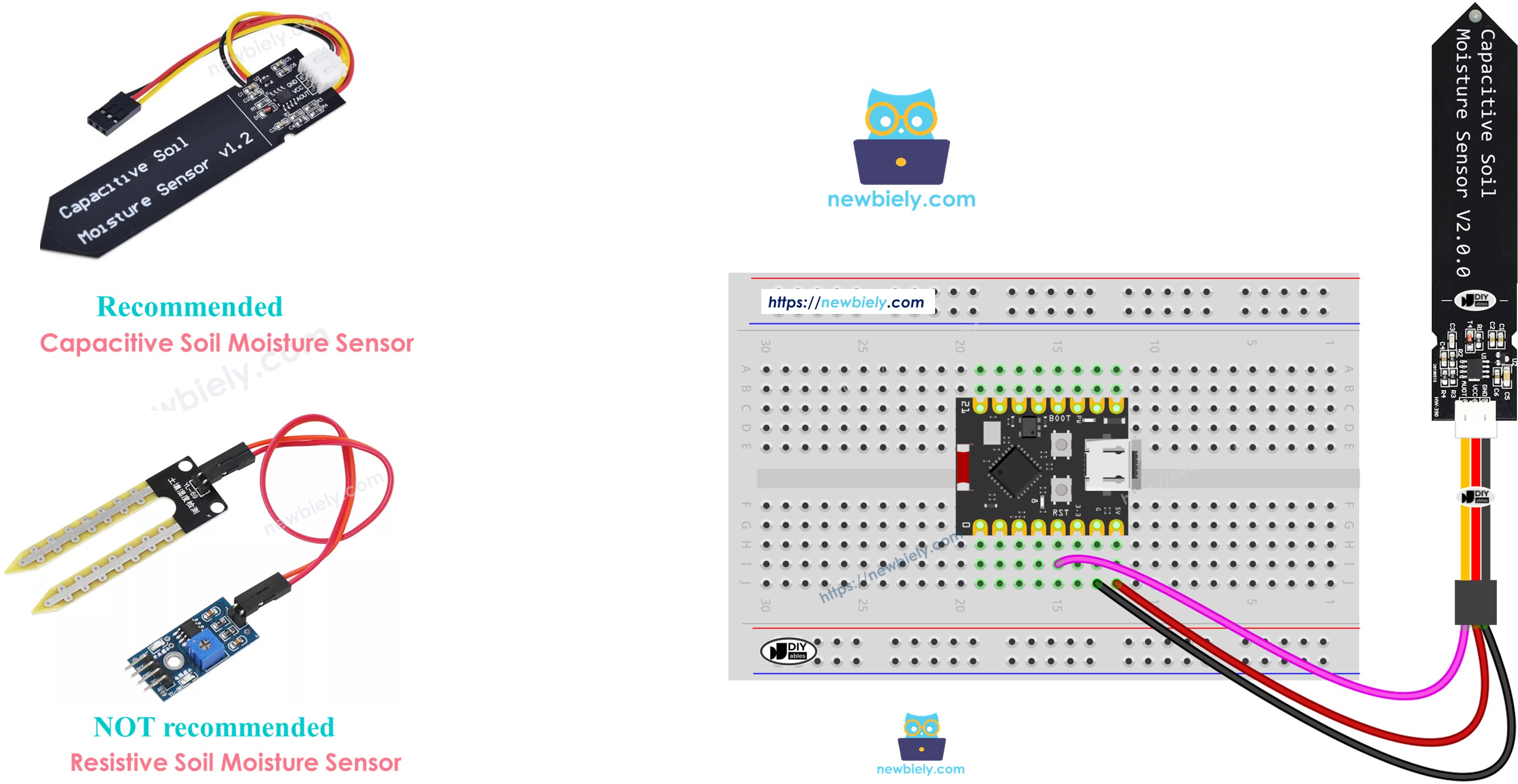
Connect your capacitive soil moisture sensor to the ESP32 C3 Super Mini following this simple wiring diagram.
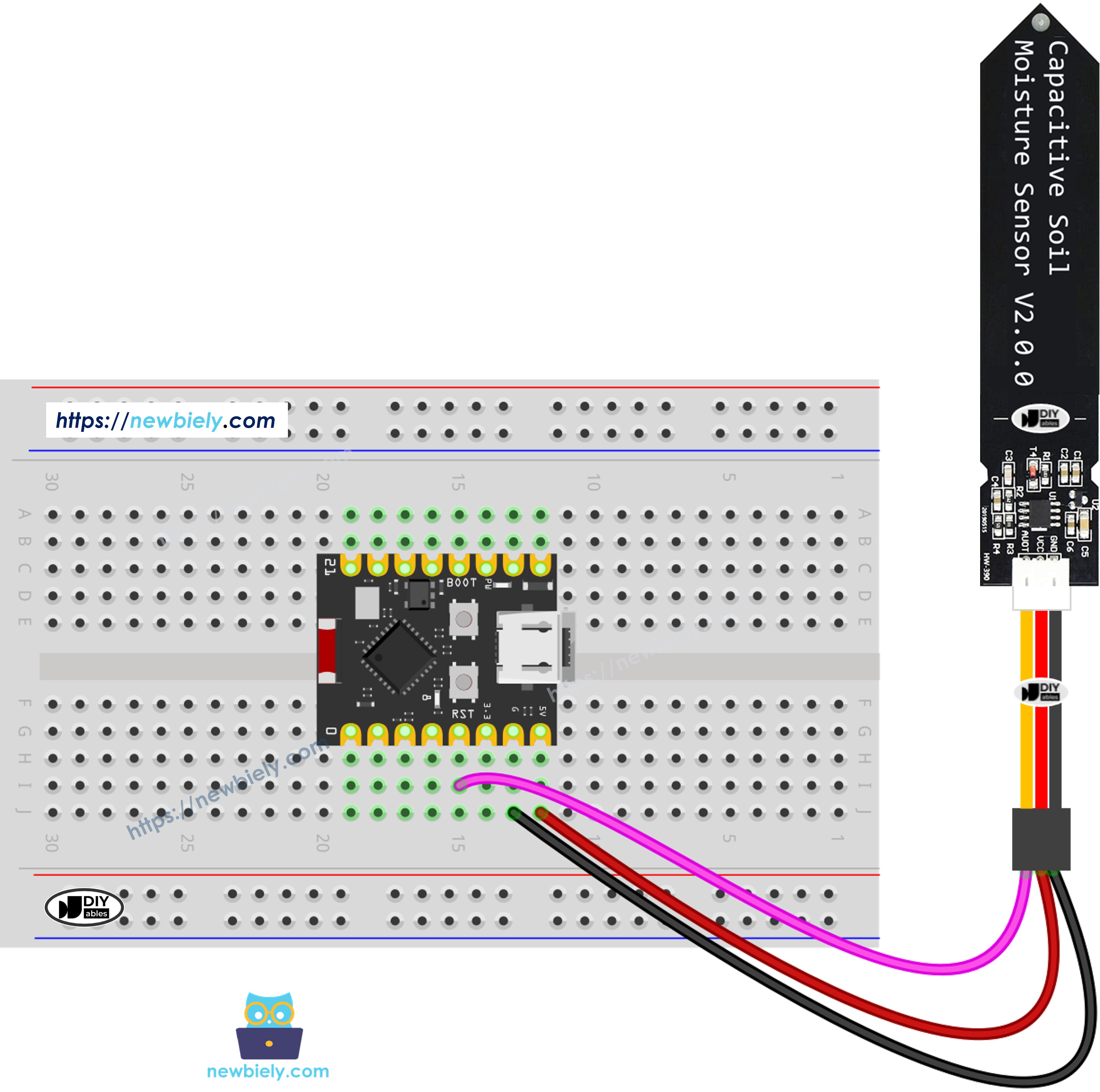
This image is created using Fritzing. Click to enlarge image
| Moisture Sensor Pin | ESP32 C3 Super Mini Pin |
|---|---|
| GND | GND |
| VCC | 3.3V |
| AOUT | A4 (GPIO4 / ADC1_CH4) |
Important Safety Notes:
- Keep the circuit board (top part of sensor) above soil/water level
- Only submerge the sensor probe portion
- Use salt water for testing, not pure water (pure water doesn't conduct electricity)
ESP32 C3 Super Mini Code - Reading Moisture Values
This code reads analog values from the capacitive soil moisture sensor and displays them on the Serial Monitor.
What the code does:
- Configures GPIO4 as analog input for moisture sensor
- Reads analog voltage from the sensor every 500ms
- Converts readings to moisture values
- Displays values on Serial Monitor for calibration
Detailed Instructions
- New to ESP32 C3 Mini? Complete our Getting Started with ESP32 C3 Mini tutorial first to set up your development environment.
- Copy the code: Paste the above code into Arduino IDE
- Upload: Click the Upload button to program your ESP32 C3 Super Mini
- Connect sensor: Wire the moisture sensor according to the diagram above
- Test the sensor: Bury the probe in soil and slowly add water, or submerge in salt water
- Open Serial Monitor: Set baud rate to 115200 to view readings
- Observe values: Watch how values decrease as moisture increases
- Record readings: Note the dry and wet values for calibration
- Pro Tip: Use a consistent soil type during calibration for the most accurate threshold values across your project.
Serial Monitor Output
※ NOTE THAT:
- Do not use pure water for testing because it doesn't conduct electricity, so it won't impact sensor readings.
- Sensor readings never drop to zero. It's normal for values to be between 3100 and 2600, although this may change due to factors such as the depth of sensor placement, soil or water composition, and power supply voltage.
- Avoid burying the circuit part (located on top of the sensor) in soil or water, as this could potentially harm the sensor.
Calibration for Capacitive Soil Moisture Sensor
The moisture sensor outputs relative values that vary based on soil type, water salinity, and sensor depth, so calibration is essential for accurate wet/dry detection.
Why Calibration is Necessary:
- Different soil types give different readings
- Water composition affects conductivity
- Sensor depth changes the measured values
- Each project needs a custom threshold
How to Calibrate Your Moisture Sensor:
- Upload the code: Run the first code example on your ESP32 C3 Super Mini
- Prepare soil: Place sensor in the actual soil you'll monitor
- Start dry: Begin with completely dry soil and note the reading
- Add water slowly: Gradually irrigate while watching Serial Monitor
- Find transition point: Identify when soil changes from dry to wet feeling
- Record threshold: Write down the value at the dry-to-wet transition
- Test both extremes: Note values for completely dry and fully saturated soil
- Calculate middle: Your threshold is typically between dry and wet values
Typical Calibration Results:
- Dry soil: 2200-2500 (varies by conditions)
- Wet soil: 1200-1500 (varies by conditions)
- Recommended threshold: midpoint between your dry and wet readings
Determine if the Soil is Wet or Dry
After calibration, use this code to determine if your soil needs watering based on the threshold value you recorded.
What this enhanced code does:
- Compares sensor readings against your calibrated threshold
- Displays "WET" or "DRY" status on Serial Monitor
- Shows the actual moisture value for reference
- Makes automated watering decisions easier
Quick Steps for Wet/Dry Detection
- New to ESP32 C3 Mini? Complete our Getting Started with ESP32 C3 Mini tutorial first to set up your development environment.
- Update threshold: Replace the THRESHOLD value with your calibrated number
- Upload code: Program your ESP32 C3 Super Mini with the updated code
- Place sensor: Insert probe into soil at your desired monitoring depth
- Open Serial Monitor: Set baud rate to 115200
- Test accuracy: Add water to verify threshold detects wet/dry correctly
- Adjust if needed: Fine-tune THRESHOLD value based on results
- Pro Tip: Set your threshold slightly higher than the transition point to trigger watering before soil becomes too dry.
Serial Monitor Output - Wet/Dry Status
※ NOTE THAT:
This tutorial uses the analogRead() function to read values from an ADC (Analog-to-Digital Converter) connected to a sensor or component. The ESP32 C3 Super Mini's ADC is suitable for projects that do not require high accuracy. However, for projects needing precise measurements, keep the following in mind:
- The ESP32 C3 Super Mini's ADC is not perfectly accurate and might require calibration for correct results. Each ESP32 C3 Super Mini board can vary slightly, so calibration is necessary for each individual board.
- Calibration can be challenging, especially for beginners, and might not always yield the exact results you want.
For projects requiring high precision, consider using an external ADC (e.g ADS1115) with the ESP32 C3 Super Mini or using another Arduino, such as the Arduino Uno R4 WiFi, which has a more reliable ADC. If you still want to calibrate the ESP32 C3 Super Mini's ADC, refer to the ESP32 ADC Calibration Driver.
Project Ideas with ESP32 C3 Super Mini and Moisture Sensor
Now that you know how to read soil moisture with your ESP32 C3 Super Mini, try these practical applications:
- Automatic Plant Watering System: Trigger a water pump when soil becomes too dry
- Smart Garden Monitor: Send moisture data to your phone via WiFi notifications
- Multi-Plant Monitor: Connect multiple sensors to track different plants simultaneously
- Data Logger: Record moisture levels over time to SD card for plant care analysis
- Greenhouse Automation: Control irrigation systems based on real-time soil conditions
- Plant Health Alert: Use LED indicators or buzzers to signal when plants need water
Video Tutorial
Watch the video below for a visual walkthrough of this project.
...VIDEO P7tG-t4dXZ0
...VIDEO
Challenge Yourself
Take your ESP32 C3 Super Mini soil moisture sensor project to the next level with these challenges:
- Easy: Add an LED that lights up when soil is too dry
- Easy: Display moisture percentage (0-100%) instead of raw values
- Medium: Create an automatic watering system with a relay and water pump
- Medium: Send moisture data to a web dashboard using ESP32's WiFi capabilities
- Advanced: Build a multi-sensor system monitoring 3+ plants with individual thresholds
- Advanced: Implement deep sleep mode to run on battery power for months