
ESP32 C3 Super Mini - Flame Sensor
Learn how to build a fire detection system using an ESP32 C3 Super Mini and a flame sensor to monitor and detect flames for safety applications. This beginner-friendly tutorial covers everything you need to get started with infrared flame sensors.
In this tutorial, you'll learn:
- What a flame sensor is and how it detects fire
- How to wire a flame sensor to ESP32 C3 Super Mini
- How to program ESP32 to read digital flame detection signals
- How to measure flame intensity using analog readings
- How to build a fire alarm system with ESP32
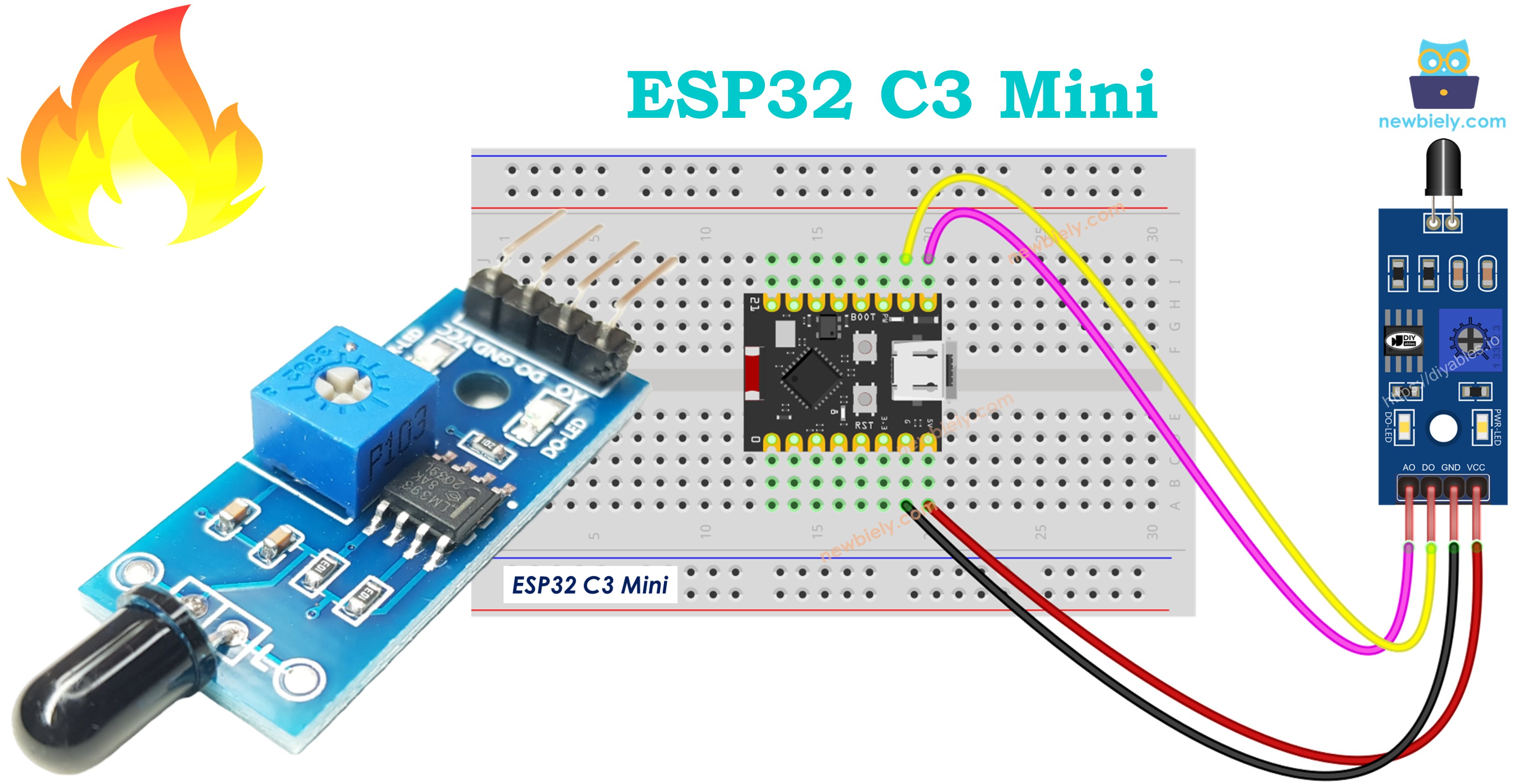
Practical Applications:
- Build fire alarm systems for home safety
- Create automated fire suppression triggers
- Monitor flame presence in industrial equipment
- Add fire detection to robotics projects
Hardware Preparation
| 1 | × | ESP32 C3 Super Mini | |
| 1 | × | USB Cable Type-A to Type-C (for USB-A PC) | |
| 1 | × | USB Cable Type-C to Type-C (for USB-C PC) | |
| 1 | × | Flame Sensor | |
| 1 | × | 5-in-1 5-way Flame Sensor | |
| 1 | × | Breadboard | |
| 1 | × | Jumper Wires |
Or you can buy the following kits:
| 1 | × | DIYables Sensor Kit (18 sensors/displays) |
Additionally, some of these links are for products from our own brand, DIYables .
Overview of Flame Sensor
A flame sensor is an infrared detector that senses flame presence and measures fire intensity through infrared light detection.
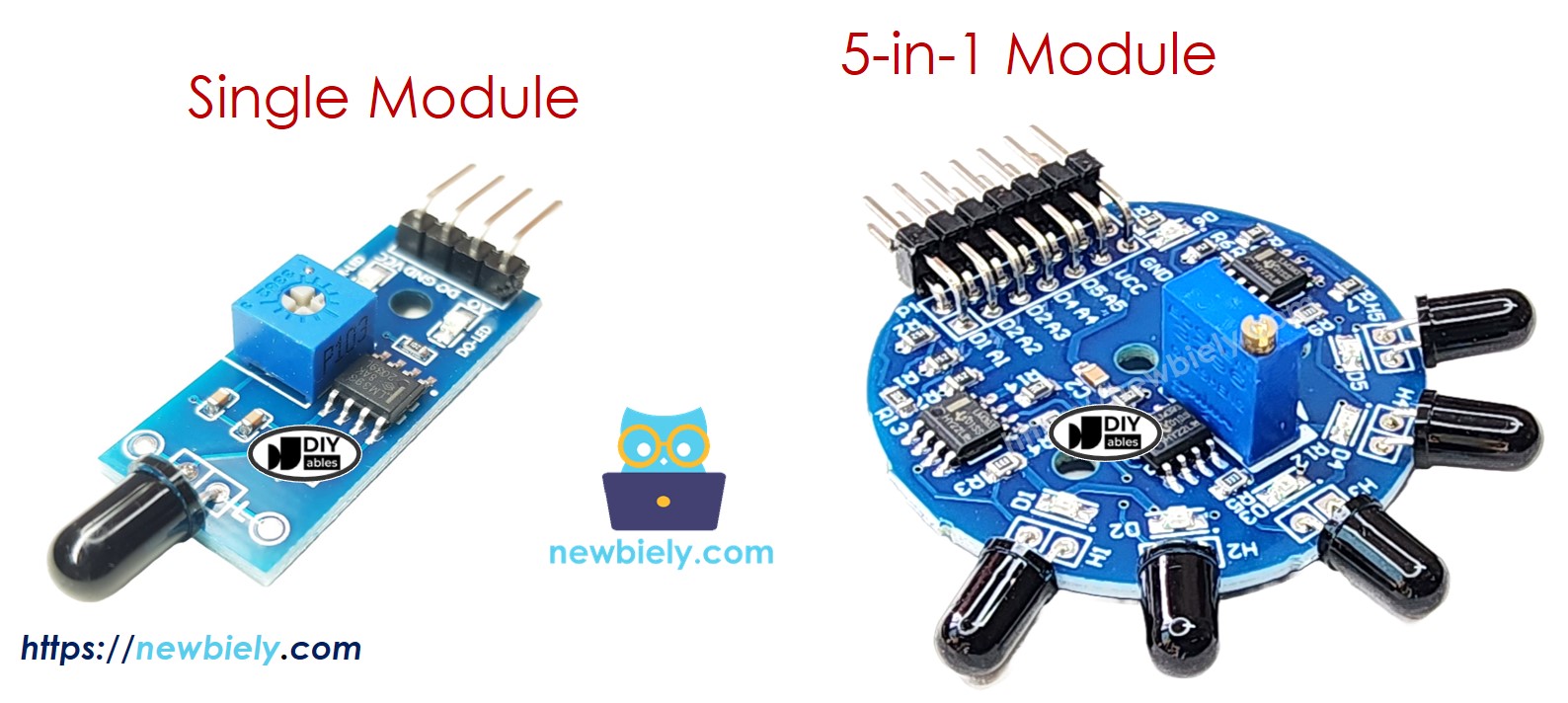
Key Features:
- Detects infrared radiation from flames (760nm to 1100nm wavelength)
- Provides both digital (on/off) and analog (intensity) outputs
- Adjustable sensitivity via onboard potentiometer
- Works with 3.3V to 5V power supply
- Fast response time for quick fire detection
- Built-in LED indicators for power and flame status
Why It's Useful for Beginners:
- Simple two or three-wire connection to ESP32 C3 Super Mini
- Easy to understand digital output for basic fire detection
- No complex programming required
- Affordable and widely available
- Great for learning about sensor integration
Important Limitations:
- May produce false positives from sunlight or heat sources
- Detection range typically 60-80cm (varies by model)
- Requires proper positioning and sensitivity adjustment
- Should not be sole fire safety device in critical applications
Pinout
The flame sensor module comes in two configurations: single sensor and 5-way detection module.
Single Flame Sensor Pinout:
- VCC: Power supply input (3.3V to 5V)
- GND: Ground connection (0V)
- DO: Digital output pin - LOW when flame detected, HIGH when no flame
- AO: Analog output pin - voltage varies with infrared intensity level
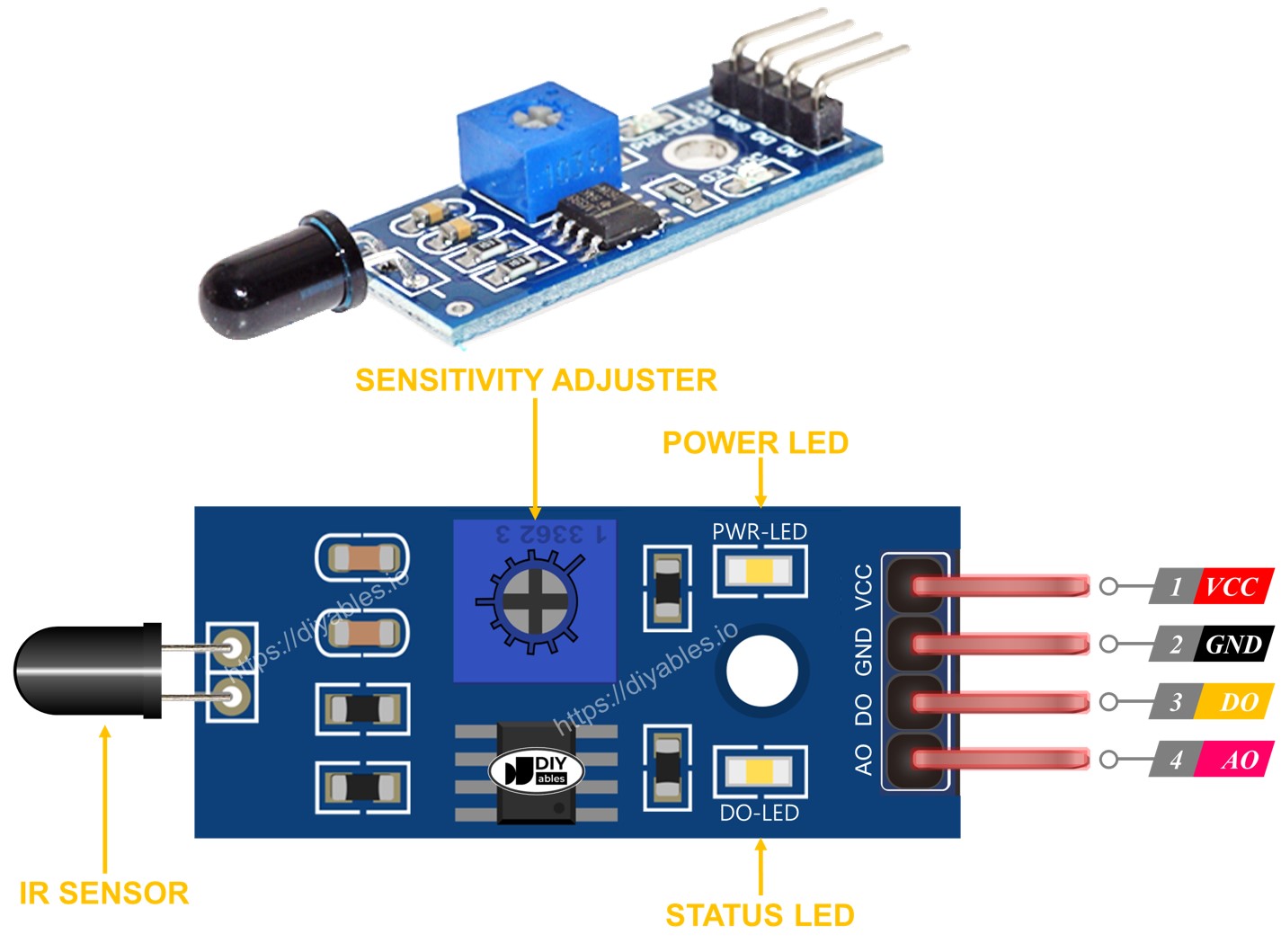
LED Indicators:
- PWR-LED: Power indicator - lights when module is powered
- DO-LED: Flame detection indicator - lights when flame is detected
5-in-1 Flame Sensor Module:
- Features five independent flame sensors on one board
- Each sensor has separate DO and AO pins
- Sensors point in different directions for 360° coverage
- Shares common VCC, GND, and potentiometer
- Provides wider detection area than single sensor
How It Works
The infrared flame sensor detects specific wavelengths of infrared light emitted by flames.
Digital Output (DO Pin):
- Adjust sensitivity by turning the onboard potentiometer
- When infrared intensity exceeds threshold: DO pin goes LOW, LED turns on
- When infrared intensity is below threshold: DO pin stays HIGH, LED turns off
- Use for simple yes/no flame detection
- Perfect for triggering alarms or automated systems
Analog Output (AO Pin):
- Output voltage increases with higher infrared intensity
- Output voltage decreases with lower infrared intensity
- Provides continuous measurement of flame strength
- Useful for distance estimation or flame size monitoring
- Not affected by potentiometer adjustment
Detection Process:
- Sensor continuously monitors infrared radiation
- Built-in comparator converts analog signal to digital output
- Both outputs available simultaneously for flexible applications
Wiring Diagram
Connect the flame sensor to your ESP32 C3 Super Mini based on whether you need digital detection, analog measurement, or both.
| Flame Sensor Pin | ESP32 C3 Super Mini Pin |
|---|---|
| VCC | 3.3V |
| GND | GND |
| DO | GPIO6 |
| AO | A5 (GPIO5 / ADC1_CH5) |
Wiring Diagram - Both Digital and Analog:
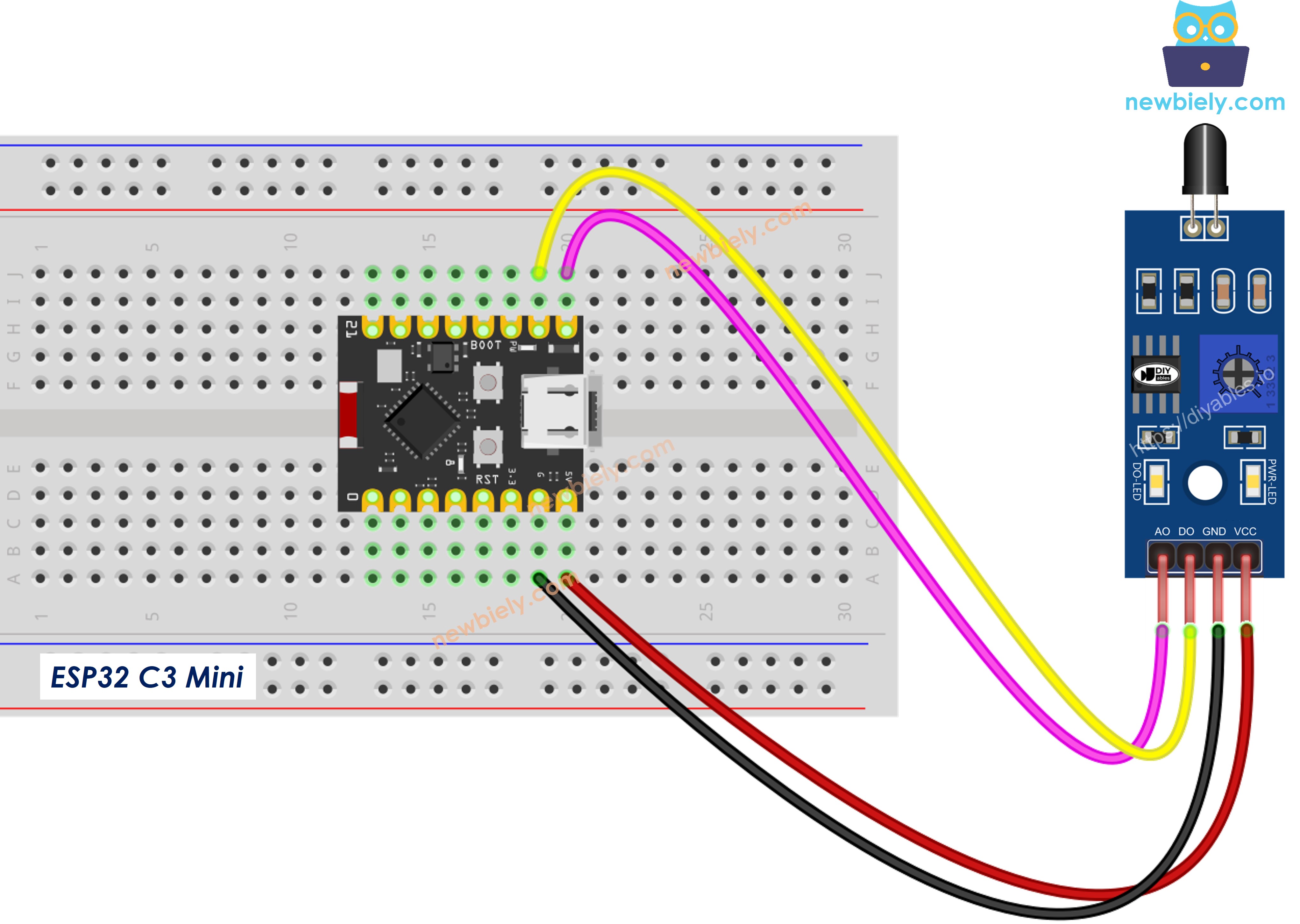
This image is created using Fritzing. Click to enlarge image
Safety Notes:
- Note: Always test with actual flame sources in a safe, controlled environment
- Note: Do not rely solely on this sensor for critical fire safety applications
- Note: Keep sensor away from direct sunlight during testing to avoid false readings
ESP32 C3 Super Mini Code - Read value from DO pin
This code reads the digital output from the flame sensor to detect fire presence.
What this code does:
- Configures GPIO6 as digital input for flame sensor
- Reads flame detection status every 500 milliseconds
- Prints fire detection status to Serial Monitor
- Shows simple on/off flame detection
Detailed Instructions
- New to ESP32 C3 Mini? Complete our Getting Started with ESP32 C3 Mini tutorial first to set up your development environment.
- Open Arduino IDE: Launch the Arduino IDE on your computer
- Copy the code: Copy the code above and paste it into Arduino IDE
- Select your board: Go to Tools > Board > ESP32 C3 Dev Module
- Select your port: Go to Tools > Port and select the correct COM port
- Upload the code: Click the Upload button to program your ESP32 C3 Super Mini
- Test the sensor: Point the flame sensor at a candle or lighter flame
- Open Serial Monitor: Click the Serial Monitor icon (top right) and set baud rate to 115200
- View results: Watch the flame detection status change in real-time
- Adjust sensitivity: Turn the potentiometer if sensor is too sensitive or not sensitive enough
- Pro Tip: If the DO-LED stays on or off constantly, adjust the onboard potentiometer clockwise or counterclockwise until the LED responds correctly to flame presence
Serial Monitor Output
ESP32 C3 Super Mini Code - Read value from AO pin
This code reads the analog output from the flame sensor to measure flame intensity.
What this code does:
- Configures GPIO5 as analog input for flame sensor
- Reads infrared intensity level continuously
- Displays raw ADC values (0-4095 range)
- Shows flame strength in real-time
- Higher values indicate stronger flames or closer proximity
Detailed Instructions
- New to ESP32 C3 Mini? Complete our Getting Started with ESP32 C3 Mini tutorial first to set up your development environment.
- Open Arduino IDE: Launch the Arduino IDE on your computer
- Copy the code: Copy the code above and paste it into Arduino IDE
- Select your board: Go to Tools > Board > ESP32 C3 Dev Module
- Select your port: Go to Tools > Port and select the correct COM port
- Upload the code: Click the Upload button to program your ESP32 C3 Super Mini
- Test the sensor: Point the flame sensor toward a flame source
- Open Serial Monitor: Click the Serial Monitor icon and set baud rate to 115200
- Observe readings: Watch how values increase as you move flame closer
- Test distance: Move flame farther away and see values decrease
- Pro Tip: Record baseline values in your environment without flames, then use those values to set detection thresholds in your code for automatic fire alarms
Serial Monitor Output
※ NOTE THAT:
This tutorial uses the analogRead() function to read values from an ADC (Analog-to-Digital Converter) connected to a sensor or component. The ESP32 C3 Super Mini's ADC is suitable for projects that do not require high accuracy. However, for projects needing precise measurements, keep the following in mind:
- The ESP32 C3 Super Mini's ADC is not perfectly accurate and might require calibration for correct results. Each ESP32 C3 Super Mini board can vary slightly, so calibration is necessary for each individual board.
- Calibration can be challenging, especially for beginners, and might not always yield the exact results you want.
For projects requiring high precision, consider using an external ADC (e.g ADS1115) with the ESP32 C3 Super Mini or using another Arduino, such as the Arduino Uno R4 WiFi, which has a more reliable ADC. If you still want to calibrate the ESP32 C3 Super Mini's ADC, refer to the ESP32 ADC Calibration Driver.
Application Ideas
Build exciting fire detection projects using your ESP32 C3 Super Mini and flame sensor.
- Smart fire alarm system with buzzer and LED warnings for home safety
- Automatic fire extinguisher trigger for small enclosed spaces or robotic systems
- Fire-fighting robot that navigates toward flames and activates suppression
- Industrial furnace monitor that tracks flame presence in heating equipment
- Gas stove safety system that detects if flame goes out and alerts user
- Multi-zone fire detection using multiple sensors for large area coverage
- IoT fire alert system that sends notifications to your phone via WiFi
Video Tutorial
Watch the video below for a visual walkthrough of this project.
Challenge Yourself
Expand your skills by trying these flame sensor challenges with ESP32 C3 Super Mini.
- Easy: Add a buzzer that sounds when flame is detected using the digital output
- Easy: Add an LED that lights up when flame intensity exceeds a threshold value
- Medium: Create a flame intensity meter using multiple LEDs as a bar graph display
- Medium: Combine digital and analog readings to create a smart fire alarm with distance warning
- Advanced: Build a WiFi-enabled fire monitoring system that sends alerts to your smartphone
- Advanced: Create a multi-sensor fire detection array using the 5-in-1 module for 360° coverage