ESP32 MicroPython Log Data with Timestamp to SD Card

This guide shows you how to build a data logger that records timestamped entries to a Micro SD Card using ESP32 and MicroPython. Here is what we will cover:

The date and time are obtained from a DS3231 RTC module and written to the Micro SD Card together with the sensor readings.

The logged data can include any type of measurement, for example:

To keep things simple, this guide uses readings from two analog input pins as sample data. You can easily modify the code to log any other type of information.
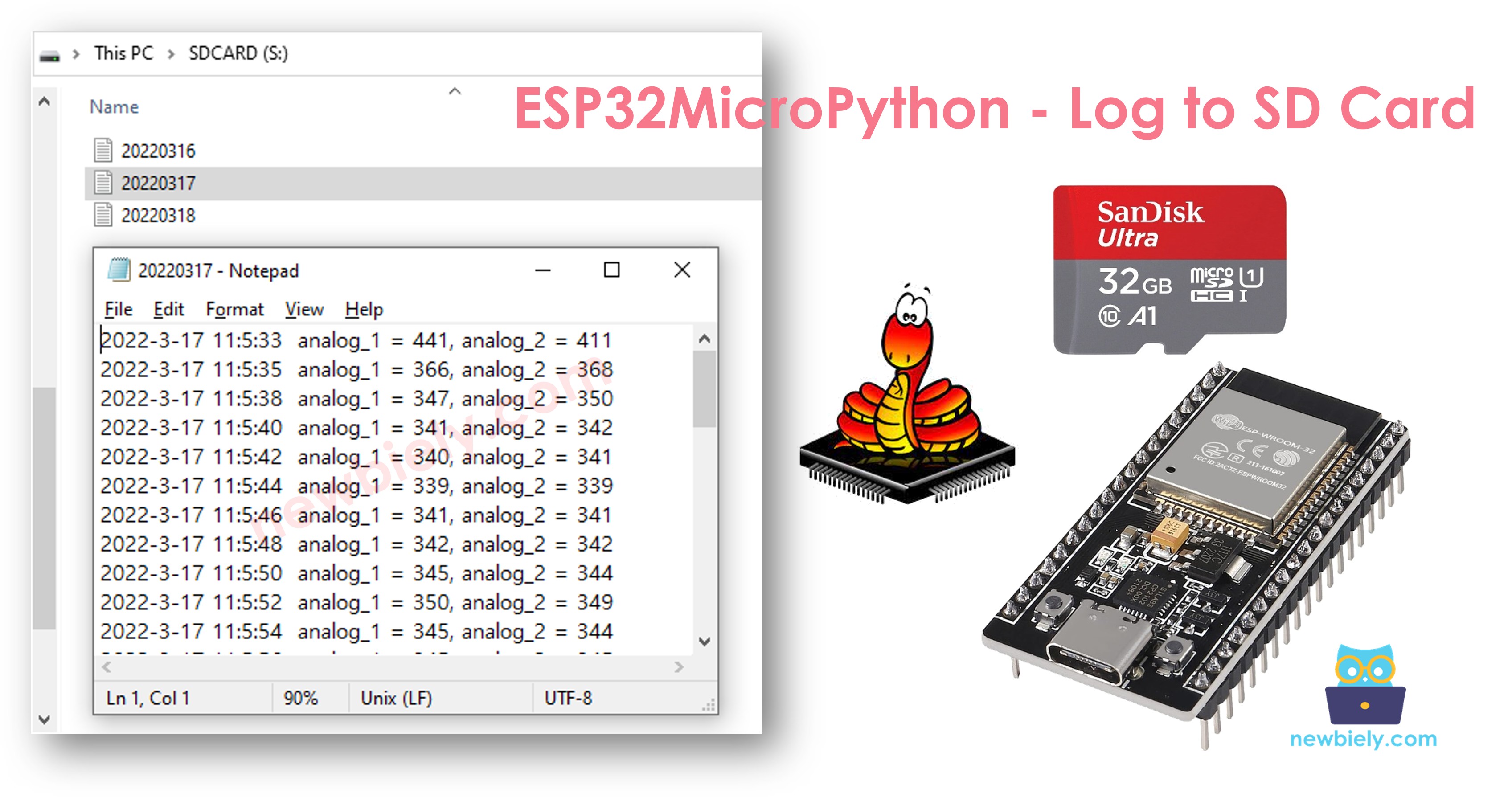
ESP32 MicroPython Log to Micro SD Card

Overview of Micro SD Card Module and RTC Module

Need help getting started with the Micro SD Card Module or RTC module? Check out these step-by-step tutorials covering pinouts, wiring, and programming:

Wiring Diagram

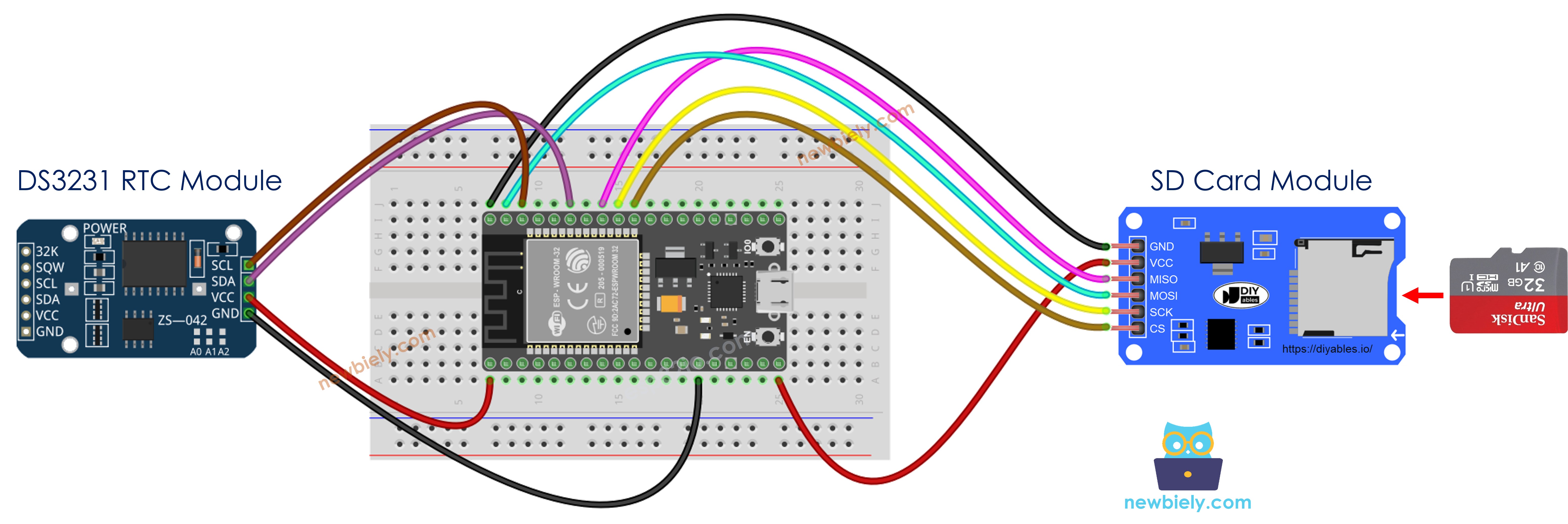
The wiring diagram between ESP32 MicroPython Micro SD Card Module RTC

This image is created using Fritzing. Click to enlarge image

The wiring table below shows how to connect the Micro SD Card Module and the DS3231 RTC Module to the ESP32:

Micro SD Card Module ESP32
VCC 5V
GND GND
MISO GPIO19
MOSI GPIO23
SCK GPIO18
CS GPIO5
DS3231 RTC Module ESP32
VCC 3.3V
GND GND
SDA GPIO21
SCL GPIO22

※ NOTE THAT:

If your shield (such as an Ethernet shield) already has a built-in Micro SD Card slot, you can skip the external module and simply insert the card directly into the shield.

ESP32 MicroPython - Recording Timestamped Data to Micro SD Card

""" This ESP32 MicroPython code was developed by newbiely.com This ESP32 MicroPython code is made available for public use without any restriction For comprehensive instructions and wiring diagrams, please visit: https://newbiely.com/tutorials/esp32-micropython/esp32-micropython-log-data-with-timestamp-to-sd-card """ import machine import os import time import sdcard # Define SPI pins for the Micro SD Card module SPI_SCK_PIN = 18 # The ESP32 pin GPIO18 connected to SCK SPI_MOSI_PIN = 23 # The ESP32 pin GPIO23 connected to MOSI SPI_MISO_PIN = 19 # The ESP32 pin GPIO19 connected to MISO SPI_CS_PIN = 5 # The ESP32 pin GPIO5 connected to SS (CS) # Define I2C pins for the RTC module I2C_SDA_PIN = 21 # The ESP32 pin GPIO21 connected to SDA I2C_SCL_PIN = 22 # The ESP32 pin GPIO22 connected to SCL FILE_NAME = "/sd/log.txt" # Initialize I2C and RTC (DS3231) i2c = machine.I2C(0, sda=machine.Pin(I2C_SDA_PIN), scl=machine.Pin(I2C_SCL_PIN)) # DS3231 I2C address DS3231_ADDR = 0x68 def bcd_to_dec(bcd): return (bcd >> 4) * 10 + (bcd & 0x0F) def get_datetime(): buf = i2c.readfrom_mem(DS3231_ADDR, 0x00, 7) second = bcd_to_dec(buf[0]) minute = bcd_to_dec(buf[1]) hour = bcd_to_dec(buf[2]) day = bcd_to_dec(buf[4]) month = bcd_to_dec(buf[5] & 0x1F) year = bcd_to_dec(buf[6]) + 2000 return (year, month, day, hour, minute, second) # Initialize SD card using SoftSPI and sdcard driver spi = machine.SoftSPI(baudrate=1000000, polarity=0, phase=0, sck=machine.Pin(SPI_SCK_PIN), mosi=machine.Pin(SPI_MOSI_PIN), miso=machine.Pin(SPI_MISO_PIN)) cs = machine.Pin(SPI_CS_PIN, machine.Pin.OUT) try: sd = sdcard.SDCard(spi, cs) os.mount(sd, "/sd") print("SD CARD INITIALIZED.") except Exception as e: print("SD CARD FAILED, OR NOT PRESENT!", e) raise SystemExit print("--------------------") # Define analog pins analog_pin_1 = machine.ADC(machine.Pin(36)) # A0 analog_pin_2 = machine.ADC(machine.Pin(39)) # A1 analog_pin_1.atten(machine.ADC.ATTN_11DB) # set attenuation to 11 dB (up to ~3.3V input) analog_pin_2.atten(machine.ADC.ATTN_11DB) while True: try: f = open(FILE_NAME, "a") print("Writing log to SD Card") # Get timestamp from RTC year, month, day, hour, minute, second = get_datetime() timestamp = "{}-{}-{} {}:{}:{}".format(year, month, day, hour, minute, second) # Read data analog_1 = analog_pin_1.read() analog_2 = analog_pin_2.read() # Write timestamp and data f.write("{} analog_1 = {}, analog_2 = {}\n".format(timestamp, analog_1, analog_2)) f.close() except Exception as e: print("SD Card: Issue encountered while attempting to open the file", FILE_NAME, e) time.sleep(2) # delay 2 seconds

Detailed Instructions

Here's instructions on how to set up and run your MicroPython code on the ESP32 using Thonny IDE:

  • Make sure Thonny IDE is installed on your computer.
  • Confirm that MicroPython firmware is loaded on your ESP32 board.
  • If this is your first time using an ESP32 with MicroPython, check out the ESP32 MicroPython Getting Started guide for step-by-step instructions.
  • Do the wiring as above image.
  • Connect the ESP32 board to your computer with a USB cable.
  • Open Thonny IDE on your computer.
  • In Thonny IDE, go to Tools Options.
  • Under the Interpreter tab, choose MicroPython (ESP32) from the dropdown menu.
  • Make sure the correct port is selected. Thonny IDE usually detects it automatically, but you might need to select it manually (like COM3 on Windows or /dev/ttyACM0 on Linux).
  • Navigate to the Tools Manage packages on the Thonny IDE.
  • Search "sdcard", then find the sdcard library provided by micropython-lib.
  • Click on sdcard, then click Install button to install the SD card library.
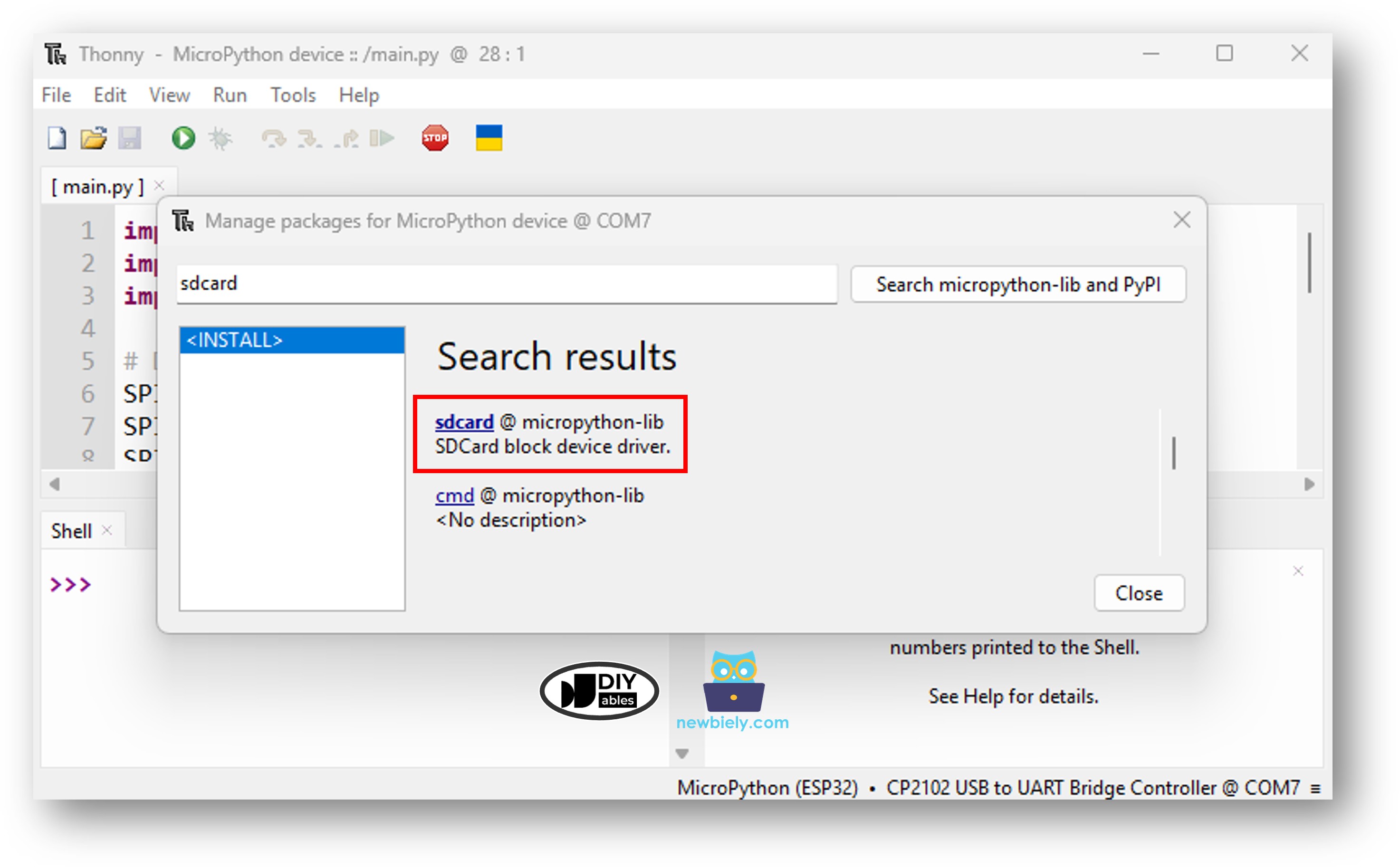
ESP32 MicroPython SD Card library
  • Ensure the Micro SD Card is formatted as FAT16 or FAT32 (look up instructions online if needed)
  • Copy the provided MicroPython code and paste it into Thonny's editor.
  • Save the code to your ESP32 by:
    • Clicking the Save button or pressing Ctrl+S.
    • In the save dialog, choose MicroPython device.
    • Name the file main.py.
  • Click the green Run button (or press F5) to execute the script.
  • Check out the message in the Shell at the bottom of Thonny.
Shell x
>>> %Run -c $EDITOR_CONTENT
MPY: soft reboot SD CARD INITIALIZED. -------------------- Writing log to SD Card Writing log to SD Card Writing log to SD Card Writing log to SD Card Writing log to SD Card Writing log to SD Card Writing log to SD Card
MicroPython (ESP32) • CP2102 USB To UART Bridge Controller @ COM12 ≡
  • Remove the Micro SD Card from the module
  • Plug it into a USB SD Card reader connected to your PC
  • Open the log.txt file on your computer — its content should look like this:
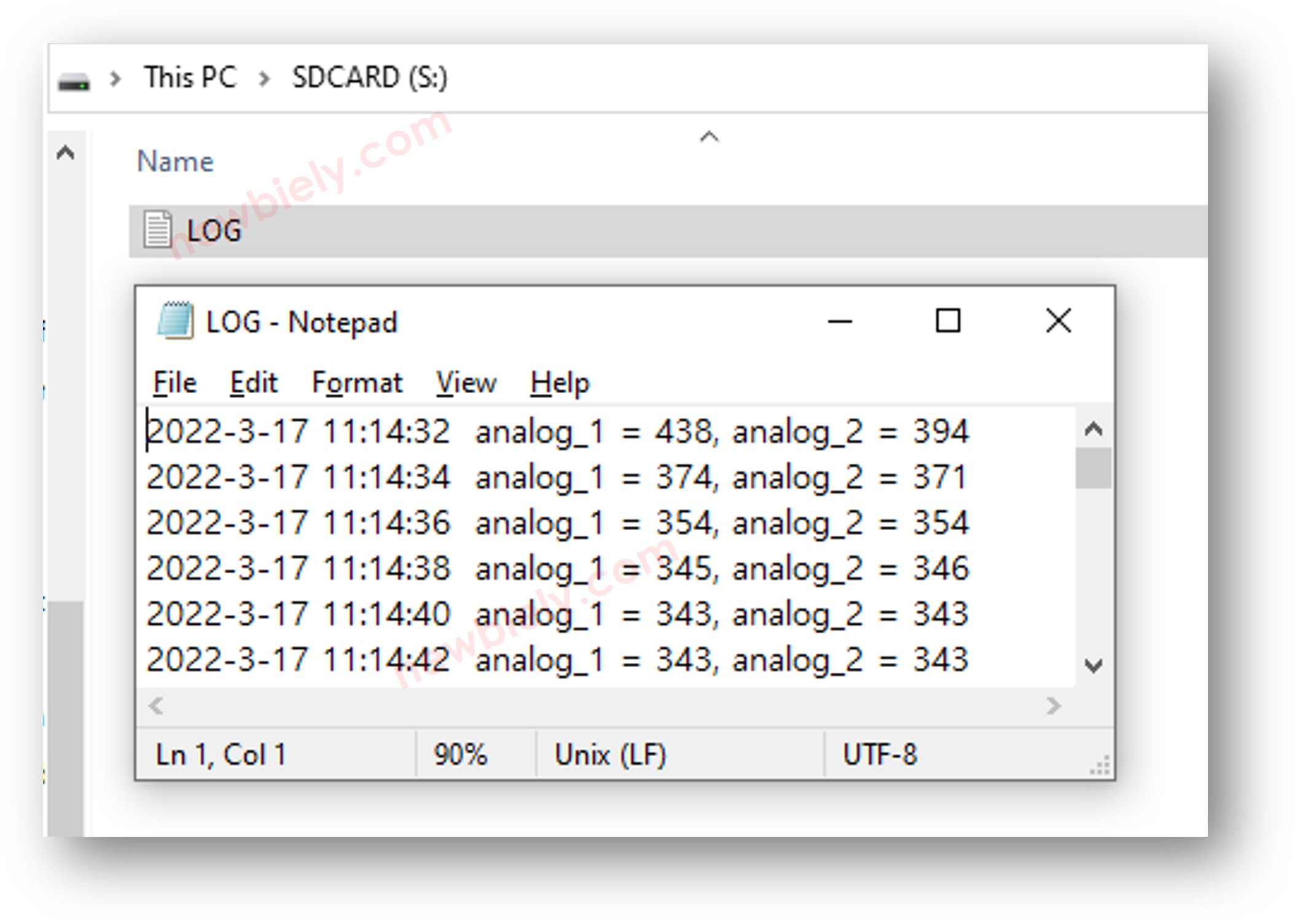
ESP32 MicroPython log to Micro SD Card with time information

If you don't have a USB SD Card reader, you can verify the log file contents by running the following MicroPython code on the ESP32.

""" This ESP32 MicroPython code was developed by newbiely.com This ESP32 MicroPython code is made available for public use without any restriction For comprehensive instructions and wiring diagrams, please visit: https://newbiely.com/tutorials/esp32-micropython/esp32-micropython-log-data-with-timestamp-to-sd-card """ import machine import os import sdcard # Define SPI pins for the Micro SD Card module SPI_SCK_PIN = 18 # The ESP32 pin GPIO18 connected to SCK SPI_MOSI_PIN = 23 # The ESP32 pin GPIO23 connected to MOSI SPI_MISO_PIN = 19 # The ESP32 pin GPIO19 connected to MISO SPI_CS_PIN = 5 # The ESP32 pin GPIO5 connected to SS (CS) FILE_NAME = "/sd/log.txt" # Initialize SD card using SoftSPI and sdcard driver spi = machine.SoftSPI(baudrate=1000000, polarity=0, phase=0, sck=machine.Pin(SPI_SCK_PIN), mosi=machine.Pin(SPI_MOSI_PIN), miso=machine.Pin(SPI_MISO_PIN)) cs = machine.Pin(SPI_CS_PIN, machine.Pin.OUT) try: sd = sdcard.SDCard(spi, cs) os.mount(sd, "/sd") print("SD CARD INITIALIZED.") except Exception as e: print("SD CARD FAILED, OR NOT PRESENT!", e) raise SystemExit # Open file for reading try: f = open(FILE_NAME, "r") while True: ch = f.read(1) # read characters one by one from Micro SD Card if not ch: break print(ch, end="") # print the character to the Shell f.close() except Exception as e: print("SD Card: Issue encountered while attempting to open the file", FILE_NAME, e) os.umount("/sd")

ESP32 MicroPython - Logging to Separate Daily Files

Storing all logs in one file causes it to grow large over time, making it harder to manage. The code below splits logs into multiple files:

  • A new file is created for each day
  • Each filename follows the format: YYYYMMDD.txt
""" This ESP32 MicroPython code was developed by newbiely.com This ESP32 MicroPython code is made available for public use without any restriction For comprehensive instructions and wiring diagrams, please visit: https://newbiely.com/tutorials/esp32-micropython/esp32-micropython-log-data-with-timestamp-to-sd-card """ import machine import os import time import sdcard # Define SPI pins for the Micro SD Card module SPI_SCK_PIN = 18 # The ESP32 pin GPIO18 connected to SCK SPI_MOSI_PIN = 23 # The ESP32 pin GPIO23 connected to MOSI SPI_MISO_PIN = 19 # The ESP32 pin GPIO19 connected to MISO SPI_CS_PIN = 5 # The ESP32 pin GPIO5 connected to SS (CS) # Define I2C pins for the RTC module I2C_SDA_PIN = 21 # The ESP32 pin GPIO21 connected to SDA I2C_SCL_PIN = 22 # The ESP32 pin GPIO22 connected to SCL # Initialize I2C and RTC (DS3231) i2c = machine.I2C(0, sda=machine.Pin(I2C_SDA_PIN), scl=machine.Pin(I2C_SCL_PIN)) # DS3231 I2C address DS3231_ADDR = 0x68 def bcd_to_dec(bcd): return (bcd >> 4) * 10 + (bcd & 0x0F) def get_datetime(): buf = i2c.readfrom_mem(DS3231_ADDR, 0x00, 7) second = bcd_to_dec(buf[0]) minute = bcd_to_dec(buf[1]) hour = bcd_to_dec(buf[2]) day = bcd_to_dec(buf[4]) month = bcd_to_dec(buf[5] & 0x1F) year = bcd_to_dec(buf[6]) + 2000 return (year, month, day, hour, minute, second) # Initialize SD card using SoftSPI and sdcard driver spi = machine.SoftSPI(baudrate=1000000, polarity=0, phase=0, sck=machine.Pin(SPI_SCK_PIN), mosi=machine.Pin(SPI_MOSI_PIN), miso=machine.Pin(SPI_MISO_PIN)) cs = machine.Pin(SPI_CS_PIN, machine.Pin.OUT) try: sd = sdcard.SDCard(spi, cs) os.mount(sd, "/sd") print("SD CARD INITIALIZED.") except Exception as e: print("SD CARD FAILED, OR NOT PRESENT!", e) raise SystemExit print("--------------------") # Define analog pins analog_pin_1 = machine.ADC(machine.Pin(36)) # A0 analog_pin_2 = machine.ADC(machine.Pin(39)) # A1 analog_pin_1.atten(machine.ADC.ATTN_11DB) # set attenuation to 11 dB (up to ~3.3V input) analog_pin_2.atten(machine.ADC.ATTN_11DB) while True: year, month, day, hour, minute, second = get_datetime() # Generate filename: /sd/YYYYMMDD.txt filename = "/sd/{:04d}{:02d}{:02d}.txt".format(year, month, day) try: f = open(filename, "a") print("Writing log to SD Card") # Write timestamp timestamp = "{}-{}-{} {}:{}:{}".format(year, month, day, hour, minute, second) # Read data analog_1 = analog_pin_1.read() analog_2 = analog_pin_2.read() # Write timestamp and data f.write("{} analog_1 = {}, analog_2 = {}\n".format(timestamp, analog_1, analog_2)) f.close() except Exception as e: print("SD Card: Issue encountered while attempting to open the file", filename, e) time.sleep(2) # delay 2 seconds

After running for an extended period, if you:

  • Remove the Micro SD Card from the module
  • Plug it into a USB SD Card reader connected to your PC
  • You will find multiple log files as shown below:
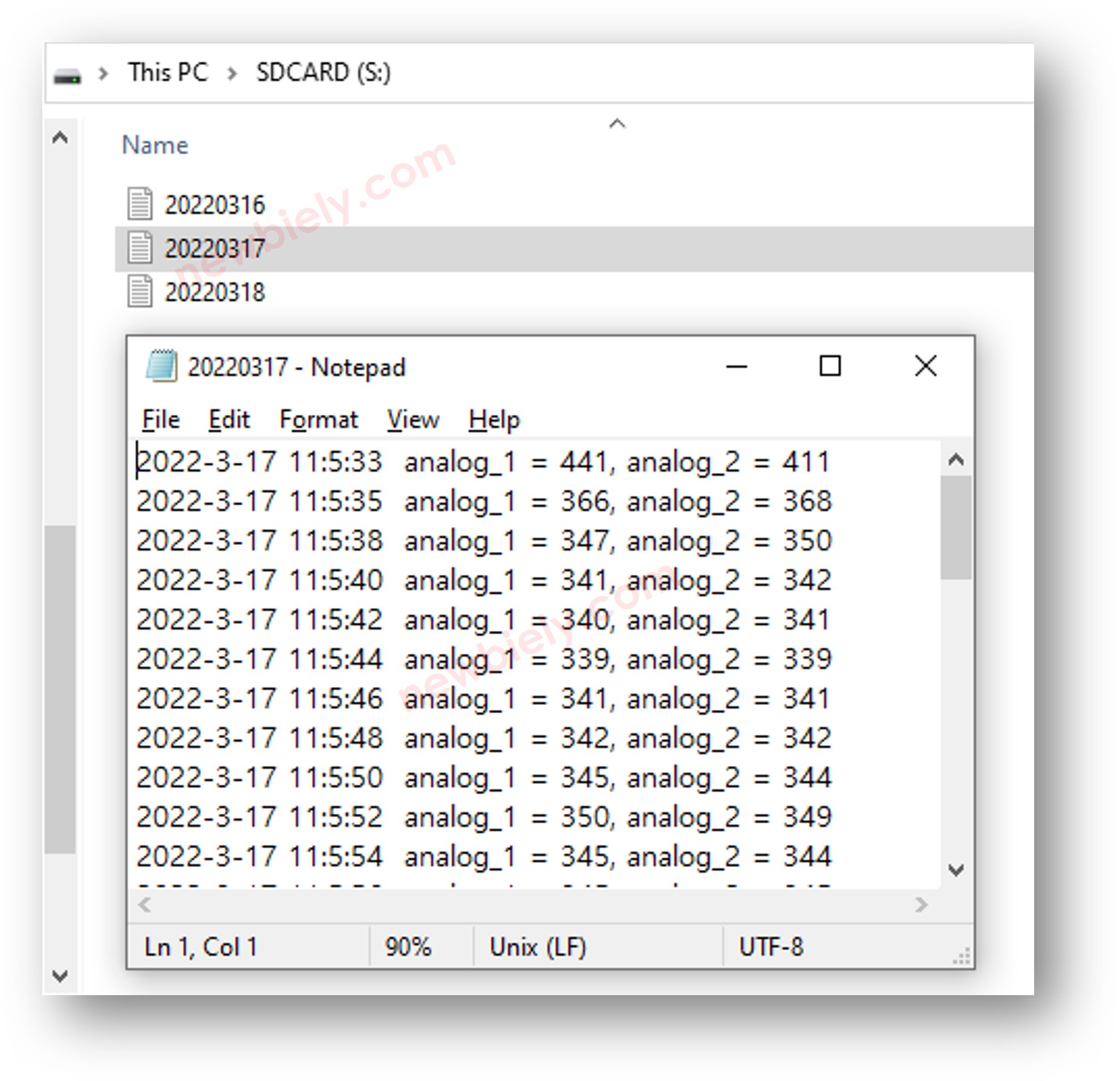
ESP32 MicroPython log to Micro SD Card multiple files

Video Tutorial

※ OUR MESSAGES

  • As freelancers, We are AVAILABLE for HIRE. See how to outsource your project to us
  • Please feel free to share the link of this tutorial. However, Please do not use our content on any other websites. We invested a lot of effort and time to create the content, please respect our work!