
Arduino MKR WiFi 1010 - 74HC595 4-Digit 7-Segment Display
This recipe walks you through using a 4-digit 7-segment display with 74HC595 shift register on the Arduino MKR WiFi 1010. The MKR WiFi 1010 combines a SAMD21 processor with an ESP32-based NINA-W102 module for Wi-Fi and BLE connectivity. It runs at 3.3V, includes a LiPo battery connector for portable projects, and exposes a clean set of I/O pins on its compact MKR header layout.
Ingredients in this recipe:
- Connecting the 74HC595 display module to the MKR WiFi 1010.
- Displaying integers and floating-point numbers.
- Showing text and temperature with a degree symbol.
- Presenting time in HH.MM format with a blinking separator.
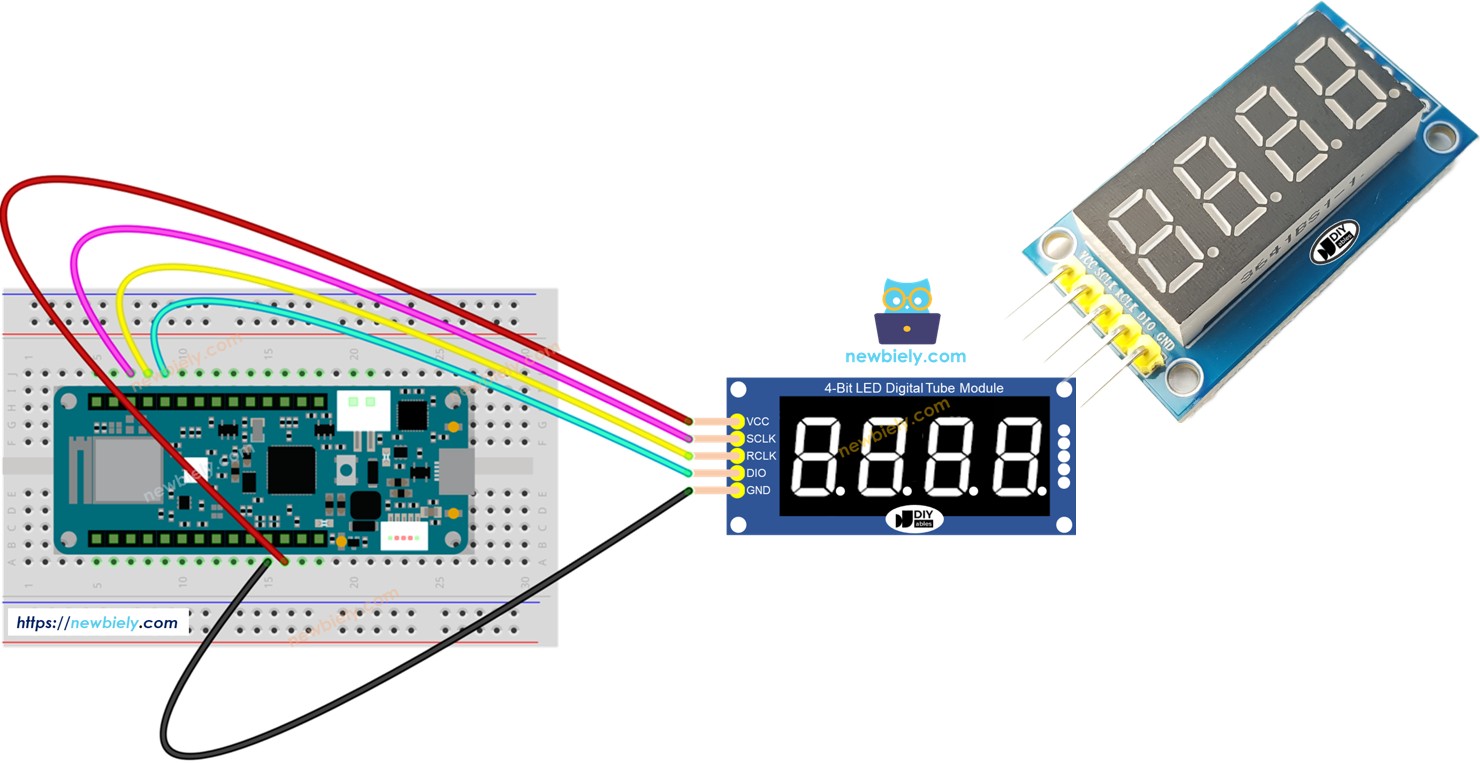
Hardware Preparation
| 1 | × | Arduino MKR WiFi 1010 | |
| 1 | × | Micro USB Cable | |
| 1 | × | 74HC595 4-digit 7-segment Display | |
| 1 | × | Jumper Wires |
Or you can buy the following kits:
| 1 | × | DIYables Sensor Kit (18 sensors/displays) |
Additionally, some of these links are for products from our own brand, DIYables .
The 74HC595 4-Digit 7-Segment Display at a Glance
Four 7-segment digits controlled through a single 74HC595 shift register - just 3 data pins from the microcontroller. Each digit has 7 segments plus a decimal point. The library shifts out segment data and digit-select patterns, then latches them to the register outputs. Multiplexing runs in software via the loop() call.
| Function | Pin | Description |
|---|---|---|
| SCLK (SH_CP) | Serial Clock | Clocks data into the shift register |
| RCLK (ST_CP) | Register Clock | Latches shifted data to outputs |
| DIO (DS) | Data Input | Serial data line |
| VCC | Power | 3.3V or 5V |
| GND | Ground | Common ground |
Note: The MKR WiFi 1010 uses 3.3V logic on all I/O pins. The 74HC595 module operates at 3.3V without problems.
Wiring Diagram
Connect the display module to the MKR WiFi 1010:
- SCLK to pin D3
- RCLK to pin D2
- DIO to pin D1
- VCC to 3.3V (VCC pin on MKR)
- GND to GND
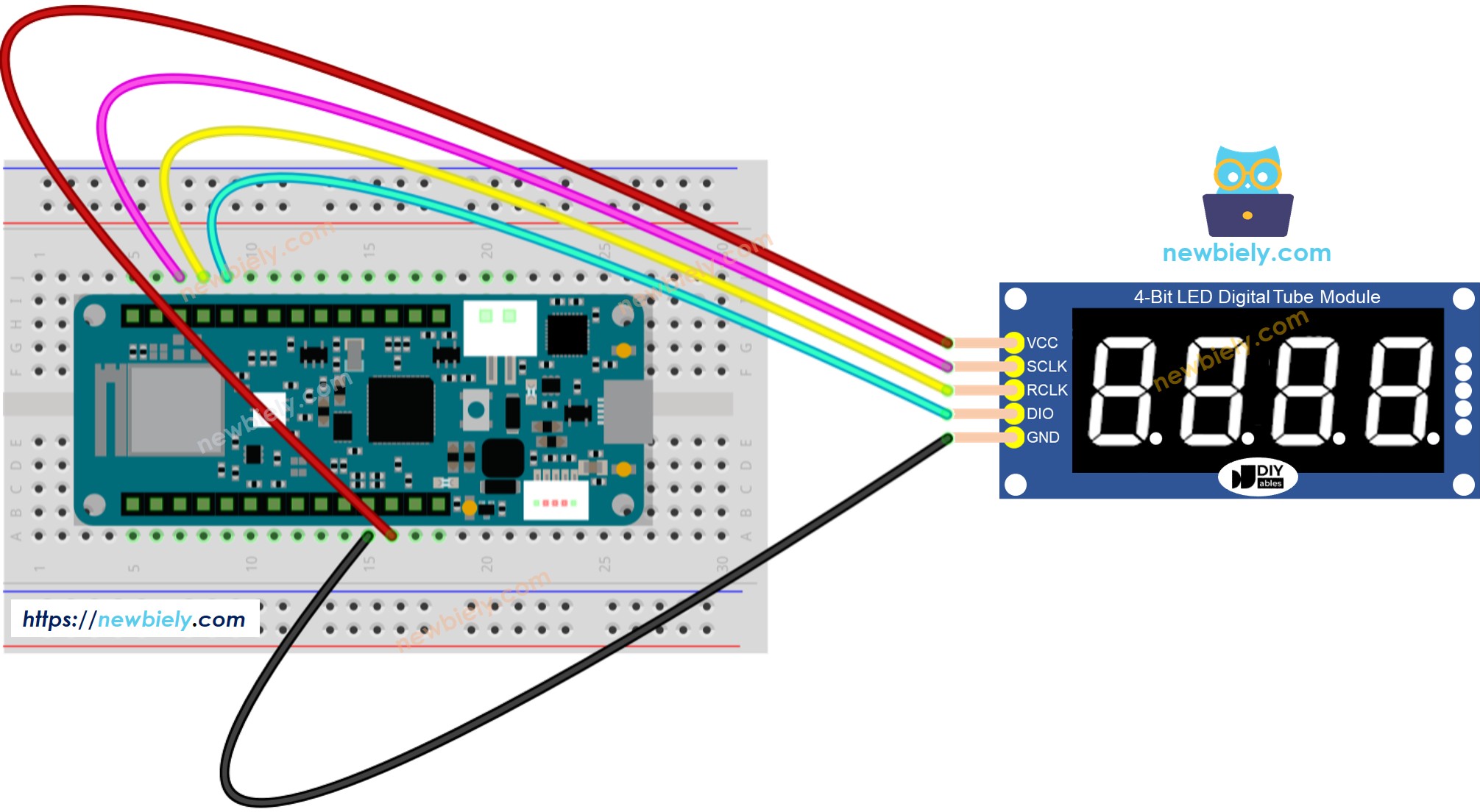
This image is created using Fritzing. Click to enlarge image
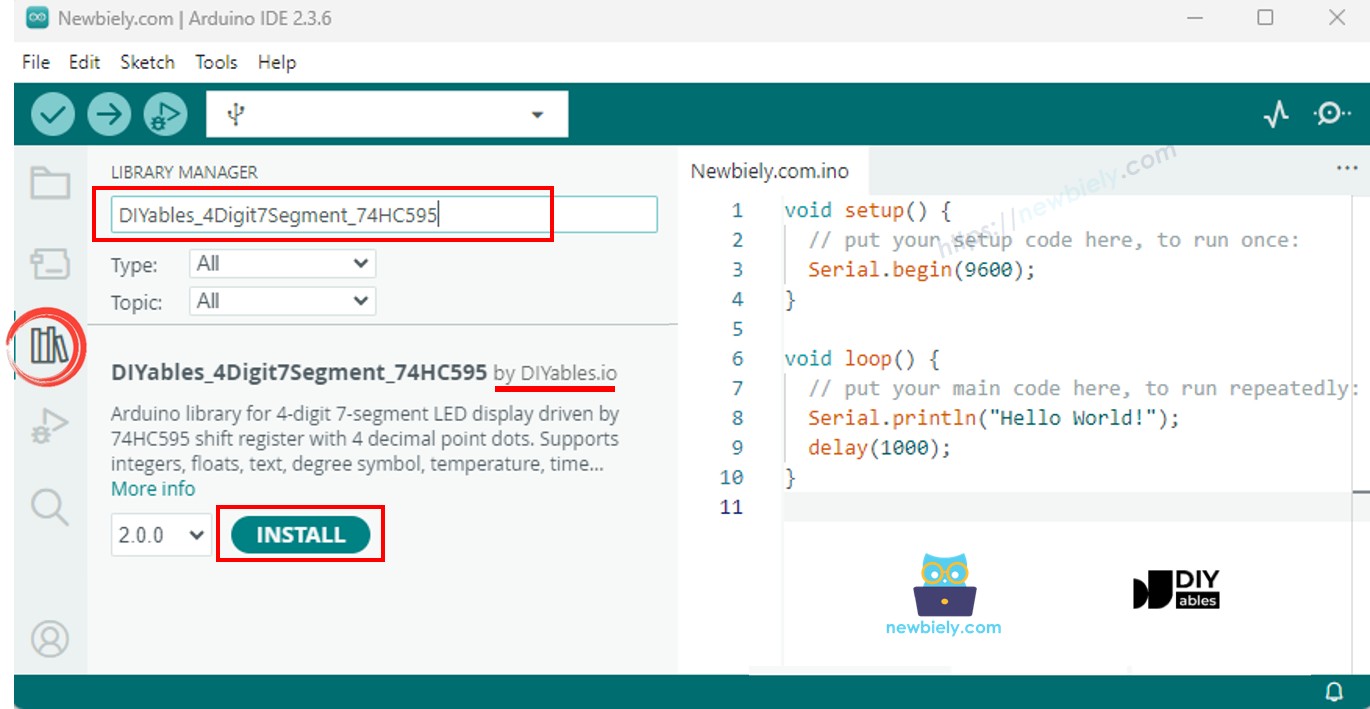
Installing the Library
- Connect the MKR WiFi 1010 to your computer with a Micro-B USB cable.
- Open Arduino IDE and select Arduino MKR WiFi 1010 from the board menu. Choose the correct port.
- Navigate to the Libraries panel.
- Search for "DIYables_4Digit7Segment_74HC595". Find the version published by DIYables.
- Click Install. Select version 2.0.0 or later.
Fully self-contained - no additional libraries required.
Base Template
The simplest sketch you can write with the DIYables_4Digit7Segment_74HC595 library:
Call begin() to configure the pins, set the value with print(), and keep calling display.loop() to run the multiplexing. Use display.delay() instead of delay() to avoid blanking the display.
Recipe - Display Integers
Shows integers and zero-padded values.
Make It Happen
- Wire the display to the MKR WiFi 1010 as shown above.
- Plug the MKR WiFi 1010 into your computer via Micro-B USB.
- Open Arduino IDE, confirm board and port, paste the code, then click Upload.
- Open the Serial Monitor to check the output.
Cycles through 0, 42, 1234, -5, -123, 9999, and 0042 (zero-padded).
Quick API Reference
| Method | Behavior | Code Snippet |
|---|---|---|
| print(int) | Show an integer | display.print(1234) |
| print(int, true) | Show with leading zeros | display.print(42, true) |
| loop() | Run display multiplexing | display.loop() |
Recipe - Display Floats
Floats with auto and manual decimal places.
Make It Happen
- Upload and open the Serial Monitor.
Shows auto-decimal floats, fixed 1 and 2 places, and zero-padded output.
Recipe - Text and Temperature
Text strings, degree symbol, and temperature display.
Make It Happen
- Upload and open the Serial Monitor.
Displays "HELP", "Hi", "COOL", "done", temperature values, and inline dots.
Recipe - Time Display
Clock-format HH.MM with blinking dot.
Make It Happen
- Upload and open the Serial Monitor.
Shows 12.30 with the dot blinking every 500ms.
Recipe - Blink
Toggles display on and off for different values.
Make It Happen
- Upload and open the Serial Monitor.
Blinks 1234, then 12.34, then "HELP" - five times each.
Troubleshoot
- Display blank: Check VCC, GND, and pin wiring. Verify begin() and display.loop() are in place.
- Wrong characters: Default is common anode. For common cathode, pass false to the constructor.
- Flickering: Replace delay() with display.delay().
- Board not showing up: Install the Arduino SAMD Boards core through the Boards Manager if the MKR WiFi 1010 does not appear in the board list.
Platform Support
This library relies solely on Arduino standard APIs and is compatible with all Arduino-supported platforms (architectures=*).