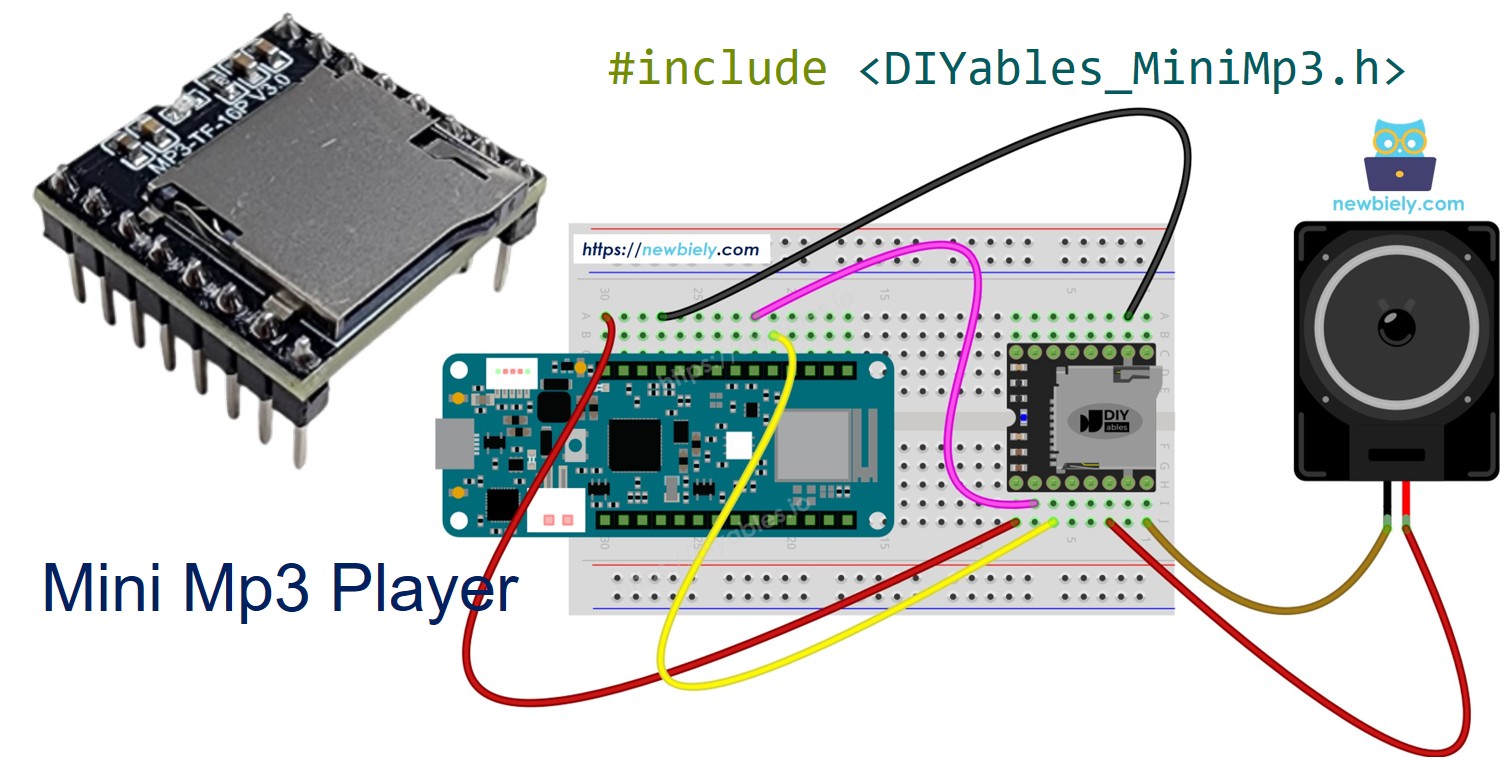
Arduino MKR WiFi 1010 - Mini Mp3 Player Module

The Arduino MKR WiFi 1010 combines WiFi and BLE connectivity with a compact MKR form factor, all running at 3.3V. Its dedicated Serial1 port makes it straightforward to interface with UART peripherals such as the DIYables Mini Mp3 Player module.

This tutorial takes you through each step:

Arduino MKR WiFi 1010 Mini Mp3 Player

Hardware Preparation

1×Arduino MKR WiFi 1010
1×Micro USB Cable
1×DIYables Mini Mp3 Player module
1×Micro SD Card
1×Speaker
1×Breadboard
1×Jumper Wires

Or you can buy the following kits:

1×DIYables Sensor Kit (30 sensors/displays)
1×DIYables Sensor Kit (18 sensors/displays)
Disclosure: Some of the links provided in this section are Amazon affiliate links. We may receive a commission for any purchases made through these links at no additional cost to you.
Additionally, some of these links are for products from our own brand, DIYables .

Because the MKR WiFi 1010 runs at 3.3V, no resistor is needed between the board and the module.

Mini Mp3 Player Module at a Glance

The DIYables Mini Mp3 Player module is a compact mp3 decoder board based on the YX5200-24SS chip. It reads mp3 files from a micro SD card and drives a small speaker (up to 3W) directly via its onboard amplifier — or you can route audio through the DAC pins to an external amp.

The module accepts commands over UART at 9600 baud and offers:

  • Full transport: play, pause, resume, stop, next, previous
  • Volume from 0 (silent) to 30 (loudest)
  • Six EQ presets: Normal, Pop, Rock, Jazz, Classic, Bass
  • Repeat modes: single track, folder, all tracks, or random shuffle
  • Folder-based playback for organized audio libraries
  • Advertisement interrupts (play a clip, then resume the original track)
  • On-demand status queries (current track, volume, play state, etc.)

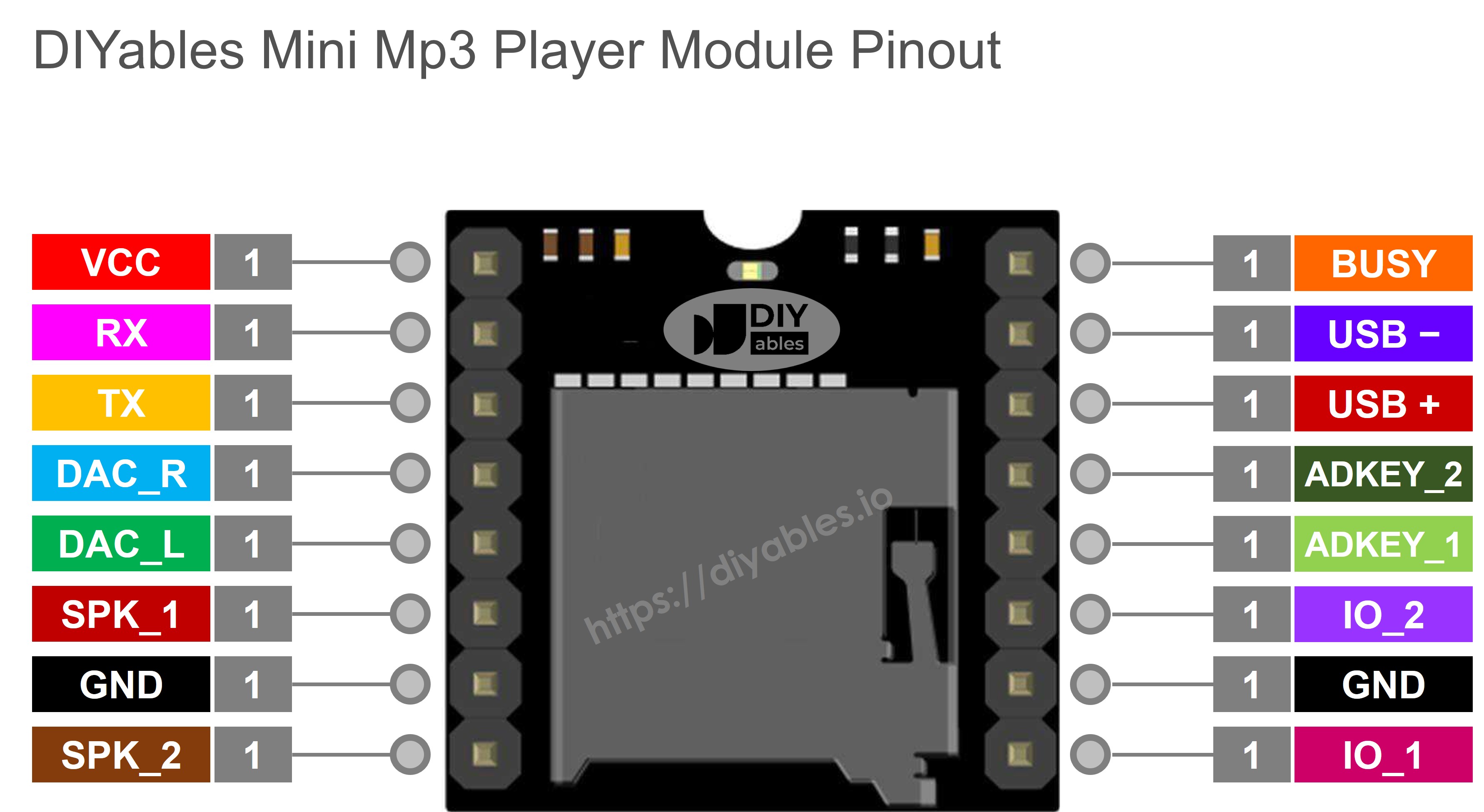
Module Pins

Pin Function
VCC Power input (3.2V – 5.0V)
GND Ground
RX Serial data in (from MKR TX)
TX Serial data out (to MKR RX)
SPK_1 Speaker + (built-in amp, 3W max)
SPK_2 Speaker −
DAC_R Right channel line output
DAC_L Left channel line output
BUSY LOW during playback, HIGH when idle
IO_1 Short press → previous track; long press → vol down
IO_2 Short press → next track; long press → vol up
Mini Mp3 Player Pinout

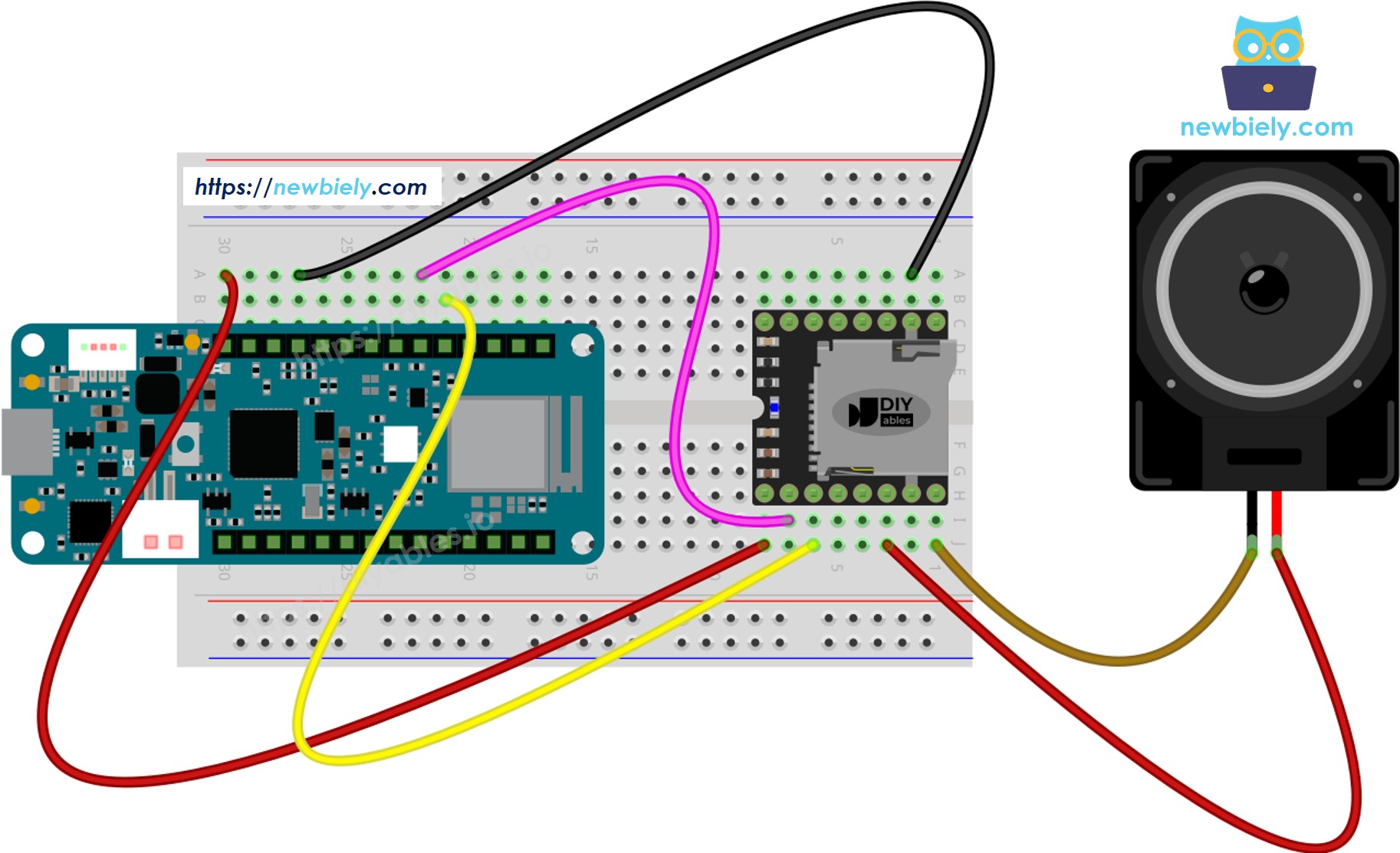
Wiring Diagram

The MKR WiFi 1010 has Serial1 on pin 13 (RX) and pin 14 (TX). Both run at 3.3V, matching the module's logic level — so you can connect the lines directly.

Mini Mp3 Player MKR WiFi 1010 Notes
VCC VCC (3.3V)
GND GND
RX Pin 14 (Serial1 TX) Direct — 3.3V logic match
TX Pin 13 (Serial1 RX) Direct
SPK_1 Speaker +
SPK_2 Speaker −
The wiring diagram between Arduino MKR WiFi 1010 Mini Mp3 Player

This image is created using Fritzing. Click to enlarge image

Note: Do not supply 5V to the module from the MKR board's VCC pin — it outputs 3.3V. If you need 5V for louder speaker output, use an external 5V source for the module's VCC while keeping GND shared.

SD Card Setup

  1. Format the micro SD card as FAT16 or FAT32.
  2. Copy mp3 files to the root directory with zero-padded names:
/001.mp3 /002.mp3 /003.mp3
  1. For folder-organized playback:
/01/001.mp3 /01/002.mp3 /02/001.mp3

Keep in mind:

  • Track numbering starts at 1, not 0.
  • The module assigns track numbers by the order files are copied, not by filename. Format the card first, then copy each file individually in sequence.
  • Folder names: 2 digits, zero-padded (01–99). Files inside: 3 digits (001–255).

Installing the Library

  • Connect the MKR WiFi 1010 to your computer via micro USB.
  • In the Arduino IDE, select Arduino MKR WiFi 1010 and the correct port.
  • Open the Libraries panel on the left sidebar.
  • Search for "DIYables_MiniMp3" and install the library by DIYables.
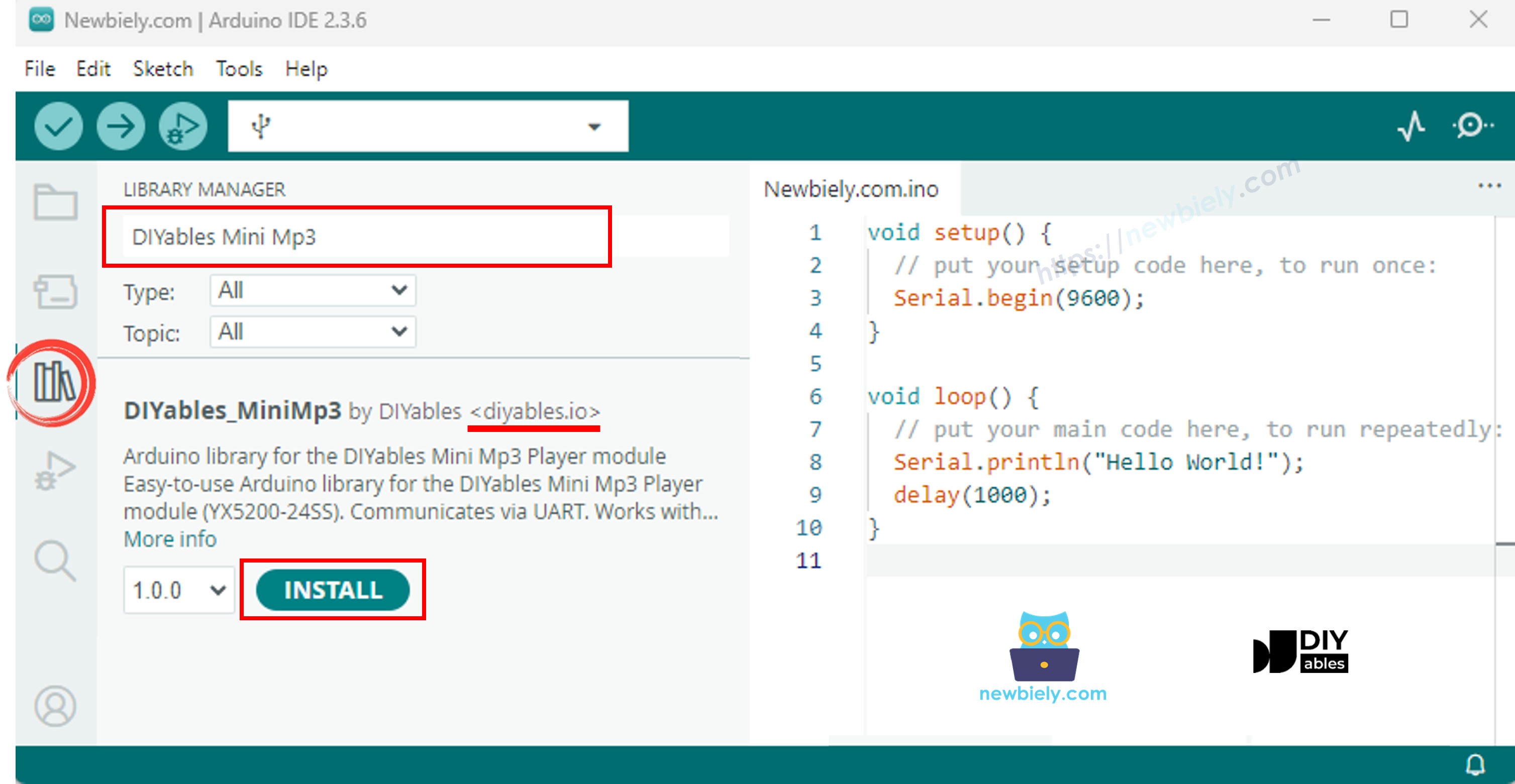
Arduino MKR WiFi 1010 Mini Mp3 Player library

No additional dependencies — the library is completely self-contained.

Base Code Template

The MKR WiFi 1010 provides hardware Serial1, so SoftwareSerial is not required:

#include <DIYables_MiniMp3.h> DIYables_MiniMp3 mp3; void setup() { Serial.begin(115200); // USB debug output Serial1.begin(9600); // Mp3 module on pins 13/14 mp3.begin(Serial1); delay(1000); // Module boot time mp3.setVolume(25); // Range: 0 to 30 } void loop() { // Your application code }

MKR WiFi 1010 — Play One Track

/* * DIYables Mini Mp3 Player - Play One Track * * Product: DIYables Mini Mp3 Player Module * https://diyables.io/products/mini-mp3-player-module * * Plays track 001 once, then stops. * * Wiring (Arduino MKR WiFi 1010): * Mini Mp3 RX -> Arduino Pin 11 * Mini Mp3 TX -> Arduino Pin 10 * Mini Mp3 VCC -> 5V * Mini Mp3 GND -> GND * Speaker connected to SPK_1 and SPK_2 pins * * SD Card: Put mp3 files in root, named 001.mp3, 002.mp3, etc. */ #include <DIYables_MiniMp3.h> #include <SoftwareSerial.h> SoftwareSerial mp3Serial(10, 11); // RX, TX DIYables_MiniMp3 mp3; void setup() { Serial.begin(9600); mp3Serial.begin(9600); mp3.begin(mp3Serial); delay(1000); // Wait for the module to initialize mp3.setVolume(25); // Set volume (0 to 30) Serial.println("Playing track 1..."); mp3.play(1); // Play track 001.mp3 } void loop() { // Nothing to do here }

Getting It Running

  • Load the SD card with mp3 files, insert it into the module, and wire as shown.
  • Select Arduino MKR WiFi 1010 in the IDE and upload.
  • Track 001.mp3 plays through the speaker.

Playback Methods Overview

Method Purpose Usage
play(n) Play a specific track mp3.play(1)
playNext() Jump to next track mp3.playNext()
playPrevious() Jump to previous track mp3.playPrevious()
pause() Pause the current track mp3.pause()
resume() Resume paused playback mp3.resume()
stop() Stop playback entirely mp3.stop()

MKR WiFi 1010 — Play Multiple Tracks

/* * DIYables Mini Mp3 Player - Play Multiple Tracks * * Product: DIYables Mini Mp3 Player Module * https://diyables.io/products/mini-mp3-player-module * * Plays tracks one after another with a delay between them. * * Wiring (Arduino MKR WiFi 1010): * Mini Mp3 RX -> Arduino Pin 11 * Mini Mp3 TX -> Arduino Pin 10 * Mini Mp3 VCC -> 5V * Mini Mp3 GND -> GND * Speaker connected to SPK_1 and SPK_2 pins * * SD Card: Put mp3 files in root, named 001.mp3, 002.mp3, 003.mp3 */ #include <DIYables_MiniMp3.h> #include <SoftwareSerial.h> SoftwareSerial mp3Serial(10, 11); // RX, TX DIYables_MiniMp3 mp3; int currentTrack = 1; int totalTracks = 3; // Change this to match your SD card unsigned long lastTrackTime = 0; unsigned long trackDuration = 5000; // Wait 5 seconds between tracks (adjust as needed) void setup() { Serial.begin(9600); mp3Serial.begin(9600); mp3.begin(mp3Serial); delay(1000); mp3.setVolume(20); Serial.println("Playing track 1..."); mp3.play(currentTrack); lastTrackTime = millis(); } void loop() { // After trackDuration, play the next track if (millis() - lastTrackTime >= trackDuration) { currentTrack++; if (currentTrack > totalTracks) currentTrack = 1; // Loop back to first track Serial.print("Playing track "); Serial.println(currentTrack); mp3.play(currentTrack); lastTrackTime = millis(); } }

Getting It Running

  • Make sure the SD card has at least 3 tracks. Upload and the board cycles through them every 5 seconds.

MKR WiFi 1010 — Volume Buttons

/* * DIYables Mini Mp3 Player - Volume Control * * Product: DIYables Mini Mp3 Player Module * https://diyables.io/products/mini-mp3-player-module * * Use two buttons to increase/decrease the volume. * Press button on pin 2 to volume up, pin 3 to volume down. * * Wiring (Arduino MKR WiFi 1010): * Mini Mp3 RX -> Arduino Pin 11 * Mini Mp3 TX -> Arduino Pin 10 * Mini Mp3 VCC -> 5V * Mini Mp3 GND -> GND * Speaker connected to SPK_1 and SPK_2 pins * Button UP -> Pin 2 (other leg to GND) * Button DOWN -> Pin 3 (other leg to GND) * * SD Card: Put mp3 files in root, named 001.mp3, 002.mp3, etc. */ #include <DIYables_MiniMp3.h> #include <SoftwareSerial.h> SoftwareSerial mp3Serial(10, 11); // RX, TX DIYables_MiniMp3 mp3; const int BUTTON_VOL_UP = 2; const int BUTTON_VOL_DOWN = 3; int volume = 15; // Start at half volume void setup() { Serial.begin(9600); mp3Serial.begin(9600); pinMode(BUTTON_VOL_UP, INPUT_PULLUP); pinMode(BUTTON_VOL_DOWN, INPUT_PULLUP); mp3.begin(mp3Serial); delay(1000); mp3.setVolume(volume); mp3.loopTrack(1); // Play track 1 on repeat Serial.print("Volume: "); Serial.println(volume); } void loop() { // Volume Up button (pressed = LOW because of INPUT_PULLUP) if (digitalRead(BUTTON_VOL_UP) == LOW) { if (volume < 30) { volume++; mp3.setVolume(volume); Serial.print("Volume: "); Serial.println(volume); } delay(200); // Simple debounce } // Volume Down button if (digitalRead(BUTTON_VOL_DOWN) == LOW) { if (volume > 0) { volume--; mp3.setVolume(volume); Serial.print("Volume: "); Serial.println(volume); } delay(200); // Simple debounce } }

Volume Methods

Method What It Does Usage
setVolume(v) Set volume to a specific level (0–30) mp3.setVolume(20)
volumeUp() Raise volume by 1 mp3.volumeUp()
volumeDown() Lower volume by 1 mp3.volumeDown()
getVolume() Read back the current level mp3.getVolume()

MKR WiFi 1010 — Next/Previous Buttons

/* * DIYables Mini Mp3 Player - Next/Previous with Buttons * * Product: DIYables Mini Mp3 Player Module * https://diyables.io/products/mini-mp3-player-module * * Use two buttons to play next/previous tracks. * Displays the current track number on the Serial Monitor. * * Wiring (Arduino MKR WiFi 1010): * Mini Mp3 RX -> Arduino Pin 11 * Mini Mp3 TX -> Arduino Pin 10 * Mini Mp3 VCC -> 5V * Mini Mp3 GND -> GND * Speaker connected to SPK_1 and SPK_2 pins * Button NEXT -> Pin 2 (other leg to GND) * Button PREV -> Pin 3 (other leg to GND) * * SD Card: Put mp3 files in root, named 001.mp3, 002.mp3, etc. */ #include <DIYables_MiniMp3.h> #include <SoftwareSerial.h> SoftwareSerial mp3Serial(10, 11); // RX, TX DIYables_MiniMp3 mp3; const int BUTTON_NEXT = 2; const int BUTTON_PREV = 3; void setup() { Serial.begin(9600); mp3Serial.begin(9600); pinMode(BUTTON_NEXT, INPUT_PULLUP); pinMode(BUTTON_PREV, INPUT_PULLUP); mp3.begin(mp3Serial); delay(1000); mp3.setVolume(20); mp3.play(1); // Start with track 1 Serial.println("Press NEXT or PREV button to change track"); } void loop() { if (digitalRead(BUTTON_NEXT) == LOW) { Serial.println("Next track"); mp3.playNext(); delay(300); // Simple debounce } if (digitalRead(BUTTON_PREV) == LOW) { Serial.println("Previous track"); mp3.playPrevious(); delay(300); // Simple debounce } }

MKR WiFi 1010 — Pause/Resume Toggle

/* * DIYables Mini Mp3 Player - Pause and Resume * * Product: DIYables Mini Mp3 Player Module * https://diyables.io/products/mini-mp3-player-module * * Demonstrates pausing and resuming playback using a single button. * Press the button to toggle between pause and resume. * * Wiring (Arduino MKR WiFi 1010): * Mini Mp3 RX -> Arduino Pin 11 * Mini Mp3 TX -> Arduino Pin 10 * Mini Mp3 VCC -> 5V * Mini Mp3 GND -> GND * Speaker connected to SPK_1 and SPK_2 pins * Button -> Pin 2 (other leg to GND) * * SD Card: Put mp3 files in root, named 001.mp3, 002.mp3, etc. */ #include <DIYables_MiniMp3.h> #include <SoftwareSerial.h> SoftwareSerial mp3Serial(10, 11); // RX, TX DIYables_MiniMp3 mp3; const int BUTTON_PIN = 2; bool paused = false; void setup() { Serial.begin(9600); mp3Serial.begin(9600); pinMode(BUTTON_PIN, INPUT_PULLUP); mp3.begin(mp3Serial); delay(1000); mp3.setVolume(20); mp3.play(1); Serial.println("Playing. Press button to pause/resume."); } void loop() { if (digitalRead(BUTTON_PIN) == LOW) { if (paused) { mp3.resume(); Serial.println("Resumed"); } else { mp3.pause(); Serial.println("Paused"); } paused = !paused; delay(300); // Simple debounce } }

MKR WiFi 1010 — Loop a Track

/* * DIYables Mini Mp3 Player - Loop Track * * Product: DIYables Mini Mp3 Player Module * https://diyables.io/products/mini-mp3-player-module * * Loops (repeats) a track continuously with EQ setting. * * Wiring (Arduino MKR WiFi 1010): * Mini Mp3 RX -> Arduino Pin 11 * Mini Mp3 TX -> Arduino Pin 10 * Mini Mp3 VCC -> 5V * Mini Mp3 GND -> GND * Speaker connected to SPK_1 and SPK_2 pins * * SD Card file structure: * /001.mp3 * /002.mp3 * ... */ #include <DIYables_MiniMp3.h> #include <SoftwareSerial.h> SoftwareSerial mp3Serial(10, 11); // RX, TX DIYables_MiniMp3 mp3; void setup() { Serial.begin(9600); mp3Serial.begin(9600); mp3.begin(mp3Serial); delay(1000); // Wait for the module to initialize mp3.setVolume(25); // Volume: 0 to 30 mp3.setEQ(DIYables_MiniMp3::EQ_NORMAL); Serial.println("Playing track 1 on loop..."); mp3.loopTrack(1); } void loop() { // Your code here }

Repeat & Shuffle Methods

Method Behavior Usage
loopTrack(n) Repeat track n endlessly mp3.loopTrack(1)
loopFolder(f) Repeat every track in folder f mp3.loopFolder(1)
loopAll() Repeat all tracks on the card mp3.loopAll()
stopLoop() Cancel any active repeat mode mp3.stopLoop()
shuffle() Play all tracks in random order mp3.shuffle()

MKR WiFi 1010 — Folder Playback

/* * DIYables Mini Mp3 Player - Play from Folder * * Product: DIYables Mini Mp3 Player Module * https://diyables.io/products/mini-mp3-player-module * * Plays tracks from specific folders on the SD card. * * Wiring (Arduino MKR WiFi 1010): * Mini Mp3 RX -> Arduino Pin 11 * Mini Mp3 TX -> Arduino Pin 10 * Mini Mp3 VCC -> 5V * Mini Mp3 GND -> GND * Speaker connected to SPK_1 and SPK_2 pins * * SD Card file structure: * /01/001.mp3 <- playFolder(1, 1) * /01/002.mp3 <- playFolder(1, 2) * /02/001.mp3 <- playFolder(2, 1) * /02/002.mp3 <- playFolder(2, 2) * * IMPORTANT: * - Numbering starts from 1, NOT 0 * - Folder names must be 2-digit zero-padded (01-99) * - Track names must be 3-digit zero-padded (001-255) * - Format SD card as FAT32, then copy files one by one in order * - Track order is determined by the order files were copied, * NOT by filename. So copy them in the correct sequence. */ #include <DIYables_MiniMp3.h> #include <SoftwareSerial.h> SoftwareSerial mp3Serial(10, 11); // RX, TX DIYables_MiniMp3 mp3; void setup() { Serial.begin(9600); mp3Serial.begin(9600); mp3.begin(mp3Serial); delay(1000); mp3.setVolume(20); // Play track 1 from folder 01 Serial.println("Playing folder 01, track 001..."); mp3.playFolder(1, 1); delay(5000); // Play track 2 from folder 01 Serial.println("Playing folder 01, track 002..."); mp3.playFolder(1, 2); delay(5000); // Play track 1 from folder 02 Serial.println("Playing folder 02, track 001..."); mp3.playFolder(2, 1); } void loop() { // Nothing to do here }

Folder Methods

Method Description Usage
playFolder(f, t) Play track t from folder f (up to 99 folders, 255 tracks) mp3.playFolder(1, 1)
playLargeFolder(f, t) Extended capacity (15 folders, 3000 tracks) mp3.playLargeFolder(1, 1500)
playFromMP3Folder(t) Play from the dedicated /mp3 folder mp3.playFromMP3Folder(1)

MKR WiFi 1010 — Serial Monitor Control

/* * DIYables Mini Mp3 Player - Serial Command Control * * Product: DIYables Mini Mp3 Player Module * https://diyables.io/products/mini-mp3-player-module * * Control the Mp3 player by typing commands in the Serial Monitor. * Great for testing all functions without extra hardware. * * Commands (type in Serial Monitor, then press Enter): * 1-9 Play track 1 to 9 * + Volume up * - Volume down * p Pause * r Resume * s Stop * n Next track * b Previous track (back) * ? Show current status * * Wiring (Arduino MKR WiFi 1010): * Mini Mp3 RX -> Arduino Pin 11 * Mini Mp3 TX -> Arduino Pin 10 * Mini Mp3 VCC -> 5V * Mini Mp3 GND -> GND * Speaker connected to SPK_1 and SPK_2 pins * * SD Card: Put mp3 files in root, named 001.mp3, 002.mp3, etc. */ #include <DIYables_MiniMp3.h> #include <SoftwareSerial.h> SoftwareSerial mp3Serial(10, 11); // RX, TX DIYables_MiniMp3 mp3; void setup() { Serial.begin(9600); mp3Serial.begin(9600); mp3.begin(mp3Serial); delay(1000); mp3.setVolume(20); Serial.println("=== DIYables Mini Mp3 Player ==="); Serial.println("Commands:"); Serial.println(" 1-9 Play track number"); Serial.println(" + Volume up"); Serial.println(" - Volume down"); Serial.println(" p Pause"); Serial.println(" r Resume"); Serial.println(" s Stop"); Serial.println(" n Next track"); Serial.println(" b Previous track"); Serial.println(" ? Show status"); Serial.println("================================"); } void loop() { if (Serial.available()) { char cmd = Serial.read(); switch (cmd) { case '1': case '2': case '3': case '4': case '5': case '6': case '7': case '8': case '9': Serial.print("Playing track "); Serial.println(cmd - '0'); mp3.play(cmd - '0'); break; case '+': Serial.println("Volume up"); mp3.volumeUp(); break; case '-': Serial.println("Volume down"); mp3.volumeDown(); break; case 'p': Serial.println("Paused"); mp3.pause(); break; case 'r': Serial.println("Resumed"); mp3.resume(); break; case 's': Serial.println("Stopped"); mp3.stop(); break; case 'n': Serial.println("Next track"); mp3.playNext(); break; case 'b': Serial.println("Previous track"); mp3.playPrevious(); break; case '?': { Serial.println("--- Status ---"); int16_t vol = mp3.getVolume(); Serial.print("Volume: "); Serial.println(vol); int16_t track = mp3.getCurrentTrack(); Serial.print("Current track: "); Serial.println(track); bool playing = mp3.isPlaying(); Serial.print("Playing: "); Serial.println(playing ? "Yes" : "No"); int16_t total = mp3.getTrackCount(); Serial.print("Total tracks: "); Serial.println(total); Serial.println("--------------"); break; } default: break; } } }
Input Action
1–9 Play that track number
+ / − Adjust volume
p Pause
r Resume
s Stop
n Next track
b Previous track
? Show current status

EQ Presets

Constant Value Character
DIYables_MiniMp3EQ_NORMAL 0 Flat / neutral
DIYables_MiniMp3EQ_POP 1 Pop
DIYables_MiniMp3EQ_ROCK 2 Rock
DIYables_MiniMp3EQ_JAZZ 3 Jazz
DIYables_MiniMp3EQ_CLASSIC 4 Classical
DIYables_MiniMp3EQ_BASS 5 Bass emphasis
mp3.setEQ(DIYables_MiniMp3::EQ_POP);

Status Queries

Each call blocks briefly (up to 100 ms) while waiting for the module's response. A return value of −1 means the module did not reply in time.

Method Returns What You Learn
isPlaying() bool Whether audio is actively playing
getVolume() int16_t Current volume level (0–30)
getEQ() int16_t Active equalizer preset (0–5)
getTrackCount() int16_t Total mp3 files on the SD card
getCurrentTrack() int16_t Track number currently playing
getFolderCount() int16_t Number of folders on the card
getTrackCountInFolder(f) int16_t Number of tracks in folder f

※ OUR MESSAGES

  • As freelancers, We are AVAILABLE for HIRE. See how to outsource your project to us
  • Please feel free to share the link of this tutorial. However, Please do not use our content on any other websites. We invested a lot of effort and time to create the content, please respect our work!