
ESP32 MicroPython GUVA-S12SD UV Sensor
This tutorial instructs you how to use the GUVA-S12SD UV sensor with the ESP32 and MicroPython, so your board can tell you how strong the sun's ultraviolet light is right now. In detail, we will learn:
- What the small purple GUVA-S12SD board measures, and why it shows almost nothing under a ceiling lamp.
- How to connect its SIG, GND and VCC pins to the ESP32, with SIG on the ADC pin GPIO36.
- How to set up machine.ADC with 11 dB attenuation, and how read_u16() and read_uv() differ.
- How to write MicroPython code that prints the raw ADC number and the SIG voltage side by side.
- How to write MicroPython code that averages 16 readings and turns them into a UV index with a name, from Low to Extreme.
Hardware Preparation
Or you can buy the following kits:
| 1 | × | DIYables ESP32 Starter Kit (ESP32 included) | |
| 1 | × | DIYables ESP32 S3 Starter Kit (ESP32 S3 included) | |
| 1 | × | DIYables Sensor Kit (18 sensors/displays) |
Additionally, some of these links are for products from our own brand, DIYables .
Overview of GUVA-S12SD UV Sensor
Our eyes cannot see ultraviolet light, and a normal light sensor such as an LDR does not care about it either. The GUVA-S12SD module is made for exactly this light. The little white square on the board is a UV photodiode. When UV light lands on it, it lets through a very small current, far too small for the ESP32 to measure directly. Next to it sits a VLM358 op-amp chip, which turns that tiny current into a voltage on the SIG pin. More UV gives a higher voltage, and the ESP32 reads it with its ADC. The whole board is only about 11mm x 27mm, with two holes for screws, and DIYables sells it in a pack of two with the header already soldered.
Do not be surprised by your first test at the desk: indoor lamps and screens give off almost no UV, so the reading stays close to zero. Glass also blocks a big part of UV, so even a sunny window is not a fair test. Take the board outside, or shine a UV flashlight on it.
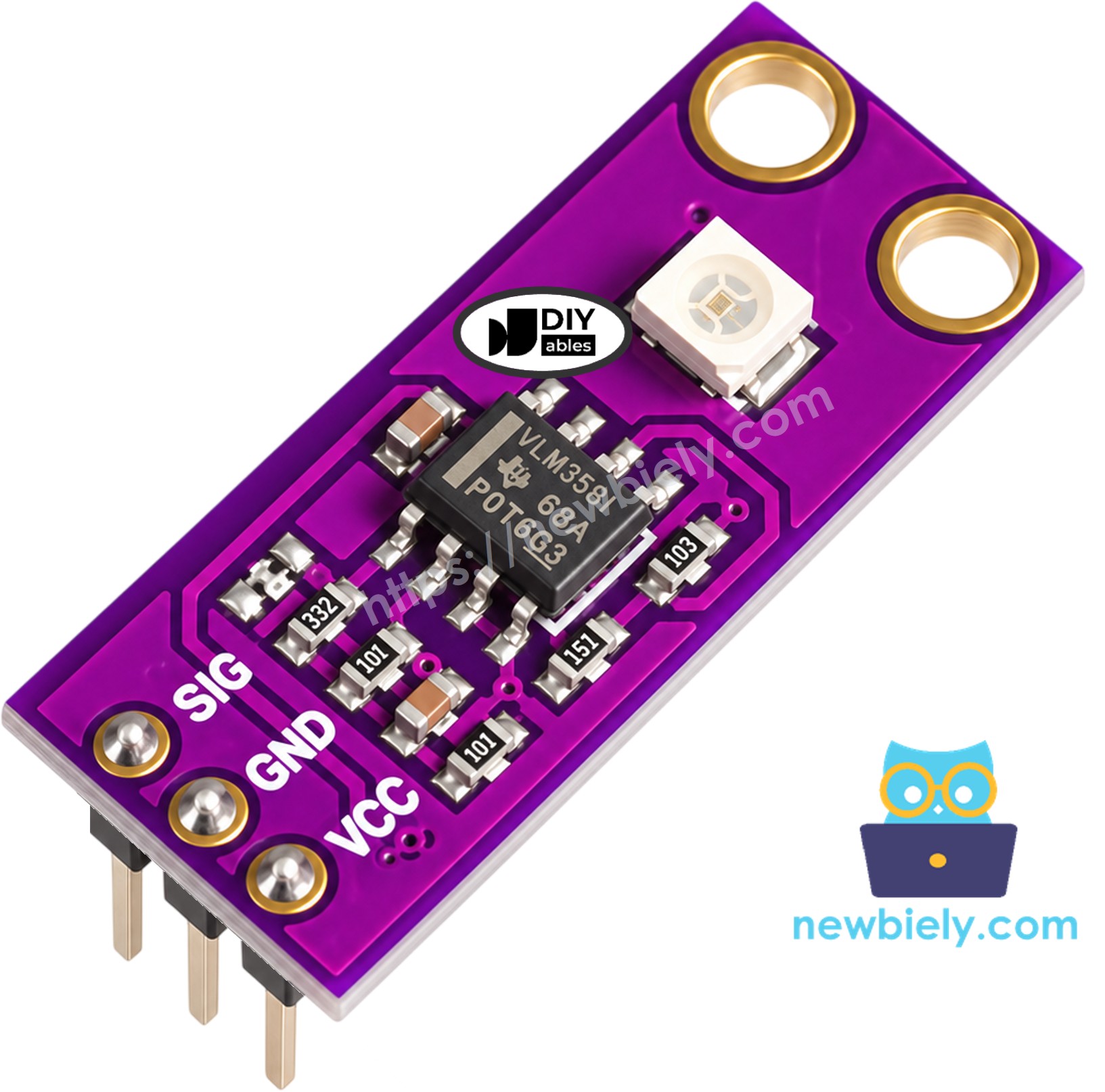
| GUVA-S12SD UV Sensor Module | |
|---|---|
| UV detector | GUVA-S12SD photodiode (the white square) |
| Amplifier | VLM358 op-amp |
| UV range | 240nm to 370nm (UV-A and UV-B) |
| Viewing angle | 130 degrees |
| Supply voltage | 2.5V to 5V DC |
| Output | analog voltage, about 0V (no UV) to about 1V or a bit more (strong sun) |
| Size | about 11mm x 27mm, with 2 screw holes |
The header has three pins, printed on the board in this order:
- SIG pin: connect to an ADC pin of the ESP32. It gives a voltage that rises with the amount of UV light.
- GND pin: connect to GND (0 volts) of the ESP32.
- VCC pin: connect to the 3.3 volts pin of the ESP32. The ESP32 works at 3.3 volts, so keep the sensor at the same level.
How do you get from volts to something useful? Most makers use a simple rule for this module: every 0.1 volts on SIG is about one point of UV index. So 0.5 volts means a UV index of about 5. This is a rough rule for hobby projects, not a lab-grade UV meter, but it is good enough to tell a safe morning from a "put on sunscreen" noon. The UV index levels are the ones the World Health Organization uses:
| UV Index | Level | SIG voltage (about) |
|---|---|---|
| 0 to 2 | Low | below 0.3V |
| 3 to 5 | Moderate | 0.3V to 0.59V |
| 6 to 7 | High | 0.6V to 0.79V |
| 8 to 10 | Very High | 0.8V to 1.09V |
| 11 and up | Extreme | 1.1V and more |
Wiring Diagram
The SIG wire goes to GPIO36. On the ESP32 this pin belongs to ADC1, which keeps working when WiFi is on, so you can later send your UV data to the internet without moving any wire. GPIO36 is input-only, which is fine here: the ESP32 only needs to listen to the sensor.
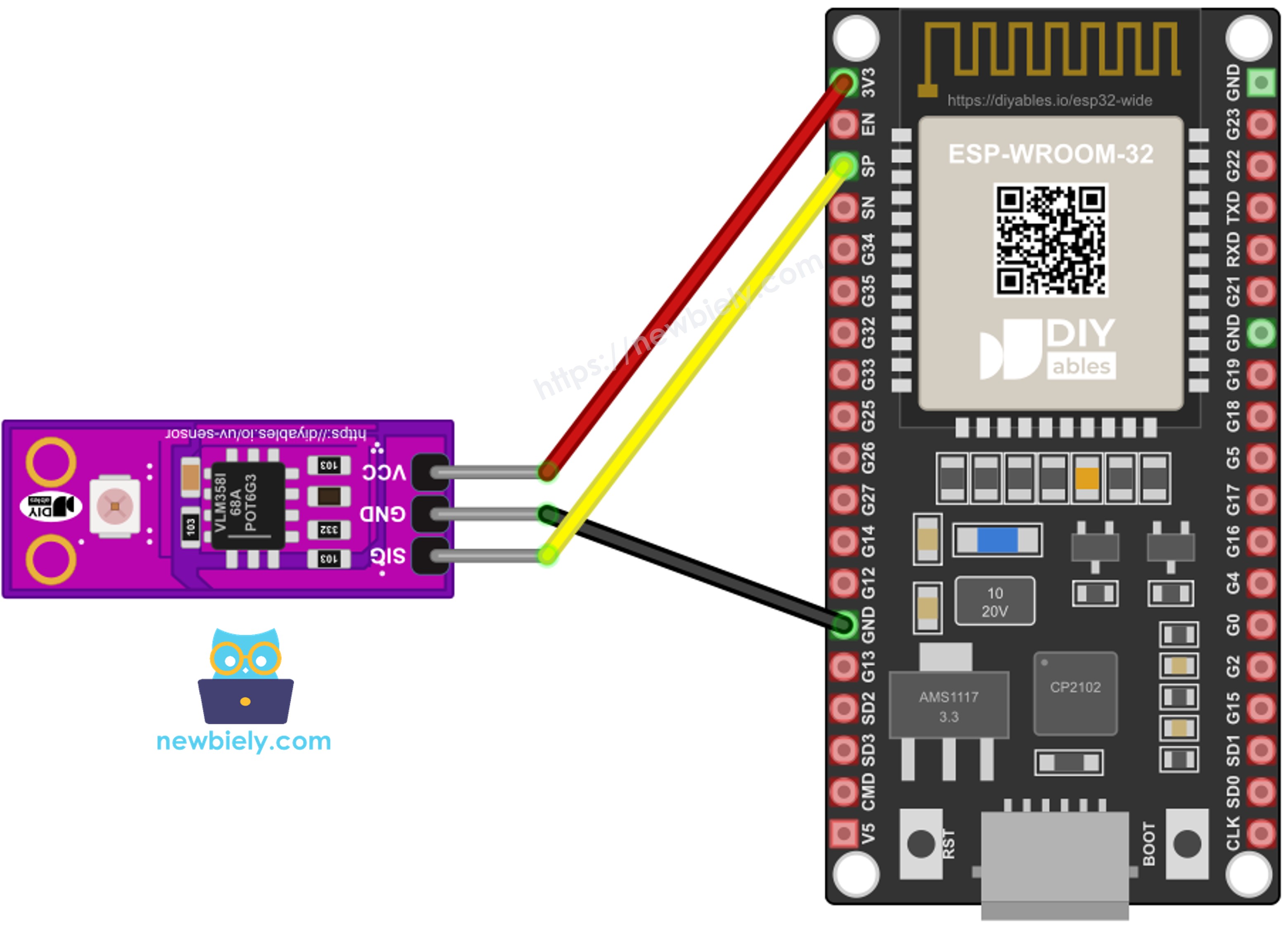
This image is created using Fritzing. Click to enlarge image
| GUVA-S12SD Pin | ESP32 Pin |
|---|---|
| SIG | GPIO36 (also printed as VP or SVP on many boards) |
| GND | GND |
| VCC | 3.3V |
ESP32 MicroPython Code - Raw ADC Value and SIG Voltage
Before we talk about UV index, it is good to see what the ESP32 actually measures. The script creates the ADC with ADC(Pin(36)) and calls atten(ADC.ATTN_11DB). Without attenuation, the ESP32 ADC only covers about 1 volt, and strong sunlight could push SIG past that. With 11 dB, the range goes up to about 3.3 volts.
Then the script reads the pin two ways:
- read_u16() gives the raw number, scaled to 0 - 65535. It is handy for a quick look, but it is not in volts.
- read_uv() gives the voltage in microvolts. MicroPython uses the calibration data stored inside each ESP32 chip, so this number is more correct than doing the math on the raw value yourself. Dividing it by 1,000,000 gives volts.
Detailed Instructions
Here's instructions on how to set up and run your MicroPython code on the ESP32 using Thonny IDE:
- Have Thonny IDE ready on your computer, and an ESP32 that already has MicroPython firmware on it.
- First time with MicroPython on the ESP32? The ESP32 MicroPython Getting Started guide shows how to flash the firmware.
- Make the three connections from the wiring table. Check that VCC is on 3.3V, not on VIN.
- Connect the ESP32 to your computer with the USB cable and start Thonny.
- Go to Tools Options, open the Interpreter tab and choose MicroPython (ESP32).
- If Thonny does not pick the port on its own, choose it from the list (for example COM5 on Windows or /dev/ttyUSB0 on Linux).
- Paste the code above into the Thonny editor.
- Save it on the ESP32:
- Click Save or press Ctrl+S.
- Pick MicroPython device in the window that pops up.
- Type main.py as the name.
- Click the green Run button or press F5.
- Watch a few lines at your desk. Then, if your USB cable is long enough (or you use a laptop), carry the board outside into the sun, sensor facing up.
- Read the numbers in the Shell:
If you name your script main.py and save it to the MicroPython device, it will run automatically every time the ESP32 is powered on.
Look at the first lines. The raw value is 0, but the voltage is not exactly 0. This is normal for the ESP32: its ADC cannot see the lowest part of the range, and the calibration gives a small starting value there. The exact number is a bit different on each board. So treat a very small reading as "no UV". The jump in the middle is the moment the sensor met the sun.
※ NOTE THAT:
The ESP32 ADC is fine for a hobby UV index, but it is not a precise meter. If you need more exact numbers, use an external ADC such as the ADS1115 with the ESP32.
ESP32 MicroPython Code - UV Index and Level Name
Voltages are not very friendly for people. This second script gives an answer anyone can read. It has two small functions:
- read_sig_voltage() takes 16 readings with read_uv(), 5 ms apart, and returns the average in volts. Clouds, shadows and ADC noise make single readings jump; the average is much calmer.
- uv_level_name() takes the UV index and returns "Low", "Moderate", "High", "Very High" or "Extreme", following the table above.
In the main loop, the UV index is simply voltage / 0.1. The result is printed with one decimal, together with the voltage and the level, once per second.
Detailed Instructions
The wiring stays the same.
- Press the red Stop button in Thonny to stop the first script.
- Delete the old code in the editor and paste the code above.
- Save it to the MicroPython device as main.py again, so it replaces the first script.
- Press F5.
- Take the ESP32 outside. Hold the sensor in full sun, then in the shade of a tree or a wall, and see the level change.
- The Shell shows something like this:
The first line was taken indoors, so it only shows the small ADC starting value from the first example. The 6s are full midday sun, and the 3 and the 2.7 are the shade. Notice how shade cuts the UV in half, but does not take it away.
Some ideas to change the script:
- Want faster updates? Lower SAMPLES or the time.sleep(1) at the end. Want a calmer number? Raise SAMPLES.
- Your module and your ESP32 give a slightly different reading than a weather app? Change the 0.1 in voltage / 0.1 a little until they match on a clear day.
Project Ideas
With MicroPython on the ESP32, the UV sensor can be the start of:
- A sunscreen reminder that blinks an LED or beeps a buzzer when the level reaches High.
- A small UV station on your balcony that sends the UV index to your phone over WiFi.
- A logger that saves the UV index every few minutes to a file on the ESP32, so you can see how the sun changes over a day.
- A tester for UV lamps and UV LEDs, to check if an old lamp is getting weak.
- An automatic window blind that closes when the UV gets too strong for your plants or furniture.