
Arduino Mega - Water/Liquid Valve
In this guide, we will learn how to control the flow of liquids such as water, beer, and oil using an Arduino Mega and a solenoid valve. We will cover:
- How to connect a solenoid valve to an Arduino Mega
- How to program Arduino Mega to control the valve
- How to switch the valve with a MOSFET module instead of a relay
The valve can be controlled by a relay or by a MOSFET module. Both of them only open and close the valve, because a valve has just two states. The MOSFET module, however, works without a click, switches much faster, and has no contacts that wear out. We explain both options.
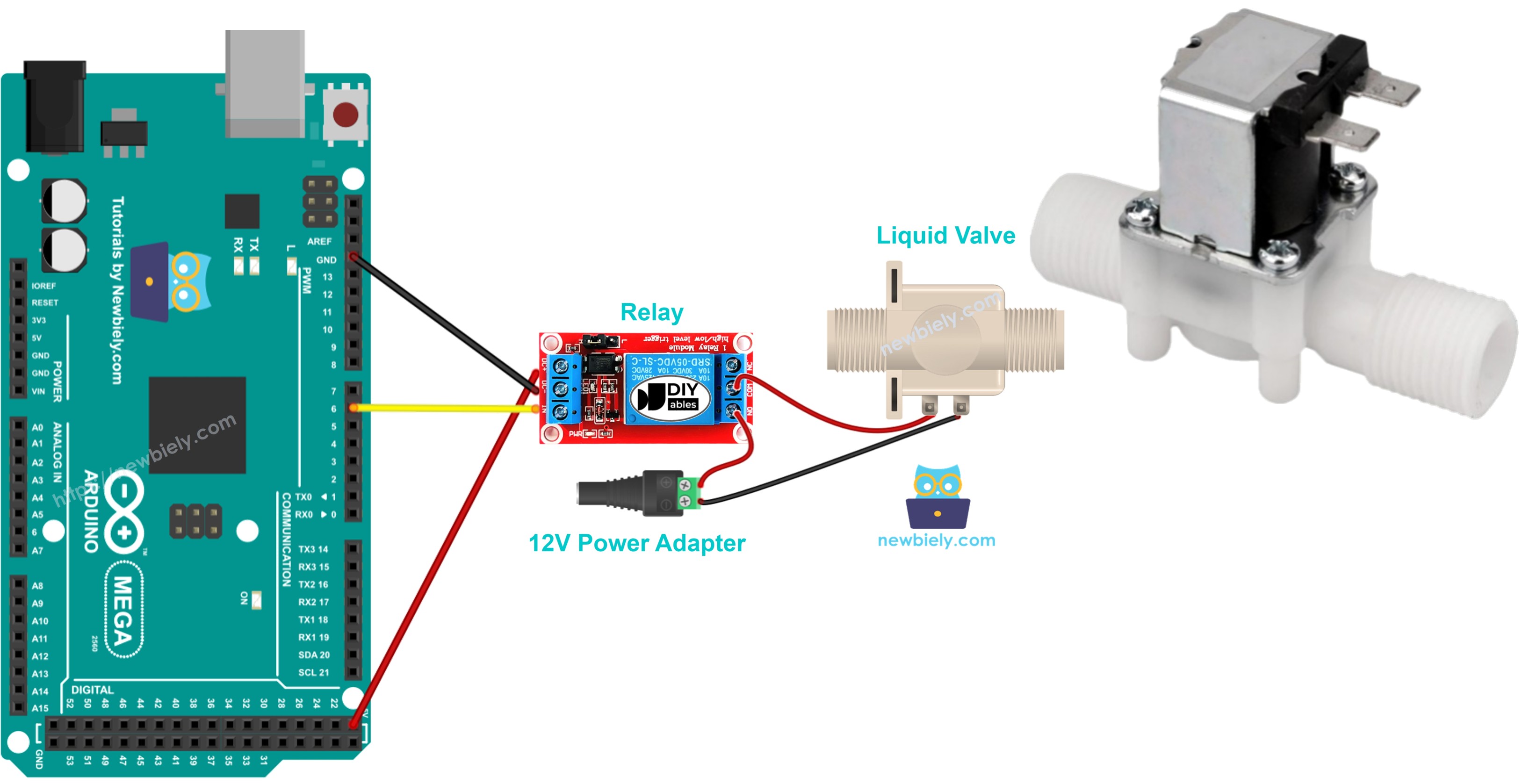
Hardware Preparation
Or you can buy the following kits:
| 1 | × | DIYables Sensor Kit (18 sensors/displays) |
Additionally, some of these links are for products from our own brand, DIYables .
Overview of Water/Liquid Valve
Pinout
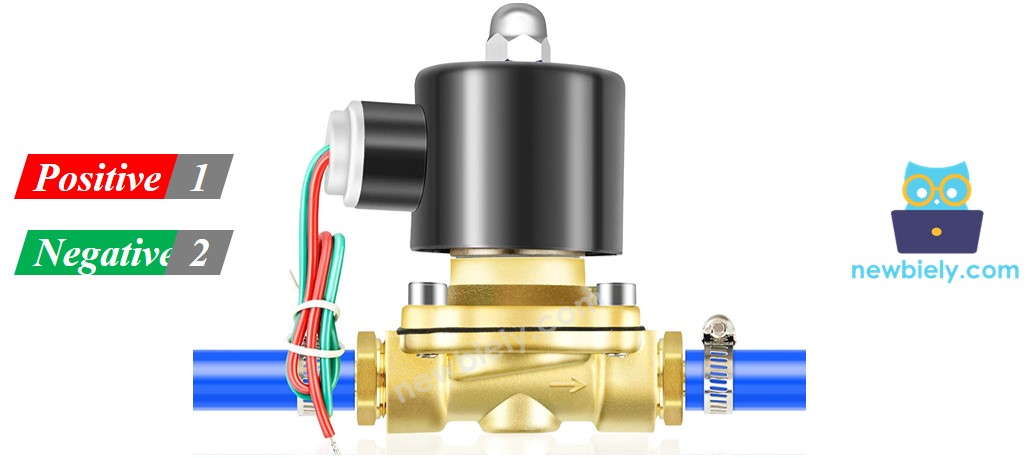
A solenoid valve usually has two ports.
- Connect the red wire to the +12V DC power supply.
- Connect the black wire to the ground (GND) terminal of the DC power supply.
How Water/Liquid Valve works
Normally the valve is closed. When you connect 12V DC to the two terminals, the valve opens and water or other liquids can flow through.
※ NOTE THAT:
Some valves have a seal inside and need a minimum pressure to open after you apply 12 V DC. This pressure can come from the liquid flow. Also, some valves let liquid flow in only one direction.
How to Control Water/Liquid Solenoid Valve
The valve opens when it gets 12V. To control the valve, you need a relay between the Arduino Mega and the valve. The Arduino Mega uses the relay to turn on the solenoid valve. If you don’t know how a relay works, what its pins do, or how to program it, you should read the Arduino Mega - Relay tutorial.
You can also open the valve with a MOSFET module. How the module works and how to wire it are covered in the Arduino Mega - MOSFET Module tutorial.
Solenoid Valve: Relay vs MOSFET Module
| Relay | MOSFET Module | |
|---|---|---|
| What it does to the valve | open or close | open or close (no PWM for a valve) |
| Noise | the relay clicks | no noise from the module |
| Response | slow, a few milliseconds | very quick |
| Wear | the contacts wear out slowly | nothing moving inside |
| Valve type | AC or DC valve | DC valve only |
| Valve supply | any voltage in the relay rating | about 6V minimum |
| Isolation | yes (coil and contacts) | yes (PC817 optocoupler) |
| Better for | AC valves, simple jobs | 12V DC valves that open and close often |
Both parts give the same result for a 12V valve: open or closed. Pick the MOSFET module if you want a quiet system that lasts long, for example a valve that opens many times each day. Pick the relay for an AC valve.
Wiring Diagram
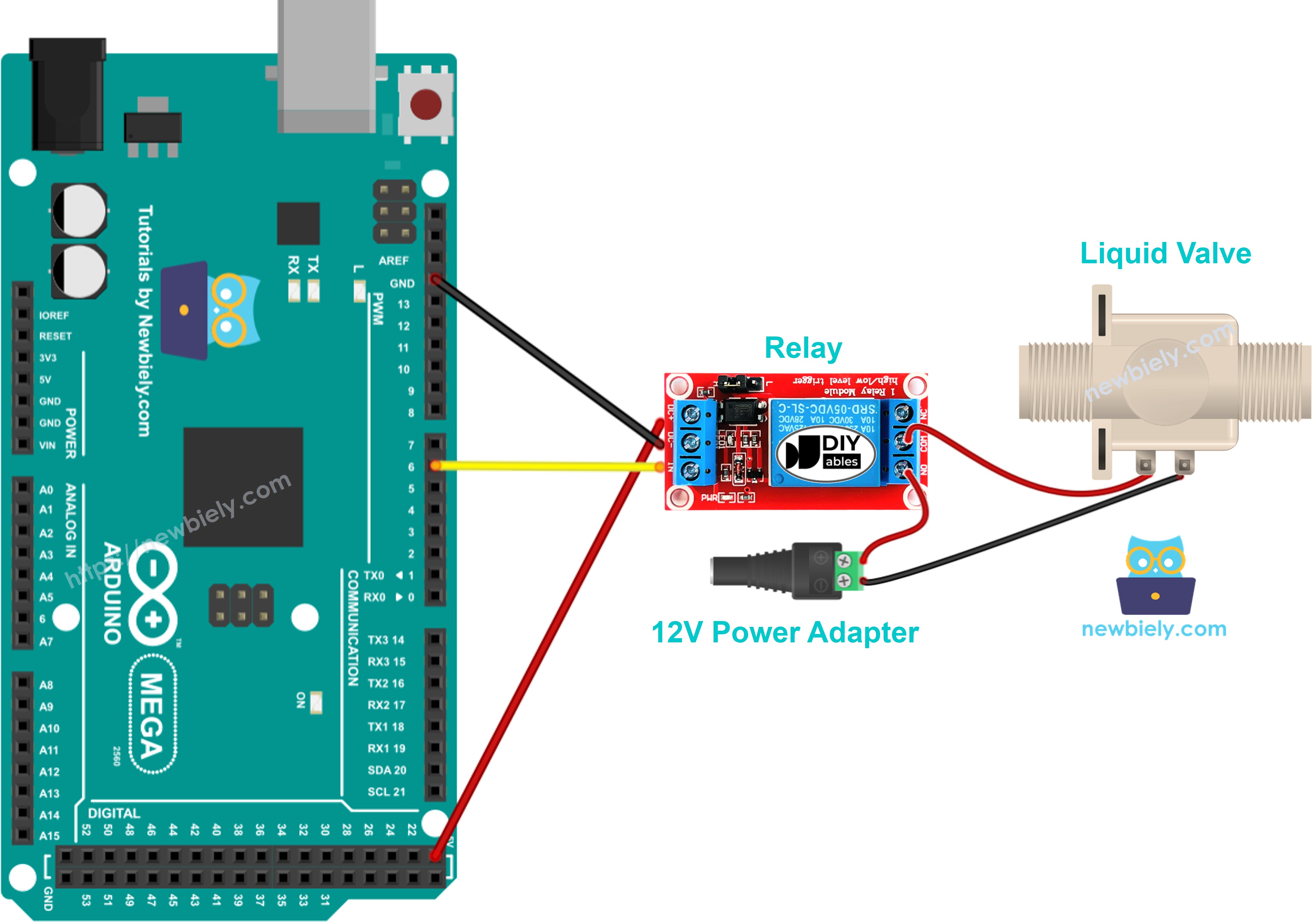
This image is created using Fritzing. Click to enlarge image
Arduino Mega Code
This code will turn the water valve on for five seconds, then turn it off for five seconds.
Detailed Instructions
Follow these steps one by one:
- Connect the Arduino Mega to the water valve as shown in the diagram.
- Connect the Arduino Mega to your computer with a USB cable.
- Open the Arduino IDE on your computer.
- Choose the correct board (Arduino Mega) and the COM port.
- Copy the code and paste it into the Arduino IDE.
- Click the Upload button in the Arduino IDE to send the code to the Arduino Mega.
- Watch the water flow.
Code Explanation
The explanation is in the comments of the Arduino code I provided.
How to Control Water Valve with MOSFET Module
Here the relay is replaced by a MOSFET module. The valve still only opens and closes, but now it happens silently.
Note: this page uses a different pin for each part. The relay is on pin 3, and the MOSFET module is on pin D2. That is why the MOSFET wiring has its own code.
Wiring Diagram
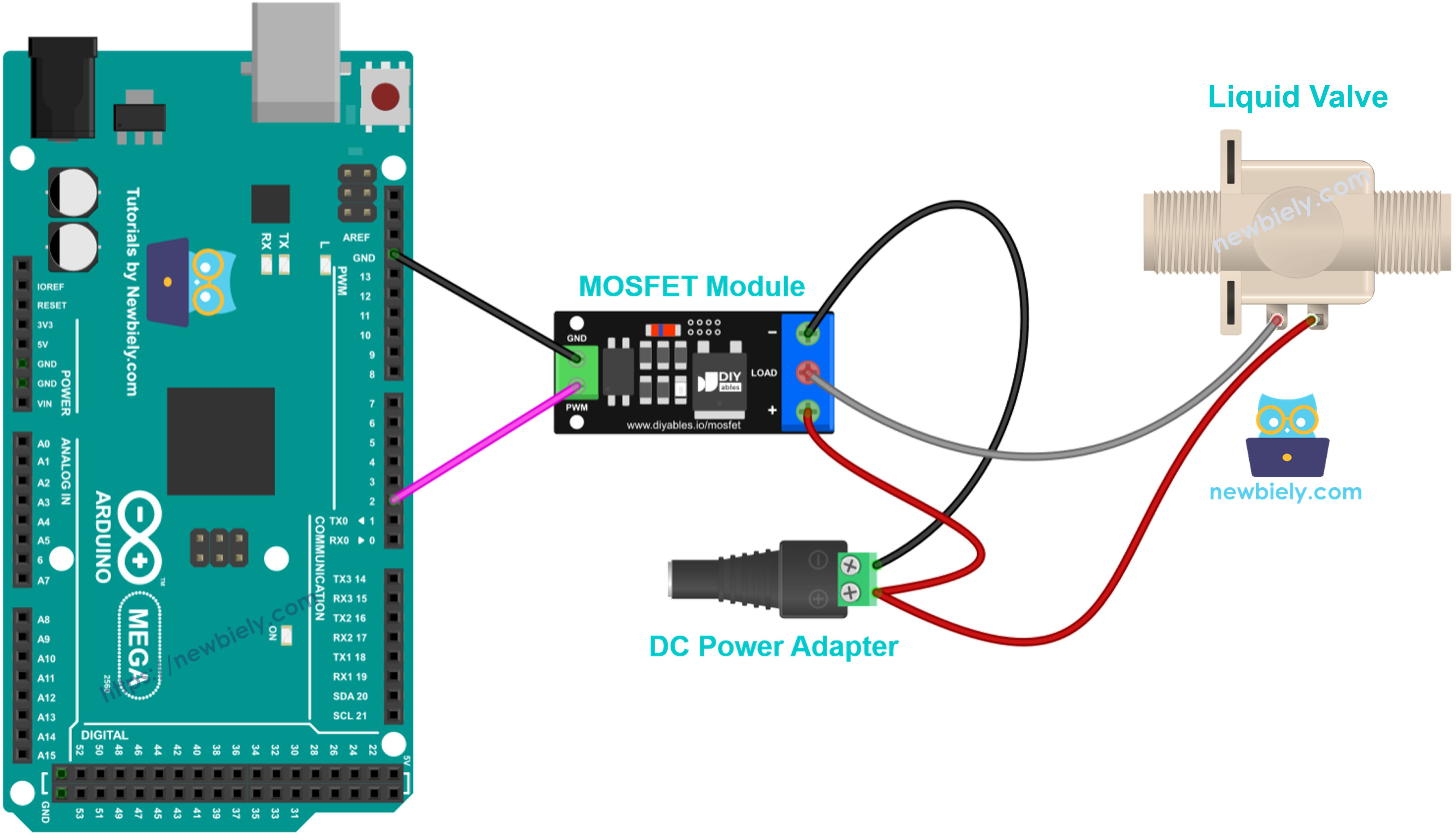
This image is created using Fritzing. Click to enlarge image
| Wire | Connect to |
|---|---|
| Arduino Mega pin D2 | Module PWM pin |
| Arduino Mega GND | Module GND pin |
| 12V adapter + | Module + terminal |
| Valve red wire (+) | Module + terminal (together with the adapter +) |
| Valve black wire (−) | Module LOAD terminal |
| 12V adapter − | Module − terminal |
The valve has a coil, so a flyback diode is needed. Place a 1N4007 or 1N5819 diode across the valve wires, with the stripe (cathode) on the valve + wire.
Arduino Mega Code
This code works like the relay code: it sets pin D2 HIGH to open the valve for 5 seconds, then LOW to close it for 5 seconds, and repeats.
Why no fade code here? The MOSFET module tutorial uses PWM to fade, but a solenoid valve must only get full ON or full OFF. Never send PWM to it.
Detailed Instructions
- Wire the valve and the MOSFET module as shown above. Keep the 12V adapter unplugged for now.
- Connect the Arduino Mega to your computer and open the Arduino IDE, just like in the relay Quick Steps.
- Copy the code above, paste it into the Arduino IDE and click Upload.
- Plug in the 12V adapter.
- The valve opens for 5 seconds and closes for 5 seconds, and you hear no relay click.
Tip: the MOSFET module is for DC valves only, and the valve supply must be at least about 6V. An AC valve needs the relay.