Arduino Mega - DC Motor Shield

Got an Arduino Mega and want to spin some motors? The Motor Shield Rev3 is your quickest path from unboxing to rotation. The Mega's headers are backward-compatible with the standard Uno pinout, so the shield drops right on - and with the DIYables_DC_Motor library you can start writing motor-control code in minutes.

This step-by-step walkthrough covers:

The Mega brings extra I/O, more SRAM, and additional hardware serial ports - handy when your project needs to talk to sensors or a display alongside the motor controller.
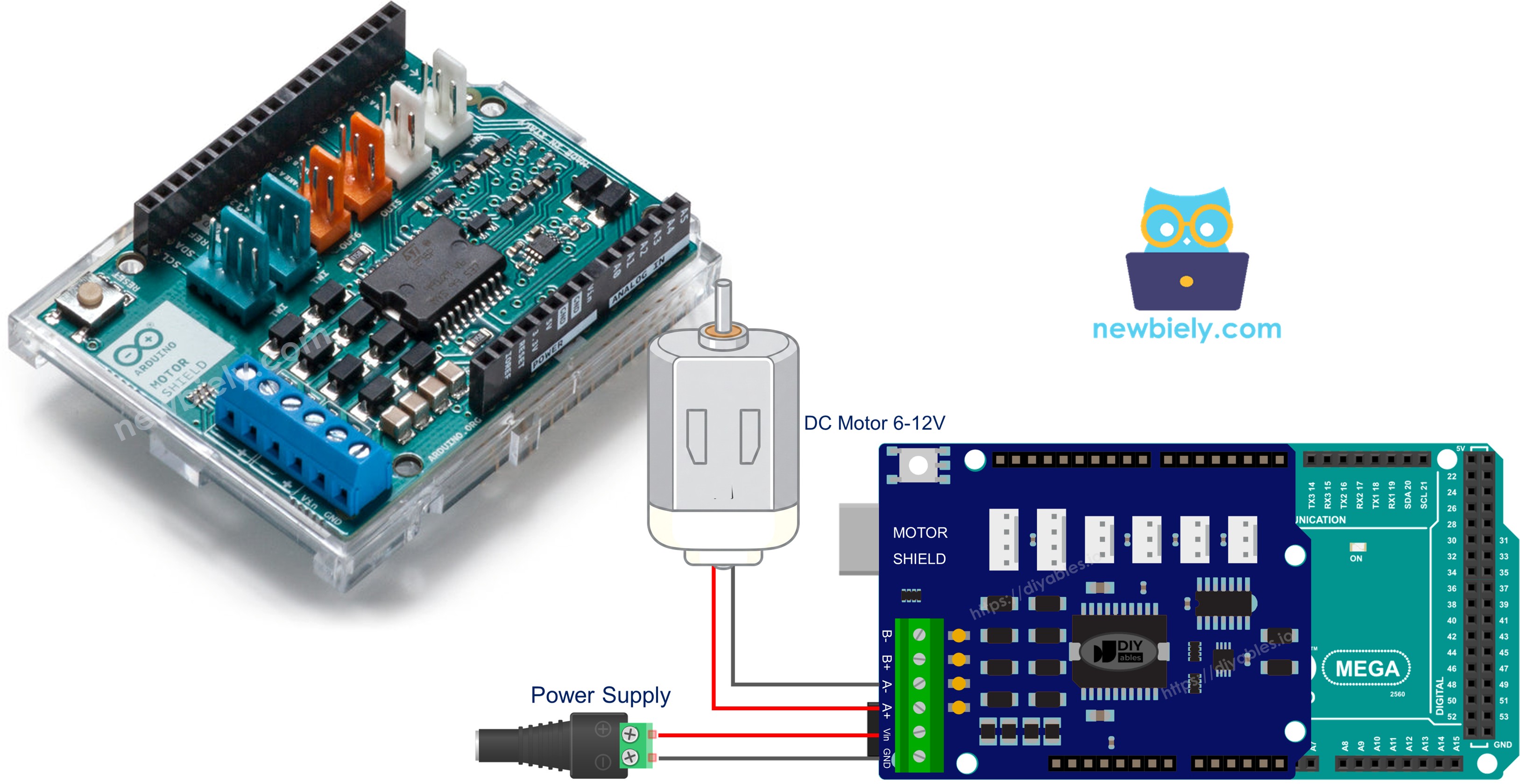
Arduino Mega DC Motor Shield

Hardware Preparation

1×Arduino Mega
1×USB 2.0 cable type A/B (for USB-A PC)
1×USB 2.0 cable type C/B (for USB-C PC)
1×Motor Shield for Arduino
1×DC Motor (e.g, 5V)
1×Power source (e.g., 5V power Adapter)
1×DC Power Jack
1×Recommended: Screw Terminal Block Shield for Arduino Uno/Mega
1×Recommended: Sensors/Servo Expansion Shield for Arduino Uno/Mega
1×Recommended: Breadboard Shield for Arduino Mega
1×Recommended: Enclosure for Arduino Mega

Or you can buy the following kits:

1×DIYables Sensor Kit (18 sensors/displays)
Disclosure: Some of the links provided in this section are Amazon affiliate links. We may receive a commission for any purchases made through these links at no additional cost to you.
Additionally, some of these links are for products from our own brand, DIYables .

Understanding the Motor Shield Rev3

The shield carries an L298P dual full-bridge driver - a single IC capable of powering two independent DC motor channels. Each channel exposes four control signals:

| Signal | Purpose |

|---|---|

| Direction | Digital pin - HIGH for one rotation sense, LOW for the other |

| PWM | Analog (PWM) pin - duty cycle from 0 (stop) to 255 (maximum) |

| Brake | Digital pin - HIGH engages the brake, LOW releases it |

| Current Sensing | Analog pin - voltage proportional to motor current |

On the Mega, these signals land on the same physical pins as on the Uno:

Function Channel A Channel B
Direction D12 D13
PWM (Speed) D3 D11
Brake D9 D8
Current Sensing A0 A1

All remaining Mega pins stay free for your other peripherals.

Power Requirements

DC motors are hungry - they draw far more current than USB can supply. Attach a 6-12 V battery pack to the shield's power screw terminals. The Mega keeps running from USB independently.

Wiring Diagram

Align the shield with the Mega's headers and press firmly until every pin is seated. Connect the DC motor leads to the Channel A screw terminals (labeled on the PCB). Then wire your battery pack to the power terminals.
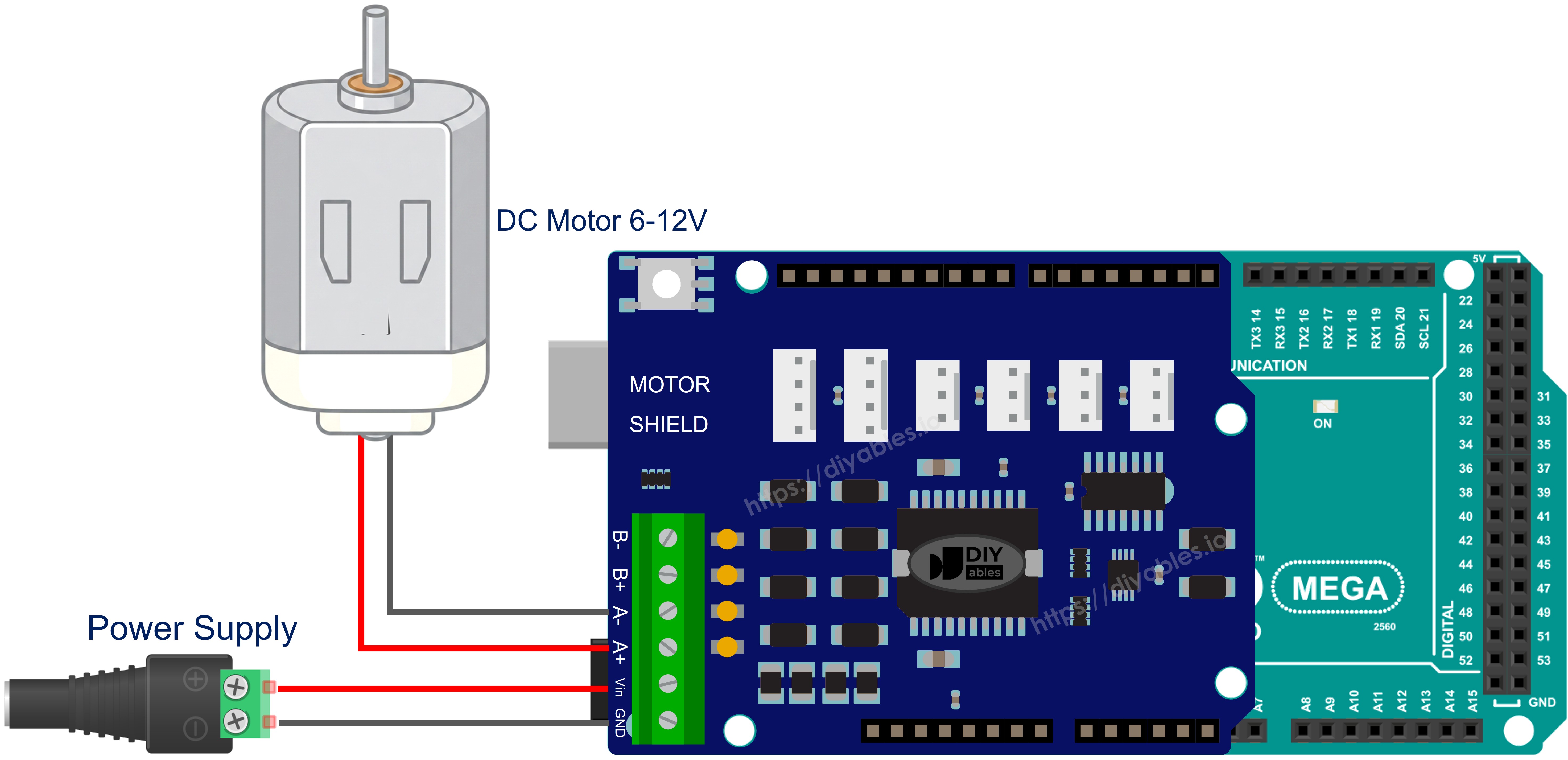
The wiring diagram between Arduino Mega DC Motor Shield

This image is created using Fritzing. Click to enlarge image

Installing the Library

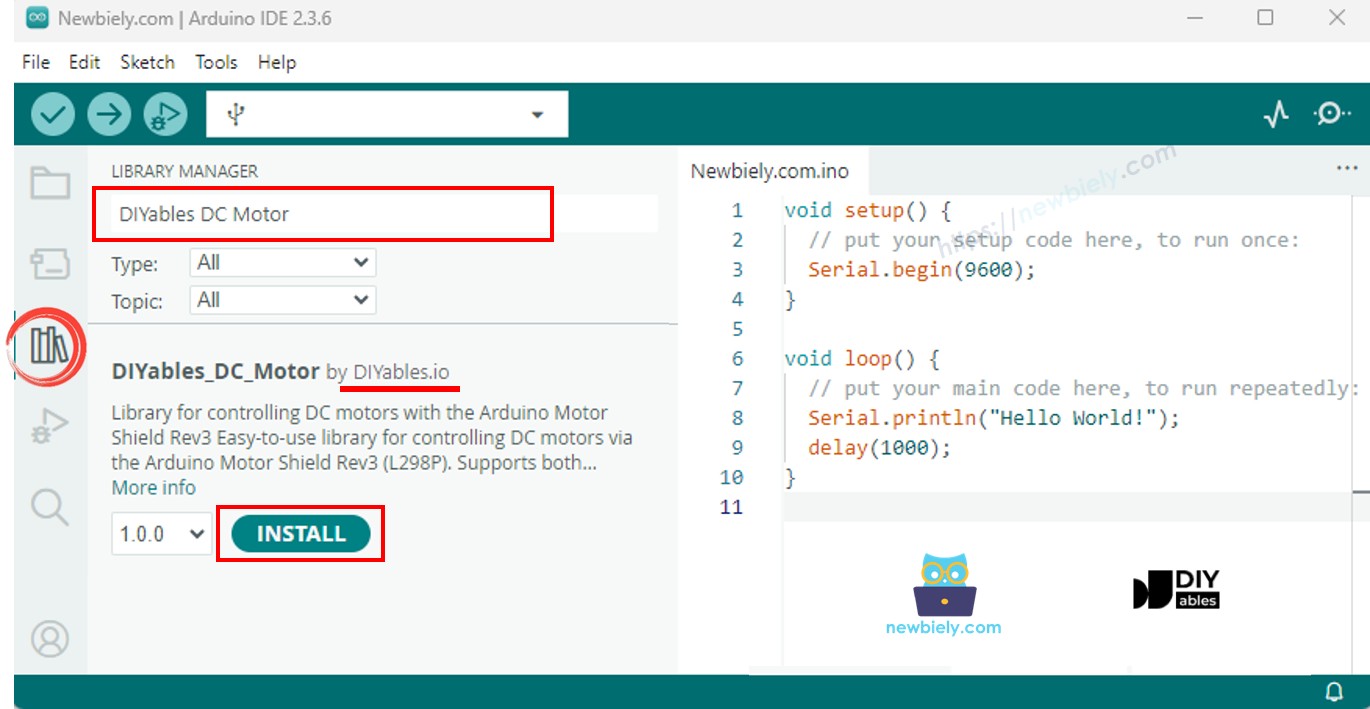
  1. Connect your Arduino Mega to the computer via a USB cable.
  2. Open the Arduino IDE. Pick Arduino Mega or Mega 2560 as the board and choose the correct port.
  3. Go to the Libraries panel on the left side.
  4. Search for "DIYables_DC_Motor". Find the entry from DIYables.
  5. Press Install.
Arduino DC Motor Shield library

The library has zero external dependencies.

Code Skeleton

The bare minimum to get a motor spinning:

#include <DIYables_DC_Motor.h> DIYables_DC_Motor motor(MOTOR_CH_A); void setup() { motor.begin(); } void loop() { motor.run(MOTOR_FORWARD, 100); delay(2000); motor.brake(); delay(1000); }

begin() sets pin modes and engages the brake. run() picks a direction, releases the brake, and applies PWM. brake() locks the shaft and zeros the PWM. That is the entire control flow.

Example - Channel A

Spin a motor on Channel A, flipping direction every cycle.

/* * This Arduino Mega code was developed by newbiely.com * * This Arduino Mega code is made available for public use without any restriction * * For comprehensive instructions and wiring diagrams, please visit: * https://newbiely.com/tutorials/arduino-mega/arduino-mega-dc-motor-shield */ /* * DIYables_DC_Motor - ChannelA Example * * This example demonstrates how to control a DC motor connected to * Channel A of the Arduino Motor Shield Rev3. The motor alternates * direction every 2 seconds with braking in between. * * Channel A pins: D12 (Direction), D3 (PWM), D9 (Brake), A0 (Current) * * Tutorial: https://diyables.io/motor-shield * * TESTED HARDWARE: * - Arduino Uno R3 * - Arduino Uno R4 WiFi * - Arduino Uno R4 Minima * - Arduino Mega * - Arduino Due * - Arduino Giga * - DIYables STEM V3: https://diyables.io/stem-v3 * - DIYables STEM V4 IoT: https://diyables.io/stem-v4-iot * - DIYables STEM V4B IoT: https://diyables.io/stem-v4b-iot * - DIYables STEM V4B Edu: https://diyables.io/stem-v4-edu * - DIYables MEGA2560 R3: https://diyables.io/atmega2560-board * - It is expected to work with other boards */ #include <DIYables_DC_Motor.h> DIYables_DC_Motor motor(MOTOR_CH_A); bool directionState = false; void setup() { Serial.begin(9600); motor.begin(); Serial.println("Motor Shield - Channel A"); } void loop() { // Toggle direction each cycle directionState = !directionState; int direction = directionState ? MOTOR_FORWARD : MOTOR_BACKWARD; // Run motor with speed 30 (out of 255) motor.run(direction, 30); Serial.print("Running "); Serial.println(directionState ? "FORWARD" : "BACKWARD"); delay(2000); // Brake the motor motor.brake(); Serial.println("Braking"); delay(2000); }

Steps to Upload

  • Mount the shield on the Mega and wire the motor to Channel A.
  • Plug in the battery pack and the USB cable.
  • Paste the code into Arduino IDE, select the board and port, and hit Upload.
  • Open the Serial Monitor (9600 baud) to watch the status output.

Expect the motor to turn one way for two seconds, stop for two seconds, reverse for two seconds, and repeat.

API at a Glance

Method Effect Sample Call
run(dir, speed) Direction + speed in one shot; auto-releases brake motor.run(MOTOR_FORWARD, 100)
setSpeed(speed) Adjusts PWM (0-255) only motor.setSpeed(200)
setDirection(dir) Flips direction only motor.setDirection(MOTOR_BACKWARD)
brake() Full stop - brake on, PWM off motor.brake()
release() Brake off motor.release()
readCurrent() Raw ADC from the sensing pin (-1 if unavailable) motor.readCurrent()

Example - Channel B

Same logic, different channel.

/* * This Arduino Mega code was developed by newbiely.com * * This Arduino Mega code is made available for public use without any restriction * * For comprehensive instructions and wiring diagrams, please visit: * https://newbiely.com/tutorials/arduino-mega/arduino-mega-dc-motor-shield */ /* * DIYables_DC_Motor - ChannelB Example * * This example demonstrates how to control a DC motor connected to * Channel B of the Arduino Motor Shield Rev3. The motor alternates * direction every 2 seconds with braking in between. * * Channel B pins: D13 (Direction), D11 (PWM), D8 (Brake), A1 (Current) * * Tutorial: https://diyables.io/motor-shield * * TESTED HARDWARE: * - Arduino Uno R3 * - Arduino Uno R4 WiFi * - Arduino Uno R4 Minima * - Arduino Mega * - Arduino Due * - Arduino Giga * - DIYables STEM V3: https://diyables.io/stem-v3 * - DIYables STEM V4 IoT: https://diyables.io/stem-v4-iot * - DIYables STEM V4B IoT: https://diyables.io/stem-v4b-iot * - DIYables STEM V4B Edu: https://diyables.io/stem-v4-edu * - DIYables MEGA2560 R3: https://diyables.io/atmega2560-board * - It is expected to work with other boards */ #include <DIYables_DC_Motor.h> DIYables_DC_Motor motor(MOTOR_CH_B); bool directionState = false; void setup() { Serial.begin(9600); motor.begin(); Serial.println("Motor Shield - Channel B"); } void loop() { // Toggle direction each cycle directionState = !directionState; int direction = directionState ? MOTOR_FORWARD : MOTOR_BACKWARD; // Run motor with speed 30 (out of 255) motor.run(direction, 30); Serial.print("Running "); Serial.println(directionState ? "FORWARD" : "BACKWARD"); delay(2000); // Brake the motor motor.brake(); Serial.println("Braking"); delay(2000); }

Steps to Upload

  • Move the motor wires to Channel B.
  • Upload and open the Serial Monitor.

The only code change is the channel constant.

Example - Dual Motor Operation

Control two motors at once, cycling through synchronized and opposing patterns.

/* * This Arduino Mega code was developed by newbiely.com * * This Arduino Mega code is made available for public use without any restriction * * For comprehensive instructions and wiring diagrams, please visit: * https://newbiely.com/tutorials/arduino-mega/arduino-mega-dc-motor-shield */ /* * DIYables_DC_Motor - BothChannels Example * * This example demonstrates how to control two DC motors simultaneously, * one on Channel A and one on Channel B of the Arduino Motor Shield Rev3. * * Channel A pins: D12 (Direction), D3 (PWM), D9 (Brake), A0 (Current) * Channel B pins: D13 (Direction), D11 (PWM), D8 (Brake), A1 (Current) * * Tutorial: https://diyables.io/motor-shield * * TESTED HARDWARE: * - Arduino Uno R3 * - Arduino Uno R4 WiFi * - Arduino Uno R4 Minima * - Arduino Mega * - Arduino Due * - Arduino Giga * - DIYables STEM V3: https://diyables.io/stem-v3 * - DIYables STEM V4 IoT: https://diyables.io/stem-v4-iot * - DIYables STEM V4B IoT: https://diyables.io/stem-v4b-iot * - DIYables STEM V4B Edu: https://diyables.io/stem-v4-edu * - DIYables MEGA2560 R3: https://diyables.io/atmega2560-board * - It is expected to work with other boards */ #include <DIYables_DC_Motor.h> DIYables_DC_Motor motorA(MOTOR_CH_A); DIYables_DC_Motor motorB(MOTOR_CH_B); void setup() { Serial.begin(9600); motorA.begin(); motorB.begin(); Serial.println("Motor Shield - Both Channels"); } void loop() { // Both motors forward motorA.run(MOTOR_FORWARD, 100); motorB.run(MOTOR_FORWARD, 100); Serial.println("Both FORWARD"); delay(2000); // Brake both motors motorA.brake(); motorB.brake(); Serial.println("Both BRAKING"); delay(1000); // Both motors backward motorA.run(MOTOR_BACKWARD, 100); motorB.run(MOTOR_BACKWARD, 100); Serial.println("Both BACKWARD"); delay(2000); // Brake both motors motorA.brake(); motorB.brake(); Serial.println("Both BRAKING"); delay(1000); // Motors in opposite directions motorA.run(MOTOR_FORWARD, 150); motorB.run(MOTOR_BACKWARD, 150); Serial.println("A FORWARD, B BACKWARD"); delay(2000); // Brake both motors motorA.brake(); motorB.brake(); Serial.println("Both BRAKING"); delay(1000); }

Steps to Upload

  • Hook up one motor to Channel A and a second motor to Channel B.
  • Upload and watch the Serial Monitor.

The program runs both motors forward, then both backward, then in opposite directions - with a braking pause between each phase.

Example - Current Monitoring

Read the current-sensing pin while the motor runs.

/* * This Arduino Mega code was developed by newbiely.com * * This Arduino Mega code is made available for public use without any restriction * * For comprehensive instructions and wiring diagrams, please visit: * https://newbiely.com/tutorials/arduino-mega/arduino-mega-dc-motor-shield */ /* * DIYables_DC_Motor - CurrentSensing Example * * This example demonstrates how to read the current drawn by a DC motor * connected to Channel A of the Arduino Motor Shield Rev3. * * The Motor Shield Rev3 provides current sensing via analog pins: * Channel A: A0 * Channel B: A1 * * Tutorial: https://diyables.io/motor-shield * * TESTED HARDWARE: * - Arduino Uno R3 * - Arduino Uno R4 WiFi * - Arduino Uno R4 Minima * - Arduino Mega * - Arduino Due * - Arduino Giga * - DIYables STEM V3: https://diyables.io/stem-v3 * - DIYables STEM V4 IoT: https://diyables.io/stem-v4-iot * - DIYables STEM V4B IoT: https://diyables.io/stem-v4b-iot * - DIYables STEM V4B Edu: https://diyables.io/stem-v4-edu * - DIYables MEGA2560 R3: https://diyables.io/atmega2560-board * - It is expected to work with other boards */ #include <DIYables_DC_Motor.h> DIYables_DC_Motor motor(MOTOR_CH_A); void setup() { Serial.begin(9600); motor.begin(); Serial.println("Motor Shield - Current Sensing"); } void loop() { // Run motor forward motor.run(MOTOR_FORWARD, 100); // Read and print current sensing value int current = motor.readCurrent(); Serial.print("Current sensing (raw ADC): "); Serial.println(current); delay(500); }

Steps to Upload

  • Connect a motor to Channel A.
  • Upload, open the Serial Monitor, and observe the ADC readings update every half second.

Current Sensing Details

Pins A0 (Channel A) and A1 (Channel B) output a voltage proportional to motor current. On the Mega's 10-bit ADC the range is 0-1023. Multiply by the shield's documented mV-per-amp factor to convert to real current.

Example - Custom Pin Mapping

Override the default pins when your hardware deviates from the standard shield layout.

/* * This Arduino Mega code was developed by newbiely.com * * This Arduino Mega code is made available for public use without any restriction * * For comprehensive instructions and wiring diagrams, please visit: * https://newbiely.com/tutorials/arduino-mega/arduino-mega-dc-motor-shield */ /* * DIYables_DC_Motor - CustomPins Example * * This example demonstrates how to create a motor object with * custom pin assignments instead of using the predefined channels. * * Tutorial: https://diyables.io/motor-shield * * TESTED HARDWARE: * - Arduino Uno R3 * - Arduino Uno R4 WiFi * - Arduino Uno R4 Minima * - Arduino Mega * - Arduino Due * - Arduino Giga * - DIYables STEM V3: https://diyables.io/stem-v3 * - DIYables STEM V4 IoT: https://diyables.io/stem-v4-iot * - DIYables STEM V4B IoT: https://diyables.io/stem-v4b-iot * - DIYables STEM V4B Edu: https://diyables.io/stem-v4-edu * - DIYables MEGA2560 R3: https://diyables.io/atmega2560-board * - It is expected to work with other boards */ #include <DIYables_DC_Motor.h> // Custom pin assignment: direction=12, pwm=3, brake=9, currentSensing=A0 DIYables_DC_Motor motor(12, 3, 9, A0); bool directionState = false; void setup() { Serial.begin(9600); motor.begin(); Serial.println("Motor Shield - Custom Pins"); } void loop() { // Toggle direction each cycle directionState = !directionState; int direction = directionState ? MOTOR_FORWARD : MOTOR_BACKWARD; // Run motor motor.run(direction, 30); Serial.print("Running "); Serial.println(directionState ? "FORWARD" : "BACKWARD"); delay(2000); // Brake the motor motor.brake(); Serial.println("Braking"); delay(2000); }

Steps to Upload

  • Edit the constructor arguments to match your actual wiring.
  • Upload and test.

Common Problems and Fixes

| Symptom | Likely Cause | Fix |

|---|---|---|

| Motor does not move | Wrong channel selected in code | Match MOTOR_CH_A / MOTOR_CH_B to the screw terminal you used |

| Motor barely turns | PWM value too low | Try a higher speed - start with 100 |

| Motor runs but no current reading | 3-pin constructor used (no sensing) | Use the channel constructor or the 4-pin constructor |

| Shield overheats | Motor stalled or drawing too much current | Reduce load or use a motor within the shield's 2 A per channel rating |

| No response at all | External power missing | Double-check battery connections and voltage |

Platform Support

Built entirely on Arduino standard APIs - compatible with every Arduino-supported architecture.

※ OUR MESSAGES

  • As freelancers, We are AVAILABLE for HIRE. See how to outsource your project to us
  • Please feel free to share the link of this tutorial. However, Please do not use our content on any other websites. We invested a lot of effort and time to create the content, please respect our work!