
Arduino Mega - GUVA-S12SD UV Sensor
The Arduino Mega has sixteen analog inputs, so one board can serve a whole rooftop weather station: temperature, humidity, rain, wind, light - and, with a GUVA-S12SD module, the strength of the sun's ultraviolet rays. The UV level is the number that tells you when to put on sunscreen, and it can be high even on a cool, cloudy day. This tutorial instructs you how to use the Arduino Mega to measure UV light from the GUVA-S12SD UV sensor and express it as a UV index. In detail, we will learn:
- What the GUVA-S12SD module is made of and what its SIG, GND and VCC pins do
- How to connect the GUVA-S12SD UV sensor to analog pin A0 of the Arduino Mega
- How to program the Arduino Mega to print the raw ADC number and the SIG voltage
- How to program the Arduino Mega to average the readings, work out an approximate UV index and name its risk level (Low to Extreme)
We suggest:
- Reading the Arduino Mega - Light Sensor tutorial if you need to know how bright a room is. The UV sensor is blind to normal visible light.
- Reading the Arduino Mega - LDR Module tutorial if you only need a simple day/night signal.
Hardware Preparation
Or you can buy the following kits:
| 1 | × | DIYables Sensor Kit (18 sensors/displays) |
Additionally, some of these links are for products from our own brand, DIYables .
Overview of GUVA-S12SD UV Sensor and Its Pinout
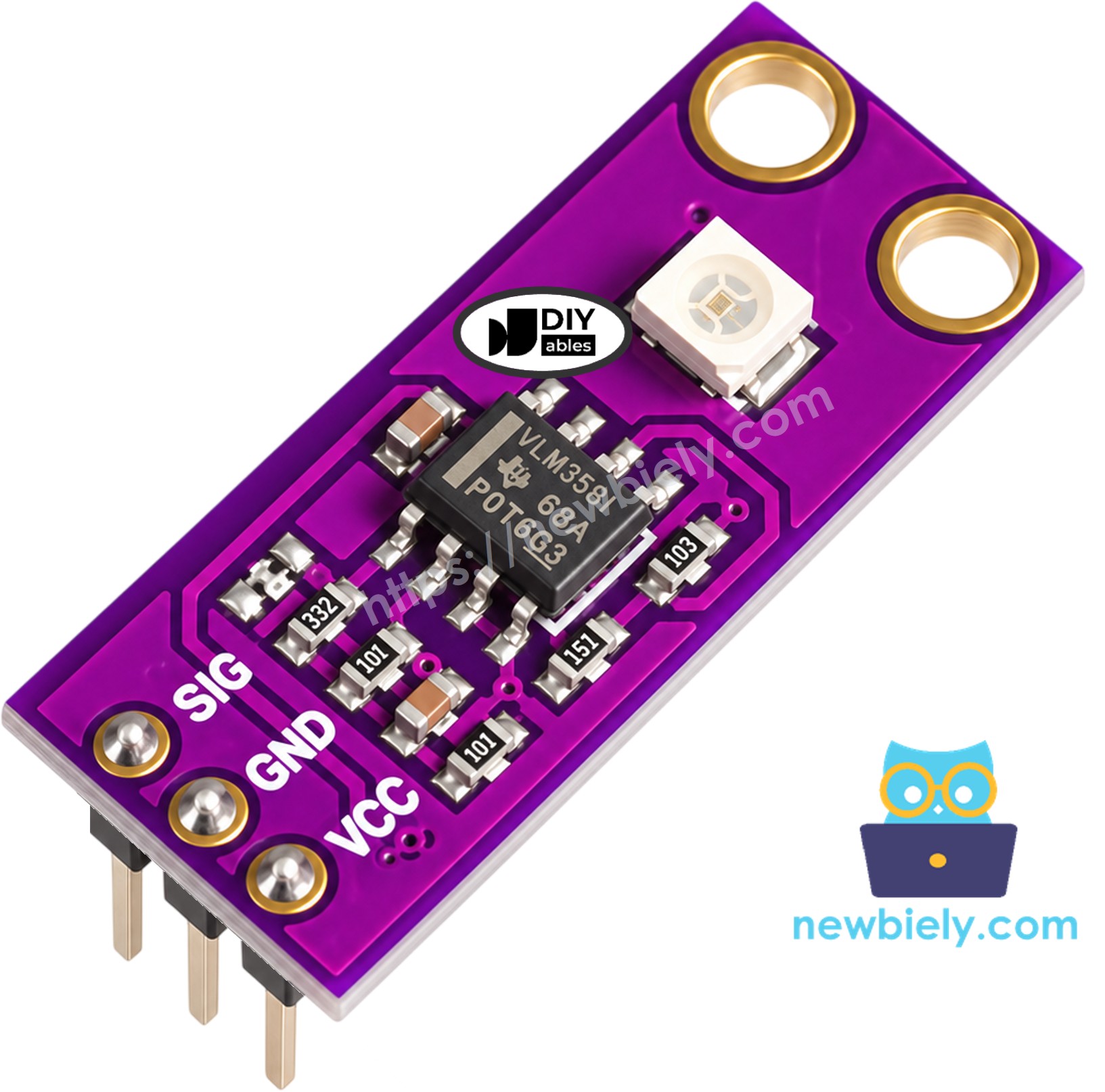
The DIYables GUVA-S12SD module is a small purple board, roughly 11mm x 27mm, with two holes for screws. Two chips do all the work. The small white square is the GUVA-S12SD photodiode, which reacts to UV-A and UV-B light between 240nm and 370nm. Next to it sits a VLM358 op-amp. When ultraviolet light lands on the photodiode, it lets through a very small current. The op-amp makes this current bigger and turns it into a voltage on the SIG pin, and the Arduino Mega reads that voltage with analogRead(). More UV means a higher voltage. The header comes already soldered, and the product is sold as a pack of two.
| GUVA-S12SD UV Sensor Module | |
|---|---|
| Supply Voltage | 2.5V to 5V DC |
| Light Range | UV-A and UV-B, 240nm to 370nm |
| Viewing Angle | 130 degrees |
| Output Type | Analog voltage on the SIG pin |
| Typical Output | About 0V with no UV, up to about 1V or a bit more in strong sun |
| Board Size | About 11mm x 27mm, two mounting holes |
Lamps and window light hold almost no UV, so inside a room the module stays close to 0V. That is normal - it is not broken. Carry it outdoors into direct sun, or shine a UV flashlight on it, to see the output rise.
The three pins are printed on the board in this order:
- SIG pin: must be connected to an analog input pin of the Arduino Mega. It carries the UV voltage.
- GND pin: must be connected to GND (0V)
- VCC pin: must be connected to the 3.3V pin or the 5V pin of the Arduino Mega. The module works on both.
※ NOTE THAT:
The arrangement of pins on a module may differ from one manufacturer to another. Check the SIG, GND and VCC labels on your own board and connect each wire by its label.
To turn the voltage into a UV index, most hobby projects use a simple rule: each 0.1V on SIG is about 1 point of UV index. So UV index ≈ SIG voltage / 0.1. This is a rough estimate for fun projects and reminders. It is not a calibrated UV meter.
The WHO sorts UV index numbers into five bands:
| UV Index | Level | What it means |
|---|---|---|
| 0 - 2 | Low | Little risk for most people |
| 3 - 5 | Moderate | Wear sunscreen and a hat at midday |
| 6 - 7 | High | Stay in the shade around noon |
| 8 - 10 | Very High | Skin can burn fast; cover up |
| 11+ | Extreme | Avoid the midday sun |
Wiring Diagram
Only three jumper wires are needed: SIG to A0, GND to a GND pin, and VCC to the 3.3V pin of the Arduino Mega. The 5V pin works for VCC too.
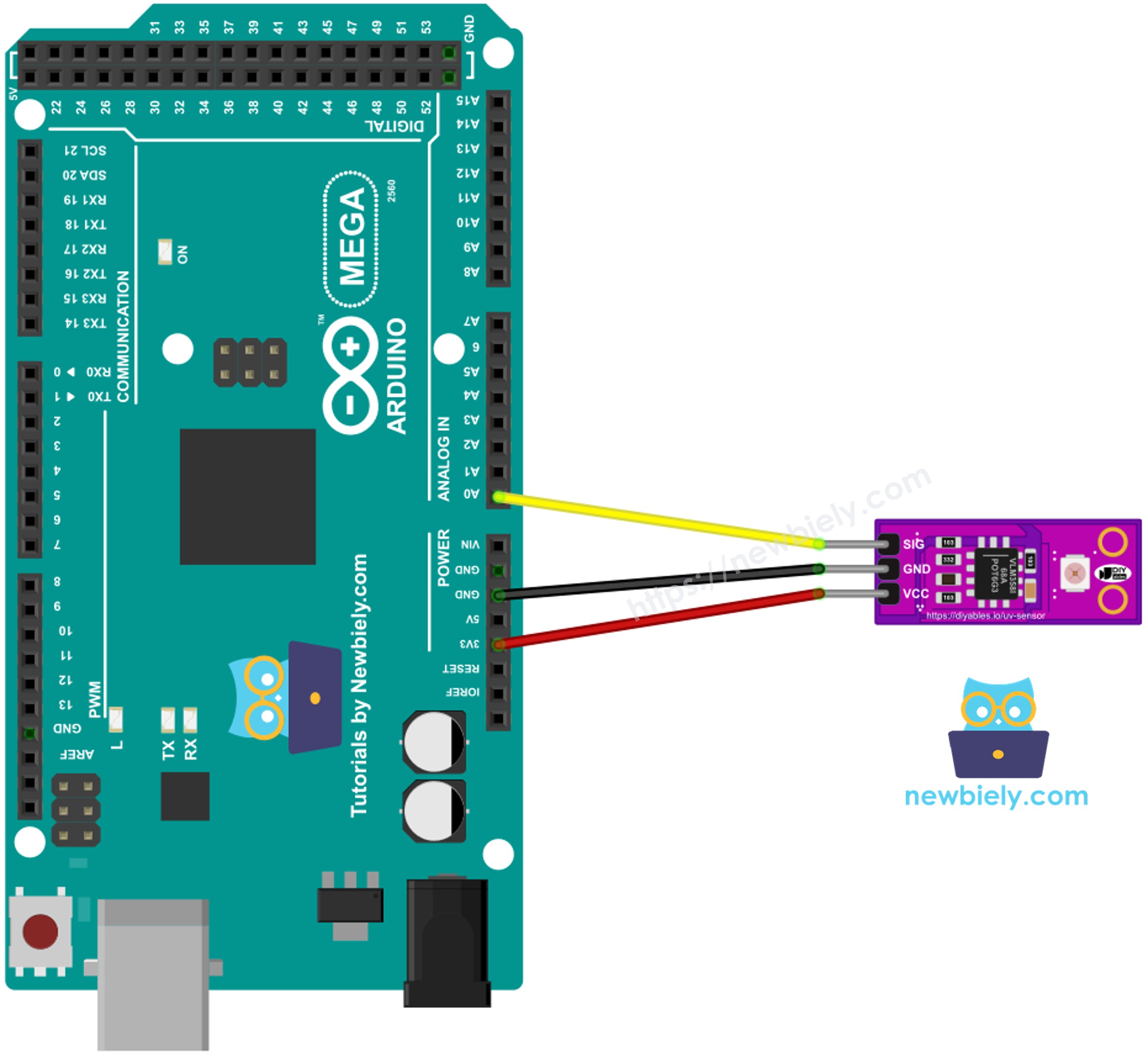
This image is created using Fritzing. Click to enlarge image
| GUVA-S12SD UV Sensor | Arduino Mega |
|---|---|
| SIG | A0 |
| GND | GND |
| VCC | 3.3V (or 5V) |
How To Program For GUVA-S12SD UV Sensor
- The first step is to give a name to the analog pin that receives the SIG wire:
- Read the pin. The Arduino Mega has a 10-bit ADC, so the result is a whole number from 0 to 1023:
- Change the number into volts. The ADC of the Mega measures against 5V, so 1023 stands for 5V. This stays true even when the module itself is powered from 3.3V:
- Divide by 0.1 to get the approximate UV index:
Arduino Mega Code for GUVA-S12SD UV Sensor - Raw ADC Value and Voltage
Start with the plain numbers. Once per second, this sketch prints the ADC value from A0 and the matching SIG voltage. It is a good way to check the wiring before you add any math.
Detailed Instructions
- If this is the first time you use the Arduino Mega, see how to set up the environment for Arduino Mega in the Arduino IDE.
- Wire the GUVA-S12SD module to the Arduino Mega as shown in the diagram.
- Connect the Arduino Mega board to your computer using a USB cable. A laptop is handy here, because you will take the setup outside.
- Open Arduino IDE on your computer.
- Select the Arduino Mega or Mega 2560 board and the right COM port.
- Paste the code above into a new sketch and click Upload.
- Open the Serial Monitor. Watch a few readings indoors, then walk out into the sun and point the white sensor chip at the sky.
The first three lines were taken next to a window, and the ADC value hardly moves above zero. The last four were taken outside around midday, where the voltage climbs to more than half a volt. Notice how small the numbers are: even in bright sun, the SIG pin uses only a small part of the 0 to 1023 range.
Arduino Mega Code for GUVA-S12SD UV Sensor - UV Index and Risk Level
A single analogRead() can jump by one or two steps from one reading to the next. This sketch takes 16 readings in a row and uses their average, so the result is steadier. Then it changes the average into volts, divides by 0.1 to get the UV index, and picks the WHO level name with a short helper function, uvLevelName().
Detailed Instructions
- Keep the same wiring.
- Replace the previous sketch with the code above and click Upload.
- Open the Serial Monitor. Start in the shade, then move into full sunlight.
In the shade the index is low. In open summer sun at noon it moves into the High and Very High levels. Your own numbers depend on the season, the time of day, the clouds and the angle of the sensor.
From here, the Arduino Mega can do more with the result. For example, it can sound a buzzer when the index reaches 6, show the level on an LCD, close a smart window blind, or check if a UV lamp or UV LED still gives enough light.
Additional Knowledge
How is the GUVA-S12SD different from the LDR light sensor in the other Arduino Mega tutorials?
| LDR Light Sensor | GUVA-S12SD UV Sensor | |
|---|---|---|
| Reacts to | Visible light | Ultraviolet light only (240nm to 370nm) |
| Indoor lamp | Big change in reading | Almost no change |
| Output | Changes with resistance (needs a resistor or a module) | Ready-to-read voltage on SIG |
| Typical use | Day/night switch, room brightness | UV index, sunburn warning |
It is evident that the two sensors answer different questions: the LDR tells you how bright it is, and the GUVA-S12SD tells you how strong the sunburn-causing part of the light is.
A tip on resolution: with the default 5V reference, one ADC step of the Arduino Mega is about 4.9mV, which is about 0.05 UV index. That is fine for hobby use. If you want finer steps, the Mega also has an internal 2.56V reference. Add analogReference(INTERNAL2V56); in setup() and change 5.0 to 2.56 in the voltage formula. The SIG voltage stays well below 2.56V, so nothing is cut off.
Finally, keep the sensor dry if you mount it outdoors. A clear window in front of it must let UV through - normal glass and many plastics block a lot of UV, and the readings will drop.