
Arduino Nano 33 IoT - Solenoid Lock
The Solenoid Lock, also called the Electric Strike Lock, is a device that locks or unlocks cabinets, drawers, or doors. This guide shows you how to use an Arduino Nano 33 IoT to control the solenoid lock.
Another option for a solenoid lock is the electromagnetic lock. You can find more information in the Arduino Nano 33 IoT Electromagnetic Lock tutorial.
Hardware Preparation
Or you can buy the following kits:
| 1 | × | DIYables Sensor Kit (18 sensors/displays) |
Additionally, some of these links are for products from our own brand, DIYables .
Overview of Solenoid Lock
Pinout
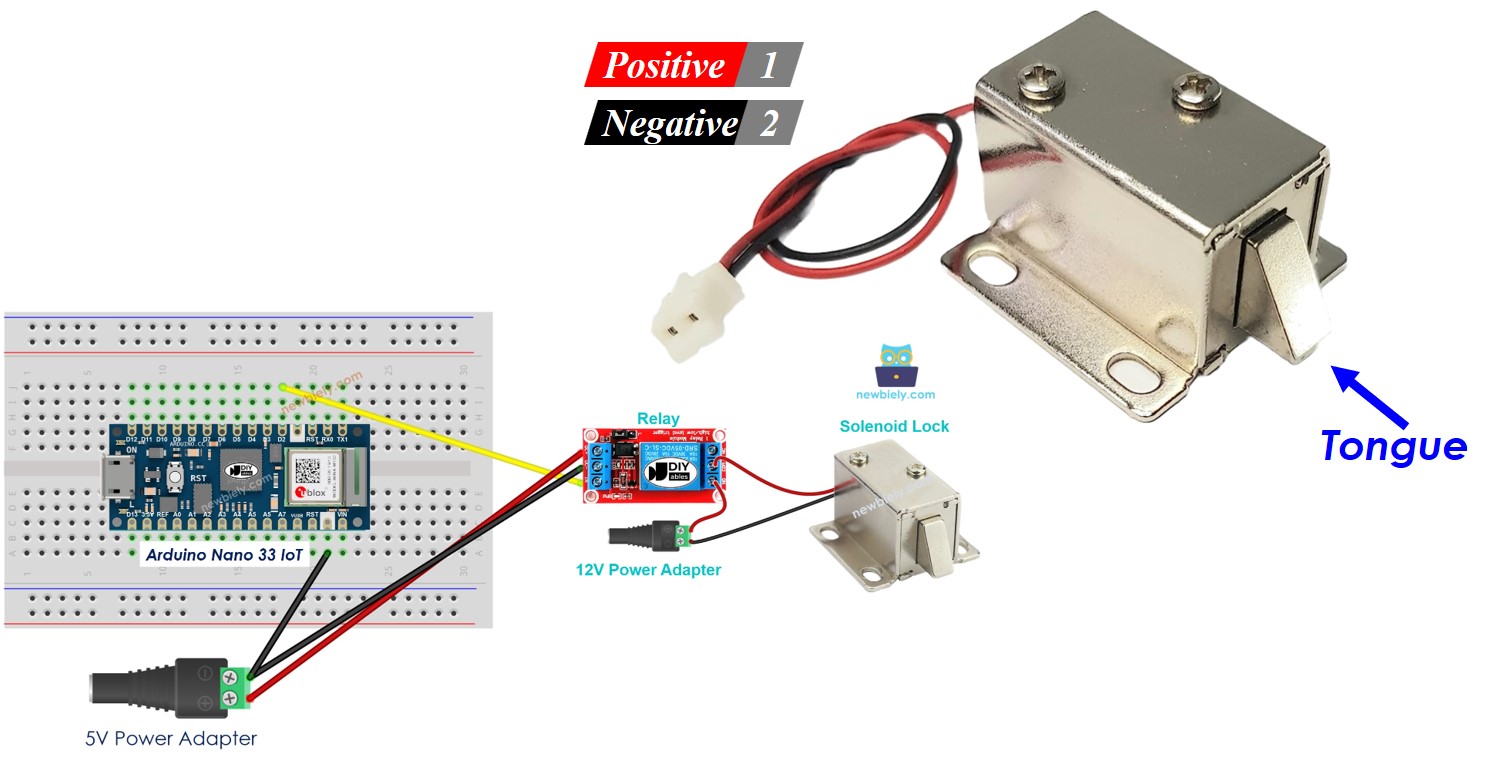
The solenoid lock has two wires:
- Red wire (+): Connect to the 12V output of the DC power supply.
- Black wire (-): Connect to the ground (GND) of the DC power supply.
How It Works
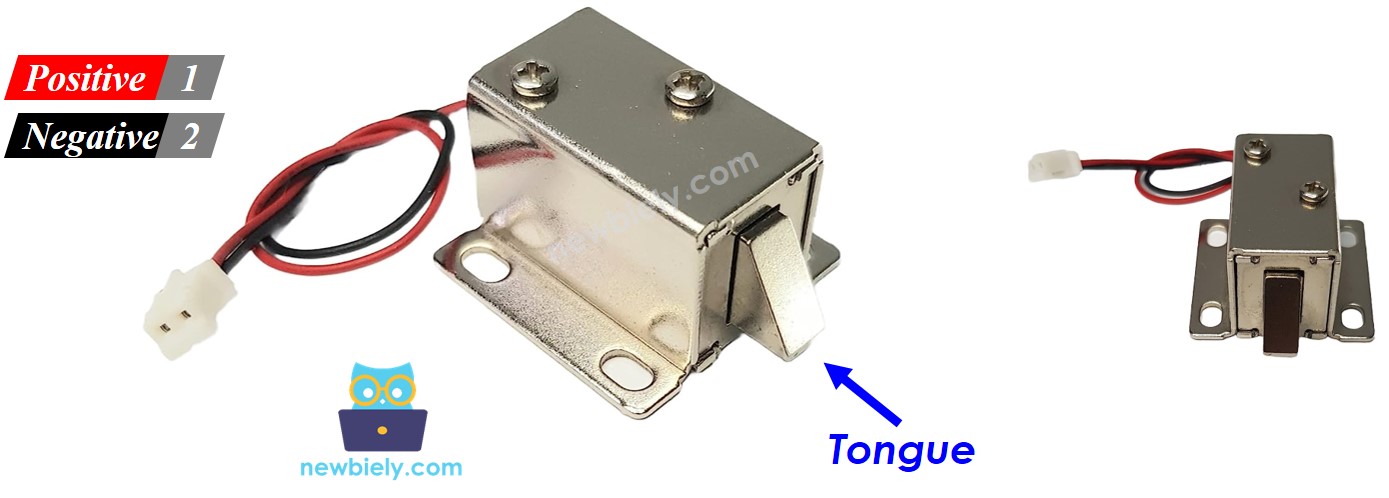
- When the solenoid lock receives power, the metal piece moves out, and the door becomes locked.
- When the solenoid lock does not receive power, the metal piece moves in, and the door becomes unlocked.
※ NOTE THAT:
The solenoid lock normally works with a 12V, 24V, or 48V power supply. This means you should not connect the solenoid lock directly to an Arduino Nano 33 IoT pin. Instead, you need to use a relay to make the connection.
If we attach the solenoid lock to a relay that stays open by default:
- When the relay is turned off, the door is unlocked.
- When the relay is turned on, the door is locked.
Connect the Arduino Nano 33 IoT to the relay, and then you can write a program to control the solenoid lock. Learn more about the relay in the Arduino Nano 33 IoT - Relay tutorial.
Wiring Diagram
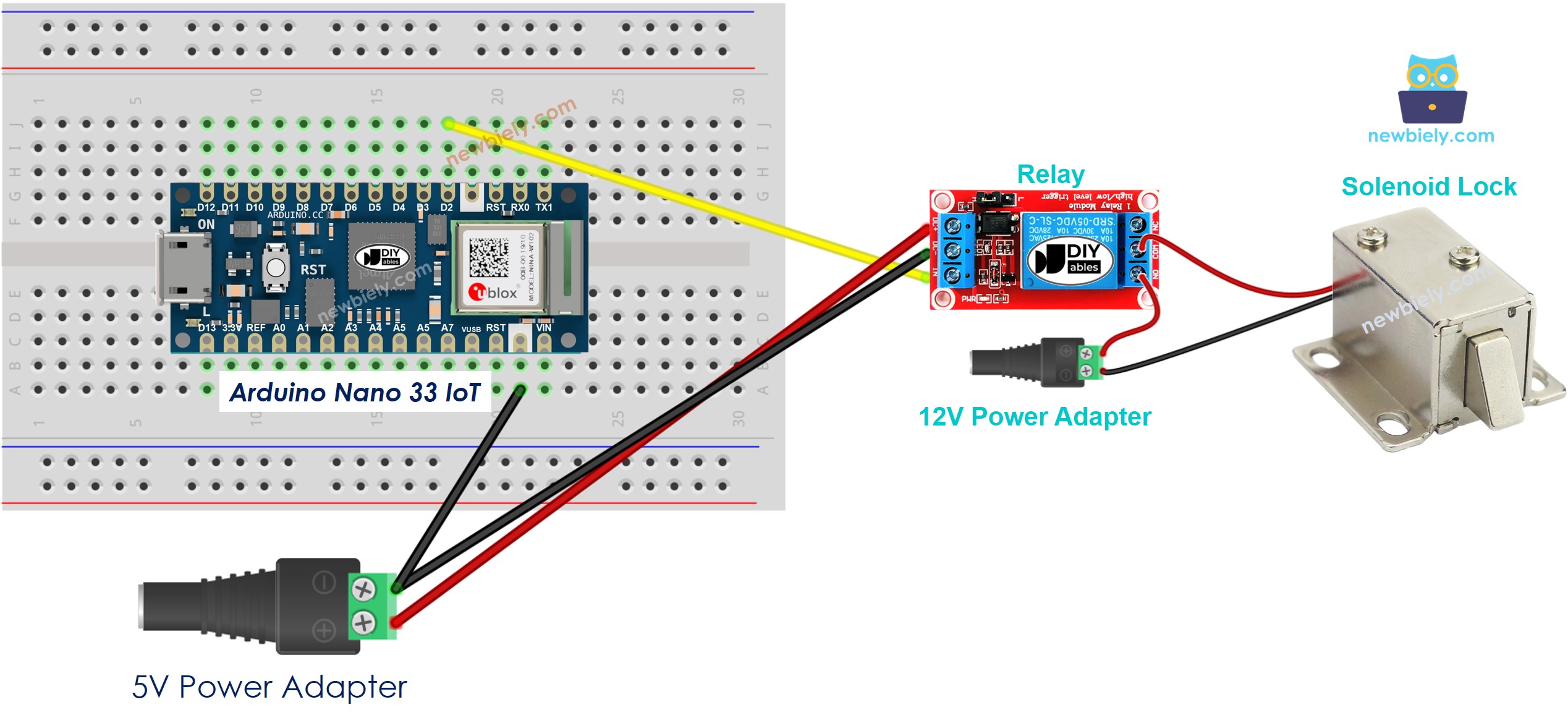
This image is created using Fritzing. Click to enlarge image
You can also build this circuit without a breadboard. Here is the same wiring:
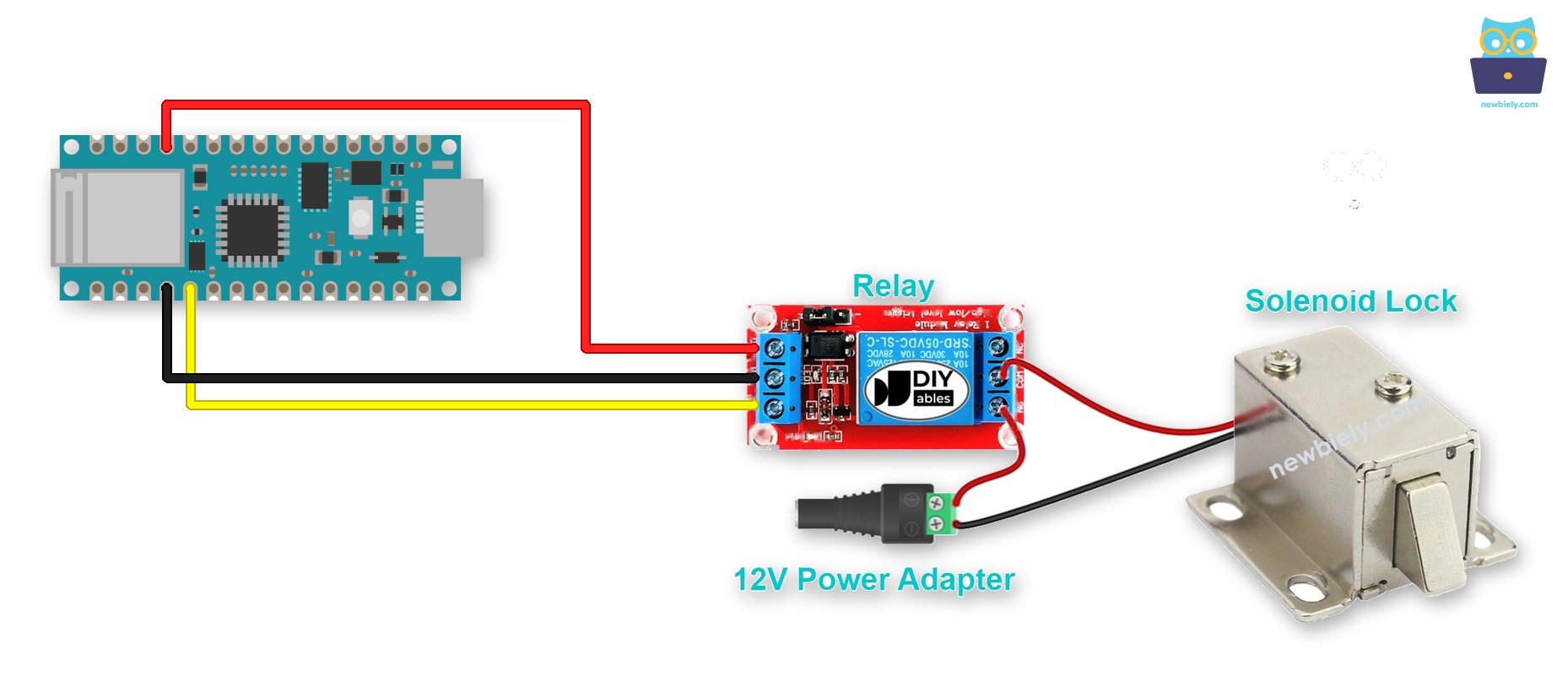
This image is created using Fritzing. Click to enlarge image
A screw terminal keeps each wire tight, even when the board shakes. To do that, mount the Arduino Nano 33 IoT on a Screw Terminal Expansion Board for Arduino Nano. Here is the same circuit wired through the screw terminal board:
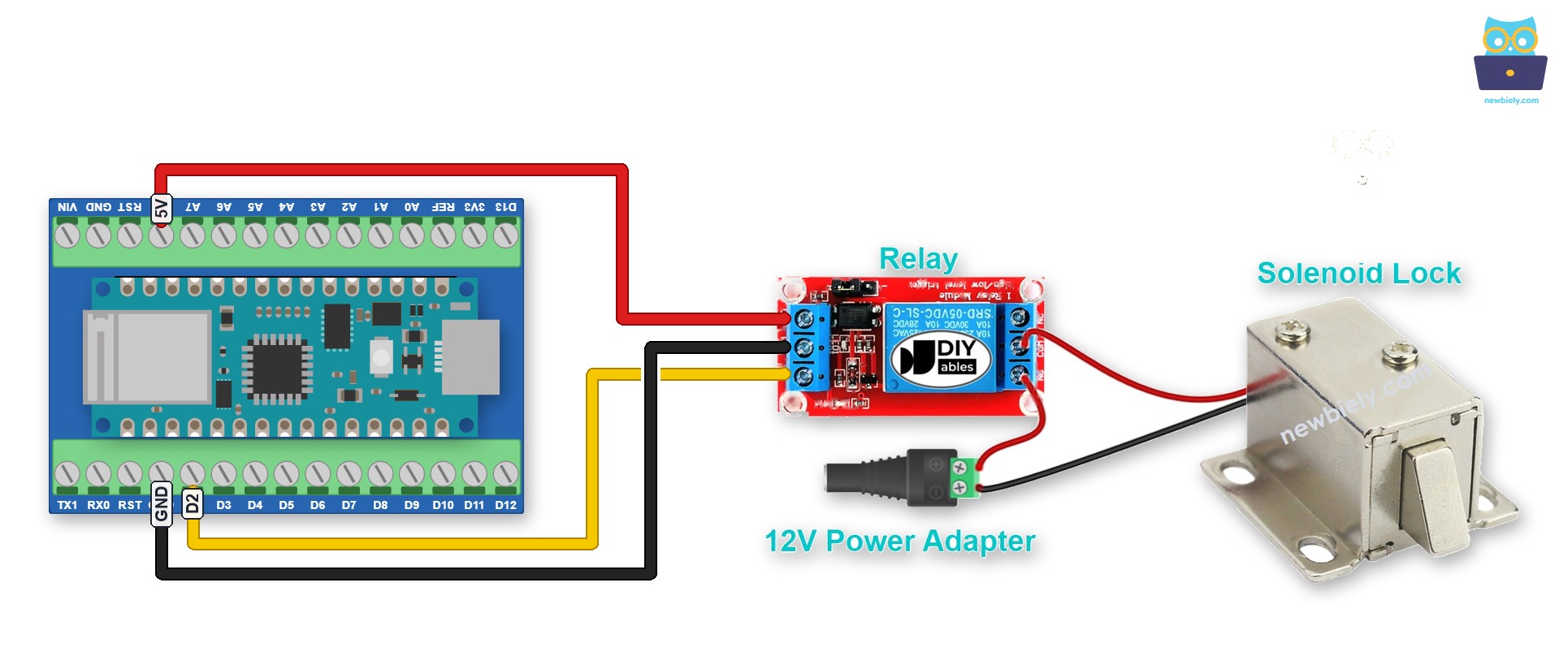
This image is created using Fritzing. Click to enlarge image
Note: on the Arduino Nano 33 IoT, the 5V pin is the VUSB pin. It gives 5V only after you close the VUSB solder jumper on the bottom of the board, and only when the board runs on USB power.
Arduino Nano 33 IoT Code
The code below locks and unlocks the door every five seconds.
Detailed Instructions
If you are new to the Arduino Nano 33 IoT, be sure to check out our Getting Started with Arduino Nano 33 IoT tutorial. Then, follow these steps:
- Connect the components to the Arduino Nano 33 IoT board as depicted in the diagram.
- Use a USB cable to connect the Arduino Nano 33 IoT board to your computer.
- Launch the Arduino IDE on your computer.
- Select the Arduino Nano 33 IoT board and choose its corresponding COM port.
- Copy the code above and paste it into the Arduino IDE.
- Click the Upload button in the Arduino IDE to compile the code and send it to the Arduino Nano 33 IoT board.
- Check the status of the lock tongue.
Relay vs MOSFET Module for the Solenoid Lock
This tutorial uses a relay to switch the solenoid lock. A 12V solenoid lock runs on DC, so a MOSFET module can also switch it.
| Relay | MOSFET Module | |
|---|---|---|
| Lock control | lock or unlock | lock or unlock |
| Switching sound | a click every time | no sound |
| Switching time | slow (milliseconds) | very fast |
| Wear | the contacts get old with use | no moving parts to wear |
| Works with | AC and DC locks | DC locks only |
| Flyback diode | most relay modules do not need one | must add one (1N4007 or 1N5819) |
| Isolation | yes | yes, with a PC817 optocoupler |
| Choose it for | a simple, common setup | a silent lock, or a door that opens many times a day |
A solenoid lock is only locked or unlocked, so the MOSFET module does not give extra control here. Its gains are: no click, and nothing wears out. Both turn on when the pin is HIGH, so the code stays the same. Do not keep the lock unlocked for a long time, or it gets hot. This is the same with a relay. The 3.3V pin of the Arduino Nano 33 IoT is enough to drive the module.
A solenoid valve works the same way as a solenoid lock. To see how to wire and code one with both a relay and a MOSFET module, see the Arduino Nano 33 IoT - Water/Liquid Valve tutorial. The wiring for a solenoid lock is in the Arduino Nano 33 IoT - MOSFET Module tutorial.