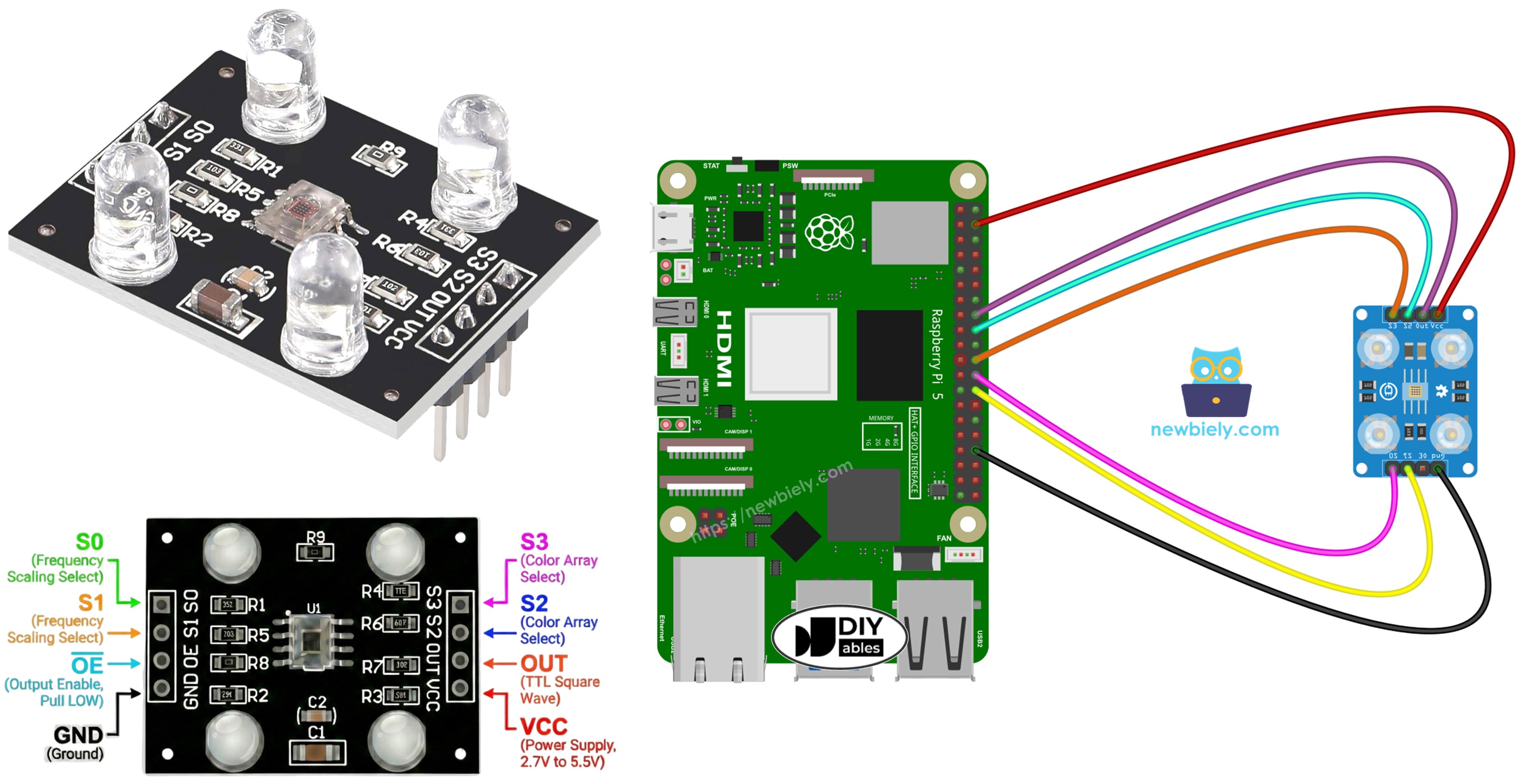
Raspberry Pi - TCS3200D/TCS230 Color Sensor

This comprehensive guide shows you how to connect the TCS3200D/TCS230 color sensor to Raspberry Pi for precise color measurement and RGB value extraction. Master calibration procedures and develop color recognition capabilities in your projects.

Learning objectives:

Raspberry Pi with TCS3200D TCS230 color recognition sensor module tutorial

Hardware Preparation

1×Raspberry Pi 5
1×TCS3200D/TCS230 Color Recognition Sensor Module
1×Breadboard
1×Jumper Wires
1×Recommended: Screw Terminal Block Shield for Raspberry Pi
1×Recommended: Raspberry Pi Prototyping Base Plate & Breadboard Kit
1×Recommended: HDMI Touch Screen Monitor for Raspberry Pi

Or you can buy the following kits:

1×DIYables Sensor Kit (30 sensors/displays)
1×DIYables Sensor Kit (18 sensors/displays)
Disclosure: Some of the links provided in this section are Amazon affiliate links. We may receive a commission for any purchases made through these links at no additional cost to you.
Additionally, some of these links are for products from our own brand, DIYables .

Overview of TCS3200D/TCS230 Color Sensor

The TCS3200D/TCS230 sensor utilizes a photodiode matrix arranged in an 8×8 grid for color detection through optical filtering. Within this 64-element array, 16 photodiodes feature red spectral filters, another 16 use green filters, 16 employ blue filters, and the remaining 16 operate without filters (clear response). Color measurement happens by activating specific filter sets and analyzing the resulting frequency-modulated square-wave output.

Built-in white LED arrays on typical modules deliver constant illumination to targets, maintaining reading stability regardless of external lighting variations and enhancing performance in dim environments.

Pinout

Available connections on the TCS3200D/TCS230 sensor board:

  • VCC pin: Supply voltage input (+5V).
  • GND pin: Ground reference (0V).
  • S0, S1 pins: Output frequency scaling selectors.
  • S2, S3 pins: Color channel filter selectors.
  • OUT pin: Frequency-modulated square wave output.
  • OE pin: Output enable input (enables when LOW). Standard modules typically hard-wire this to GND internally. If not connected, manually wire to GND.
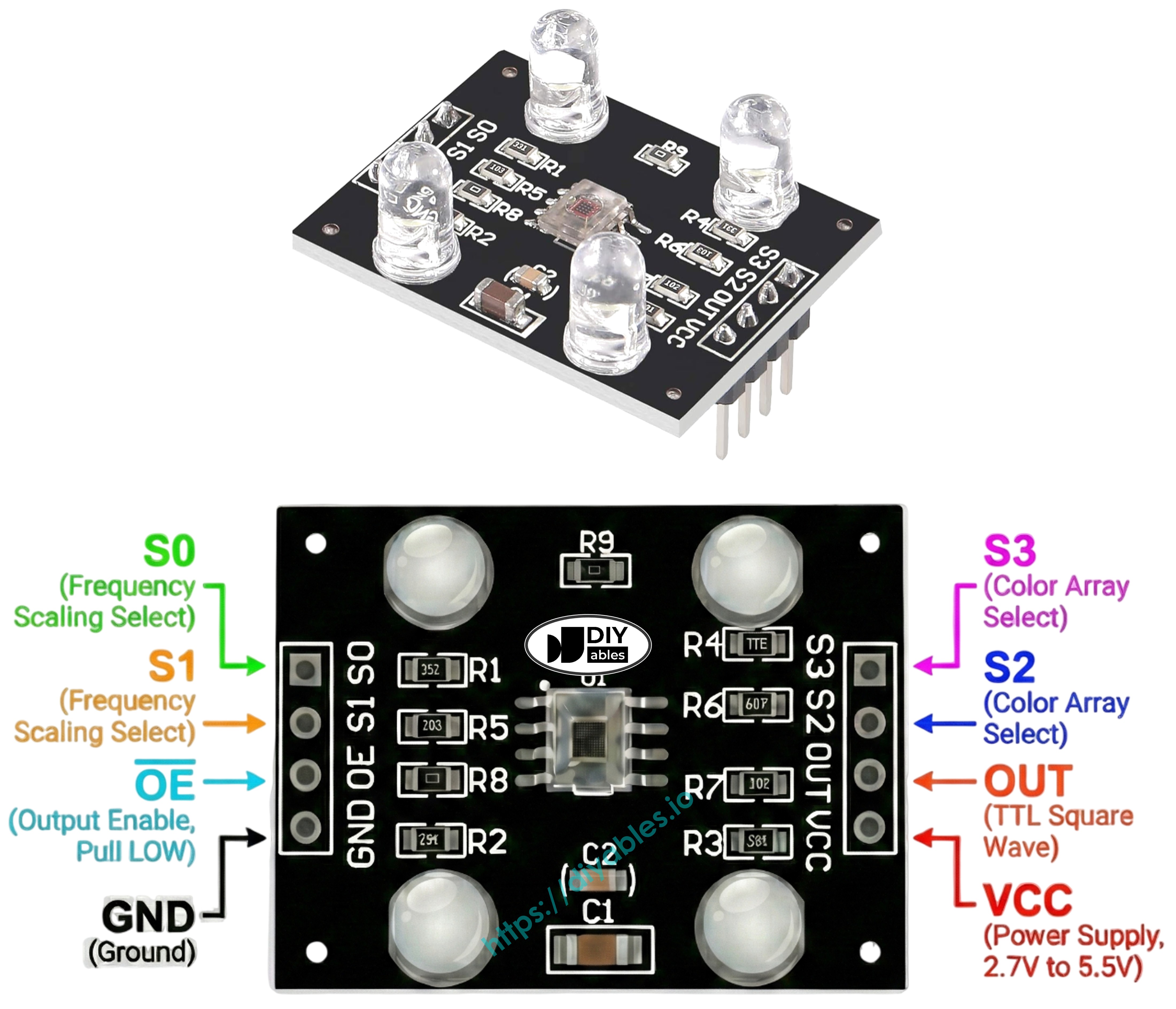
TCS3200 TCS230 color sensor module pinout diagram showing VCC GND S0 S1 S2 S3 OUT pins

How It Works

Two critical settings control sensor behavior: which color channel to activate and what output signal strength to generate. Two pairs of control inputs manage these functions:

Frequency scaling control (S0 and S1 pins):

  • S0=LOW, S1=LOW: Power down state
  • S0=LOW, S1=HIGH: 2% scaling factor
  • S0=HIGH, S1=LOW: 20% scaling factor
  • S0=HIGH, S1=HIGH: 100% scaling factor (full speed)

Color channel selection (S2 and S3 pins):

  • S2=LOW, S3=LOW: Red photodiodes active
  • S2=LOW, S3=HIGH: Blue photodiodes active
  • S2=HIGH, S3=LOW: Clear photodiodes active (no filtering)
  • S2=HIGH, S3=HIGH: Green photodiodes active

The OUT pin delivers square-wave frequencies spanning approximately 2 Hz to 500 kHz range. Frequency increases with light intensity—brighter illumination produces higher frequency output. By measuring pulse duration (which correlates inversely—shorter durations indicate stronger light), we can translate these measurements into conventional 0-255 RGB format through calibration.

Achieving Optimal Precision

  • Keep sensor positioned 1-3 cm from measurement target with stable angular alignment.
  • Utilize integrated white LED illumination for repeatable lighting.
  • Shield sensor from variable ambient light to enhance measurement consistency.

Wiring Diagram

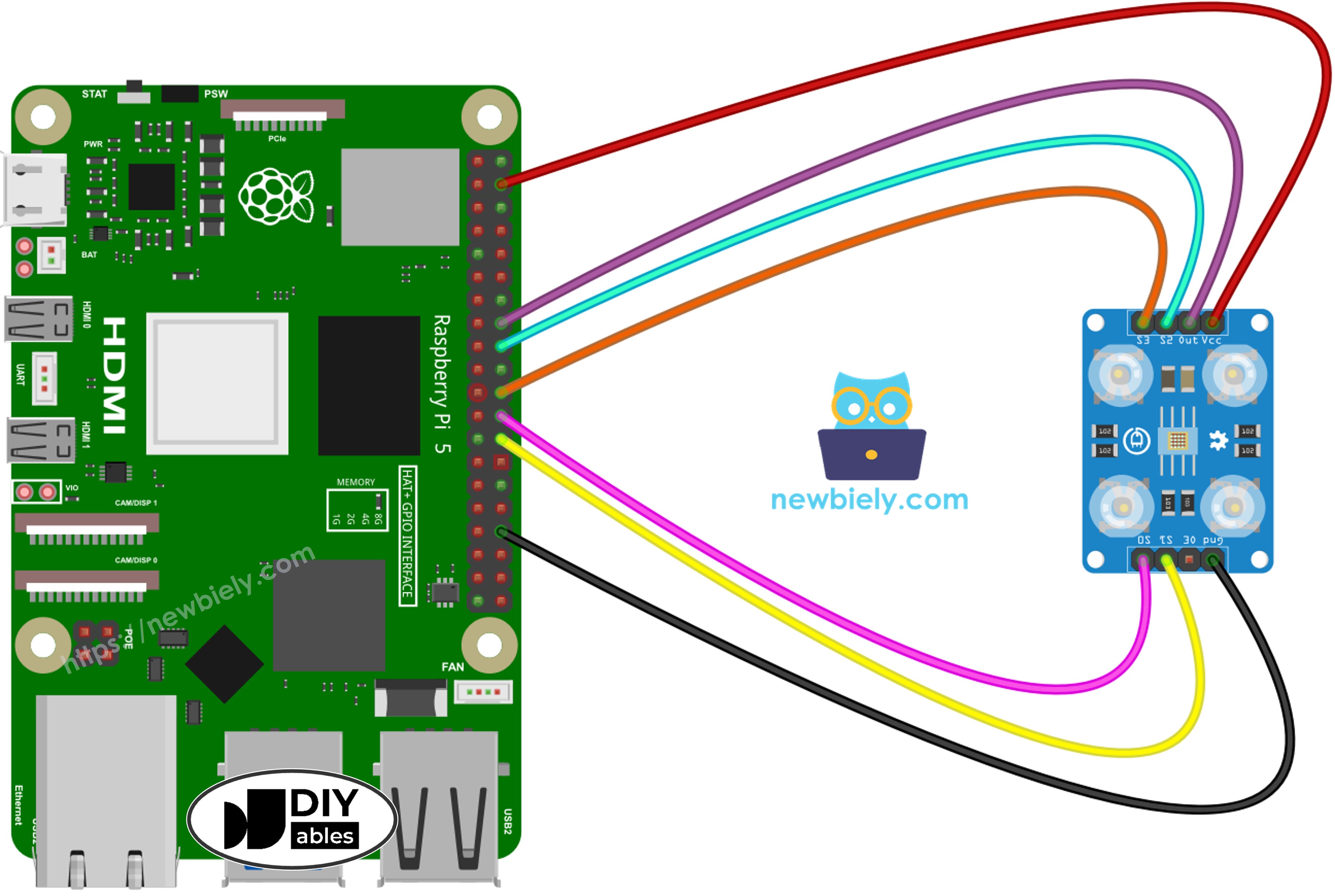
TCS3200 color sensor to Raspberry Pi wiring configuration:

TCS3200 Color SensorRaspberry Pi
VCC5V
GNDGND
OUTGPIO23
S0GPIO8
S1GPIO7
S2GPIO24
S3GPIO25
The wiring diagram between Raspberry Pi and and TCS3200 color sensor  showing connection between pins

This image is created using Fritzing. Click to enlarge image

To simplify and organize your wiring setup, we recommend using a Screw Terminal Block Shield for Raspberry Pi. This shield ensures more secure and manageable connections, as shown below:
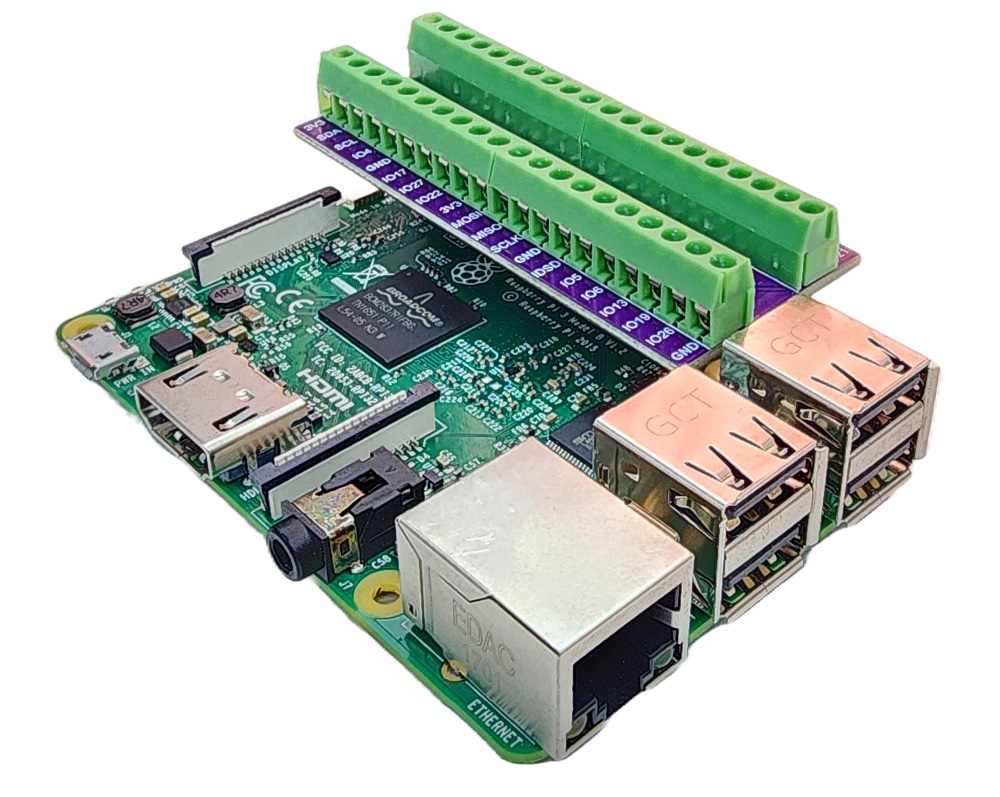
Raspberry Pi Screw Terminal Block Shield

Raspberry Pi Code - Pulse Width Calibration

Calibration eliminates environmental interference from raw measurements. Variables including LED output strength, target spacing, material reflectivity, and room lighting all affect readings. Think of these as systematic errors requiring measurement. The calibration routine identifies minimum and maximum pulse widths across all color channels, establishing reference boundaries for converting raw data into accurate 0–255 RGB values matched to your deployment environment.

""" This Raspberry Pi code was developed by newbiely.com This Raspberry Pi code is made available for public use without any restriction For comprehensive instructions and wiring diagrams, please visit: https://newbiely.com/tutorials/raspberry-pi/raspberry-pi-tcs3200d-tcs230-color-sensor """ import RPi.GPIO as GPIO import time # Pin Definitions (all on same physical row for easy wiring) OUT_PIN = 23 # Raspberry Pi GPIO23 pin connected to OUT (physical pin 16) S0_PIN = 8 # Raspberry Pi GPIO8 pin connected to S0 (physical pin 24) S1_PIN = 7 # Raspberry Pi GPIO7 pin connected to S1 (physical pin 26) S2_PIN = 24 # Raspberry Pi GPIO24 pin connected to S2 (physical pin 18) S3_PIN = 25 # Raspberry Pi GPIO25 pin connected to S3 (physical pin 22) # Set up GPIO mode GPIO.setmode(GPIO.BCM) GPIO.setup(S0_PIN, GPIO.OUT) GPIO.setup(S1_PIN, GPIO.OUT) GPIO.setup(S2_PIN, GPIO.OUT) GPIO.setup(S3_PIN, GPIO.OUT) GPIO.setup(OUT_PIN, GPIO.IN) # Set frequency scaling to 2% (S0=LOW, S1=HIGH) for reliable timing on Raspberry Pi GPIO.output(S0_PIN, GPIO.LOW) GPIO.output(S1_PIN, GPIO.HIGH) # Variables to track min and max pulse widths for each color red_min = 999999 red_max = 0 green_min = 999999 green_max = 0 blue_min = 999999 blue_max = 0 def read_pulse_width(): """Read the pulse width from OUT pin in microseconds""" # Wait for pulse to go HIGH timeout = time.time() + 0.1 # 100ms timeout while GPIO.input(OUT_PIN) == GPIO.LOW: if time.time() > timeout: return 0 # Measure HIGH pulse duration pulse_start = time.time() timeout = time.time() + 0.1 while GPIO.input(OUT_PIN) == GPIO.HIGH: if time.time() > timeout: return 0 pulse_end = time.time() # Return duration in microseconds return int((pulse_end - pulse_start) * 1000000) def read_red(): """Read red color pulse width """ GPIO.output(S2_PIN, GPIO.LOW) GPIO.output(S3_PIN, GPIO.LOW) time.sleep(0.01) return read_pulse_width() def read_green(): """Read green color pulse width""" GPIO.output(S2_PIN, GPIO.HIGH) GPIO.output(S3_PIN, GPIO.HIGH) time.sleep(0.01) return read_pulse_width() def read_blue(): """Read blue color pulse width """ GPIO.output(S2_PIN, GPIO.LOW) GPIO.output(S3_PIN, GPIO.HIGH) time.sleep(0.01) return read_pulse_width() try: print("=== TCS3200 Calibration ===") print("Point the sensor at different objects (white, black, colors).") print("Min and Max values are tracked automatically.") print("When values look stable, note them down for the next code.") print() while True: # Read all three colors (average of 3 readings for stability) red_readings = [read_red() for _ in range(3)] green_readings = [read_green() for _ in range(3)] blue_readings = [read_blue() for _ in range(3)] red_pw = sum(r for r in red_readings if r > 0) // max(1, len([r for r in red_readings if r > 0])) green_pw = sum(g for g in green_readings if g > 0) // max(1, len([g for g in green_readings if g > 0])) blue_pw = sum(b for b in blue_readings if b > 0) // max(1, len([b for b in blue_readings if b > 0])) # Update min values if red_pw > 0 and red_pw < red_min: red_min = red_pw if green_pw > 0 and green_pw < green_min: green_min = green_pw if blue_pw > 0 and blue_pw < blue_min: blue_min = blue_pw # Update max values if red_pw > red_max: red_max = red_pw if green_pw > green_max: green_max = green_pw if blue_pw > blue_max: blue_max = blue_pw # Display current readings and min/max print("-" * 42) print(f"Red PW = {red_pw} - Green PW = {green_pw} - Blue PW = {blue_pw}") print(f" Min -> R:{red_min} G:{green_min} B:{blue_min}") print(f" Max -> R:{red_max} G:{green_max} B:{blue_max}") time.sleep(0.5) except KeyboardInterrupt: print("\nCalibration stopped") print(f"\nFinal calibration values:") print(f"redMin = {red_min}, redMax = {red_max}") print(f"greenMin = {green_min}, greenMax = {green_max}") print(f"blueMin = {blue_min}, blueMax = {blue_max}") finally: GPIO.cleanup()

Detailed Instructions

  • Copy the code and save it to a file, for example, tcs3200_calibration.py
  • Run the script:
PuTTY - Raspberry Pi
python3 tcs3200_calibration.py
  • Expose sensor to diverse surfaces: white materials (printer paper), black objects, plus multi-colored items
  • Watch Min/Max boundaries update automatically as extremes are detected
  • Once values stabilize (generally 10-20 seconds), press Ctrl+C to stop
  • Document all six calibration parameters displayed
PuTTY - Raspberry Pi
=== TCS3200 Calibration === Point the sensor at different objects (white, black, colors). Min and Max values are tracked automatically. When values look stable, note them down for the next code. ------------------------------------------ Red PW = 42 - Green PW = 55 - Blue PW = 60 Min -> R:42 G:55 B:60 Max -> R:42 G:55 B:60 ------------------------------------------ Red PW = 210 - Green PW = 185 - Blue PW = 172 Min -> R:42 G:55 B:60 Max -> R:210 G:185 B:172 ------------------------------------------ Red PW = 44 - Green PW = 57 - Blue PW = 61 Min -> R:42 G:55 B:60 Max -> R:210 G:185 B:172 ------------------------------------------ Calibration stopped Final calibration values: redMin = 42, redMax = 210 greenMin = 55, greenMax = 185 blueMin = 60, blueMax = 172

Sample calibration parameters extracted from above output:

  • RedMin = 42, redMax = 210
  • GreenMin = 55, greenMax = 185
  • BlueMin = 60, blueMax = 172

Raspberry Pi Code - RGB Value Measurement

""" This Raspberry Pi code was developed by newbiely.com This Raspberry Pi code is made available for public use without any restriction For comprehensive instructions and wiring diagrams, please visit: https://newbiely.com/tutorials/raspberry-pi/raspberry-pi-tcs3200d-tcs230-color-sensor """ import RPi.GPIO as GPIO import time # Pin Definitions (all on same physical row for easy wiring) OUT_PIN = 23 # Raspberry Pi GPIO23 pin connected to OUT (physical pin 16) S0_PIN = 8 # Raspberry Pi GPIO8 pin connected to S0 (physical pin 24) S1_PIN = 7 # Raspberry Pi GPIO7 pin connected to S1 (physical pin 26) S2_PIN = 24 # Raspberry Pi GPIO24 pin connected to S2 (physical pin 18) S3_PIN = 25 # Raspberry Pi GPIO25 pin connected to S3 (physical pin 22) # Calibration values - REPLACE with your calibrated values! red_min = 0 red_max = 0 green_min = 0 green_max = 0 blue_min = 0 blue_max = 0 # Set up GPIO mode GPIO.setmode(GPIO.BCM) GPIO.setup(S0_PIN, GPIO.OUT) GPIO.setup(S1_PIN, GPIO.OUT) GPIO.setup(S2_PIN, GPIO.OUT) GPIO.setup(S3_PIN, GPIO.OUT) GPIO.setup(OUT_PIN, GPIO.IN) # Set frequency scaling to 2% (S0=LOW, S1=HIGH) for reliable timing on Raspberry Pi GPIO.output(S0_PIN, GPIO.LOW) GPIO.output(S1_PIN, GPIO.HIGH) def read_pulse_width(): """Read the pulse width from OUT pin in microseconds""" # Wait for pulse to go HIGH timeout = time.time() + 0.1 # 100ms timeout while GPIO.input(OUT_PIN) == GPIO.LOW: if time.time() > timeout: return 0 # Measure HIGH pulse duration pulse_start = time.time() timeout = time.time() + 0.1 while GPIO.input(OUT_PIN) == GPIO.HIGH: if time.time() > timeout: return 0 pulse_end = time.time() # Return duration in microseconds return int((pulse_end - pulse_start) * 1000000) def read_red(): """Read red color pulse width """ GPIO.output(S2_PIN, GPIO.LOW) GPIO.output(S3_PIN, GPIO.LOW) time.sleep(0.01) return read_pulse_width() def read_green(): """Read green color pulse width""" GPIO.output(S2_PIN, GPIO.HIGH) GPIO.output(S3_PIN, GPIO.HIGH) time.sleep(0.01) return read_pulse_width() def read_blue(): """Read blue color pulse width """ GPIO.output(S2_PIN, GPIO.LOW) GPIO.output(S3_PIN, GPIO.HIGH) time.sleep(0.01) return read_pulse_width() def map_value(value, in_min, in_max, out_min, out_max): """Map value from one range to another""" if in_max == in_min: return out_min return int((value - in_min) * (out_max - out_min) / (in_max - in_min) + out_min) def constrain(value, min_val, max_val): """Constrain value between min and max """ return max(min_val, min(value, max_val)) try: print("TCS3200 Color Sensor - RGB Reading") print() while True: # Read pulse widths for all colors (average of 3 readings for stability) red_readings = [read_red() for _ in range(3)] green_readings = [read_green() for _ in range(3)] blue_readings = [read_blue() for _ in range(3)] red_pw = sum(r for r in red_readings if r > 0) // max(1, len([r for r in red_readings if r > 0])) green_pw = sum(g for g in green_readings if g > 0) // max(1, len([g for g in green_readings if g > 0])) blue_pw = sum(b for b in blue_readings if b > 0) // max(1, len([b for b in blue_readings if b > 0])) # Convert to 0-255 RGB values # Lower pulse width = brighter = higher RGB value red_value = map_value(red_pw, red_min, red_max, 255, 0) green_value = map_value(green_pw, green_min, green_max, 255, 0) blue_value = map_value(blue_pw, blue_min, blue_max, 255, 0) # Constrain to 0-255 range red_value = constrain(red_value, 0, 255) green_value = constrain(green_value, 0, 255) blue_value = constrain(blue_value, 0, 255) # Display RGB values print(f"Red = {red_value} - Green = {green_value} - Blue = {blue_value}") time.sleep(0.5) except KeyboardInterrupt: print("\nProgram stopped") finally: GPIO.cleanup()

Detailed Instructions

  • Identify calibration variables at code start:
red_min = 0 red_max = 0 green_min = 0 green_max = 0 blue_min = 0 blue_max = 0
  • Substitute all six zero placeholders with measured calibration data. Example using values redMin = 42, redMax = 210, greenMin = 55, greenMax = 185, blueMin = 60, blueMax = 172:
red_min = 42 red_max = 210 green_min = 55 green_max = 185 blue_min = 60 blue_max = 172
  • Save the updated code to a file, for example, tcs3200_sensor.py
  • Run the script:
PuTTY - Raspberry Pi
python3 tcs3200_sensor.py
  • Arrange colored sample before sensor
  • Check RGB output in the terminal
PuTTY - Raspberry Pi
TCS3200 Color Sensor - RGB Reading Red = 210 - Green = 35 - Blue = 20 Red = 25 - Green = 200 - Blue = 40 Red = 30 - Green = 45 - Blue = 215

Displayed RGB values conform to standard 0-255 scaling. Reduced pulse widths (indicating brighter reflections) generate higher RGB outputs; extended pulse widths (dimmer reflections) yield lower values.

Project Applications

With operational RGB measurement capability, you can develop:

  • Chromatic sorting system: Categorize objects by color (red/green/blue differentiation)
  • Color verification device: Confirm color consistency between samples
  • Colored path follower: Robots that navigate along chromatic markers
  • Visual quality inspection: Detect production defects via color analysis
  • Color-triggered automation: Execute actions when specific hues are detected

Video Tutorial

Learn More

※ OUR MESSAGES

  • As freelancers, We are AVAILABLE for HIRE. See how to outsource your project to us
  • Please feel free to share the link of this tutorial. However, Please do not use our content on any other websites. We invested a lot of effort and time to create the content, please respect our work!