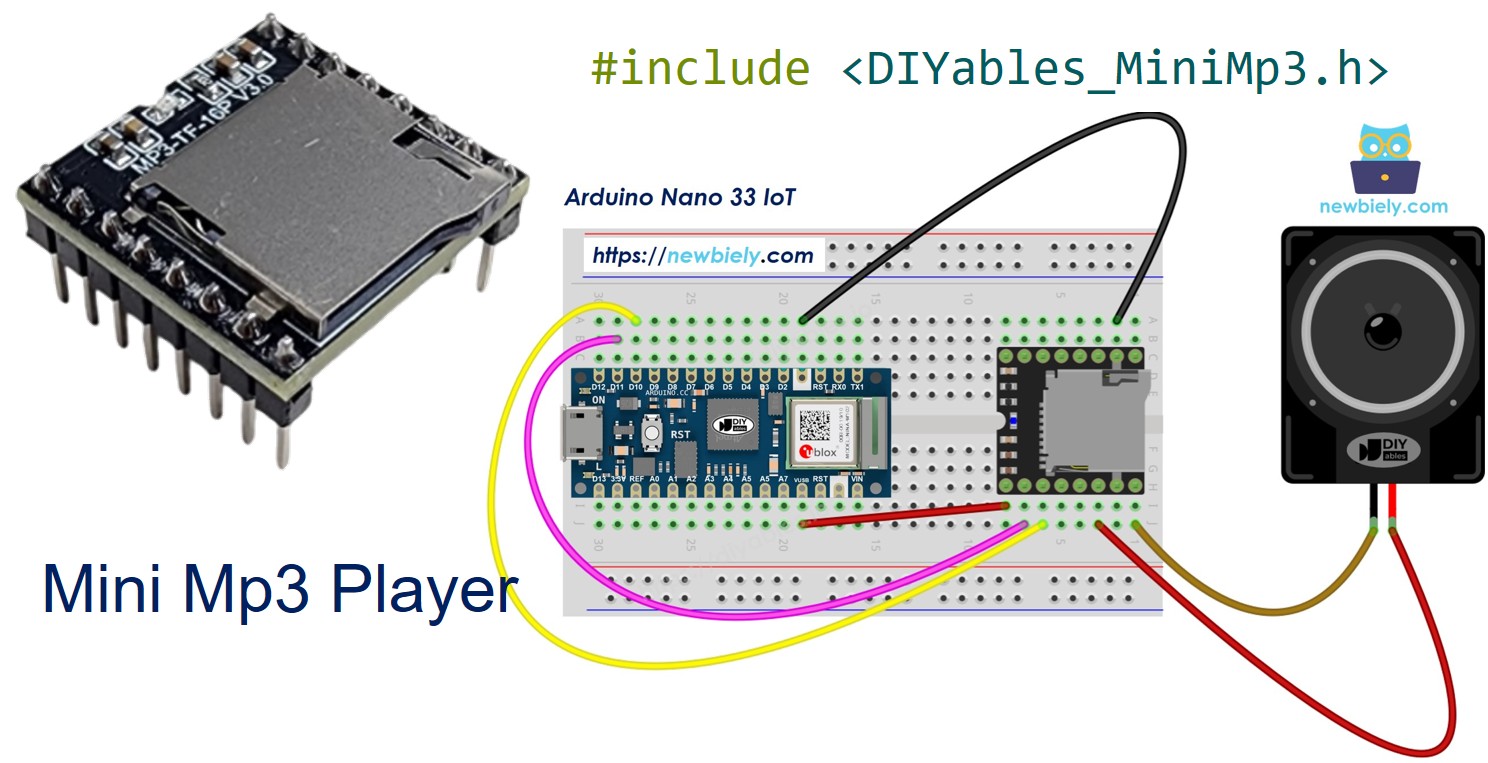
Arduino Nano 33 IoT - Mini Mp3 Player Module
The Arduino Nano 33 IoT packs WiFi and Bluetooth into a Nano-sized board running at 3.3V. It also provides a dedicated hardware Serial1 port — making it ideal for UART peripherals like the DIYables Mini Mp3 Player module.
Throughout this tutorial, we will explore:
How to connect the mp3 module directly to the Nano 33 IoT (no resistor required).
How to prepare the micro SD card with mp3 files.
How to write Arduino sketches that play, pause, stop, and skip tracks.
How to wire buttons for volume control and track navigation.
How to use looping, shuffling, and folder-based organization.
How to query the module for real-time status information.
Or you can buy the following kits:
Disclosure: Some of the links provided in this section are Amazon affiliate links. We may receive a commission for any purchases made through these links at no additional cost to you.
Additionally, some of these links are for products from our own brand,
DIYables .
Since the Nano 33 IoT operates at 3.3V logic, no series resistor is needed between the board and the module.
The DIYables Mini Mp3 Player is built around the YX5200-24SS chip. It reads mp3 files from a micro SD card and outputs audio through its onboard 3W amplifier or through DAC pins for use with a larger amplifier.
The board communicates over UART at 9600 baud and supports the following:
Transport control (play, pause, resume, stop, next, previous)
31 volume levels (0 silent, 30 maximum)
6 equalizer modes: Normal, Pop, Rock, Jazz, Classic, Bass
Repeat and shuffle modes
Folder-organized playback
Advertisement overlay
Status queries for track info, volume, and play state
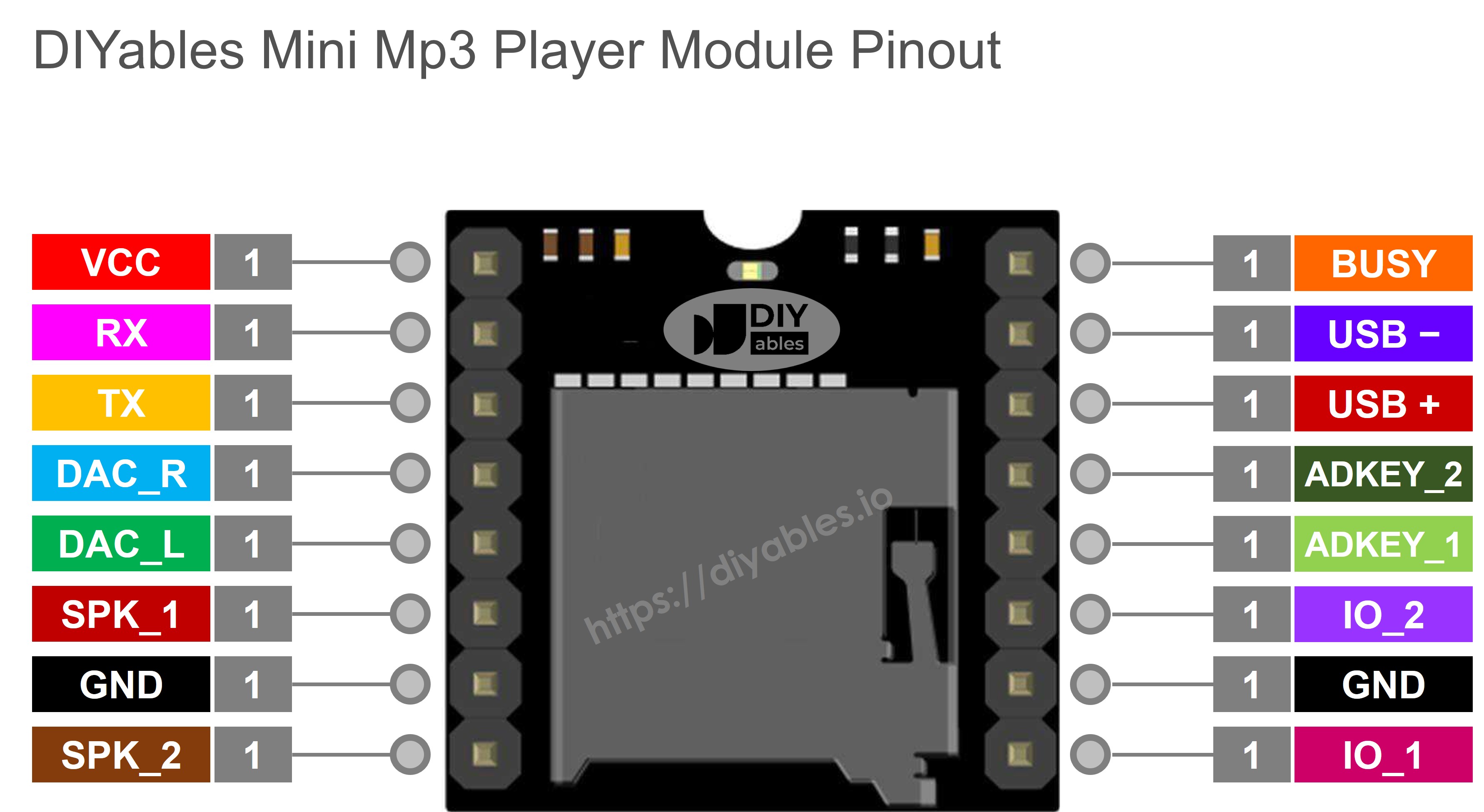
| Pin | Description |
|---|
| VCC | Power (3.2V – 5.0V) |
| GND | Ground |
| RX | UART input — connect from board TX |
| TX | UART output — connect to board RX |
| SPK_1 | Speaker positive (onboard amplifier) |
| SPK_2 | Speaker negative |
| DAC_R | Right audio line output |
| DAC_L | Left audio line output |
| BUSY | LOW = playing, HIGH = idle |
| IO_1 | Short press → previous; long press → volume down |
| IO_2 | Short press → next; long press → volume up |
The Nano 33 IoT exposes Serial1 on pins D0 (TX) and D1 (RX). Since the board runs at 3.3V, you connect directly to the module with no resistor.
| Mini Mp3 Player | Nano 33 IoT | Notes |
|---|
| VCC | 3.3V | |
| GND | GND | |
| RX | D0 (TX / Serial1 TX) | Direct — 3.3V logic |
| TX | D1 (RX / Serial1 RX) | Direct |
| SPK_1 | Speaker + | |
| SPK_2 | Speaker − | |
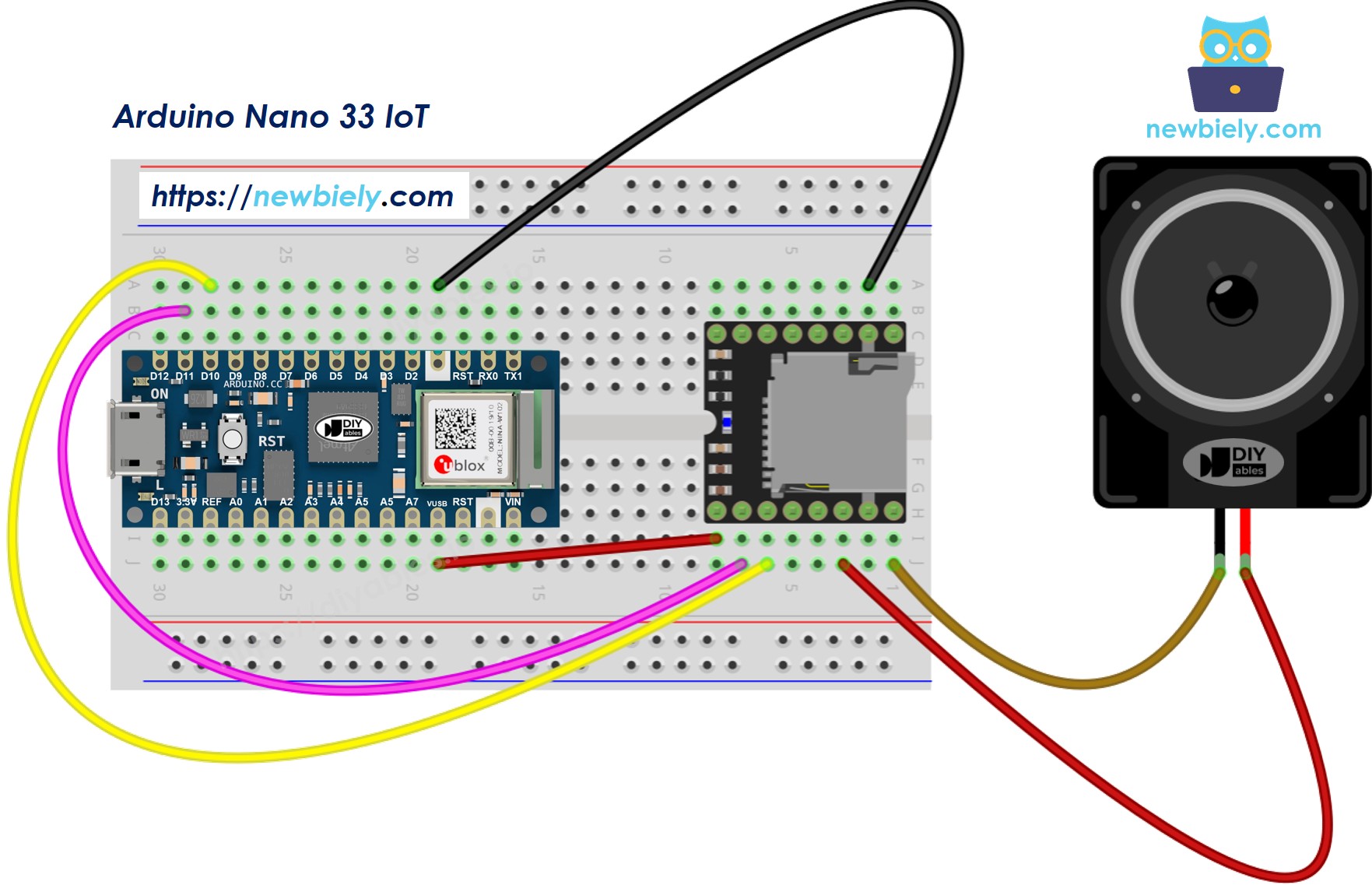
This image is created using Fritzing. Click to enlarge image
Note: Pin D0 and D1 on the Nano 33 IoT are dedicated Serial1 pins — they do not conflict with USB communication (which uses the native USB port).
※ NOTE THAT:
Please note that the Arduino Nano 33 IoT pins A4 and A5 have built-in pull-up resistors for I2C communication. Although these pins can be used as digital input pins, it is recommended to avoid using them for digital input. If you must use them, do NOT use internal or external pull-down resistors for these pins
Format the micro SD card as FAT16 or FAT32.
Place mp3 files at the root of the card:
/001.mp3
/002.mp3
/003.mp3
For folder-based playback:
/01/001.mp3
/01/002.mp3
/02/001.mp3
Important:
Track indices start at 1.
The module assigns track numbers according to the order files were copied, not by filename — format the card first, then copy one file at a time.
Folders: 2-digit names (01–99). Files within: 3-digit names (001–255).
Connect the Nano 33 IoT via micro USB.
In the Arduino IDE, select Arduino Nano 33 IoT and the right port.
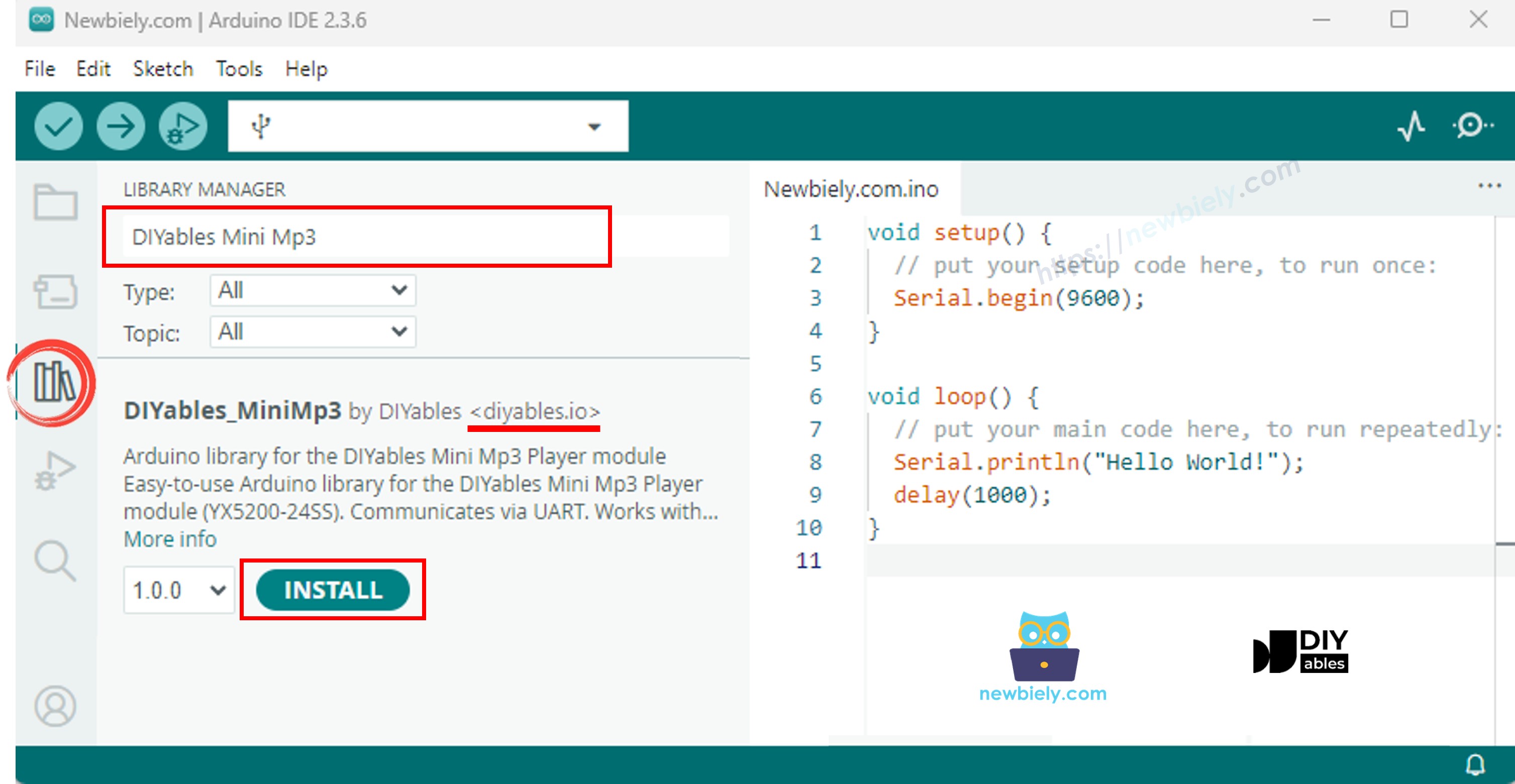
Open the Libraries panel.
Search for "DIYables_MiniMp3" and install the library by DIYables.
No additional dependencies are required.
Because the Nano 33 IoT has hardware Serial1, we skip SoftwareSerial entirely:
#include <DIYables_MiniMp3.h>
DIYables_MiniMp3 mp3;
void setup() {
Serial.begin(115200);
Serial1.begin(9600);
mp3.begin(Serial1);
delay(1000);
mp3.setVolume(25);
}
void loop() {
}
#include <DIYables_MiniMp3.h>
#include <SoftwareSerial.h>
SoftwareSerial mp3Serial(10, 11);
DIYables_MiniMp3 mp3;
void setup()
{
Serial.begin(9600);
mp3Serial.begin(9600);
mp3.begin(mp3Serial);
delay(1000);
mp3.setVolume(25);
Serial.println("Playing track 1...");
mp3.play(1);
}
void loop()
{
}
Set up the SD card and wire the module to the Nano 33 IoT.
Select Arduino Nano 33 IoT in the IDE.
Upload. Track 001.mp3 plays through the speaker.
| Method | Description | Example |
|---|
| play(n) | Start track n | mp3.play(1) |
| playNext() | Go to next track | mp3.playNext() |
| playPrevious() | Return to previous track | mp3.playPrevious() |
| pause() | Pause current audio | mp3.pause() |
| resume() | Unpause | mp3.resume() |
| stop() | Stop completely | mp3.stop() |
#include <DIYables_MiniMp3.h>
#include <SoftwareSerial.h>
SoftwareSerial mp3Serial(10, 11);
DIYables_MiniMp3 mp3;
int currentTrack = 1;
int totalTracks = 3;
unsigned long lastTrackTime = 0;
unsigned long trackDuration = 5000;
void setup()
{
Serial.begin(9600);
mp3Serial.begin(9600);
mp3.begin(mp3Serial);
delay(1000);
mp3.setVolume(20);
Serial.println("Playing track 1...");
mp3.play(currentTrack);
lastTrackTime = millis();
}
void loop()
{
if (millis() - lastTrackTime >= trackDuration)
{
currentTrack++;
if (currentTrack > totalTracks)
currentTrack = 1;
Serial.print("Playing track ");
Serial.println(currentTrack);
mp3.play(currentTrack);
lastTrackTime = millis();
}
}
#include <DIYables_MiniMp3.h>
#include <SoftwareSerial.h>
SoftwareSerial mp3Serial(10, 11);
DIYables_MiniMp3 mp3;
const int BUTTON_VOL_UP = 2;
const int BUTTON_VOL_DOWN = 3;
int volume = 15;
void setup()
{
Serial.begin(9600);
mp3Serial.begin(9600);
pinMode(BUTTON_VOL_UP, INPUT_PULLUP);
pinMode(BUTTON_VOL_DOWN, INPUT_PULLUP);
mp3.begin(mp3Serial);
delay(1000);
mp3.setVolume(volume);
mp3.loopTrack(1);
Serial.print("Volume: ");
Serial.println(volume);
}
void loop()
{
if (digitalRead(BUTTON_VOL_UP) == LOW)
{
if (volume < 30)
{
volume++;
mp3.setVolume(volume);
Serial.print("Volume: ");
Serial.println(volume);
}
delay(200);
}
if (digitalRead(BUTTON_VOL_DOWN) == LOW)
{
if (volume > 0)
{
volume--;
mp3.setVolume(volume);
Serial.print("Volume: ");
Serial.println(volume);
}
delay(200);
}
}
| Method | Description | Example |
|---|
| setVolume(v) | Set volume directly | mp3.setVolume(20) |
| volumeUp() | Increase by one step | mp3.volumeUp() |
| volumeDown() | Decrease by one step | mp3.volumeDown() |
| getVolume() | Query current level | mp3.getVolume() |
#include <DIYables_MiniMp3.h>
#include <SoftwareSerial.h>
SoftwareSerial mp3Serial(10, 11);
DIYables_MiniMp3 mp3;
const int BUTTON_NEXT = 2;
const int BUTTON_PREV = 3;
void setup()
{
Serial.begin(9600);
mp3Serial.begin(9600);
pinMode(BUTTON_NEXT, INPUT_PULLUP);
pinMode(BUTTON_PREV, INPUT_PULLUP);
mp3.begin(mp3Serial);
delay(1000);
mp3.setVolume(20);
mp3.play(1);
Serial.println("Press NEXT or PREV button to change track");
}
void loop()
{
if (digitalRead(BUTTON_NEXT) == LOW)
{
Serial.println("Next track");
mp3.playNext();
delay(300);
}
if (digitalRead(BUTTON_PREV) == LOW)
{
Serial.println("Previous track");
mp3.playPrevious();
delay(300);
}
}
#include <DIYables_MiniMp3.h>
#include <SoftwareSerial.h>
SoftwareSerial mp3Serial(10, 11);
DIYables_MiniMp3 mp3;
const int BUTTON_PIN = 2;
bool paused = false;
void setup()
{
Serial.begin(9600);
mp3Serial.begin(9600);
pinMode(BUTTON_PIN, INPUT_PULLUP);
mp3.begin(mp3Serial);
delay(1000);
mp3.setVolume(20);
mp3.play(1);
Serial.println("Playing. Press button to pause/resume.");
}
void loop()
{
if (digitalRead(BUTTON_PIN) == LOW)
{
if (paused)
{
mp3.resume();
Serial.println("Resumed");
}
else
{
mp3.pause();
Serial.println("Paused");
}
paused = !paused;
delay(300);
}
}
#include <DIYables_MiniMp3.h>
#include <SoftwareSerial.h>
SoftwareSerial mp3Serial(10, 11);
DIYables_MiniMp3 mp3;
void setup()
{
Serial.begin(9600);
mp3Serial.begin(9600);
mp3.begin(mp3Serial);
delay(1000);
mp3.setVolume(25);
mp3.setEQ(DIYables_MiniMp3::EQ_NORMAL);
Serial.println("Playing track 1 on loop...");
mp3.loopTrack(1);
}
void loop()
{
}
| Method | Action | Example |
|---|
| loopTrack(n) | Loop track n | mp3.loopTrack(1) |
| loopFolder(f) | Loop folder f | mp3.loopFolder(1) |
| loopAll() | Loop all tracks | mp3.loopAll() |
| stopLoop() | End looping | mp3.stopLoop() |
| shuffle() | Random playback | mp3.shuffle() |
#include <DIYables_MiniMp3.h>
#include <SoftwareSerial.h>
SoftwareSerial mp3Serial(10, 11);
DIYables_MiniMp3 mp3;
void setup()
{
Serial.begin(9600);
mp3Serial.begin(9600);
mp3.begin(mp3Serial);
delay(1000);
mp3.setVolume(20);
Serial.println("Playing folder 01, track 001...");
mp3.playFolder(1, 1);
delay(5000);
Serial.println("Playing folder 01, track 002...");
mp3.playFolder(1, 2);
delay(5000);
Serial.println("Playing folder 02, track 001...");
mp3.playFolder(2, 1);
}
void loop()
{
}
| Method | Description | Example |
|---|
| playFolder(f, t) | Track t from folder f | mp3.playFolder(1, 1) |
| playLargeFolder(f, t) | Large folder support | mp3.playLargeFolder(1, 1500) |
| playFromMP3Folder(t) | From /mp3 folder | mp3.playFromMP3Folder(1) |
#include <DIYables_MiniMp3.h>
#include <SoftwareSerial.h>
SoftwareSerial mp3Serial(10, 11);
DIYables_MiniMp3 mp3;
void setup()
{
Serial.begin(9600);
mp3Serial.begin(9600);
mp3.begin(mp3Serial);
delay(1000);
mp3.setVolume(20);
Serial.println("=== DIYables Mini Mp3 Player ===");
Serial.println("Commands:");
Serial.println(" 1-9 Play track number");
Serial.println(" + Volume up");
Serial.println(" - Volume down");
Serial.println(" p Pause");
Serial.println(" r Resume");
Serial.println(" s Stop");
Serial.println(" n Next track");
Serial.println(" b Previous track");
Serial.println(" ? Show status");
Serial.println("================================");
}
void loop()
{
if (Serial.available())
{
char cmd = Serial.read();
switch (cmd)
{
case '1': case '2': case '3':
case '4': case '5': case '6':
case '7': case '8': case '9':
Serial.print("Playing track ");
Serial.println(cmd - '0');
mp3.play(cmd - '0');
break;
case '+':
Serial.println("Volume up");
mp3.volumeUp();
break;
case '-':
Serial.println("Volume down");
mp3.volumeDown();
break;
case 'p':
Serial.println("Paused");
mp3.pause();
break;
case 'r':
Serial.println("Resumed");
mp3.resume();
break;
case 's':
Serial.println("Stopped");
mp3.stop();
break;
case 'n':
Serial.println("Next track");
mp3.playNext();
break;
case 'b':
Serial.println("Previous track");
mp3.playPrevious();
break;
case '?':
{
Serial.println("--- Status ---");
int16_t vol = mp3.getVolume();
Serial.print("Volume: ");
Serial.println(vol);
int16_t track = mp3.getCurrentTrack();
Serial.print("Current track: ");
Serial.println(track);
bool playing = mp3.isPlaying();
Serial.print("Playing: ");
Serial.println(playing ? "Yes" : "No");
int16_t total = mp3.getTrackCount();
Serial.print("Total tracks: ");
Serial.println(total);
Serial.println("--------------");
break;
}
default:
break;
}
}
}
| Key | Action |
|---|
| 1–9 | Play that track |
| + / − | Volume up / down |
| p | Pause |
| r | Resume |
| s | Stop |
| n | Next track |
| b | Previous track |
| ? | Print status |
| Constant | Value | Tone |
|---|
| DIYables_MiniMp3::EQ_NORMAL | 0 | Flat |
| DIYables_MiniMp3::EQ_POP | 1 | Pop |
| DIYables_MiniMp3::EQ_ROCK | 2 | Rock |
| DIYables_MiniMp3::EQ_JAZZ | 3 | Jazz |
| DIYables_MiniMp3::EQ_CLASSIC | 4 | Classic |
| DIYables_MiniMp3::EQ_BASS | 5 | Bass |
mp3.setEQ(DIYables_MiniMp3::EQ_ROCK);
Blocking calls — each waits up to 100 ms. Returns −1 on timeout.
| Method | Return Type | Information |
|---|
| isPlaying() | bool | true while playing |
| getVolume() | int16_t | Volume (0–30) |
| getEQ() | int16_t | Active EQ (0–5) |
| getTrackCount() | int16_t | Total tracks on card |
| getCurrentTrack() | int16_t | Currently playing track |
| getFolderCount() | int16_t | Number of folders |
| getTrackCountInFolder(f) | int16_t | Tracks in folder f |