
Raspberry Pi - SW520D Tilt Sensor
The SW520D tilt sensor module has the capability to detect tilt or orientation changes in its surroundings. It can be employed to create projects that respond to tilt, like an alarm that activates when an object is disturbed or a servo motor that responds to orientation changes.
This tutorial instructs you how to use the Raspberry Pi and a SW520D tilt sensor to detect tilt. We will explore:
- How to connect the SW520D tilt sensor to the Raspberry Pi
- How to program the Raspberry Pi to detect tilt using the SW520D tilt sensor.
Following that, you have the flexibility to modify the code and customize it to trigger an LED or a light (using a relay) upon tilt detection. Alternatively, you can also configure it to control the rotation of a servo motor.
Hardware Preparation
| 1 | × | Raspberry Pi 5 | |
| 1 | × | SW520D Tilt Sensor Module | |
| 1 | × | Jumper Wires | |
| 1 | × | Recommended: Screw Terminal Block Shield for Raspberry Pi | |
| 1 | × | Recommended: Raspberry Pi Prototyping Base Plate & Breadboard Kit |
Or you can buy the following kits:
| 1 | × | DIYables Sensor Kit (18 sensors/displays) |
Additionally, some of these links are for products from our own brand, DIYables .
Overview of SW520D Tilt Sensor
The SW520D tilt sensor module can detect tilt or orientation changes in its surroundings. Inside the module, there is a small metal ball that rolls between two electrical contacts depending on the tilt angle. The module outputs a simple digital signal (ON/OFF).
Pinout
The SW520D tilt sensor includes three pins:
- VCC pin: needs to be connected to VCC (3.3V to 5V)
- GND pin: needs to be connected to GND (0V)
- DO pin: is an output pin: HIGH when the sensor is upright and LOW when the sensor is tilted. This pin needs to be connected to Raspberry Pi's input pin.
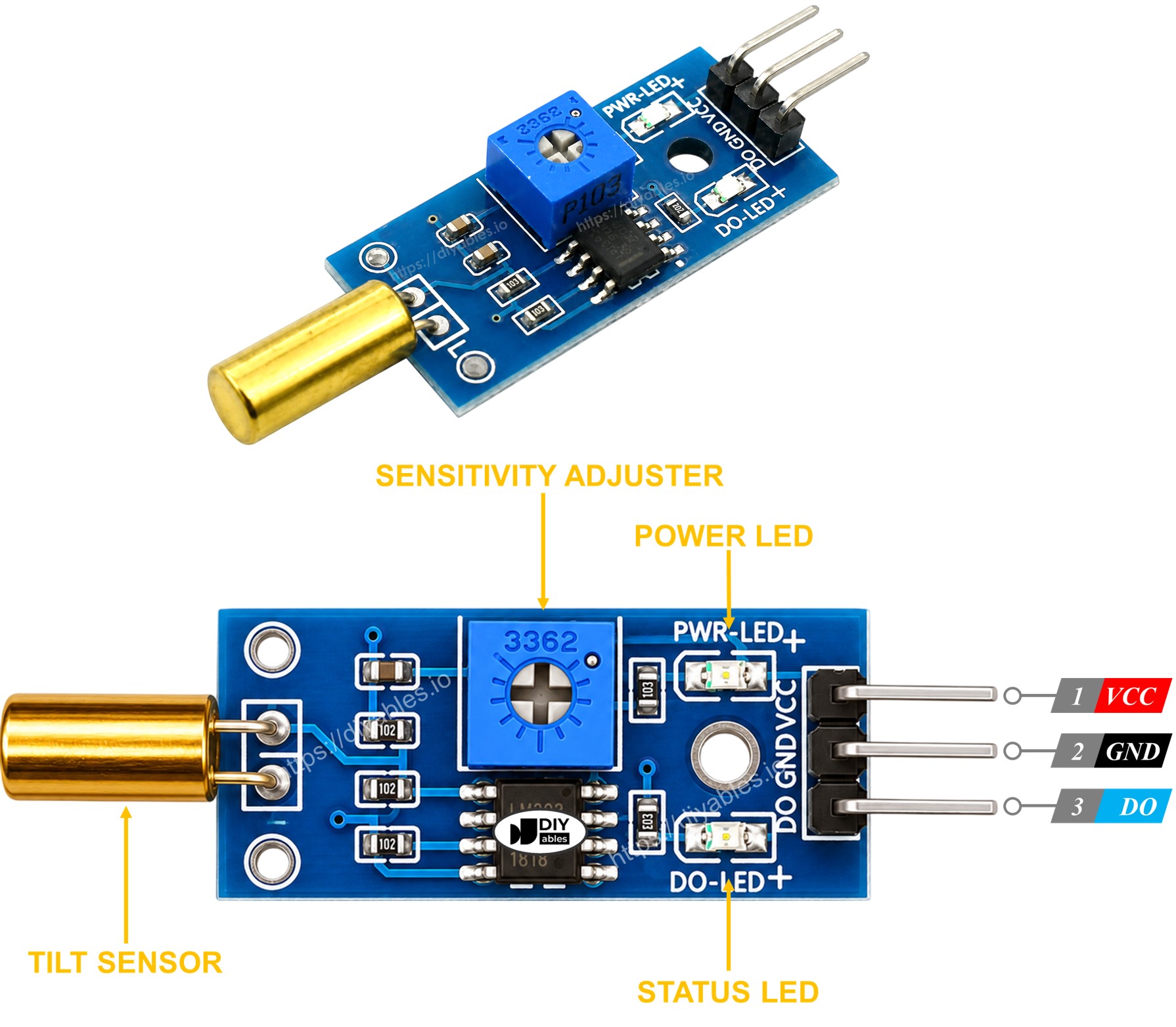
The SW520D tilt sensor module features two LED indicators:
- One LED indicates the power status.
- Another LED indicates the tilt state, turning on when the sensor is upright and off when it is tilted.
How It Works
Here's how the output pin of the sensor behaves:
- When the sensor is upright, the metal ball closes the contact, and the output pin is set to HIGH.
- When the sensor is tilted, the metal ball opens the contact, and the output pin is set to LOW.
Wiring Diagram
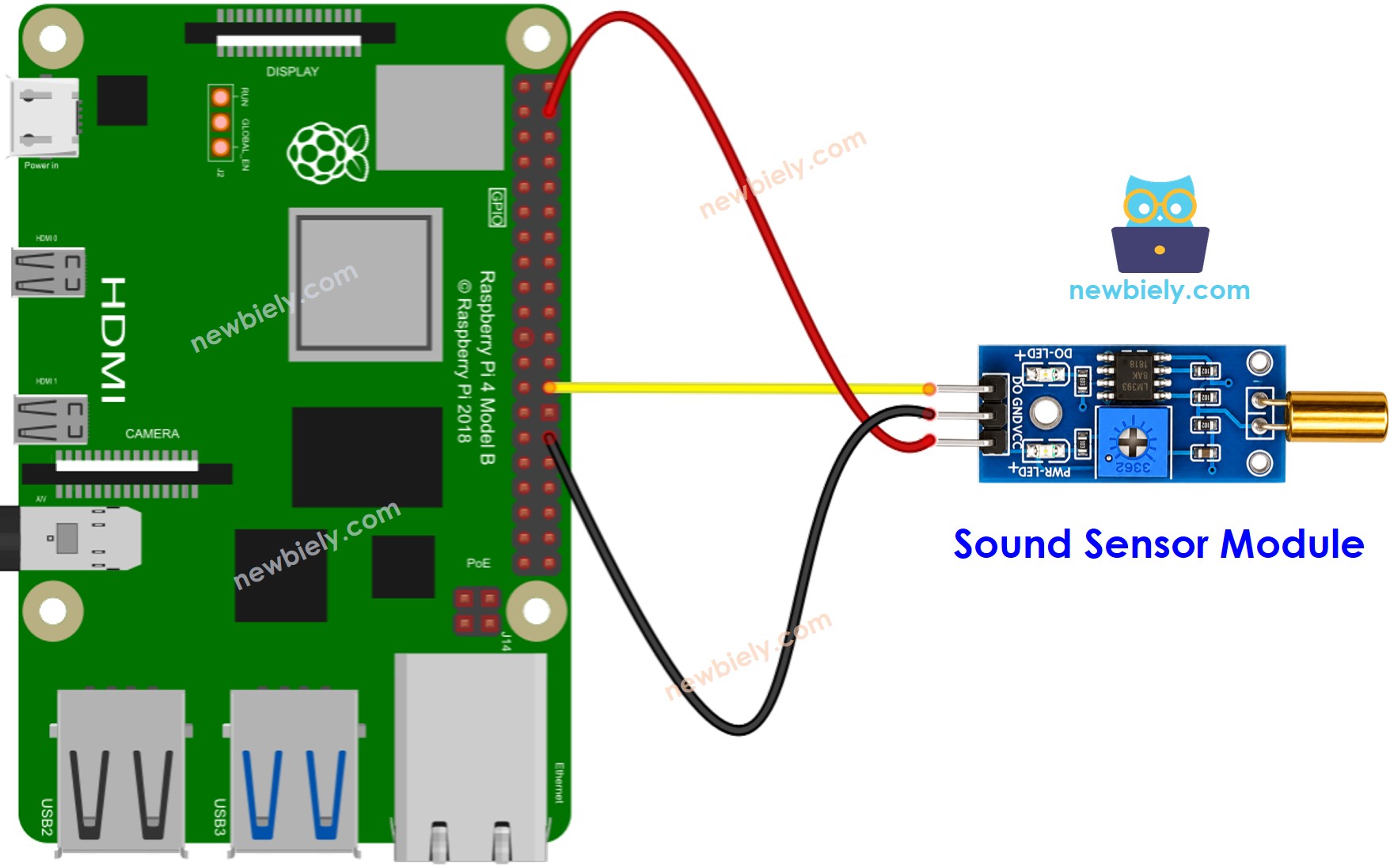
This image is created using Fritzing. Click to enlarge image
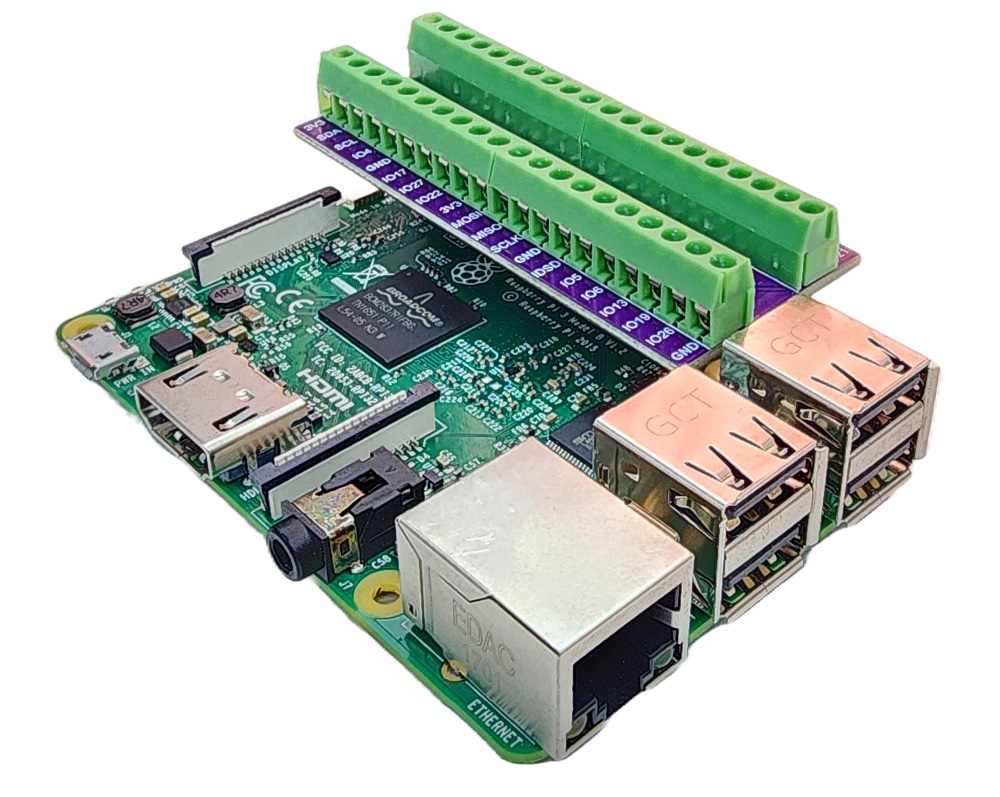
To simplify and organize your wiring setup, we recommend using a Screw Terminal Block Shield for Raspberry Pi. This shield ensures more secure and manageable connections, as shown below:
How To Program For SW520D Tilt Sensor
- Initializes the Raspberry Pi pin to the digital input mode by using GPIO.setup() function.
- Reads the state of the Raspberry Pi pin by using GPIO.input() function.
Raspberry Pi Code - Detecting the tilt
Detailed Instructions
- Make sure you have Raspbian or any other Raspberry Pi compatible operating system installed on your Pi.
- Make sure your Raspberry Pi is connected to the same local network as your PC.
- Make sure your Raspberry Pi is connected to the internet if you need to install some libraries.
- If this is the first time you use Raspberry Pi, See how to set up the Raspberry Pi
- Connect your PC to the Raspberry Pi via SSH using the built-in SSH client on Linux and macOS or PuTTY on Windows. See to how connect your PC to Raspberry Pi via SSH.
- Make sure you have the RPi.GPIO library installed. If not, install it using the following command:
- Create a Python script file tilt_sensor.py and add the following code:
- Save the file and run the Python script by executing the following command in the terminal:
- Tilt the SW520D sensor back and forth.
- See the result in the Terminal.
The script runs in an infinite loop continuously until you press Ctrl + C in the terminal.
Now, we have the flexibility to modify the code and make it trigger an LED or a light when tilt is detected. Additionally, we can even program it to rotate a servo motor. For detailed instructions and more information, please refer to the tutorials provided at the end of this guide.
Troubleshooting
If you encounter any issues with the SW520D tilt sensor's functionality, try the following troubleshooting steps:
- Check the orientation: The SW520D is sensitive to its mounting angle. Make sure it is installed in the correct upright position for reliable detection.
- Reduce vibrations: The tilt sensor can also react to mechanical vibrations. Mounting it on a stable surface can help minimize false triggers.
- Check the wiring: Make sure the VCC, GND, and DO pins are connected correctly.
- Check the power supply: Ensure that the power supply is stable and free from any electrical noise for consistent readings.
By following these steps, you should be able to address any potential issues with the SW520D tilt sensor.