
DIYables Web Apps Library Reference
Overview
This ESP32 S3 Uno API reference lists every class, method and callback of the DIYables ESP32 WebApps library. Use it when you build WebSocket web apps on the ESP32 S3 Uno form board and need the exact function name, parameter or return value.
The library is modular. It ships with many ready-made web apps and a small framework for making your own. You add only the apps your sketch needs, so the rest takes no memory.
In this reference, you will:
- Look up the methods of the main server class, DIYablesWebAppServer
- Learn how to build a custom web app from the DIYablesWebAppPageBase class
- Find the URL path, callbacks and message format of each built-in web app
- Check the memory use of each web app
- Understand the platform interfaces the library is built on
New to the board? Set up the Arduino IDE first with ESP32 S3 Uno - Getting Started, then choose the ESP32S3 Dev Module board. Install the library from the Library Manager by searching for "DIYables ESP32 WebApps". In your sketch, include it with #include <DIYablesWebApps.h>.
Features
The library is designed to be small and easy to use. These are its main ideas.
Modular architecture
You add only the web apps you need. Each app can be turned on or off on its own, which keeps flash and RAM use low.
11+ ready-to-use web applications
You can control the ESP32 S3 Uno from a browser with no web programming. Chat, monitor, digital pins, slider, joystick, plotter and more are included.
Custom web app framework
You can make your own app by extending the base class. The server handles HTTP and WebSocket for you.
Real-time communication
All apps use WebSocket, so updates reach the browser at once, in both directions.
Responsive design
The pages work on desktop, tablet and mobile.
Easy integration
You connect the apps to your code with simple callback functions. You can also add several web apps to one server at the same time.
Core Classes
The core class is the one object every sketch creates. It joins the WiFi network, serves the web pages and passes WebSocket messages to the right app.
DIYablesWebAppServer
This main server class manages the web applications, the HTTP requests and the WebSocket communication.
Constructor
This creates a web app server instance. httpPort is the HTTP server port (default 80). websocketPort is the WebSocket server port (default 81).
Methods
Setup and Connection
Starts the network connection and the web server, without WiFi credentials. It is meant for a future Ethernet option, or for when the WiFi credentials are already set up. It returns true on success and false on failure.
Connects to WiFi and starts the web server. This is the normal way to start. ssid is the WiFi network name and password is the WiFi password. It returns true on success and false on failure.
Handles the HTTP requests and the WebSocket communication. You must call it in the main loop().
Returns true if WiFi is connected.
Returns the IP address of the ESP32 S3 Uno as a string. Type this address in your browser to open the web apps.
Application Management
Adds a web application to the server. app is a pointer to a web application instance.
Removes a web application by its URL path. path is the URL path of the app, for example "/chat".
Gets a web application by its URL path. It returns a pointer to the app, or nullptr if no app has that path.
Sets the optional 404 Not Found page. page is a 404 page instance.
Specialized App Access
Returns a pointer to the digital pins page if it was added, or nullptr.
Returns a pointer to the slider page if it was added, or nullptr.
Returns a pointer to the joystick page if it was added, or nullptr.
Base Classes
Every web app in the library comes from one base class. If you want to make your own web page, this is the class you extend.
DIYablesWebAppPageBase
This abstract base class is the parent of all web applications. It gives them the common parts: HTTP handling, WebSocket communication and page management.
Constructor
Creates a base page with the given URL path. pagePath is the URL path of the page, for example "/web-joystick".
Virtual Methods (Must be implemented by derived classes)
Pure virtual. Handles the HTTP requests for this page. client is the web client interface you use to send the response.
Pure virtual. Handles the WebSocket messages for this page. ws is the WebSocket connection, message is the received content and length is the message length.
Pure virtual. Returns the page name string shown in the connection info, for example "🕹️ Web Joystick: ".
Pure virtual. Returns the HTML of the navigation card (button) on the home page.
Virtual Methods (Optional overrides)
Called when a new WebSocket connection opens. ws is the new connection.
Called when a WebSocket connection closes. ws is the closed connection.
Common Methods
Returns the URL path of this page.
Returns true if the page is enabled, false if it is disabled.
Turns the page on (true) or off (false).
Utility Methods
Sends the standard HTTP headers to the client. contentType is the MIME type (default "text/html").
Sends a message to one WebSocket client. ws is the target connection and message is the text to send.
Sends a message to all connected WebSocket clients.
Sends large HTML content with chunked transfer encoding. Use it for big pages, so the ESP32 S3 Uno does not need one huge buffer.
Usage Example
The class below is a very small custom page. It answers the HTTP request with a short HTML page, and it replies to every WebSocket message with "Response: " plus the message.
Web Application Classes
These are the ready-made apps. Create one object for each app you want, then pass it to addApp().
DIYablesHomePage
The home page is the main menu. It links to every app you enabled.
Constructor
URL Path
The path is / (root).
DIYablesWebChatPage
A chat box for two-way messages between the browser and the ESP32 S3 Uno.
Constructor
URL Path
The path is /webchat.
Methods
Sets the callback for incoming chat messages.
Sends a message to the web chat page.
DIYablesWebMonitorPage
A serial monitor in the browser. It shows live output and lets you type commands.
Constructor
URL Path
The path is /webmonitor.
Methods
Sets the callback for incoming monitor messages.
Sends a message to the web monitor page.
DIYablesWebDigitalPinsPage
Controls and watches digital pins 0-13 from the web page.
Constructor
URL Path
The path is /webdigitalpins.
Methods
Enables a pin for web control. pin is the pin number (0-13). mode is WEB_PIN_OUTPUT or WEB_PIN_INPUT.
※ NOTE THAT:
The library only accepts numbers 0 to 13. On the ESP32 S3 Uno, use them as the Uno header labels D0 to D13, and turn each label into the real GPIO yourself in pinMode(), digitalWrite() and digitalRead() (for example D13 is GPIO12, D7 is GPIO14). The Web Digital Pins tutorial shows this with a small UNO_TO_GPIO table. Leave D0 and D1 disabled, because they carry the Serial Monitor, and take care with D6 (GPIO3) and D9 (GPIO46), which are boot strapping pins.
Sets the callback for pin write operations (output pins).
Sets the callback for pin read operations (input pins).
Sets the callback for pin mode changes.
Updates a pin state in real time on all web clients.
DIYablesWebSliderPage
Two sliders for analog or PWM control.
Constructor
URL Path
The path is /webslider.
Methods
Sets the callback for slider changes from the web. The parameters are slider1 (0-255) and slider2 (0-255).
Sets the callback for when a web client asks for the current values.
Sends the slider values to the web page.
DIYablesWebJoystickPage
A 2D joystick for robots and position control.
Constructor
autoReturn sets whether the joystick goes back to the center by itself. sensitivity is the smallest movement, in percent, that sends an update.
URL Path
The path is /webjoystick.
Methods
Sets the callback for joystick movement from the web. The parameters are x (-100 to 100) and y (-100 to 100).
Sets the callback for when a web client asks for the current position.
Sends the joystick position to the web page.
Sets the auto-return behavior.
Sets the movement sensitivity (percent).
DIYablesWebPlotterPage
Draws live data as a graph, with support for several data series.
Constructor
URL Path
The path is /webplotter.
Methods
Sets the plot title.
Sets the axis labels.
Turns automatic Y-axis scaling on or off.
Sets the maximum number of data points shown.
Adds a data point to a series.
Clears all data from the plot.
DIYablesNotFoundPage
An optional 404 error page. It gives a nicer message when someone opens a wrong URL.
Constructor
ESP32 S3 Uno Pinout
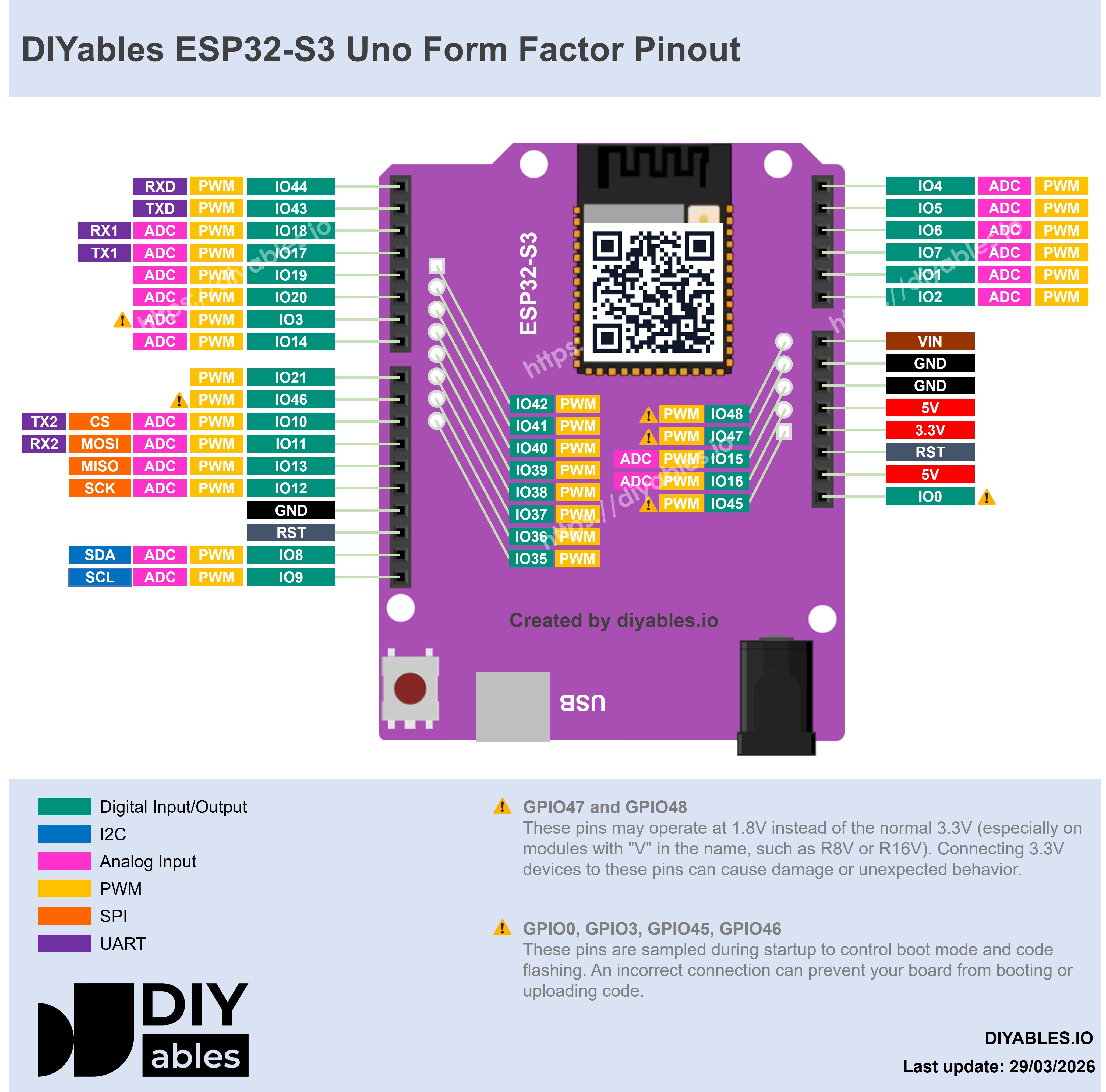
The image below shows the pinout of the ESP32 S3 Uno form board. Use it to match the Uno header pins (D2, A0, SDA…) to their GPIO numbers when you use the digital pins app or your own pin code.
Basic Usage Example
This sketch shows the normal pattern. It creates the server and three apps (home, chat and monitor), adds them, and connects to WiFi. When a chat message arrives, it prints the message to the Serial Monitor and sends a reply back to the chat page.
Replace YOUR_WIFI_SSID and YOUR_WIFI_PASSWORD with your own network. Upload the sketch with the ESP32S3 Dev Module board selected, then open the Serial Monitor at 9600 baud. You should see something like this:
Web Applications Overview
Each app has its own URL on the ESP32 S3 Uno. Replace [esp32-s3-uno-ip] with the IP address printed in the Serial Monitor.
Home Page
The URL is http://[esp32-s3-uno-ip]/. It is the main menu. It shows links to all enabled apps and the connection status.
WebChat Application
The URL is http://[esp32-s3-uno-ip]/webchat. It is a two-way message page with real-time messages, message history and the WebSocket status.
Web Monitor
The URL is http://[esp32-s3-uno-ip]/webmonitor. It replaces the Serial Monitor. It shows live serial output, has a command input and uses a dark theme.
Web Digital Pins Control
The URL is http://[esp32-s3-uno-ip]/webdigitalpins. It controls digital pins 0-13. You can switch each pin, use bulk actions and see the live state.
Web Slider Control
The URL is http://[esp32-s3-uno-ip]/webslider. It gives two independent sliders (0-255) for analog/PWM control, with preset values and live feedback.
Web Joystick Control
The URL is http://[esp32-s3-uno-ip]/webjoystick. It is a 2D position control for robots and cars. It works with touch or mouse, shows the coordinates and lets you change the sensitivity.
Web Plotter
The URL is http://[esp32-s3-uno-ip]/webplotter. It draws live data, with several data series, auto-scaling, and titles and axes you can set.
WebSocket Communication
All apps talk to the ESP32 S3 Uno over WebSocket on port 81. The WebSocket URL is ws://[esp32-s3-uno-ip]:81. The page reconnects by itself if the link drops, and the messages are plain text.
Message Formats
You only need these formats if you write your own web page or debug the link. The built-in apps handle them for you.
WebChat Messages
From the web: plain text message. To the web: plain text message.
Web Monitor Messages
From the web: plain text message. To the web: plain text message.
Web Digital Pin Messages
From the web: JSON, {"pin": 13, "state": 1}. To the web: JSON, {"pin": 13, "state": 1}.
Web Slider Messages
From the web: JSON, {"slider1": 128, "slider2": 255}. To the web: JSON, {"slider1": 128, "slider2": 255}.
Web Joystick Messages
From the web: JSON, {"x": 50, "y": -25}. To the web: JSON, {"x": 50, "y": -25}.
Web Plotter Messages
From the web: not used (display only). To the web: JSON, {"series": "temp", "x": 10.5, "y": 23.4}.
Error Handling
The library handles common errors by itself, so your sketch stays simple. It deals with WiFi connection failures, WebSocket disconnections, invalid message formats and client connection limits.
Memory Usage
Because the library is modular, you save memory by adding only the apps you use. The ESP32 S3 Uno has much more flash and RAM than a classic Uno, but the numbers below still help when your sketch grows.
| Component | Flash | RAM |
|---|---|---|
| DIYablesWebAppServer | ~8KB | ~2KB |
| DIYablesHomePage | ~3KB | ~1KB |
| DIYablesWebChatPage | ~6KB | ~1.5KB |
| DIYablesWebMonitorPage | ~5KB | ~1.5KB |
| DIYablesWebDigitalPinsPage | ~8KB | ~2KB |
| DIYablesWebSliderPage | ~6KB | ~1.5KB |
| DIYablesWebJoystickPage | ~7KB | ~1.5KB |
| DIYablesWebPlotterPage | ~10KB | ~2KB |
| WebSocket Buffer | - | ~1KB per connection |
With all apps enabled, the total is about 53KB of flash and 12KB of RAM. A minimal setup (server + home page + one app) uses about 17KB of flash and 4.5KB of RAM.
Browser Compatibility
The web apps run in any modern browser. Supported browsers are Chrome 50+, Firefox 45+, Safari 10+, Edge 79+, and mobile browsers (iOS Safari, Chrome Mobile).
Security Notes
The library has no login or password for the web pages. Anyone on the same network can open them. Use it only on local, trusted networks, and add your own authentication if you ever expose the board to the public internet.
Common Issues
Most problems come from WiFi, the browser link or memory. Check these points first.
Cannot connect to WiFi
- Check the SSID and password.
- Make sure the network is 2.4GHz, not 5GHz.
- Check the signal strength.
WebSocket connection fails
- Make sure the IP address is correct.
- Check your firewall settings.
- Try a different browser.
High memory usage
- Disable the apps you do not use.
- Limit the number of connections at the same time.
- Restart the ESP32 S3 Uno if memory gets fragmented.
Slow response
- Check the WiFi signal strength.
- Send WebSocket messages less often.
- Keep your callback functions short.
Example Projects
Each app has its own step-by-step ESP32 S3 Uno tutorial with full code:
- DIYables WebApps Library for ESP32 S3 Uno - library overview and installation
Example Applications
The DIYables ESP32 WebApps library also comes with example sketches. Open them in the Arduino IDE from File > Examples > DIYables ESP32 WebApps.
Available examples
- Chat: a two-way message page
- WebMonitor: a serial monitor replacement with extra features
- WebDigitalPins: controls all digital pins with visual feedback
- WebSlider: two sliders for analog/PWM control, with presets
- WebJoystick: 2D position control for robot projects
- MultipleWebApps: all apps running at the same time
See the examples/ folder of the library for the complete projects and the docs/ folder for detailed setup notes.
Platform Abstraction Interfaces
You do not need this part for normal projects. It explains how the library is built inside. The library uses a platform layer made of interfaces. These interfaces keep the main web app code separate from the board-specific network code, so the same apps can run on different hardware.
Core Interfaces
IWebClient
The interface for HTTP client connections.
IWebSocket
The interface for WebSocket connections, with two-way communication.
IWebServer
The interface for the HTTP server.
IWebSocketServer
The interface for the WebSocket server, with connection management.
INetworkProvider
The interface for the network connection.
IServerFactory
The factory interface that creates the platform-specific objects.
Platform Implementation Example
On ESP32-family boards, including the ESP32 S3 Uno, the interfaces are built on the DIYables_ESP32_WebServer library. The class names below come from the library itself.
Adding New Platform Support
To add support for another board, follow these steps:
- Implement all interfaces for the target board.
- Create a ServerFactory that creates your implementations.
- Handle the board-specific networking and WebSocket protocol.
- Test with the existing WebApp classes. They need no changes.
A server is then created from the factory like this:
Benefits of Interface-Based Design
This design keeps the web app logic the same on every board. New hardware is easy to add, because the board-specific code sits in one place. The interfaces can be mocked for unit tests, and you get the same API on every supported platform.
Current Platform Support
- ✅ ESP32 boards (including the ESP32 S3 Uno): fully implemented and tested in the DIYables ESP32 WebApps library
- 🚀 Future platforms: can be added with the same interface pattern
FAQ
Which library do I install for the ESP32 S3 Uno: "DIYables WebApps" or "DIYables ESP32 WebApps"?
Install "DIYables ESP32 WebApps". The other library, "DIYables WebApps", is made for the Arduino UNO R4 WiFi and does not build for ESP32 boards. Both use the same class names and the same #include <DIYablesWebApps.h>, so sketches are almost the same.
Which Arduino IDE board do I select?
Install the "esp32 by Espressif Systems" core and choose ESP32S3 Dev Module. Then select the COM port of the ESP32 S3 Uno.
Can I use 5GHz WiFi?
No. The ESP32 S3 Uno supports only 2.4GHz WiFi. If your router has both bands, connect to the 2.4GHz network name.
What pin number do I pass to enablePin() on the ESP32 S3 Uno?
Pass the Uno header label (0 to 13), and map it to the real GPIO in your own code. For example, D13 is GPIO12 and D7 is GPIO14. The pins are 3.3V and not 5V tolerant, so do not connect 5V signals to them.
What if my project needs more pins than the Uno headers give?
The ESP32 S3 Uno has two extra rows of holes with more GPIOs: GPIO15 and GPIO16 (I/O, PWM, analog), GPIO45 and GPIO35 to GPIO42 (I/O, PWM), and GPIO47/GPIO48 (output only, PWM). Solder pin headers to use them and write the GPIO number in code. For web-controlled outputs like LEDs or relays, GPIO35 to GPIO42 are a good first choice; for analog sensors shown on the plotter or gauge, use GPIO15/GPIO16. Be careful with two groups. GPIO47 and GPIO48 may run at 1.8V instead of 3.3V on some modules (especially ones with "V" in the name, like R8V or R16V), so 3.3V devices can be damaged or act strangely. GPIO0, GPIO3 (D6), GPIO45 and GPIO46 (D9) are boot strapping pins, and a wrong connection can stop the board from booting or uploading code. Use the other extra pins first.
How many browsers can connect at the same time?
Several clients can connect, but each WebSocket connection uses about 1KB of RAM. The library also has a client connection limit. For a smooth experience, keep the number of open pages small.
Troubleshooting
| Problem | Possible Cause | Solution |
|---|---|---|
| No COM port in Arduino IDE | USB driver missing or board not in upload mode | Install the CP210x or CH340 driver, use a data USB cable, or hold BOOT while pressing RESET |
| Compile error "DIYablesWebApps.h not found" | Library not installed | Install "DIYables ESP32 WebApps" and its dependencies from the Library Manager |
| Compile error about WiFiS3.h | Wrong library (the non-ESP32 version) installed | Remove "DIYables WebApps" and install "DIYables ESP32 WebApps" |
| Serial Monitor shows no IP address | Wrong SSID or password, or a 5GHz network | Check the credentials and use a 2.4GHz network |
| Web page opens but does not update | WebSocket port 81 is blocked | Check the firewall, use the same WiFi network, or try another browser |
| Board resets or behaves strangely after many page loads | Low memory or a weak USB power supply | Remove unused apps, close extra browser tabs, and use a good USB cable and port |
| Digital pins page controls the wrong pin | The Uno label was not mapped to its GPIO | Keep 0 to 13 in enablePin() and map each label to its GPIO (see the UNO_TO_GPIO table) |
| Board does not boot after wiring a pin | A boot strapping pin (GPIO0, D6 GPIO3, D9 GPIO46) is pulled at startup | Move the device to another pin or remove it while booting |