
ESP32 S3 UNO - GUVA-S12SD UV Sensor
The UV forecast in a weather app covers a whole city and is often hours old. A GUVA-S12SD module wired to your ESP32 S3 Uno measures the UV light that falls on your own balcony, garden or playground, right at this minute. The module sends out a small voltage that grows with ultraviolet light, and the board turns that voltage into a number you can read, log or send over WiFi later.
Steps on this page:
- Get to know the purple GUVA-S12SD board and its SIG, GND and VCC pins
- Run three wires to A0 (GPIO2), GND and 3.3V on the ESP32 S3 Uno form board
- Print the 12-bit ADC count and the calibrated SIG voltage side by side
- Turn the SIG voltage into a UV index with a level name, from Low to Extreme
One thing to know before you start: this sensor is almost blind inside the house. Lamps and window light give it close to nothing. Plan to carry the board outside for the real test.
Hardware Preparation
Or you can buy the following kits:
| 1 | × | DIYables Sensor Kit (18 sensors/displays) |
Additionally, some of these links are for products from our own brand, DIYables .
Overview of GUVA-S12SD UV Sensor
The DIYables GUVA-S12SD module comes two to a pack, with the header pins already soldered. Each one is a small purple PCB of about 11mm x 27mm, with a mounting hole on each end so you can screw it into a weatherproof box.
Look for the tiny white square on the board. That is the GUVA-S12SD photodiode, the part that reacts to ultraviolet light. When UV-A or UV-B light lands on it, it lets through a very small current, far too small for any ADC to read. Beside it, a VLM358 op-amp chip makes that current bigger and hands it to the SIG pin as a voltage. The ESP32 S3 Uno only has to measure that voltage on an analog pin.
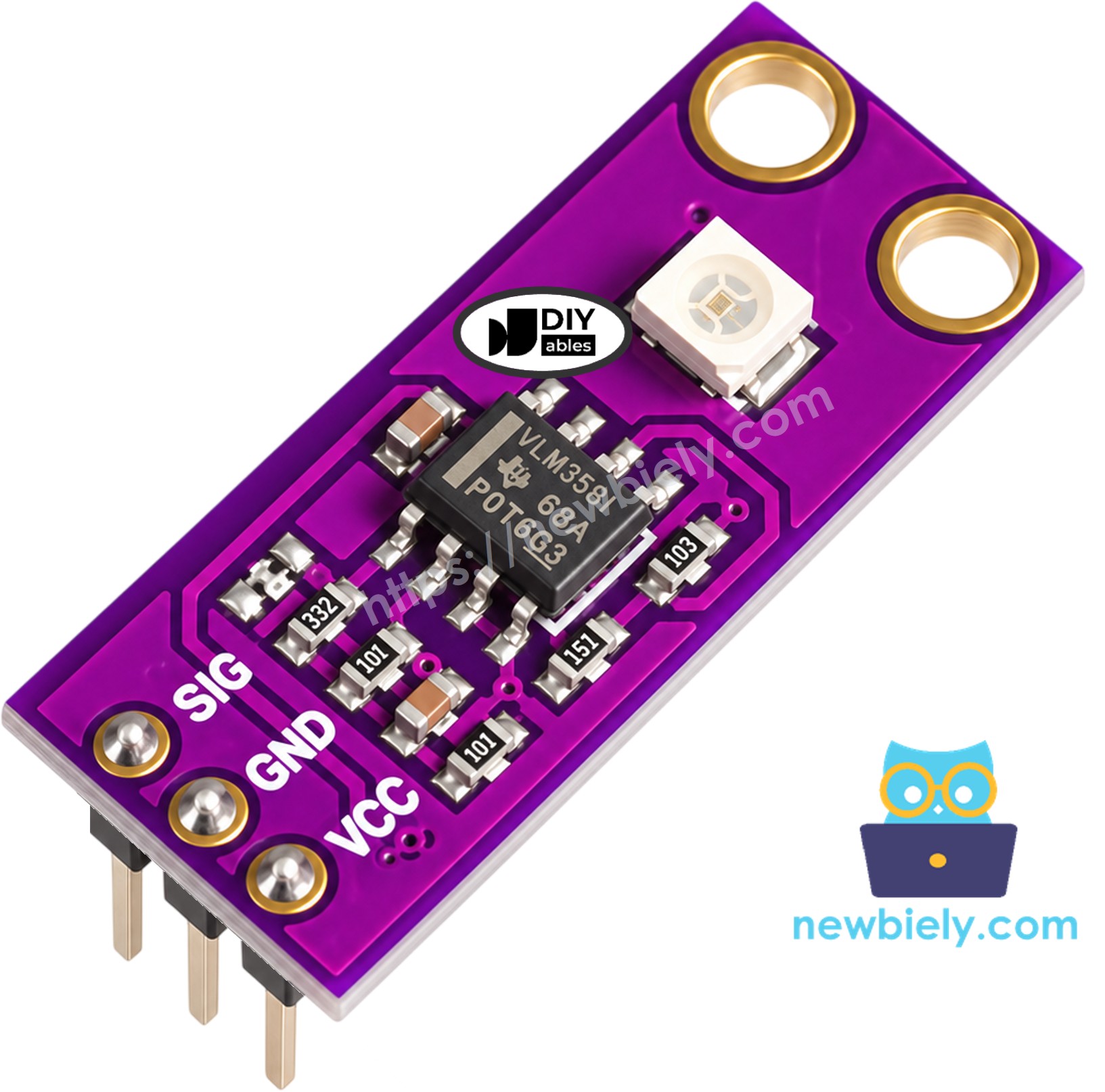
The header has three pins. Read them from the print on the board: SIG, GND, VCC.
- SIG: the analog output. It rests near 0V when there is no UV and climbs to about 1V in strong summer sun. Wire it to A0 (GPIO2).
- GND: ground. Wire it to any GND pin of the ESP32 S3 Uno.
- VCC: power in. The module runs on 2.5V to 5V DC. On this board, wire it to the 3.3V pin.
| GUVA-S12SD Module | |
|---|---|
| Sensing element | GUVA-S12SD UV photodiode |
| Amplifier | VLM358 op-amp |
| Light it reacts to | UV-A and UV-B, 240nm to 370nm |
| Viewing angle | 130 degrees |
| Supply voltage | 2.5V to 5V DC |
| Output | analog voltage, about 0V (no UV) to about 1V+ (strong sun) |
| Board size | about 11mm x 27mm, 2 mounting holes |
| Pack | 2 modules, header presoldered |
From SIG voltage to UV index
Most makers use one simple rule with this module: UV index ≈ SIG voltage ÷ 0.1. Said another way, each 0.1V on SIG is roughly one UV index point, so 0.5V means about UV index 5. The rule is good enough for a hobby project or a "put on sunscreen" reminder. It is not a calibrated meter, so do not use it for medical or safety decisions.
These are the five UV index levels used by the World Health Organization:
| UV Index | Level | What it means for you |
|---|---|---|
| 0 to 2 | Low | Little risk for most people |
| 3 to 5 | Moderate | Wear a hat and sunscreen near midday |
| 6 to 7 | High | Find shade in the middle of the day |
| 8 to 10 | Very High | Skin can burn quickly, cover up |
| 11 and above | Extreme | Stay out of the midday sun if you can |
ESP32 S3 Uno Pinout
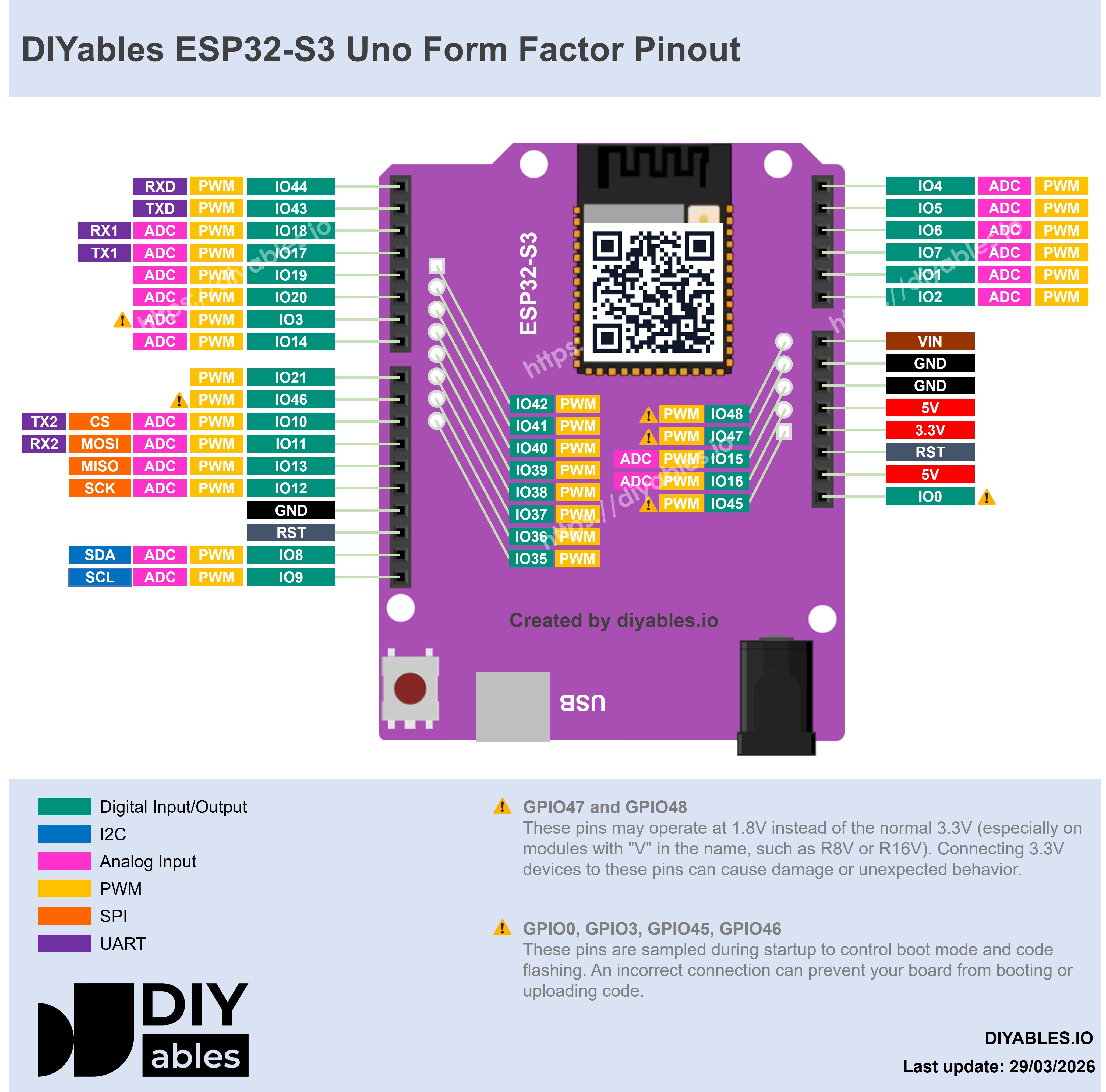
The picture below shows the pinout of the ESP32 S3 Uno form board. You need the 3.3V pin, a GND pin and the A0 header. A0 is GPIO2 on the chip, one of the ADC1 inputs, so it keeps working even when WiFi is on.
Wiring Diagram
The module plugs straight onto three jumper wires. There is no resistor to add and no breadboard to set up.
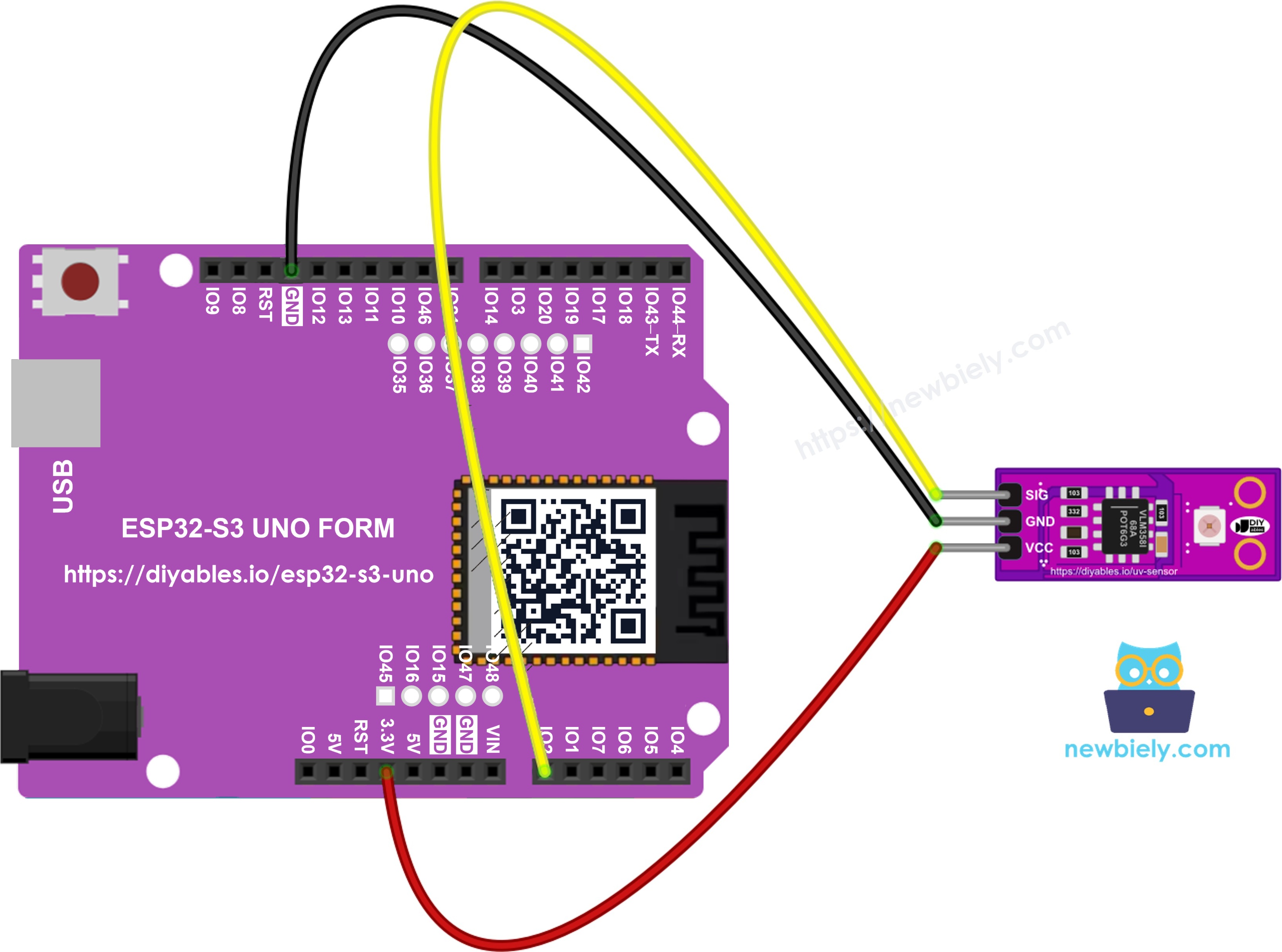
This image is created using Fritzing. Click to enlarge image
| GUVA-S12SD Pin | ESP32 S3 Uno Pin |
|---|---|
| SIG | A0 (GPIO2) |
| GND | GND |
| VCC | 3.3V |
WARNING
Keep VCC on the 3.3V pin. The SIG voltage is low in normal use, but a fault on the module could pass the supply voltage to SIG. The ESP32 S3 Uno pins are 3.3V only and are not 5V tolerant, so a 3.3V supply keeps GPIO2 safe in every case.
Why A0? On the ESP32-S3 chip, the ADC2 pins stop working while WiFi is busy. GPIO2 belongs to ADC1, so you can add a web page or cloud upload to this project later without moving the wire.
How To Program For GUVA-S12SD UV Sensor
The SIG pin gives a plain analog voltage, so no extra library is needed. Three things matter on this board.
- Write the GPIO number, not the Uno label. A0 on the ESP32 S3 Uno is GPIO2:
- Open the full input range in setup(). The 11 dB setting lets the pin measure up to about 3.3V:
- Ask for millivolts instead of doing the math yourself. analogReadMilliVolts() uses the calibration data stored in the chip at the factory, so the result is closer to the true voltage than raw * 3.3 / 4095:
ESP32 S3 Uno Code - Raw ADC Count and SIG Voltage
Start with a check of the hardware. This sketch reads A0 twice in each round: once with analogRead() for the raw 12-bit count (0 to 4095), and once with analogReadMilliVolts() for the calibrated voltage. Both go to the Serial Monitor on one line, a little under once per second.
Detailed Instructions
- Never used this board before? Install the ESP32 core first with ESP32 S3 Uno - Getting Started.
- Connect three wires: SIG to A0, GND to GND, VCC to 3.3V.
- Plug the board into your computer with a USB Type-C cable.
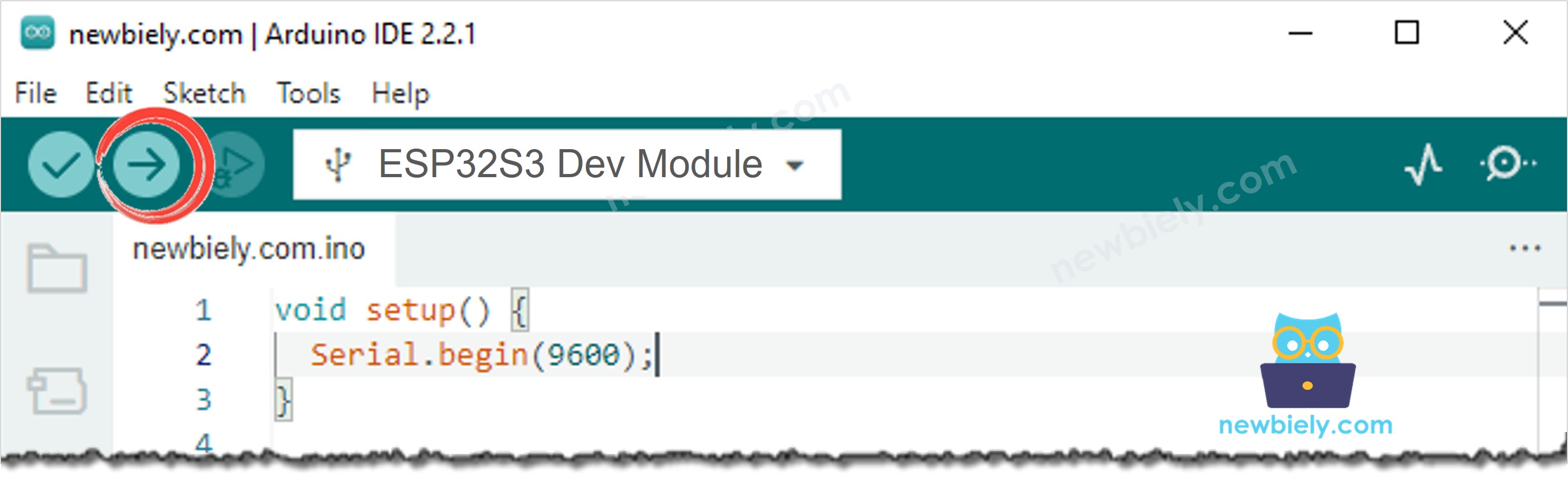
- Select the board ESP32S3 Dev Module and its COM port in Arduino IDE.
- Paste the code above into a new sketch.
- Press Upload and wait for "Done uploading".
- Open the Serial Monitor and set it to 9600 baud.
- Read the numbers at your desk first, then take the board (still on the USB cable of a laptop) out into direct sun:
- Did the indoor lines stay near zero? Good, that is normal. The jump only shows up under real sky. If the value stays near zero outside too, check the SIG wire and make sure the white square faces the sun.
Notice that the raw count and the millivolts are not in a fixed 3.3V / 4095 ratio. That gap is the reason to use analogReadMilliVolts(): each ESP32-S3 chip is a little different, and the stored calibration fixes it.
ESP32 S3 Uno Code - UV Index and Level Name
Now turn the voltage into something useful. This sketch takes 16 quick millivolt readings, averages them so one noisy sample does not jump the result, and divides the average by 0.1V to get the UV index. A small helper function then rounds the index and picks the WHO level name.
Detailed Instructions
- Keep the same three wires. Nothing changes in the circuit.
- Upload this sketch the same way as the first one.
- Open the Serial Monitor at 9600 baud.
- Walk outside and point the sensor at the open sky. Try the shade of a tree, then full sun. A sunny day near noon gave these lines:
- Compare the result with the UV index in your weather app for the same hour. If yours is always a bit higher or lower, change the 0.1 in the code a little until the two agree. That is a quick, simple calibration for your own module.
Why does 5.6 say "High"? The level comes from the rounded index, the same way weather reports do it. 5.6 rounds to 6, and 6 is in the High group.
Video Tutorial
Watch the video below to see this ESP32 S3 Uno project step by step.
Additional Knowledge
Glass, clouds and angle
- Window glass stops most UV-B. A sensor behind a window reads much lower than one outside, so it is not a fair test.
- Thin clouds let a lot of UV through. A grey day can still reach Moderate, which is why people get sunburned on cloudy days.
- Angle changes the reading. The sensor sees a wide 130 degree cone, but it reads highest when it faces the sun. For a fixed station, point it straight up at the sky.
- Heat is not UV. A hot, bright lamp in your room can leave the reading at zero. That is correct.
Project ideas
- Sunscreen alarm: beep a buzzer when the index reaches 3 (Moderate) or more.
- Balcony UV station: show the index on an LCD and log the highest value of each day.
- UV lamp checker: see if an old UV curing lamp or UV LED still gives out real UV light.
- Smart blind: drive a servo motor to close a blind when the index goes over 6.
- Web UV meter: add the ESP32 S3 Uno - Web Server code and read the UV index on your phone.
Function References
FAQ
Why does the sensor read 0 indoors?
It only reacts to light between 240nm and 370nm. Most indoor lamps give almost no light in that band, and window glass blocks a lot of the rest. A reading near 0 inside is normal. Test it outside in the sun, or with a UV flashlight.
Why use analogReadMilliVolts() and not analogRead()?
analogRead() gives a count from 0 to 4095, and turning that into volts with a simple formula can be off by tens of millivolts on the ESP32-S3. On this sensor, 0.1V is a whole UV index point, so that error matters. analogReadMilliVolts() uses the calibration stored in the chip and returns the voltage directly.
Do I still need analogSetAttenuation(ADC_11db)?
Keep it. In strong sun SIG can go above 1V, and the 11 dB setting gives the pin a range up to about 3.3V. It costs nothing and keeps the reading from hitting the top of the scale.
Can I power the module from 5V?
The module accepts 5V, and SIG would still stay around 1V in normal use. But on the ESP32 S3 Uno the safe choice is 3.3V, because the GPIO pins are not 5V tolerant. The sensor works the same at 3.3V.
How accurate is the UV index from this module?
It is a rough guide. The 0.1V-per-point rule is an approximation, and each sensor is a little different. It is fine for reminders, logging and fun projects. Do not use it as a medical or safety device.
Can I use another analog pin?
Yes. A1 (GPIO1), A2 (GPIO7), A3 (GPIO6), A4 (GPIO5) and A5 (GPIO4) are all ADC1 pins too, so any of them works, even with WiFi on. Change UV_SIG_PIN to the matching GPIO number. Avoid the ADC2 pins (for example GPIO15 and GPIO16 on the extra rows) if you plan to use WiFi.
Troubleshooting
| Problem | Possible Cause | Solution | |
|---|---|---|---|
| No COM port in Arduino IDE | USB driver missing or charge-only cable | Install the CP210x or CH340 driver, use a data USB cable, or hold BOOT while you press RESET | |
| Reading near 0 even outside | Sensor behind glass, or SIG wire loose | Go fully outside, face the white square to the sky, and check the SIG wire on A0 | |
| Reading near 0 all the time | Wrong pin number in code | Write 2 (GPIO2) for the A0 header. Do not write A0 in code | with the ESP32S3 Dev Module setting it means GPIO1, which is the A1 header |
| Reading stuck near 4095 | SIG wired to 3.3V by mistake | Check that the middle wire goes to GND and the SIG wire goes to A0 | |
| UV index jumps around | Clouds moving, or a single noisy sample | Use the second sketch, which averages 16 readings, or raise SAMPLE_COUNT | |
| Readings stop when WiFi is added | Signal moved to an ADC2 pin | Keep SIG on A0 (GPIO2) or another ADC1 pin | |
| Serial Monitor shows strange characters | Baud rate does not match | Set the Serial Monitor to 9600 baud |