
ESP32 S3 UNO - 4-Channel Relay Module
This ESP32 S3 Uno 4-channel relay module tutorial shows you how to switch four separate loads, like pumps, fans, lamps or actuators, from the ESP32 S3 Uno form board. You will learn the four-channel relay pinout, wire it with a safe external 5V supply, and run Arduino IDE code that clicks all four relays on and off every second.
In this tutorial, you will:
- Learn what each pin on a four-channel relay module does
- Wire a 4-channel relay module to the ESP32 S3 Uno with an external 5V supply
- Write code that controls four relays with pinMode() and digitalWrite()
- Upload the sketch and watch the result in the Serial Monitor
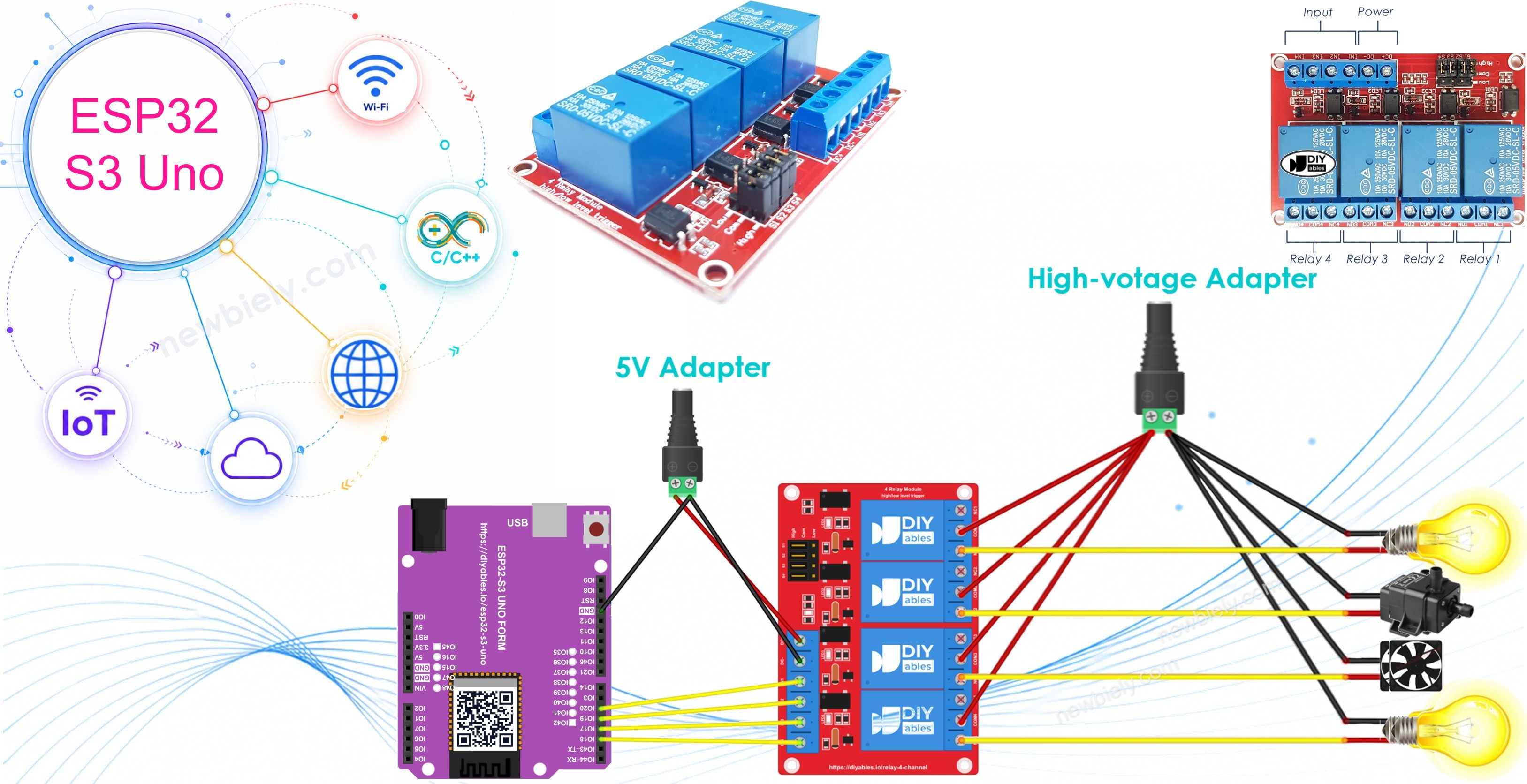
Four single relay modules could do the same job. Still, one 4-channel board is usually the smarter pick. It needs fewer wires and less space, it often costs less, and the code does not change at all.
Hardware Preparation
Or you can buy the following kits:
| 1 | × | DIYables Sensor Kit (18 sensors/displays) |
Additionally, some of these links are for products from our own brand, DIYables .
Overview of 4-Channel Relay Module
Knowing the pins first makes the wiring much easier. A 4-channel relay module groups its pins into three sets: power, signal and output. Each set has one clear job.
Pinout
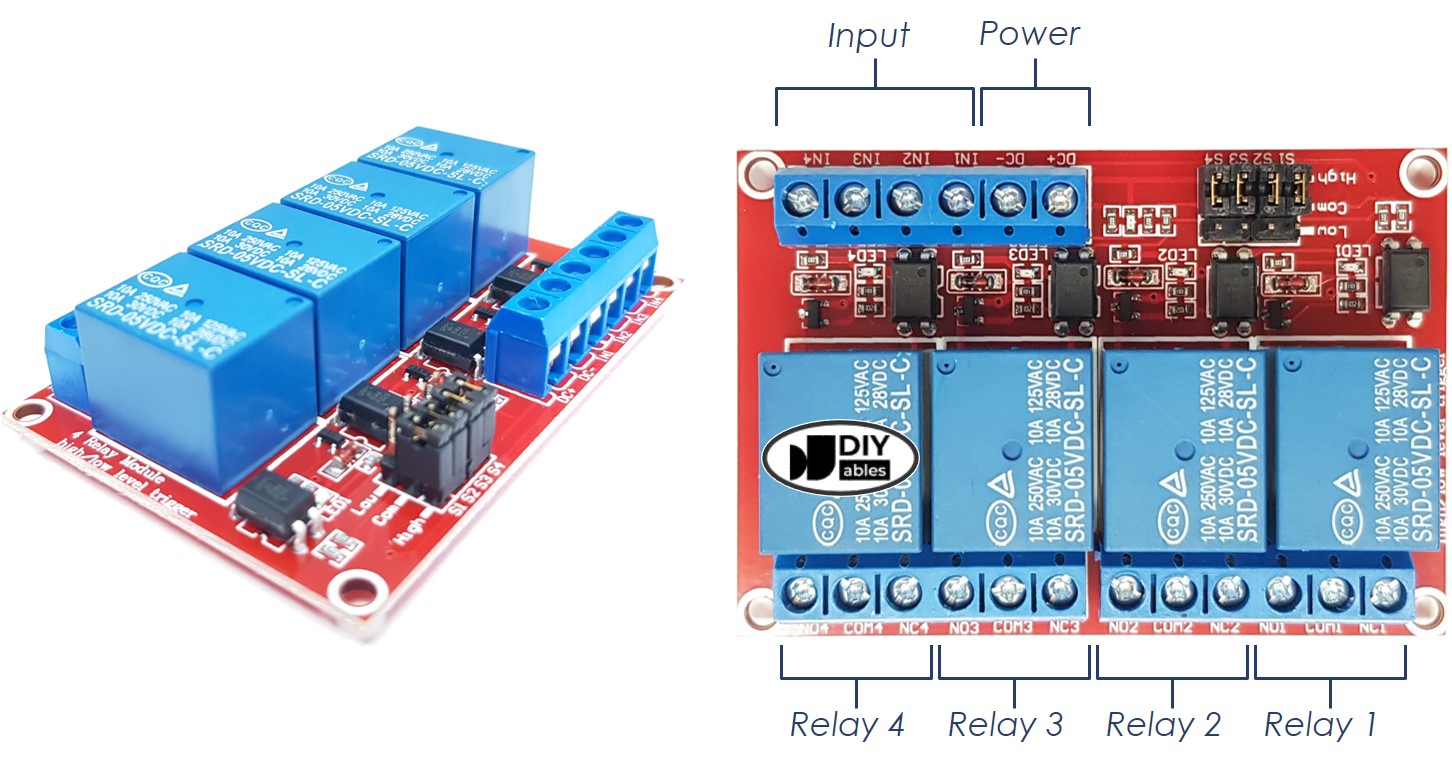
Power pins
These two pins feed the relay coils. Connect DC+ to the 5V pin of your power supply. Connect DC- to the GND pin of that supply, and also to a GND pin of the ESP32 S3 Uno, so both sides share one ground.
Signal pins
The ESP32 S3 Uno sends its control signals here. IN1 drives relay 1, IN2 drives relay 2, IN3 drives relay 3, and IN4 drives relay 4.
Output pins
Every relay has three output terminals: NCx (normally closed), NOx (normally open) and COMx (common). Your high-voltage device connects to these. NC1, NO1 and COM1 belong to relay 1, NC2, NO2 and COM2 to relay 2, and so on up to relay 4.
Trigger jumpers
The board also carries 4 jumpers. Each one lets you pick low-level trigger or high-level trigger for its relay.
Never used a relay before? Start with the ESP32 S3 Uno - Relay tutorial. It shows how to hook a relay up to a high-voltage device and explains the difference between normally closed and normally open.
ESP32 S3 Uno Pinout
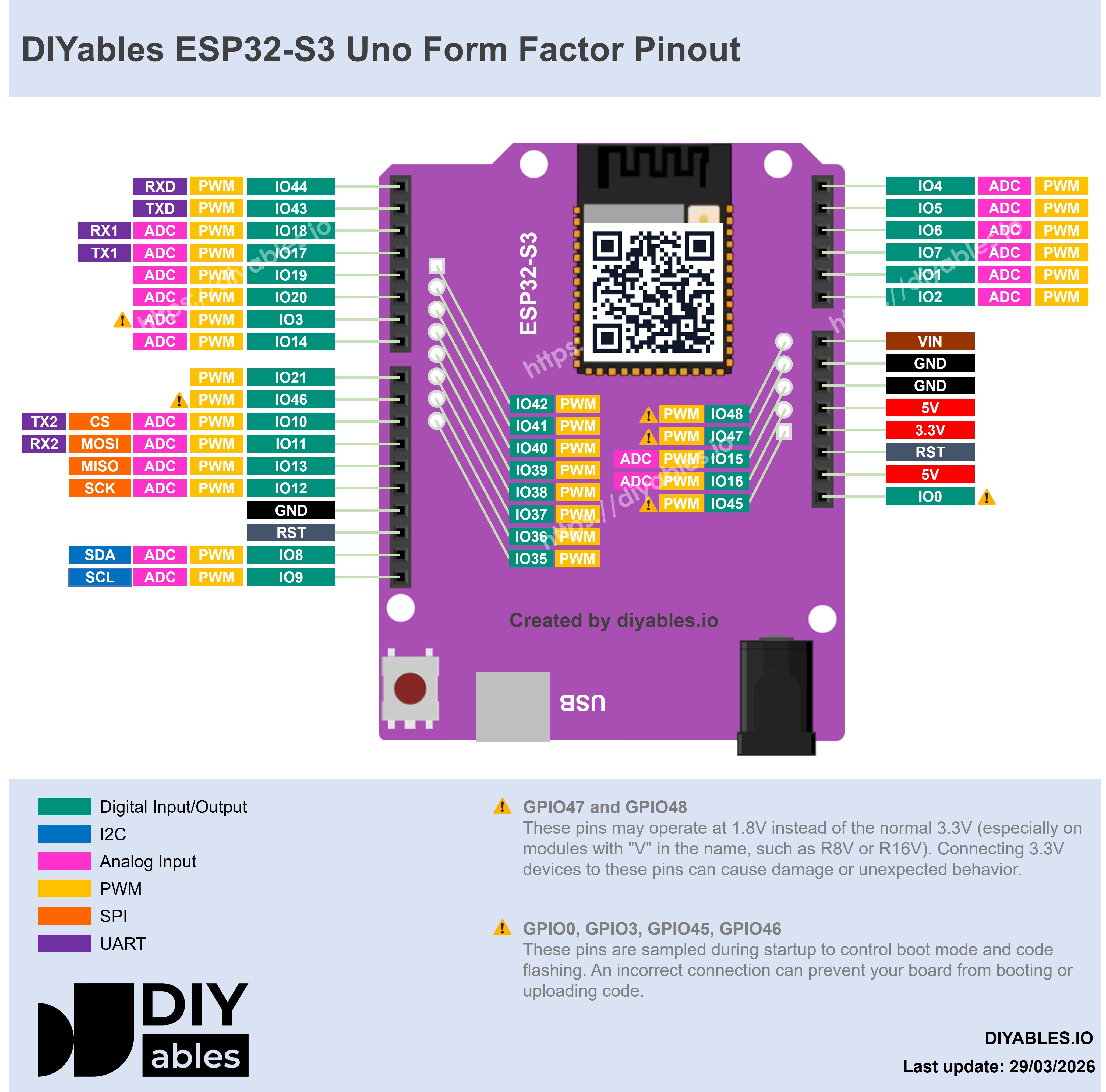
The image below shows the pinout diagram of the ESP32 S3 Uno form board. Use it to find the D2 to D5 headers and their GPIO numbers when you wire the relay module.
Wiring Diagram
Four relay coils together pull a lot of current. Do NOT power the module from the 5V pin of the ESP32 S3 Uno. Give the module its own external 5V supply instead.
This setup uses three separate power sources. A 5V power adapter runs the ESP32 S3 Uno. A second 5V power adapter runs the 4-channel relay module. A higher-voltage adapter (12VDC, 24VDC, 48VDC, 220VAC...) runs the devices that the relays switch.
The ESP32 S3 Uno can take its power from the USB Type-C cable or from the power jack. That source is not drawn in the image. The table lists the signal and power connections.
| Relay Module Pin | Connect To |
|---|---|
| DC+ | 5V of the relay power adapter |
| DC- | GND of the relay power adapter and GND of the ESP32 S3 Uno |
| IN1 | D2 (GPIO18) of the ESP32 S3 Uno |
| IN2 | D3 (GPIO17) of the ESP32 S3 Uno |
| IN3 | D4 (GPIO19) of the ESP32 S3 Uno |
| IN4 | D5 (GPIO20) of the ESP32 S3 Uno |
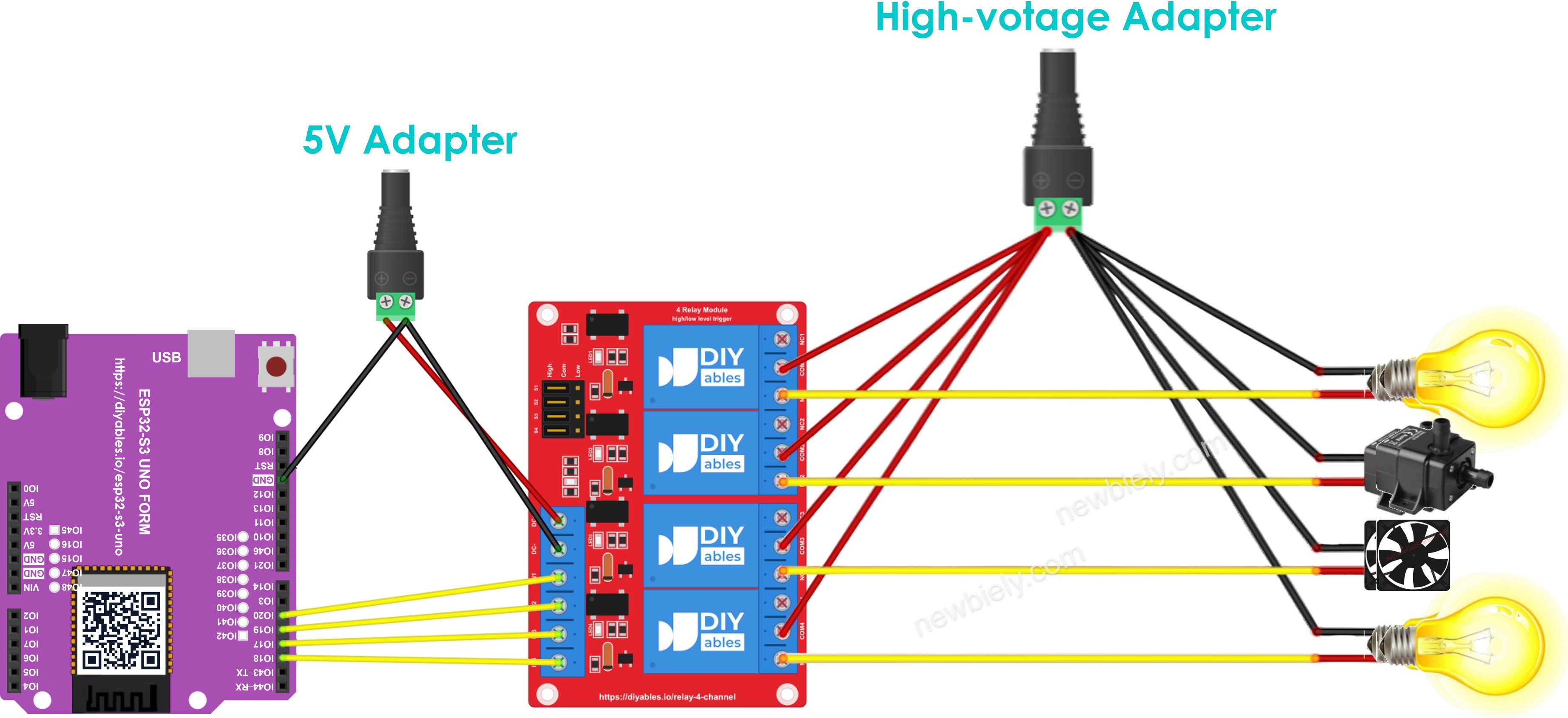
This image is created using Fritzing. Click to enlarge image
※ NOTE THAT:
The ESP32 S3 Uno sends a 3.3V HIGH signal, not 5V. Most 5V relay modules with an optocoupler or transistor input switch fine with it. The IN pins only take signals from the board, so nothing at 5V flows back into an ESP32 S3 Uno pin. Keep it that way, because ESP32 S3 Uno pins are NOT 5V tolerant.
※ NOTE THAT:
When all four devices run on the same voltage, one high-voltage adapter can feed them all. When they need different voltages, give each device its own high-voltage adapter.
How To Program For 4-Channel Relay Module
Switching a relay works the same way as switching an LED. Two functions are enough, and you simply repeat them for each of the four relays.
- Make each relay pin a digital output with the pinMode() function:
- Switch each relay on or off with the digitalWrite() function:
ESP32 S3 Uno Code
This sketch makes GPIO18 (D2), GPIO17 (D3), GPIO19 (D4) and GPIO20 (D5) outputs. Inside the loop, it switches all four relays on for one second, then off for one second, and prints each step to the Serial Monitor.
Detailed Instructions
- New to the ESP32 S3 Uno? Follow ESP32 S3 Uno - Getting Started first.
- Wire it up as shown in the diagram.
- Connect the board to your computer with a USB Type-C cable.
- Open Arduino IDE, choose the ESP32S3 Dev Module board and the correct COM port.
- Copy the code above and paste it into the Arduino IDE.
- Upload the code by clicking the Upload button.
- Listen for the relays. All four should click every second.
- Open the Serial Monitor at 9600 baud to read the messages.
- Tip: Run the first test with no high-voltage load attached. If all four relays click and the module LEDs change, your wiring and code are good.
Video Tutorial
Watch the video below to see this ESP32 S3 Uno project step by step.
Function References
Application Examples
Four relays let the ESP32 S3 Uno run four different devices. These ideas show how far you can take this project.
Four-zone garden watering
Hook one water pump or valve to each relay. Then read soil moisture sensors on the analog pins and water only the zones that are dry.
Smart room controller
Wire a lamp, a fan, a heater and a night light to the four relays. Add four buttons so each one toggles its own relay.
Temperature control
Read a DS18B20 or DHT22 sensor. Let the ESP32 S3 Uno switch a fan relay on when the room is hot and a heater relay on when it is cold.
Phone control over WiFi
The ESP32 S3 Uno has WiFi built in. Run a small web server on it and switch each relay from a web page on your phone.
Scheduled switching
Add a real-time clock module, or get the time from the internet, so the ESP32 S3 Uno turns each relay on and off at set times of the day.
FAQ
Can I power the 4-channel relay module from the 5V pin of the ESP32 S3 Uno?
It is better not to. Four relay coils draw far more current than the board should supply, and the board may reset when they switch. Use an external 5V supply for the module, and join its GND with the GND of the ESP32 S3 Uno.
Will a 5V relay module work with the 3.3V signals of the ESP32 S3 Uno?
Usually yes. The ESP32 S3 Uno outputs 3.3V on HIGH, and most 5V relay modules with an optocoupler or transistor input accept it. If a relay LED lights but the relay does not click, try a 3V relay module. Never connect any 5V signal into an ESP32 S3 Uno pin, because the pins are NOT 5V tolerant.
Why does the code use 18, 17, 19 and 20 instead of 2, 3, 4 and 5?
On the ESP32 S3 Uno, the header labels are not the GPIO numbers. D2 is GPIO18, D3 is GPIO17, D4 is GPIO19 and D5 is GPIO20. In code you always write the GPIO number. Writing 2 would use GPIO2, which sits on the A0 header.
Can I control each relay on its own?
Yes. Each relay has its own IN pin wired to its own ESP32 S3 Uno pin. Call digitalWrite() on just one pin and only that relay changes.
My relays turn ON when the code says LOW. Why?
The module is set to low-level trigger. Move the trigger jumpers to high-level trigger, or swap HIGH and LOW in the digitalWrite() lines.
What if my project needs more relay pins than the Uno headers give?
The ESP32 S3 Uno has two extra rows of holes with more GPIOs. GPIO15 and GPIO16 are I/O, PWM and analog. GPIO45 and GPIO35 to GPIO42 are I/O and PWM. GPIO47 and GPIO48 are output only, with PWM. Solder pin headers to use them and write the GPIO number in code. For a second relay module, GPIO35 to GPIO42 are a good choice. Watch out for two things. First, GPIO47 and GPIO48 may run at 1.8V instead of 3.3V on some modules (especially ones with "V" in the name, like R8V or R16V), so 3.3V devices can be damaged or act strangely. Second, GPIO0, GPIO3 (D6), GPIO45 and GPIO46 (D9) are boot strapping pins, and a wrong connection can stop the board from booting or uploading code. Use the other extra pins first.
Troubleshooting
| Problem | Possible Cause | Solution |
|---|---|---|
| No COM port appears in the Arduino IDE | USB driver missing or charge-only cable | Install the CP210x or CH340 driver, try a USB Type-C data cable, or hold BOOT while pressing RESET |
| No relay clicks | The module has no power or the grounds are not shared | Connect DC+ to the external 5V supply and join DC- with the GND of the ESP32 S3 Uno |
| Only some relays work | An IN wire is loose or on the wrong header | Check that IN1 to IN4 go to D2, D3, D4 and D5 |
| Relays do nothing after upload | Code uses header numbers instead of GPIO numbers | Write 18, 17, 19 and 20 in code, not 2, 3, 4 and 5 |
| Relay LED lights but the relay does not click | The 3.3V signal is too weak for this module | Use a 3V relay module or one with a transistor or optocoupler input |
| Relays work in reverse | The trigger jumpers are set to low-level trigger | Move the jumpers to high-level trigger or swap HIGH and LOW in the code |
| Board resets when the relays switch | The relay coils take power from the board | Power the module from an external 5V supply, not from the board 5V pin |
| Serial Monitor shows strange characters | Wrong baud rate | Set the Serial Monitor to 9600 baud |