
Raspberry Pi - GUVA-S12SD UV Sensor
Sunburn can start on a day that does not feel hot at all, because heat and ultraviolet light are two different things. A Raspberry Pi that measures UV can warn you when the sun is strong, log the UV level of your garden all summer, or tell you if an old UV lamp still works. This tutorial instructs you how to use Raspberry Pi to read the strength of ultraviolet light from the GUVA-S12SD UV sensor module. The module gives an analog voltage, but the 40-pin header of the Pi has no analog input, so an ADS1115 ADC module sits between them. In detail, we will learn:
- What the GUVA-S12SD module measures and why it shows almost nothing inside a room
- How to wire the Raspberry Pi, the ADS1115 module and the UV sensor together on one I2C bus
- How to print the raw ADS1115 value and the SIG voltage with a Python script
- How to estimate the UV index from the voltage and print a level such as Low or High
We suggest:
- Utilizing the Raspberry Pi - ADC tutorial first if the ADS1115 module is new to you.
- Utilizing a light sensor instead if you want to measure normal visible brightness, such as a room getting dark in the evening.
Hardware Preparation
Or you can buy the following kits:
| 1 | × | DIYables Sensor Kit (18 sensors/displays) |
Additionally, some of these links are for products from our own brand, DIYables .
Overview of GUVA-S12SD UV Sensor
The DIYables GUVA-S12SD UV sensor module is a small purple board, about 11mm x 27mm, with two mounting holes so you can screw it inside a case or under a clear window. The tiny white square on it is the GUVA-S12SD UV photodiode. Next to it sits a VLM358 op-amp. Here is the idea in short: when UV light lands on the photodiode, it lets through a very small current. That current is far too weak to measure directly, so the op-amp turns it into a voltage on the SIG pin. More UV gives a higher voltage. The ADS1115 module then converts that voltage into a number that Python can read. The modules come as a pack of 2 and the pins are already soldered.
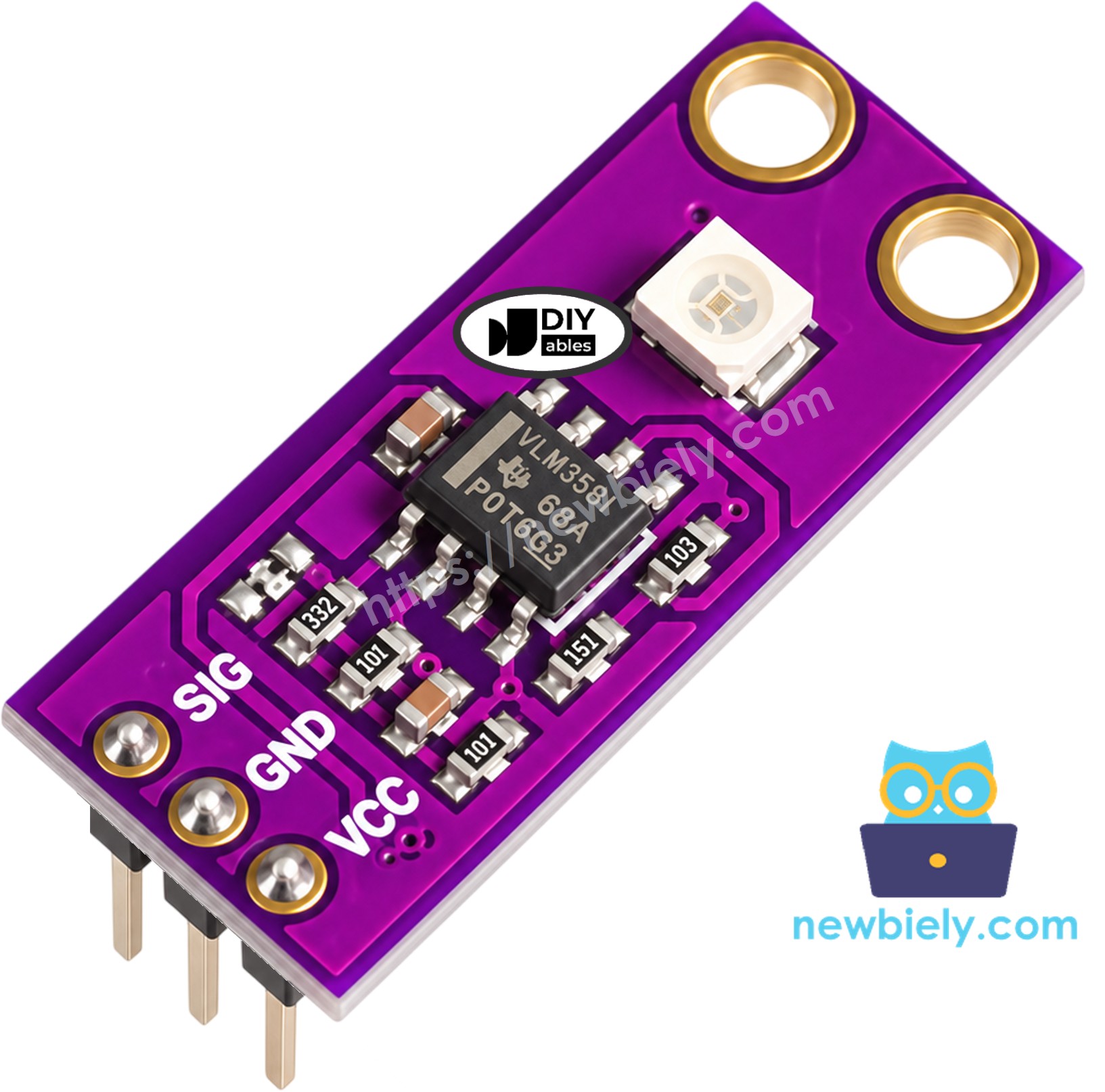
The module has 3 pins, labeled in this order:
- SIG: This pin gives the analog UV voltage. It must be connected to an input of the ADS1115 module (A0 in this tutorial), never directly to a GPIO pin
- GND: This pin must be connected to ground (0V)
- VCC: This pin must be connected to the 3.3V supply of the Raspberry Pi. The module accepts 2.5V to 5V DC, but 3.3V keeps everything at the logic level of the Pi
Key facts about the sensor:
| GUVA-S12SD UV Sensor Module | |
|---|---|
| Light it responds to | UV-A and UV-B, 240nm to 370nm |
| Viewing angle | 130 degrees |
| Supply voltage | 2.5V to 5V DC |
| Output | analog voltage on SIG, about 0V with no UV, about 1V or a bit more in strong sunlight |
| Board size | about 11mm x 27mm |
The sensor ignores most visible light. A bright desk lamp or the ceiling LEDs give a voltage very close to 0V, so do not worry if the reading stays near zero on your desk. Take it to a sunny window that is open (normal glass blocks much of the UV), go outside, or shine a UV flashlight on it.
To get a UV index from the voltage, most makers use this simple rule: every 0.1V on SIG is about 1 point of UV index. In other words:
UV index ≈ SIG voltage (V) / 0.1
This is a rough estimate for hobby projects, not the reading of a calibrated UV meter. It is good enough to tell a cloudy morning from a strong summer noon. The World Health Organization groups the UV index into these levels:
| UV index | Level | What it means for you |
|---|---|---|
| 0 to 2 | Low | little risk for most people |
| 3 to 5 | Moderate | use sunscreen and a hat around noon |
| 6 to 7 | High | cover your skin and look for shade |
| 8 to 10 | Very High | skin can burn fast, stay out of the midday sun |
| 11 or more | Extreme | avoid the sun if you can |
※ NOTE THAT:
The arrangement of pins on a module can differ between manufacturers. It is essential to always use the labels printed on the module when working with it. Be sure to take a close look!
Wiring Diagram
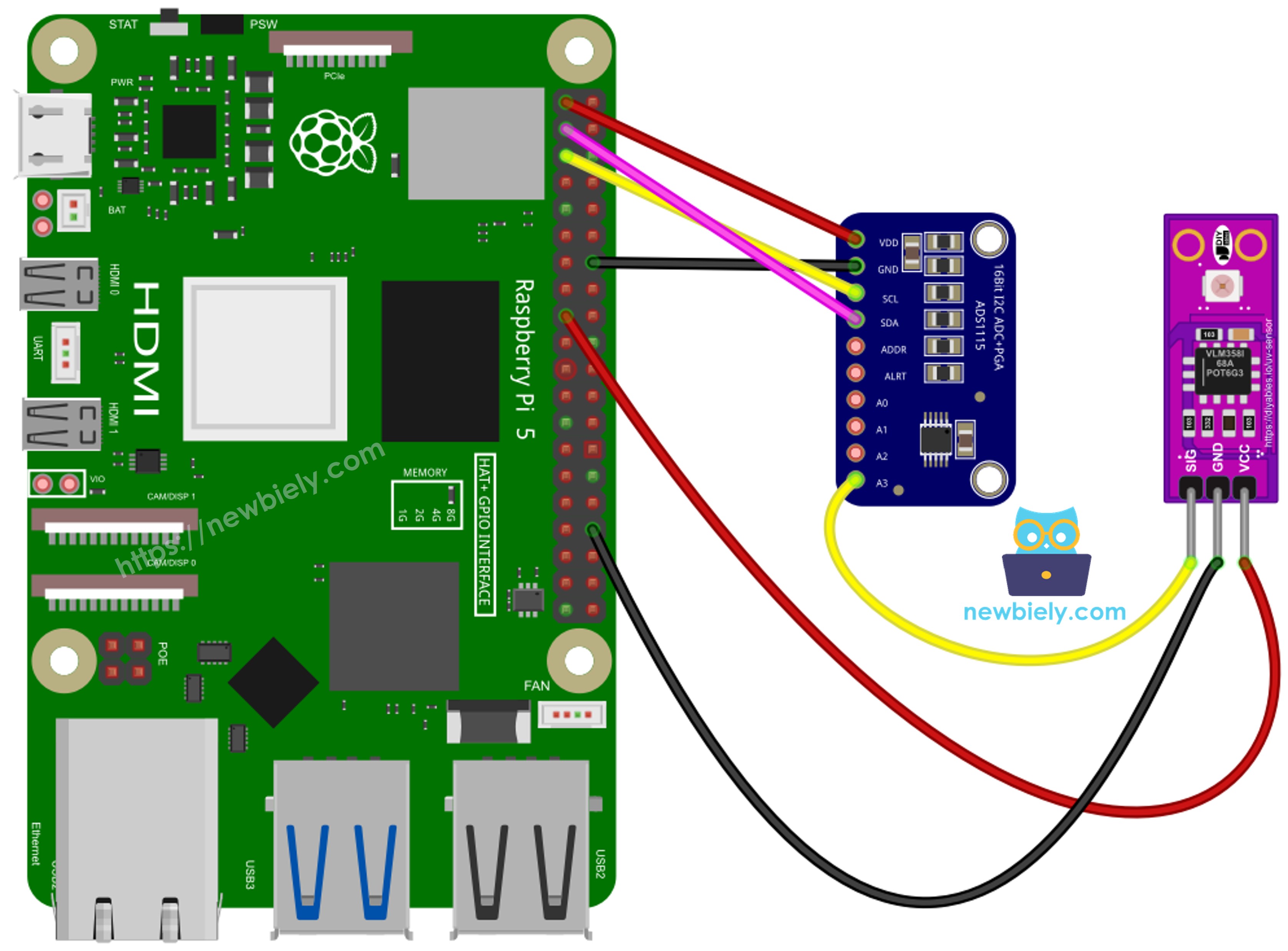
This image is created using Fritzing. Click to enlarge image
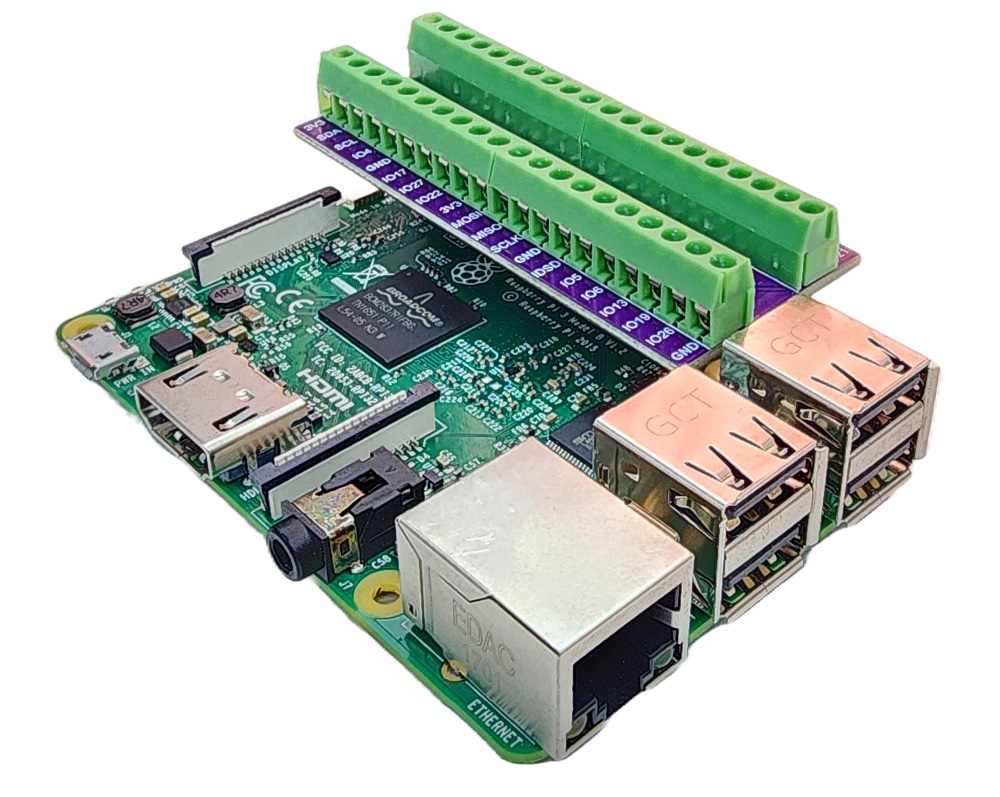
To simplify and organize your wiring setup, we recommend using a Screw Terminal Block Shield for Raspberry Pi. This shield ensures more secure and manageable connections, as shown below:
The ADS1115 talks to the Raspberry Pi over I2C, and the UV sensor feeds its voltage into the first input of the ADS1115.
Connect the ADS1115 module to the Raspberry Pi:
- ADS1115 VDD pin to Raspberry Pi 3.3V (pin 1)
- ADS1115 GND pin to Raspberry Pi GND (pin 9)
- ADS1115 SCL pin to Raspberry Pi GPIO 3 (pin 5)
- ADS1115 SDA pin to Raspberry Pi GPIO 2 (pin 3)
Connect the GUVA-S12SD UV sensor module:
- UV sensor SIG pin to ADS1115 A0
- UV sensor GND pin to Raspberry Pi GND (pin 20, or any other GND pin)
- UV sensor VCC pin to Raspberry Pi 3.3V (pin 17)
Leave the ADDR pin of the ADS1115 unconnected or tied to GND, so the module keeps its default I2C address 0x48, which the library uses. The A1, A2 and A3 inputs stay free for other sensors.
When you test outdoors, keep the jumper wires long enough so only the sensor goes into the sun, while the Raspberry Pi stays in the shade.
How To Program for Raspberry Pi to Read the UV Sensor Voltage
The first script only shows the numbers, so you can see the sensor react. It reads channel A0 of the ADS1115 once per second with the Adafruit_ADS1x15 library:
- gain=2 sets the input range of the ADS1115 to ±2.048V. The UV sensor never goes much above 1V, so this smaller range gives finer steps than the ±4.096V range used in some other tutorials.
- For positive voltages, the ADS1115 gives a value from 0 to 32767. A value of 32767 means 2.048V, so dividing by 32767 and multiplying by 2.048 gives the SIG voltage.
Detailed Instructions
- Make sure you have Raspbian or any other Raspberry Pi compatible operating system installed on your Pi.
- Make sure your Raspberry Pi is connected to the same local network as your PC.
- Make sure your Raspberry Pi is connected to the internet if you need to install some libraries.
- If this is the first time you use Raspberry Pi, See how to set up the Raspberry Pi
- Connect your PC to the Raspberry Pi via SSH using the built-in SSH client on Linux and macOS or PuTTY on Windows. See to how connect your PC to Raspberry Pi via SSH.
- Run the following command to open the Raspberry Pi configuration tool:
- Navigate to Interfacing Options > I2C and enable it to enable I2C interface on Raspberry Pi. See also How to enable I2C interface on Raspberry Pi
- Reboot the Raspberry Pi:
- Reconnect your PC to the Raspberry Pi via SSH
- Install the Adafruit_ADS1x15 library by running the following command on your Raspberry Pi terminal:
- Wire the ADS1115 module and the UV sensor to the Raspberry Pi as shown in the wiring diagram above.
- Create a Python script file guva_s12sd_raw.py and add the following code:
- Save the file and run the Python script by executing the following command in the terminal:
- Let the script run for a few seconds indoors, then carry the sensor (or the whole setup) into direct sunlight.
- Check the terminal:
The first lines are from inside the room, where the voltage stays at a few millivolts. The line with 0.016V was taken near a window. Once the sensor sees the sun, the voltage climbs to about 0.4V. Press Ctrl + C keys in the terminal to stop the script.
If the script stops with an I/O error such as "Remote I/O error", the Pi cannot find the ADS1115. Check that I2C is enabled, and that SDA and SCL are not swapped. You can also run i2cdetect -y 1: the ADS1115 should show up as 48.
Code Explanation
Check out the line-by-line explanation contained in the comments of the source code!
How To Program for Raspberry Pi to Show the UV Index and Level
A voltage like 0.394V does not mean much to most people. The second script turns it into a UV index and a WHO level name. Because a passing cloud or a hand moving over the sensor can make one reading jump, the script takes 10 readings, averages them, and only then does the math:
- Divide the average voltage by 0.1 to get the UV index, printed with one decimal.
- Compare the UV index with the WHO limits to choose Low, Moderate, High, Very High or Extreme.
Detailed Instructions
- Keep the same wiring and the same I2C setup as before.
- Create a Python script file guva_s12sd_uv_index.py and add the following code:
- Save the file and run it with this command:
- Start in the shade, then turn the sensor toward the sun.
- Check the terminal:
These lines were taken on a clear afternoon. In the shade, the index stays low. As the sensor faces the sun, it rises step by step and settles near 6.6, which is the High level. The script prints a new result about every second (as specified in the time.sleep(1) line), until you stop it by pressing Ctrl + C keys in the terminal.
Your numbers will not match a weather app exactly. The 0.1V rule is only an estimate, and the angle of the sensor to the sun changes the reading a lot. Keep the white photodiode facing the sky and compare readings taken the same way.
Code Explanation
Check out the line-by-line explanation contained in the comments of the source code!
Additional Knowledge
GUVA-S12SD UV Sensor vs Light Sensor
Let's compare the UV sensor with the photoresistor used in the light sensor tutorial:
| GUVA-S12SD UV Sensor | Light Sensor (photoresistor) | |
|---|---|---|
| What it senses | UV-A and UV-B light (240nm to 370nm) | visible light |
| Reading under a room lamp | almost 0V | a clear value that changes with the lamp |
| Reading in sunlight | rises with the UV strength | often near its maximum |
| Extra parts | none, the op-amp is on the board | a fixed resistor |
| Typical use | UV index, sunburn warning, UV lamp check | day/night detection, room brightness |
Evidently, the two sensors answer different questions. The light sensor tells you how bright it is, while the UV sensor tells you how strong the part of sunlight that burns skin is. A sunny but cool spring day can be bright and have a high UV index at the same time.
Project Ideas with the GUVA-S12SD UV Sensor
- Sunscreen reminder: send a message to your phone when the UV index reaches 3 or more.
- UV logger: save the UV index to a CSV file every minute and plot the whole day later.
- Weather station: add the UV index next to temperature and humidity on a small web page served by the Pi.
- UV lamp tester: check if a UV curing lamp or a UV LED still gives out enough ultraviolet light.
- Smart window blind: close a blind with a motor when the UV level becomes High.