ESP32 C3 Super Mini - TFT LCD Touch Display SPI

This tutorial shows you how to connect an SPI TFT LCD display to an ESP32 C3 Super Mini. The board runs at 3.3V, the same voltage most SPI TFT modules use, so the wiring stays simple and safe.

In this tutorial, you'll learn:

This tutorial covers both touch and non-touch SPI TFT LCD displays. It works with 1.3, 1.54, 2.2, 2.4, 2.8, 3.2, and 3.5 inch panels driven by ILI9341, ILI9488, or ST7789 controller chips.

ESP32 C3 Super Mini TFT LCD Touch Display SPI

Tutorial stations in this tutorial:

Hardware Preparation

1×ESP32 C3 Super Mini
1×USB Cable Type-A to Type-C (for USB-A PC)
1×USB Cable Type-C to Type-C (for USB-C PC)
1×SPI TFT display module
1×Jumper Wires

Or you can buy the following kits:

1×DIYables Sensor Kit (18 sensors/displays)
Disclosure: Some of the links provided in this section are Amazon affiliate links. We may receive a commission for any purchases made through these links at no additional cost to you.
Additionally, some of these links are for products from our own brand, DIYables .

Overview of the SPI TFT Display

An SPI TFT display is a color LCD screen that talks to the ESP32 C3 Super Mini over a fast SPI link.

Key Features:

  • A driver IC inside the module stores the pixels and runs the drawing commands.
  • Only a few wires are needed - SPI is a 3-wire bus plus one chip select per device.
  • Works with the Adafruit GFX drawing functions, so shapes, text, fonts, and bitmaps are ready to use.
  • Touch versions add an XPT2046 controller on the same SPI bus.
  • The DIYables_TFT_SPI library drives both the screen and the touch panel with one API.

Technical Specifications:

  • ILI9341: 16-bit RGB565 color, up to 40 MHz SPI.
  • ILI9488: 18-bit RGB666 color over SPI, up to 24 MHz.
  • ST7789: 16-bit RGB565 color, up to 40 MHz SPI.
  • Logic level: 3.3V - a perfect match for the ESP32 C3 Super Mini.
  • Panel sizes: 1.3, 1.54, 2.2, 2.4, 2.8, 3.2, and 3.5 inch.

Recommendation: If you have not bought a display yet, pick the ST7789 driver. It is easy to find, runs at the full 40 MHz SPI speed, and is the simplest choice for a new ESP32 C3 Super Mini project.

WARNING

The ESP32 C3 Super Mini uses 3.3V logic. Connect TFT VCC to the 3.3V pin only. Never use 5V.

Pinout

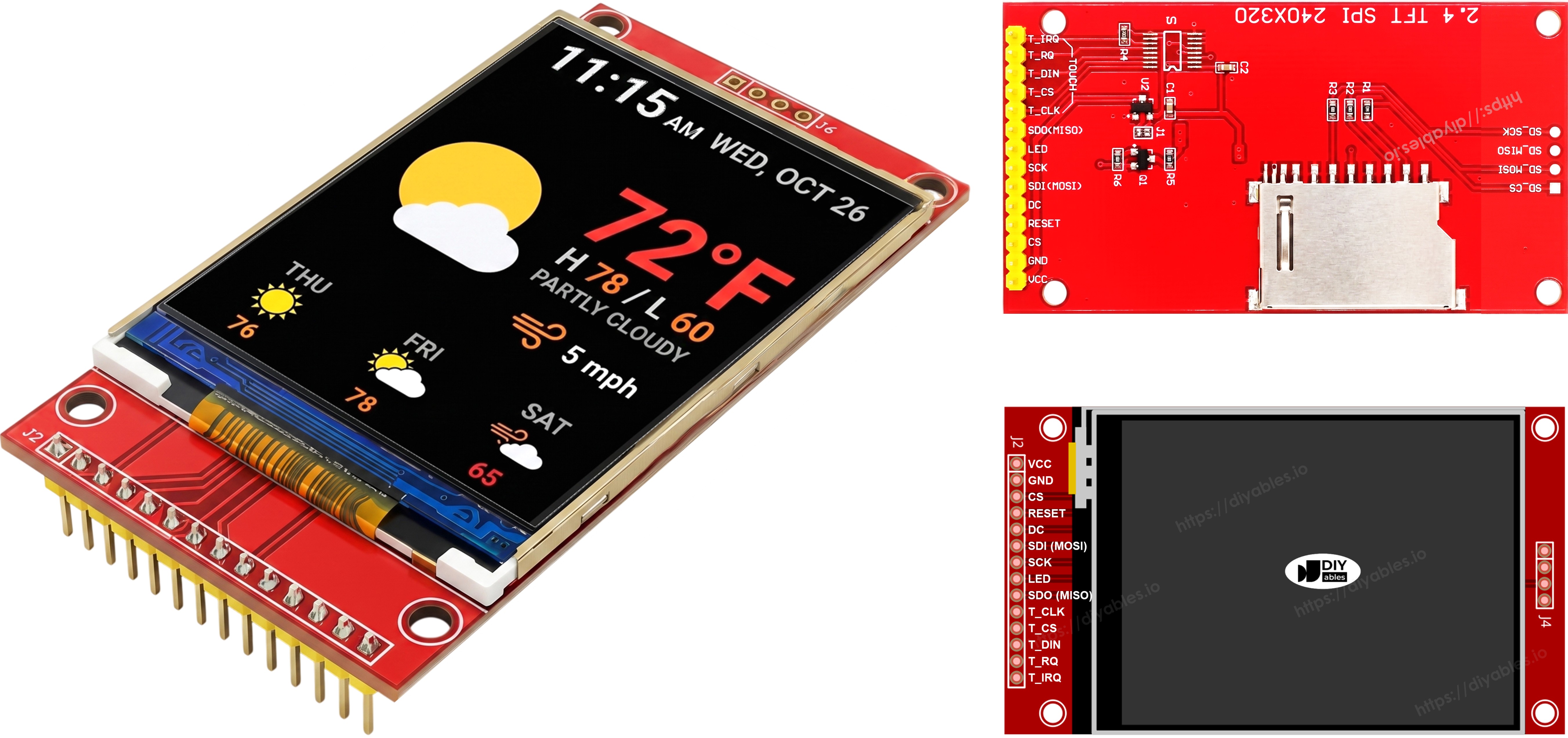
Most SPI TFT LCD displays have the following pins.

Display pins:

Pin Function
VCC Power supply
GND Ground
CS Chip Select — pulled low to select the display on the SPI bus
DC / RS Data / Command select — high for pixel data, low for commands
RST Hardware reset — optional; tie to 3.3V if unused
MOSI / SDI / SDA SPI data in (MCU → display)
SCK / CLK SPI clock
MISO / SDO SPI data out (display → MCU) — optional for display-only use
LED / BL / BLK Backlight power — connect to 3.3V or a PWM pin for dimming

SD card pins (if your application needs to access the SD card):

Pin Function
SD_CS / TF_CS SD card Chip Select
MOSI / SDI MOSI — data from MCU to SD card
SCK / CLK SCK — SPI clock
MISO / SDO MISO — data from SD card to MCU

For TFT displays that support touch, there are additional touch pins (if your application uses the touch function and the display supports it):

Pin Function
T_CS Touch controller Chip Select
T_CLK SCK — SPI clock
T_DIN MOSI — data from MCU to touch controller
T_DO MISO — data from touch controller to MCU
T_IRQ Touch interrupt — optional; signals when the screen is being touched

※ NOTE THAT:

Some non-touch display modules also expose T_CS, T_CLK, T_DIN, T_DO, and T_IRQ pins. These are non-functional on those boards — the touch controller IC is not populated. They appear because the PCB reuses the same layout as the touch-enabled version to reduce manufacturing variants.

TFT SPI Display Pinout

Wiring Diagram

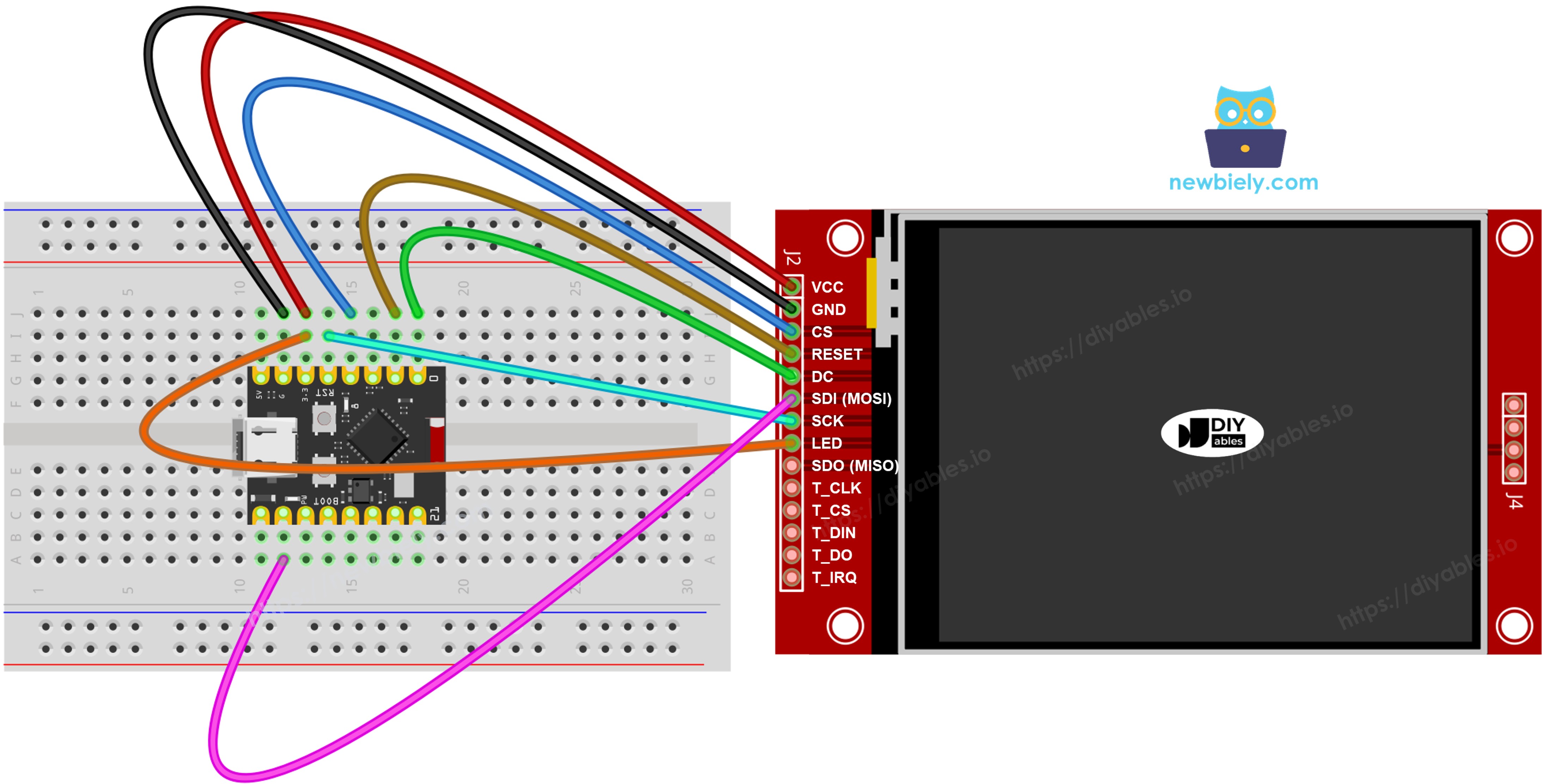
Wire the TFT LCD display to the ESP32 C3 Super Mini hardware SPI pins.

  • Note: VCC goes to 3.3V only. 5V can damage the ESP32 C3 Super Mini and the panel.
  • Note: The hardware SPI pins on the ESP32 C3 Super Mini are SCK = GPIO4, MISO = GPIO5, MOSI = GPIO6.
  • Note: Each device on the bus needs its own CS pin. The display uses GPIO3, the touch controller uses GPIO10, and the SD card uses GPIO7.
  • Note — SDO (MISO) is optional: The SDO (MISO) line only carries data from the display back to the board. None of the example code in this tutorial reads from the display, so this pin can be left unconnected. On modules where the touch controller shares the same SPI bus, a connected SDO line can interfere with communication, so leaving it unconnected is recommended.

Without Touch

Connect MOSI to GPIO6, SCK to GPIO4, and MISO to GPIO5. CS, DC, and RST can be any free GPIO — GPIO3, GPIO0, and GPIO1 are used in the examples.

Display:

TFT Pin ESP32 C3 Super Mini Pin Description
VCC 3.3V Power supply (3.3V only)
GND GND Ground
CS GPIO3 Chip Select
DC / RS GPIO0 Data / Command select
RST GPIO1 Reset (optional)
MOSI / SDI GPIO6 Hardware SPI MOSI
SCK GPIO4 Hardware SPI clock
MISO / SDO GPIO5 Hardware SPI MISO (optional)
LED / BL 3.3V Backlight power

SD card (if your application needs to access the SD card):

SD Pin ESP32 C3 Super Mini Pin Description
SD_CS / TF_CS GPIO7 SD card Chip Select
MOSI / SDI GPIO6 Shared with display MOSI (GPIO6)
SCK / CLK GPIO4 Shared with display SCK (GPIO4)
MISO / SDO GPIO5 Shared with display MISO (GPIO5)
The wiring diagram between ESP32 C3 Super Mini TFT SPI Display  without touch

This image is created using Fritzing. Click to enlarge image

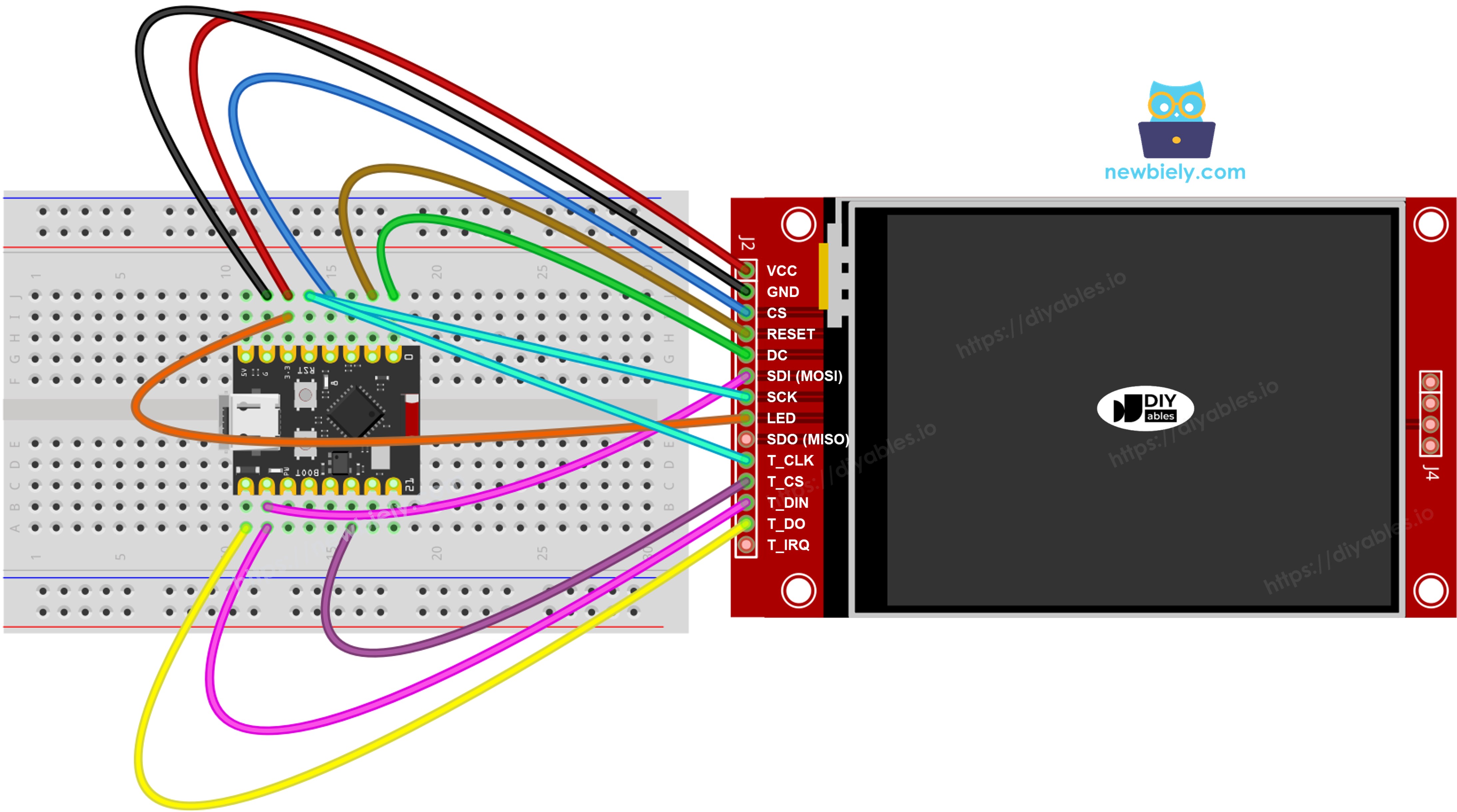
With Touch

Connect the XPT2046 touch controller to the same ESP32 C3 Super Mini SPI bus, sharing GPIO6, GPIO4, and GPIO5 with the display.

Display:

TFT Pin ESP32 C3 Super Mini Pin Description
VCC 3.3V Power supply (3.3V only)
GND GND Ground
CS GPIO3 Chip Select
DC / RS GPIO0 Data / Command select
RST GPIO1 Reset (optional)
MOSI / SDI GPIO6 Hardware SPI MOSI
SCK GPIO4 Hardware SPI clock
MISO / SDO GPIO5 Hardware SPI MISO (optional)
LED / BL 3.3V Backlight power

Touch controller (if your application uses the touch function and the display supports it):

Touch Pin ESP32 C3 Super Mini Pin Description
T_CS GPIO10 Touch Chip Select
T_IRQ not connected Touch interrupt (optional, set to -1 in the code)
T_DIN GPIO6 Shared with display MOSI (GPIO6)
T_CLK GPIO4 Shared with display SCK (GPIO4)
T_DO GPIO5 Shared with display MISO (GPIO5)
The wiring diagram between ESP32 C3 Super Mini TFT SPI Display  with touch

This image is created using Fritzing. Click to enlarge image

The ESP32 C3 Super Mini has one hardware SPI bus on the header pins, so the display, the SD card, and the touch controller all share the same three data lines (MOSI GPIO6, SCK GPIO4, MISO GPIO5). Each device has its own CS pin, so only one is active at a time. The DIYables_TFT_SPI library manages both the display and the XPT2046 touch controller through a single API — no separate SPI library is needed for the touch side.

Library Setup

Install the library once, then every example below will compile.

  • Connect the board: Plug the ESP32 C3 Super Mini into your computer with a USB Type-C cable.
  • Open Arduino IDE: Make sure ESP32 C3 Super Mini is selected in Tools > Board, and pick the right port.
  • Open the Library Manager: Click the Libraries icon on the left sidebar.
  • Search the library: Type "DIYables_TFT_SPI" in the search field and find the DIYables entry.
  • Install it: Hit Install, then Install All when dependencies are offered.
  • Search for DIYables TFT SPI created by DIYables.io and click the Install button.
Newbiely | Arduino IDE 2.3.8
──
File
Edit
Sketch
Tools
Help
ESP32C3 Dev Module
Library Manager
Type:
All
Topic:
All
DIYables TFT SPI by DIYables.io
Works with both touch and non-touch versions of the same SPI TFT modules. Supports ILI9341 (240x320, 16-bit RGB565), ILI9488 (320x480, 18-bit RGB666), and ST7789 (240x320, 16-bit RGB565) displays over SPI. Includes built-in driver for XPT2046 / HR2046 / ADS7843 SPI touch controllers and 4-wire resistive touch panels - no separate touch library required. Use the display-only API for non-touch panels, or add initTouchSPI() to enable touch on modules that include a touch controller. Extends Adafruit GFX for full graphics support. Works with any Arduino-compatible board that has SPI. More info
1.0.3
INSTALL
Newbiely.ino
···
1 void setup() {
Output
Serial Monitor
Ln 1, Col 1
ESP32C3 Dev Module on COM15
1

Starter Sketch

This is the smallest sketch that gets the TFT LCD display running on the ESP32 C3 Super Mini.

What This Code Does:

  • Includes the DIYables_TFT_SPI library.
  • Sets the CS, DC, and RST pins to GPIO3, GPIO0, and GPIO1.
  • Creates the display object for your driver chip.
  • Starts the display and turns it to landscape.
#include <DIYables_TFT_SPI.h> #define TFT_CS_PIN 7 #define TFT_DC_PIN 3 #define TFT_RST_PIN 2 // Uncomment the line that matches your driver chip: // DIYables_ILI9341_SPI TFT_display(240, 320, TFT_CS_PIN, TFT_DC_PIN, TFT_RST_PIN); // DIYables_ILI9488_SPI TFT_display(320, 480, TFT_CS_PIN, TFT_DC_PIN, TFT_RST_PIN); DIYables_ST7789_SPI TFT_display(240, 320, TFT_CS_PIN, TFT_DC_PIN, TFT_RST_PIN); void setup() { TFT_display.begin(); TFT_display.setRotation(1); } void loop() { // drawing code here }

※ NOTE THAT:

Only ONE display object line may be active. Leave the other two commented out, or the sketch will not compile.

Tutorial - Draw Shapes

The DrawShapes example uses all the Adafruit GFX drawing primitives on the ESP32 C3 Super Mini.

What This Code Does:

  • Draws outlined and filled circles.
  • Draws outlined and filled triangles.
  • Draws rectangles and rounded rectangles.
  • Draws diamonds from single lines.
  • Redraws the whole pattern every 10 seconds.
/* * This ESP32 C3 Super Mini code was developed by newbiely.com * * This ESP32 C3 Super Mini code is made available for public use without any restriction * * For comprehensive instructions and wiring diagrams, please visit: * https://newbiely.com/tutorials/esp32-c3/esp32-c3-super-mini-tft-lcd-touch-display-spi */ /* Created by DIYables This example code is in the public domain Product page: https://diyables.io */ // ============================================= // Single include brings in the base class plus all driver classes. // ============================================= #include <DIYables_TFT_SPI.h> // ============================================= // Wiring (ESP32 C3 SuperMini) // --------------------------------------------- // TFT module ESP32 C3 SuperMini // ------------ --------------------------------- // VCC -> 3.3V (NOT 5V!) // GND -> GND // CS -> GPIO3 (TFT_CS_PIN) // RESET -> GPIO1 (TFT_RST_PIN) // DC / RS -> GPIO0 (TFT_DC_PIN) // SDI / MOSI -> GPIO6 (hardware SPI MOSI) // SCK -> GPIO4 (hardware SPI SCK) // LED -> 3.3V (or any GPIO via initBacklight) // SDO / MISO -> GPIO5 (only needed when reading from display) // ============================================= // ============================================= // SPI pin definitions (adjust for your board) // ============================================= #define TFT_CS_PIN 3 #define TFT_DC_PIN 0 #define TFT_RST_PIN 1 // Panel resolution in native (portrait) orientation - change to match your module #define TFT_WIDTH 240 #define TFT_HEIGHT 320 // MOSI and SCK use default hardware SPI pins // ============================================= // Create display object (uncomment matching driver) // ============================================= // DIYables_ILI9341_SPI TFT_display(TFT_WIDTH, TFT_HEIGHT, TFT_CS_PIN, TFT_DC_PIN, TFT_RST_PIN); // DIYables_ILI9488_SPI TFT_display(TFT_WIDTH, TFT_HEIGHT, TFT_CS_PIN, TFT_DC_PIN, TFT_RST_PIN); DIYables_ST7789_SPI TFT_display(TFT_WIDTH, TFT_HEIGHT, TFT_CS_PIN, TFT_DC_PIN, TFT_RST_PIN); #define BLACK DIYables_TFT_SPI::colorRGB(0, 0, 0) #define BLUE DIYables_TFT_SPI::colorRGB(0, 0, 255) #define RED DIYables_TFT_SPI::colorRGB(255, 0, 0) #define GREEN DIYables_TFT_SPI::colorRGB(0, 255, 0) #define ORANGE DIYables_TFT_SPI::colorRGB(255, 165, 0) #define PINK DIYables_TFT_SPI::colorRGB(255, 192, 203) #define VIOLET DIYables_TFT_SPI::colorRGB(148, 0, 211) #define TURQUOISE DIYables_TFT_SPI::colorRGB(64, 224, 208) #define WHITE DIYables_TFT_SPI::colorRGB(255, 255, 255) // Helper to draw a filled diamond void fillDiamond(int cx, int cy, int h, int v, uint16_t color) { int x0 = cx, y0 = cy - v; int x1 = cx + h, y1 = cy; int x2 = cx, y2 = cy + v; int x3 = cx - h, y3 = cy; TFT_display.fillTriangle(x0, y0, x1, y1, x2, y2, color); TFT_display.fillTriangle(x0, y0, x2, y2, x3, y3, color); } void setup() { TFT_display.begin(); TFT_display.setRotation(1); // Landscape } void loop() { TFT_display.fillScreen(WHITE); uint16_t w = TFT_display.width(); uint16_t h = TFT_display.height(); // Scale positions relative to screen size with better spacing int col1 = w / 8; int col2 = w * 3 / 8; int col3 = w * 5 / 8; int col4 = w * 7 / 8; int row1 = h / 4; int row2 = h / 2; int row3 = h * 3 / 4; // Outlined circle TFT_display.drawCircle(col1, row1, 30, RED); // Filled circle TFT_display.fillCircle(col2, row1, 30, RED); // Outlined triangle TFT_display.drawTriangle(col3 - 30, row1 + 25, col3 + 30, row1 + 25, col3, row1 - 25, BLUE); // Filled triangle TFT_display.fillTriangle(col4 - 30, row1 + 25, col4 + 30, row1 + 25, col4, row1 - 25, GREEN); // Outlined rectangle TFT_display.drawRect(col1 - 35, row2 - 20, 70, 40, ORANGE); // Filled rectangle TFT_display.fillRect(col2 - 35, row2 - 20, 70, 40, TURQUOISE); // Outlined round rectangle TFT_display.drawRoundRect(col3 - 35, row2 - 20, 70, 40, 10, VIOLET); // Filled round rectangle TFT_display.fillRoundRect(col4 - 35, row2 - 20, 70, 40, 10, PINK); // Outlined diamond (centered between col1 and col2) int diamond1_x = (col1 + col2) / 2; TFT_display.drawLine(diamond1_x, row3 - 30, diamond1_x + 25, row3, GREEN); TFT_display.drawLine(diamond1_x + 25, row3, diamond1_x, row3 + 30, GREEN); TFT_display.drawLine(diamond1_x, row3 + 30, diamond1_x - 25, row3, GREEN); TFT_display.drawLine(diamond1_x - 25, row3, diamond1_x, row3 - 30, GREEN); // Filled diamond (centered between col3 and col4) int diamond2_x = (col3 + col4) / 2; fillDiamond(diamond2_x, row3, 25, 30, BLUE); delay(10000); }

Detailed Instructions

  • New to ESP32 C3 Super Mini? Complete our Getting Started with ESP32 C3 Super Mini tutorial first to set up your development environment.
  • Wire the components: Connect the TFT LCD module using the table above. Use 3.3V for VCC.
  • Connect the board: Plug the ESP32 C3 Super Mini into your computer with a USB Type-C cable.
  • Select your board: Make sure ESP32 C3 Super Mini is selected in Tools > Board, and pick the COM port.
  • Copy the code: Paste the code above into Arduino IDE.
  • Upload the code: Click Upload and wait for the done message.
  • See the result: The screen shows a pattern of colored shapes.
  • Pro Tip: Uncomment only the driver line that matches your panel. A wrong driver gives a blank or noisy screen.

Method Reference

Method Action Syntax
begin() Initialize and reset the display. TFT_display.begin();
setRotation(r) Set orientation (0=portrait, 1=landscape). TFT_display.setRotation(1);
fillScreen(color) Clear screen to one color. TFT_display.fillScreen(BLACK);
colorRGB(r,g,b) Create 16-bit color from R, G, B. colorRGB(255,128,0)
fillCircle(x,y,r,color) Filled circle. TFT_display.fillCircle(100,100,50,RED);
fillRoundRect(x,y,w,h,r,color) Filled rounded rectangle. TFT_display.fillRoundRect(10,10,100,50,10,BLUE);
drawTriangle(x0,y0,x1,y1,x2,y2,color) Triangle outline. TFT_display.drawTriangle(60,10,10,110,110,110,GREEN);

Tutorial - Show Text and Number

The ShowTextAndNumber example prints strings and numbers with the built-in GFX text engine.

What This Code Does:

  • Sets the text color and the text size.
  • Prints a temperature value with one decimal place.
  • Prints a humidity value with a percent sign.
  • Places each line at its own pixel position.
/* * This ESP32 C3 Super Mini code was developed by newbiely.com * * This ESP32 C3 Super Mini code is made available for public use without any restriction * * For comprehensive instructions and wiring diagrams, please visit: * https://newbiely.com/tutorials/esp32-c3/esp32-c3-super-mini-tft-lcd-touch-display-spi */ /* Created by DIYables This example code is in the public domain Product page: https://diyables.io */ // ============================================= // Single include brings in the base class plus all driver classes. // ============================================= #include <DIYables_TFT_SPI.h> // ============================================= // Wiring (ESP32 C3 SuperMini) // --------------------------------------------- // TFT module ESP32 C3 SuperMini // ------------ --------------------------------- // VCC -> 3.3V (NOT 5V!) // GND -> GND // CS -> GPIO3 (TFT_CS_PIN) // RESET -> GPIO1 (TFT_RST_PIN) // DC / RS -> GPIO0 (TFT_DC_PIN) // SDI / MOSI -> GPIO6 (hardware SPI MOSI) // SCK -> GPIO4 (hardware SPI SCK) // LED -> 3.3V (or any GPIO via initBacklight) // SDO / MISO -> GPIO5 (only needed when reading from display) // ============================================= // ============================================= // SPI pin definitions (adjust for your board) // ============================================= #define TFT_CS_PIN 3 #define TFT_DC_PIN 0 #define TFT_RST_PIN 1 // Panel resolution in native (portrait) orientation - change to match your module #define TFT_WIDTH 240 #define TFT_HEIGHT 320 // ============================================= // Create display object (uncomment matching driver) // ============================================= // DIYables_ILI9341_SPI TFT_display(TFT_WIDTH, TFT_HEIGHT, TFT_CS_PIN, TFT_DC_PIN, TFT_RST_PIN); // DIYables_ILI9488_SPI TFT_display(TFT_WIDTH, TFT_HEIGHT, TFT_CS_PIN, TFT_DC_PIN, TFT_RST_PIN); DIYables_ST7789_SPI TFT_display(TFT_WIDTH, TFT_HEIGHT, TFT_CS_PIN, TFT_DC_PIN, TFT_RST_PIN); #define MAGENTA DIYables_TFT_SPI::colorRGB(255, 0, 255) #define WHITE DIYables_TFT_SPI::colorRGB(255, 255, 255) void setup() { Serial.begin(115200); Serial.println(F("TFT SPI Display - Show text and numbers")); TFT_display.begin(); TFT_display.setRotation(1); // Landscape TFT_display.fillScreen(WHITE); // Set text color and size TFT_display.setTextColor(MAGENTA); TFT_display.setTextSize(3); // Sample values float temperature = 23.5; float humidity = 78.6; // Display temperature TFT_display.setCursor(20, 20); TFT_display.print("Temperature: "); TFT_display.print(temperature, 1); TFT_display.print(char(247)); TFT_display.println("C"); // Display humidity TFT_display.setCursor(20, 60); TFT_display.print("Humidity: "); TFT_display.print(humidity, 1); TFT_display.print("%"); } void loop() { }

Detailed Instructions

  • Wire and upload: Use the same wiring as the shapes station, then click Upload.
  • See the result: The display prints lines of text in different colors and sizes.
  • Pro Tip: Text size 1 is 6x8 pixels. Size 3 is easy to read from across the room.

Method Reference

Method Action Syntax
setTextColor(color) Sets the foreground color for text output. TFT_display.setTextColor(WHITE);
setTextSize(size) Scales text by an integer factor. Size 1 = 6×8 px. TFT_display.setTextSize(2);
setCursor(x, y) Moves the text cursor to pixel position (x, y). TFT_display.setCursor(10, 20);
print(value) Prints a string or number at the cursor position. TFT_display.print("ESP32 C3!");
println(value) Prints and moves the cursor to the next line. TFT_display.println(42);

Tutorial - Draw Image

In this station you load a full-color RGB565 bitmap onto the TFT LCD display. The pixel data is compiled into the firmware as a PROGMEM array inside bitmap.h. On the ESP32 C3 Super Mini, PROGMEM data lives in flash and is mapped into the address space, so no SRAM is used by the image data.

What This Code Does:

  • Includes the image array from bitmap.h.
  • Reads the real screen width and height from the driver.
  • Centers the image on the screen.
  • Inverts the colors every 2 seconds so you can see the refresh.
/* * This ESP32 C3 Super Mini code was developed by newbiely.com * * This ESP32 C3 Super Mini code is made available for public use without any restriction * * For comprehensive instructions and wiring diagrams, please visit: * https://newbiely.com/tutorials/esp32-c3/esp32-c3-super-mini-tft-lcd-touch-display-spi */ /* Created by DIYables This example code is in the public domain Product page: https://diyables.io */ // ============================================= // Single include brings in the base class plus all driver classes. // ============================================= #include <DIYables_TFT_SPI.h> #include "bitmap.h" // ============================================= // Wiring (ESP32 C3 SuperMini) // --------------------------------------------- // TFT module ESP32 C3 SuperMini // ------------ --------------------------------- // VCC -> 3.3V (NOT 5V!) // GND -> GND // CS -> GPIO3 (TFT_CS_PIN) // RESET -> GPIO1 (TFT_RST_PIN) // DC / RS -> GPIO0 (TFT_DC_PIN) // SDI / MOSI -> GPIO6 (hardware SPI MOSI) // SCK -> GPIO4 (hardware SPI SCK) // LED -> 3.3V (or any GPIO via initBacklight) // SDO / MISO -> GPIO5 (only needed when reading from display) // ============================================= // ============================================= // SPI pin definitions (adjust for your board) // ============================================= #define TFT_CS_PIN 3 #define TFT_DC_PIN 0 #define TFT_RST_PIN 1 // Panel resolution in native (portrait) orientation - change to match your module #define TFT_WIDTH 240 #define TFT_HEIGHT 320 // ============================================= // Create display object (uncomment matching driver) // ============================================= // DIYables_ILI9341_SPI TFT_display(TFT_WIDTH, TFT_HEIGHT, TFT_CS_PIN, TFT_DC_PIN, TFT_RST_PIN); // DIYables_ILI9488_SPI TFT_display(TFT_WIDTH, TFT_HEIGHT, TFT_CS_PIN, TFT_DC_PIN, TFT_RST_PIN); DIYables_ST7789_SPI TFT_display(TFT_WIDTH, TFT_HEIGHT, TFT_CS_PIN, TFT_DC_PIN, TFT_RST_PIN); #define WHITE DIYables_TFT_SPI::colorRGB(255, 255, 255) int img_width = 120; int img_height = 53; void setup() { Serial.begin(115200); Serial.println(F("TFT SPI Display - Draw Image")); TFT_display.begin(); uint16_t SCREEN_WIDTH = TFT_display.width(); uint16_t SCREEN_HEIGHT = TFT_display.height(); int x = (SCREEN_WIDTH - img_width) / 2; int y = (SCREEN_HEIGHT - img_height) / 2; TFT_display.fillScreen(WHITE); TFT_display.drawRGBBitmap(x, y, myBitmap, img_width, img_height); } void loop() { delay(2000); TFT_display.invertDisplay(true); delay(2000); TFT_display.invertDisplay(false); }

Add a second tab named bitmap.h to the sketch and paste this image data into it.

/* * This ESP32 C3 Super Mini code was developed by newbiely.com * * This ESP32 C3 Super Mini code is made available for public use without any restriction * * For comprehensive instructions and wiring diagrams, please visit: * https://newbiely.com/tutorials/esp32-c3/esp32-c3-super-mini-tft-lcd-touch-display-spi */ const uint16_t myBitmap[] PROGMEM = {0xffff, 0xffff, 0xffff, 0xffff, 0xffff, 0xffff, 0xffff, 0xffff, 0xffff, 0xffff, 0xffff, 0xffff, 0xffff, 0xffff, 0xffff, 0xffff, 0xffff, 0xffff, 0xffff, 0xffff, 0xef5d, 0x0000, 0x0000, 0x0000, 0x0000, 0x0000, 0x0000, 0x0000, 0x0000, 0x0000, 0x0000, 0x0000, 0x0000, 0x0000, 0x0000, 0x0000, 0x0000, 0x0000, 0x0000, 0x0000, 0x0000, 0x0000, 0x0000, 0x0000, 0x0000, 0x0000, 0x0000, 0x0000, 0x0000, 0x0000, 0x0000, 0x0000, 0x0000, 0x0000, 0x0000, 0xffff, 0xffff, 0xffff, 0xffff, 0xbdf7, 0x0000, 0x0000, 0x0000, 0x0000, 0x0000, 0x0000, 0x0000, 0x0000, 0x0000, 0x0000, 0x0000, 0x0000, 0x0000, 0x18c3, 0xbdf7, 0xbdf7, 0xe73c, 0xffff, 0xffff, 0xffff, 0xffff, 0xffff, 0xffff, 0xffff, 0xffff, 0xffff, 0xffff, 0xffdf, 0x0000, 0x0000, 0x0000, 0x0000, 0x0000, 0xffdf, 0xffff, 0xffff, 0x2124, 0x0000, 0x0000, 0x0000, 0x0000, 0x0000, 0xdedb, 0xffff, 0xffff, 0xffff, 0xffff, 0xffff, 0xffff, 0xffff, 0xffff, 0xffff, 0xffff, 0xffff, 0x0841, 0x0000, 0x0000, 0x0000, 0x0000, 0x3186, 0xffff, 0xffff, 0xffff, 0xffff, 0xffff, 0xffff, 0xffff, 0xffff, 0xffff, 0xffff, 0xffff, 0xffff, 0xffff, 0xffff, 0xffff, 0xffff, 0xffff, 0xffff, 0xffff, 0xffff, 0xef5d, 0x0000, 0x0000, 0x0000, 0x0000, 0x0000, 0x0000, 0x0000, 0x0000, 0x0000, 0x0000, 0x0000, 0x0000, 0x0000, 0x0000, 0x0000, 0x0000, 0x0000, 0x0000, 0x0000, 0x0000, 0x0000, 0x0000, 0x0000, 0x0000, 0x0000, 0x0000, 0x0000, 0x0000, 0x0000, 0x0000, 0x0000, 0x0000, 0x0000, 0x0000, 0xffff, 0xffff, 0xffff, 0xffff, 0xbdf7, 0x0000, 0x0000, 0x0000, 0x0000, 0x0000, 0x0000, 0x0000, 0x0000, 0x0000, 0x0000, 0x0000, 0x0000, 0x0000, 0x0000, 0x0000, 0x0000, 0x2124, 0x528a, 0xffff, 0xffff, 0xffff, 0xffff, 0xffff, 0xffff, 0xffff, 0xffff, 0xffff, 0xffdf, 0x0000, 0x0000, 0x0000, 0x0000, 0x0000, 0xffdf, 0xffff, 0xffff, 0x8c71, 0x0000, 0x0000, 0x0000, 0x0000, 0x0000, 0x632c, 0xffff, 0xffff, 0xffff, 0xffff, 0xffff, 0xffff, 0xffff, 0xffff, 0xffff, 0xffff, 0x630c, 0x0000, 0x0000, 0x0000, 0x0000, 0x3186, 0xf79e, 0xffff, 0xffff, 0xffff, 0xffff, 0xffff, 0xffff, 0xffff, 0xffff, 0xffff, 0xffff, 0xffff, 0xffff, 0xffff, 0xffff, 0xffff, 0xffff, 0xffff, 0xffff, 0xffff, 0xffff, 0xef5d, 0x0000, 0x0000, 0x0000, 0x0000, 0x0000, 0x0000, 0x0000, 0x0000, 0x0000, 0x0000, 0x0000, 0x0000, 0x0000, 0x0000, 0x0000, 0x0000, 0x0000, 0x0000, 0x0000, 0x0000, 0x0000, 0x0000, 0x0000, 0x0000, 0x0000, 0x0000, 0x0000, 0x0000, 0x0000, 0x0000, 0x0000, 0x0000, 0x0000, 0x0000, 0xffff, 0xffff, 0xffff, 0xffff, 0xbdf7, 0x0000, 0x0000, 0x0000, 0x0000, 0x0000, 0x0000, 0x0000, 0x0000, 0x0000, 0x0000, 0x0000, 0x0000, 0x0000, 0x0000, 0x0000, 0x0000, 0x0000, 0x0000, 0x0000, 0xbdf7, 0xffff, 0xffff, 0xffff, 0xffff, 0xffff, 0xffff, 0xffff, 0xffdf, 0x0000, 0x0000, 0x0000, 0x0000, 0x0000, 0xffdf, 0xffff, 0xffff, 0xffff, 0x528a, 0x0000, 0x0000, 0x0000, 0x0000, 0x0000, 0xe71c, 0xffff, 0xffff, 0xffff, 0xffff, 0xffff, 0xffff, 0xffff, 0xffff, 0xef5d, 0x2124, 0x0000, 0x0000, 0x0000, 0x0000, 0x73ae, 0xffff, 0xffff, 0xffff, 0xffff, 0xffff, 0xffff, 0xffff, 0xffff, 0xffff, 0xffff, 0xffff, 0xffff, 0xffff, 0xffff, 0xffff, 0xffff, 0xffff, 0xffff, 0xffff, 0xffff, 0xffff, 0xef5d, 0x0000, 0x0000, 0x0000, 0x0000, 0x0000, 0x0000, 0x0000, 0x0000, 0x0000, 0x0000, 0x0000, 0x0000, 0x0000, 0x0000, 0x0000, 0x0000, 0x0000, 0x0000, 0x0000, 0x0000, 0x0000, 0x0000, 0x0000, 0x0000, 0x0000, 0x0000, 0x0000, 0x0000, 0x0000, 0x0000, 0x0000, 0x0000, 0x0000, 0x0000, 0xffff, 0xffff, 0xffff, 0xffff, 0xbdf7, 0x0000, 0x0000, 0x0000, 0x0000, 0x0000, 0x0000, 0x0000, 0x0000, 0x0000, 0x0000, 0x0000, 0x0000, 0x0000, 0x0000, 0x0000, 0x0000, 0x0000, 0x0000, 0x0000, 0x0020, 0xad55, 0xffff, 0xffff, 0xffff, 0xffff, 0xffff, 0xffff, 0xffdf, 0x0000, 0x0000, 0x0000, 0x0000, 0x0000, 0xffdf, 0xffff, 0xffff, 0xffff, 0xffff, 0x0000, 0x0000, 0x0000, 0x0000, 0x0000, 0x3186, 0xffff, 0xffff, 0xffff, 0xffff, 0xffff, 0xffff, 0xffff, 0xffff, 0x4a69, 0x0000, 0x0000, 0x0000, 0x0000, 0x0000, 0xffff, 0xffff, 0xffff, 0xffff, 0xffff, 0xffff, 0xffff, 0xffff, 0xffff, 0xffff, 0xffff, 0xffff, 0xffff, 0xffff, 0xffff, 0xffff, 0xffff, 0xffff, 0xffff, 0xffff, 0xffff, 0xffff, 0xef5d, 0x0000, 0x0000, 0x0000, 0x0000, 0x0000, 0x0000, 0x0000, 0x0000, 0x0000, 0x0000, 0x0000, 0x0000, 0x0000, 0x0000, 0x0000, 0x0000, 0x0000, 0x0000, 0x0000, 0x0000, 0x0000, 0x0000, 0x0000, 0x0000, 0x0000, 0x0000, 0x0000, 0x0000, 0x0000, 0x0000, 0x0000, 0x0000, 0x0000, 0x0000, 0xffff, 0xffff, 0xffff, 0xffff, 0xbdf7, 0x0000, 0x0000, 0x0000, 0x0000, 0x0000, 0x4a49, 0x4a49, 0x4a49, 0x4a49, 0x4a49, 0x4a49, 0x4a49, 0x4a49, 0x0000, 0x0000, 0x0000, 0x0000, 0x0000, 0x0000, 0x0000, 0x0000, 0xbdd7, 0xffff, 0xffff, 0xffff, 0xffff, 0xffff, 0xffdf, 0x0000, 0x0000, 0x0000, 0x0000, 0x0000, 0xffdf, 0xffff, 0xffff, 0xffff, 0xffff, 0x9492, 0x0000, 0x0000, 0x0000, 0x0000, 0x0000, 0x630c, 0xffff, 0xffff, 0xffff, 0xffff, 0xffff, 0xffff, 0xc618, 0x0000, 0x0000, 0x0000, 0x0000, 0x10a2, 0xd6ba, 0xffff, 0xffff, 0xffff, 0xffff, 0xffff, 0xffff, 0xffff, 0xffff, 0xffff, 0xffff, 0xffff, 0xffff, 0xffff, 0xffff, 0xffff, 0xffff, 0xffff, 0xffff, 0xffff, 0xffff, 0xffff, 0xffff, 0xef5d, 0x0000, 0x0000, 0x0000, 0x0000, 0x0000, 0x0000, 0x0000, 0x0000, 0x0000, 0x0000, 0x0000, 0x0000, 0x0000, 0x0000, 0x0000, 0x0000, 0x0000, 0x0000, 0x0000, 0x0000, 0x0000, 0x0000, 0x0000, 0x0000, 0x0000, 0x0000, 0x0000, 0x0000, 0x0000, 0x0000, 0x0000, 0x0000, 0x0000, 0x0000, 0xffff, 0xffff, 0xffff, 0xffff, 0xbdf7, 0x0000, 0x0000, 0x0000, 0x0000, 0x0000, 0xffff, 0xffff, 0xffff, 0xffff, 0xffff, 0xffff, 0xffff, 0xffff, 0xce79, 0xb596, 0x0000, 0x0000, 0x0000, 0x0000, 0x0000, 0x0000, 0x1082, 0xffff, 0xffff, 0xffff, 0xffff, 0xffff, 0xffdf, 0x0000, 0x0000, 0x0000, 0x0000, 0x0000, 0xffdf, 0xffff, 0xffff, 0xffff, 0xffff, 0xef5d, 0x1082, 0x0000, 0x0000, 0x0000, 0x0000, 0x1082, 0xe73c, 0xffff, 0xffff, 0xffff, 0xffff, 0xffff, 0x2965, 0x0000, 0x0000, 0x0000, 0x0000, 0x4228, 0xffff, 0xffff, 0xffff, 0xffff, 0xffff, 0xffff, 0xffff, 0xffff, 0xffff, 0xffff, 0xffff, 0xffff, 0xffff, 0xffff, 0xffff, 0xffff, 0xffff, 0xffff, 0xffff, 0xffff, 0xffff, 0xffff, 0xffff, 0xef5d, 0x0000, 0x0000, 0x0000, 0x0000, 0x0000, 0x0000, 0x0000, 0x0000, 0x0000, 0x0000, 0x0000, 0x0000, 0x0000, 0x0000, 0x0000, 0x0000, 0x0000, 0x0000, 0x0000, 0x0000, 0x0000, 0x0000, 0x0000, 0x0000, 0x0000, 0x0000, 0x0000, 0x0000, 0x0000, 0x0000, 0x0000, 0x0000, 0x0000, 0x0000, 0xffff, 0xffff, 0xffff, 0xffff, 0xbdf7, 0x0000, 0x0000, 0x0000, 0x0000, 0x0000, 0xffff, 0xffff, 0xffff, 0xffff, 0xffff, 0xffff, 0xffff, 0xffff, 0xffff, 0xffff, 0xef5d, 0x18e3, 0x0000, 0x0000, 0x0000, 0x0000, 0x0000, 0x8c71, 0xffff, 0xffff, 0xffff, 0xffff, 0xffdf, 0x0000, 0x0000, 0x0000, 0x0000, 0x0000, 0xffdf, 0xffff, 0xffff, 0xffff, 0xffff, 0xffff, 0xffff, 0x0000, 0x0000, 0x0000, 0x0000, 0x0000, 0x9cd3, 0xffff, 0xffff, 0xffff, 0xffff, 0x9cf3, 0x0000, 0x0000, 0x0000, 0x0000, 0x0000, 0xffff, 0xffff, 0xffff, 0xffff, 0xffff, 0xffff, 0xffff, 0xffff, 0xffff, 0xffff, 0xffff, 0xffff, 0xffff, 0xffff, 0xffff, 0xffff, 0xffff, 0xffff, 0xffff, 0xffff, 0xffff, 0xffff, 0xffff, 0xffff, 0xef5d, 0x0000, 0x0000, 0x0000, 0x0000, 0x0000, 0x0000, 0x0000, 0x0000, 0x0000, 0x0000, 0x0000, 0x0000, 0x0000, 0x0000, 0x0000, 0x0000, 0x0000, 0x0000, 0x0000, 0x0000, 0x0000, 0x0000, 0x0000, 0x0000, 0x0000, 0x0000, 0x0000, 0x0000, 0x0000, 0x0000, 0x0000, 0x0000, 0x0000, 0x0000, 0xffff, 0xffff, 0xffff, 0xffff, 0xbdf7, 0x0000, 0x0000, 0x0000, 0x0000, 0x0000, 0xffff, 0xffff, 0xffff, 0xffff, 0xffff, 0xffff, 0xffff, 0xffff, 0xffff, 0xffff, 0xffff, 0xe71c, 0x0000, 0x0000, 0x0000, 0x0000, 0x0000, 0x18c3, 0xffff, 0xffff, 0xffff, 0xffff, 0xffdf, 0x0000, 0x0000, 0x0000, 0x0000, 0x0000, 0xffdf, 0xffff, 0xffff, 0xffff, 0xffff, 0xffff, 0xffff, 0x7bcf, 0x0000, 0x0000, 0x0000, 0x0000, 0x0000, 0x7bef, 0xffff, 0xffff, 0xffff, 0x10a2, 0x0000, 0x0000, 0x0000, 0x0000, 0xa534, 0xffff, 0xffff, 0xffff, 0xffff, 0xffff, 0xffff, 0xffff, 0xffff, 0xffff, 0xffff, 0xffff, 0xffff, 0xffff, 0xffff, 0xffff, 0xffff, 0xffff, 0xffff, 0xffff, 0xffff, 0xffff, 0xffff, 0xffff, 0xffff, 0xef5d, 0x0000, 0x0000, 0x0000, 0x0000, 0x0000, 0x0000, 0x0000, 0x0000, 0x0000, 0x0000, 0x0000, 0x0000, 0x0000, 0x0000, 0x0000, 0x0000, 0x0000, 0x0000, 0x0000, 0x0000, 0x0000, 0x0000, 0x0000, 0x0000, 0x0000, 0x0000, 0x0000, 0x0000, 0x0000, 0x0000, 0x0000, 0x0000, 0x0000, 0x0000, 0xffff, 0xffff, 0xffff, 0xffff, 0xbdf7, 0x0000, 0x0000, 0x0000, 0x0000, 0x0000, 0xffff, 0xffff, 0xffff, 0xffff, 0xffff, 0xffff, 0xffff, 0xffff, 0xffff, 0xffff, 0xffff, 0xffff, 0x4a69, 0x0000, 0x0000, 0x0000, 0x0000, 0x0000, 0xffff, 0xffff, 0xffff, 0xffff, 0xffdf, 0x0000, 0x0000, 0x0000, 0x0000, 0x0000, 0xffdf, 0xffff, 0xffff, 0xffff, 0xffff, 0xffff, 0xffff, 0xbdd7, 0x0841, 0x0000, 0x0000, 0x0000, 0x0000, 0x39e7, 0xf79e, 0xffff, 0x2945, 0x0000, 0x0000, 0x0000, 0x0000, 0x4a69, 0xffff, 0xffff, 0xffff, 0xffff, 0xffff, 0xffff, 0xffff, 0xffff, 0xffff, 0xffff, 0xffff, 0xffff, 0xffff, 0xffff, 0xffff, 0xffff, 0xffff, 0xffff, 0xffff, 0xffff, 0xffff, 0xffff, 0xffff, 0xffff, 0xffff, 0xef5d, 0x0000, 0x0000, 0x0000, 0x0000, 0x0000, 0x0000, 0x0000, 0x0000, 0x0000, 0x0000, 0x0000, 0x0000, 0x0000, 0x0000, 0x0000, 0x0000, 0x0000, 0x0000, 0x0000, 0x0000, 0x0000, 0x0000, 0x0000, 0x0000, 0x0000, 0x0000, 0x0000, 0x0000, 0x0000, 0x0000, 0x0000, 0x0000, 0x0000, 0x0000, 0xffff, 0xffff, 0xffff, 0xffff, 0xbdf7, 0x0000, 0x0000, 0x0000, 0x0000, 0x0000, 0xffff, 0xffff, 0xffff, 0xffff, 0xffff, 0xffff, 0xffff, 0xffff, 0xffff, 0xffff, 0xffff, 0xffff, 0xe73c, 0x0000, 0x0000, 0x0000, 0x0000, 0x0000, 0x31a6, 0xffff, 0xffff, 0xffff, 0xffdf, 0x0000, 0x0000, 0x0000, 0x0000, 0x0000, 0xffdf, 0xffff, 0xffff, 0xffff, 0xffff, 0xffff, 0xffff, 0xffff, 0xdedb, 0x0000, 0x0000, 0x0000, 0x0000, 0x0000, 0xdedb, 0xb5b6, 0x0020, 0x0000, 0x0000, 0x0000, 0x0000, 0xe71c, 0xffff, 0xffff, 0xffff, 0xffff, 0xffff, 0xffff, 0xffff, 0xffff, 0xffff, 0xffff, 0xffff, 0xffff, 0xffff, 0xffff, 0xffff, 0xffff, 0xffff, 0xffff, 0xffff, 0xffff, 0xffff, 0xffff, 0xffff, 0xffff, 0xffff, 0xef5d, 0x0000, 0x0000, 0x0000, 0x0000, 0x0000, 0x0000, 0x0000, 0x0000, 0x0000, 0x0000, 0x0000, 0x0000, 0x0000, 0x0000, 0x0000, 0x0000, 0x0000, 0x0000, 0x0000, 0x0000, 0x0000, 0x0000, 0x0000, 0x0000, 0x0000, 0x0000, 0x0000, 0x0000, 0x0000, 0x0000, 0x0000, 0x0000, 0x0000, 0x0000, 0xffff, 0xffff, 0xffff, 0xffff, 0xbdf7, 0x0000, 0x0000, 0x0000, 0x0000, 0x0000, 0xffff, 0xffff, 0xffff, 0xffff, 0xffff, 0xffff, 0xffff, 0xffff, 0xffff, 0xffff, 0xffff, 0xffff, 0xe73c, 0x0841, 0x0000, 0x0000, 0x0000, 0x0000, 0x0861, 0xffff, 0xffff, 0xffff, 0xffdf, 0x0000, 0x0000, 0x0000, 0x0000, 0x0000, 0xffdf, 0xffff, 0xffff, 0xffff, 0xffff, 0xffff, 0xffff, 0xffff, 0xffff, 0x31a6, 0x0000, 0x0000, 0x0000, 0x0000, 0x0000, 0x6b6d, 0x0000, 0x0000, 0x0000, 0x0000, 0x4a49, 0xffff, 0xffff, 0xffff, 0xffff, 0xffff, 0xffff, 0x2124, 0x2124, 0x2124, 0x2124, 0xffff, 0xffff, 0xffff, 0xffff, 0xffff, 0xffff, 0xffff, 0xffff, 0xffff, 0xffff, 0xffff, 0xffff, 0xffff, 0xffff, 0xffff, 0xffff, 0xef5d, 0x0000, 0x0000, 0x0000, 0x0000, 0x0000, 0x0000, 0x0000, 0x0000, 0x0000, 0x0000, 0x0000, 0x0000, 0x0000, 0x0000, 0x0000, 0x0000, 0x0000, 0x0000, 0x0000, 0x0000, 0x0000, 0x0000, 0x0000, 0x0000, 0x0000, 0x0000, 0x0000, 0x0000, 0x0000, 0x0000, 0x0000, 0x0000, 0x0000, 0x0000, 0xffff, 0xffff, 0xffff, 0xffff, 0xbdf7, 0x0000, 0x0000, 0x0000, 0x0000, 0x0000, 0xffff, 0xffff, 0xffff, 0xffff, 0xffff, 0xffff, 0xffff, 0xffff, 0xffff, 0xffff, 0xffff, 0xffff, 0xffff, 0x5aeb, 0x0000, 0x0000, 0x0000, 0x0000, 0x0861, 0xffff, 0xffff, 0xffff, 0xffdf, 0x0000, 0x0000, 0x0000, 0x0000, 0x0000, 0xffdf, 0xffff, 0xffff, 0xffff, 0xffff, 0xffff, 0xffff, 0xffff, 0xffff, 0x9cd3, 0x0000, 0x0000, 0x0000, 0x0000, 0x0000, 0x0000, 0x0000, 0x0000, 0x0000, 0x4228, 0xffdf, 0xffff, 0xffff, 0xffff, 0xffff, 0xffff, 0xffff, 0x0000, 0x0000, 0x0000, 0x0000, 0x0000, 0x0000, 0x2104, 0xa514, 0xffff, 0xffff, 0xffff, 0xffff, 0xffff, 0xffff, 0xffff, 0xffff, 0xffff, 0xffff, 0xffff, 0xffff, 0xef5d, 0x0000, 0x0000, 0x0000, 0x0000, 0x0000, 0x0000, 0x0000, 0x0000, 0x0000, 0x0000, 0x0000, 0x0000, 0x0000, 0x0000, 0x0000, 0x0000, 0x0000, 0x0000, 0x0000, 0x0000, 0x0000, 0x0000, 0x0000, 0x0000, 0x0000, 0x0000, 0x0000, 0x0000, 0x0000, 0x0000, 0x0000, 0x0000, 0x0000, 0x0000, 0xffff, 0xffff, 0xffff, 0xffff, 0xbdf7, 0x0000, 0x0000, 0x0000, 0x0000, 0x0000, 0xffff, 0xffff, 0xffff, 0xffff, 0xffff, 0xffff, 0xffff, 0xffff, 0xffff, 0xffff, 0xffff, 0xffff, 0xffdf, 0x528a, 0x0000, 0x0000, 0x0000, 0x0000, 0x0861, 0xffff, 0xffff, 0xffff, 0xffdf, 0x0000, 0x0000, 0x0000, 0x0000, 0x0000, 0xffdf, 0xffff, 0xffff, 0xffff, 0xffff, 0xffff, 0xffff, 0xffff, 0xffff, 0xffff, 0x6b6d, 0x0000, 0x0000, 0x0000, 0x0000, 0x0000, 0x0000, 0x0000, 0x0000, 0x9492, 0xffff, 0xffff, 0xffff, 0xffff, 0xffff, 0xffff, 0xffff, 0x0000, 0x0000, 0x0000, 0x0000, 0x0000, 0x0000, 0x0000, 0x0000, 0x18e3, 0xb5b6, 0xffff, 0xffff, 0xffff, 0xffff, 0xffff, 0xffff, 0xffff, 0xffff, 0xffff, 0xffff, 0xef5d, 0x0000, 0x0000, 0x0000, 0x0000, 0x0000, 0x0000, 0x0000, 0x0000, 0x0000, 0x0000, 0x0000, 0x0000, 0x0000, 0x0000, 0x0000, 0x0000, 0x0000, 0x0000, 0x0000, 0x0000, 0x0000, 0x0000, 0x0000, 0x0000, 0x0000, 0x0000, 0x0000, 0x0000, 0x0000, 0x0000, 0x0000, 0x0000, 0x0000, 0x0000, 0xffff, 0xffff, 0xffff, 0xffff, 0xbdf7, 0x0000, 0x0000, 0x0000, 0x0000, 0x0000, 0xffff, 0xffff, 0xffff, 0xffff, 0xffff, 0xffff, 0xffff, 0xffff, 0xffff, 0xffff, 0xffff, 0xffff, 0xe73c, 0x0020, 0x0000, 0x0000, 0x0000, 0x0000, 0x0861, 0xffff, 0xffff, 0xffff, 0xffdf, 0x0000, 0x0000, 0x0000, 0x0000, 0x0000, 0xffdf, 0xffff, 0xffff, 0xffff, 0xffff, 0xffff, 0xffff, 0xffff, 0xffff, 0xffff, 0xffff, 0x0000, 0x0000, 0x0000, 0x0000, 0x0000, 0x0000, 0x0000, 0x0000, 0xffff, 0xffff, 0xffff, 0xffff, 0xffff, 0xffff, 0xffff, 0xffff, 0x0000, 0x0000, 0x0000, 0x0000, 0x0000, 0x0000, 0x0000, 0x0000, 0x0000, 0x0000, 0x18c3, 0xdefb, 0xffff, 0xffff, 0xffff, 0xffff, 0xffff, 0xffff, 0xffff, 0xffff, 0xef5d, 0x0000, 0x0000, 0x0000, 0x0000, 0x0000, 0x0000, 0x0000, 0x0000, 0x0000, 0x0000, 0x0000, 0x0000, 0x0000, 0x0000, 0x0000, 0x0000, 0x0000, 0x0000, 0x0000, 0x0000, 0x0000, 0x0000, 0x0000, 0x0000, 0x0000, 0x0000, 0x0000, 0x0000, 0x0000, 0x0000, 0x0000, 0x0000, 0x0000, 0x0000, 0xffff, 0xffff, 0xffff, 0xffff, 0xbdf7, 0x0000, 0x0000, 0x0000, 0x0000, 0x0000, 0xffff, 0xffff, 0xffff, 0xffff, 0xffff, 0xffff, 0xffff, 0xffff, 0xffff, 0xffff, 0xffff, 0xffff, 0xe73c, 0x0000, 0x0000, 0x0000, 0x0000, 0x0000, 0x6b6d, 0xffff, 0xffff, 0xffff, 0xffdf, 0x0000, 0x0000, 0x0000, 0x0000, 0x0000, 0xffdf, 0xffff, 0xffff, 0xffff, 0xffff, 0xffff, 0xffff, 0xffff, 0xffff, 0xffff, 0xffff, 0x9cf3, 0x0000, 0x0000, 0x0000, 0x0000, 0x0000, 0x18e3, 0xe71c, 0xffff, 0xffff, 0xffff, 0xffff, 0xffff, 0xffff, 0xffff, 0xffff, 0x0000, 0x0000, 0x0000, 0x0000, 0x0000, 0x0000, 0x0000, 0x0000, 0x0000, 0x0000, 0x0000, 0x1082, 0x39e7, 0xffff, 0xffff, 0xffff, 0xffff, 0xffff, 0xffff, 0xffff, 0xef5d, 0x0000, 0x0000, 0x0000, 0x0000, 0x0000, 0x0000, 0x0000, 0x0000, 0x0000, 0x0000, 0x0000, 0x0000, 0x0000, 0x0000, 0x0000, 0x0000, 0x0000, 0x0000, 0x0000, 0x0000, 0x0000, 0x0000, 0x0000, 0x0000, 0x0000, 0x0000, 0x0000, 0x0000, 0x0000, 0x0000, 0x0000, 0x0000, 0x0000, 0x0000, 0xffff, 0xffff, 0xffff, 0xffff, 0xbdf7, 0x0000, 0x0000, 0x0000, 0x0000, 0x0000, 0xffff, 0xffff, 0xffff, 0xffff, 0xffff, 0xffff, 0xffff, 0xffff, 0xffff, 0xffff, 0xffff, 0xffff, 0x18c3, 0x0000, 0x0000, 0x0000, 0x0000, 0x0000, 0xffff, 0xffff, 0xffff, 0xffff, 0xffdf, 0x0000, 0x0000, 0x0000, 0x0000, 0x0000, 0xffdf, 0xffff, 0xffff, 0xffff, 0xffff, 0xffff, 0xffff, 0xffff, 0xffff, 0xffff, 0xffff, 0xf7be, 0x18e3, 0x0000, 0x0000, 0x0000, 0x0000, 0x528a, 0xffff, 0xffff, 0xffff, 0xffff, 0xffff, 0xffff, 0xffff, 0xffff, 0xffff, 0x0000, 0x0000, 0x0000, 0x0000, 0x0000, 0x0000, 0x0000, 0x0000, 0x0000, 0x0000, 0x0000, 0x0000, 0x0000, 0x630c, 0xffff, 0xffff, 0xffff, 0xffff, 0xffff, 0xffff, 0xef5d, 0x0000, 0x0000, 0x0000, 0x0000, 0x0000, 0x0000, 0x0000, 0x0000, 0x0000, 0x0000, 0x0000, 0x0000, 0x0000, 0x0000, 0x0000, 0x0000, 0x0000, 0x0000, 0x0000, 0x0000, 0x0000, 0x0000, 0x0000, 0x0000, 0x0000, 0x0000, 0x0000, 0x0000, 0x0000, 0x0000, 0x0000, 0x0000, 0x0000, 0x0000, 0xffff, 0xffff, 0xffff, 0xffff, 0xbdf7, 0x0000, 0x0000, 0x0000, 0x0000, 0x0000, 0xffff, 0xffff, 0xffff, 0xffff, 0xffff, 0xffff, 0xffff, 0xffff, 0xffff, 0xffff, 0xffff, 0xbdf7, 0x0000, 0x0000, 0x0000, 0x0000, 0x0000, 0x18e3, 0xffff, 0xffff, 0xffff, 0xffff, 0xffdf, 0x0000, 0x0000, 0x0000, 0x0000, 0x0000, 0xffdf, 0xffff, 0xffff, 0xffff, 0xffff, 0xffff, 0xffff, 0xffff, 0xffff, 0xffff, 0xffff, 0xffff, 0x2104, 0x0000, 0x0000, 0x0000, 0x0000, 0x52aa, 0xffff, 0xffff, 0xffff, 0xffff, 0xffff, 0xffff, 0xffff, 0xffff, 0xffff, 0x0000, 0x0000, 0x0000, 0x0000, 0x0000, 0x0000, 0x0000, 0x0000, 0x0000, 0x0000, 0x0000, 0x0000, 0x0000, 0x0000, 0x31a6, 0xffff, 0xffff, 0xffff, 0xffff, 0xffff, 0xef5d, 0x0000, 0x0000, 0x0000, 0x0000, 0x0000, 0x0000, 0x0000, 0x0000, 0x0000, 0x0000, 0x0000, 0x0000, 0x0000, 0x0000, 0x0000, 0x0000, 0x0000, 0x0000, 0x0000, 0x0000, 0x0000, 0x0000, 0x0000, 0x0000, 0x0000, 0x0000, 0x0000, 0x0000, 0x0000, 0x0000, 0x0000, 0x0000, 0x0000, 0x0000, 0xffff, 0xffff, 0xffff, 0xffff, 0xbdf7, 0x0000, 0x0000, 0x0000, 0x0000, 0x0000, 0xffff, 0xffff, 0xffff, 0xffff, 0xffff, 0xffff, 0xffff, 0xffff, 0xffff, 0xffff, 0xe71c, 0x0841, 0x0000, 0x0000, 0x0000, 0x0000, 0x0000, 0x8c51, 0xffff, 0xffff, 0xffff, 0xffff, 0xffdf, 0x0000, 0x0000, 0x0000, 0x0000, 0x0000, 0xffdf, 0xffff, 0xffff, 0xffff, 0xffff, 0xffff, 0xffff, 0xffff, 0xffff, 0xffff, 0xffff, 0xffff, 0x2104, 0x0000, 0x0000, 0x0000, 0x0000, 0x52aa, 0xffff, 0xffff, 0xffff, 0xffff, 0xffff, 0xffff, 0xffff, 0xffff, 0xffff, 0x0000, 0x0000, 0x0000, 0x0000, 0x0000, 0x0000, 0x0000, 0x0000, 0x0000, 0x0000, 0x0000, 0x0000, 0x0000, 0x0000, 0x0000, 0x5acb, 0xffff, 0xffff, 0xffff, 0xffff, 0xef5d, 0x0000, 0x0000, 0x0000, 0x0000, 0x0000, 0x0000, 0x0000, 0x0000, 0x0000, 0x0000, 0x0000, 0x0000, 0x0000, 0x0000, 0x0000, 0x0000, 0x0000, 0x0000, 0x0000, 0x0000, 0x0000, 0x0000, 0x0000, 0x0000, 0x0000, 0x0000, 0x0000, 0x0000, 0x0000, 0x0000, 0x0000, 0x0000, 0x0000, 0x0000, 0xffff, 0xffff, 0xffff, 0xffff, 0xbdf7, 0x0000, 0x0000, 0x0000, 0x0000, 0x0000, 0xffff, 0xffff, 0xffff, 0xffff, 0xffff, 0xffff, 0xffff, 0xffff, 0xc618, 0x9492, 0x0000, 0x0000, 0x0000, 0x0000, 0x0000, 0x0000, 0x1082, 0xffff, 0xffff, 0xffff, 0xffff, 0xffff, 0xffdf, 0x0000, 0x0000, 0x0000, 0x0000, 0x0000, 0xffdf, 0xffff, 0xffff, 0xffff, 0xffff, 0xffff, 0xffff, 0xffff, 0xffff, 0xffff, 0xffff, 0xffff, 0x2104, 0x0000, 0x0000, 0x0000, 0x0000, 0x52aa, 0xffff, 0xffff, 0xffff, 0xffff, 0xffff, 0xffff, 0xffff, 0xffff, 0xffff, 0x0000, 0x0000, 0x0000, 0x0000, 0x0000, 0x0000, 0x0000, 0x0000, 0x0000, 0x0000, 0x0000, 0x0000, 0x0000, 0x0000, 0x0000, 0x0000, 0xffff, 0xffff, 0xffff, 0xffff, 0xef5d, 0x0000, 0x0000, 0x0000, 0x0000, 0x0000, 0x0000, 0x0000, 0x0000, 0x0000, 0x0000, 0x0000, 0x0000, 0x0000, 0x0000, 0x0000, 0x0000, 0x0000, 0x0000, 0x0000, 0x0000, 0x0000, 0x0000, 0x0000, 0x0000, 0x0000, 0x0000, 0x0000, 0x0000, 0x0000, 0x0000, 0x0000, 0x0000, 0x0000, 0x0000, 0xffff, 0xffff, 0xffff, 0xffff, 0xbdf7, 0x0000, 0x0000, 0x0000, 0x0000, 0x0000, 0x1082, 0x1082, 0x1082, 0x1082, 0x1082, 0x1082, 0x1082, 0x1082, 0x0020, 0x0000, 0x0000, 0x0000, 0x0000, 0x0000, 0x0000, 0x0000, 0xef7d, 0xffff, 0xffff, 0xffff, 0xffff, 0xffff, 0xffdf, 0x0000, 0x0000, 0x0000, 0x0000, 0x0000, 0xffdf, 0xffff, 0xffff, 0xffff, 0xffff, 0xffff, 0xffff, 0xffff, 0xffff, 0xffff, 0xffff, 0xffff, 0x2104, 0x0000, 0x0000, 0x0000, 0x0000, 0x52aa, 0xffff, 0xffff, 0xffff, 0xffff, 0xffff, 0xffff, 0xffff, 0xffff, 0xffff, 0x0000, 0x0000, 0x0000, 0x0000, 0x0000, 0x0000, 0x0000, 0x0000, 0x0000, 0x0000, 0x0000, 0x0000, 0x0000, 0x0000, 0x0000, 0x0000, 0x1082, 0xd69a, 0xffff, 0xffff, 0xef5d, 0x0000, 0x0000, 0x0000, 0x0000, 0x0000, 0x0000, 0x0000, 0x0000, 0x0000, 0x0000, 0x0000, 0x0000, 0x0000, 0x0000, 0x0000, 0x0000, 0x0000, 0x0000, 0x0000, 0x0000, 0x0000, 0x0000, 0x0000, 0x0000, 0x0000, 0x0000, 0x0000, 0x0000, 0x0000, 0x0000, 0x0000, 0x0000, 0x0000, 0x0000, 0xffff, 0xffff, 0xffff, 0xffff, 0xbdf7, 0x0000, 0x0000, 0x0000, 0x0000, 0x0000, 0x0000, 0x0000, 0x0000, 0x0000, 0x0000, 0x0000, 0x0000, 0x0000, 0x0000, 0x0000, 0x0000, 0x0000, 0x0000, 0x0000, 0x0841, 0xc618, 0xffff, 0xffff, 0xffff, 0xffff, 0xffff, 0xffff, 0xffdf, 0x0000, 0x0000, 0x0000, 0x0000, 0x0000, 0xffdf, 0xffff, 0xffff, 0xffff, 0xffff, 0xffff, 0xffff, 0xffff, 0xffff, 0xffff, 0xffff, 0xffff, 0x2104, 0x0000, 0x0000, 0x0000, 0x0000, 0x52aa, 0xffff, 0xffff, 0xffff, 0xffff, 0xffff, 0xffff, 0xffff, 0xffff, 0xffff, 0x0000, 0x0000, 0x0000, 0x0000, 0x0000, 0x0000, 0x0000, 0x0000, 0x0000, 0x0000, 0x0000, 0x0000, 0x0000, 0x0000, 0x0000, 0x0000, 0x0000, 0x9cd3, 0xffff, 0xffff, 0xef5d, 0x0000, 0x0000, 0x0000, 0x0000, 0x0000, 0x0000, 0x0000, 0x0000, 0x0000, 0x0000, 0x0000, 0x0000, 0x0000, 0x0000, 0x0000, 0x0000, 0x0000, 0x0000, 0x0000, 0x0000, 0x0000, 0x0000, 0x0000, 0x0000, 0x0000, 0x0000, 0x0000, 0x0000, 0x0000, 0x0000, 0x0000, 0x0000, 0x0000, 0x0000, 0xffff, 0xffff, 0xffff, 0xffff, 0xbdf7, 0x0000, 0x0000, 0x0000, 0x0000, 0x0000, 0x0000, 0x0000, 0x0000, 0x0000, 0x0000, 0x0000, 0x0000, 0x0000, 0x0000, 0x0000, 0x0000, 0x0000, 0x0000, 0x0000, 0xf7be, 0xffff, 0xffff, 0xffff, 0xffff, 0xffff, 0xffff, 0xffff, 0xffdf, 0x0000, 0x0000, 0x0000, 0x0000, 0x0000, 0xffdf, 0xffff, 0xffff, 0xffff, 0xffff, 0xffff, 0xffff, 0xffff, 0xffff, 0xffff, 0xffff, 0xffff, 0x2104, 0x0000, 0x0000, 0x0000, 0x0000, 0x52aa, 0xffff, 0xffff, 0xffff, 0xffff, 0xffff, 0xffff, 0xffff, 0xffff, 0xffff, 0x0000, 0x0000, 0x0000, 0x0000, 0x0000, 0x0000, 0x0000, 0x0000, 0x0000, 0x0000, 0x0000, 0x0000, 0x0000, 0x0000, 0x0000, 0x0000, 0x0000, 0x0000, 0xffff, 0xffff, 0xef5d, 0x0000, 0x0000, 0x0000, 0x0000, 0x0000, 0x0000, 0x0000, 0x0000, 0x0000, 0x0000, 0x0000, 0x0000, 0x0000, 0x0000, 0x0000, 0x0000, 0x0000, 0x0000, 0x0000, 0x0000, 0x0000, 0x0000, 0x0000, 0x0000, 0x0000, 0x0000, 0x0000, 0x0000, 0x0000, 0x0000, 0x0000, 0x0000, 0x0000, 0x0000, 0xffff, 0xffff, 0xffff, 0xffff, 0xbdf7, 0x0000, 0x0000, 0x0000, 0x0000, 0x0000, 0x0000, 0x0000, 0x0000, 0x0000, 0x0000, 0x0000, 0x0000, 0x0000, 0x0000, 0x0000, 0x0000, 0x4a49, 0x8430, 0xffff, 0xffff, 0xffff, 0xffff, 0xffff, 0xffff, 0xffff, 0xffff, 0xffff, 0xffdf, 0x0000, 0x0000, 0x0000, 0x0000, 0x0000, 0xffdf, 0xffff, 0xffff, 0xffff, 0xffff, 0xffff, 0xffff, 0xffff, 0xffff, 0xffff, 0xffff, 0xffff, 0x2104, 0x0000, 0x0000, 0x0000, 0x0000, 0x52aa, 0xffff, 0xffff, 0xffff, 0xffff, 0xffff, 0xffff, 0xffff, 0xffff, 0xffff, 0x0000, 0x0000, 0x0000, 0x0000, 0x0000, 0x0000, 0x0000, 0x0000, 0x0000, 0x0000, 0x0000, 0x0000, 0x0000, 0x0000, 0x0000, 0x0000, 0x0000, 0x0000, 0x18e3, 0xffff, 0xef5d, 0x0000, 0x0000, 0x0000, 0x0000, 0x0000, 0x0000, 0x0000, 0x0000, 0x0000, 0x0000, 0x0000, 0x0000, 0x0000, 0x0000, 0x0000, 0x0000, 0x0000, 0x0000, 0x0000, 0x0000, 0x0000, 0x0000, 0x0000, 0x0000, 0x0000, 0x0000, 0x0000, 0x0000, 0x0000, 0x0000, 0x0000, 0x0000, 0x0000, 0x0000, 0xffff, 0xffff, 0xffff, 0xffff, 0xbdf7, 0x0000, 0x0000, 0x0000, 0x0000, 0x0000, 0x0000, 0x0000, 0x0000, 0x0000, 0x0000, 0x0000, 0x0000, 0x0000, 0x0000, 0x9cf3, 0xffdf, 0xffff, 0xffff, 0xffff, 0xffff, 0xffff, 0xffff, 0xffff, 0xffff, 0xffff, 0xffff, 0xffff, 0xffdf, 0x0000, 0x0000, 0x0000, 0x0000, 0x0000, 0xffdf, 0xffff, 0xffff, 0xffff, 0xffff, 0xffff, 0xffff, 0xffff, 0xffff, 0xffff, 0xffff, 0xffff, 0x2104, 0x0000, 0x0000, 0x0000, 0x0000, 0x52aa, 0xffff, 0xffff, 0xffff, 0xffff, 0xffff, 0xffff, 0xffff, 0xffff, 0xffff, 0x0000, 0x0000, 0x0000, 0x0000, 0x0000, 0x0000, 0x0000, 0x0000, 0x0000, 0x0000, 0x0000, 0x0000, 0x0000, 0x0000, 0x0000, 0x0000, 0x0000, 0x0000, 0x0861, 0xce79, 0xef5d, 0x0000, 0x0000, 0x0000, 0x0000, 0x0000, 0x0000, 0x0000, 0x0000, 0x0000, 0x0000, 0x0000, 0x0000, 0x0000, 0x0000, 0x0000, 0x0000, 0x0000, 0x0000, 0x0000, 0x0000, 0x0000, 0x0000, 0x0000, 0x0000, 0x0000, 0x0000, 0x0000, 0x0000, 0x0000, 0x0000, 0x0000, 0x0000, 0x0000, 0x0000, 0xffff, 0xffff, 0xffff, 0xffff, 0xffff, 0xffff, 0xffff, 0xffff, 0xffff, 0xffff, 0xffff, 0xffff, 0xffff, 0xffff, 0xffff, 0xffff, 0xffff, 0xffff, 0xffff, 0xffff, 0xffff, 0xffff, 0xffff, 0xffff, 0xffff, 0xffff, 0xffff, 0xffff, 0xffff, 0xffff, 0xffff, 0xffff, 0xffff, 0xffff, 0xffff, 0xffff, 0xffff, 0xffff, 0xffff, 0xffff, 0xffff, 0xffff, 0xffff, 0xffff, 0xffff, 0xffff, 0xffff, 0xffff, 0xffff, 0xffff, 0xffff, 0xffff, 0xffff, 0xffff, 0xffff, 0xffff, 0xffff, 0xffff, 0xffff, 0xffff, 0xffff, 0xffff, 0xffff, 0xffff, 0xffff, 0x0000, 0x0000, 0x0000, 0x0000, 0x0000, 0x0000, 0x0000, 0x0000, 0x0000, 0x0000, 0x0000, 0x0000, 0x0000, 0x0000, 0x0000, 0x0000, 0x0000, 0x0000, 0x0000, 0x94b2, 0xef5d, 0x0000, 0x0000, 0x0000, 0x0000, 0x0000, 0x0000, 0x0000, 0x0000, 0x0000, 0x0000, 0x0000, 0x0000, 0x0000, 0x0000, 0x0000, 0x0000, 0x0000, 0x0000, 0x0000, 0x0000, 0x0000, 0x0000, 0x0000, 0x0000, 0x0000, 0x0000, 0x0000, 0x0000, 0x0000, 0x0000, 0x0000, 0x0000, 0x0000, 0x0000, 0xffff, 0xffff, 0xffff, 0xffff, 0xffff, 0xffff, 0xffff, 0xffff, 0xffff, 0xffff, 0xffff, 0xffff, 0xffff, 0xffff, 0xffff, 0xffff, 0xffff, 0xffff, 0xffff, 0xffff, 0xffff, 0xffff, 0xffff, 0xffff, 0xffff, 0xffff, 0xffff, 0xffff, 0xffff, 0xffff, 0xffff, 0xffff, 0xffff, 0xffff, 0xffff, 0xffff, 0xffff, 0xffff, 0xffff, 0xffff, 0xffff, 0xffff, 0xffff, 0xffff, 0xffff, 0xffff, 0xffff, 0xffff, 0xffff, 0xffff, 0xffff, 0xffff, 0xffff, 0xffff, 0xffff, 0xffff, 0xffff, 0xffff, 0xffff, 0xffff, 0xffff, 0xffff, 0xffff, 0xffff, 0xffff, 0x0000, 0x0000, 0x0000, 0x0000, 0x0000, 0x0000, 0x0000, 0x0000, 0x0000, 0x0000, 0x0000, 0x0000, 0x0000, 0x0000, 0x0000, 0x0000, 0x0000, 0x0000, 0x0000, 0x4a49, 0xef5d, 0x0000, 0x0000, 0x0000, 0x0000, 0x0000, 0x0000, 0x0000, 0x0000, 0x0000, 0x0000, 0x0000, 0x0000, 0x0000, 0x0000, 0x0000, 0x0000, 0x0000, 0x0000, 0x0000, 0x0000, 0x0000, 0x0000, 0x0000, 0x0000, 0x0000, 0x0000, 0x0000, 0x0000, 0x0000, 0x0000, 0x0000, 0x0000, 0x0000, 0x0000, 0xffff, 0xffff, 0xffff, 0xffff, 0xffff, 0xffff, 0xffff, 0xffff, 0xffff, 0xffff, 0xffff, 0xffff, 0xffff, 0xffff, 0xffff, 0xffff, 0xffff, 0xffff, 0xffff, 0xffff, 0xffff, 0xffff, 0xffff, 0xffff, 0xffff, 0xffff, 0xffff, 0xffff, 0xffff, 0xffff, 0xffff, 0xffff, 0xffff, 0xffff, 0xffff, 0xffff, 0xffff, 0xffff, 0xffff, 0xffff, 0xffff, 0xffff, 0xffff, 0xffff, 0xffff, 0xffff, 0xffff, 0xffff, 0xffff, 0xffff, 0xffff, 0xffff, 0xffff, 0xffff, 0xffff, 0xffff, 0xffff, 0xffff, 0xffff, 0xffff, 0xffff, 0xffff, 0xffff, 0xffff, 0xffff, 0x0000, 0x0000, 0x0000, 0x0000, 0x0000, 0x0000, 0x0000, 0x0000, 0x0000, 0x0000, 0x0000, 0x0000, 0x0000, 0x0000, 0x0000, 0x0000, 0x0000, 0x0000, 0x0000, 0x0000, 0xef5d, 0x0000, 0x0000, 0x0000, 0x0000, 0x0000, 0x0000, 0x0000, 0x0000, 0x0000, 0x0000, 0x0000, 0x0000, 0x0000, 0x0000, 0x0000, 0x0000, 0x0000, 0x0000, 0x0000, 0x0000, 0x0000, 0x0000, 0x0000, 0x0000, 0x0000, 0x0000, 0x0000, 0x0000, 0x0000, 0x0000, 0x0000, 0x0000, 0x0000, 0x0000, 0xffff, 0xffff, 0xffff, 0xffff, 0xffff, 0xffff, 0xffff, 0xffff, 0xffff, 0xffff, 0xffff, 0xffff, 0xffff, 0xffff, 0xffff, 0xffff, 0xffff, 0xffff, 0xffff, 0xffff, 0xffff, 0xffff, 0xffff, 0xffff, 0xffff, 0xffff, 0xffff, 0xffff, 0xffff, 0xffff, 0xffff, 0xffff, 0xffff, 0xffff, 0xffff, 0xffff, 0xffff, 0xffff, 0xffff, 0xffff, 0xffff, 0xffff, 0xffff, 0xffff, 0xffff, 0xffff, 0xffff, 0xffff, 0xffff, 0xffff, 0xffff, 0xffff, 0xffff, 0xffff, 0xffff, 0xffff, 0xffff, 0xffff, 0xffff, 0xffff, 0xffff, 0xffff, 0xffff, 0xffff, 0xffff, 0x0000, 0x0000, 0x0000, 0x0000, 0x0000, 0x0000, 0x0000, 0x0000, 0x0000, 0x0000, 0x0000, 0x0000, 0x0000, 0x0000, 0x0000, 0x0000, 0x0000, 0x0000, 0x0000, 0x0000, 0xef5d, 0x0000, 0x0000, 0x0000, 0x0000, 0x0000, 0x0000, 0x0000, 0x0000, 0x0000, 0x0000, 0x0000, 0x0000, 0x0000, 0x0000, 0x0000, 0x0000, 0x0000, 0x0000, 0x0000, 0x0000, 0x0000, 0x0000, 0x0000, 0x0000, 0x0000, 0x0000, 0x0000, 0x0000, 0x0000, 0x0000, 0x0000, 0x0000, 0x0000, 0x0000, 0xffff, 0xffff, 0xffff, 0xffff, 0xffff, 0xffff, 0xffff, 0xffff, 0xffff, 0xffff, 0xffff, 0xffff, 0xffff, 0xffff, 0xffff, 0xffff, 0xffff, 0xffff, 0xffff, 0xffff, 0xffff, 0xffff, 0xffff, 0xffff, 0xffff, 0xffff, 0xffff, 0xffff, 0xffff, 0xffff, 0xffff, 0xffff, 0xffff, 0xffff, 0xffff, 0xffff, 0xffff, 0xffff, 0xffff, 0xffff, 0xffff, 0xffff, 0xffff, 0xffff, 0xffff, 0xffff, 0xffff, 0xffff, 0xffff, 0xffff, 0xffff, 0xffff, 0xffff, 0xffff, 0xffff, 0xffff, 0xffff, 0xffff, 0xffff, 0xffff, 0xffff, 0xffff, 0xffff, 0xffff, 0xffff, 0x0000, 0x0000, 0x0000, 0x0000, 0x0000, 0x0000, 0x0000, 0x0000, 0x0000, 0x0000, 0x0000, 0x0000, 0x0000, 0x0000, 0x0000, 0x0000, 0x0000, 0x0000, 0x0000, 0x0000, 0xef5d, 0x0000, 0x0000, 0x0000, 0x0000, 0x0000, 0x0000, 0x0000, 0x0000, 0x0000, 0x0000, 0x0000, 0x0000, 0x0000, 0x0000, 0x0000, 0x0000, 0x0000, 0x0000, 0x0000, 0x0000, 0x0000, 0x0000, 0x0000, 0x0000, 0x0000, 0x0000, 0x0000, 0x0000, 0x0000, 0x0000, 0x0000, 0x0000, 0x0000, 0x0000, 0xffff, 0xffff, 0xffff, 0xffff, 0xbdf7, 0x0000, 0x0000, 0x0000, 0x0000, 0x0000, 0x0000, 0x0000, 0x0000, 0x0000, 0x0000, 0x0000, 0x0000, 0x0000, 0x0000, 0x0000, 0x0000, 0x0000, 0x0000, 0x0000, 0x0000, 0x0000, 0x0000, 0x0000, 0x0000, 0x0000, 0x0000, 0x0000, 0x0000, 0x0000, 0x0000, 0x0000, 0x0000, 0x0000, 0x0000, 0x0000, 0x0000, 0x0000, 0x0000, 0x0000, 0x0000, 0x0000, 0x0000, 0x0000, 0x0000, 0x0000, 0x0000, 0x0000, 0x0000, 0x0000, 0x0000, 0x0000, 0x0000, 0x0000, 0x0000, 0x0000, 0x0000, 0x0000, 0x0000, 0x0000, 0x0000, 0x0000, 0x0000, 0x0000, 0x0000, 0x0000, 0x0000, 0x0000, 0x0000, 0x0000, 0x0000, 0x0000, 0x0000, 0x0000, 0x0000, 0x0000, 0x0000, 0x0000, 0x0000, 0x0000, 0x0000, 0xef5d, 0x0000, 0x0000, 0x0000, 0x0000, 0x0000, 0x0000, 0x0000, 0x0000, 0x0000, 0x0000, 0x0000, 0x0000, 0x0000, 0x0000, 0x0000, 0x0000, 0x0000, 0x0000, 0x0000, 0x0000, 0x0000, 0x0000, 0x0000, 0x0000, 0x0000, 0x0000, 0x0000, 0x0000, 0x0000, 0x0000, 0x0000, 0x0000, 0x0000, 0x0000, 0xffff, 0xffff, 0xffff, 0xffff, 0xbdf7, 0x0000, 0x0000, 0x0000, 0x0000, 0x0000, 0x0000, 0x0000, 0x0000, 0x0000, 0x0000, 0x0000, 0x0000, 0x0000, 0x0000, 0x0000, 0x0000, 0x0000, 0x0000, 0x0000, 0x0000, 0x0000, 0x0000, 0x0000, 0x0000, 0x0000, 0x0000, 0x0000, 0x0000, 0x0000, 0x0000, 0x0000, 0x0000, 0x0000, 0x0000, 0x0000, 0x0000, 0x0000, 0x0000, 0x0000, 0x0000, 0x0000, 0x0000, 0x0000, 0x0000, 0x0000, 0x0000, 0x0000, 0x0000, 0x0000, 0x0000, 0x0000, 0x0000, 0x0000, 0x0000, 0x0000, 0x0000, 0x0000, 0x0000, 0x0000, 0x0000, 0x0000, 0x0000, 0x0000, 0x0000, 0x0000, 0x0000, 0x0000, 0x0000, 0x0000, 0x0000, 0x0000, 0x0000, 0x0000, 0x0000, 0x0000, 0x0000, 0x0000, 0x0000, 0x0000, 0x0000, 0x0000, 0x0000, 0x0000, 0x0000, 0x0000, 0x0000, 0x0000, 0x0000, 0x0000, 0x0000, 0x0000, 0x0000, 0x0000, 0x0000, 0x0000, 0x0000, 0x0000, 0x0000, 0x0000, 0x0000, 0x0000, 0x0000, 0x0000, 0x0000, 0x0000, 0x0000, 0x0000, 0x0000, 0x0000, 0x0000, 0x0000, 0x0000, 0x0000, 0x0000, 0x18e3, 0xffff, 0xffff, 0xffff, 0xffff, 0xbdf7, 0x0000, 0x0000, 0x0000, 0x0000, 0x0000, 0x0000, 0x0000, 0x0000, 0x0000, 0x0000, 0x0000, 0x0000, 0x0000, 0x0000, 0x0000, 0x0000, 0x0000, 0x0000, 0x0000, 0x0000, 0x0000, 0x0000, 0x0000, 0x0000, 0x0000, 0x0000, 0x0000, 0x0000, 0x0000, 0x0000, 0x0000, 0x0000, 0x0000, 0x0000, 0x0000, 0x0000, 0x0000, 0x0000, 0x0000, 0x0000, 0x0000, 0x0000, 0x0000, 0x0000, 0x0000, 0x0000, 0x0000, 0x0000, 0x0000, 0x0000, 0x0000, 0x0000, 0x0000, 0x0000, 0x0000, 0x0000, 0x0000, 0x0000, 0x0000, 0x0000, 0x0000, 0x0000, 0x0000, 0x0000, 0x0000, 0x0000, 0x0000, 0x0000, 0x0000, 0x0000, 0x0000, 0x0000, 0x0000, 0x0000, 0x0000, 0x0000, 0x0000, 0x0000, 0x0000, 0x0000, 0x0000, 0x0000, 0x0000, 0x0000, 0x0000, 0x0000, 0x0000, 0x0000, 0x0000, 0x0000, 0x0000, 0x0000, 0x0000, 0x0000, 0x0000, 0x0000, 0x0000, 0x0000, 0x0000, 0x0000, 0x0000, 0x0000, 0x0000, 0x0000, 0x0000, 0x0000, 0x0000, 0x0000, 0x0000, 0x0000, 0x0000, 0x0000, 0x0000, 0x0000, 0xce59, 0xffff, 0xffff, 0xffff, 0xffff, 0xbdf7, 0x0000, 0x0000, 0x0000, 0x0000, 0x0000, 0x0000, 0x0000, 0x0000, 0x0000, 0x0000, 0x0000, 0x0000, 0x0000, 0x0000, 0x0000, 0x0000, 0x0000, 0x0000, 0x0000, 0x0000, 0x0000, 0x0000, 0x0000, 0x0000, 0x0000, 0x0000, 0x0000, 0x0000, 0x0000, 0x0000, 0x0000, 0x0000, 0x0000, 0x0000, 0x0000, 0x0000, 0x0000, 0x0000, 0x0000, 0x0000, 0x0000, 0x0000, 0x0000, 0x0000, 0x0000, 0x0000, 0x0000, 0x0000, 0x0000, 0x0000, 0x0000, 0x0000, 0x0000, 0x0000, 0x0000, 0x0000, 0x0000, 0x0000, 0x0000, 0x0000, 0x0000, 0x0000, 0x0000, 0x0000, 0x0000, 0x0000, 0x0000, 0x0000, 0x0000, 0x0000, 0x0000, 0x0000, 0x0000, 0x0000, 0x0000, 0x0000, 0x0000, 0x0000, 0x0000, 0x0000, 0xef5d, 0x0000, 0x0000, 0x0000, 0x0000, 0x0000, 0x0000, 0x0000, 0x0000, 0x0000, 0x0000, 0x0000, 0x0000, 0x0000, 0x0000, 0x0000, 0x0000, 0x0000, 0x0000, 0x0000, 0x0000, 0x0000, 0x0000, 0x0000, 0x0000, 0x0000, 0x0000, 0x0000, 0x0000, 0x0000, 0x0000, 0x0000, 0x0000, 0x0000, 0xce59, 0xffff, 0xffff, 0xffff, 0xffff, 0xbdf7, 0x0000, 0x0000, 0x0000, 0x0000, 0x0000, 0x0000, 0x0000, 0x0000, 0x0000, 0x0000, 0x0000, 0x0000, 0x0000, 0x0000, 0x0000, 0x0000, 0x0000, 0x1082, 0x1082, 0x0000, 0x0000, 0x0000, 0x0000, 0x0000, 0x0000, 0x0000, 0x0000, 0x0000, 0x0000, 0x0000, 0x1082, 0x1082, 0x0841, 0x0000, 0x0000, 0x0000, 0x0000, 0x0000, 0x0000, 0x0000, 0x0000, 0x0000, 0x0000, 0x0000, 0x0000, 0x0000, 0x0000, 0x0000, 0x0000, 0x0000, 0x0000, 0x0000, 0x0000, 0x0000, 0x0000, 0x0000, 0x0000, 0x0000, 0x0000, 0x0000, 0x0000, 0x0000, 0x0000, 0x0000, 0x0000, 0x0000, 0x0000, 0x0000, 0x0000, 0x0000, 0x0000, 0x0000, 0x0000, 0x0000, 0x0000, 0x0000, 0x0000, 0x0000, 0x0000, 0x0000, 0xef5d, 0x0000, 0x0000, 0x0000, 0x0000, 0x0000, 0x0000, 0x0000, 0x0000, 0x0000, 0x0000, 0x0000, 0x0000, 0x0000, 0x0000, 0x0000, 0x0000, 0x0000, 0x0000, 0x0000, 0x0000, 0x0000, 0x0000, 0x0000, 0x0000, 0x0000, 0x0000, 0x0000, 0x0000, 0x0000, 0x0000, 0x0000, 0x0000, 0x0000, 0xce59, 0xffff, 0xffff, 0xffff, 0xffff, 0xbdf7, 0x0000, 0x0000, 0x0000, 0x0000, 0x0000, 0x0000, 0x0000, 0x0000, 0x0000, 0x0000, 0x0000, 0x0000, 0x0000, 0x0000, 0x0000, 0x0000, 0x0000, 0xffff, 0xffff, 0x0000, 0x0000, 0x0000, 0x0000, 0x0000, 0x0000, 0x0000, 0x0000, 0x0000, 0x0000, 0x0000, 0xffff, 0xffff, 0x8430, 0x0000, 0x0000, 0x0000, 0x0000, 0x0000, 0x0000, 0x0000, 0x0000, 0x0000, 0x0000, 0x0000, 0x0000, 0x0000, 0x0000, 0x0000, 0x0000, 0x0000, 0x0000, 0x0000, 0x0000, 0x0000, 0x0000, 0x0000, 0x0000, 0x0000, 0x0000, 0x0000, 0x0000, 0x0000, 0x0000, 0x0000, 0x0000, 0x0000, 0x0000, 0x0000, 0x0000, 0x0000, 0x0000, 0x0000, 0x0000, 0x0000, 0x0000, 0x0000, 0x0000, 0x0000, 0x0000, 0x0000, 0xef5d, 0x0000, 0x0000, 0x0000, 0x0000, 0x0000, 0x0000, 0x0000, 0x0000, 0x0000, 0x0000, 0x0000, 0x0000, 0x0000, 0x0000, 0x0000, 0x0000, 0x0000, 0x0000, 0x0000, 0x0000, 0x0000, 0x0000, 0x0000, 0x0000, 0x0000, 0x0000, 0x0000, 0x0000, 0x0000, 0x0000, 0x0000, 0x0000, 0x0020, 0xce79, 0xffff, 0xffff, 0xffff, 0xffff, 0xbdf7, 0x0000, 0x0000, 0x0000, 0x0000, 0x0000, 0x0000, 0x0000, 0x0000, 0x0000, 0x0000, 0x0000, 0x0000, 0x0000, 0x0000, 0x0000, 0x0000, 0x0000, 0xffff, 0xffff, 0x0000, 0x0000, 0x0000, 0x0000, 0x0000, 0x0000, 0x0000, 0x0000, 0x0000, 0x0000, 0x0000, 0xffff, 0xffff, 0x8430, 0x0000, 0x0000, 0x0000, 0x0000, 0x0000, 0x0000, 0x0000, 0x0000, 0x0000, 0x0000, 0x0000, 0x0000, 0x0000, 0x0000, 0x0000, 0x0000, 0x0000, 0x0000, 0x0000, 0x0000, 0x0000, 0x0000, 0x0000, 0x0000, 0x0000, 0x0000, 0x0000, 0x0000, 0x0000, 0x0000, 0x0000, 0x0000, 0x0000, 0x0000, 0x0000, 0x0000, 0x0000, 0x0000, 0x0000, 0x0000, 0x0000, 0x0000, 0x0000, 0x0000, 0x0000, 0x0000, 0x0000, 0xef5d, 0x0000, 0x0000, 0x0000, 0x0000, 0x0000, 0x0000, 0x0000, 0x0000, 0x0000, 0x0000, 0x0000, 0x0000, 0x0000, 0x0000, 0x0000, 0x0000, 0x0000, 0x0000, 0x0000, 0x0000, 0x0000, 0x0000, 0x0000, 0x0000, 0x0000, 0x0000, 0x0000, 0x0000, 0x0000, 0x0000, 0x0000, 0x0000, 0x4a69, 0xffff, 0xffff, 0xffff, 0xffff, 0xffff, 0xbdf7, 0x0000, 0x0000, 0x0000, 0x0000, 0x0000, 0x0000, 0x0000, 0x0000, 0x0000, 0x0000, 0x0000, 0x0000, 0x0000, 0x0000, 0x0000, 0x0000, 0x0000, 0xffff, 0xffff, 0x0000, 0x0000, 0x0000, 0x0000, 0x0000, 0x0000, 0x0000, 0x0000, 0x0000, 0x0000, 0x0000, 0xffff, 0xffff, 0x8430, 0x0000, 0x0000, 0x0000, 0x0000, 0x0000, 0x0000, 0x0000, 0x0000, 0x0000, 0x0000, 0x0000, 0x0000, 0x0000, 0x0000, 0x0000, 0x0000, 0x0000, 0x0000, 0x0000, 0x0000, 0x0000, 0x0000, 0x0000, 0x0000, 0x0000, 0x0000, 0x0000, 0x0000, 0x0000, 0x0000, 0x0000, 0x0000, 0x0000, 0x0000, 0x0000, 0x0000, 0x0000, 0x0000, 0x0000, 0x0000, 0x0000, 0x0000, 0x0000, 0x0000, 0x0000, 0x0000, 0x1082, 0xef5d, 0x0000, 0x0000, 0x0000, 0x0000, 0x0000, 0x0000, 0x0000, 0x0000, 0x0000, 0x0000, 0x0000, 0x0000, 0x0000, 0x0000, 0x0000, 0x0000, 0x0000, 0x0000, 0x0000, 0x0000, 0x0000, 0x0000, 0x0000, 0x0000, 0x0000, 0x0000, 0x0000, 0x0000, 0x0000, 0x0000, 0x0000, 0x0000, 0x630c, 0xffff, 0xffff, 0xffff, 0xffff, 0xffff, 0xbdf7, 0x0000, 0x0000, 0x0000, 0x0000, 0x0000, 0x0000, 0x0000, 0x18c3, 0x18c3, 0x18c3, 0x18c3, 0x10a2, 0x0000, 0x0000, 0x0000, 0x0000, 0x0000, 0xffff, 0xffff, 0x0000, 0x0861, 0x18c3, 0x18c3, 0x18c3, 0x0861, 0x0000, 0x0000, 0x0000, 0x0000, 0x0000, 0xffff, 0xffff, 0x8430, 0x0000, 0x0000, 0x0000, 0x0000, 0x0000, 0x18c3, 0x18c3, 0x18c3, 0x18c3, 0x0000, 0x0000, 0x0000, 0x0000, 0x0000, 0x0000, 0x0841, 0x18c3, 0x18c3, 0x18c3, 0x18c3, 0x0020, 0x0000, 0x0000, 0x0000, 0x0000, 0x0000, 0x0000, 0x0000, 0x0000, 0x0000, 0x0000, 0x0000, 0x0000, 0x0000, 0x0000, 0x0000, 0x0000, 0x0000, 0x0000, 0x0000, 0x0000, 0x0000, 0x0000, 0x0000, 0x0000, 0x0000, 0x94b2, 0xef5d, 0x0000, 0x0000, 0x0000, 0x0000, 0x0000, 0x0000, 0x0000, 0x0000, 0x0000, 0x0000, 0x0000, 0x0000, 0x0000, 0x0000, 0x0000, 0x0000, 0x0000, 0x0000, 0x0000, 0x0000, 0x0000, 0x0000, 0x0000, 0x0000, 0x0000, 0x0000, 0x0000, 0x0000, 0x0000, 0x0000, 0x0000, 0x0000, 0xffff, 0xffff, 0xffff, 0xffff, 0xffff, 0xffff, 0xbdf7, 0x0000, 0x0000, 0x0000, 0x0000, 0x0000, 0x2104, 0x9cf3, 0xffff, 0xffff, 0xffff, 0xffff, 0xf79e, 0x9cf3, 0x0000, 0x0000, 0x0000, 0x0000, 0xffff, 0xffff, 0x0861, 0xce59, 0xffff, 0xffff, 0xffff, 0xce59, 0x94b2, 0x0000, 0x0000, 0x0000, 0x0000, 0xffff, 0xffff, 0x8430, 0x0000, 0x0000, 0x0000, 0x4228, 0x9cf3, 0xffff, 0xffff, 0xffff, 0xffff, 0x9cf3, 0x1082, 0x0000, 0x0000, 0x0000, 0x8430, 0xbdf7, 0xffff, 0xffff, 0xffff, 0xffff, 0xad75, 0x6b6d, 0x0000, 0x0000, 0x0000, 0x0000, 0x0000, 0x0000, 0x0000, 0x0000, 0x0000, 0x0000, 0x0000, 0x0000, 0x0000, 0x0000, 0x0000, 0x0000, 0x0000, 0x0000, 0x0000, 0x0000, 0x0000, 0x0000, 0x0000, 0x0000, 0xa514, 0xef5d, 0x0000, 0x0000, 0x0000, 0x0000, 0x0000, 0x0000, 0x0000, 0x0000, 0x0000, 0x0000, 0x0000, 0x0000, 0x0000, 0x0000, 0x0000, 0x0000, 0x0000, 0x0000, 0x0000, 0x0000, 0x0000, 0x0000, 0x0000, 0x0000, 0x0000, 0x0000, 0x0000, 0x0000, 0x0000, 0x0000, 0x0000, 0xce79, 0xffff, 0xffff, 0xffff, 0xffff, 0xffff, 0xffff, 0xbdf7, 0x0000, 0x0000, 0x0000, 0x0000, 0x0000, 0x8430, 0xffff, 0xe71c, 0xe71c, 0xe71c, 0xe71c, 0xffff, 0xffff, 0x18c3, 0x0000, 0x0000, 0x0000, 0xffff, 0xffff, 0xffff, 0xffff, 0xe71c, 0xe71c, 0xe71c, 0xffff, 0xffff, 0x8c51, 0x0000, 0x0000, 0x0000, 0xffff, 0xffff, 0x8430, 0x0000, 0x0000, 0x18e3, 0xffff, 0xffff, 0xe73c, 0xe71c, 0xe71c, 0xffdf, 0xffff, 0xffff, 0x1082, 0x0000, 0x5aeb, 0xffff, 0xffff, 0xe73c, 0xe71c, 0xe71c, 0xe71c, 0xffdf, 0x0000, 0x0000, 0x0000, 0x0000, 0x0000, 0x0000, 0x0000, 0x0000, 0x0000, 0x0000, 0x0000, 0x0000, 0x0000, 0x0000, 0x0000, 0x0000, 0x0000, 0x0000, 0x0000, 0x0000, 0x0000, 0x0000, 0x0000, 0x0000, 0x18c3, 0xffff, 0xef5d, 0x0000, 0x0000, 0x0000, 0x0000, 0x0000, 0x0000, 0x0000, 0x0000, 0x0000, 0x0000, 0x0000, 0x0000, 0x0000, 0x0000, 0x0000, 0x0000, 0x0000, 0x0000, 0x0000, 0x0000, 0x0000, 0x0000, 0x0000, 0x0000, 0x0000, 0x0000, 0x0000, 0x0000, 0x0000, 0x0000, 0x2965, 0xef5d, 0xffff, 0xffff, 0xffff, 0xffff, 0xffff, 0xffff, 0xbdf7, 0x0000, 0x0000, 0x0000, 0x0000, 0x0000, 0x1082, 0x5aeb, 0x0000, 0x0000, 0x0000, 0x0000, 0xe73c, 0xffff, 0xdefb, 0x0000, 0x0000, 0x0000, 0xffff, 0xffff, 0xf79e, 0x5aeb, 0x0000, 0x0000, 0x0020, 0xb5b6, 0xffff, 0xffff, 0x0000, 0x0000, 0x0000, 0xffff, 0xffff, 0x8430, 0x0000, 0x0000, 0xf79e, 0xffff, 0x6b4d, 0x10a2, 0x0000, 0x0000, 0x4a69, 0xef7d, 0xffff, 0x94b2, 0x0000, 0x5aeb, 0xffff, 0xc638, 0x0861, 0x0000, 0x0000, 0x0000, 0x4a69, 0x0000, 0x0000, 0x0000, 0x0000, 0x0000, 0x0000, 0x0000, 0x0000, 0x0000, 0x0000, 0x0000, 0x0000, 0x0000, 0x0000, 0x0000, 0x0000, 0x0000, 0x0000, 0x0000, 0x0000, 0x0000, 0x0000, 0x0000, 0x0000, 0xffff, 0xffff, 0xef5d, 0x0000, 0x0000, 0x0000, 0x0000, 0x0000, 0x0000, 0x0000, 0x0000, 0x0000, 0x0000, 0x0000, 0x0000, 0x0000, 0x0000, 0x0000, 0x0000, 0x0000, 0x0000, 0x0000, 0x0000, 0x0000, 0x0000, 0x0000, 0x0000, 0x0000, 0x0000, 0x0000, 0x0000, 0x0000, 0x0000, 0x6b4d, 0xffff, 0xffff, 0xffff, 0xffff, 0xffff, 0xffff, 0xffff, 0xbdf7, 0x0000, 0x0000, 0x0000, 0x0000, 0x0000, 0x0000, 0x0000, 0x0000, 0x18e3, 0x2124, 0x2124, 0x4228, 0xffff, 0xdefb, 0x0000, 0x0000, 0x0000, 0xffff, 0xffff, 0xd69a, 0x0000, 0x0000, 0x0000, 0x0000, 0x0000, 0xffff, 0xffff, 0xffdf, 0x0000, 0x0000, 0xffff, 0xffff, 0x8430, 0x0000, 0x73ae, 0xffff, 0xffff, 0x2124, 0x10a2, 0x10a2, 0x10a2, 0x10a2, 0x738e, 0xffff, 0xad55, 0x0020, 0x5aeb, 0xffff, 0xffff, 0x4a49, 0x2124, 0x0020, 0x0000, 0x0000, 0x0000, 0x0000, 0x0000, 0x0000, 0x0000, 0x0000, 0x0000, 0x0000, 0x0000, 0x0000, 0x0000, 0x0000, 0x0000, 0x0000, 0x0000, 0x0000, 0x0000, 0x0000, 0x0000, 0x0000, 0x0000, 0x0000, 0x0000, 0x632c, 0xffff, 0xffff, 0xef5d, 0x0000, 0x0000, 0x0000, 0x0000, 0x0000, 0x0000, 0x0000, 0x0000, 0x0000, 0x0000, 0x0000, 0x0000, 0x0000, 0x0000, 0x0000, 0x0000, 0x0000, 0x0000, 0x0000, 0x0000, 0x0000, 0x0000, 0x0000, 0x0000, 0x0000, 0x0000, 0x0000, 0x0000, 0x0000, 0x0000, 0xffff, 0xffff, 0xffff, 0xffff, 0xffff, 0xffff, 0xffff, 0xffff, 0xbdf7, 0x0000, 0x0000, 0x0000, 0x0000, 0x0000, 0x2104, 0xa534, 0xad75, 0xef5d, 0xffff, 0xffff, 0xffff, 0xffff, 0xdefb, 0x0000, 0x0000, 0x0000, 0xffff, 0xffff, 0x10a2, 0x0000, 0x0000, 0x0000, 0x0000, 0x0000, 0xffff, 0xffff, 0xffdf, 0x0000, 0x0000, 0xffff, 0xffff, 0x8430, 0x0000, 0x73ae, 0xffff, 0xffff, 0xe71c, 0xe71c, 0xe71c, 0xe71c, 0xe71c, 0xef7d, 0xffff, 0xffff, 0x2104, 0x2104, 0xe73c, 0xffff, 0xffff, 0xffff, 0xb5b6, 0xa534, 0xa534, 0x0000, 0x0000, 0x0000, 0x0000, 0x0000, 0x0000, 0x0000, 0x0000, 0x0000, 0x0000, 0x0000, 0x0000, 0x0000, 0x0000, 0x0000, 0x0000, 0x0000, 0x0000, 0x0000, 0x0000, 0x0000, 0x0000, 0x0020, 0xad55, 0xffff, 0xffff, 0xef5d, 0x0000, 0x0000, 0x0000, 0x0000, 0x0000, 0x0000, 0x0000, 0x0000, 0x0000, 0x0000, 0x0000, 0x0000, 0x0000, 0x0000, 0x0000, 0x0000, 0x0000, 0x0000, 0x0000, 0x0000, 0x0000, 0x0000, 0x0000, 0x0000, 0x0000, 0x0000, 0x0000, 0x0000, 0x0861, 0xdedb, 0xffff, 0xffff, 0xffff, 0xffff, 0xffff, 0xffff, 0xffff, 0xffff, 0xbdf7, 0x0000, 0x0000, 0x0000, 0x0000, 0x0000, 0xffff, 0xffff, 0xf7be, 0xd6ba, 0xd6ba, 0xd6ba, 0xdefb, 0xffff, 0xdefb, 0x0000, 0x0000, 0x0000, 0xffff, 0xffff, 0x2124, 0x0000, 0x0000, 0x0000, 0x0000, 0x0000, 0xffff, 0xffff, 0xffdf, 0x0000, 0x0000, 0xffff, 0xffff, 0x8430, 0x0000, 0x73ae, 0xffff, 0xffff, 0xdedb, 0xd6ba, 0xd6ba, 0xd6ba, 0xd6ba, 0xd6ba, 0xd6ba, 0xd6ba, 0x18e3, 0x0000, 0x0000, 0xd6ba, 0xd6ba, 0xd6ba, 0xffdf, 0xffff, 0xffff, 0xb596, 0x0000, 0x0000, 0x0000, 0x0000, 0x0000, 0x0000, 0x0000, 0x0000, 0x0000, 0x0000, 0x0000, 0x0000, 0x0000, 0x0000, 0x0000, 0x0000, 0x0000, 0x0000, 0x0000, 0x0000, 0x0000, 0xb5b6, 0xffff, 0xffff, 0xffff, 0xef5d, 0x0000, 0x0000, 0x0000, 0x0000, 0x0000, 0x0000, 0x0000, 0x0000, 0x0000, 0x0000, 0x0000, 0x0000, 0x0000, 0x0000, 0x0000, 0x0000, 0x0000, 0x0000, 0x0000, 0x0000, 0x0000, 0x0000, 0x0000, 0x0000, 0x0000, 0x0000, 0x0000, 0x0000, 0xc638, 0xffff, 0xffff, 0xffff, 0xffff, 0xffff, 0xffff, 0xffff, 0xffff, 0xffff, 0xbdf7, 0x0000, 0x0000, 0x0000, 0x0000, 0x0000, 0xffff, 0xffff, 0x4228, 0x0000, 0x0000, 0x0000, 0x2124, 0xffff, 0xdefb, 0x0000, 0x0000, 0x0000, 0xffff, 0xffff, 0xef5d, 0x0000, 0x0000, 0x0000, 0x0000, 0x0000, 0xffff, 0xffff, 0x6b6d, 0x0000, 0x0000, 0xffff, 0xffff, 0x8430, 0x0000, 0x2124, 0xf7be, 0xffff, 0x1082, 0x0000, 0x0000, 0x0000, 0x0000, 0x0000, 0x0000, 0x0000, 0x0000, 0x0000, 0x0000, 0x0000, 0x0000, 0x0000, 0x4228, 0x8c51, 0xffff, 0xbdd7, 0x0000, 0x0000, 0x0000, 0x0000, 0x0000, 0x0000, 0x0000, 0x0000, 0x0000, 0x0000, 0x0000, 0x0000, 0x0000, 0x0000, 0x0000, 0x0000, 0x0000, 0x0000, 0x0000, 0x0000, 0x18e3, 0xffff, 0xffff, 0xffff, 0xffff, 0xef5d, 0x0000, 0x0000, 0x0000, 0x0000, 0x0000, 0x0000, 0x0000, 0x0000, 0x0000, 0x0000, 0x0000, 0x0000, 0x0000, 0x0000, 0x0000, 0x0000, 0x0000, 0x0000, 0x0000, 0x0000, 0x0000, 0x0000, 0x0000, 0x0000, 0x0000, 0x0000, 0x0000, 0x2124, 0xffff, 0xffff, 0xffff, 0xffff, 0xffff, 0xffff, 0xffff, 0xffff, 0xffff, 0xffff, 0xbdf7, 0x0000, 0x0000, 0x0000, 0x0000, 0x0000, 0xffff, 0xffff, 0x2124, 0x0000, 0x0000, 0x18e3, 0xffff, 0xffff, 0xdefb, 0x0000, 0x0000, 0x0000, 0xffff, 0xffff, 0xffff, 0x8430, 0x2965, 0x2965, 0x2965, 0xa514, 0xffff, 0xef5d, 0x0000, 0x0000, 0x0000, 0xffff, 0xffff, 0x8430, 0x0000, 0x0000, 0xc638, 0xffff, 0xffff, 0x2965, 0x2965, 0x18c3, 0x2965, 0x8410, 0x4228, 0x0000, 0x0000, 0x5aeb, 0x4a69, 0x2965, 0x0841, 0x0000, 0x2104, 0x738e, 0xffff, 0xb596, 0x0000, 0x0000, 0x0000, 0x0000, 0x0000, 0x0000, 0x0000, 0x0000, 0x0000, 0x0000, 0x0000, 0x0000, 0x0000, 0x0000, 0x0000, 0x0000, 0x0000, 0x0000, 0x0000, 0x10a2, 0xe71c, 0xffff, 0xffff, 0xffff, 0xffff, 0xef5d, 0x0000, 0x0000, 0x0000, 0x0000, 0x0000, 0x0000, 0x0000, 0x0000, 0x0000, 0x0000, 0x0000, 0x0000, 0x0000, 0x0000, 0x0000, 0x0000, 0x0000, 0x0000, 0x0000, 0x0000, 0x0000, 0x0000, 0x0000, 0x0000, 0x0000, 0x0000, 0x39e7, 0xf79e, 0xffff, 0xffff, 0xffff, 0xffff, 0xffff, 0xffff, 0xffff, 0xffff, 0xffff, 0xffff, 0xbdf7, 0x0000, 0x0000, 0x0000, 0x0000, 0x0000, 0xa534, 0xffff, 0xf79e, 0xad75, 0xad75, 0xe73c, 0xffff, 0xffff, 0xdefb, 0x0000, 0x0000, 0x0000, 0xffff, 0xffff, 0xffff, 0xffff, 0xffff, 0xffff, 0xffff, 0xffff, 0xffff, 0x7bef, 0x0000, 0x0000, 0x0000, 0xffff, 0xffff, 0x8430, 0x0000, 0x0000, 0x0000, 0x9cf3, 0xffff, 0xffff, 0xffff, 0xdedb, 0xffff, 0xffff, 0xffff, 0x0000, 0x0000, 0xce79, 0xffff, 0xffff, 0xbdf7, 0xad75, 0xef5d, 0xffff, 0xffff, 0x632c, 0x0000, 0x0000, 0x0000, 0x0000, 0x0000, 0x0000, 0x0000, 0x0000, 0x0000, 0x0000, 0x0000, 0x0000, 0x0000, 0x0000, 0x0000, 0x0000, 0x0000, 0x0000, 0x2104, 0xffff, 0xffff, 0xffff, 0xffff, 0xffff, 0xffff, 0xef5d, 0x0000, 0x0000, 0x0000, 0x0000, 0x0000, 0x0000, 0x0000, 0x0000, 0x0000, 0x0000, 0x0000, 0x0000, 0x0000, 0x0000, 0x0000, 0x0000, 0x0000, 0x0000, 0x0000, 0x0000, 0x0000, 0x0000, 0x0000, 0x0000, 0x1082, 0x6b4d, 0xffff, 0xffff, 0xffff, 0xffff, 0xffff, 0xffff, 0xffff, 0xffff, 0xffff, 0xffff, 0xffff, 0xffff, 0xbdf7, 0x0000, 0x0000, 0x0000, 0x0000, 0x0000, 0x0000, 0x8c71, 0xce79, 0xf79e, 0xce79, 0xce79, 0x18e3, 0xce79, 0xb596, 0x0000, 0x0000, 0x0000, 0xce79, 0xce79, 0x0020, 0x94b2, 0xce79, 0xef7d, 0xce79, 0xce79, 0x0000, 0x0000, 0x0000, 0x0000, 0x0000, 0xce79, 0xce79, 0x6b4d, 0x0000, 0x0000, 0x0000, 0x0000, 0xbdf7, 0xce79, 0xd69a, 0xef7d, 0xce79, 0xce79, 0x10a2, 0x0000, 0x0000, 0x2104, 0xbdf7, 0xce79, 0xd69a, 0xf7be, 0xd69a, 0xce79, 0x2945, 0x0000, 0x0000, 0x0000, 0x0000, 0x0000, 0x0000, 0x0000, 0x0000, 0x0000, 0x0000, 0x0000, 0x0000, 0x0000, 0x0000, 0x0000, 0x0000, 0x0000, 0x0000, 0x2104, 0xe73c, 0xffff, 0xffff, 0xffff, 0xffff, 0xffff, 0xffff, 0xef5d, 0x0000, 0x0000, 0x0000, 0x0000, 0x0000, 0x0000, 0x0000, 0x0000, 0x0000, 0x0000, 0x0000, 0x0000, 0x0000, 0x0000, 0x0000, 0x0000, 0x0000, 0x0000, 0x0000, 0x0000, 0x0000, 0x0000, 0x0000, 0x0000, 0xd69a, 0xffff, 0xffff, 0xffff, 0xffff, 0xffff, 0xffff, 0xffff, 0xffff, 0xffff, 0xffff, 0xffff, 0xffff, 0xffff, 0xbdf7, 0x0000, 0x0000, 0x0000, 0x0000, 0x0000, 0x0000, 0x0000, 0x0000, 0x31a6, 0x0000, 0x0000, 0x0000, 0x0000, 0x0000, 0x0000, 0x0000, 0x0000, 0x0000, 0x0000, 0x0000, 0x0000, 0x0000, 0x3186, 0x0000, 0x0000, 0x0000, 0x0000, 0x0000, 0x0000, 0x0000, 0x0000, 0x0000, 0x0000, 0x0000, 0x0000, 0x0000, 0x0000, 0x0000, 0x0000, 0x0841, 0x2965, 0x0000, 0x0000, 0x0000, 0x0000, 0x0000, 0x0000, 0x0000, 0x0000, 0x0020, 0x39e7, 0x0020, 0x0000, 0x0000, 0x0000, 0x0000, 0x0000, 0x0000, 0x0000, 0x0000, 0x0000, 0x0000, 0x0000, 0x0000, 0x0000, 0x0000, 0x0000, 0x0000, 0x0000, 0x0000, 0x0841, 0xbdd7, 0xffff, 0xffff, 0xffff, 0xffff, 0xffff, 0xffff, 0xffff, 0xffff, 0xef5d, 0x0000, 0x0000, 0x0000, 0x0000, 0x0000, 0x0000, 0x0000, 0x0000, 0x0000, 0x0000, 0x0000, 0x0000, 0x0000, 0x0000, 0x0000, 0x0000, 0x0000, 0x0000, 0x0000, 0x0000, 0x0000, 0x0000, 0x528a, 0xf79e, 0xffff, 0xffff, 0xffff, 0xffff, 0xffff, 0xffff, 0xffff, 0xffff, 0xffff, 0xffff, 0xffff, 0xffff, 0xffff, 0xffff, 0xbdf7, 0x0000, 0x0000, 0x0000, 0x0000, 0x0000, 0x0000, 0x0000, 0x0000, 0x0000, 0x0000, 0x0000, 0x0000, 0x0000, 0x0000, 0x0000, 0x0000, 0x0000, 0x0000, 0x0000, 0x0000, 0x0000, 0x0000, 0x0000, 0x0000, 0x0000, 0x0000, 0x0000, 0x0000, 0x0000, 0x0000, 0x0000, 0x0000, 0x0000, 0x0000, 0x0000, 0x0000, 0x0000, 0x0000, 0x0000, 0x0000, 0x0000, 0x0000, 0x0000, 0x0000, 0x0000, 0x0000, 0x0000, 0x0000, 0x0000, 0x0000, 0x0000, 0x0000, 0x0000, 0x0000, 0x0000, 0x0000, 0x0000, 0x0000, 0x0000, 0x0000, 0x0000, 0x0000, 0x0000, 0x0000, 0x0000, 0x0000, 0x0000, 0x0000, 0x0000, 0x7bef, 0xc638, 0xffff, 0xffff, 0xffff, 0xffff, 0xffff, 0xffff, 0xffff, 0xffff, 0xffff, 0xef5d, 0x0000, 0x0000, 0x0000, 0x0000, 0x0000, 0x0000, 0x0000, 0x0000, 0x0000, 0x0000, 0x0000, 0x0000, 0x0000, 0x0000, 0x0000, 0x0000, 0x0000, 0x0000, 0x0000, 0x0000, 0x4a49, 0xbdd7, 0xffff, 0xffff, 0xffff, 0xffff, 0xffff, 0xffff, 0xffff, 0xffff, 0xffff, 0xffff, 0xffff, 0xffff, 0xffff, 0xffff, 0xffff, 0xffff, 0xbdf7, 0x0000, 0x0000, 0x0000, 0x0000, 0x0000, 0x0000, 0x0000, 0x0000, 0x0000, 0x0000, 0x0000, 0x0000, 0x0000, 0x0000, 0x0000, 0x0000, 0x0000, 0x0000, 0x0000, 0x0000, 0x0000, 0x0000, 0x0000, 0x0000, 0x0000, 0x0000, 0x0000, 0x0000, 0x0000, 0x0000, 0x0000, 0x0000, 0x0000, 0x0000, 0x0000, 0x0000, 0x0000, 0x0000, 0x0000, 0x0000, 0x0000, 0x0000, 0x0000, 0x0000, 0x0000, 0x0000, 0x0000, 0x0000, 0x0000, 0x0000, 0x0000, 0x0000, 0x0000, 0x0000, 0x0000, 0x0000, 0x0000, 0x0000, 0x0000, 0x0000, 0x0000, 0x0000, 0x0000, 0x0000, 0x0000, 0x0000, 0x39e7, 0x39e7, 0xffff, 0xffff, 0xffff, 0xffff, 0xffff, 0xffff, 0xffff, 0xffff, 0xffff, 0xffff, 0xffff, 0xffff, 0xef5d, 0x0000, 0x0000, 0x0000, 0x0000, 0x0000, 0x0000, 0x0000, 0x0000, 0x0000, 0x0000, 0x0000, 0x0000, 0x0000, 0x0000, 0x0000, 0x0000, 0x0000, 0x39c7, 0x39e7, 0xef7d, 0xffff, 0xffff, 0xffff, 0xffff, 0xffff, 0xffff, 0xffff, 0xffff, 0xffff, 0xffff, 0xffff, 0xffff, 0xffff, 0xffff, 0xffff, 0xffff, 0xffff, 0xffff, 0xbdf7, 0x0000, 0x0000, 0x0000, 0x0000, 0x0000, 0x0000, 0x0000, 0x0000, 0x0000, 0x0000, 0x0000, 0x0000, 0x0000, 0x0000, 0x0000, 0x0000, 0x0000, 0x0000, 0x0000, 0x0000, 0x0000, 0x0000, 0x0000, 0x0000, 0x0000, 0x0000, 0x0000, 0x0000, 0x0000, 0x0000, 0x0000, 0x0000, 0x0000, 0x0000, 0x0000, 0x0000, 0x0000, 0x0000, 0x0000, 0x0000, 0x0000, 0x0000, 0x0000, 0x0000, 0x0000, 0x0000, 0x0000, 0x0000, 0x0000, 0x0000, 0x0000, 0x0000, 0x0000, 0x0000, 0x0000, 0x0000, 0x0000, 0x0000, 0x0000, 0x0000, 0x0000, 0x0000, 0x0000, 0x8c51, 0xbdf7, 0xbdf7, 0xffff, 0xffff, 0xffff, 0xffff, 0xffff, 0xffff, 0xffff, 0xffff, 0xffff, 0xffff, 0xffff, 0xffff, 0xffff, 0xffff, 0xef5d, 0x0000, 0x0000, 0x0000, 0x0000, 0x0000, 0x0000, 0x0000, 0x0000, 0x0000, 0x0000, 0x0000, 0x0000, 0x0000, 0x0000, 0x8410, 0xbdf7, 0xbdf7, 0xffdf, 0xffff, 0xffff, 0xffff, 0xffff, 0xffff, 0xffff, 0xffff, 0xffff, 0xffff, 0xffff, 0xffff, 0xffff, 0xffff, 0xffff, 0xffff, 0xffff, 0xffff, 0xffff, 0xffff, 0xffff, 0xbdf7, 0x0000, 0x0000, 0x0000, 0x0000, 0x0000, 0x0000, 0x0000, 0x0000, 0x0000, 0x0000, 0x0000, 0x0000, 0x0000, 0x0000, 0x0000, 0x0000, 0x0000, 0x0000, 0x0000, 0x0000, 0x0000, 0x0000, 0x0000, 0x0000, 0x0000, 0x0000, 0x0000, 0x0000, 0x0000, 0x0000, 0x0000, 0x0000, 0x0000, 0x0000, 0x0000, 0x0000, 0x0000, 0x0000, 0x0000, 0x0000, 0x0000, 0x0000, 0x0000, 0x0000, 0x0000, 0x0000, 0x0000, 0x0000, 0x0000, 0x0000, 0x0000, 0x0000, 0x0000, 0x0000, 0x0000, 0x0000, 0x0000, 0x0000, 0x0000, 0x0000, };

Detailed Instructions

  • Create the tab: In Arduino IDE press Ctrl+Shift+N and name the new file bitmap.h.
  • Paste the data: Copy the bitmap code above into that tab.
  • Wire the module: Connect the TFT LCD to the ESP32 C3 Super Mini. Use 3.3V for VCC.
  • Upload the code: Choose the board and port, then click Upload.
  • See the result: The image appears in the middle of the screen.
  • Pro Tip: Use the Image to Bitmap Converter tool to turn your own PNG or JPG into a bitmap array, then update img_width and img_height.

Method Reference

Method Action Syntax
drawRGBBitmap(x,y,bitmap,w,h) Draws an RGB565 PROGMEM bitmap with its top-left corner at (x, y). TFT_display.drawRGBBitmap(0, 0, myImage, 240, 320);
fillScreen(color) Clears the screen to one color before drawing the bitmap. TFT_display.fillScreen(BLACK);

Tutorial - Draw Image SD Card

In this station you stream a bitmap file from a micro SD card straight to the TFT LCD display. The SD card module shares the SPI bus with the display and only needs its own CS pin.

What This Code Does:

  • Starts the SD card on chip select pin GPIO7.
  • Reads the BMP header to get the image width and height.
  • Centers the image on the screen.
  • Draws the picture row by row from the file.

Wire the SD module to the same SPI pins as the display (GPIO6, GPIO4, GPIO5 on the ESP32 C3 Super Mini). Connect SD CS to GPIO7, which the sketch calls SD_CS.

/* * This ESP32 C3 Super Mini code was developed by newbiely.com * * This ESP32 C3 Super Mini code is made available for public use without any restriction * * For comprehensive instructions and wiring diagrams, please visit: * https://newbiely.com/tutorials/esp32-c3/esp32-c3-super-mini-tft-lcd-touch-display-spi */ /* Created by DIYables This example code is in the public domain Product page: https://diyables.io */ // ============================================= // Single include brings in the base class plus all driver classes. // ============================================= #include <DIYables_TFT_SPI.h> #include <SD.h> // ============================================= // Wiring (ESP32 C3 SuperMini) // ============================================= // TFT + SD module pins // TFT + SD module ESP32 C3 SuperMini // ----------------------- --------------------------------- // VCC -> 3.3V (NOT 5V!) // GND -> GND // TFT CS -> GPIO3 (TFT_CS_PIN) // TFT RESET -> GPIO1 (TFT_RST_PIN) // TFT DC / RS -> GPIO0 (TFT_DC_PIN) // SD CS -> GPIO7 (SD_CS) // SDI / MOSI (shared) -> GPIO6 (hardware SPI MOSI) // SDO / MISO (shared) -> GPIO5 (hardware SPI MISO) // SCK (shared) -> GPIO4 (hardware SPI SCK) // LED -> 3.3V (or any GPIO via initBacklight) // ============================================= // ============================================= // SPI pin definitions (adjust for your board) // ============================================= #define TFT_CS_PIN 3 #define TFT_DC_PIN 0 #define TFT_RST_PIN 1 // Panel resolution in native (portrait) orientation - change to match your module #define TFT_WIDTH 240 #define TFT_HEIGHT 320 #define SD_CS 7 // SD card chip select (must differ from TFT_CS_PIN) // ============================================= // Create display object (uncomment matching driver) // ============================================= // DIYables_ILI9341_SPI TFT_display(TFT_WIDTH, TFT_HEIGHT, TFT_CS_PIN, TFT_DC_PIN, TFT_RST_PIN); // DIYables_ILI9488_SPI TFT_display(TFT_WIDTH, TFT_HEIGHT, TFT_CS_PIN, TFT_DC_PIN, TFT_RST_PIN); DIYables_ST7789_SPI TFT_display(TFT_WIDTH, TFT_HEIGHT, TFT_CS_PIN, TFT_DC_PIN, TFT_RST_PIN); #define WHITE DIYables_TFT_SPI::colorRGB(255, 255, 255) #define BUFFPIXEL 20 File bmpFile; uint16_t SCREEN_WIDTH; uint16_t SCREEN_HEIGHT; // Helper functions to read BMP file header uint16_t read16(File &f) { uint16_t result; result = f.read(); result |= (f.read() << 8); return result; } uint32_t read32(File &f) { uint32_t result; result = f.read(); result |= ((uint32_t)f.read() << 8); result |= ((uint32_t)f.read() << 16); result |= ((uint32_t)f.read() << 24); return result; } int32_t readS32(File &f) { int32_t result; result = f.read(); result |= ((uint32_t)f.read() << 8); result |= ((uint32_t)f.read() << 16); result |= ((uint32_t)f.read() << 24); return result; } bool getBMPDimensions(const char *filename, uint32_t &w, uint32_t &h) { File f = SD.open(filename); if (!f) return false; if (read16(f) != 0x4D42) { f.close(); return false; } read32(f); // file size read32(f); // reserved read32(f); // image offset read32(f); // DIB header size w = read32(f); int32_t sh = readS32(f); h = (sh < 0) ? -sh : sh; f.close(); return true; } void drawBMP(const char *filename, int x, int y) { bmpFile = SD.open(filename); if (!bmpFile) { Serial.println("File not found"); return; } if (read16(bmpFile) != 0x4D42) { Serial.println("Not a BMP file"); bmpFile.close(); return; } uint32_t fileSize = read32(bmpFile); read32(bmpFile); // Reserved uint32_t imageOffset = read32(bmpFile); uint32_t dibHeaderSize = read32(bmpFile); uint32_t bmpWidth = read32(bmpFile); int32_t bmpHeight = readS32(bmpFile); bool topDown = false; if (bmpHeight < 0) { bmpHeight = -bmpHeight; topDown = true; } if (read16(bmpFile) != 1) { Serial.println("Invalid BMP file"); bmpFile.close(); return; } uint16_t depth = read16(bmpFile); if (depth != 24) { Serial.println("Only 24-bit BMP is supported"); bmpFile.close(); return; } if (read32(bmpFile) != 0) { Serial.println("Unsupported BMP compression"); bmpFile.close(); return; } bmpFile.seek(imageOffset); uint8_t sdbuffer[3 * BUFFPIXEL]; uint16_t color; uint32_t rowSize = (bmpWidth * 3 + 3) & ~3; if (x >= SCREEN_WIDTH || y >= SCREEN_HEIGHT) return; uint32_t maxRow = min((uint32_t)bmpHeight, (uint32_t)(SCREEN_HEIGHT - y)); uint32_t maxCol = min(bmpWidth, (uint32_t)(SCREEN_WIDTH - x)); for (uint32_t row = 0; row < maxRow; row++) { int32_t rowPos = topDown ? row : bmpHeight - 1 - row; uint32_t filePosition = imageOffset + rowPos * rowSize; bmpFile.seek(filePosition); for (uint32_t col = 0; col < maxCol; col += BUFFPIXEL) { uint32_t pixelsToRead = min((uint32_t)BUFFPIXEL, maxCol - col); bmpFile.read(sdbuffer, 3 * pixelsToRead); for (uint32_t i = 0; i < pixelsToRead; i++) { uint8_t b = sdbuffer[i * 3]; uint8_t g = sdbuffer[i * 3 + 1]; uint8_t r = sdbuffer[i * 3 + 2]; color = DIYables_TFT_SPI::colorRGB(r, g, b); if ((x + col + i) < SCREEN_WIDTH && (y + row) < SCREEN_HEIGHT) { TFT_display.drawPixel(x + col + i, y + row, color); } } } } bmpFile.close(); Serial.println("BMP drawn"); } void setup() { Serial.begin(115200); if (!SD.begin(SD_CS)) { Serial.println("SD card initialization failed!"); return; } Serial.println("SD card initialized."); TFT_display.begin(); TFT_display.setRotation(1); // Landscape SCREEN_WIDTH = TFT_display.width(); SCREEN_HEIGHT = TFT_display.height(); TFT_display.fillScreen(WHITE); uint32_t imgWidth, imgHeight; if (getBMPDimensions("diyables.bmp", imgWidth, imgHeight)) { int x = (SCREEN_WIDTH - imgWidth) / 2; int y = (SCREEN_HEIGHT - imgHeight) / 2; drawBMP("diyables.bmp", x, y); } else { Serial.println("Failed to get BMP dimensions"); } } void loop() { }

Detailed Instructions

  • Wire the SD module: Share MOSI (GPIO6), SCK (GPIO4), MISO (GPIO5) with the display. Connect SD CS to GPIO7.
  • Prepare the card: Copy a 24-bit BMP file named diyables.bmp to the root of the SD card.
  • Insert the card: Put the micro SD card into the module.
  • Connect the board: Plug the ESP32 C3 Super Mini into your computer with a USB Type-C cable.
  • Upload the code: Choose the board and port, then click Upload.
  • See the result: The image streamed from the SD card appears on the TFT LCD display.
  • Pro Tip: Keep file names short (8 characters or fewer before .bmp) for the best SD library compatibility.

Method Reference

Method Action Syntax
startWrite() Opens a raw SPI write session, asserting the display CS. TFT_display.startWrite();
setAddrWindow(x0,y0,x1,y1) Sets the rectangular pixel region to receive data. TFT_display.setAddrWindow(0, 0, 239, 319);
pushColors(buf, len) Writes a buffer of RGB565 pixel values directly to the panel. TFT_display.pushColors(buf, 512);
endWrite() Closes the SPI session and releases the display CS. TFT_display.endWrite();

Tutorial - Use External Font

In this station you swap the default raster font for a sharper Adafruit GFX custom font. Switching fonts takes only one function call.

What This Code Does:

  • Includes the FreeSansBold12pt7b font header.
  • Sets that font before drawing any text.
  • Prints temperature and humidity values with the new look.
  • Keeps text size at 1, because custom fonts already have their own size.
/* * This ESP32 C3 Super Mini code was developed by newbiely.com * * This ESP32 C3 Super Mini code is made available for public use without any restriction * * For comprehensive instructions and wiring diagrams, please visit: * https://newbiely.com/tutorials/esp32-c3/esp32-c3-super-mini-tft-lcd-touch-display-spi */ /* Created by DIYables This example code is in the public domain Product page: https://diyables.io */ // ============================================= // Single include brings in the base class plus all driver classes. // ============================================= #include <DIYables_TFT_SPI.h> #include <Fonts/FreeSansBold12pt7b.h> // ============================================= // Wiring (ESP32 C3 SuperMini) // --------------------------------------------- // TFT module ESP32 C3 SuperMini // ------------ --------------------------------- // VCC -> 3.3V (NOT 5V!) // GND -> GND // CS -> GPIO3 (TFT_CS_PIN) // RESET -> GPIO1 (TFT_RST_PIN) // DC / RS -> GPIO0 (TFT_DC_PIN) // SDI / MOSI -> GPIO6 (hardware SPI MOSI) // SCK -> GPIO4 (hardware SPI SCK) // LED -> 3.3V (or any GPIO via initBacklight) // SDO / MISO -> GPIO5 (only needed when reading from display) // ============================================= // ============================================= // SPI pin definitions (adjust for your board) // ============================================= #define TFT_CS_PIN 3 #define TFT_DC_PIN 0 #define TFT_RST_PIN 1 // Panel resolution in native (portrait) orientation - change to match your module #define TFT_WIDTH 240 #define TFT_HEIGHT 320 // ============================================= // Create display object (uncomment matching driver) // ============================================= // DIYables_ILI9341_SPI TFT_display(TFT_WIDTH, TFT_HEIGHT, TFT_CS_PIN, TFT_DC_PIN, TFT_RST_PIN); // DIYables_ILI9488_SPI TFT_display(TFT_WIDTH, TFT_HEIGHT, TFT_CS_PIN, TFT_DC_PIN, TFT_RST_PIN); DIYables_ST7789_SPI TFT_display(TFT_WIDTH, TFT_HEIGHT, TFT_CS_PIN, TFT_DC_PIN, TFT_RST_PIN); #define MAGENTA DIYables_TFT_SPI::colorRGB(255, 0, 255) #define WHITE DIYables_TFT_SPI::colorRGB(255, 255, 255) void setup() { Serial.begin(115200); Serial.println(F("TFT SPI Display - Use external font")); TFT_display.begin(); TFT_display.setFont(&FreeSansBold12pt7b); TFT_display.setRotation(1); // Landscape TFT_display.fillScreen(WHITE); TFT_display.setTextColor(MAGENTA); TFT_display.setTextSize(1); float temperature = 23.5; float humidity = 78.6; TFT_display.setCursor(20, 30); TFT_display.print("Temperature: "); TFT_display.print(temperature, 1); TFT_display.print(char(247)); TFT_display.println("C"); TFT_display.setCursor(20, 70); TFT_display.print("Humidity: "); TFT_display.print(humidity, 1); TFT_display.print("%"); } void loop() { }

Detailed Instructions

  • Wire the module: Connect the TFT LCD to the ESP32 C3 Super Mini. Use 3.3V for VCC.
  • Upload the code: Choose the board and port, then click Upload.
  • Compare the look: Watch the custom font on screen and compare it to the built-in font.
  • Pro Tip: Pass NULL to setFont() to go back to the built-in 5x7 font at any time.

※ NOTE THAT:

Some custom fonts do not include special characters such as the degree symbol. Test your font before you build a whole interface around it.

Method Reference

Method Action Syntax
setFont(&FontName) Switches to a custom GFX-compatible font. Passing NULL restores the built-in 5×7 font. TFT_display.setFont(&FreeSans12pt7b);
setCursor(x, y) Positions the text cursor at the given pixel coordinate. TFT_display.setCursor(10, 40);
setTextColor(color) Sets the foreground color for all subsequent text output. TFT_display.setTextColor(WHITE);
print(text) Prints a string at the cursor position using the active font. TFT_display.print("ESP32 Tutorial");

Tutorial - Touch Get Point

In this station you read the XPT2046 touch controller with the ESP32 C3 Super Mini. Every touch point is printed to the Serial Monitor and marked with a red dot on screen.

What This Code Does:

  • Starts the touch controller on chip select pin GPIO10.
  • Applies a default calibration range.
  • Prints the touch X and Y values to the Serial Monitor.
  • Draws a small red dot where you press.

Wiring: share the SPI bus (GPIO6, GPIO4, GPIO5) between the XPT2046 and the display. T_CS goes to GPIO10. T_IRQ can be left unconnected. All signals are 3.3V.

/* * This ESP32 C3 Super Mini code was developed by newbiely.com * * This ESP32 C3 Super Mini code is made available for public use without any restriction * * For comprehensive instructions and wiring diagrams, please visit: * https://newbiely.com/tutorials/esp32-c3/esp32-c3-super-mini-tft-lcd-touch-display-spi */ /* Touch Get Point Example ----------------------- This example demonstrates how to read and display touch coordinates using a DIYables SPI TFT display with a 4-wire resistive touch panel. When you touch the screen, the sketch prints the mapped (screen) X and Y coordinates to the Serial Monitor and draws a red dot at the touched location. NOTE: Run the TouchCalibration example first and paste the calibration values into setTouchCalibration() below if the touch coordinates are inaccurate. Created by DIYables This example code is in the public domain Product page: https://diyables.io */ // ============================================= // Single include brings in the base class plus all driver classes. // ============================================= #include <DIYables_TFT_SPI.h> // ============================================= // Wiring (ESP32 C3 SuperMini) // ============================================= // TFT pins (always required) // TFT module ESP32 C3 SuperMini // ------------ --------------------------------- // VCC -> 3.3V (NOT 5V!) // GND -> GND // CS -> GPIO3 (TFT_CS_PIN) // RESET -> GPIO1 (TFT_RST_PIN) // DC / RS -> GPIO0 (TFT_DC_PIN) // SDI / MOSI -> GPIO6 (hardware SPI MOSI) // SCK -> GPIO4 (hardware SPI SCK) // SDO / MISO -> GPIO5 (only needed when reading from display) // LED -> 3.3V (or any GPIO via initBacklight) // // XPT2046 / HR2046 / ADS7843 SPI touch controller // (modules with pins: T_CS, T_CLK, T_DIN, T_DO, T_IRQ) // Touch pin ESP32 C3 SuperMini // ------------ --------------------------------- // T_CS -> GPIO10 (TOUCH_CS_PIN) // T_IRQ -> not connected (TOUCH_IRQ_PIN, optional - use -1 to skip) // T_CLK -> GPIO4 (shared with display SCK) // T_DIN -> GPIO6 (shared with display MOSI) // T_DO -> GPIO5 (shared with display MISO) // ============================================= // ============================================= // SPI pin definitions (adjust for your board) // ============================================= #define TFT_CS_PIN 3 #define TFT_DC_PIN 0 #define TFT_RST_PIN 1 // Panel resolution in native (portrait) orientation - change to match your module #define TFT_WIDTH 240 #define TFT_HEIGHT 320 // MOSI and SCK use default hardware SPI pins // ============================================= // Touch pin definitions (XPT2046 / HR2046 SPI touch controller) // ============================================= #define TOUCH_CS_PIN 10 // T_CS (any GPIO) #define TOUCH_IRQ_PIN -1 // T_IRQ (any GPIO, or -1 if not connected) // ============================================= // ============================================= // Calibration values. // Run the TouchCalibration example and update these if touch is inaccurate. // Typical raw ranges: // - XPT2046 / HR2046 : ~200..3900 (default below) // - 4-wire resistive : ~100..900 // ============================================= #define TOUCH_LEFT_X 300 #define TOUCH_RIGHT_X 3700 #define TOUCH_TOP_Y 300 #define TOUCH_BOT_Y 3700 // ============================================= // Create display object (uncomment matching driver) // ============================================= // DIYables_ILI9341_SPI TFT_display(TFT_WIDTH, TFT_HEIGHT, TFT_CS_PIN, TFT_DC_PIN, TFT_RST_PIN); // DIYables_ILI9488_SPI TFT_display(TFT_WIDTH, TFT_HEIGHT, TFT_CS_PIN, TFT_DC_PIN, TFT_RST_PIN); DIYables_ST7789_SPI TFT_display(TFT_WIDTH, TFT_HEIGHT, TFT_CS_PIN, TFT_DC_PIN, TFT_RST_PIN); #define RED DIYables_TFT_SPI::colorRGB(255, 0, 0) #define WHITE DIYables_TFT_SPI::colorRGB(255, 255, 255) void setup() { Serial.begin(115200); TFT_display.begin(); TFT_display.setRotation(0); TFT_display.fillScreen(WHITE); TFT_display.initTouchSPI(TOUCH_CS_PIN, TOUCH_IRQ_PIN); // If touch X is mirrored on your board, uncomment: //TFT_display.setTouchInvertX(true); // If touch Y is mirrored on your board, uncomment: //TFT_display.setTouchInvertY(false); TFT_display.setTouchCalibration(TOUCH_LEFT_X, TOUCH_RIGHT_X, TOUCH_TOP_Y, TOUCH_BOT_Y); Serial.println("Touch the screen to see coordinates."); } void loop() { int x, y; if (TFT_display.getTouch(x, y)) { Serial.print("Touch at: "); Serial.print(x); Serial.print(", "); Serial.println(y); TFT_display.fillCircle(x, y, 4, RED); delay(200); } }

Detailed Instructions

  • Wire the touch panel: Connect T_CS to GPIO10 and share the SPI bus with the display.
  • Connect the board: Plug the ESP32 C3 Super Mini into your computer with a USB Type-C cable.
  • Upload the code: Choose the board and port, then click Upload.
  • Open the Serial Monitor: Set the baud rate to 115200.
  • Press the screen: The X and Y values appear as you touch.
  • Pro Tip: If the numbers move the wrong way, run the TouchCalibration station and copy its values here.
Newbiely | Arduino IDE 2.3.8
──
File
Edit
Sketch
Tools
Help
ESP32C3 Dev Module
Newbiely.ino
···
8 Serial.println("Hello World!");
Output
Serial Monitor
Message (Enter to send message to 'ESP32C3 Dev Module' on 'COM15')
New Line
9600 baud
Touch the screen to see coordinates. Touch at: 62, 118 Touch at: 64, 121 Touch at: 137, 205 Touch at: 198, 43
Ln 11, Col 1
ESP32C3 Dev Module on COM15
2

Method Reference

Method Action Syntax
initTouchSPI(cs, irq) Initializes the XPT2046 on the shared SPI bus. Pass -1 for irq if the interrupt pin is not connected. TFT_display.initTouchSPI(10, -1);
readTouchRaw(x, y, z) Reads raw ADC values from the controller, bypassing calibration. Returns true when pressed. TFT_display.readTouchRaw(x, y, z);

Tutorial - Touch Draw

In this station you build a touch-paint app on the ESP32 C3 Super Mini. Drag a finger to paint a line on the TFT LCD display.

What This Code Does:

  • Starts the XPT2046 on the shared SPI bus.
  • Applies the calibration values so touch matches the pixels.
  • Reads the touch point on every loop.
  • Draws a small filled circle at each point.
/* * This ESP32 C3 Super Mini code was developed by newbiely.com * * This ESP32 C3 Super Mini code is made available for public use without any restriction * * For comprehensive instructions and wiring diagrams, please visit: * https://newbiely.com/tutorials/esp32-c3/esp32-c3-super-mini-tft-lcd-touch-display-spi */ /* Touch Draw Lines Example ------------------------- Draws lines on the screen following the pen. - Touch and drag on the screen to draw. - Lift the pen to stop drawing. - Touch again to start a new line from the last point. NOTE: Run the TouchCalibration example and update setTouchCalibration() below if the touch coordinates are inaccurate. Created by DIYables This example code is in the public domain Product page: https://diyables.io */ // ============================================= // Single include brings in the base class plus all driver classes. // ============================================= #include <DIYables_TFT_SPI.h> // ============================================= // Wiring (ESP32 C3 SuperMini) // ============================================= // TFT pins (always required) // TFT module ESP32 C3 SuperMini // ------------ --------------------------------- // VCC -> 3.3V (NOT 5V!) // GND -> GND // CS -> GPIO3 (TFT_CS_PIN) // RESET -> GPIO1 (TFT_RST_PIN) // DC / RS -> GPIO0 (TFT_DC_PIN) // SDI / MOSI -> GPIO6 (hardware SPI MOSI) // SCK -> GPIO4 (hardware SPI SCK) // SDO / MISO -> GPIO5 (only needed when reading from display) // LED -> 3.3V (or any GPIO via initBacklight) // // XPT2046 / HR2046 / ADS7843 SPI touch controller // (modules with pins: T_CS, T_CLK, T_DIN, T_DO, T_IRQ) // Touch pin ESP32 C3 SuperMini // ------------ --------------------------------- // T_CS -> GPIO10 (TOUCH_CS_PIN) // T_IRQ -> not connected (TOUCH_IRQ_PIN, optional - use -1 to skip) // T_CLK -> GPIO4 (shared with display SCK) // T_DIN -> GPIO6 (shared with display MOSI) // T_DO -> GPIO5 (shared with display MISO) // ============================================= // ============================================= // SPI pin definitions (adjust for your board) // ============================================= #define TFT_CS_PIN 3 #define TFT_DC_PIN 0 #define TFT_RST_PIN 1 // Panel resolution in native (portrait) orientation - change to match your module #define TFT_WIDTH 240 #define TFT_HEIGHT 320 // ============================================= // Touch pin definitions (XPT2046 / HR2046 SPI touch controller) // ============================================= #define TOUCH_CS_PIN 10 // T_CS (any GPIO) #define TOUCH_IRQ_PIN -1 // T_IRQ (any GPIO, or -1 if not connected) // ============================================= // ============================================= // Calibration values. // Run the TouchCalibration example and update these if touch is inaccurate. // Typical raw ranges: // - XPT2046 / HR2046 : ~200..3900 (default below) // - 4-wire resistive : ~100..900 // ============================================= #define TOUCH_LEFT_X 300 #define TOUCH_RIGHT_X 3700 #define TOUCH_TOP_Y 300 #define TOUCH_BOT_Y 3700 // ============================================= // Create display object (uncomment matching driver) // ============================================= // DIYables_ILI9341_SPI TFT_display(TFT_WIDTH, TFT_HEIGHT, TFT_CS_PIN, TFT_DC_PIN, TFT_RST_PIN); // DIYables_ILI9488_SPI TFT_display(TFT_WIDTH, TFT_HEIGHT, TFT_CS_PIN, TFT_DC_PIN, TFT_RST_PIN); DIYables_ST7789_SPI TFT_display(TFT_WIDTH, TFT_HEIGHT, TFT_CS_PIN, TFT_DC_PIN, TFT_RST_PIN); #define RED DIYables_TFT_SPI::colorRGB(255, 0, 0) #define WHITE DIYables_TFT_SPI::colorRGB(255, 255, 255) #define PEN_RADIUS 3 void setup() { TFT_display.begin(); TFT_display.setRotation(0); TFT_display.fillScreen(WHITE); TFT_display.initTouchSPI(TOUCH_CS_PIN, TOUCH_IRQ_PIN); // If touch X is mirrored on your board, uncomment: //TFT_display.setTouchInvertX(true); // If touch Y is mirrored on your board, uncomment: //TFT_display.setTouchInvertY(false); TFT_display.setTouchCalibration(TOUCH_LEFT_X, TOUCH_RIGHT_X, TOUCH_TOP_Y, TOUCH_BOT_Y); } void loop() { int x, y; if (TFT_display.getTouch(x, y)) { TFT_display.fillCircle(x, y, PEN_RADIUS, RED); } }

Detailed Instructions

  • Wire the touch panel: Same wiring as the Touch Get Point station. T_CS goes to GPIO10.
  • Connect the board: Plug the ESP32 C3 Super Mini into your computer with a USB Type-C cable.
  • Upload the code: Choose the board and port, then click Upload.
  • Draw on screen: Touch and drag your finger to paint.
  • Pro Tip: Change PEN_RADIUS to make the brush thicker or thinner.

Method Reference

Method Action Syntax
initTouchSPI(cs, irq) Starts the XPT2046 on the shared SPI bus. TFT_display.initTouchSPI(10, -1);
setTouchCalibration(minX,maxX,minY,maxY) Maps raw ADC readings to screen pixel coordinates. Get the four values from the TouchCalibration station. TFT_display.setTouchCalibration(200, 3800, 300, 3700);
setTouchInvertX(invert) / setTouchInvertY(invert) Flips the touch axis when X or Y is mirrored on your specific panel or batch. Call BEFORE setTouchCalibration(). TFT_display.setTouchInvertY(true);
getTouch(x, y) Returns calibrated touch coordinates in screen pixels. Returns true while the screen is pressed. if (TFT_display.getTouch(x, y)) { ... }
fillCircle(x, y, r, color) Draws a dot at the touch point, building up the painted stroke. TFT_display.fillCircle(x, y, 3, RED);

Tutorial - Touch Button

In this station you build an on-screen button that reacts to a finger tap. The code checks whether the touch point falls inside the button rectangle.

What This Code Does:

  • Draws a red rectangle that says PRESS.
  • Reads the calibrated touch point on every loop.
  • Turns the button gray and says PRESSED while you hold it.
  • Debounces the touch so one tap is one event.
  • Prints PRESSED and RELEASED to the Serial Monitor.

T_IRQ is optional here. The sketch passes -1 as the irq argument and runs in polling mode.

/* * This ESP32 C3 Super Mini code was developed by newbiely.com * * This ESP32 C3 Super Mini code is made available for public use without any restriction * * For comprehensive instructions and wiring diagrams, please visit: * https://newbiely.com/tutorials/esp32-c3/esp32-c3-super-mini-tft-lcd-touch-display-spi */ /* Touch Button Press/Release Example ------------------------------------ This example shows how to detect press and release events on a rectangular button using a DIYables SPI TFT display with a 4-wire resistive touch panel. When you touch inside the button, it changes colour and shows "PRESSED". When you release, it returns to its original state. NOTE: Run the TouchCalibration example and update setTouchCalibration() below if the touch coordinates are inaccurate. Created by DIYables This example code is in the public domain Product page: https://diyables.io */ // ============================================= // Single include brings in the base class plus all driver classes. // ============================================= #include <DIYables_TFT_SPI.h> // ============================================= // Wiring (ESP32 C3 SuperMini) // ============================================= // TFT pins (always required) // TFT module ESP32 C3 SuperMini // ------------ --------------------------------- // VCC -> 3.3V (NOT 5V!) // GND -> GND // CS -> GPIO3 (TFT_CS_PIN) // RESET -> GPIO1 (TFT_RST_PIN) // DC / RS -> GPIO0 (TFT_DC_PIN) // SDI / MOSI -> GPIO6 (hardware SPI MOSI) // SCK -> GPIO4 (hardware SPI SCK) // SDO / MISO -> GPIO5 (only needed when reading from display) // LED -> 3.3V (or any GPIO via initBacklight) // // XPT2046 / HR2046 / ADS7843 SPI touch controller // (modules with pins: T_CS, T_CLK, T_DIN, T_DO, T_IRQ) // Touch pin ESP32 C3 SuperMini // ------------ --------------------------------- // T_CS -> GPIO10 (TOUCH_CS_PIN) // T_IRQ -> -1 (TOUCH_IRQ_PIN, optional - use -1 to skip) // T_CLK -> GPIO4 (shared with display SCK) // T_DIN -> GPIO6 (shared with display MOSI) // T_DO -> GPIO5 (shared with display MISO) // ============================================= // ============================================= // SPI pin definitions (adjust for your board) // ============================================= #define TFT_CS_PIN 3 #define TFT_DC_PIN 0 #define TFT_RST_PIN 1 // Panel resolution in native (portrait) orientation - change to match your module #define TFT_WIDTH 240 #define TFT_HEIGHT 320 // ============================================= // Touch pin definitions (XPT2046 / HR2046 SPI touch controller) // ============================================= #define TOUCH_CS_PIN 10 // T_CS (any GPIO) #define TOUCH_IRQ_PIN -1 // T_IRQ (any GPIO, or -1 if not connected) // ============================================= // ============================================= // Calibration values. // Run the TouchCalibration example and update these if touch is inaccurate. // Typical raw ranges: // - XPT2046 / HR2046 : ~200..3900 (default below) // - 4-wire resistive : ~100..900 // ============================================= #define TOUCH_LEFT_X 300 #define TOUCH_RIGHT_X 3700 #define TOUCH_TOP_Y 300 #define TOUCH_BOT_Y 3700 // ============================================= // Create display object (uncomment matching driver) // ============================================= // DIYables_ILI9341_SPI TFT_display(TFT_WIDTH, TFT_HEIGHT, TFT_CS_PIN, TFT_DC_PIN, TFT_RST_PIN); // DIYables_ILI9488_SPI TFT_display(TFT_WIDTH, TFT_HEIGHT, TFT_CS_PIN, TFT_DC_PIN, TFT_RST_PIN); DIYables_ST7789_SPI TFT_display(TFT_WIDTH, TFT_HEIGHT, TFT_CS_PIN, TFT_DC_PIN, TFT_RST_PIN); #define BLACK DIYables_TFT_SPI::colorRGB( 0, 0, 0) #define WHITE DIYables_TFT_SPI::colorRGB(255, 255, 255) #define GRAY DIYables_TFT_SPI::colorRGB(128, 128, 128) #define RED DIYables_TFT_SPI::colorRGB(255, 0, 0) #define BUTTON_X 30 #define BUTTON_Y 100 #define BUTTON_W 180 #define BUTTON_H 60 #define DEBOUNCE_DELAY 50 bool lastPressed = false; bool stablePressed = false; unsigned long lastDebounceTime = 0; void drawButton(bool pressed) { uint16_t bg = pressed ? GRAY : RED; TFT_display.fillRect(BUTTON_X, BUTTON_Y, BUTTON_W, BUTTON_H, bg); TFT_display.drawRect(BUTTON_X, BUTTON_Y, BUTTON_W, BUTTON_H, BLACK); TFT_display.setTextColor(WHITE, bg); TFT_display.setTextSize(3); TFT_display.setCursor(BUTTON_X + 10, BUTTON_Y + 16); TFT_display.print(pressed ? "PRESSED" : " PRESS "); } void setup() { Serial.begin(115200); TFT_display.begin(); TFT_display.setRotation(0); TFT_display.fillScreen(WHITE); TFT_display.initTouchSPI(TOUCH_CS_PIN, TOUCH_IRQ_PIN); // If touch X is mirrored on your board, uncomment: //TFT_display.setTouchInvertX(true); // If touch Y is mirrored on your board, uncomment: //TFT_display.setTouchInvertY(false); TFT_display.setTouchCalibration(TOUCH_LEFT_X, TOUCH_RIGHT_X, TOUCH_TOP_Y, TOUCH_BOT_Y); drawButton(false); } void loop() { int x, y; bool pressed = false; if (TFT_display.getTouch(x, y)) { if (x >= BUTTON_X && x < (BUTTON_X + BUTTON_W) && y >= BUTTON_Y && y < (BUTTON_Y + BUTTON_H)) { pressed = true; } } if (pressed != lastPressed) { lastDebounceTime = millis(); } lastPressed = pressed; if ((millis() - lastDebounceTime) > DEBOUNCE_DELAY) { if (pressed != stablePressed) { stablePressed = pressed; drawButton(stablePressed); Serial.println(stablePressed ? "Button PRESSED" : "Button RELEASED"); } } }

Detailed Instructions

  • Wire the touch panel: Connect T_CS to GPIO10. T_IRQ can be left unconnected.
  • Connect the board: Plug the ESP32 C3 Super Mini into your computer with a USB Type-C cable.
  • Upload the code: Choose the board and port, then click Upload.
  • Open the Serial Monitor: Set the baud rate to 115200.
  • Tap the button: Watch it highlight and print its state.
  • Pro Tip: Change BUTTON_X, BUTTON_Y, BUTTON_W, and BUTTON_H to build a whole row of buttons.
Newbiely | Arduino IDE 2.3.8
──
File
Edit
Sketch
Tools
Help
ESP32C3 Dev Module
Newbiely.ino
···
8 Serial.println("Hello World!");
Output
Serial Monitor
Message (Enter to send message to 'ESP32C3 Dev Module' on 'COM15')
New Line
9600 baud
Button PRESSED Button RELEASED Button PRESSED Button RELEASED
Ln 11, Col 1
ESP32C3 Dev Module on COM15
2

Method Reference

Method Action Syntax
initTouchSPI(cs, irq) Initializes the XPT2046. Pass -1 for irq to disable the interrupt pin. TFT_display.initTouchSPI(10, -1);
setTouchCalibration(minX,maxX,minY,maxY) Applies calibration so getTouch() returns accurate screen coordinates. TFT_display.setTouchCalibration(200, 3800, 300, 3700);
setTouchInvertX(invert) / setTouchInvertY(invert) Flips the touch axis when X or Y is mirrored on your specific panel or batch. Call BEFORE setTouchCalibration(). TFT_display.setTouchInvertY(true);
getTouch(x, y) Gets the current calibrated touch position. Returns true while the screen is pressed. if (TFT_display.getTouch(x, y)) { ... }
fillRect(x, y, w, h, color) Renders a button as a solid filled rectangle. TFT_display.fillRect(10, 10, 120, 60, BLUE);

Tutorial - Touch Calibration

In this station you find the four calibration numbers for your own panel. Touch each corner when the dot blinks, and the ESP32 C3 Super Mini prints the values you need.

What This Code Does:

  • Blinks a red dot in each of the four corners, numbered 1 to 4.
  • Averages ten raw samples for each corner.
  • Prints the live raw Z, X, and Y values while you wait.
  • Prints a ready-to-paste setTouchCalibration() line at the end.
/* * This ESP32 C3 Super Mini code was developed by newbiely.com * * This ESP32 C3 Super Mini code is made available for public use without any restriction * * For comprehensive instructions and wiring diagrams, please visit: * https://newbiely.com/tutorials/esp32-c3/esp32-c3-super-mini-tft-lcd-touch-display-spi */ /* Touch Screen Calibration Example --------------------------------- This example measures the raw touch coordinates at all four screen corners and prints ready-to-use calibration values to the Serial Monitor. It uses readTouchRaw() directly — it does NOT rely on getTouch() or any existing calibration values, so it works even when touch is completely broken. INSTRUCTIONS: 1. Upload this sketch to your board. 2. Open the Serial Monitor (Ctrl+Shift+M) and set baud rate to 115200. 3. The screen shows a blinking red dot in each corner, numbered 1-4: 1 = Top-left 2 = Top-right 3 = Bottom-right 4 = Bottom-left 4. Press and HOLD firmly on the blinking dot. Keep holding until the Serial Monitor prints "Captured!" for that corner. 5. Release, then wait for the next dot to appear and repeat. 6. After all 4 corners, the Serial Monitor prints the calibration values and a ready-to-use setTouchCalibration() call. Copy it into your sketch. NOTE: While waiting, the Serial Monitor continuously prints the live raw Z/X/Y readings so you can confirm that touch is being detected. Created by DIYables This example code is in the public domain Product page: https://diyables.io */ // ============================================= // Single include brings in the base class plus all driver classes. // ============================================= #include <DIYables_TFT_SPI.h> // ============================================= // Wiring (ESP32 C3 SuperMini) // ============================================= // TFT pins (always required) // TFT module ESP32 C3 SuperMini // ------------ --------------------------------- // VCC -> 3.3V (NOT 5V!) // GND -> GND // CS -> GPIO3 (TFT_CS_PIN) // RESET -> GPIO1 (TFT_RST_PIN) // DC / RS -> GPIO0 (TFT_DC_PIN) // SDI / MOSI -> GPIO6 (hardware SPI MOSI) // SCK -> GPIO4 (hardware SPI SCK) // SDO / MISO -> GPIO5 (only needed when reading from display) // LED -> 3.3V (or any GPIO via initBacklight) // // XPT2046 / HR2046 / ADS7843 SPI touch controller // (modules with pins: T_CS, T_CLK, T_DIN, T_DO, T_IRQ) // Touch pin ESP32 C3 SuperMini // ------------ --------------------------------- // T_CS -> GPIO10 (TOUCH_CS_PIN) // T_IRQ -> not connected (TOUCH_IRQ_PIN, optional - use -1 to skip) // T_CLK -> GPIO4 (shared with display SCK) // T_DIN -> GPIO6 (shared with display MOSI) // T_DO -> GPIO5 (shared with display MISO) // ============================================= // ============================================= // SPI pin definitions (adjust for your board) // ============================================= #define TFT_CS_PIN 3 #define TFT_DC_PIN 0 #define TFT_RST_PIN 1 // Panel resolution in native (portrait) orientation - change to match your module #define TFT_WIDTH 240 #define TFT_HEIGHT 320 // ============================================= // Touch pin definitions (XPT2046 / HR2046 SPI touch controller) // ============================================= #define TOUCH_CS_PIN 10 // T_CS (any GPIO) #define TOUCH_IRQ_PIN -1 // T_IRQ (any GPIO, or -1 if not connected) // ============================================= // ============================================= // Create display object (uncomment matching driver) // ============================================= // DIYables_ILI9341_SPI TFT_display(TFT_WIDTH, TFT_HEIGHT, TFT_CS_PIN, TFT_DC_PIN, TFT_RST_PIN); // DIYables_ILI9488_SPI TFT_display(TFT_WIDTH, TFT_HEIGHT, TFT_CS_PIN, TFT_DC_PIN, TFT_RST_PIN); DIYables_ST7789_SPI TFT_display(TFT_WIDTH, TFT_HEIGHT, TFT_CS_PIN, TFT_DC_PIN, TFT_RST_PIN); // Minimum pressure to count as a valid touch. #define TOUCH_Z_MIN 10 // How many consecutive valid samples required before a corner is accepted. #define SAMPLES_NEEDED 10 // Delay between samples (ms). #define SAMPLE_DELAY_MS 30 #define DOT_RADIUS 12 #define BLACK DIYables_TFT_SPI::colorRGB( 0, 0, 0) #define WHITE DIYables_TFT_SPI::colorRGB(255, 255, 255) #define RED DIYables_TFT_SPI::colorRGB(255, 0, 0) // Corner pixel positions - filled in setup() once display size is known. // Order: 0=top-left, 1=top-right, 2=bottom-right, 3=bottom-left int cx[4], cy[4]; // Captured averaged raw values per corner. int cap_x[4], cap_y[4]; // ----------------------------------------------------------------------- void drawDot(int corner, bool on) { uint16_t color = on ? RED : WHITE; TFT_display.fillCircle(cx[corner], cy[corner], DOT_RADIUS, color); TFT_display.setTextSize(2); TFT_display.setTextColor(BLACK, color); TFT_display.setCursor(cx[corner] - 6, cy[corner] - 8); TFT_display.print(corner + 1); } void captureCorner(int corner) { const char* names[] = { "Top-left", "Top-right", "Bottom-right", "Bottom-left" }; Serial.println(); Serial.print("Corner "); Serial.print(corner + 1); Serial.print(" ("); Serial.print(names[corner]); Serial.println(")"); Serial.println(" Press and HOLD firmly on the blinking dot."); Serial.println(" Keep holding until you see 'Captured!'"); unsigned long lastBlink = 0; unsigned long lastPrint = 0; bool dotOn = false; int goodSamples = 0; long sumX = 0, sumY = 0; while (true) { // Blink the dot if (millis() - lastBlink > 400) { lastBlink = millis(); dotOn = !dotOn; drawDot(corner, dotOn); } int raw_x, raw_y, z; TFT_display.readTouchRaw(raw_x, raw_y, z); // Print live readings every 500 ms if (millis() - lastPrint > 500) { lastPrint = millis(); Serial.print(" Z="); Serial.print(z); Serial.print(" X="); Serial.print(raw_x); Serial.print(" Y="); Serial.println(raw_y); } if (z >= TOUCH_Z_MIN) { sumX += raw_x; sumY += raw_y; goodSamples++; if (goodSamples >= SAMPLES_NEEDED) { cap_x[corner] = sumX / goodSamples; cap_y[corner] = sumY / goodSamples; Serial.print(" Captured! raw_x="); Serial.print(cap_x[corner]); Serial.print(" raw_y="); Serial.println(cap_y[corner]); drawDot(corner, false); delay(500); return; } } else { goodSamples = 0; sumX = 0; sumY = 0; } delay(SAMPLE_DELAY_MS); } } // ----------------------------------------------------------------------- void setup() { Serial.begin(115200); TFT_display.begin(); TFT_display.setRotation(0); // Always calibrate in rotation 0 TFT_display.fillScreen(WHITE); TFT_display.initTouchSPI(TOUCH_CS_PIN, TOUCH_IRQ_PIN); // If touch X is mirrored on your board, uncomment the line below // BEFORE calibrating (so the printed values match your panel): //TFT_display.setTouchInvertX(true); // If touch Y is mirrored on your board, uncomment: //TFT_display.setTouchInvertY(false); int w = TFT_display.width(); int h = TFT_display.height(); int m = DOT_RADIUS + 4; cx[0] = m; cy[0] = m; cx[1] = w - m; cy[1] = m; cx[2] = w - m; cy[2] = h - m; cx[3] = m; cy[3] = h - m; Serial.println("=== Touch Calibration ==="); for (int i = 0; i < 4; i++) { captureCorner(i); } // Derive calibration values from the four corners int min_x = (cap_x[0] + cap_x[3]) / 2; // left edge int max_x = (cap_x[1] + cap_x[2]) / 2; // right edge int min_y = (cap_y[0] + cap_y[1]) / 2; // top edge int max_y = (cap_y[2] + cap_y[3]) / 2; // bottom edge Serial.println(); Serial.println("=== Calibration Results ==="); Serial.print(" Left X (min_x): "); Serial.println(min_x); Serial.print(" Right X (max_x): "); Serial.println(max_x); Serial.print(" Top Y (min_y): "); Serial.println(min_y); Serial.print(" Bot Y (max_y): "); Serial.println(max_y); Serial.println(); Serial.println("Copy this line into your sketch:"); Serial.print(" TFT_display.setTouchCalibration("); Serial.print(min_x); Serial.print(", "); Serial.print(max_x); Serial.print(", "); Serial.print(min_y); Serial.print(", "); Serial.print(max_y); Serial.println(");"); TFT_display.fillScreen(WHITE); TFT_display.setTextColor(BLACK); TFT_display.setTextSize(2); TFT_display.setCursor(10, 10); TFT_display.println("Done! Check"); TFT_display.setCursor(10, 35); TFT_display.println("Serial Monitor"); } void loop() {}

Detailed Instructions

  • Wire the touch panel: Same wiring as the Touch Get Point station. T_CS goes to GPIO10.
  • Connect the board: Plug the ESP32 C3 Super Mini into your computer with a USB Type-C cable.
  • Upload the code: Choose the board and port, then click Upload.
  • Open the Serial Monitor: Set the baud rate to 115200.
  • Touch each corner: Press and hold the blinking dot until you see "Captured!".
  • Copy the result: Paste the printed setTouchCalibration() line into the other touch sketches.
  • Pro Tip: Use a plastic stylus, not a fingernail, for the most repeatable corner readings.
Newbiely | Arduino IDE 2.3.8
──
File
Edit
Sketch
Tools
Help
ESP32C3 Dev Module
Newbiely.ino
···
8 Serial.println("Hello World!");
Output
Serial Monitor
Message (Enter to send message to 'ESP32C3 Dev Module' on 'COM15')
New Line
9600 baud
=== Touch Calibration === Corner 1 (Top-left) Press and HOLD firmly on the blinking dot. Keep holding until you see 'Captured!' Z=0 X=0 Y=0 Captured! raw_x=318 raw_y=294 Corner 2 (Top-right) Press and HOLD firmly on the blinking dot. Keep holding until you see 'Captured!' Captured! raw_x=3712 raw_y=301 Corner 3 (Bottom-right) Press and HOLD firmly on the blinking dot. Keep holding until you see 'Captured!' Captured! raw_x=3705 raw_y=3694 Corner 4 (Bottom-left) Press and HOLD firmly on the blinking dot. Keep holding until you see 'Captured!' Captured! raw_x=325 raw_y=3688 === Calibration Results === Left X (min_x): 321 Right X (max_x): 3708 Top Y (min_y): 297 Bot Y (max_y): 3691 Copy this line into your sketch: TFT_display.setTouchCalibration(321, 3708, 297, 3691);
Ln 11, Col 1
ESP32C3 Dev Module on COM15
2

Method Reference

Method Action Syntax
initTouchSPI(cs, irq) Initializes the XPT2046 controller. TFT_display.initTouchSPI(10, -1);
readTouchRaw(x, y, z) Reads raw ADC values to measure the calibration range. TFT_display.readTouchRaw(x, y, z);
setTouchCalibration(minX,maxX,minY,maxY) Stores calibration constants so getTouch() maps raw values to pixel coordinates. TFT_display.setTouchCalibration(200, 3800, 300, 3700);
setTouchInvertX(invert) / setTouchInvertY(invert) Flips the touch axis when X or Y is mirrored on your specific panel or batch. Call BEFORE running calibration so the stored values match your panel. TFT_display.setTouchInvertY(true);

Tutorial - Custom SPI

In this station you pass your own SPIClass object to the display constructor. This is useful when you want full control over the SPI bus the ESP32 C3 Super Mini uses for the screen.

What This Code Does:

  • Defines MY_SPI as a pointer to an SPI bus object.
  • Passes that pointer as the last constructor argument.
  • Draws three color bars to confirm the bus works.
  • Prints a short message in the middle of the screen.
/* * This ESP32 C3 Super Mini code was developed by newbiely.com * * This ESP32 C3 Super Mini code is made available for public use without any restriction * * For comprehensive instructions and wiring diagrams, please visit: * https://newbiely.com/tutorials/esp32-c3/esp32-c3-super-mini-tft-lcd-touch-display-spi */ /* Created by DIYables This example code is in the public domain Product page: https://diyables.io This example demonstrates how to use a custom (non-default) SPI bus with the DIYables TFT SPI library. This is useful on boards that have multiple SPI interfaces, such as: - ESP32: HSPI / VSPI - Arduino Giga / Portenta: SPI1 - Raspberry Pi Pico: SPI1 */ // ============================================= // Single include brings in the base class plus all driver classes. // ============================================= #include <DIYables_TFT_SPI.h> // ============================================= // Wiring (ESP32 C3 SuperMini - default SPI bus) // --------------------------------------------- // NOTE: The ESP32 C3 SuperMini exposes one hardware SPI bus on its // header pins (GPIO6=MOSI, GPIO4=SCK, GPIO5=MISO). MY_SPI must remain &SPI // and the wiring uses the standard hardware SPI mapping below. // // TFT module ESP32 C3 SuperMini // ------------ --------------------------------- // VCC -> 3.3V (NOT 5V!) // GND -> GND // CS -> GPIO3 (TFT_CS_PIN) // RESET -> GPIO1 (TFT_RST_PIN) // DC / RS -> GPIO0 (TFT_DC_PIN) // SDI / MOSI -> GPIO6 (hardware SPI MOSI) // SCK -> GPIO4 (hardware SPI SCK) // LED -> 3.3V (or any GPIO via initBacklight) // SDO / MISO -> GPIO5 (only needed when reading from display) // ============================================= // ============================================= // SPI pin definitions (adjust for your board) // ============================================= #define TFT_CS_PIN 3 #define TFT_DC_PIN 0 #define TFT_RST_PIN 1 // Panel resolution in native (portrait) orientation - change to match your module #define TFT_WIDTH 240 #define TFT_HEIGHT 320 // ============================================= // Select SPI bus // ============================================= // --- Default SPI (GPIO6/GPIO4/GPIO5 on ESP32 C3 SuperMini) --- #define MY_SPI &SPI // ============================================= // Create display object with custom SPI bus // (uncomment matching driver) // ============================================= // DIYables_ILI9341_SPI TFT_display(TFT_WIDTH, TFT_HEIGHT, TFT_CS_PIN, TFT_DC_PIN, TFT_RST_PIN, MY_SPI); // DIYables_ILI9488_SPI TFT_display(TFT_WIDTH, TFT_HEIGHT, TFT_CS_PIN, TFT_DC_PIN, TFT_RST_PIN, MY_SPI); DIYables_ST7789_SPI TFT_display(TFT_WIDTH, TFT_HEIGHT, TFT_CS_PIN, TFT_DC_PIN, TFT_RST_PIN, MY_SPI); #define BLACK DIYables_TFT_SPI::colorRGB(0, 0, 0) #define WHITE DIYables_TFT_SPI::colorRGB(255, 255, 255) #define RED DIYables_TFT_SPI::colorRGB(255, 0, 0) #define GREEN DIYables_TFT_SPI::colorRGB(0, 255, 0) #define BLUE DIYables_TFT_SPI::colorRGB(0, 0, 255) void setup() { Serial.begin(115200); TFT_display.begin(); TFT_display.setRotation(1); // Landscape TFT_display.fillScreen(BLACK); uint16_t w = TFT_display.width(); uint16_t h = TFT_display.height(); // Draw a simple test pattern TFT_display.fillRect(0, 0, w / 3, h, RED); TFT_display.fillRect(w / 3, 0, w / 3, h, GREEN); TFT_display.fillRect(w * 2 / 3, 0, w / 3, h, BLUE); TFT_display.setTextColor(WHITE); TFT_display.setTextSize(2); TFT_display.setCursor(10, h / 2 - 10); TFT_display.print("Custom SPI bus OK"); } void loop() { // Nothing to do }

Detailed Instructions

  • Keep the default bus: The ESP32 C3 Super Mini has one header SPI bus, so leave MY_SPI as &SPI.
  • Wire the module: Use GPIO6 for MOSI, GPIO4 for SCK, GPIO5 for MISO, GPIO3 for CS.
  • Connect the board: Plug the ESP32 C3 Super Mini into your computer with a USB Type-C cable.
  • Upload the code: Choose the board and port, then click Upload.
  • See the result: Red, green, and blue bars fill the screen with a text label.
  • Pro Tip: Passing the SPI object explicitly makes your sketch easy to move to a board that has two SPI buses.

Method Reference

Method Action Syntax
DIYables_ILI9341_SPI(w,h,cs,dc,rst,spi) Constructor accepting an explicit SPIClass pointer as the final argument. Defaults to &SPI when omitted. DIYables_ILI9341_SPI tft(240, 320, 7, 3, 2, &SPI);
begin() Initializes the display on the configured SPI bus. TFT_display.begin();

Troubleshoot

Use this table when the TFT LCD display does not behave.

Issue Possible Cause Resolution
Black screen VCC at 5V, or CS/DC not connected Use 3.3V for VCC; verify CS (GPIO3) and DC (GPIO0) wiring
Garbage on screen Wrong driver constructor active Leave only one constructor uncommented
Image shifted or missing Wrong width or height in constructor Match values to your panel's physical size
Touch unresponsive Missing calibration Run TouchCalibration example and copy the output values
Nothing in Serial Monitor Wrong baud rate Set the Serial Monitor to 115200
Upload fails Board in wrong mode Hold BOOT while pressing RESET, then retry upload
SD card not found CS pin conflict SD_CS must be GPIO7, different from the display CS (GPIO3)

Application and Project Ideas

Here are some fun things to build with an ESP32 C3 Super Mini and an SPI TFT LCD touch display.

  • Touch Thermostat: Show room temperature and set the target with on-screen buttons.
  • Wi-Fi Weather Panel: Pull the forecast over Wi-Fi and draw icons on the TFT LCD display.
  • Photo Frame: Cycle through bitmap pictures loaded from a micro SD card.
  • Sensor Dashboard: Plot live sensor values as bars or a scrolling graph.
  • Drawing Pad: Turn the touch screen into a sketch pad with color buttons.
  • Menu Controller: Build a touch menu that switches your project between modes.

Challenge Yourself

Try these challenges to go further with the ESP32 C3 Super Mini and your SPI TFT LCD display.

  • Easy: Change the colors and text size in the ShowTextAndNumber example.
  • Easy: Replace the bitmap in bitmap.h with your own picture.
  • Medium: Add a second touch button that clears the drawing screen.
  • Medium: Show a live analog reading on the display, remembering the ADC returns 0-4095. RST is optional, so tie the display's RESET pin to 3.3V and use the freed GPIO1 for the sensor.
  • Advanced: Build a three-page touch menu that switches between a clock, a gauge, and a settings page.
  • Advanced: Log every touch point to the micro SD card, then redraw the whole picture after a reset.

Platform Support

The library is built entirely on Arduino standard APIs and supports all Arduino-compatible platforms (architectures=*).

※ OUR MESSAGES

  • As freelancers, We are AVAILABLE for HIRE. See how to outsource your project to us
  • Please feel free to share the link of this tutorial. However, Please do not use our content on any other websites. We invested a lot of effort and time to create the content, please respect our work!