
ESP32 UNO - 10 Segment LED Bar Graph
| 1 | × | ESP32 Uno-form Board | |
| 1 | × | USB Cable Type-A to Type-C (for USB-A PC) | |
| 1 | × | USB Cable Type-C to Type-C (for USB-C PC) | |
| 1 | × | 10 Segment LED Bar Graph | |
| 10 | × | 220 Ω Resistor | |
| 1 | × | Breadboard | |
| 1 | × | Jumper Wires |
Or you can buy the following kits:
| 1 | × | DIYables Sensor Kit (18 sensors/displays) |
Additionally, some of these links are for products from our own brand, DIYables .
Need a level meter made of light? Hook a 10 segment LED bar graph to the ESP32 Uno and drive all ten red segments from ten digital pins. The ESP32 Uno form board runs a short sketch that turns the LED bar display into a rising and falling level animation, and the same pattern is echoed as text in the Serial Monitor.
By the end, you can:
- Connect a 10 segment LED bar graph to the ESP32 Uno with one resistor per segment
- Store the anode GPIO numbers in an array
- Switch each LED segment with digitalWrite()
- Build a level meter animation for an LED bar display
What Is a 10 Segment LED Bar Graph?
After this part, you know what is inside the bar graph and what each pin does.
Think of the part as ten small red LEDs packed into one plastic block. Every segment is a separate LED with a separate anode and cathode, so your code decides which ones glow. Makers use it for audio levels, battery gauges, fill levels and signal bars.
| Property | Value |
|---|---|
| Number of segments | 10 |
| LED color | Bright red |
| Forward voltage | About 2V per segment |
| Forward current | 20mA max per segment |
| Series resistor | 220Ω for each segment |
Pinout
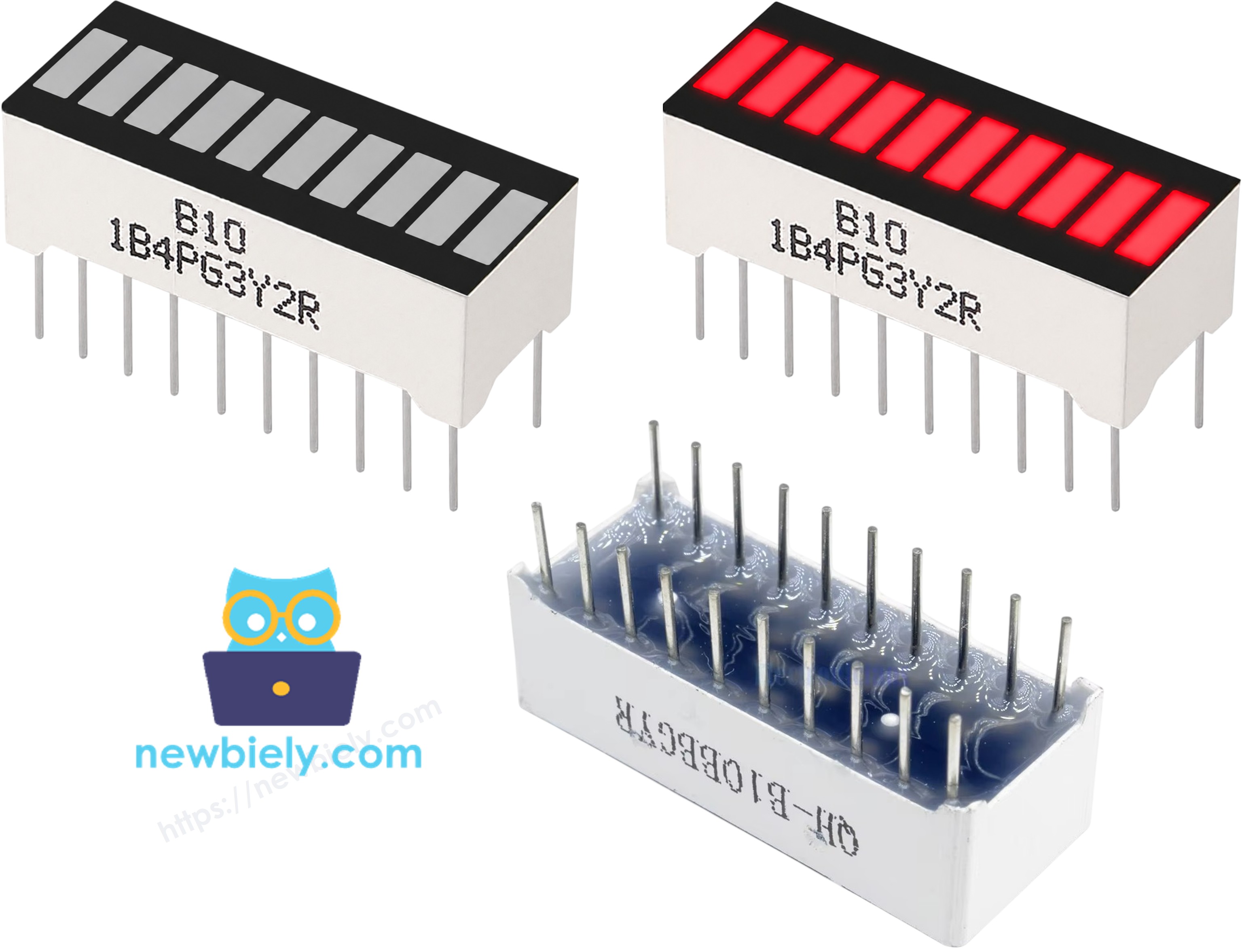
The block has 20 legs: one row of anodes and one row of cathodes.
| Pin Group | Role | Connect To |
|---|---|---|
| A1 to A10 (anodes) | Positive side of each segment | A digital pin, through a 220Ω resistor |
| K1 to K10 (cathodes) | Negative side of each segment | GND |
Good to know: if nothing glows, the block is most likely rotated. The anode row must face the resistors.
ESP32 Uno Pinout
Your sketch never uses the printed D-labels; it uses the GPIO number behind each Uno header pin. Look up the D2 to D11 pins in this diagram before you start wiring.

How to Connect the Bar Graph to the ESP32 Uno
When this part is done, all ten segments are wired and protected by resistors.
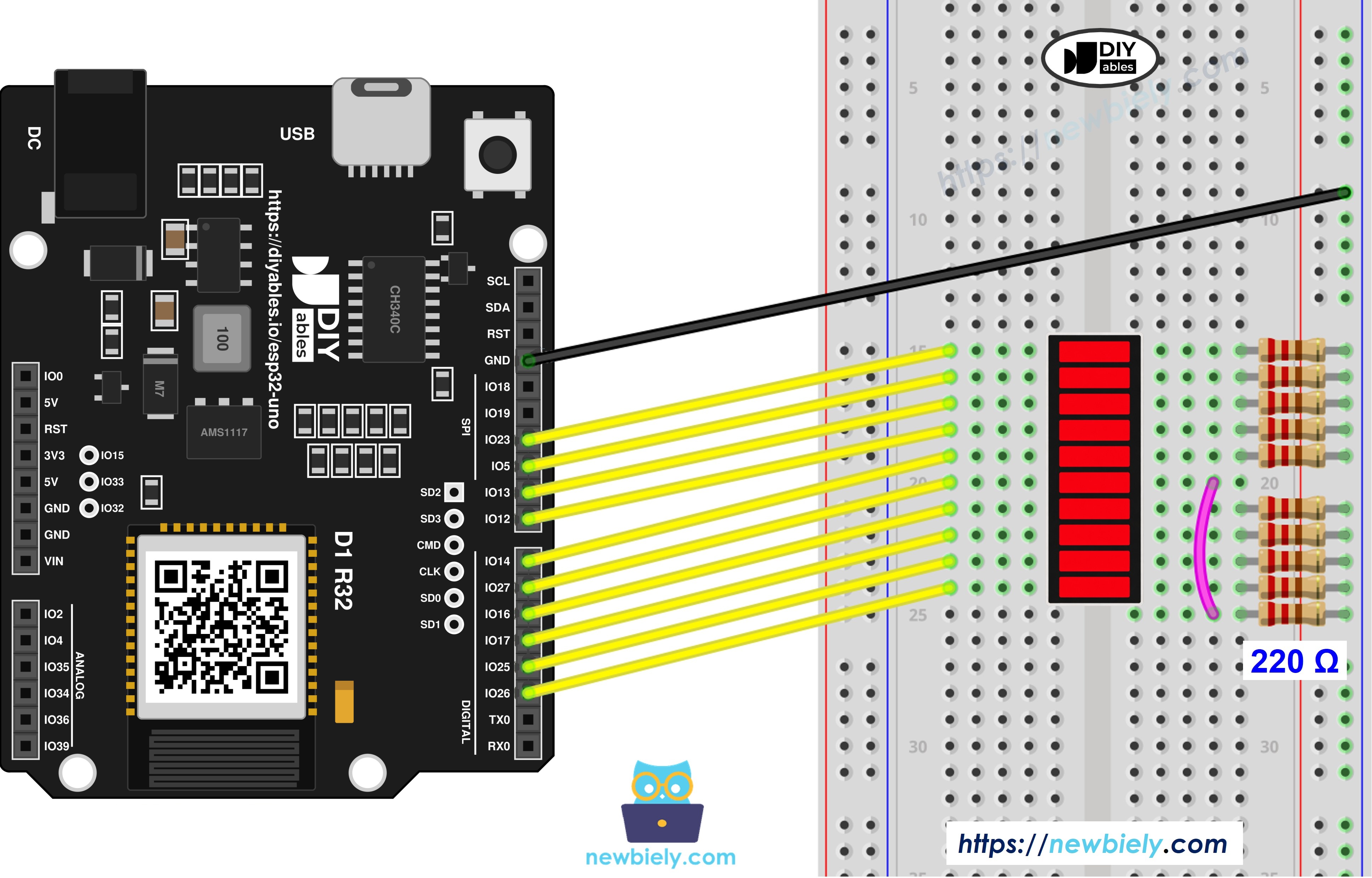
This image is created using Fritzing. Click to enlarge image
| LED Bar Graph Pin | ESP32 Uno Pin |
|---|---|
| A1 (Anode 1) | D2 (GPIO26) through 220Ω |
| A2 (Anode 2) | D3 (GPIO25) through 220Ω |
| A3 (Anode 3) | D4 (GPIO17) through 220Ω |
| A4 (Anode 4) | D5 (GPIO16) through 220Ω |
| A5 (Anode 5) | D6 (GPIO27) through 220Ω |
| A6 (Anode 6) | D7 (GPIO14) through 220Ω |
| A7 (Anode 7) | D8 (GPIO12) through 220Ω |
| A8 (Anode 8) | D9 (GPIO13) through 220Ω |
| A9 (Anode 9) | D10 (GPIO5) through 220Ω |
| A10 (Anode 10) | D11 (GPIO23) through 220Ω |
| K1 to K10 (Cathodes) | GND |
WARNING
D8 (GPIO12) and D10 (GPIO5) are boot strapping pins on the ESP32 Uno. The chip checks them at power-on. GPIO12 must be LOW at boot, and an LED with a resistor to GND keeps it LOW, so this circuit is normally fine. If the board ever refuses to start or to take an upload, pull the D8 and D10 wires out, upload, and plug them back in.
Good to know: ESP32 Uno pins give 3.3V, not 5V. That still lights a red segment (about 2V), with roughly 6mA through each 220Ω resistor.
Program Logic for the LED Bar Graph
This part shows the four ideas the sketch is built on. No extra library is required.
| Idea | Code |
|---|---|
| Keep the ten anode GPIOs in an array | const int ledPins[10] = {26, 25, 17, 16, 27, 14, 12, 13, 5, 23}; |
| Make every pin an output | pinMode(ledPins[i], OUTPUT); |
| Light segment i | digitalWrite(ledPins[i], HIGH); |
| Turn segment i off | digitalWrite(ledPins[i], LOW); |
ESP32 Uno Code - LED Bar Level Animation
The sketch fills the bar from the bottom segment to the top, holds for half a second, then empties it in reverse.
Upload and Test
- First time with this board? Set it up with ESP32 Uno - Getting Started before you continue.
- Build the circuit by following the wiring table above.
- Plug in the USB Type-C cable between the ESP32 Uno and your computer.
- Select the board in Arduino IDE: pick ESP32 Dev Module and the COM port of the board (CH340).
- Paste the sketch into a new Arduino IDE window.
- Press Upload (Upload) and wait for "Done uploading".
- Open the Serial Monitor at 9600 baud.
- Check the bar: the segments climb one at a time, stay full for a moment, then drop back to dark, over and over.
- Pro tip: before you trust the animation, set every pin HIGH in setup() for one second. A segment that stays dark points to a bad wire or resistor at once.
Video Tutorial
See the ESP32 Uno build in action in the video below.
Code Explanation
Here is what each block of the sketch is responsible for.
| Code Part | What It Does |
|---|---|
| NUM_SEGMENTS and ledPins[] | Holds the count and the ten anode GPIO numbers, from D2 (GPIO26) up to D11 (GPIO23) |
| printBar() | Writes one star for every lit segment and a space for every dark one |
| setup() | Starts Serial at 9600 baud, makes all ten GPIOs outputs and forces them LOW |
| First for loop in loop() | Sets segments HIGH from index 0 to 9, 100 ms apart |
| Second for loop in loop() | Sets segments LOW from index 9 back to 0, 100 ms apart |
| delay(500) | Holds the full bar and the empty bar for half a second each |
One full up-and-down cycle takes about three seconds, and then it starts again.
ESP32 Uno vs UNO R4 for This Project
Moving this project from the UNO R4 to the ESP32 Uno only changes pin numbers and the logic level.
| Item | Arduino UNO R4 | ESP32 Uno |
|---|---|---|
| Logic voltage | 5V | 3.3V |
| Pin numbers in code | 2 to 11 | 26, 25, 17, 16, 27, 14, 12, 13, 5, 23 |
| Header positions | D2 to D11 | D2 to D11 (same holes) |
| Current per segment with 220Ω | About 14mA | About 6mA |
| Strapping pins in use | None | D8 (GPIO12) and D10 (GPIO5) |
| Arduino IDE board | Arduino UNO R4 WiFi or Minima | ESP32 Dev Module |
The wiring stays exactly the same; only the array in the sketch changes. The segments look a bit dimmer at 3.3V, but they stay easy to read.
Go Wireless: Set the Bar Level from Your Phone
Here you get an idea for turning the bar graph into a phone-controlled indicator.
The ESP32 Uno has WiFi and Bluetooth (Classic and BLE) on board. Swap the fixed animation for a value that arrives from your phone, and the bar becomes a remote level display. A slider can choose how many segments glow, or a pin switch page can toggle single segments on and off.
A slider value from 0 to 100 maps to a segment count like this (same pins as the main sketch):
Troubleshooting
| Problem | Possible Cause | Solution |
|---|---|---|
| No COM port appears in Arduino IDE | CH340 driver not installed or a charge-only cable | Install the CH340 driver and use a USB cable that carries data |
| Upload stops at "Failed to connect" or "Waiting for download" | Board did not enter download mode | Hold the BOOT button while the upload starts, then release it |
| Board does not boot or upload with the bar graph connected | Boot strapping pin D8 (GPIO12) or D10 (GPIO5) pulled the wrong way | Unplug the module or the D8 and D10 wires while uploading, or use another pin |
| The whole bar stays dark | Block turned around, or the cathode row is not on GND | Rotate the bar graph and check the GND rail on the breadboard |
| A single segment never glows | Loose jumper, missing resistor or a dead segment | Reseat that wire and resistor, then swap it with a working segment to test |
| The fill runs in a jumbled order | Two anode wires swapped | Match each wire with the table, D2 to A1 through D11 to A10 |
| Segments glow very weakly | Wrong resistor, for example 2.2kΩ instead of 220Ω | Check the color bands (red, red, brown) and replace it |
| Text in the Serial Monitor is garbage | Baud rate mismatch | Set the Serial Monitor to 9600 |
FAQ
Do I need ten resistors, or can one resistor be shared?
Use ten. A shared resistor would split its current between all lit segments, so the bar would get dimmer as more segments turn on. One 220Ω resistor per anode keeps every segment equally bright.
What does a 10 segment LED bar graph show best?
Anything with a level: volume, battery charge, water height, WiFi signal or a countdown. Ten steps give 10% per segment, which is easy to read at a glance.
Can the ESP32 Uno power all ten segments at the same time?
Yes. At 3.3V with 220Ω resistors each segment draws about 6mA, so the full bar uses about 60mA. That is within what the ESP32 Uno GPIOs and 3.3V supply can handle.
Why are the numbers in the array not 2 to 11?
The header labels and the chip GPIO numbers are different on the ESP32 Uno. D2 is GPIO26, D7 is GPIO14 and D11 is GPIO23, for example. The code must use the GPIO number, so the array holds 26, 25, 17, 16, 27, 14, 12, 13, 5 and 23.
Is it safe to use D8 and D10 for LED segments?
Normally yes. D8 (GPIO12) and D10 (GPIO5) are boot strapping pins, but an LED plus resistor to GND does not pull them hard enough to cause trouble. If the board ever fails to boot, unplug those two wires during power-on or upload.
Could I use A2 to A5 for more segments?
No. On the ESP32 Uno, A2 to A5 (GPIO35, 34, 36, 39) are input only. They cannot drive an LED, so keep the segments on digital pins.
How can I dim the segments instead of just switching them?
Every pin in this project supports PWM. Replace digitalWrite() with analogWrite(pin, value) and use a value from 0 to 255 to set the brightness.
Can the bar graph follow a potentiometer or sensor?
Yes. Read the sensor with analogRead() on an analog pin, which returns 0 to 4095 on the ESP32 Uno, and use map(value, 0, 4095, 0, 10) to get the number of lit segments. Add analogSetAttenuation(ADC_11db) in setup() so the input covers 0 to 3.3V.
Does the original UNO R4 sketch run on the ESP32 Uno?
It compiles, but it lights the wrong pins, because pin 2 to 11 mean different GPIOs on this board. Change the array to the GPIO numbers above and select ESP32 Dev Module in Arduino IDE.
What if my project needs more pins than the Uno headers give?
This bar graph already takes D2 to D11, so add-ons like buttons or a sensor may run short of pins. The ESP32 Uno has a few extra holes near the power header: GPIO32 and GPIO33 (I/O, PWM, analog on ADC1, so they also work while WiFi is on) and GPIO15 (I/O, PWM, analog on ADC2). Add pin headers with a soldering iron, then put the bare GPIO number in your sketch. GPIO32/33 are a good fit for a level sensor that drives the bar. Two warnings: GPIO15 and GPIO0 (the IO0 pin at the unused Uno NC position) are boot strapping pins, and a wrong connection can stop the board from booting or uploading code, so use GPIO32/33 first. Never use the six holes under the digital header (SD0 to SD3, CMD, CLK = GPIO6 to GPIO11); they are wired to the flash chip and using them crashes the board.