
ESP32 UNO - Motion Sensor - Relay
Need a light that wakes up the moment someone walks in? Hook an ESP32 Uno motion sensor relay circuit together and the board flips the switch for you. An HC-SR501 PIR sensor spots body heat on the move, and the ESP32 Uno form board closes a relay in reply. Behind that relay you can put a bulb, a fan, an LED strip or a 12V solenoid lock, so this PIR relay switch fits porches, closets and stairways.
By the end, you can:
- Hook up an HC-SR501 PIR sensor and a relay board on the Uno headers
- Tune the delay knob, the range knob and the trigger jumper
- Catch the start and the end of movement with digitalRead()
- Drive a relay load from the sensor events in Arduino IDE
Components You Need
Or you can buy the following kits:
| 1 | × | DIYables Sensor Kit (18 sensors/displays) |
Additionally, some of these links are for products from our own brand, DIYables .
Relay and PIR Sensor Basics
After this part, you know the role of every block in the build.
| Part | Role Here |
|---|---|
| HC-SR501 PIR sensor | Watches for moving warm bodies; OUTPUT reads HIGH during movement and LOW after it |
| Relay module | An electric switch; a small signal on IN moves a contact that carries the big load |
| ESP32 Uno | Polls the PIR level and sets the relay to match |
| Optional lock or lamp | The real load, powered by its own supply through the relay contacts |
Want the pinout and single-part code for each module? Open these guides:
ESP32 Uno Pinout
Your sketch talks to GPIO numbers, while the headers keep their Uno labels such as D3 and D10. Look up the GPIO behind each label in the picture below before you plug anything in.

How to Connect
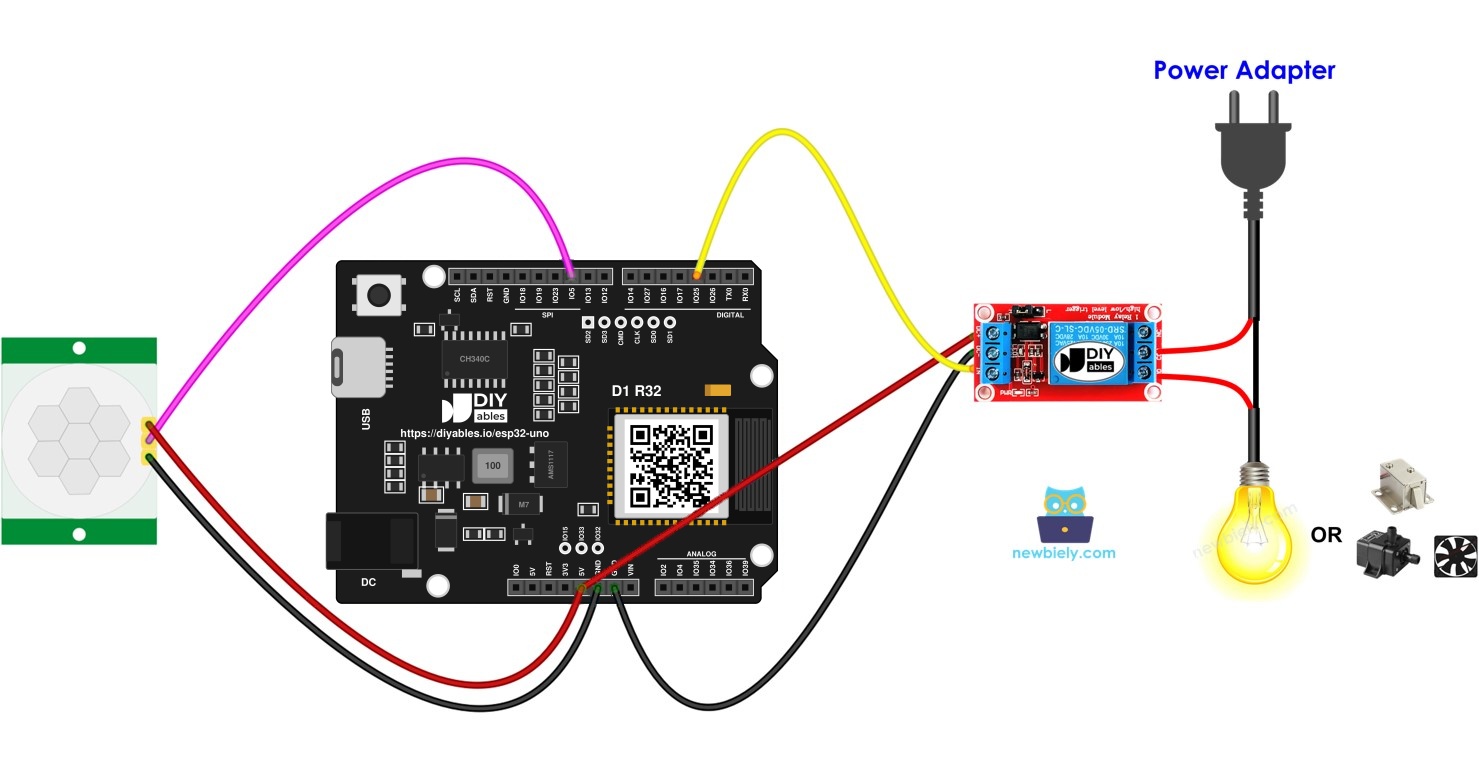
Once this step is done, the PIR sensor reports to D10 (GPIO5) and D3 (GPIO25) commands the relay.
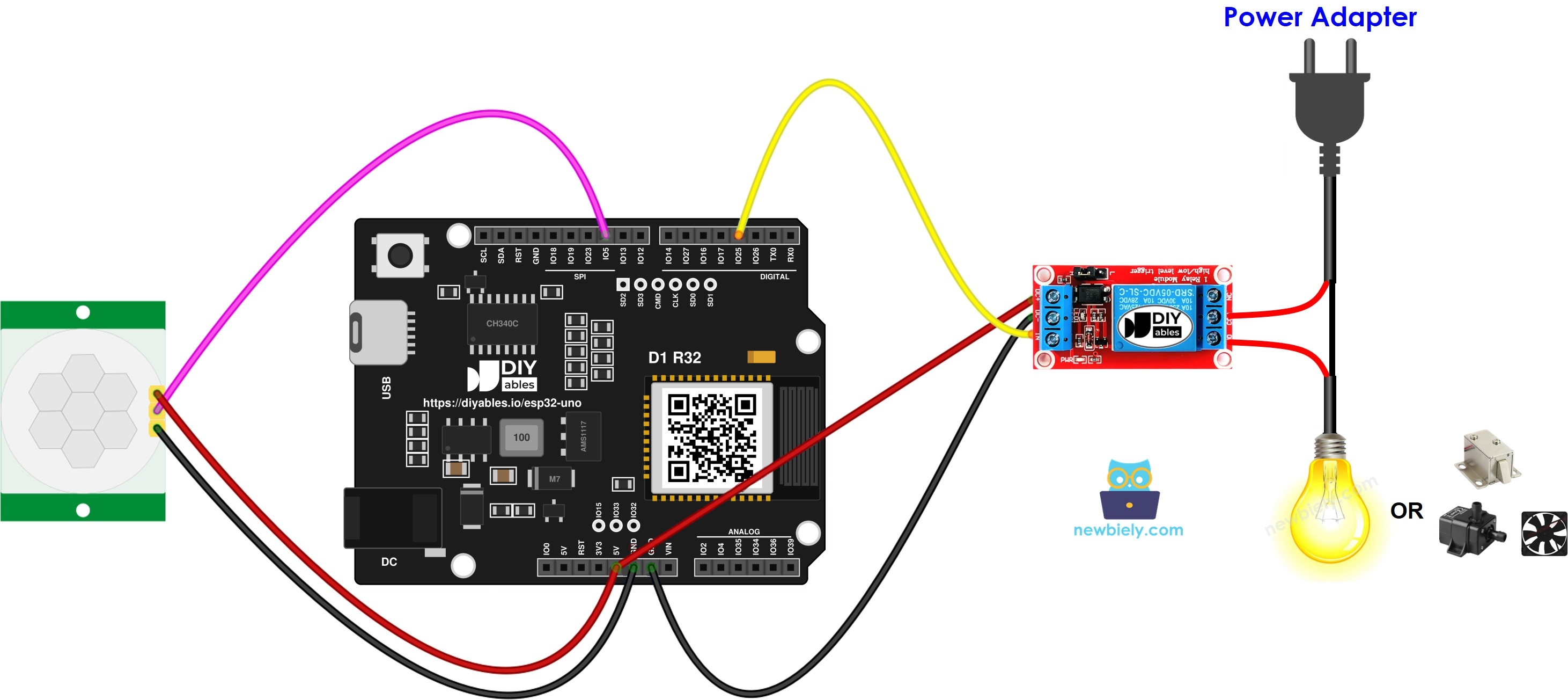
This image is created using Fritzing. Click to enlarge image
| Component Pin | ESP32 Uno Pin |
|---|---|
| PIR sensor VCC | 5V |
| PIR sensor GND | GND |
| PIR sensor OUTPUT | D10 (GPIO5) |
| Relay VCC | 5V |
| Relay GND | GND |
| Relay IN | D3 (GPIO25) |
WARNING
D10 maps to GPIO5, a boot strapping pin on the ESP32 Uno. The chip samples it at power-on, and it should sit HIGH at that moment. A PIR sensor that holds its OUTPUT LOW during reset rarely causes trouble, but if the board will not start or the upload hangs on "Waiting for download", unplug the OUTPUT wire, upload, then reconnect it.
Good to know: the HC-SR501 wants 4.5V to 20V on VCC, yet its OUTPUT only rises to about 3.3V. That level is safe for ESP32 Uno pins, which are NOT 5V tolerant. A different PIR board with a 5V output needs a voltage divider before D10.
Good to know: ESP32 Uno outputs swing to 3.3V, not 5V. Most 5V relay modules with a transistor stage on IN still switch from that level.
Adding the solenoid lock? Run it through the relay COM and NO screw terminals with the 12V adapter and the DC jack. The lock current must stay away from the ESP32 Uno.
Initial Setting
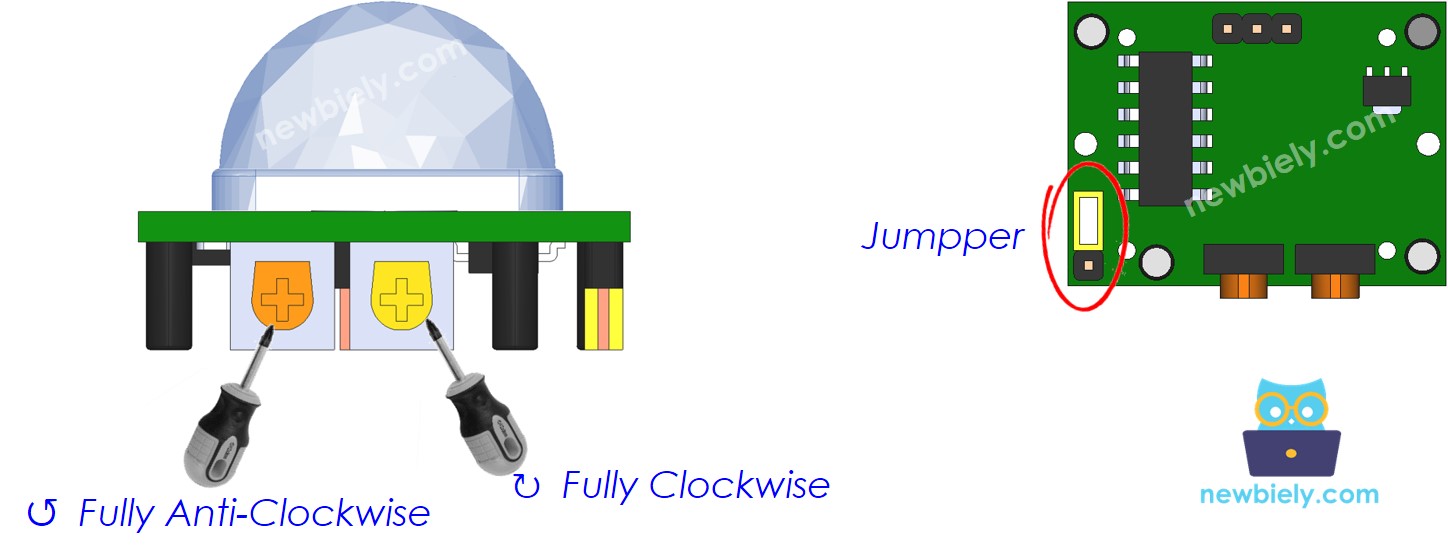
Set the sensor now, so the relay tracks your movement closely and the sensor sees the widest area.
| Time Delay Adjuster | Rotate it anti-clockwise until it stops. |
| Detection Range Adjuster | Rotate it clockwise until it stops. |
| Repeat Trigger Selector | Set the jumper to the position in the picture. |
ESP32 Uno Code
This sketch watches the PIR level, closes the relay when movement begins and opens it when movement ends.
Upload and Test
- First time with this board? Set it up with ESP32 Uno - Getting Started before you continue.
- Build the circuit by following the wiring table above.
- Plug in the USB Type-C cable between the ESP32 Uno and your computer.
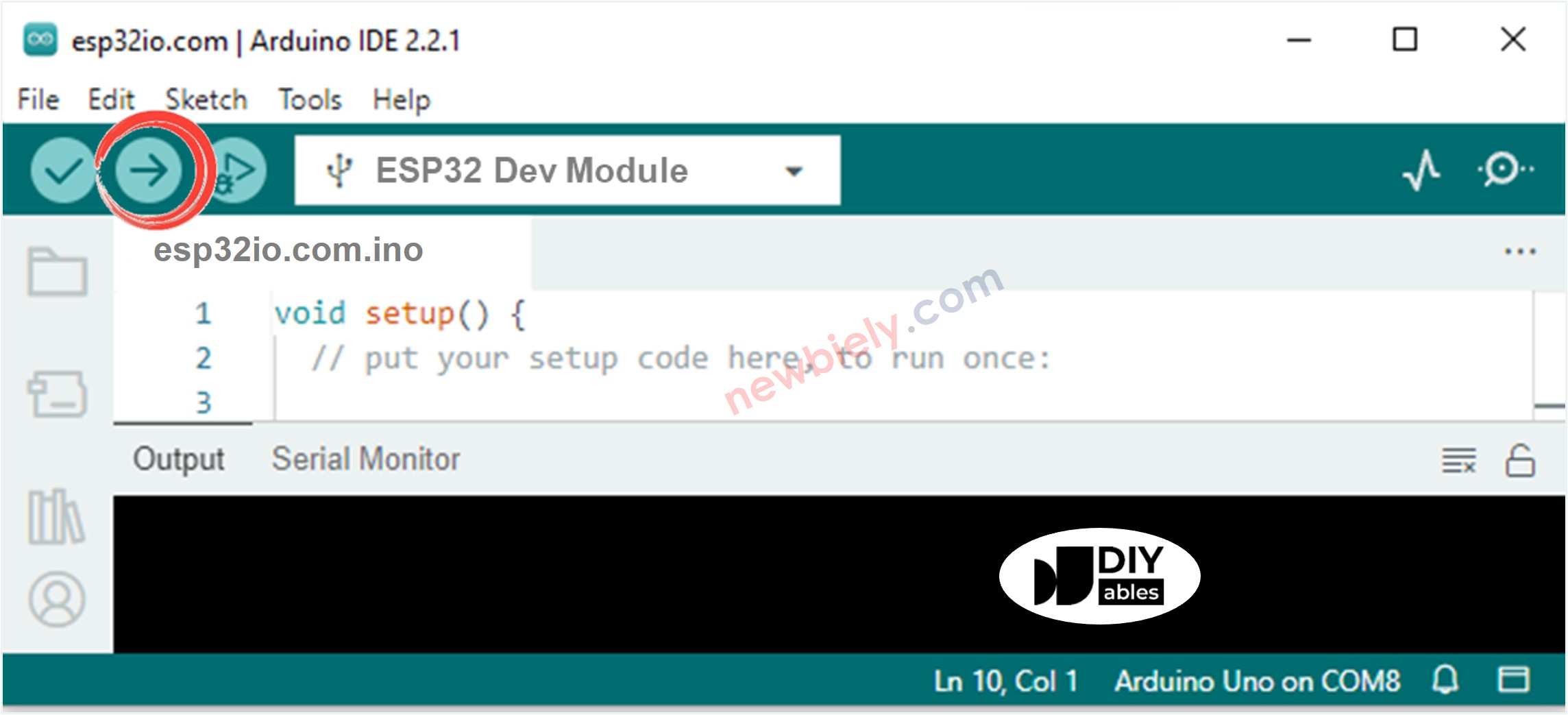
- Select the board in Arduino IDE: pick ESP32 Dev Module and the COM port of the board (CH340).
- Paste the sketch into a fresh Arduino IDE window.
- Press Upload (the Upload button) and wait for "Done uploading".
- Launch the Serial Monitor and choose 9600 baud.
- Walk past the sensor, then freeze for a few seconds.
- Listen for the relay: one click as you move, a second click soon after you hold still. The Serial Monitor logs each change:
- Pro tip: cover the PIR dome with a paper cup while you work on the code. The relay then stays quiet, and you can uncover it when you are ready to test.
Video Tutorial
See the ESP32 Uno build in action in the video below.
Code Explanation
After this part, you know why the sketch prints one line per event instead of a flood.
| Code Part | What It Does |
|---|---|
| MOTION_SENSOR_PIN 5 and RELAY_PIN 25 | Name D10 (GPIO5) and D3 (GPIO25) for the rest of the sketch |
| prev_motion_state = motion_state | Saves the earlier PIR level before the new read |
| digitalRead(MOTION_SENSOR_PIN) | Gets the present PIR level, HIGH or LOW |
| LOW then HIGH check | Movement just started, so it prints a line and writes HIGH to the relay |
| HIGH then LOW check | Movement just ended, so it prints a line and writes LOW to the relay |
The sketch acts only on a change of level, so each walk-by gives exactly one ON event and one OFF event.
ESP32 Uno vs UNO R4 for This Project
Here is what changes when this build moves from the UNO R4 to the ESP32 Uno.
| Item | Arduino UNO R4 | ESP32 Uno |
|---|---|---|
| Logic voltage | 5V | 3.3V |
| PIR OUTPUT pin in code | 10 (D10) | 5 (D10, GPIO5) |
| Relay IN pin in code | 3 (D3) | 25 (D3, GPIO25) |
| Boot strapping risk on the sensor pin | None | GPIO5 is read at boot |
| Libraries | None | None |
| Arduino IDE board | Arduino UNO R4 WiFi | ESP32 Dev Module |
| WiFi and Bluetooth | WiFi only on the WiFi model | WiFi plus Bluetooth Classic and BLE |
The same wires and the same image work as-is. Only the two pin numbers in the code change. Keep any sensor signal at 3.3V or less.
Go Wireless: Phone-Controlled Light With Motion Backup
Here you see how a phone can join this project.
The ESP32 Uno has built-in WiFi and Bluetooth. Add a digital pin panel on your phone, so you can force the relay on for a party or switch it off at night, while the PIR sensor still runs it the rest of the time. You can also log each "Motion detected!" event on the phone to see when people pass by.
Try These Next
- Keep the relay on for 30 seconds after the last movement with a millis() timer, instead of the sensor knob.
- Add a light sensor so the relay only closes when the room is dark.
- Count how many times motion starts each hour and print the total.
Troubleshooting
| Problem | Possible Cause | Solution |
|---|---|---|
| No COM port in Arduino IDE | CH340 driver missing or the USB cable carries power only | Install the CH340 driver and use a data USB cable |
| Upload stops at "Waiting for download" | The board did not enter flash mode | Hold the BOOT button while the upload starts |
| Board does not boot or upload with the PIR connected | D10 (GPIO5) is a boot strapping pin and gets pulled the wrong way | Unplug the PIR OUTPUT wire while uploading, or move it to another pin |
| Relay never clicks | Relay VCC or GND loose, or the coil does not get 5V | Feed relay VCC from 5V and check the shared GND |
| No motion events at all | PIR has no 5V supply or is still settling | Power VCC from 5V and wait about a minute after power-on |
| Relay clicks with nobody around | Heat from a heater, sunlight or an air vent hits the sensor | Aim the sensor away from heat sources and turn the range knob down |
| Relay acts backwards | The relay board is active LOW | Swap HIGH and LOW in the two digitalWrite() lines |
| Garbled text in the Serial Monitor | Baud rate does not match | Choose 9600 baud |
FAQ
How does an HC-SR501 PIR sensor sense people?
It has a pyroelectric element behind a plastic lens that splits the view into zones. When a warm body moves from one zone to the next, the infrared level changes and the OUTPUT pin goes HIGH. A still person or a cold object does not trigger it.
How far can the HC-SR501 see?
The range knob sets it from about 3 m up to about 7 m, with a cone of roughly 110 degrees. Turning the knob clockwise gives the longest reach.
Is the HC-SR501 output safe for a 3.3V board pin?
Yes. The sensor runs from 5V, but a regulator inside keeps OUTPUT at about 3.3V when HIGH. You can wire it straight to D10 (GPIO5) on the ESP32 Uno with no divider.
Can the relay IN pin work with a 3.3V signal?
Most relay modules with a transistor or optocoupler input switch fine from 3.3V. Power the coil side from 5V. If your module only clicks now and then, pick a 3V relay module or one rated for 3.3V logic.
Why is D10 called GPIO5 in the ESP32 Uno code?
The ESP32 Uno board keeps Uno labels on its headers, but the chip only knows GPIO numbers. D10 is routed to GPIO5 and D3 to GPIO25, so the sketch uses 5 and 25.
Will a PIR sensor on D10 stop the ESP32 Uno from starting?
It can in rare cases. GPIO5 is a boot strapping pin that the chip samples at reset. Most HC-SR501 boards do not hold it hard enough to matter, but if the board fails to boot, disconnect the OUTPUT wire during reset or upload.
Do I need a driver to upload code to the ESP32 Uno?
The board talks over a CH340 USB-to-serial chip. Windows and macOS sometimes need the CH340 driver before the COM port shows up in Arduino IDE.
Can I reuse a sketch written for another Uno board?
The UNO R4 logic runs as-is, but the pin numbers must change. Write 5 for the sensor and 25 for the relay, then select ESP32 Dev Module as the board.
How do I make the relay stay on for a fixed time?
Turn the time delay knob clockwise to make the sensor hold HIGH longer, from a few seconds up to a few minutes. For an exact time, keep the knob at minimum and use millis() in the code.
Can I add a second PIR sensor to cover another doorway?
Yes. Wire its OUTPUT to a free digital pin such as D7 (GPIO14), read it the same way, and close the relay when either sensor sees movement.
What if this build needs more pins than the Uno headers offer?
The ESP32 Uno has a few extra holes near the power header: GPIO32 and GPIO33 (I/O, PWM and analog on ADC1, so they work while WiFi is on) and GPIO15 (I/O, PWM and analog on ADC2). To use one, solder a header strip into the hole and put its GPIO number in the sketch. For an extra PIR sensor or a second relay, GPIO32 and GPIO33 are the best picks. Two warnings: GPIO15 and GPIO0 (the IO0 pin at the unused Uno NC spot) are boot strapping pins, so a wrong connection can stop the board from booting or uploading; reach for GPIO32/33 first. Also never use the six holes under the digital header (SD0 to SD3, CMD, CLK = GPIO6 to GPIO11), because they connect to the flash chip and using them crashes the board.
Is it safe to switch a mains lamp with this relay?
The relay contacts may be rated for mains, but mains voltage can kill. Only wire it if you are trained to work with high voltage, and use an enclosure. For learning, switch a 12V LED strip or the 12V solenoid lock.