
ESP32 UNO - DC Motor Shield
Need to spin a DC motor fast, slow, forward or in reverse with the ESP32 Uno? Plug the Motor Shield Rev3 onto the ESP32 Uno form board and control it with a few lines of Arduino code. The L298P motor driver on the shield takes care of the heavy current. Your sketch only sends direction, PWM speed and brake signals, and it can read back how much current each motor pulls.
By the end, you can:
- Mount the Motor Shield Rev3 and hook up a DC motor plus a battery pack.
- Run the motor forward and in reverse with the DIYables_DC_Motor library.
- Change motor speed with a PWM duty value (0-255).
- Stop the shaft with the brake and measure motor current.
- Control two DC motors at the same time on Channel A and Channel B.
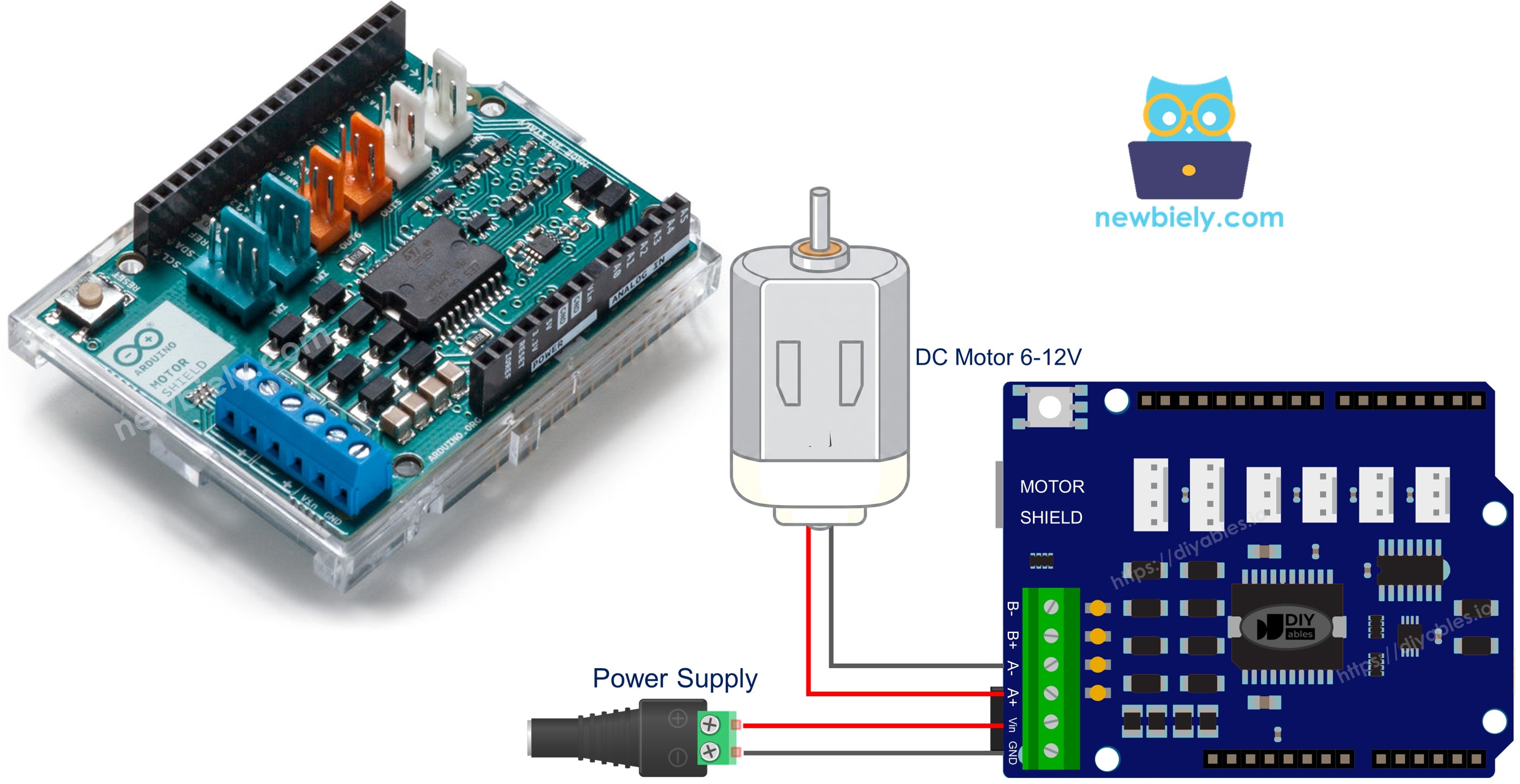
Components You Need
Or you can buy the following kits:
| 1 | × | DIYables Sensor Kit (18 sensors/displays) |
Additionally, some of these links are for products from our own brand, DIYables .
Inside the Motor Shield Rev3
After this part, you know which shield signal sits on which ESP32 Uno GPIO.
The shield carries an L298P dual full-bridge driver. It drives two DC motors on their own, and each motor channel has four control lines.
| Signal | Type | Effect |
|---|---|---|
| Direction | Digital output | HIGH turns the motor one way, LOW turns it the other way |
| PWM (Speed) | PWM output | 0 means stopped, 255 means full speed |
| Brake | Digital output | HIGH holds the shaft still, LOW lets it coast |
| Current Sensing | Analog input | Voltage goes up as the motor draws more current |
The ESP32 Uno keeps the classic Uno header shape, so each shield pin lands on a fixed header position. In code you use the GPIO number in brackets.
| Line | Motor A Side | Motor B Side |
|---|---|---|
| Spin direction | D12 (GPIO19) | D13 (GPIO18) |
| Speed (PWM) | D3 (GPIO25) | D11 (GPIO23) |
| Stop (brake) | D9 (GPIO13) | D8 (GPIO12) |
| Current feedback | A0 (GPIO2) | A1 (GPIO4) |
WARNING
Skip the MOTOR_CH_A and MOTOR_CH_B channel constants on this board. They hold plain Uno pin numbers (12, 3, 9, A0 and 13, 11, 8, A1). On this board those numbers are the wrong GPIOs, and GPIO9 is wired to the flash chip, so the board can crash. Every sketch on this page gives the four GPIO numbers to the constructor, for example DIYables_DC_Motor motor(19, 25, 13, 2);
Motor Power Supply
A DC motor pulls far more current than a USB port can give. Feed the shield's power screw terminals from a 6-12V source, such as two 18650 lithium cells in series. The ESP32 Uno itself can stay on USB power.
Good to know: look under the shield for a jumper marked "Vin Connect". If it is closed, the motor supply also reaches the ESP32 Uno VIN pin, which accepts 5-12V. Keep your supply inside that range, or open the jumper and power the board from USB.
ESP32 Uno Pinout
On the ESP32 Uno form board, every Uno header hole is linked to one GPIO, and that GPIO number is what goes in your sketch. Look at the diagram to find the GPIOs under the shield pins.

How to Connect
When you finish this part, the shield, motor and battery are ready to run.
Step 1 — Stack the shield
Line up the Motor Shield Rev3 with the ESP32 Uno headers and press it down. Check that no pin is bent or outside its socket.
Step 2 — Attach the motor
Screw the two motor leads into the Channel A terminals. The channel names are printed next to the terminals.
Step 3 — Attach the battery
Screw the battery pack leads into the power terminals. Check the + and - marks.
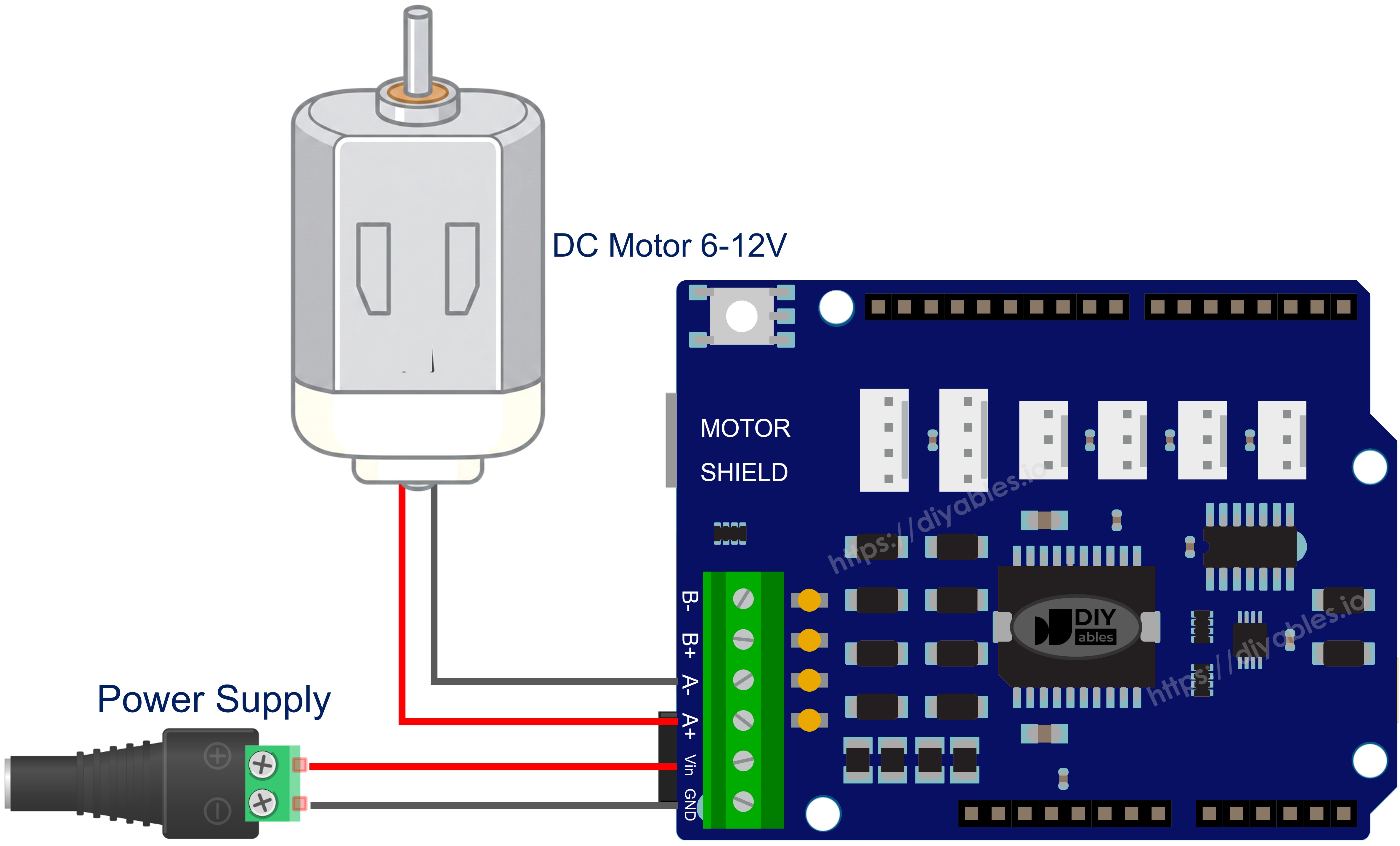
This image is created using Fritzing. Click to enlarge image
| Shield Line | ESP32 Uno Header (GPIO) |
|---|---|
| Motor A direction | D12 (GPIO19) |
| Motor A speed (PWM) | D3 (GPIO25) |
| Motor A brake | D9 (GPIO13) |
| Motor A current feedback | A0 (GPIO2) |
| Motor B direction | D13 (GPIO18) |
| Motor B speed (PWM) | D11 (GPIO23) |
| Motor B brake | D8 (GPIO12) |
| Motor B current feedback | A1 (GPIO4) |
WARNING
Two shield pins land on ESP32 Uno boot strapping pins. D8 (GPIO12) is the Channel B brake. The chip reads GPIO12 at power-up, and it must be LOW then. If it is HIGH, the flash gets the wrong voltage and the board does not start. A0 (GPIO2) is the Channel A current-sense input, and it is also read at boot. With the motors stopped, both lines normally sit LOW, so the board starts fine. If the board will not boot or upload with the shield on, lift the shield off, upload, and then plug it back in.
Good to know: the ESP32 Uno sends 3.3V control signals, and the shield reads them as HIGH. The only lines going back into the board are the current-sense outputs on A0 and A1. At roughly 1.65V for every amp, even the 2A channel maximum keeps them under 3.3V. No 5V signal reaches an ESP32 Uno pin.
Good to know: A0 (GPIO2) and A1 (GPIO4) are ADC2 pins. The current reading works in these sketches, but analogRead() on them fails while WiFi is on.
Get the Motor Library
After this part, the Arduino IDE knows the run(), brake() and readCurrent() functions. You install it only once.
- Connect the ESP32 Uno to your computer with the USB Type-C cable.
- Pick the board: in the Arduino IDE, select ESP32 Dev Module and the CH340 COM port.
- Go to the Library Manager: click Libraries in the sidebar.
- Search for "DIYables_DC_Motor" and find the one made by DIYables.
- Hit Install next to it.
- Search for DIYables_DC_Motor created by DIYables.io and click the Install button.
The library needs no other library, so you are done.
Basic Sketch Pattern
Learn this short pattern first. Every longer example below is built on it.
| Code Part | What It Does |
|---|---|
| DIYables_DC_Motor motor(19, 25, 13, 2) | Creates the motor object with direction, PWM, brake and current GPIOs |
| motor.begin() | Sets the direction, PWM and brake pins as outputs |
| motor.run(MOTOR_FORWARD, 100) | Sets the direction, lets go of the brake and applies speed 100 |
| motor.brake() | Holds the shaft and sets PWM to 0 |
The motor turns forward for 2 seconds, stops for 1 second, and repeats.
Run One Motor on Channel A
Use this sketch to prove that the shield, motor and battery all work together. The motor turns one way, stops, turns the other way and stops, with 2 seconds for each step.
Upload and Test
- First time with this board? Set it up with ESP32 Uno - Getting Started before you continue.
- Build the circuit by following the wiring table above, with the motor on Channel A.
- Screw in the battery leads at the shield power terminals.
- Plug in the USB Type-C cable between the ESP32 Uno and your computer.
- Select the board in Arduino IDE: pick ESP32 Dev Module and the COM port of the board (CH340).
- Paste the sketch into a new Arduino IDE window.
- Press Upload and wait for "Done uploading".
- Open the Serial Monitor, set it to 9600 baud, and watch each direction change.
- Pro tip: mark the motor shaft with a small piece of tape. Then you can see the direction flip at a glance, even at the slow speed of 30.
At speed 30, the motor swaps between forward and backward, with a 2-second brake in between.
Library Functions at a Glance
| Function | Result | Example Call |
|---|---|---|
| run(dir, speed) | Turns the motor in the chosen direction at the chosen speed | motor.run(MOTOR_FORWARD, 100) |
| setSpeed(speed) | Changes only the speed, keeps direction and brake as they are | motor.setSpeed(200) |
| setDirection(dir) | Changes only the direction, keeps speed and brake as they are | motor.setDirection(MOTOR_BACKWARD) |
| brake() | Holds the shaft and sets the speed to zero | motor.brake() |
| release() | Lets go of the brake | motor.release() |
| readCurrent() | Gives the raw ADC value of the current-sense pin | motor.readCurrent() |
Run One Motor on Channel B
Same behavior on the second channel. Only the four GPIO numbers in the constructor are new.
Upload and Test
- Move the motor leads to the Channel B terminals.
- Upload the sketch, then open the Serial Monitor.
The motor acts the same as on Channel A. The only change is the header set: D13, D11, D8 and A1, which are GPIO18, 23, 12 and 4.
Drive Two Motors Together
After this part, you can steer a two-wheel robot base. The sketch runs both motors forward, then both backward, then in opposite directions, which turns the robot in place.
Upload and Test
- Wire one motor to Channel A and the second motor to Channel B.
- Upload the sketch, then open the Serial Monitor.
Each move lasts 2 seconds, and a 1-second brake sits between moves. The spin move uses a higher speed of 150.
Measure Motor Current
After this part, you can see how hard the motor works. A big jump in the number usually means the shaft is blocked or stalled.
The motor runs forward at speed 100, and the raw current value prints every 500 ms.
Good to know: the line analogSetAttenuation(ADC_11db) in setup() widens the ESP32 Uno ADC input range, so the analog pin reads from 0V up to about 3.3V. Without it, the reading reaches 4095 too early and the current numbers look wrong.
Upload and Test
- Keep the motor on the Channel A terminals.
- Upload the sketch, then open the Serial Monitor.
- Load the motor: squeeze the shaft lightly with two fingers and watch the value climb.
From Raw Value to Milliamps
Channel A current comes in on A0 (GPIO2), and Channel B current on A1 (GPIO4). The voltage on each pin rises by about 1.65V per amp.
| Item | Value |
|---|---|
| ADC range on the ESP32 Uno | 12-bit, 0 to 4095 |
| Full scale | about 3.3V |
| Shield sensitivity | about 1.65V per amp |
| Formula | current (mA) = raw x 3300 / 4095 / 1.65 |
| Example | raw 262 is about 211mV, so about 128mA |
The ESP32 Uno ADC is not fully linear, especially near 0V and 3.3V. Use the result as a rough guide, not an exact meter.
Set Your Own Pins
After this part, you can use the library with any pin set, for example with a different motor driver board.
Upload and Test
- Edit the four numbers in the constructor to fit your hardware. Write GPIO numbers (like 19), not header labels (like D12).
- Upload the sketch and check that the motor turns as expected.
Watch It Run
See the ESP32 Uno build in action in the video below.
ESP32 Uno vs UNO R4 for This Project
This table lists what changes when you move this motor shield project from the UNO R4 to the ESP32 Uno.
| Item | Arduino UNO R4 | ESP32 Uno |
|---|---|---|
| Logic voltage | 5V | 3.3V |
| Channel A pins in code | MOTOR_CH_A (12, 3, 9, A0) | 19, 25, 13, 2 |
| Channel B pins in code | MOTOR_CH_B (13, 11, 8, A1) | 18, 23, 12, 4 |
| Current-sense ADC range | 14-bit (0 to 16383) | 12-bit (0 to 4095) |
| Extra code line | none | analogSetAttenuation(ADC_11db) in the current sketch |
| Arduino IDE board | Arduino UNO R4 WiFi or Minima | ESP32 Dev Module |
| WiFi and Bluetooth | WiFi only on the WiFi model | WiFi plus Bluetooth Classic and BLE |
The shield and the wiring stay exactly the same. Only the constructor changes, and you should watch the boot strapping pins D8 (GPIO12) and A0 (GPIO2) if the board ever refuses to start.
Library Compatibility
The library calls only standard Arduino functions: pinMode, digitalWrite, analogWrite and analogRead. That is why it works on the ESP32 Uno once the esp32 by Espressif Systems core is installed. The one change you must make is in the constructor: give the GPIO numbers instead of MOTOR_CH_A or MOTOR_CH_B.
Go Wireless: Drive the Motor from Your Phone
After this part, you have an idea for a remote-controlled motor.
The ESP32 Uno has WiFi and Bluetooth built in, so your phone can replace the fixed speed values in the code. A slider can set the PWM speed, and a joystick can steer a two-motor robot base. Keep one thing in mind: A0 and A1 are ADC2 pins, so readCurrent() does not work while WiFi is on. Bluetooth does not have this limit.
Troubleshooting
| Problem | Possible Cause | Solution | |
|---|---|---|---|
| No COM port shows up in Arduino IDE | CH340 driver missing or charge-only USB cable | Install the CH340 driver and use a USB cable that carries data | |
| Upload stops at "Failed to connect" or "Waiting for download" | Board did not enter download mode | Hold the BOOT button while the upload starts, then let go | |
| Board does not boot or upload with the shield on | D8 (GPIO12) or A0 (GPIO2) boot strapping pin pulled the wrong way | Unplug the shield while uploading, then plug it back in | |
| Board crashes or reboots in a loop at start | Sketch uses MOTOR_CH_A or MOTOR_CH_B, so GPIO9 (a flash pin) is used | Pass the GPIO numbers, like motor(19, 25, 13, 2) | |
| Motor stays still | Loose motor leads, wrong channel in code or no battery power | Tighten the terminals, match the GPIO set to the channel and connect a charged 6-12V supply | |
| Motor hums but does not turn | PWM value too low to beat the motor's inertia | Raise the speed to 70 or more | |
| Motor turns the wrong way | Motor leads swapped | Swap the two leads at the terminal, or swap MOTOR_FORWARD and MOTOR_BACKWARD in code | |
| Board resets when the motor starts | Motor noise or supply drop | Power the motor from the shield terminals, not the board 5V pin, and keep motor wires short | |
| Current value always 0 | Constructor has no current-sense pin, or WiFi is on (ADC2) | Use the 4-pin constructor and turn WiFi off while reading A0 or A1 | |
| "DIYables_DC_Motor.h | No such file" when compiling | The motor library is missing | Add DIYables_DC_Motor through the Library Manager, then compile again |
FAQ
Does the Arduino Motor Shield Rev3 fit the ESP32 Uno?
Yes. Its headers sit where an Uno has them, so the shield just presses on, and no jumper wires are needed. The L298P reads the 3.3V control signals as HIGH, and the current-sense signals that come back stay under 3.3V.
What does the L298P chip on the shield do?
It is a dual H-bridge driver. It switches the motor supply in both directions, so one low-power logic signal can control a motor that pulls up to about 2A per channel.
Why do the sketches use four numbers instead of MOTOR_CH_A?
Those two constants are just the numbers 12, 3, 9 (and 13, 11, 8) from the classic Uno. The ESP32 Uno code needs GPIO numbers, and GPIO9 is even a flash pin. Use motor(19, 25, 13, 2) for Channel A and motor(18, 23, 12, 4) for Channel B.
Why does the current sketch call analogSetAttenuation(ADC_11db)?
With 11 dB, the ESP32 Uno ADC accepts roughly 0-3.3V, and that whole span becomes 0-4095 in your sketch. With a smaller range, the readings saturate early. The UNO R4 sketch has no such line, since only the ESP32 Uno ADC needs it. Up to 2A per channel, the shield signal never goes above 3.3V.
Can I read motor current while the ESP32 Uno is on WiFi?
Not on the shield's default pins. A0 (GPIO2) and A1 (GPIO4) are ADC2 pins, and ADC2 cannot be read while WiFi is on. To fix it, bend out or cut the current-sense pin of the shield, run a jumper to A2-A5 (GPIO35, 34, 36, 39) or GPIO32/33, and change the last number in the constructor.
Is the brake on D8 (GPIO12) a problem at power-up?
Usually not. GPIO12 must be LOW when the board starts, and the shield does not pull it HIGH. If the board ever fails to boot with the shield on, upload with the shield removed, or check that nothing else pulls D8 HIGH.
How do I change the motor speed while it runs?
Call motor.setSpeed() with a new value from 0 to 255. It keeps the direction and the brake as they are, so the motor speeds up or slows down without stopping.
Can the ESP32 Uno 5V pin power the motors?
Avoid it. Motors pull high current and make electrical noise, which can reset the board or damage the USB port. Feed the motors from a separate 6-12V source wired to the shield screw terminals.
Do I need a driver to upload code to the ESP32 Uno?
The board uses a CH340 USB-to-serial chip. Windows 10 and 11 often install it by themselves. If no COM port appears, install the CH340 driver by hand.
The shield covers most headers. Where can I find more free pins?
The ESP32 Uno has a few extra holes near the power header: GPIO32 and GPIO33 (I/O, PWM, analog on ADC1, so they also work while WiFi is on) and GPIO15 (I/O, PWM, analog on ADC2). To use them, solder on pin headers and put the GPIO number in your sketch. With the motor shield on, GPIO32/33 are the best choice for a moved current-sense line or an analog sensor in a WiFi robot. Watch two things. First, GPIO15 and GPIO0 (the IO0 pin at the unused Uno NC position) are boot strapping pins, and a wrong connection can stop the board from booting or uploading code, so use GPIO32/33 first. Second, never use the six holes under the digital header (SD0-SD3, CMD, CLK = GPIO6-GPIO11). They are wired to the flash chip, and using them crashes the board.
Can I build a phone-controlled robot car with this setup?
Yes. Use the two-motor sketch as the base and add a DIYables web app or Bluetooth app joystick. The ESP32 Uno has WiFi and Bluetooth, so no extra module is needed.