
ESP32 UNO - MAX6675 Thermocouple Module
Need to read heat far above what a DS18B20 or DHT22 can take? Hook a MAX6675 thermocouple module to the ESP32 Uno and get readings from 0°C up to 1024°C. The Type-K probe sits on the hot spot, and the MAX6675 thermocouple digitizer turns its weak signal into a ready number. The ESP32 Uno form board then prints that high temperature value in both °C and °F.
By the end, you can:
- Explain how a Type-K thermocouple makes a voltage from heat
- Wire the thermocouple module to three digital pins
- Add the Adafruit MAX6675 library through the Library Manager
- Print high temperature sensor readings on the Serial Monitor
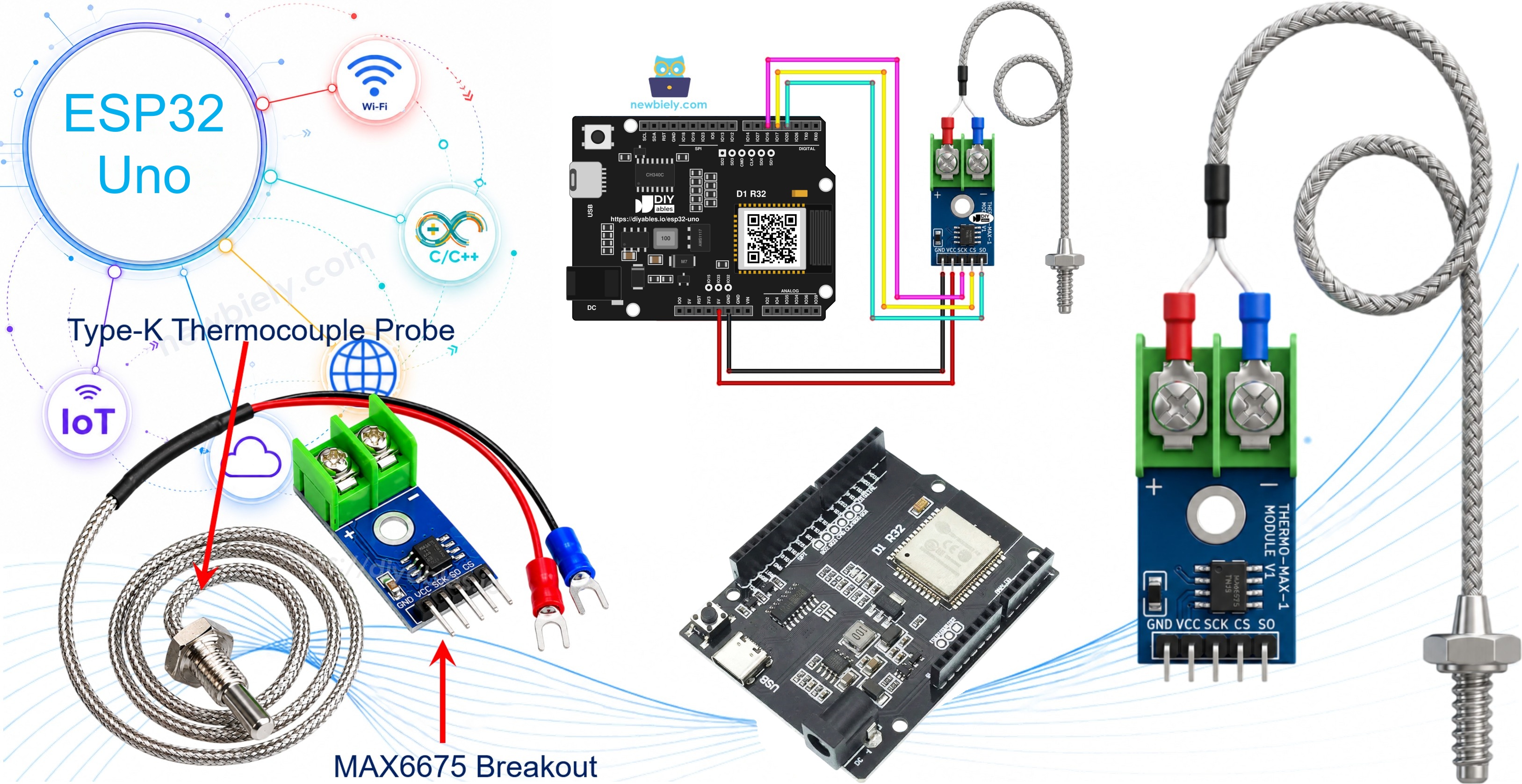
Components You Need
| 1 | × | ESP32 Uno-form Board | |
| 1 | × | USB Cable Type-A to Type-C (for USB-A PC) | |
| 1 | × | USB Cable Type-C to Type-C (for USB-C PC) | |
| 1 | × | MAX6675 Thermocouple Module | |
| 1 | × | Jumper Wires |
Or you can buy the following kits:
| 1 | × | DIYables Sensor Kit (18 sensors/displays) |
Additionally, some of these links are for products from our own brand, DIYables .
Inside the MAX6675 Thermocouple Module
After this part, you know what each piece of the kit does before you touch a wire.
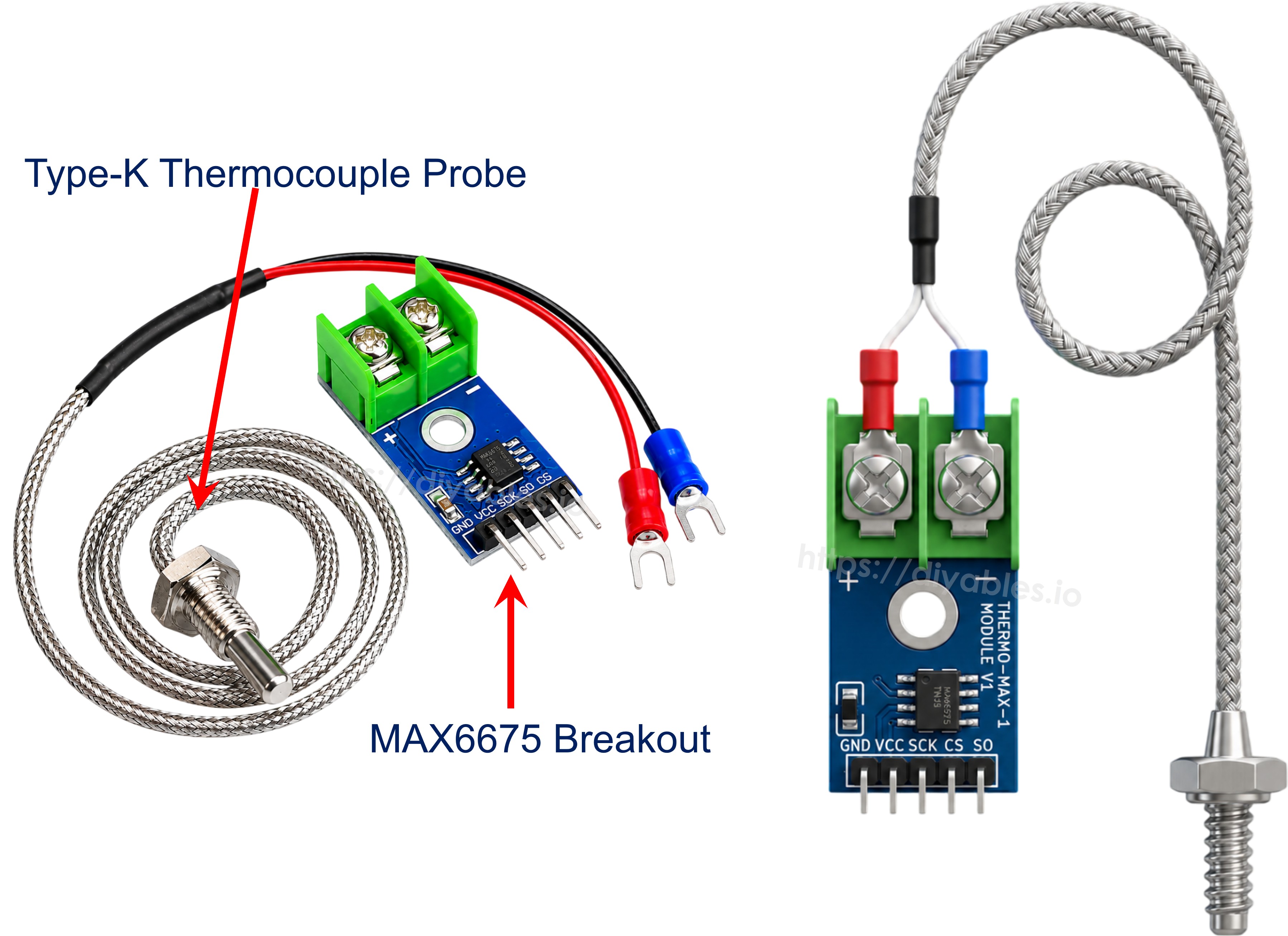
Common sensors such as the LM35, TMP36 or DS18B20 have a chip at the tip. That chip fails in a furnace (over 1000°C, or 1800°F) and in liquid nitrogen (near −195.8°C, or −320°F). A thermocouple has no chip at the tip, so it keeps working where they cannot. The kit has two parts: a MAX6675 breakout board and a Type-K probe.
How a Thermocouple Works
A thermocouple is a pair of wires made from two unlike metals. They touch at one end, the hot junction. Heat on that junction creates a small voltage, and the voltage grows as the temperature changes. This is the thermoelectric effect. Thermocouples as a group can span about -330°F to +2460°F.
| Type | Notes |
|---|---|
| J | Iron and Constantan wires |
| K | Chromel and Alumel wires, the most used type, about -328°F to +2300°F |
| E | Its own metal pair, high output |
| T | Its own metal pair, good for low temperatures |
The signal is only a few microvolts for each degree. That is much too weak for a direct analogRead(). The MAX6675 chip reads this voltage for you and hands back a finished temperature.
Good to know: the MAX6675 does the analog work, so this project does not use the ESP32 Uno ADC at all. No 0–4095 math and no attenuation setting is needed.
Pins of the MAX6675 Board
The breakout reads the probe, turns the signal into a temperature and sends it out over a read-only SPI link. Range is 0°C to +1024°C, accuracy is about ±3°C, and the supply can be 3.0V to 5.5V.
| Pin | Role |
|---|---|
| VCC | Power in, 3V to 5V (use 3.3V with the ESP32 Uno) |
| GND | Ground |
| SCK | Clock from the board |
| CS | Chip select, LOW starts a read |
| SO | Serial data out, carries the reading to the ESP32 Uno |
At the other end of the board sits a 2-way screw terminal for the probe. The red lead goes into + and the blue lead goes into -.
The Type-K Probe in the Kit
The supplied probe is roughly 18 inches long and is rated for 0°C to 80°C. Red is the positive lead, blue is the negative lead. For an oven, a kiln or a soldering tip, buy a Type-K probe rated for that heat.
Specs at a Glance
| Item | Value |
|---|---|
| Supply voltage | 3.0V to 5.5V |
| Interface | SPI, read only |
| Range of the MAX6675 | 0 to 1024°C |
| Range of the supplied probe | 0 to 80°C |
| Accuracy | ±3°C |
| Step size | 0.25°C |
ESP32 Uno Pinout
On the ESP32 Uno form board, every Uno header label (D3, D4, D5 and so on) is really one GPIO. Find the three you need in this diagram, because the sketch uses the GPIO numbers.

How to Connect
By the end of this part, the module is powered and its three data lines reach the board.
Power the module, run the three data wires, then screw the probe into the terminal block: red to '+', blue to '-'.
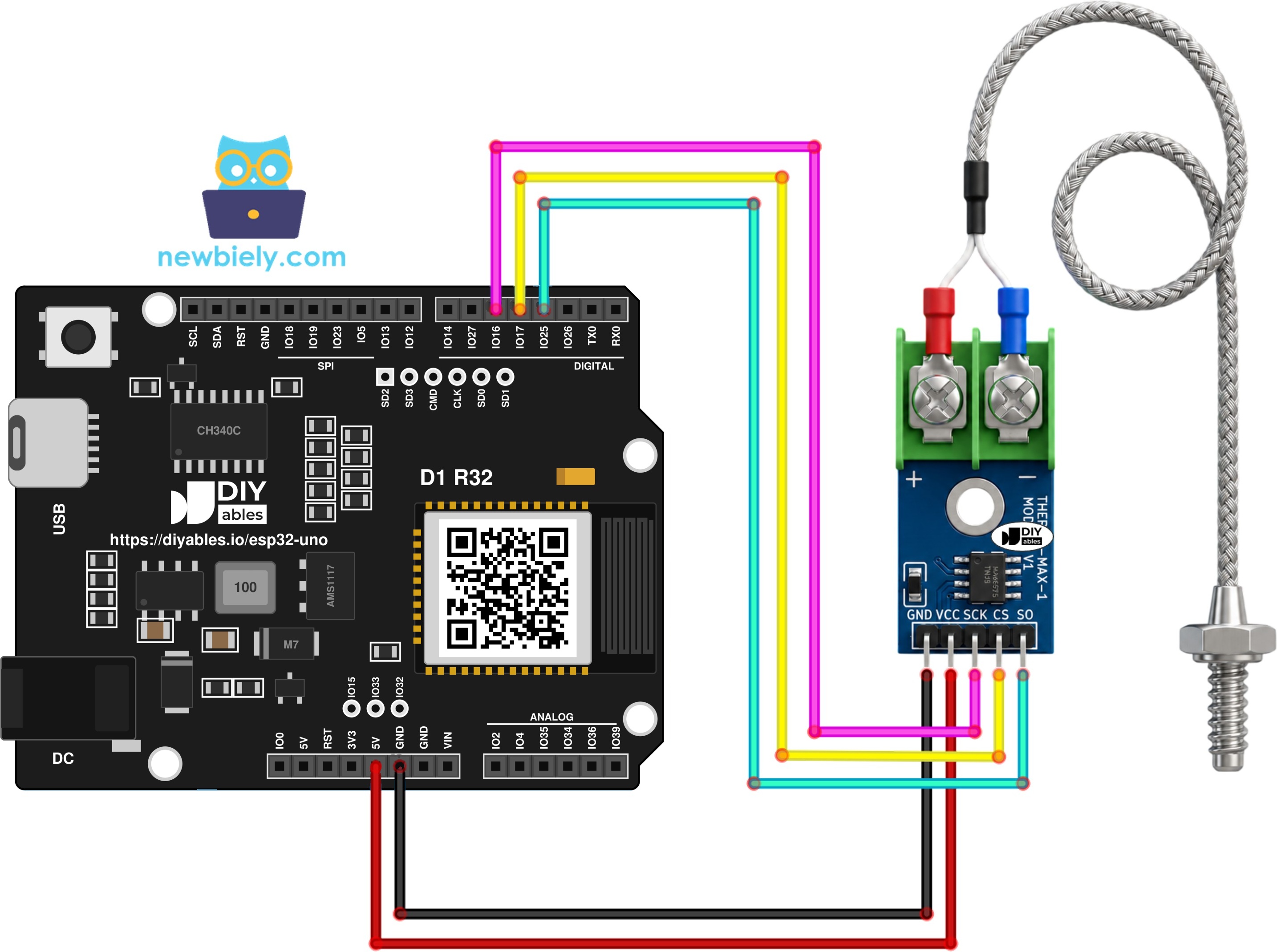
This image is created using Fritzing. Click to enlarge image
※ NOTE THAT:
The wiring diagram may not show the correct wiring for the ESP32 Uno. On the ESP32 Uno, connect VCC to 3.3V, not 5V. We will update the diagram soon. Until then, follow the wiring table and the text on this page, not the picture.
Connection Table
| MAX6675 Module Pin | ESP32 Uno Pin |
|---|---|
| VCC | 3.3V |
| GND | GND |
| SCK | D5 (GPIO16) |
| CS | D4 (GPIO17) |
| SO | D3 (GPIO25) |
WARNING
ESP32 Uno pins take 3.3V at most. The SO line swings to whatever VCC you give the module. Feed the module 5V and D3 (GPIO25) gets a 5V signal, which can harm the board. Use the 3.3V pin for VCC. The MAX6675 is happy at 3.3V, so nothing is lost.
Good to know: D3, D4 and D5 (GPIO25, GPIO17, GPIO16) are plain I/O pins. None of them is a boot strapping pin, so the board starts and uploads normally with the module attached.
ESP32 Uno Code
This sketch reads the thermocouple once every second and prints the result in Celsius and Fahrenheit.
Upload and Test
- First time with this board? Set it up with ESP32 Uno - Getting Started before you continue.
- Build the circuit by following the wiring table above. Keep VCC on 3.3V.
- Plug in the USB Type-C cable between the ESP32 Uno and your computer.
- Select the board in Arduino IDE: pick ESP32 Dev Module and the COM port of the board (CH340).
- Go to the Library Manager by clicking the Libraries button in the left bar.
- Add the library: type "MAX6675", choose the one by Adafruit, and press Install.
- Search for MAX6675 library created by Adafruit and click the Install button.
- Paste the sketch from above into a new Arduino IDE window.
- Upload it with the Upload button.
- Put the probe tip on the surface or in the liquid you want to check.
- Open the Serial Monitor at 9600 baud.
- Read the values. A new line shows up each second. Here the probe was dipped into a mug of hot tea:
- Pro tip: put the probe in a glass of ice water and stir. A good setup reads close to 0°C. Note the offset, and subtract it in code later if you need better accuracy.
※ NOTE THAT:
A frozen or odd value usually points to the wiring. Check the SCK, CS and SO jumpers first. Then check that the red and blue probe leads are tight in the right screw terminals.
Video Tutorial
See the ESP32 Uno build in action in the video below.
Code Explanation
After this part, you know what every block of the sketch is for.
| Code Part | What It Does |
|---|---|
| #include "max6675.h" | Loads the Adafruit library that talks to the chip |
| SO_PIN, CS_PIN, SCK_PIN | Hold GPIO25, GPIO17 and GPIO16, the pins behind D3, D4 and D5 |
| MAX6675 thermocouple(SCK_PIN, CS_PIN, SO_PIN) | Makes the sensor object, pins in the order SCK, CS, SO |
| Serial.begin(9600) and delay(500) | Start the Serial Monitor and let the chip finish its first conversion |
| readCelsius() / readFahrenheit() | Return the temperature in °C or °F as a float |
| delay(1000) | Waits one second before the next reading |
The pin lines are the only part that differs from other boards:
The print block sends one line per reading. The string "\xC2\xB0" is the UTF-8 code for the degree sign.
The result: a fresh °C and °F reading lands on the Serial Monitor every second, forever.
ESP32 Uno vs UNO R4 for This Project
This part lists what changes when you move the thermocouple project from the UNO R4 to the ESP32 Uno.
| Item | Arduino UNO R4 | ESP32 Uno |
|---|---|---|
| Logic voltage | 5V | 3.3V |
| Module VCC | 5V | 3.3V |
| SO pin | D3 (pin 3) | D3 (GPIO25) |
| CS pin | D4 (pin 4) | D4 (GPIO17) |
| SCK pin | D5 (pin 5) | D5 (GPIO16) |
| Library | Adafruit MAX6675 | Same library, no change |
| Board in Arduino IDE | Arduino UNO R4 WiFi | ESP32 Dev Module |
The wires stay on the same header spots. Only the VCC wire moves from 5V to 3.3V, and the code uses GPIO numbers instead of 3, 4 and 5.
Go Wireless: Watch the Furnace from Your Phone
With this part, you know how to see the probe reading without a USB cable.
A thermocouple often sits next to something you should not stand beside, like a kiln, a smoker or a hot plate. The ESP32 Uno has WiFi and Bluetooth built in. Send readCelsius() to a web page or a phone app, and you can watch the heat climb from across the room. A live chart also shows how fast the temperature rises and falls.
Try These Next
- Light an LED or sound a buzzer when the reading passes a limit you choose.
- Average the last 10 readings to smooth out the ±3°C jitter.
- Show the value on an I2C LCD wired to the SDA (GPIO21) and SCL (GPIO22) pins.
Troubleshooting
| Problem | Possible Cause | Solution |
|---|---|---|
| No COM port appears | CH340 driver missing or a charge-only USB cable | Install the CH340 driver and use a USB cable that carries data |
| Upload stops at Waiting for download | The board did not enter download mode | Hold the BOOT button while the upload starts, then release it |
| Serial Monitor prints nan | The chip sees an open probe input | Retighten the red and blue leads in the screw terminal, or try another probe |
| Reading stays at 0.00 | No power to the module or SO on the wrong pin | Check VCC on 3.3V, GND on GND and SO on D3 (GPIO25) |
| Value falls when you heat the probe | Probe leads in the wrong terminals | Swap them so red is on + and blue is on - |
| Random symbols in the Serial Monitor | Baud rate mismatch | Pick 9600 baud in the Serial Monitor |
| max6675.h not found when compiling | Library not installed | Install the MAX6675 library by Adafruit |
| Reading drifts near motors or mains wires | Noise picked up on the long probe leads | Route the probe away from noisy cables and average a few readings |
FAQ
What is a MAX6675 and why do I need it with a thermocouple?
The MAX6675 is a converter chip for Type-K thermocouples. It amplifies the microvolt signal, corrects for the cold end and outputs a digital temperature. Without it, the signal is far too small for the ESP32 Uno to read.
Should the module run on 3.3V or 5V when I use the ESP32 Uno?
Use 3.3V. The module accepts 3.0V to 5.5V, but its SO output follows VCC. At 3.3V the signal is safe for ESP32 Uno pins, so no level shifter is needed.
Is the MAX6675 able to read below 0°C?
No. Its range is 0°C to 1024°C. For freezing or cryogenic work, pick a converter chip that supports negative values, such as the MAX31855.
How accurate are the readings?
The chip is rated at about ±3°C, and each step is 0.25°C. For better results, check it in ice water and boiling water, then apply an offset in code.
Can one ESP32 Uno read two or three MAX6675 modules?
Yes. Let the modules share the SCK and SO lines, and give each one its own CS pin. Then create one MAX6675 object per module with its own CS number.
Does this project use the ESP32 Uno analog pins or ADC?
No. The MAX6675 sends a digital value, so the ESP32 Uno 12-bit ADC is not used. That also means WiFi does not affect the reading, unlike analog sensors on the ADC2 pins A0 and A1.
Can I move the SO, CS or SCK wire to another ESP32 Uno pin?
Yes, the library toggles the pins in software, so most free I/O pins work. Do not use A2 to A5 (GPIO35, 34, 36, 39) for SCK or CS, because they are input only. Also avoid D8 (GPIO12), D10 (GPIO5) and A0 (GPIO2), since they are boot strapping pins.
Do I need to change the UNO R4 sketch for the ESP32 Uno?
Only the three pin numbers. The UNO R4 code uses 3, 4 and 5, while the ESP32 Uno needs 25, 17 and 16 for the same header spots. The library and the rest of the sketch stay the same.
My computer does not see the board. Which driver do I need?
The ESP32 Uno uses a CH340 USB-to-serial chip. Install the CH340 driver for your system, then reconnect the board and pick its COM port in Arduino IDE.
What if my project needs more pins than the Uno headers give?
The ESP32 Uno has a few extra holes near the power header: GPIO32 and GPIO33 (I/O, PWM, analog on ADC1, so they also work with WiFi on) and GPIO15 (I/O, PWM, analog on ADC2). Solder pin headers on them and write the GPIO number in code. For a second or third MAX6675, GPIO32 and GPIO33 make good CS pins. Two warnings: (1) GPIO15 and GPIO0 (the IO0 pin at the unused Uno NC spot) are boot strapping pins, and a wrong connection can stop the board from booting or uploading, so use GPIO32/33 first; (2) never use the six holes under the digital header (SD0 to SD3, CMD, CLK = GPIO6 to GPIO11), because they are wired to the flash chip and using them crashes the board.
Can I log the temperature over WiFi with the ESP32 Uno?
Yes. The board has WiFi and Bluetooth, so you can send each reading to a web page, a phone app or a cloud service. The Go Wireless links above are a good place to start.