
ESP32 UNO - Light Sensor Control Relay
Want a lamp that turns on by itself when the sun goes down? Pair an ESP32 Uno light sensor with a relay and the board does the switching for you. The ESP32 Uno form board watches a photoresistor (LDR) or a ready-made LDR module, and when the room gets dark it closes the relay. That relay can then run a bulb, an LED strip, a fan or a 12V solenoid lock.
By the end, you can:
- Hook up a photoresistor and a relay board on the ESP32 Uno headers
- Turn a light level into a 0–4095 number with analogRead()
- Switch the relay from the digital output of an LDR module
- Tune the dark point so the relay clicks at the right moment
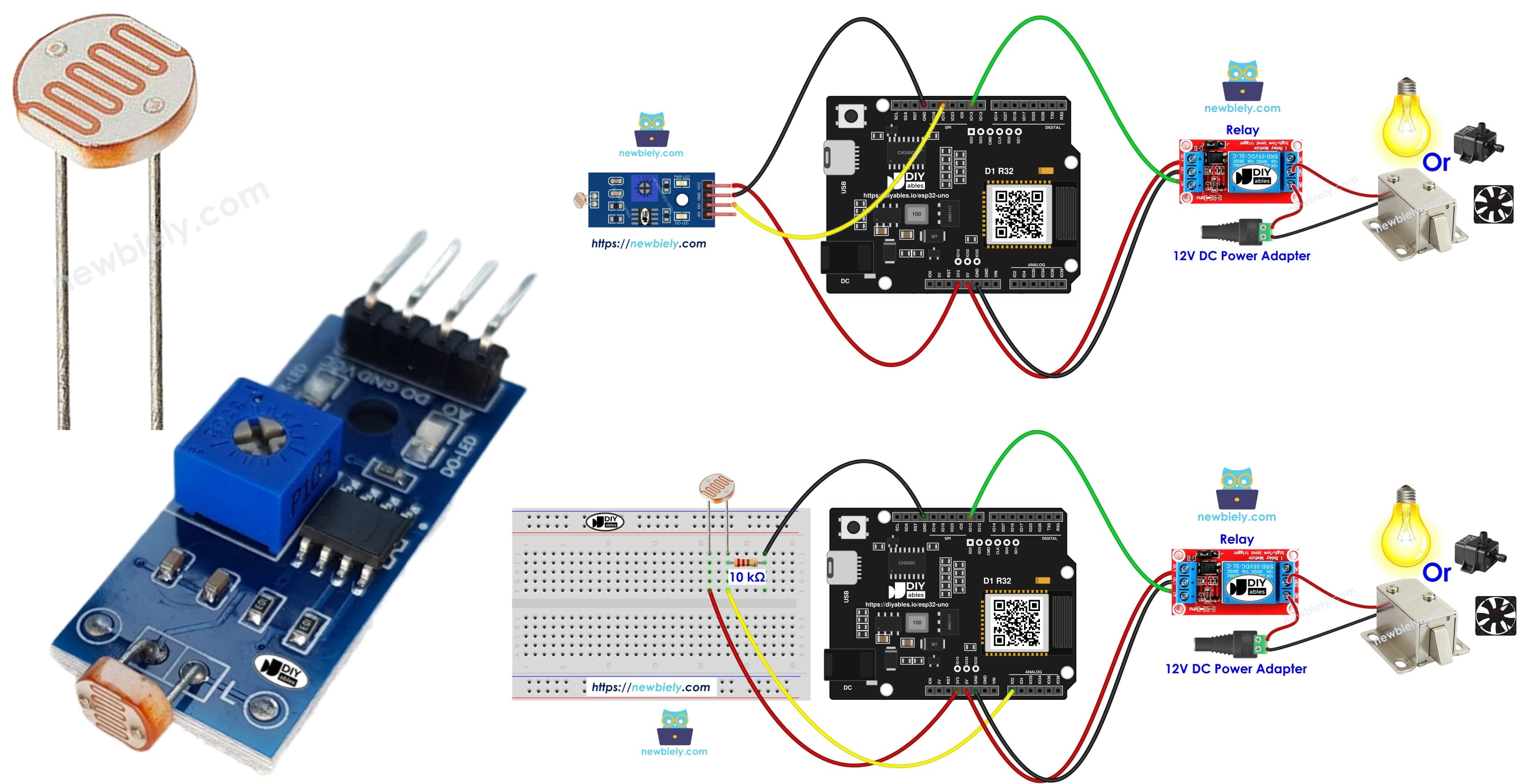
Components You Need
Or you can buy the following kits:
| 1 | × | DIYables Sensor Kit (18 sensors/displays) |
Additionally, some of these links are for products from our own brand, DIYables .
Two sensor choices work here. Pick the one that fits your parts box:
| Sensor Choice | Extra Parts | Signal You Get |
|---|---|---|
| Bare LDR light sensor | One 10 kΩ resistor | Analog light level |
| LDR light sensor module | None, resistor is on the board | Digital dark or bright |
The bare photoresistor costs almost nothing. The module saves you a few wires and has a trimmer to set the dark point.
Relay and Light Sensor Basics
After this part, you know which job each part does in the circuit.
| Part | Job In This Project |
|---|---|
| Light sensor (LDR) | Changes its resistance with the light level, so the board can tell bright from dark |
| 10 kΩ resistor | Forms a voltage divider with the bare LDR, giving a voltage the ADC can read |
| Relay module | A switch moved by a small signal; it controls a separate, bigger load |
| ESP32 Uno | Reads the sensor and decides when the relay closes |
Need more depth on one part? These guides cover pinouts and single-part code:
ESP32 Uno Pinout
The headers carry Uno names such as A0, D9 and D12, but your sketch needs GPIO numbers. Use the diagram below to find the GPIO behind each header pin first.

How to Connect
When this step is done, the sensor feeds the board and the board drives the relay. Both builds send the relay signal to D9 (GPIO13).
Build A — Bare photoresistor (analog)
The LDR sits on top and the 10 kΩ resistor sits below. The point between them goes to A0.
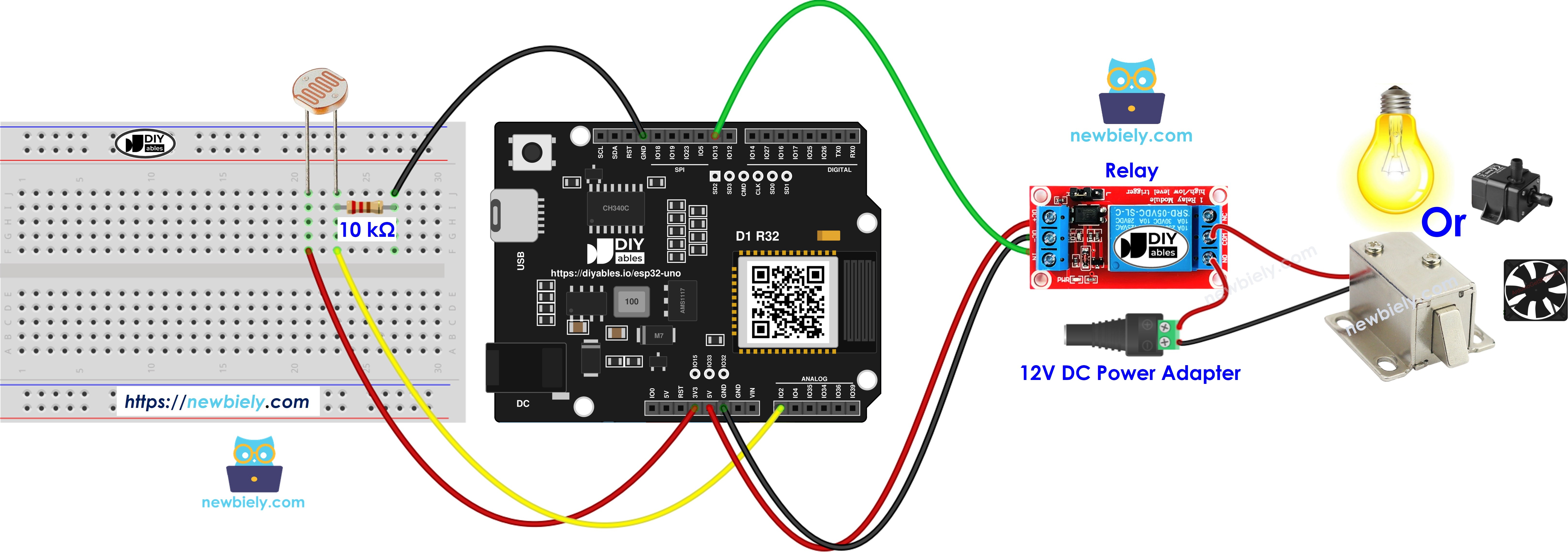
This image is created using Fritzing. Click to enlarge image
| Component Pin | ESP32 Uno Pin |
|---|---|
| LDR leg 1 | 3.3V |
| LDR leg 2 | A0 (GPIO2) |
| 10 kΩ resistor, top leg | A0 (GPIO2) |
| 10 kΩ resistor, bottom leg | GND |
| Relay VCC | 5V |
| Relay GND | GND |
| Relay IN | D9 (GPIO13) |
WARNING
A0 maps to GPIO2, which is a boot strapping pin on the ESP32 Uno. The chip checks its level at power-on to choose a boot mode. The LDR divider usually does no harm, but if uploads stop with "Waiting for download", pull the A0 wire, upload, then plug it back. GPIO2 is also on ADC2, so this analog reading would fail if you later add WiFi.
Build B — LDR module (digital)
The module does the comparing for you. Only its DO pin needs a signal wire.
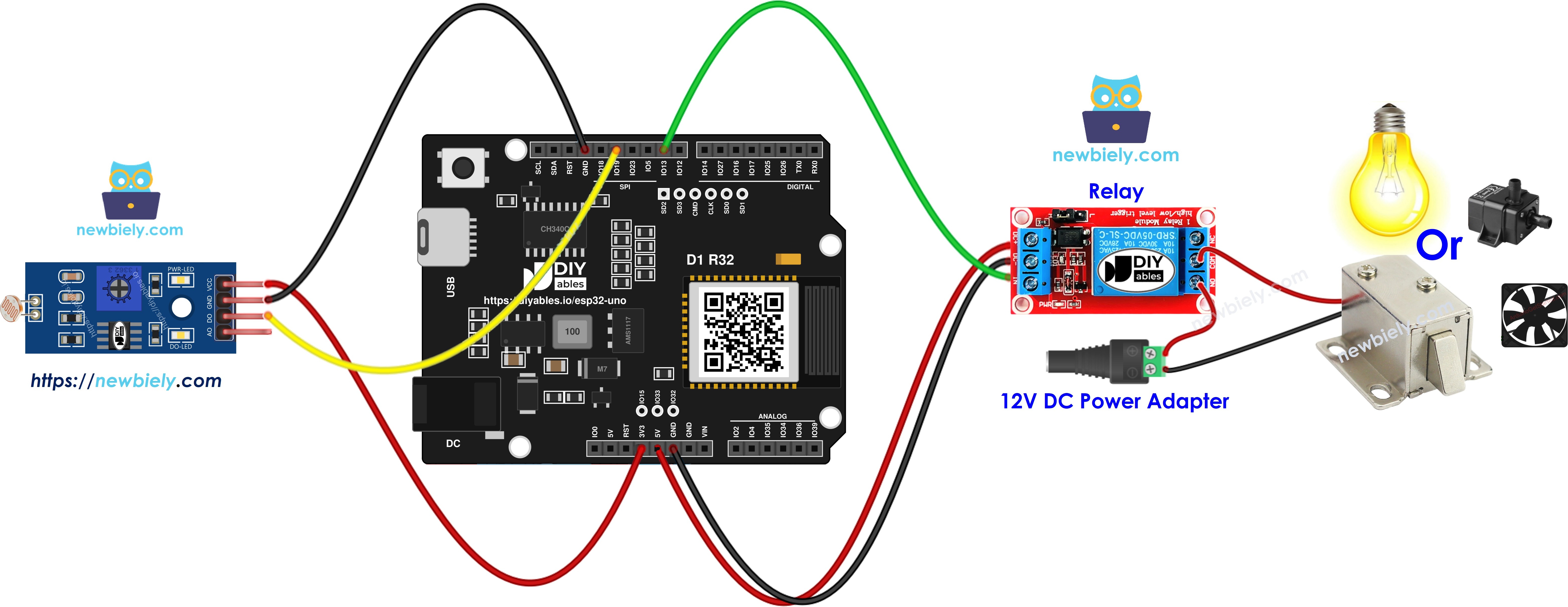
This image is created using Fritzing. Click to enlarge image
| Component Pin | ESP32 Uno Pin |
|---|---|
| LDR module VCC | 3.3V |
| LDR module GND | GND |
| LDR module DO | D12 (GPIO19) |
| Relay VCC | 5V |
| Relay GND | GND |
| Relay IN | D9 (GPIO13) |
WARNING
Feed the LDR or the module from 3.3V only. ESP32 Uno pins are NOT 5V tolerant, so a 5V level on A0 (GPIO2) or D12 (GPIO19) can kill the pin. The relay board can still take 5V on VCC, because the board only sends a signal into its IN pin and never reads from it.
Good to know: the ESP32 Uno drives its outputs at 3.3V. Most 5V relay modules with a transistor input still switch from that level.
Using the optional solenoid lock? Wire it through the relay COM and NO terminals with the 12V adapter and the DC jack. The lock current must never pass through the ESP32 Uno.
ESP32 Uno Code
Pick the sketch that matches your build. Both close the relay in the dark and open it in the light.
Sketch for Build A (bare photoresistor)
This sketch samples A0 (GPIO2) in a loop and compares the value with a 2000 threshold.
Good to know: the line analogSetAttenuation(ADC_11db) widens the ESP32 Uno ADC input to cover 0V up to about 3.3V. With a narrow range, readings hit 4095 too soon and the light level looks wrong.
The threshold of 2000 sits near the middle of the 12-bit range (0–4095). A darker room gives a lower number in this wiring, so values under 2000 switch the relay on.
Sketch for Build B (LDR module)
This sketch checks the DO pin on D12 (GPIO19). DO goes HIGH in the dark, the relay closes, and a status line goes to the Serial Monitor.
Upload and Test
- First time with this board? Set it up with ESP32 Uno - Getting Started before you continue.
- Build the circuit by following the wiring table above.
- Plug in the USB Type-C cable between the ESP32 Uno and your computer.
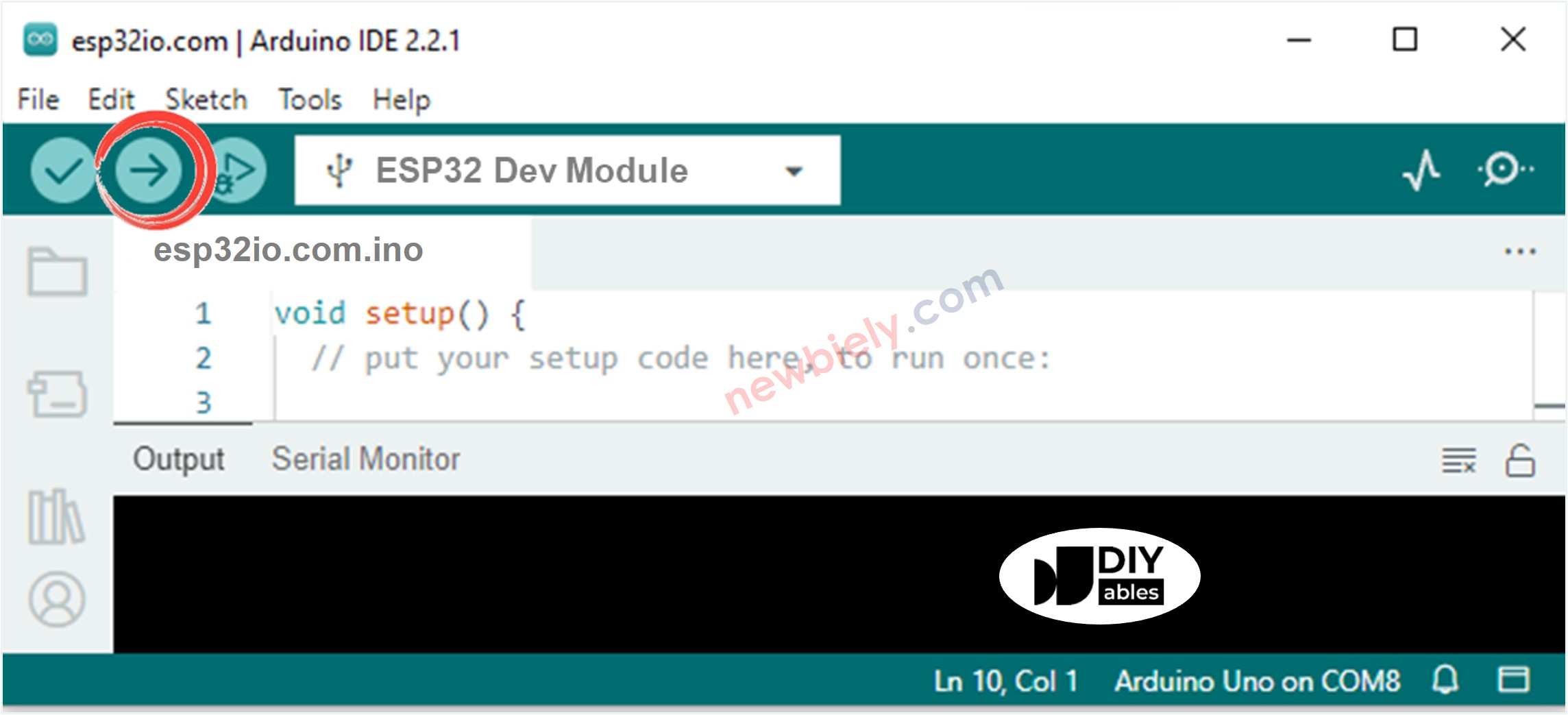
- Select the board in Arduino IDE: pick ESP32 Dev Module and the COM port of the board (CH340).
- Paste the sketch for your build into a new Arduino IDE window.
- Press Upload (Upload button) and wait for "Done uploading".
- Cup your hand over the sensor for two seconds, then take it away.
- Listen for the click. The relay closes when it gets dark and opens again in the light.
- Check the Serial Monitor (9600 baud) when Build B is running. Lines like these show up:
- Pro tip: Test the dark point at the real time of day you care about. Leave the board at the window at sunset and turn the module trimmer (or change the threshold) until the relay clicks just as the room starts to dim.
Video Tutorial
See the ESP32 Uno build in action in the video below.
How the Code Works
By the end of this part, you can read both sketches line by line.
| Code Part | What It Does |
|---|---|
| #define LIGHT_SENSOR_PIN 2 / 19 | Names the sensor pin, A0 (GPIO2) in Build A or D12 (GPIO19) in Build B |
| #define RELAY_PIN 13 | Names D9 (GPIO13), the pin wired to relay IN |
| analogSetAttenuation(ADC_11db) | Lets the analog pin read up to about 3.3V (Build A only) |
| analogRead() / digitalRead() | Gets the light level or the dark/bright state |
| digitalWrite(RELAY_PIN, HIGH or LOW) | Closes the relay in the dark and opens it in the light |
The result is a hands-free dusk switch that checks the light thousands of times per second.
To see the raw light number in Build A, add Serial.begin(9600); in setup() and Serial.println(analogValue); in loop(). Then write down the dark and the bright values and set ANALOG_THRESHOLD halfway between them.
ESP32 Uno vs UNO R4 for This Project
This shows what changes when you move this dusk switch from the UNO R4 to the ESP32 Uno.
| Item | Arduino UNO R4 | ESP32 Uno |
|---|---|---|
| Logic voltage | 5V | 3.3V |
| Analog sensor pin | A0 | A0 (GPIO2) - a boot strapping pin |
| Relay pin | D9 | D9 (GPIO13) |
| Module DO pin | D12 | D12 (GPIO19) |
| ADC range and threshold | 0 to 1023, threshold 500 | 0 to 4095, threshold 2000 |
| Extra code line | none | analogSetAttenuation(ADC_11db) |
| Arduino IDE board | Arduino UNO R4 WiFi or Minima | ESP32 Dev Module |
The wiring stays the same, header for header. Just power the sensor from 3.3V instead of 5V, and use the new GPIO numbers and threshold in the code.
Go Wireless: Flip the Relay From Your Phone
After this part, you have an idea for adding remote control to this project.
The ESP32 Uno has WiFi and Bluetooth built in, so the relay does not have to depend on the light alone. Add a manual override: tap a button on your phone to force the lamp on, or watch the light state live while you are in another room. For a WiFi build, move the bare LDR off A0 first, because ADC2 pins cannot read while WiFi is on. Build B (digital DO on D12) works with WiFi as it is.
Troubleshooting
| Problem | Possible Cause | Solution |
|---|---|---|
| No COM port shows up in Arduino IDE | CH340 driver missing or a charge-only USB cable | Install the CH340 driver and use a USB cable that carries data |
| Upload stops at "Waiting for download" | The board did not enter flash mode | Hold the BOOT button while the upload starts, then let go |
| Board does not boot or upload with the circuit attached | A0 (GPIO2) is a boot strapping pin and the divider holds it at the wrong level | Unplug the A0 wire while uploading, or move the sensor to another analog pin |
| Relay LED never lights | Relay VCC or GND is loose | Check that relay VCC is on 5V and that all grounds are shared |
| Relay stays on day and night | Threshold is too high for your room | Print analogValue and pick a value between your dark and bright numbers |
| Relay reacts the wrong way round | The relay board is active LOW | Swap HIGH and LOW in both digitalWrite() lines |
| Reading is stuck at 4095 | Sensor powered from 5V or attenuation line removed | Move the LDR to 3.3V and keep analogSetAttenuation(ADC_11db) |
| Relay chatters at dusk | Light level hovers right at the threshold | Add a gap, for example on below 1800 and off above 2200 |
| DO pin never changes | Module trimmer turned fully to one end | Cover the sensor and turn the trimmer until the DO-LED flips |
FAQ
How does an LDR know it is getting dark?
An LDR is a resistor made of a light-sensitive material. Its resistance falls in bright light and rises in the dark. With the 10 kΩ resistor, that change becomes a voltage on A0 that the ESP32 Uno can measure.
Should the light sensor get 3.3V or 5V on the ESP32 Uno?
Use 3.3V. The sensor output goes straight into an ESP32 Uno pin, and those pins are not built for 5V. The relay module is different, because the board only sends a signal to it.
Will a 5V relay module switch from a 3.3V ESP32 Uno signal?
Most modules with a transistor or an optocoupler on the input do. If yours stays silent, try a module rated for 3V input or a relay board with a "high/low level trigger" jumper.
Why does the threshold read 2000 instead of 500?
The ESP32 Uno ADC is 12-bit and returns 0 to 4095, four times the 0 to 1023 range of the UNO R4. So 500 becomes about 2000, and the switch point stays about the same.
Why is analogSetAttenuation(ADC_11db) in the light sensor sketch?
This line opens the ESP32 Uno ADC window to roughly 0–3.3V, and that full span then fills the 0–4095 scale. Leave it out and the readings top out early. The UNO R4 sketch never had it, since it is an ESP32-only call. Never let the LDR voltage go above 3.3V.
Is A0 a safe pin for the light sensor on the ESP32 Uno?
It works fine for this project. A0 is GPIO2, a boot strapping pin, so a strong pull at power-on can block booting or uploading. It is also an ADC2 pin, so analogRead() on it fails once WiFi starts.
Can I add a second LDR and a second relay?
Yes. Give the new LDR an ADC1 pin such as A2 (GPIO35) and the new relay a free output pin such as D7 (GPIO14). Copy the read-and-compare block in loop() and use the new pin names.
What if my dusk switch needs more pins than the Uno headers give?
The ESP32 Uno has a few extra holes near the power header. GPIO32 and GPIO33 are I/O, PWM and analog on ADC1, so they still read while WiFi is on. GPIO15 is I/O, PWM and analog on ADC2. To use one, solder a header pin into the hole and type its GPIO number in the sketch. For a second LDR in a WiFi version, GPIO32 or GPIO33 is the best pick. Two warnings: GPIO15 and GPIO0 (the IO0 pin at the unused Uno NC position) are boot strapping pins, and a wrong connection can stop the board from booting or uploading, so use GPIO32/33 first. Never use the six holes under the digital header (SD0 to SD3, CMD, CLK = GPIO6 to GPIO11); they are wired to the flash chip and using them crashes the board.
Can I put an UNO relay shield on the ESP32 Uno?
The headers fit, but check the shield first. Many relay shields use pins like D4 to D7 and expect 5V logic. Map each shield pin to its GPIO and test that the relays click at 3.3V.
Can this project switch a 230V lamp?
The relay contacts can switch mains, but mains wiring can kill. Only do it if you are trained to work with high voltage and use a closed box. For practice, switch a 12V LED strip or the solenoid lock instead.
Can I check the light state from my phone?
Yes. The ESP32 Uno has WiFi and Bluetooth. The Go Wireless section above links to web and Bluetooth app guides that show a pin state or let you flip the relay by hand.