
ESP32 UNO - Control Heating Element
Need your ESP32 Uno to run a heating element on a schedule? Hook a 12V heater to the ESP32 Uno form board through a relay, and a few lines of Arduino code will switch it on and off for you. Swap the relay for a MOSFET module, and the same board can also pick a heat level with PWM, from a gentle 20% to full power. This build is the first half of a full heater control system with a temperature sensor.
What you will do:
- Identify the two wires of a 12V heating element
- Connect a heater relay and a 12V adapter to the ESP32 Uno
- Switch the heater with digitalWrite() in Arduino IDE
- Drive a MOSFET module with analogWrite() to set the heater power in steps
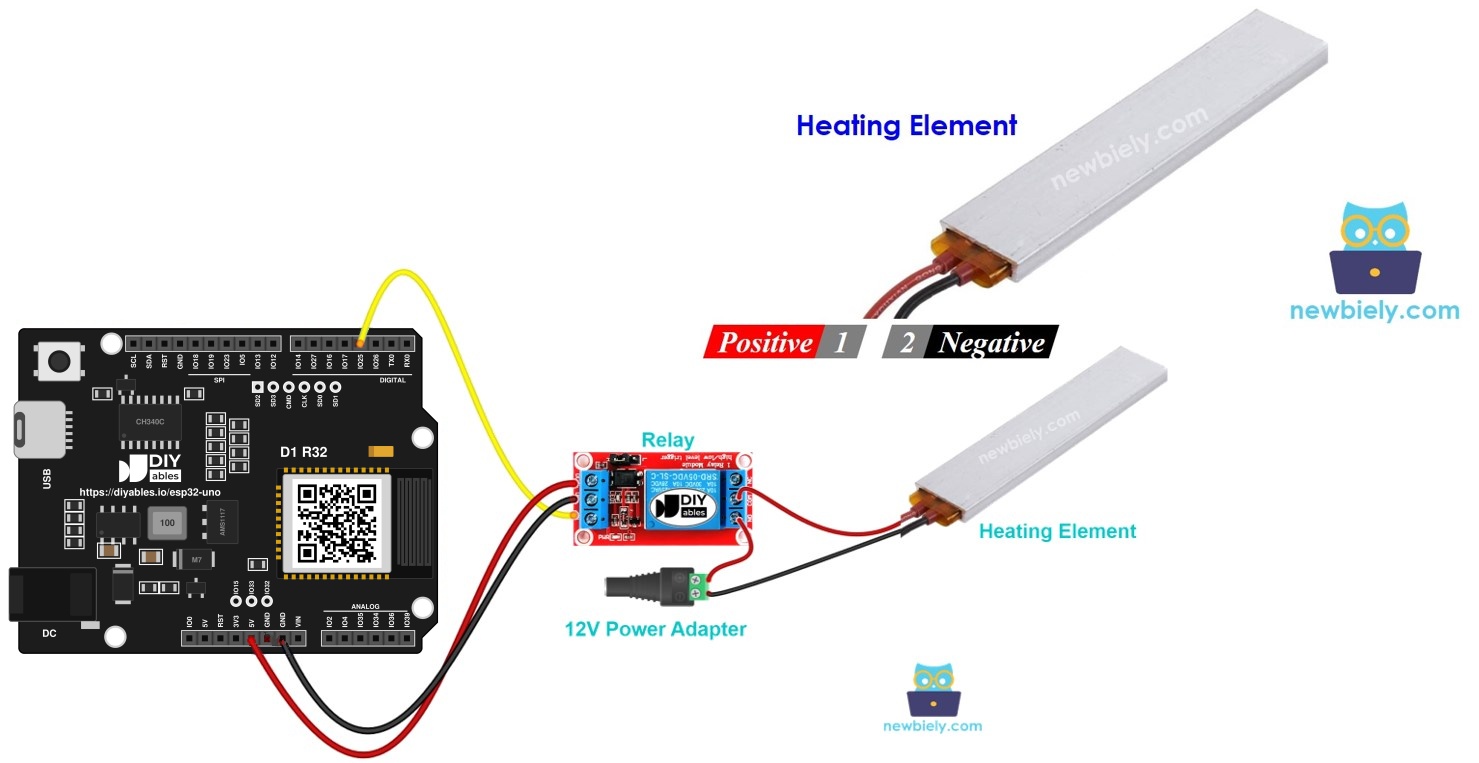
Components You Need
Or you can buy the following kits:
| 1 | × | DIYables Sensor Kit (18 sensors/displays) |
Additionally, some of these links are for products from our own brand, DIYables .
The Heating Element at a Glance
After this part, you know how the heater is wired and why the board needs a helper part to switch it.
Pinout
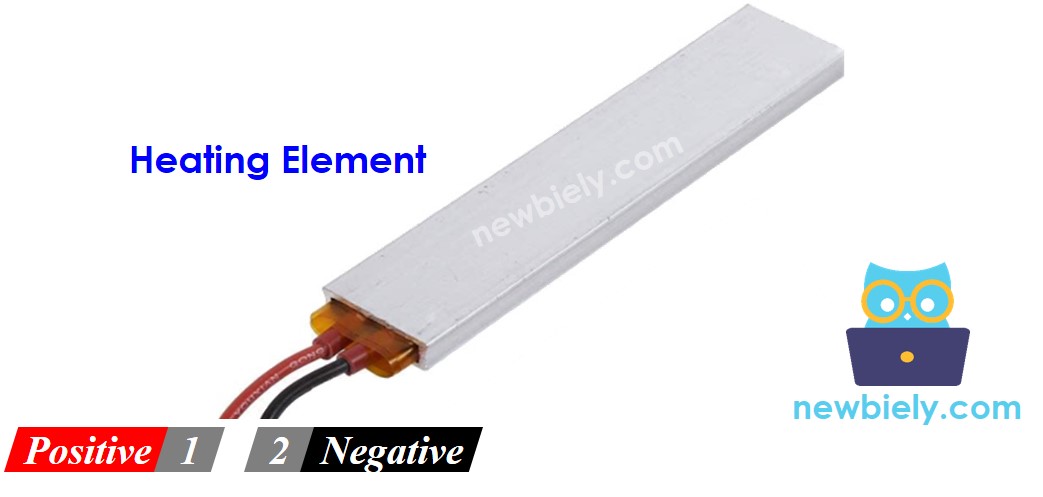
| Wire | Usual Color | Goes To |
|---|---|---|
| Positive (+) | Red | 12V side of the DC supply |
| Negative (-) | Black | GND of the DC supply |
The element has no polarity inside, it is just a resistive wire. Still, keep the red/black convention so the circuit is easy to check.
Switching the Heater from a Board
Give the element 12V and it warms up at once. The ESP32 Uno cannot feed that current, so a relay or a MOSFET module stands in the middle. The board only sends a small control signal. The helper part connects or breaks the 12V path.
Relay basics (pinout, NO/NC contacts, trigger level) are covered in ESP32 Uno - Relay. For the screw terminals and PWM behavior of the MOSFET board, open ESP32 Uno - MOSFET Module.
Good to know: a GPIO on the ESP32 Uno gives only a few milliamps at 3.3V. Never try to run the heater straight from a pin or from the 5V header.
Picking a Switch: Relay or MOSFET Module
| Point | Relay | MOSFET Module |
|---|---|---|
| Output levels | two (on, off) | on, off and every PWM step between |
| Works with | AC and DC loads | DC loads only |
| Lowest load supply | any value inside the rating | roughly 6V |
| Life with frequent switching | contacts slowly wear | no moving parts |
| Noise | audible click | silent |
| Switching time | several ms | microseconds |
| Signal isolation | coil apart from contacts | PC817 optocoupler |
| Good match | mains heaters, plain on/off | 12V heaters, heat level, many cycles |
A heater that a thermostat cycles all day is a good fit for the MOSFET module, since nothing inside it wears and it can hold a low heat level. If your heater runs from mains AC, choose the relay.
ESP32 Uno Pinout
Your sketch talks to GPIO numbers, while the board is printed with Uno labels such as D3 and D9. Look up both pins on the diagram below before you plug in a jumper.

How to Connect
When this step is done, the relay links the board to the 12V heater loop.
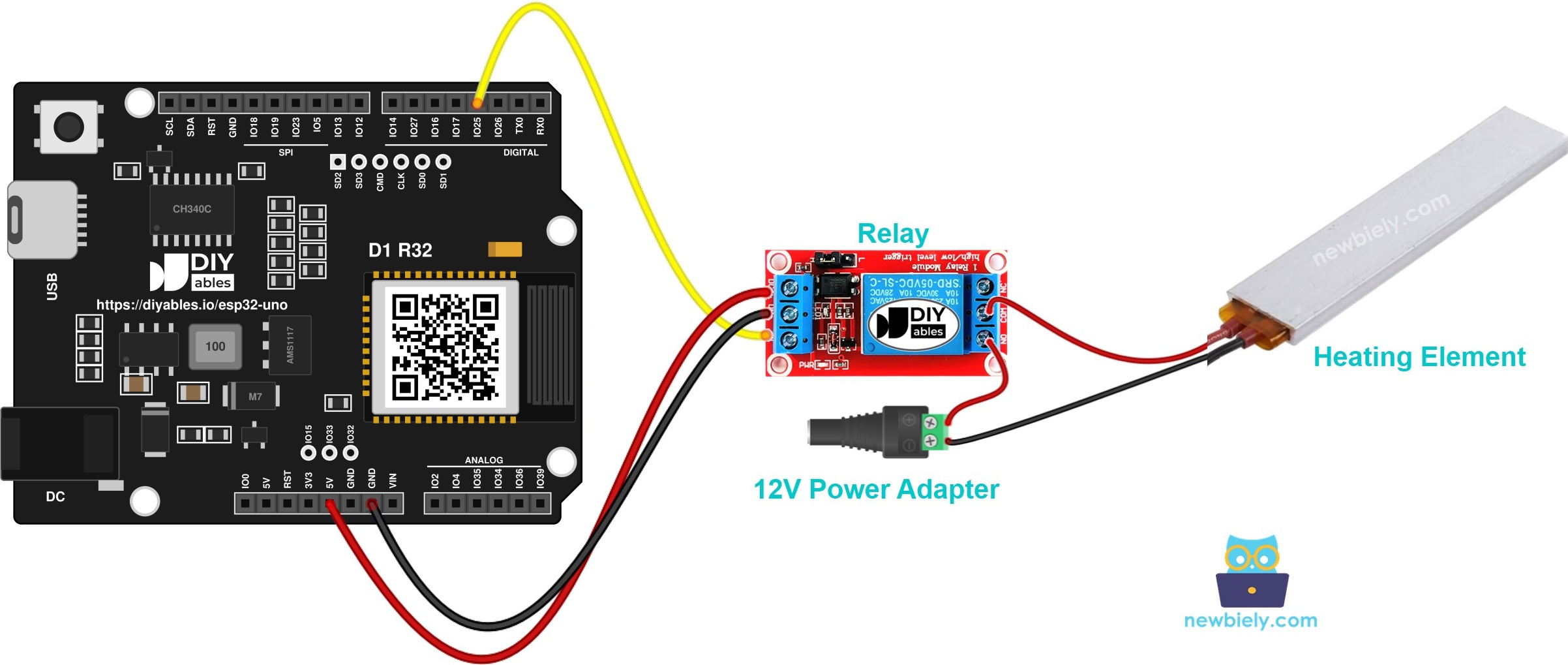
This image is created using Fritzing. Click to enlarge image
| Component Pin | ESP32 Uno Pin |
|---|---|
| Relay VCC | 5V |
| Relay GND | GND |
| Relay IN | D3 (GPIO25) |
High-power side, wire by wire:
| From | To |
|---|---|
| 12V adapter | DC power jack |
| DC jack positive | Relay COM |
| Relay NO | Heater + (red) |
| Heater - (black) | DC jack GND |
Good to know: ESP32 Uno pins work at 3.3V and are NOT 5V tolerant. The relay is safe here, because D3 only sends a signal out to the IN pin. Nothing from the 12V side may ever touch a board pin.
※ NOTE THAT:
The relay coil wants 5V, so VCC goes to the 5V header. A 3.3V HIGH from GPIO25 is enough for most relay modules with a transistor or optocoupler input. If yours stays silent, use a 3V relay module.
ESP32 Uno Code
The sketch closes the relay for five seconds, opens it for five seconds, and repeats forever.
Upload and Test
- First time with this board? Set it up with ESP32 Uno - Getting Started before you continue.
- Build the circuit by following the wiring table above. Leave the 12V adapter out of the wall for now.
- Plug in the USB Type-C cable between the ESP32 Uno and your computer.
- Select the board in Arduino IDE: pick ESP32 Dev Module and the COM port of the board (CH340).
- Paste the sketch into an empty Arduino IDE window.
- Press Upload and wait for "Done uploading".
- Power the heater side by plugging in the 12V adapter. The relay should click on and off every 5 seconds.
- Watch the heater from a short distance. It warms during the on phase and cools during the off phase.
- Pro tip: put a small LED with a 1kΩ resistor in parallel with the heater for your first test. You see the on/off rhythm without waiting for the element to heat.
WARNING
The element becomes hot enough to burn skin and set things on fire. Keep it on a heat-proof surface and away from paper, cloth and plastic. If you are unsure about any step, stop and ask an experienced person for help. Your safety is your own responsibility; we cannot accept liability for it.
Video Tutorial
See the ESP32 Uno build in action in the video below.
Code Explanation
Each line of the relay sketch is short, so the table below covers all of it.
| Code Part | What It Does |
|---|---|
| #define RELAY_PIN 25 | Names GPIO25, the D3 header pin, as the relay pin |
| pinMode(RELAY_PIN, OUTPUT) | Lets the pin drive the relay IN line |
| digitalWrite(RELAY_PIN, HIGH) | Closes the relay, so 12V reaches the heater |
| digitalWrite(RELAY_PIN, LOW) | Opens the relay, so the heater has no power |
| delay(5000) | Holds each state for 5 seconds |
The result is a simple heat timer: five seconds on, five seconds off, with no feedback from the heater.
ESP32 Uno Code - Heater Power Control with a MOSFET Module
After this part, the ESP32 Uno sets how much power the heater gets, not just on or off.
How to Connect the MOSFET Module
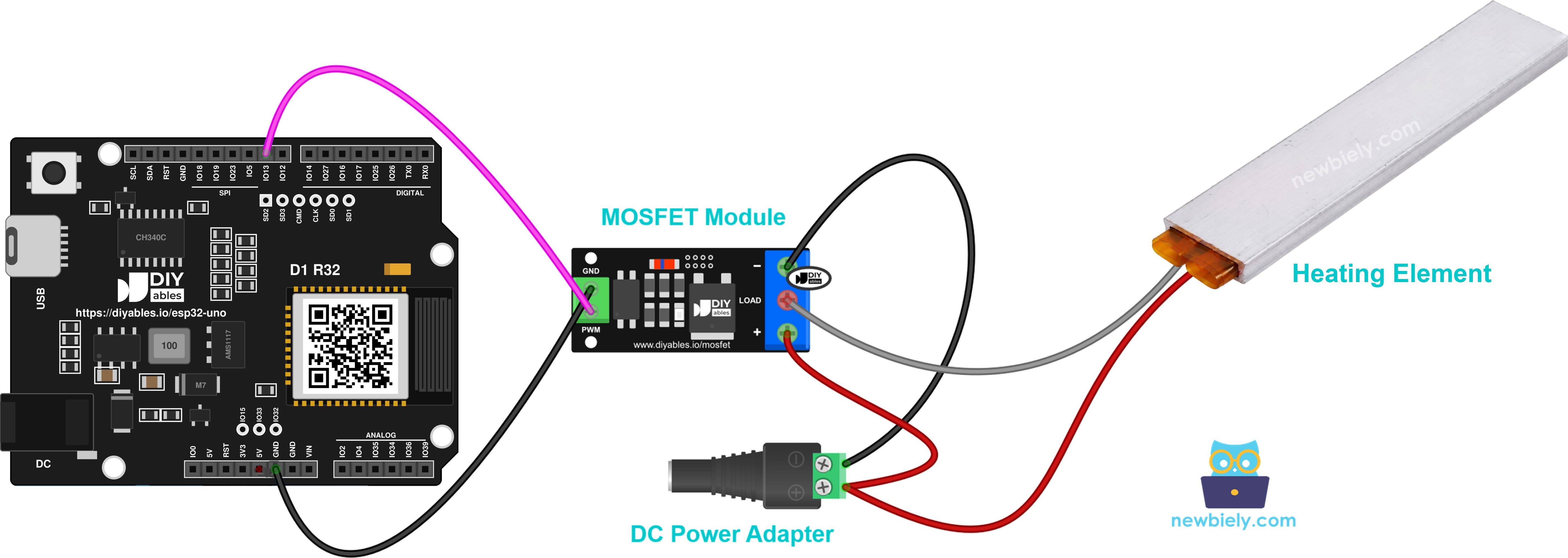
This image is created using Fritzing. Click to enlarge image
| From | To |
|---|---|
| ESP32 Uno D9 (GPIO13) | Module PWM pin |
| ESP32 Uno GND | Module GND pin |
| 12V adapter + (via DC jack) | Module + terminal |
| Heater + (red) | Module + terminal (shared with the adapter +) |
| Heater - (black) | Module LOAD terminal |
| 12V adapter - (via DC jack) | Module - terminal |
Good to know: the heater is a pure resistor with no coil, so a flyback diode is not needed.
Code
The sketch gives full power for 2 seconds, cuts power for 2 seconds, then climbs from 10% to 100% and steps back down to 0%.
| Code Part | What It Does |
|---|---|
| const int MOSFET_PIN = 13 | Uses GPIO13, the D9 header pin, for the PWM signal |
| map(percent, 0, 100, 0, 255) | Turns a percent value into an 8-bit duty value |
| analogWrite(MOSFET_PIN, duty) | Sends the PWM signal to the module |
| First for loop | Raises the power by 10% every half second |
| Second for loop | Lowers the power by 10% every half second |
The element heats and cools slowly, so it cannot follow a change every 0.5 seconds. To feel a real difference, keep one power level for several minutes.
Upload and Test
- Reuse your setup: board, cable and IDE settings stay the same as in the relay steps.
- Wire the MOSFET module from the table above, with the 12V adapter still unplugged.
- Upload the sketch.
- Plug in the 12V adapter.
- Open the Serial Monitor at 9600 baud and follow the power level.
- Keep your hands off the element. Even 30% power makes it hot.
Part of the output during the falling ramp:
※ NOTE THAT:
The MOSFET module handles DC loads only, and its supply should be about 6V or more. A 12V heater fits well. Check the current, too: without a heatsink, the FR120N version is good for about 2A.
ESP32 Uno vs UNO R4 for This Project
Moving this heater project from the UNO R4 to the ESP32 Uno changes only pin numbers and the logic level.
| Item | Arduino UNO R4 | ESP32 Uno |
|---|---|---|
| Logic voltage | 5V | 3.3V |
| Relay pin in code | 3 | 25 (D3 header) |
| MOSFET PWM pin in code | 9 | 13 (D9 header) |
| PWM duty range in sketch | 0 to 255 | 0 to 255 (same analogWrite call) |
| Arduino IDE board | Arduino UNO R4 WiFi | ESP32 Dev Module |
| Wireless | WiFi only on the WiFi model | WiFi and Bluetooth built in |
The wiring stays on the same header positions, so the circuit from the UNO R4 works as-is. Only check that your relay module switches on a 3.3V signal.
Go Wireless: Heater Switch on Your Phone
After this part, you have an idea for running the heater without touching the board.
The ESP32 Uno has WiFi and Bluetooth on board. Put an on/off button for D3 on a phone web page, and you can start the heater from across the room. With the MOSFET version, a slider in the app can set the PWM percent on D9 directly. Always keep a timer or a temperature limit in the code, so the heater cannot stay on by mistake.
Troubleshooting
| Problem | Possible Cause | Solution |
|---|---|---|
| Board missing from the port list | CH340 driver not installed, or a charge-only USB cable | Install the CH340 driver and use a cable that carries data |
| Upload stops at "Waiting for download" | The board did not enter download mode | Hold the BOOT button while the upload starts, then release it |
| Relay is silent | VCC or GND of the relay is loose, or IN sits on a different header | Recheck 5V and GND, and move IN to D3 (GPIO25) |
| Relay clicks, element stays cold | 12V adapter off, DC jack loose, or heater wired to NC | Check the adapter and jack, and use the COM and NO terminals |
| Heater never turns off | Heater on NC, or the relay module triggers on LOW | Move the wire to NO, or swap HIGH and LOW in the sketch |
| Relay ignores the 3.3V HIGH | The module input needs a 5V signal | Use a 3V relay module or one with a transistor driver |
| MOSFET version gives full heat at every step | PWM wire on the wrong pin or GND not shared | Put PWM on D9 (GPIO13) and join the board GND with the module GND |
| Module gets very hot | Heater current is above the module rating | Add a heatsink, pick the AOD4184 version, or use a smaller heater |
| Board resets as the relay switches | Supply dip or noise from the 12V wiring | Use a strong USB port and route the 12V wires away from the board |
FAQ
Is a heating element polarized?
No. It is a resistive wire, so current can flow either way. The red and black colors only help you keep the wiring tidy.
Why does the ESP32 Uno sketch use 25 instead of 3?
The D3 header on the ESP32 Uno is connected to GPIO25 inside the board. Arduino code for this board uses the GPIO number, so you write 25. The wire stays on D3.
Can a 5V relay module work with the 3.3V pins of the ESP32 Uno?
Usually yes. Power the coil from the 5V header, and the IN pin reacts to the 3.3V HIGH on most modules. If it does not, choose a 3V relay or a module with a transistor input.
Does analogWrite() work on the ESP32 Uno?
Yes. The esp32 by Espressif Systems core supports analogWrite() on any output pin, with the same 0 to 255 range as the UNO R4. The MOSFET sketch runs without changes apart from the pin number.
How many amps can the MOSFET module handle for my heater?
It depends on the version and cooling. The AOD4184 version handles the most current, while the FR120N is good for about 2A with no heatsink. Check your heater current (watts divided by volts) before you choose.
Can I hold the heater at a fixed temperature?
Yes. Read a DS18B20 or similar sensor, and let the code power the heater only while the reading is under your set point. With the MOSFET module, you can also lower the PWM percent as the temperature gets close.
Can I plug the ESP32 Uno into an UNO shield for this project?
The headers match the Uno shape, so many shields fit. Check that the shield works with 3.3V logic and does not use A4/A5 for I2C, because on the ESP32 Uno those pins are not I2C.
Do I need a driver to upload code to the ESP32 Uno?
The board talks to your computer through a CH340 chip. Windows and macOS often install the driver on their own; if no COM port appears, install the CH340 driver by hand.
What if my project needs more pins than the Uno headers give?
The ESP32 Uno has a few extra holes near the power header. GPIO32 and GPIO33 are I/O, PWM and analog on ADC1, so they still read analog values while WiFi is on. GPIO15 is I/O, PWM and analog on ADC2. Add pin headers with a soldering iron, then type the plain GPIO number in your sketch. For an analog temperature sensor in a WiFi heater project, use GPIO32 or GPIO33. Two warnings: GPIO15 and GPIO0 (the IO0 pin at the unused Uno NC position) are boot strapping pins, and a wrong connection can stop the board from booting or uploading code, so use GPIO32/33 first. Also, never use the six holes under the digital header (SD0 to SD3, CMD, CLK, which are GPIO6 to GPIO11). They are wired to the flash chip, and using them crashes the board.
Can I run a mains 220V heater with the relay?
Only if the relay is rated for it and you know how to work safely with mains voltage. Mains wiring can kill. While you learn, a low-voltage 12V element is the safer pick.
Can I control the heater from a web page?
Yes. The ESP32 Uno has WiFi, so a DIYables web app can show an on/off button or a power slider in your phone browser. See the Go Wireless section above for the links.