
ESP32 UNO - 2-Channel Relay Module
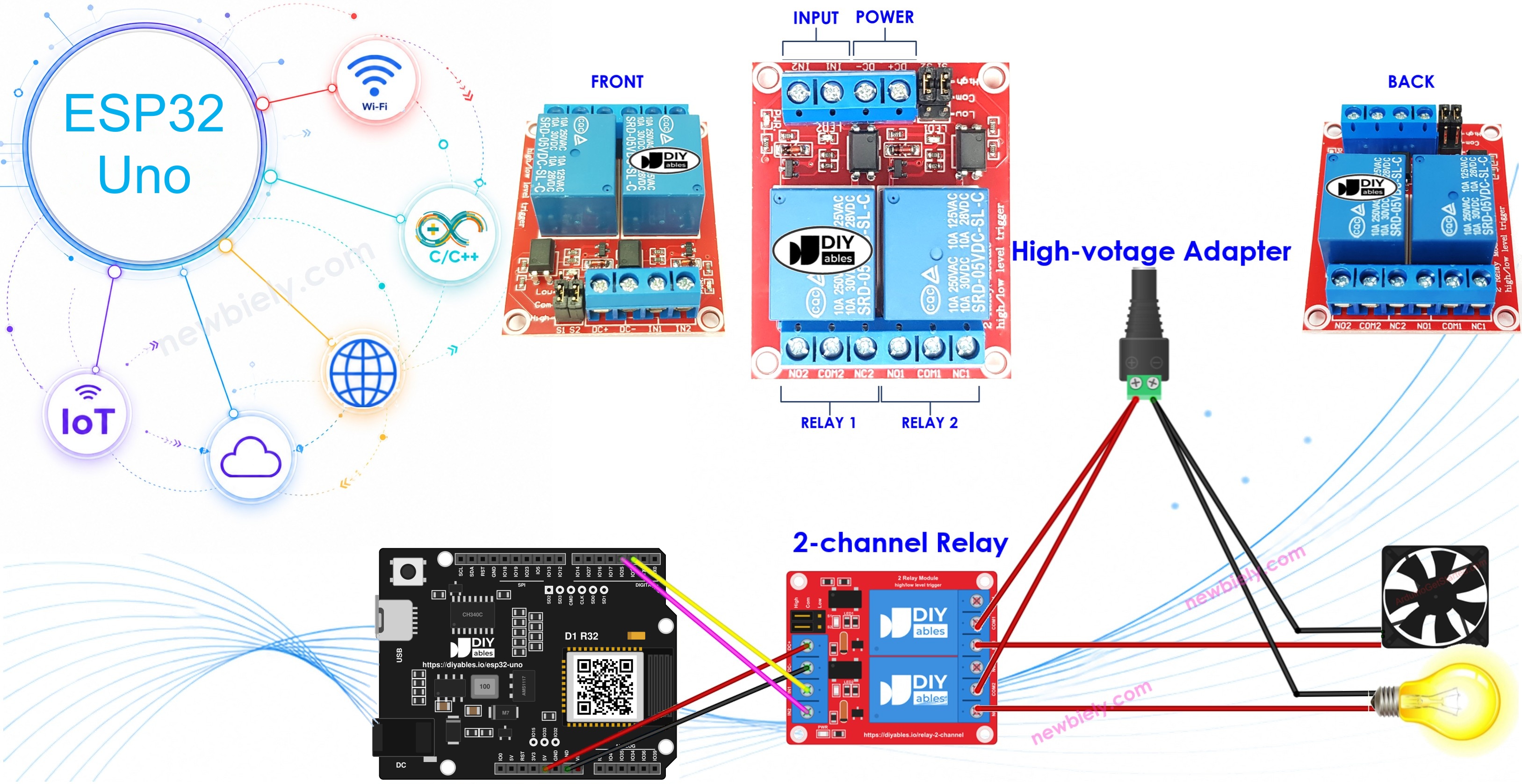
Need to switch a lamp and a fan from one board? An ESP32 Uno and a 2-channel relay module do it with two signal wires and about twenty lines of Arduino code. The two-channel relay board takes the 3.3V output of the ESP32 Uno form board and uses it to open and close two separate high-voltage circuits, so you hear two clicks each time the state flips.
By the end, you can:
- Name every pin on a two channel relay module and what it connects to
- Connect the relay inputs to D2 and D3 of the ESP32 Uno
- Switch both relays with digitalWrite() in an Arduino IDE sketch
- Confirm each on/off change in the Serial Monitor
Why one dual board and not two single relays? Look at the numbers:
| Point | Two single relay modules | One 2-channel relay module |
|---|---|---|
| Power wires | 4 | 2 |
| Board space | Two footprints | One footprint |
| Price | Higher | Lower |
| Code | Two output pins | The same two output pins |
Components You Need
| 1 | × | ESP32 Uno-form Board | |
| 1 | × | USB Cable Type-A to Type-C (for USB-A PC) | |
| 1 | × | USB Cable Type-C to Type-C (for USB-C PC) | |
| 1 | × | 2-channel Relay Module | |
| 1 | × | Optionally, 5V Power Adapter | |
| 1 | × | Jumper Wires |
Or you can buy the following kits:
| 1 | × | DIYables Sensor Kit (18 sensors/displays) |
Additionally, some of these links are for products from our own brand, DIYables .
Inside the 2-Channel Relay Module
After this part, you know which pin takes power, which takes the control signal, and where each load goes.
Pinout
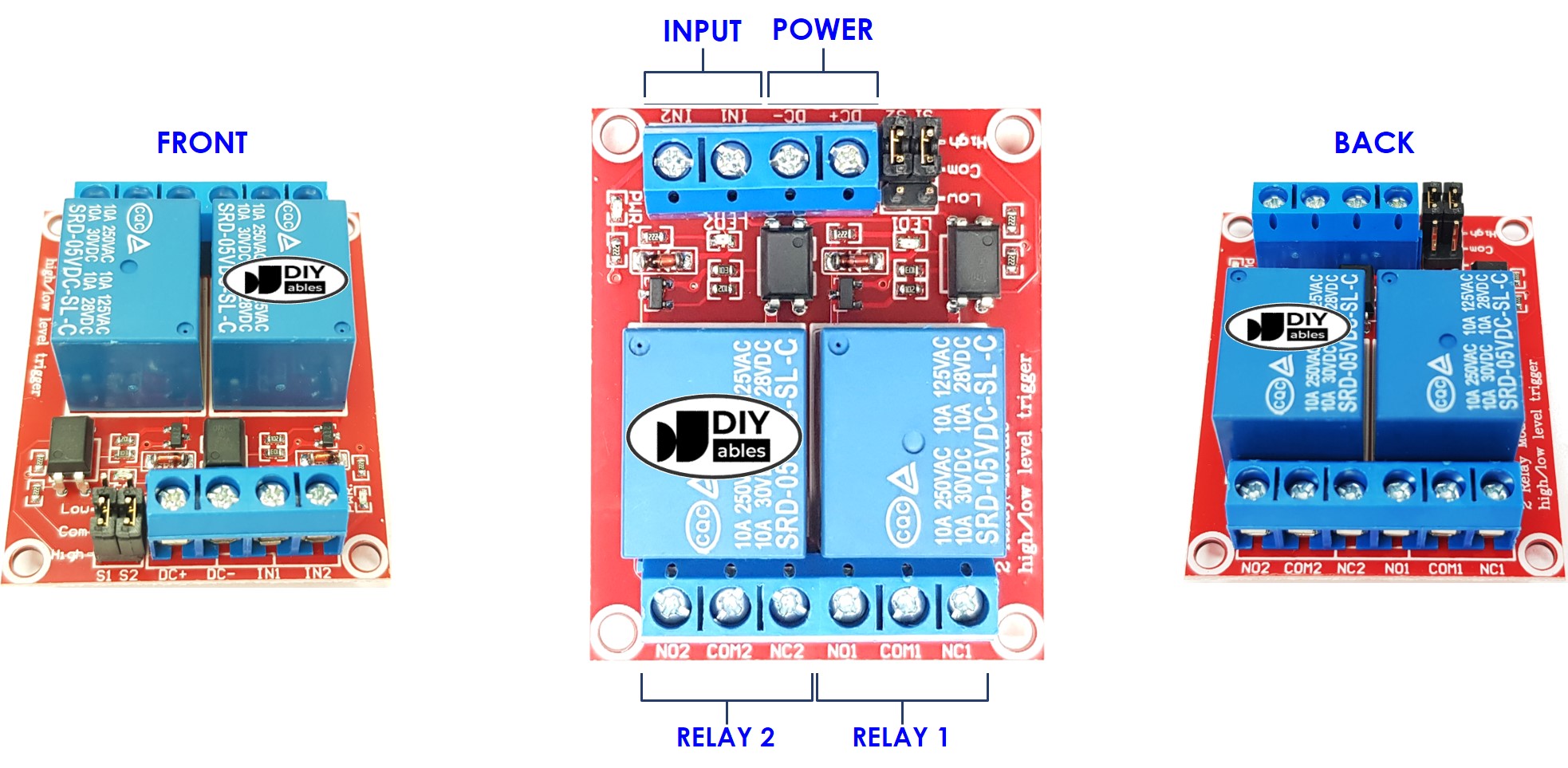
The pins sit in three groups. Use this table as your map:
| Pin | Group | Connect To |
|---|---|---|
| DC+ | Power | 5V of the supply (board 5V pin or a 5V adapter) |
| DC- | Power | GND of the supply, and also a GND pin of the ESP32 Uno |
| IN1 | Signal | The ESP32 Uno pin that controls relay 1 |
| IN2 | Signal | The ESP32 Uno pin that controls relay 2 |
| COM1 / NO1 / NC1 | Output | The high-voltage device switched by relay 1 |
| COM2 / NO2 / NC2 | Output | The high-voltage device switched by relay 2 |
Output contacts
Each relay gives you three screw terminals. The middle terminal, COMx (common), is the contact that moves. NOx (normally open) joins COMx only while the relay is active. NCx (normally closed) joins COMx while the relay is resting. For a load that should be off by default, wire it through COMx and NOx.
Trigger jumpers
Two small jumpers sit on the board, one per channel. Each one picks a low-level trigger or a high-level trigger for its own relay, so channel 1 and channel 2 can work in different modes.
Good to know: the sketch below assumes high-level trigger, so HIGH means "relay on".
Want the basics of a single relay first? Open ESP32 Uno - Relay. That page walks through mains wiring for one relay, explains normally closed and normally open, the difference between low-level trigger and high-level trigger, and how the ESP32 Uno drives one relay.
ESP32 Uno Pinout
On the ESP32 Uno form board, the printed Uno label (like D2) is not the number you type in code; the GPIO number is. Find D2 and D3 on the diagram below and note their GPIO numbers before you wire the relay.

How to Connect
When you finish this step, both relay channels are linked to the board and powered.
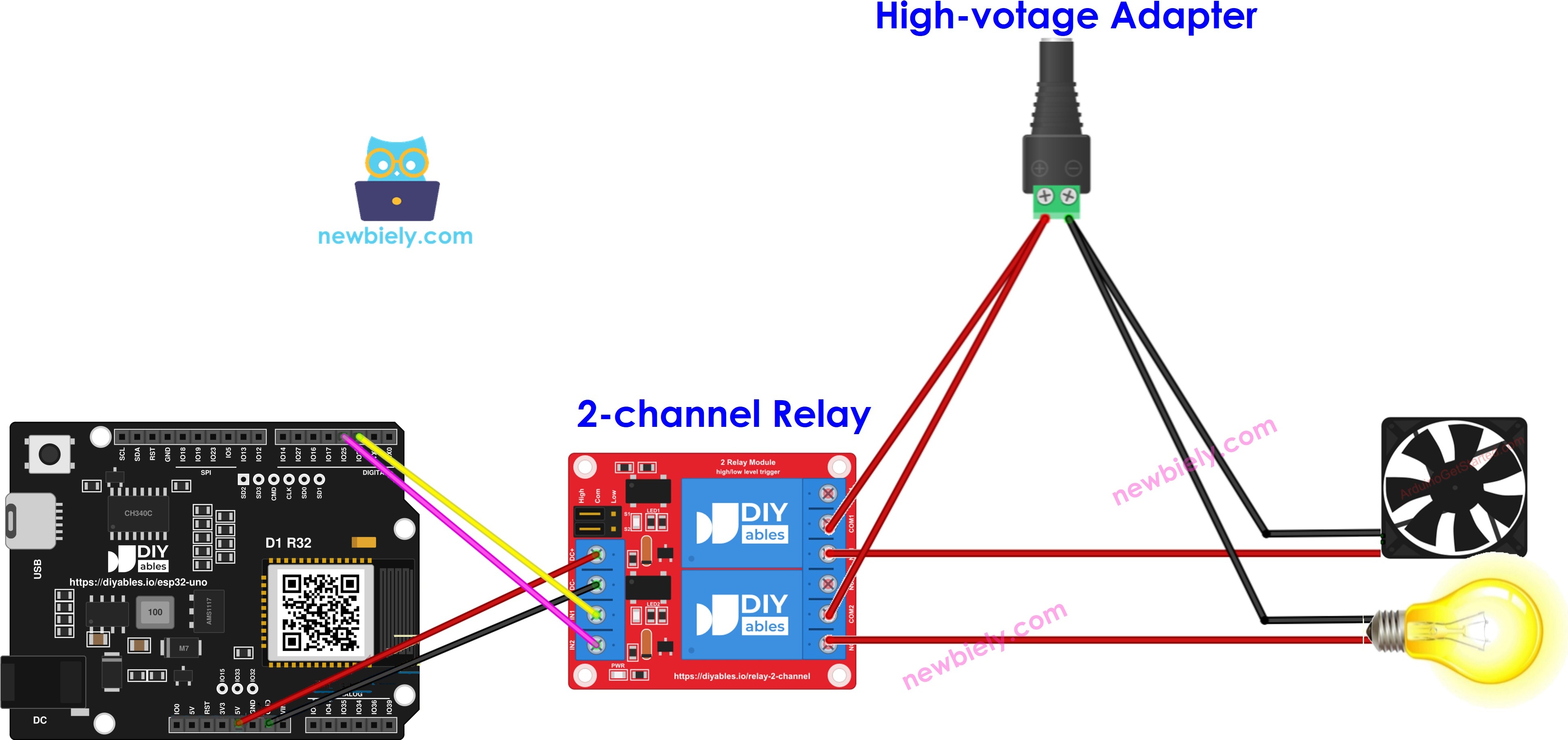
This image is created using Fritzing. Click to enlarge image
| Relay Module Pin | ESP32 Uno Pin |
|---|---|
| DC+ | 5V |
| DC- | GND |
| IN1 | D2 (GPIO26) |
| IN2 | D3 (GPIO25) |
Good to know: ESP32 Uno pins run at 3.3V logic and are NOT 5V tolerant. Here that is fine, because the signal only flows out of the board into IN1 and IN2.
※ NOTE THAT:
The relay coils on most of these modules are rated for 5V, so DC+ stays on 5V. The IN pins just need a logic HIGH, and the 3.3V level from GPIO26 and GPIO25 switches most modules that use a transistor or optocoupler input. Do not feed any 5V line from the module back into an ESP32 Uno pin.
For a bench test, the board's 5V pin can power the module. Once other parts also hang off that 5V pin, two coils pulling current at the same moment may cause a voltage dip. Then move DC+ and DC- to a separate 5V adapter and tie the adapter GND to an ESP32 Uno GND.
※ NOTE THAT:
Two loads with the same supply voltage can share one high-voltage adapter. Two loads with different voltages each need their own adapter.
Programming the Two Relays
After this part, you know the only two calls the sketch needs.
| Step | Function | Line |
|---|---|---|
| Set each relay pin as an output | pinMode() | pinMode(PIN_RELAY_1, OUTPUT); |
| Drive each relay pin HIGH or LOW | digitalWrite() | digitalWrite(PIN_RELAY_1, HIGH); |
Both functions are explained in the pinMode() and digitalWrite() references.
Do the same for the second relay:
Good to know: a HIGH on the ESP32 Uno is 3.3V, not 5V.
ESP32 Uno Code
This sketch flips both relays every 2 seconds and prints the new state each time.
Upload and Test
- First time with this board? Set it up with ESP32 Uno - Getting Started before you continue.
- Build the circuit by following the wiring table above.
- Plug in the USB Type-C cable between the ESP32 Uno and your computer.
- Select the board in Arduino IDE: pick ESP32 Dev Module and the COM port of the board (CH340).
- Paste the sketch into a new Arduino IDE window.
- Press Upload (Upload button) and wait for "Done uploading".
- Listen to the module: you should hear a double click every 2 seconds, and the two channel LEDs blink together.
- Open the Serial Monitor at 9600 baud and watch the messages:
- Pro tip: before you connect any mains load, put a 5V LED with its resistor (or a small 5V buzzer) on COM and NO of each channel. You can then see or hear which output closes, with no risk.
Video Tutorial
See the ESP32 Uno build in action in the video below.
How the Code Works
| Code Part | What It Does |
|---|---|
| #define PIN_RELAY_1 26 | Links relay 1 to D2 (GPIO26) |
| #define PIN_RELAY_2 25 | Links relay 2 to D3 (GPIO25) |
| Serial.begin(9600) | Opens the USB serial link for the messages |
| pinMode(..., OUTPUT) | Lets each pin drive its IN input |
| digitalWrite(..., HIGH / LOW) | Turns both relays on, then off |
| delay(2000) | Holds each state for 2 seconds |
The result is a steady 4-second cycle: 2 seconds with both loads powered, 2 seconds with both off.
ESP32 Uno vs UNO R4 for This Project
Moving this build from the UNO R4 to the ESP32 Uno changes only the pin numbers and the signal voltage.
| Item | Arduino UNO R4 | ESP32 Uno |
|---|---|---|
| Logic voltage | 5V | 3.3V |
| IN1 pin | D2 (pin 2 in code) | D2 (GPIO26 in code) |
| IN2 pin | D3 (pin 3 in code) | D3 (GPIO25 in code) |
| Relay coil power | 5V pin | 5V pin (same) |
| WiFi and Bluetooth | WiFi on the R4 WiFi only | WiFi plus Bluetooth Classic and BLE |
| Arduino IDE board | Arduino UNO R4 WiFi or Minima | ESP32 Dev Module |
The same wiring works as-is, because the relay module sits on the same D2 and D3 headers. Watch only for modules that need a 5V input signal; for those, pick a 3V relay module.
Project Ideas
Two working channels are the base for many small automation builds.
| Idea | Relay 1 | Relay 2 | Trigger |
|---|---|---|---|
| Garden helper | Water pump | Grow light | Soil moisture sensor and time of day |
| Room climate | Fan | Heater | DHT22 temperature reading |
| Two-gang switch | Light A | Light B | Two push buttons |
| Aquarium timer | Air pump | Tank light | millis() schedules |
Go Wireless: Two Relays on Your Phone
At the end of this part, you know how to swap the timer loop for phone buttons.
The ESP32 Uno has WiFi and Bluetooth built in, so the relays do not have to follow a fixed timer. Show two ON/OFF switches on a phone page, and let each one drive its own channel. Keep D2 (GPIO26) and D3 (GPIO25) as the outputs.
Try These Next
- Run relay 1 and relay 2 on different timers (for example 1 second and 3 seconds) with millis() and no delay().
- Add a button on D7 that toggles relay 1 only.
- Print the state of each relay as "R1=ON R2=OFF" in the Serial Monitor.
Function References
Troubleshooting
| Problem | Possible Cause | Solution |
|---|---|---|
| Arduino IDE lists no COM port | CH340 driver is missing or the USB cable carries power only | Install the CH340 driver and use a USB Type-C cable that carries data |
| Upload stops at "Failed to connect" or "Waiting for download" | The chip did not enter download mode | Hold the BOOT button while the upload starts, then let go |
| Neither relay makes a sound | Module has no 5V or its GND is not joined to the board GND | Measure 5V between DC+ and DC-, and add a wire from DC- to an ESP32 Uno GND |
| Channel LED turns on but no click | 3.3V signal is not enough for this module input | Swap to a 3V relay module or one with a transistor or optocoupler input |
| Nothing switches after a good upload | Code still uses 2 and 3 as pin numbers | Use 26 for D2 and 25 for D3 |
| Relay is on when the code writes LOW | Jumper is set to low-level trigger | Move that jumper to high-level trigger or swap HIGH and LOW |
| Only channel 2 or only channel 1 works | One IN wire is loose or on the wrong header | Put IN1 on D2 (GPIO26) and IN2 on D3 (GPIO25) |
| Board restarts every time the relays switch | Both coils pull too much from the 5V pin | Give the module its own 5V adapter with a shared GND |
| Relay clicks but the device stays off | Device is on NC or the COM wire is missing | Move the device to COM and NO and check its own power |
| Serial Monitor shows garbage | Baud rate does not match | Set the Serial Monitor to 9600 |
FAQ
Is the 3.3V output of the ESP32 Uno strong enough to trigger a 5V relay board?
Usually yes. The coil runs from the 5V on DC+, and the IN pin only needs a logic HIGH. Boards with an optocoupler or a transistor on the input switch fine at 3.3V. If the LED lights but the relay stays quiet, use a 3V relay module.
How do I turn on relay 1 while relay 2 stays off?
Write HIGH to PIN_RELAY_1 and LOW to PIN_RELAY_2. Each channel has its own pin, so you can change them at different times in any order.
What can I switch with a 2-channel relay module?
Lamps, fans, pumps, solenoid valves and small heaters, as long as they stay inside the voltage and current rating printed on the relay. Work with mains voltage only when the power is off, and use a closed box.
Should the relay module get its own power adapter?
For a short test, the board 5V pin is fine. For a real build, a separate 5V adapter is safer, because two coils pulling current together can make the ESP32 Uno brown out and restart. Always join the adapter GND to the board GND.
Why are the pin numbers 26 and 25 and not 2 and 3?
The ESP32 Uno code uses GPIO numbers, not the printed Uno labels. The D2 header maps to GPIO26, and the D3 header maps to GPIO25. If you type 2 and 3, the sketch drives GPIO2 (the A0 header) and GPIO3 (the USB RX line) instead.
Can I run an UNO R4 relay sketch on the ESP32 Uno without changes?
Almost. The logic is the same, but you must change the pin numbers to GPIO numbers. In Arduino IDE, select ESP32 Dev Module instead of the UNO R4 board.
Which ESP32 Uno pins should I avoid for relays?
Do not use A2 to A5 (GPIO35, 34, 36, 39), because they are input only and cannot drive an IN pin. Also avoid D0 and D1 (USB serial), and be careful with D8, D10 and A0, which are boot strapping pins.
Does the board need a driver to show up in Arduino IDE?
Yes. The ESP32 Uno talks to your computer through a CH340 USB-to-serial chip. Install the CH340 driver once, and the COM port appears.
What if my project needs more pins than the Uno headers give?
The ESP32 Uno has a few extra holes near the power header: GPIO32 and GPIO33 (I/O, PWM, analog on ADC1, so they also work while WiFi is on) and GPIO15 (I/O, PWM, analog on ADC2). To use them, solder on pin headers and put the GPIO number in your sketch. For a third and fourth relay, GPIO32 and GPIO33 are the best fit. Two warnings: GPIO15 and GPIO0 (the IO0 pin at the unused Uno NC position) are boot strapping pins, and a wrong connection can stop the board from booting or uploading code, so use GPIO32/33 first. Never use the six holes under the digital header (SD0 to SD3, CMD, CLK = GPIO6 to GPIO11); they are wired to the flash chip and using them crashes the board.
Can I control the two relays from a web page or a phone app?
Yes. The ESP32 Uno has WiFi and Bluetooth, so you can show two buttons on a phone and send the state to D2 and D3. See the Go Wireless section above for the matching tutorials.