
ESP32 UNO - LM35 Temperature Sensor
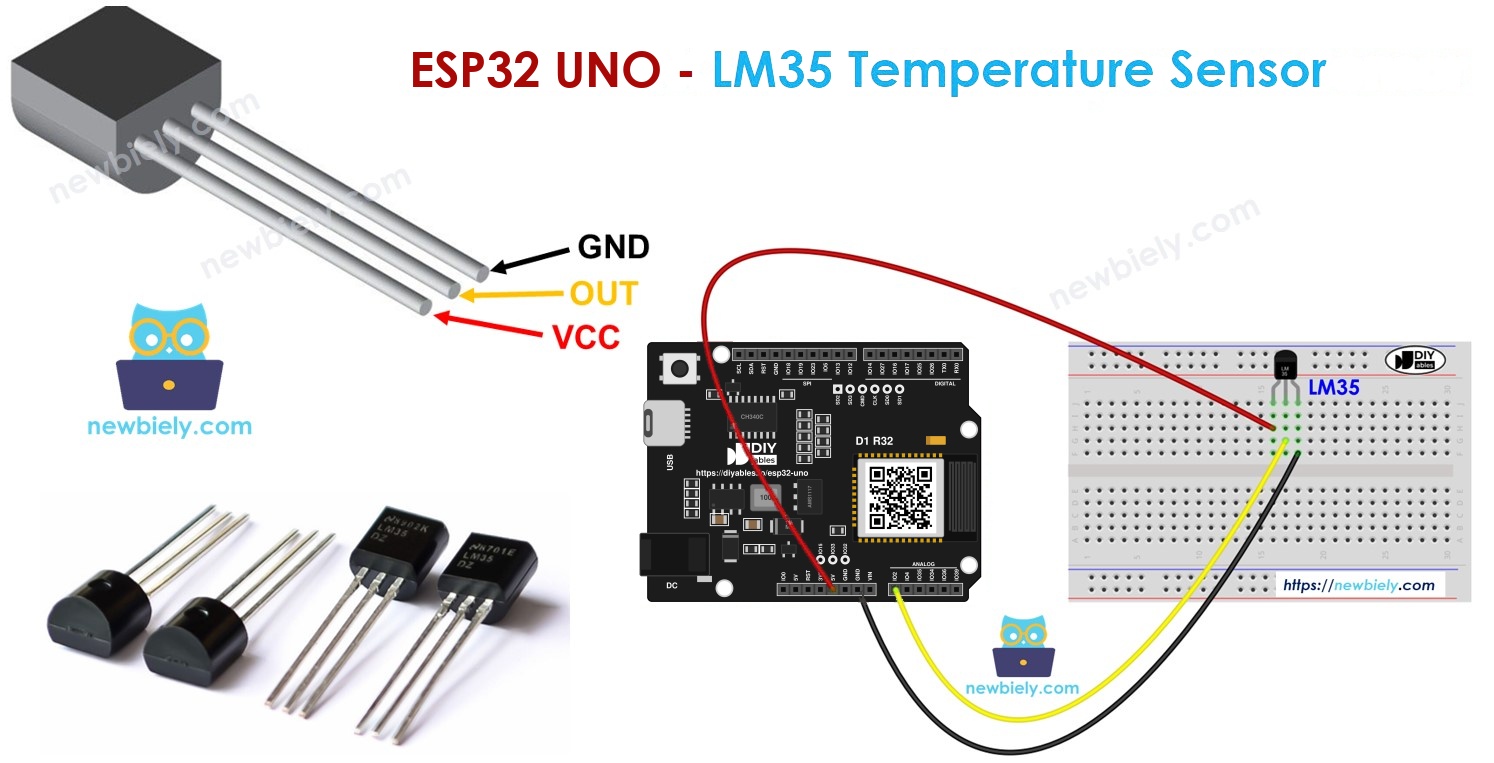
Need a cheap way to measure room temperature with the ESP32 Uno? Hook up an LM35 temperature sensor and get live readings in °C and °F with a short Arduino sketch. The LM35 is an analog temperature sensor, so one analog pin on the ESP32 Uno form board is all it takes. No library is needed.
What you will do:
- Connect the LM35 sensor to A0, 5V and GND.
- Sample the OUT voltage using analogRead() from an Arduino IDE sketch.
- Turn millivolts into Celsius, then into Fahrenheit.
- Watch the numbers climb when you warm the sensor with your fingers.
Components You Need
| 1 | × | ESP32 Uno-form Board | |
| 1 | × | USB Cable Type-A to Type-C (for USB-A PC) | |
| 1 | × | USB Cable Type-C to Type-C (for USB-C PC) | |
| 1 | × | LM35 Temperature Sensor | |
| 1 | × | Breadboard | |
| 1 | × | Jumper Wires |
Or you can buy the following kits:
| 1 | × | DIYables Sensor Kit (18 sensors/displays) |
Additionally, some of these links are for products from our own brand, DIYables .
Meet the LM35 Temperature Sensor
After this part, you know what each leg does and how the sensor reports heat.
LM35 Pin Roles
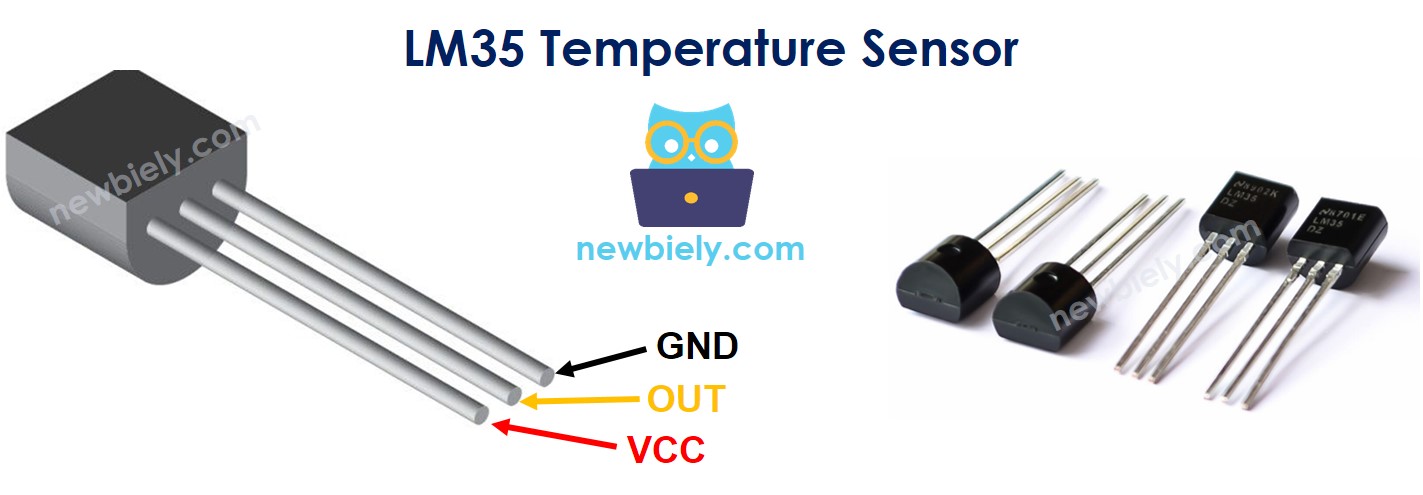
Hold the LM35 with the flat face toward you and the legs down. The legs are, from left to right, VCC, OUT and GND.
| LM35 Pin | Role | Goes To |
|---|---|---|
| VCC | Supply input, needs 4V to 30V | 5V header pin |
| OUT | Analog voltage that follows the temperature | An analog input |
| GND | Common ground, 0V | GND header pin |
Voltage to Temperature
The LM35 output is a straight line: each rise of 1°C pushes the OUT pin up by 10 mV.
| Temperature | OUT Voltage |
|---|---|
| 0°C | 0 mV |
| 20°C | 200 mV |
| 37°C | 370 mV |
| 100°C | 1000 mV |
| 150°C | 1500 mV |
So the math is simple: temperature in °C = millivolts ÷ 10.
Good to know: the OUT pin tops out near 1.5V, so it stays far under the 3.3V limit of an ESP32 Uno analog pin even with the sensor on 5V.
ESP32 Uno Pinout
Your sketch never uses the labels printed on the Uno headers. It uses the GPIO number behind each one, so look at the map below first.

How to Connect
When you finish this part, the LM35 is powered and its signal reaches A0.
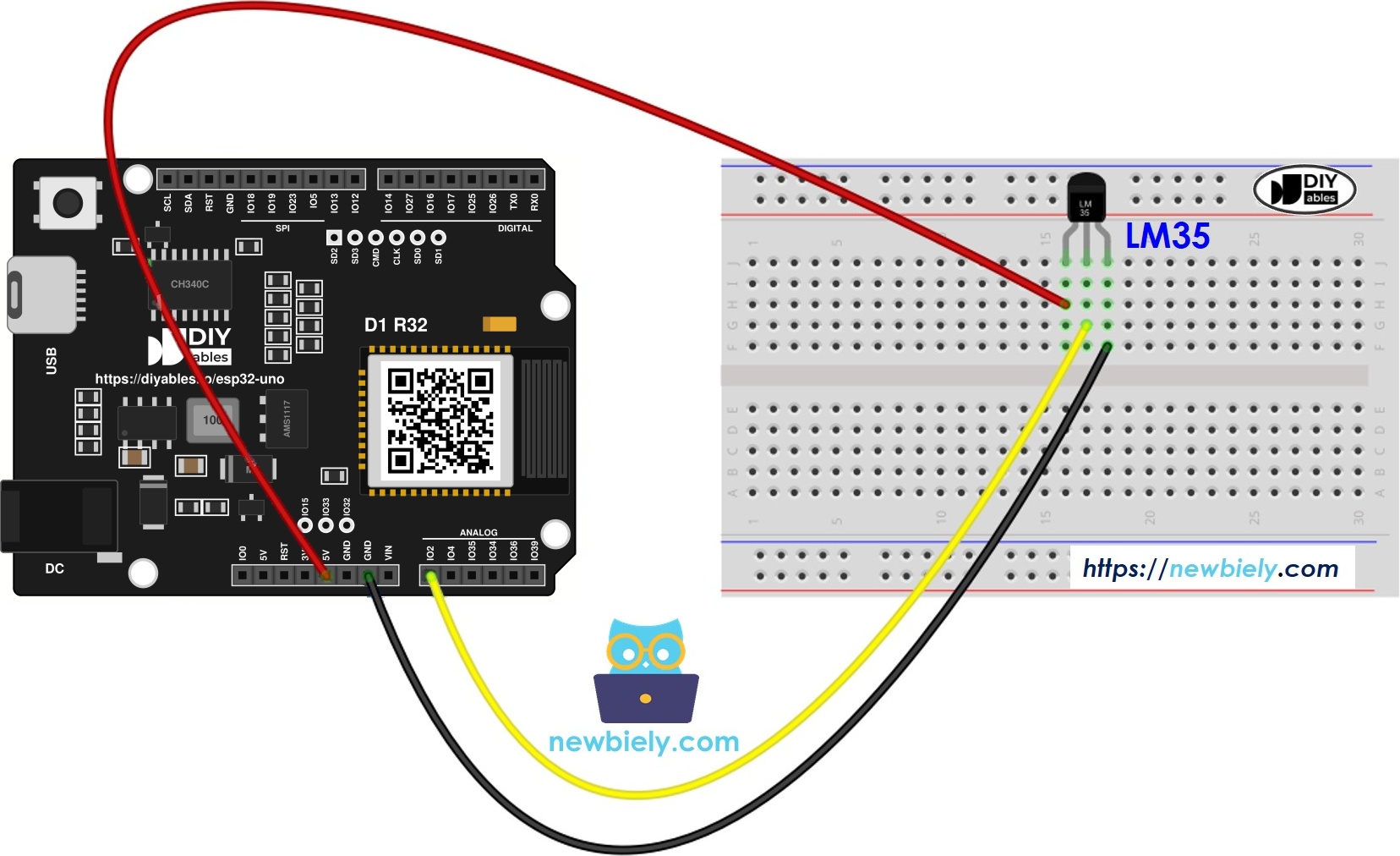
This image is created using Fritzing. Click to enlarge image
| LM35 Pin | ESP32 Uno Pin |
|---|---|
| VCC | 5V |
| GND | GND |
| OUT | A0 (GPIO2) |
WARNING
A0 is GPIO2, a boot strapping pin on the ESP32 Uno. The chip checks it at power-up. The LM35 output is low (well under 1V at room temperature), so it does not disturb booting. If an upload ever fails with the sensor plugged in, pull the OUT wire, upload, then plug it back.
Good to know: ESP32 Uno pins run at 3.3V and are NOT 5V tolerant. Feed only the LM35 VCC leg from 5V. Never wire the 5V pin straight to A0.
Reading the LM35 in Code
By the end of this part, you know the four lines that turn a raw ADC number into a temperature.
| Step | Code Line | Result |
|---|---|---|
| Read the pin | int adcVal = analogRead(PIN_LM35); | Raw value from 0 to 4095 |
| Scale to millivolts | float milliVolt = adcVal * (ADC_VREF_mV / ADC_RESOLUTION); | Voltage in mV (3300.0 / 4096.0) |
| Get Celsius | float tempC = milliVolt / 10; | 10 mV per degree |
| Get Fahrenheit | float tempF = tempC * 9 / 5 + 32; | Optional second unit |
The first line uses analogRead(). On the ESP32 Uno it returns a 12-bit number, not the 0 to 1023 range of older boards.
ESP32 Uno Code
This sketch samples the LM35 on A0 (GPIO2) every second and prints the temperature in two units.
Good to know: analogSetAttenuation(ADC_11db) in setup() opens the ESP32 Uno analog input to its widest range, from 0V up to about 3.3V. Leave it out and the readings hit 4095 too early, so the sensor values look wrong.
Upload and Test
- First time with this board? Set it up with ESP32 Uno - Getting Started before you continue.
- Build the circuit by following the wiring table above.
- Plug in the USB Type-C cable between the ESP32 Uno and your computer.
- Select the board in Arduino IDE: pick ESP32 Dev Module and the COM port of the board (CH340).
- Paste the sketch into a new Arduino IDE window.
- Send it to the board with the Upload button, then wait for "Done uploading".
- Open the Serial Monitor and set it to 9600 baud.
- Pinch the LM35 between two fingers for about 20 seconds and watch the value rise.
- Pro tip: blow gently across the sensor after you let go. The reading drops faster, which is a quick way to confirm the wiring is live.
Each step of the 12-bit ADC is about 0.08°C, so values move in small jumps like the ones above.
Video Tutorial
See the ESP32 Uno build in action in the video below.
ESP32 Uno vs UNO R4 for This Project
Moving this LM35 project from the UNO R4 to the ESP32 Uno changes three constants and adds one setup line.
| Item | Arduino UNO R4 | ESP32 Uno |
|---|---|---|
| Logic voltage | 5V | 3.3V |
| Sensor pin | A0 | A0 (GPIO2), written as 2 in code |
| ADC range | 0 to 1023 (10-bit) | 0 to 4095 (12-bit) |
| ADC_VREF_mV and ADC_RESOLUTION | 5000.0 and 1024.0 | 3300.0 and 4096.0 |
| Extra setup line | None | analogSetAttenuation(ADC_11db) |
| Arduino IDE board | Arduino UNO R4 WiFi | ESP32 Dev Module |
| Wireless | WiFi only on the WiFi model | WiFi plus Bluetooth Classic and BLE |
The wiring stays the same, and the LM35 can still run from 5V because its output never gets near 3.3V. Keep the UNO R4 constants out of the ESP32 Uno sketch, or the reading will be wrong.
Go Wireless: Check the Room Temperature from Your Phone
After this part, you know how to send the LM35 reading to a phone instead of a USB cable.
The ESP32 Uno has WiFi and Bluetooth, so the sensor can live in another room while you watch the value on your phone. A gauge shows the current temperature, and a plotter shows how it changes over an hour. Bluetooth works with the sensor on A0 as it is. For WiFi, move the OUT wire to A2 (GPIO35) and set PIN_LM35 to 35, because A0 is an ADC2 pin that cannot be read while WiFi is on.
Try These Next
- Light an LED on D7 (GPIO14) when the room goes above 28°C.
- Print the average of the last 10 readings to smooth out ADC noise.
- Track the lowest and highest value since power-on and print them every minute.
Function References
Troubleshooting
| Problem | Possible Cause | Solution |
|---|---|---|
| No COM port shows up | CH340 driver missing or a charge-only cable | Install the CH340 driver and use a USB cable that carries data |
| Upload stops at "Failed to connect" or "Waiting for download" | Board did not enter download mode | Hold the BOOT button while the upload starts, release it when writing begins |
| Board does not boot or upload with the sensor connected | A0 (GPIO2) is a boot strapping pin and is pulled the wrong way | Unplug the OUT wire while uploading, then reconnect it |
| Reading stays at 0°C | OUT wire not on A0 or a loose jumper | Check every wire on the breadboard and make sure OUT goes to A0 |
| Reading far too high or stuck near the top | Old sketch with 5000.0 and 1024.0, or no attenuation line | Upload the ESP32 Uno sketch above with 3300.0, 4096.0 and analogSetAttenuation |
| Sensor feels hot and the value is huge | VCC and GND legs swapped | Unplug now, check the flat face against the pin table, then wire again |
| Values jump around by 1 to 2°C | Long wires or ADC noise | Keep wires short and average several readings in code |
| Temperature always a few degrees off | ESP32 Uno ADC offset | Add a fixed offset in code after you compare with a known thermometer |
| Strange characters on screen | Serial Monitor baud rate wrong | Choose 9600 baud |
FAQ
Does the LM35 run on 3.3V from the ESP32 Uno?
Not reliably. The LM35 is rated for 4V and up, so connect VCC to the 5V header pin. Its output stays below 1.5V, which is safe for the 3.3V analog input.
How accurate is an LM35 temperature sensor?
The LM35 itself is accurate to about ±0.5°C near room temperature. On the ESP32 Uno, the ADC adds its own small error, so expect about ±1 to 2°C unless you add an offset.
What temperature range can the LM35 measure here?
With this wiring it reads from about 2°C to 150°C. Readings below 0°C need a negative supply circuit, which this simple setup does not have.
What is the analogSetAttenuation(ADC_11db) line in setup() for?
It widens the ESP32 Uno ADC window to roughly 0V through 3.3V, and that whole span becomes 0 to 4095. A narrower window makes readings max out too soon. You will not find this line in UNO R4 sketches, because the function exists only in the esp32 by Espressif Systems core. Never let the signal on the pin go past 3.3V.
Why are the constants 3300.0 and 4096.0 instead of 5000.0 and 1024.0?
The ESP32 Uno ADC is 12-bit and its range ends near 3.3V. The UNO R4 values describe a 5V, 10-bit ADC, so they would make the ESP32 Uno report a far too high temperature.
Is there a better way to get millivolts on the ESP32 Uno?
Yes. analogReadMilliVolts(2) returns a calibrated voltage in mV directly. Divide it by 10 to get °C. It is often closer to the real value than the plain scale math.
Can I keep the LM35 on A0 in a WiFi project?
No. A0 (GPIO2) and A1 (GPIO4) are ADC2 pins, and ADC2 cannot be read while WiFi is on. Move the OUT wire to A2 to A5 (GPIO35, 34, 36, 39) or to GPIO32/33, and change PIN_LM35 to that GPIO number.
How do I read two LM35 sensors at once?
Wire the second OUT leg to another analog pin, such as A2 (GPIO35), and add a second analogRead() with its own pin define. Both sensors can share 5V and GND.
Do I need a driver to program the ESP32 Uno?
This board uses a CH340 USB-to-serial chip. Windows and macOS sometimes need the CH340 driver before the COM port appears in the Arduino IDE.
Will my UNO shields fit the ESP32 Uno?
The headers have the Uno layout, so most shields plug in. Check that the shield works with 3.3V logic and does not use A4/A5 for I2C, because on this board I2C is on the SDA (GPIO21) and SCL (GPIO22) pins.
What if this project needs more pins than the Uno headers offer?
The ESP32 Uno has a few extra holes near the power header. GPIO32 and GPIO33 give I/O, PWM and analog on ADC1, so they still read analog values with WiFi on. GPIO15 gives I/O, PWM and analog on ADC2. Solder pin headers there and write the GPIO number in code. For an LM35 in a WiFi project, GPIO32 or GPIO33 is a good choice. Two warnings: GPIO15 and GPIO0 (the IO0 pin at the unused Uno NC spot) are boot strapping pins, and a wrong connection can stop the board from booting or uploading code, so use GPIO32/33 first. Never use the six holes under the digital header (SD0 to SD3, CMD, CLK = GPIO6 to GPIO11), because they connect to the flash chip and using them crashes the board.