
ESP32 UNO - Buzzer
Need an alarm loud enough to hear across the house? Hook a 12V active buzzer to an ESP32 Uno buzzer circuit with one relay, and your sketch decides exactly when it sounds. The ESP32 Uno form board gives the switching signal, and the relay carries the 12V that the loud buzzer needs. Using a little 5V piezo (active or passive) part? See the ESP32 Uno Piezo Buzzer guide instead.
What you will do:
- Find out why a 12V electronic buzzer cannot sit on a GPIO pin
- Wire a relay, a 12V adapter and the buzzer to the ESP32 Uno
- Upload an on/off alarm sketch with the Arduino IDE
- Change the beep and pause times to make your own alarm pattern
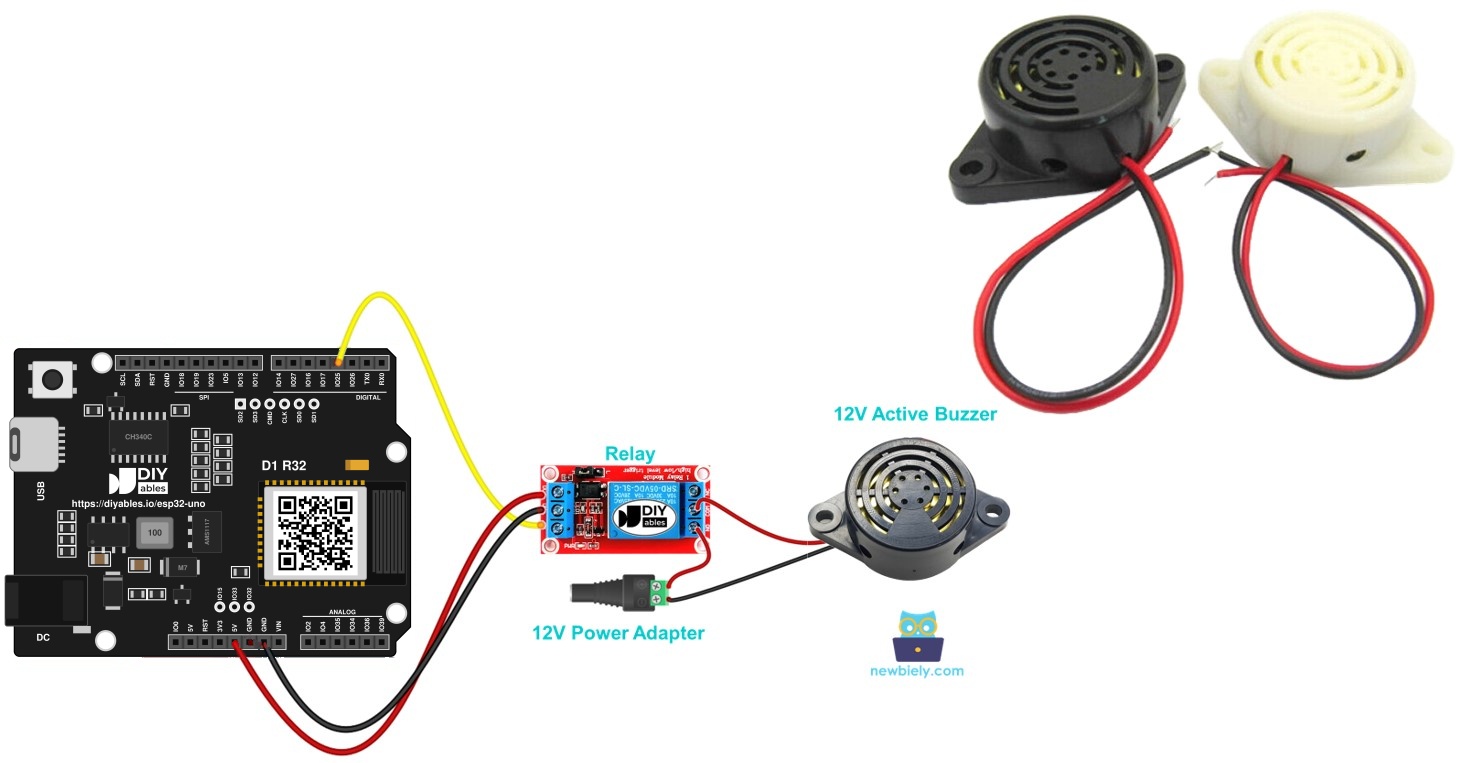
Components You Need
| 1 | × | ESP32 Uno-form Board | |
| 1 | × | USB Cable Type-A to Type-C (for USB-A PC) | |
| 1 | × | USB Cable Type-C to Type-C (for USB-C PC) | |
| 1 | × | Relay | |
| 1 | × | 12V Active Buzzer | |
| 1 | × | 12V Power Adapter | |
| 1 | × | DC Power Jack | |
| 1 | × | Jumper Wires |
Or you can buy the following kits:
| 1 | × | DIYables Sensor Kit (18 sensors/displays) |
Additionally, some of these links are for products from our own brand, DIYables .
The 12V Active Buzzer at a Glance
After this part, you know what the buzzer needs and why a relay sits in the middle.
| Property | Value |
|---|---|
| Supply voltage | 12V DC |
| Sound source | Built-in oscillator (fixed tone) |
| Control method | Power on = sound, power off = silence |
| Typical use | Alarms, warning signals, door chimes, timers |
| Signal needed from the board | None directly, only a relay trigger |
Because the tone circuit lives inside the buzzer, no PWM or tone() call is involved. You only switch its 12V feed.
Pinout
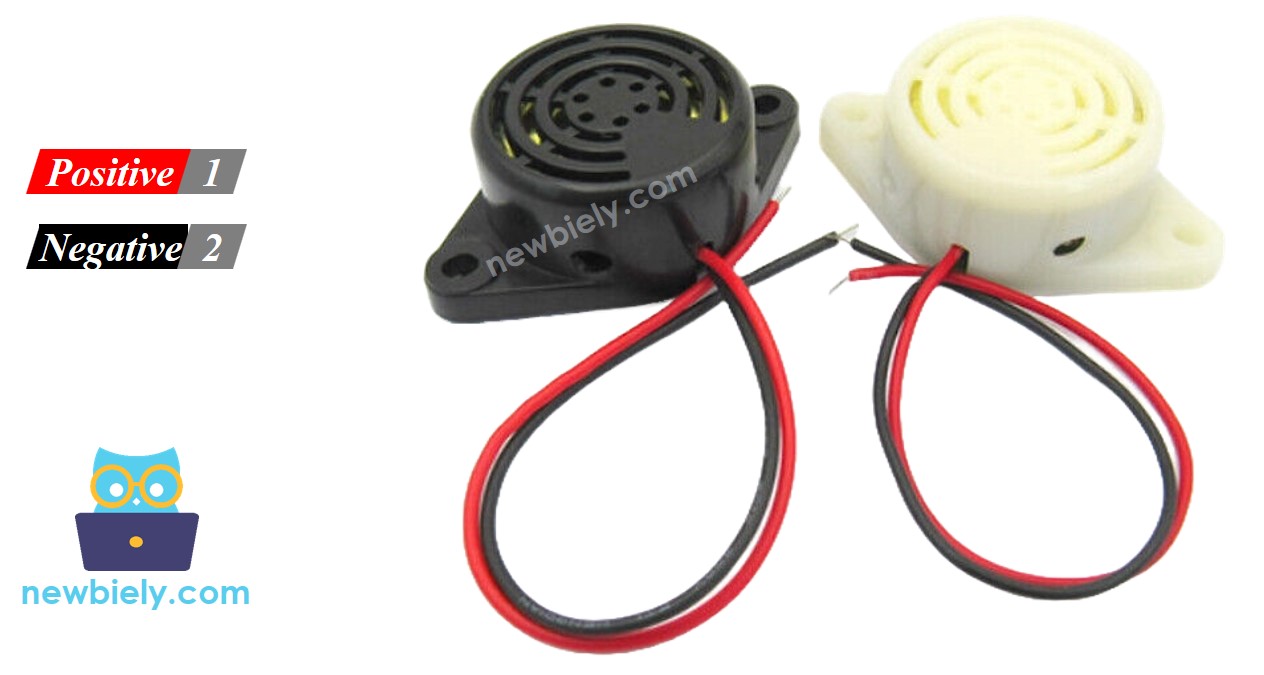
The buzzer has two leads:
| Lead | Usual Color | Goes To |
|---|---|---|
| Negative (-) | Black | GND (minus) of the 12V DC supply |
| Positive (+) | Red | 12V (plus) of the DC supply, passed through the relay contacts |
Switching It with a Relay
Goal of this part: understand the signal path from code to sound.
An ESP32 Uno pin outputs 3.3V and only a few milliamps. The buzzer wants 12V and far more current. So the pin drives the relay input, and the relay contacts close or break the 12V loop of the buzzer.
| Pin State | Relay | Buzzer |
|---|---|---|
| HIGH (3.3V) | Contacts closed | Sounds |
| LOW (0V) | Contacts open | Silent |
Good to know: the board and the 12V loop never share a signal wire. Only the relay touches both sides.
New to relays? Read ESP32 Uno - Relay for the relay pinout, NO/NC contacts and trigger modes.
ESP32 Uno Pinout
Your sketch talks to GPIO numbers, while the board shows Uno labels such as D3. Look up D3 on the diagram below so you know which GPIO the relay signal goes to.

How to Connect
When you finish this step, the relay is on D3 and the buzzer sits in its own 12V loop.
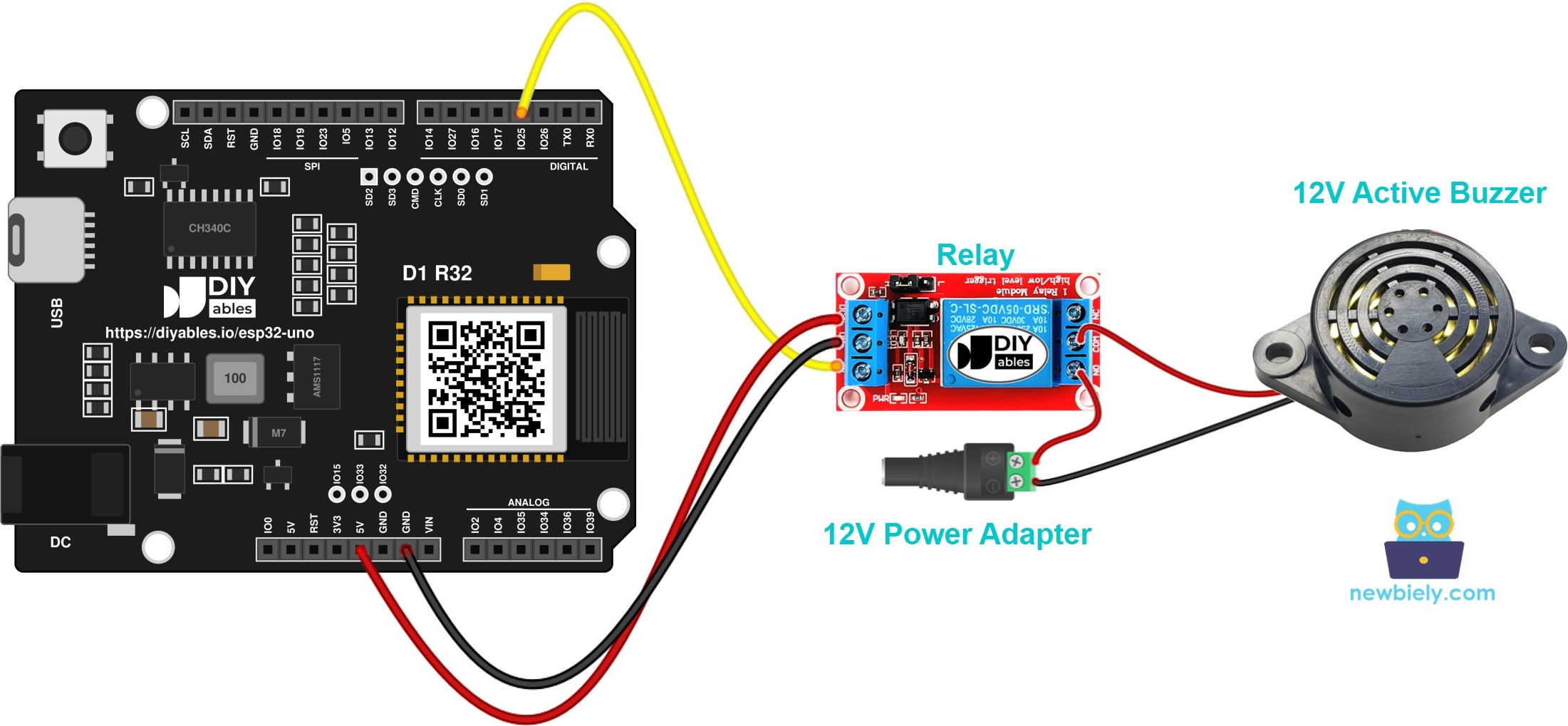
This image is created using Fritzing. Click to enlarge image
Step 1 — Relay control side
| Relay Pin | ESP32 Uno Pin |
|---|---|
| VCC | 5V |
| GND | GND |
| IN | D3 (GPIO25) |
Step 2 — 12V buzzer side
| Wire From | Wire To |
|---|---|
| Adapter positive (+) via DC power jack | Relay COM |
| Relay NO | Buzzer red lead (+) |
| Buzzer black lead (-) | Adapter negative (-) via DC power jack |
Good to know: ESP32 Uno pins run at 3.3V logic and are NOT 5V tolerant. The IN pin only receives a signal from the board, so this wiring is safe.
WARNING
Keep every 12V wire away from the ESP32 Uno headers. If 12V reaches any pin, the board dies on the spot. The COM and NO screw terminals of the relay are the only place where the 12V loop belongs.
※ NOTE THAT:
A typical 5V relay module accepts the 3.3V HIGH from GPIO25 through its transistor or optocoupler input. If the module LED lights but you hear no click, switch to a relay module made for a 3.3V trigger.
ESP32 Uno Code
This sketch sounds the buzzer for 2 seconds, pauses for 5 seconds, and loops forever.
Upload and Test
- First time with this board? Set it up with ESP32 Uno - Getting Started before you continue.
- Build the circuit by following the wiring table above.
- Plug in the USB Type-C cable between the ESP32 Uno and your computer.
- Select the board in Arduino IDE: pick ESP32 Dev Module and the COM port of the board (CH340).
- Paste the sketch into an empty Arduino IDE window.
- Click Upload (Upload button) and wait until the IDE shows "Done uploading".
- Connect the 12V adapter to the DC power jack.
- Listen for the pattern: 2 seconds of loud sound, 5 seconds of quiet, again and again.
- Pro tip: for testing at your desk, cover the buzzer hole with tape. It stays loud enough to check, and your ears will thank you.
Video Tutorial
See the ESP32 Uno build in action in the video below.
How the Sketch Works
In short, one pin, two states and two waits make the whole alarm.
| Code Part | What It Does |
|---|---|
| #define RELAY_PIN 25 | Names GPIO25, which is the D3 header |
| pinMode(RELAY_PIN, OUTPUT) | Lets the pin drive the relay input |
| digitalWrite(RELAY_PIN, HIGH) | Closes the relay, so 12V reaches the buzzer |
| delay(2000) | Keeps the sound on for 2000 ms |
| digitalWrite(RELAY_PIN, LOW) | Opens the relay, so the buzzer goes quiet |
| delay(5000) | Waits 5000 ms before the next beep |
Change the two delay values to make a faster or slower alarm, for example 300 and 300 for a quick warning beep.
ESP32 Uno vs UNO R4 for This Project
Here is what changes when this buzzer build moves from the UNO R4 to the ESP32 Uno.
| Item | Arduino UNO R4 | ESP32 Uno |
|---|---|---|
| Logic voltage | 5V | 3.3V |
| Relay control pin | D3 (pin 3 in code) | D3 (GPIO25 in code) |
| Pin number in sketch | 3 | 25 |
| Arduino IDE board | Arduino UNO R4 WiFi or Minima | ESP32 Dev Module |
| USB chip and driver | Built-in USB, no driver | CH340, driver needed |
| WiFi and Bluetooth | WiFi only on the WiFi model | WiFi plus Bluetooth Classic and BLE |
The wiring stays the same, with the relay still on D3. Just make sure your relay module switches with a 3.3V trigger.
Go Wireless: Phone-Controlled Alarm
Here, the aim is to sound the buzzer from your phone, not from a fixed timer.
The ESP32 Uno has WiFi and Bluetooth built in. Instead of a fixed 2 s / 5 s cycle, you can show an ON/OFF switch on a phone or a web page and drive D3 (GPIO25) from it. That turns this circuit into a remote doorbell or a panic alarm.
Troubleshooting
| Problem | Possible Cause | Solution |
|---|---|---|
| No COM port in Arduino IDE | CH340 driver not installed or charge-only cable | Install the CH340 driver and use a USB Type-C data cable |
| Upload stops at "Failed to connect" or "Waiting for download" | Chip did not enter download mode | Hold the BOOT button while the upload starts, then release it |
| You hear the relay click but no beep | 12V loop open or adapter unplugged | Check adapter to COM, NO to buzzer red lead, and buzzer black lead back to the adapter |
| No click and no LED on the relay | Relay VCC or GND missing, or IN on the wrong header | Feed the relay from 5V and GND and put IN on D3 (GPIO25) |
| Relay LED on but no click | 3.3V HIGH is too weak for this module | Use a relay module rated for a 3.3V trigger |
| Buzzer never stops | Buzzer wired to NC, or the relay is low-level trigger | Move the wire to NO, or swap HIGH and LOW in the sketch |
| Nothing happens after a good upload | Sketch still uses pin 3 | Set RELAY_PIN to 25, the GPIO behind D3 |
| Weak or crackly sound | Adapter gives less than 12V or too little current | Use a proper 12V adapter with enough current |
| Board restarts when the relay switches | Supply dip from the relay coil | Use a solid USB port and route the 12V wires away from the board |
FAQ
Why can't a GPIO pin power the 12V buzzer by itself?
An ESP32 Uno pin gives 3.3V and only a small current. The buzzer needs 12V and much more current, so a relay or a MOSFET must switch its power while the pin only gives the trigger.
What is the difference between an active and a passive buzzer?
An active buzzer has a built-in oscillator and beeps as soon as it gets power. A passive buzzer needs a changing signal, such as tone(), to make sound, and it can play melodies.
Can this 12V buzzer play a melody?
No. It always makes the same single pitch, and the relay only gives it power or cuts it. For songs, use a passive piezo buzzer, as in the ESP32 Uno Piezo Buzzer guide.
Can I use a MOSFET instead of a relay?
Yes. A logic-level N-channel MOSFET that turns fully on at 3.3V can switch the buzzer quietly and faster. Add a diode across the buzzer if it has a coil inside.
Why is the pin number 25 when the wire goes to D3?
ESP32 Uno code uses GPIO numbers. The D3 header is wired to GPIO25, so the sketch writes 25. Writing 3 would drive GPIO3, which is the USB serial RX line.
Which ESP32 Uno pins should I not use for the relay?
Skip A2 to A5 (GPIO35, 34, 36, 39), because they are input only and cannot drive the relay. Also skip D0 and D1, which carry USB serial, and take care with D8, D10 and A0, which are boot strapping pins.
Does a buzzer sketch written for an UNO R4 run on the ESP32 Uno?
Yes, after one change: set RELAY_PIN to 25 instead of 3. In Arduino IDE, pick ESP32 Dev Module and the CH340 COM port.
Do I need a driver to upload code to the ESP32 Uno?
Yes, on most computers. The board uses a CH340 USB-to-serial chip, so install the CH340 driver once and the COM port appears.
Can the relay and the board share the 12V adapter?
The buzzer loop uses the 12V adapter, and the relay coil uses the 5V pin of the board. You can also power the board from the 12V adapter through VIN (5V to 12V), but keep the buzzer wires on the relay contacts only.
What if my project needs more pins than the Uno headers give?
The ESP32 Uno has a few extra holes near the power header: GPIO32 and GPIO33 (I/O, PWM, analog on ADC1, so they also work while WiFi is on) and GPIO15 (I/O, PWM, analog on ADC2). Solder pin headers to them and use the GPIO number in code. For a second buzzer relay or a status LED, GPIO32 or GPIO33 is the best choice. Two warnings: GPIO15 and GPIO0 (the IO0 pin at the unused Uno NC position) are boot strapping pins, and a wrong connection can stop the board from booting or uploading code, so use GPIO32/33 first. Never use the six holes under the digital header (SD0 to SD3, CMD, CLK = GPIO6 to GPIO11); they are wired to the flash chip and using them crashes the board.
Can I trigger the buzzer from a sensor?
Yes. Read a motion sensor, a door switch or a distance sensor, and set D3 HIGH when it detects something. That gives you a simple intruder or parking alarm.