
ESP32 UNO RS422
Need serial data to travel far and stay clean? Connect a TTL to RS422 module to the ESP32 Uno form board and turn its UART into a long-distance RS-422 link. The ESP32 Uno talks plain TTL, and the module does the differential conversion.
By the end, you can:
- Connect the RS422 converter board to the ESP32 Uno
- Receive bytes from an RS-422 device with Serial.read()
- Send bytes back with Serial.print()
- Use Serial2 on free pins where other boards use SoftwareSerial
- Check the link from your PC with a serial terminal
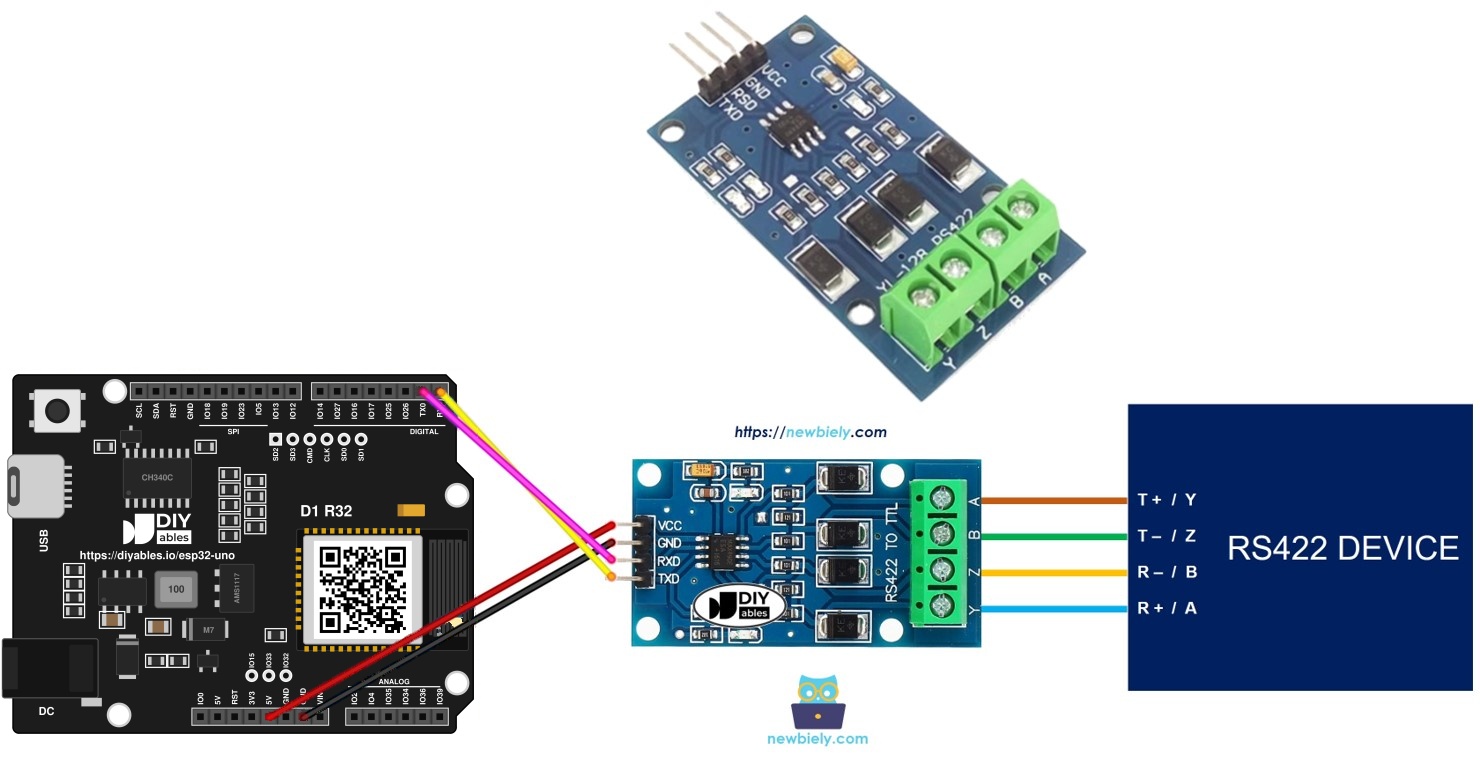
Components You Need
| 1 | × | ESP32 Uno-form Board | |
| 1 | × | USB Cable Type-A to Type-C (for USB-A PC) | |
| 1 | × | USB Cable Type-C to Type-C (for USB-C PC) | |
| 1 | × | TTL to RS422 Module | |
| 1 | × | Jumper Wires | |
| 1 | × | Optionally, RS422 to USB Cable |
Or you can buy the following kits:
| 1 | × | DIYables Sensor Kit (18 sensors/displays) |
Additionally, some of these links are for products from our own brand, DIYables .
Overview of the TTL to RS422 Module
By the end of this part, you know why the module is needed and what each pin does.
A normal serial port (TX and RX) uses TTL levels. The signal is weak, so it only works over short wires. RS232, RS422 and RS485 are standards made for long cables. The module changes TTL to RS422 and RS422 back to TTL, so the ESP32 Uno can use the same Serial functions as always.
| Item | Value |
|---|---|
| Signal type | Differential, one pair to send and one pair to receive |
| Duplex | Full duplex (send and receive at the same time) |
| Typical range | Up to about 1200 m at low baud rates |
| Board side logic | TTL |
Good to know: The ESP32 Uno uses 3.3V logic and its pins are not 5V tolerant. Power the module from 3.3V so its TXD output stays at 3.3V.
Pinout
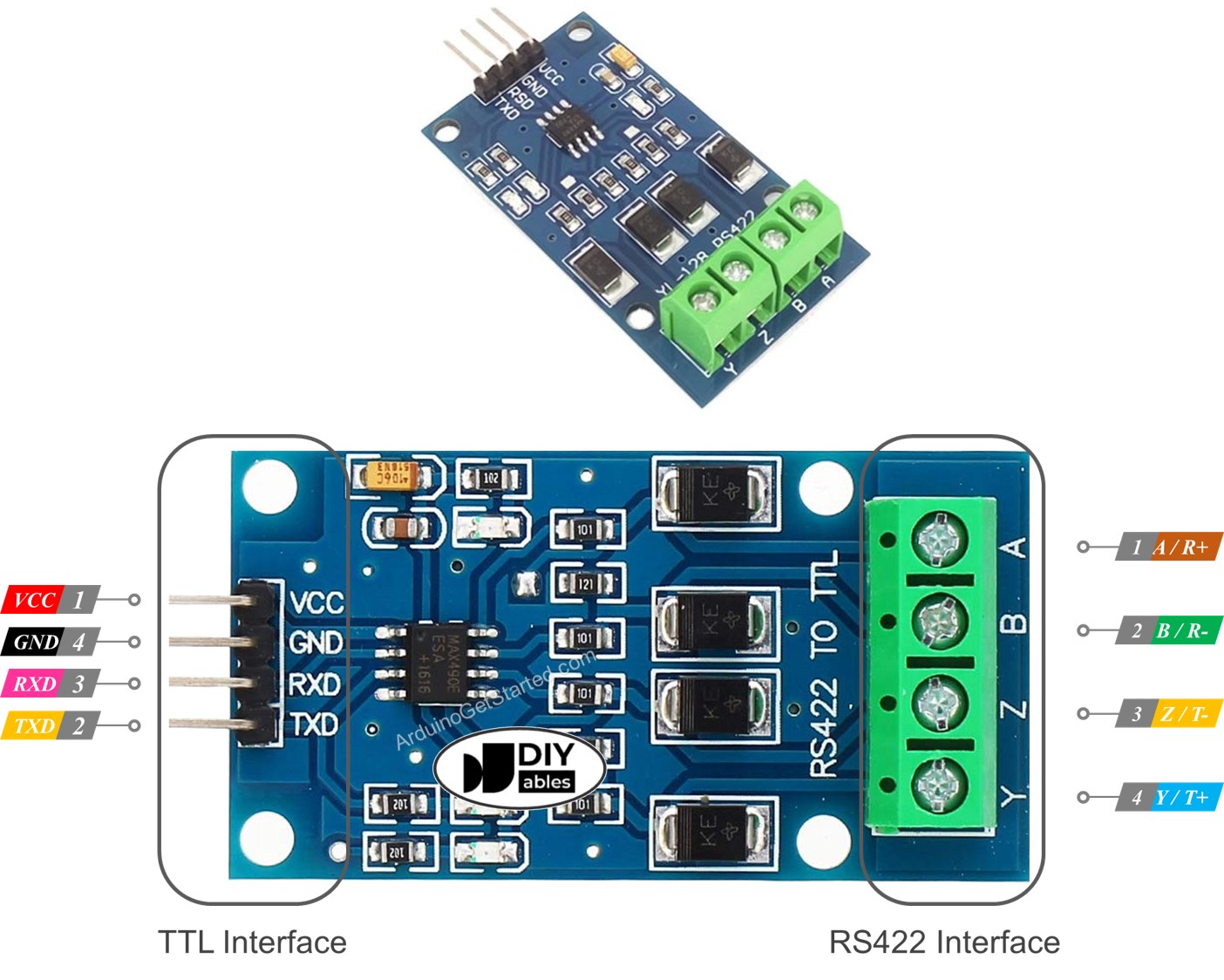
The board has a TTL side for the ESP32 Uno and an RS422 side for the remote device.
TTL Side (board end)
| Module Pin | Role |
|---|---|
| VCC | Power input, 3.3V or 5V |
| GND | Ground (0V) |
| RXD | Data input. Wire to a TX pin of the board |
| TXD | Data output. Wire to an RX pin of the board |
RS422 Side (cable end)
| Module Pin | Role |
|---|---|
| A (R+) | Positive receive line. Wire it to TX+ (T+ or Y) on the far device |
| B (R-) | Negative receive line. Wire it to TX- (T- or Z) on the far device |
| Y (T+) | Positive transmit line. Wire it to RX+ (R+ or A) on the far device |
| Z (T-) | Negative transmit line. Wire it to RX- (R- or B) on the far device |
ESP32 Uno Pinout
Every Uno header pin on the ESP32 Uno form board has its own GPIO number, and the code uses that number. Match the labels in the diagram with the GPIO numbers before you add any wire.

How to Connect
By the end of this part, the module is wired in one of two ways. Pick the one that fits the code you want to upload.
Option 1 - Main Serial on D0 and D1
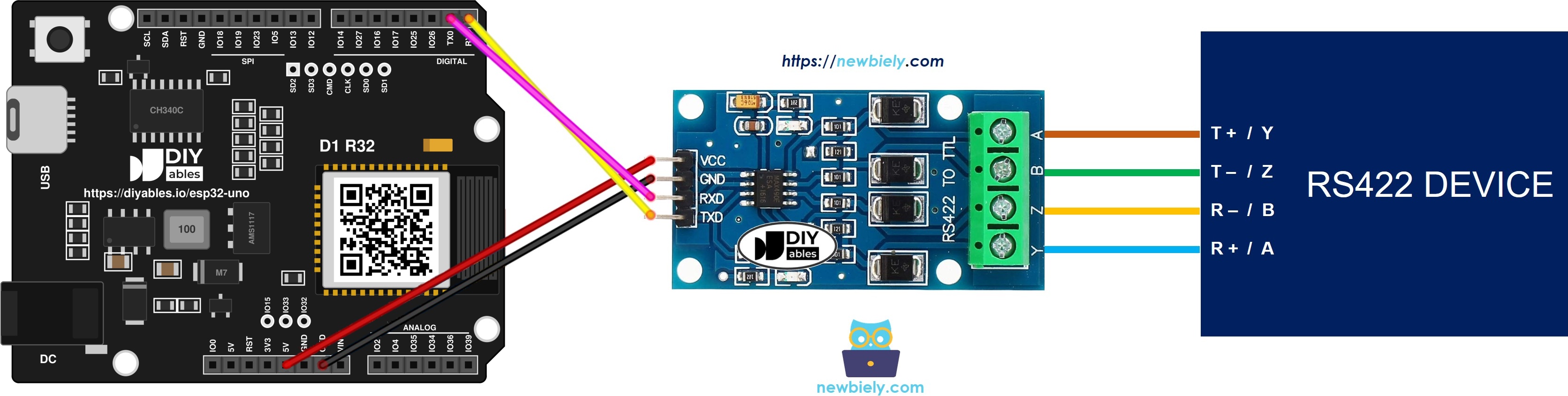
This image is created using Fritzing. Click to enlarge image
※ NOTE THAT:
The wiring diagram may not show the correct wiring for the ESP32 Uno. The first picture shows the module on D0 and D1 (Option 1). On the ESP32 Uno these pins are the USB serial pins, and they can block the upload. We suggest Option 2, with Serial2 on D6 and D7. We will update the diagram soon. Until then, follow the wiring table and the text on this page, not the picture.
| Module Pin | Connect To |
|---|---|
| VCC | 3.3V |
| GND | GND |
| RXD | D1 (GPIO1) |
| TXD | D0 (GPIO3) |
WARNING
D0 (GPIO3) and D1 (GPIO1) belong to UART0. The USB port uses them for code upload and for the Serial Monitor. With the module wired here, an upload can fail, and the Serial Monitor and the RS422 line share the same data. Unplug the TXD and RXD wires before you upload, and plug them back in afterward.
Option 2 - Second UART (Serial2) on D6 and D7
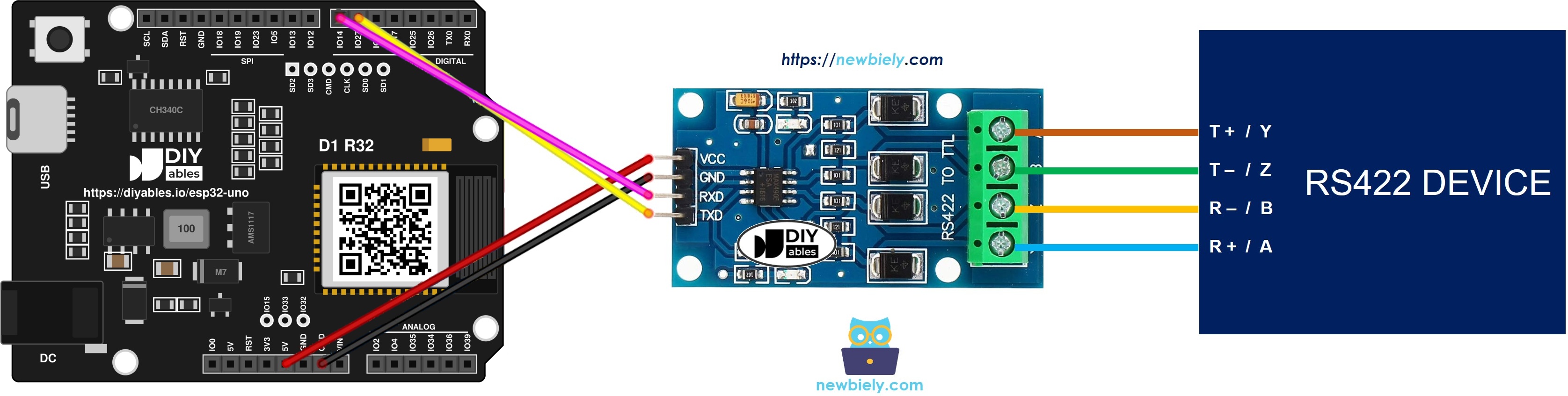
This image is created using Fritzing. Click to enlarge image
| Module Pin | Connect To |
|---|---|
| VCC | 3.3V |
| GND | GND |
| RXD | D7 (GPIO14) |
| TXD | D6 (GPIO27) |
Good to know: Option 2 keeps the USB serial port free, so uploads and the Serial Monitor work as usual.
WARNING
Pins on this board do NOT accept 5V. If you power the module from 5V, its TXD pin sends a 5V signal into the board. Use the 3.3V pin for VCC, or put a 5V to 3.3V level converter on the TXD wire.
How to Program the ESP32 Uno for RS422
By the end of this part, you know which functions open the port and move the data.
The converter handles every RS422 detail, so your sketch only sees an ordinary serial port.
Step 1 - Open the port
Step 2 - Or use Serial2 on your own pins
The SoftwareSerial library does not exist on the ESP32 Uno. Use the second hardware UART instead. It can sit on almost any pins. Give begin() the baud rate, the data format, the RX GPIO and the TX GPIO:
Step 3 - Read from RS422
Step 4 - Write to RS422
With Serial2, put Serial2. in front of the same calls. More functions are in the Serial reference.
ESP32 Uno Code - Main Serial
This sketch reads each byte that arrives on the main serial port and sends it straight back. Pair it with the Option 1 circuit.
| Code Part | What It Does |
|---|---|
| Serial.begin(9600) | Opens the port at 9600 baud |
| Serial.available() | Checks if a byte is waiting |
| Serial.read() | Takes one byte from the buffer |
| Serial.print(data) | Sends the byte back as an echo |
The other device sees every character it sends come back to it.
ESP32 Uno Code - Serial2
This sketch does the same echo job on Serial2, with D6 (GPIO27) as RX and D7 (GPIO14) as TX. It takes the place of the SoftwareSerial sketch from other boards. Pair it with the Option 2 circuit.
| Code Part | What It Does |
|---|---|
| RS422_RX_PIN / RS422_TX_PIN | Hold the two GPIO numbers |
| Serial2.begin(...) | Starts the UART on those pins |
| Serial2.available() | Checks if a byte is waiting |
| Serial2.print(data) | Echoes the byte to the RS422 line |
Upload and Test
By the end of this part, you see your typed text come back from the ESP32 Uno.
Step 1 - Upload the code
- First time with this board? Set it up with ESP32 Uno - Getting Started before you continue.
- Build the circuit by following the wiring table of the option you chose.
- Plug in the USB Type-C cable between the ESP32 Uno and your computer.
- Select the board in Arduino IDE: pick ESP32 Dev Module and the COM port of the board (CH340).
- Copy the code for your option and paste it into the Arduino IDE.
- Click Upload. With Option 1, unplug the TXD and RXD wires first.
Step 2 - Send text from your PC
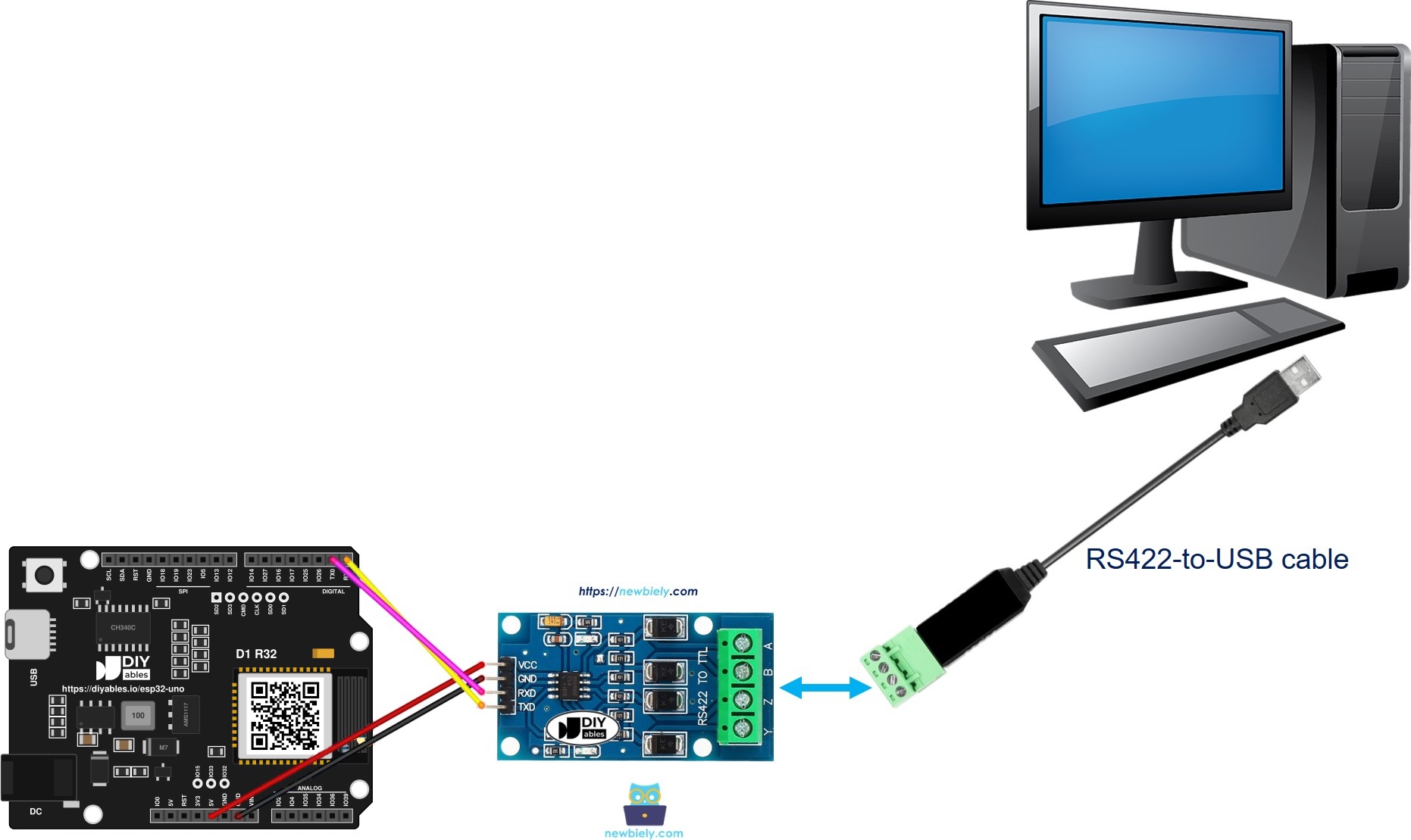
- Plug the module RS422 pins into your PC through an RS422 to USB cable, like this:
- Start the terminal on the COM port of your RS422 to USB cable. Choose 9600 baud and 8N1 (8 data bits, no parity, one stop bit).
- Type some text.
- Check the echo. Each character you type shows up again on the screen.
- Pro tip: Use short jumper wires first. When it works, move to a long twisted-pair cable and test again.
The terminal shows something like this:
Video Tutorial
See the ESP32 Uno build in action in the video below.
ESP32 Uno vs UNO R4 for This Project
By the end of this part, you know what changes when you move this RS422 project to the ESP32 Uno.
| Item | Arduino UNO R4 | ESP32 Uno |
|---|---|---|
| Logic voltage | 5V | 3.3V |
| Main serial pins | D0 and D1 | D0 (GPIO3) and D1 (GPIO1) |
| Second serial port | SoftwareSerial on D6 and D7 | Serial2 on D6 (GPIO27) and D7 (GPIO14) |
| Library | SoftwareSerial.h | none needed |
| Arduino IDE board | Arduino UNO R4 WiFi | ESP32 Dev Module |
| USB driver | none | CH340 |
The Uno header positions stay the same, so the same wiring works. Power the module from 3.3V, because the ESP32 Uno pins are not 5V tolerant.
Go Wireless: RS422 Data on Your Phone
By the end of this part, you have an idea how to see the RS422 data without a PC cable.
The ESP32 Uno has WiFi and Bluetooth. You can read bytes from an RS422 device and show them live on a web page. A web serial monitor works well: the ESP32 Uno sends each received line to your phone browser.
Troubleshooting
| Problem | Possible Cause | Solution |
|---|---|---|
| No COM port in Arduino IDE | CH340 driver missing or charge-only USB cable | Install the CH340 driver and use a data USB cable |
| Failed to connect or Waiting for download | Board is not in upload mode | Hold the BOOT button when the upload starts |
| Upload fails with Option 1 | Module is wired to D0 and D1, the upload pins | Unplug TXD and RXD during upload, or use Option 2 |
| Terminal stays empty | A/B and Y/Z pairs are crossed, or TXD and RXD are swapped | Join Y/Z to far-end A/B, and module RXD to the board TX pin |
| Garbled text | Speed or frame format differs from the sketch | Set the terminal to 9600 baud and 8N1 |
| Link fails on a long run | Plain cable, or run too long for the speed | Switch to twisted pair and use a lower baud rate |
| Board reboots or heats up | TXD sends 5V into a 3.3V input | Feed the module with 3.3V, or fit a level converter on TXD |
| Module has no power | VCC or GND wire is loose | Check the VCC and GND wires |
| Serial Monitor shows RS422 data mixed with logs | Option 1 shares UART0 with USB | Move to Option 2 and Serial2 |
FAQ
What is RS422 and why use it with the ESP32 Uno?
RS422 is a serial standard that sends data on differential wire pairs. It reaches far and ignores noise. The ESP32 Uno UART is TTL only, so a TTL to RS422 module makes the long link possible.
Is SoftwareSerial available for RS422 on the ESP32 Uno?
No, and it is not needed. This board already has spare hardware UARTs. Start Serial2 with Serial2.begin(9600, SERIAL_8N1, RX_GPIO, TX_GPIO) and pick your pins.
Should I power the module from 3.3V or 5V?
Use 3.3V. The module works at 3.3V, and then its TXD output is safe for the ESP32 Uno. At 5V you need a level converter on the TXD wire.
How far can RS422 go?
About 1200 meters at low baud rates such as 9600. Higher baud rates mean shorter cables. Use twisted pair for each wire pair.
RS422 or RS485, which one is better here?
RS422 uses one pair to send and one pair to receive, so it is full duplex. RS485 often uses a single shared pair, so the code must switch direction.
Why is the echo sketch so short?
The module handles all RS422 signals. The code only reads a byte and writes it back, like on any serial port.
Do I need an RS422 to USB cable?
No, but it helps. It lets your PC act as the other RS422 device, so you can test the echo with a terminal.
Why avoid D0 and D1 on the ESP32 Uno?
D0 (GPIO3) and D1 (GPIO1) are also the USB serial pins. The module can block uploads, and boot messages can leak onto the RS422 line. Serial2 on D6 and D7 avoids both problems.
Can I use an UNO shield with this project?
The Uno header positions match, so most shields fit. Check that the shield does not push 5V into the 3.3V pins, and that it does not use the pins you chose for the module.
Can I show the RS422 data on a web page with the ESP32 Uno?
Yes. The ESP32 Uno has WiFi and Bluetooth, so you can forward each received line to a web page or a phone app.
What if I run out of Uno header pins in this RS422 project?
The ESP32 Uno has a few extra holes near the power header: GPIO32 and GPIO33 (I/O, PWM, analog on ADC1, so they also work while WiFi is on) and GPIO15 (I/O, PWM, analog on ADC2). Solder pin headers on them, then type the GPIO number in your sketch. For a third serial line, GPIO32 or GPIO33 are the best choices. Two warnings: (1) GPIO15 and GPIO0 (the IO0 pin at the unused Uno NC position) are boot strapping pins, so a wrong connection can stop the board from booting or uploading code. Use GPIO32 and GPIO33 first. (2) Never use the six holes under the digital header (SD0-SD3, CMD, CLK = GPIO6-GPIO11). They are wired to the flash chip, and using them crashes the board.