
ESP32 UNO - Automated Light Control with Motion Sensor and LED Strip
Need lights that switch on when somebody steps into the room? Build an ESP32 Uno motion sensor LED strip controller: an HC-SR501 PIR detector watches the space, and a relay feeds 12V to the strip only while a person is there. The ESP32 Uno form board does the thinking, so this light automation runs with no switch and no app.
By the end, you can:
- Wire an HC-SR501 PIR motion sensor and a relay to the board
- Switch a 12V LED strip from a 3.3V logic pin through a relay
- Tune the PIR delay and range screws for quick testing
- Upload the automated light control sketch from Arduino IDE
Where this build fits well:
| Place | What Happens |
|---|---|
| Staircase | Each step glows as soon as a foot reaches the bottom stair |
| Bedroom floor | A dim strip under the bed lights the path for a night walk |
| Holiday tree | The tree lights only shine while guests stand close by |
Components You Need
Or you can buy the following kits:
| 1 | × | DIYables Sensor Kit (18 sensors/displays) |
Additionally, some of these links are for products from our own brand, DIYables .
How the Motion Sensor and LED Strip Work Together
After this part, you know the job of each block in the circuit.
| Part | Role in This Build |
|---|---|
| HC-SR501 PIR sensor | Senses the body heat of a moving person and raises its OUTPUT pin |
| ESP32 Uno | Reads the sensor pin and decides when the light goes on or off |
| Relay module | Acts as an electric switch in the 12V line, driven by one board pin |
| 12V adapter + DC jack | Gives the strip its own power, apart from the USB supply |
| 12V LED strip | The light you see |
Good to know: the board pins only give 3.3V and a few milliamps, far too little for a 12V strip, so the relay is not optional.
Each part has its own deep-dive page with pinout and basic code:
ESP32 Uno Pinout
On the ESP32 Uno form board, every printed Uno label (D3, D10, A0…) stands for a GPIO number, and the sketch must use that number. Look up D3 and D10 in the picture below first.

How to Connect
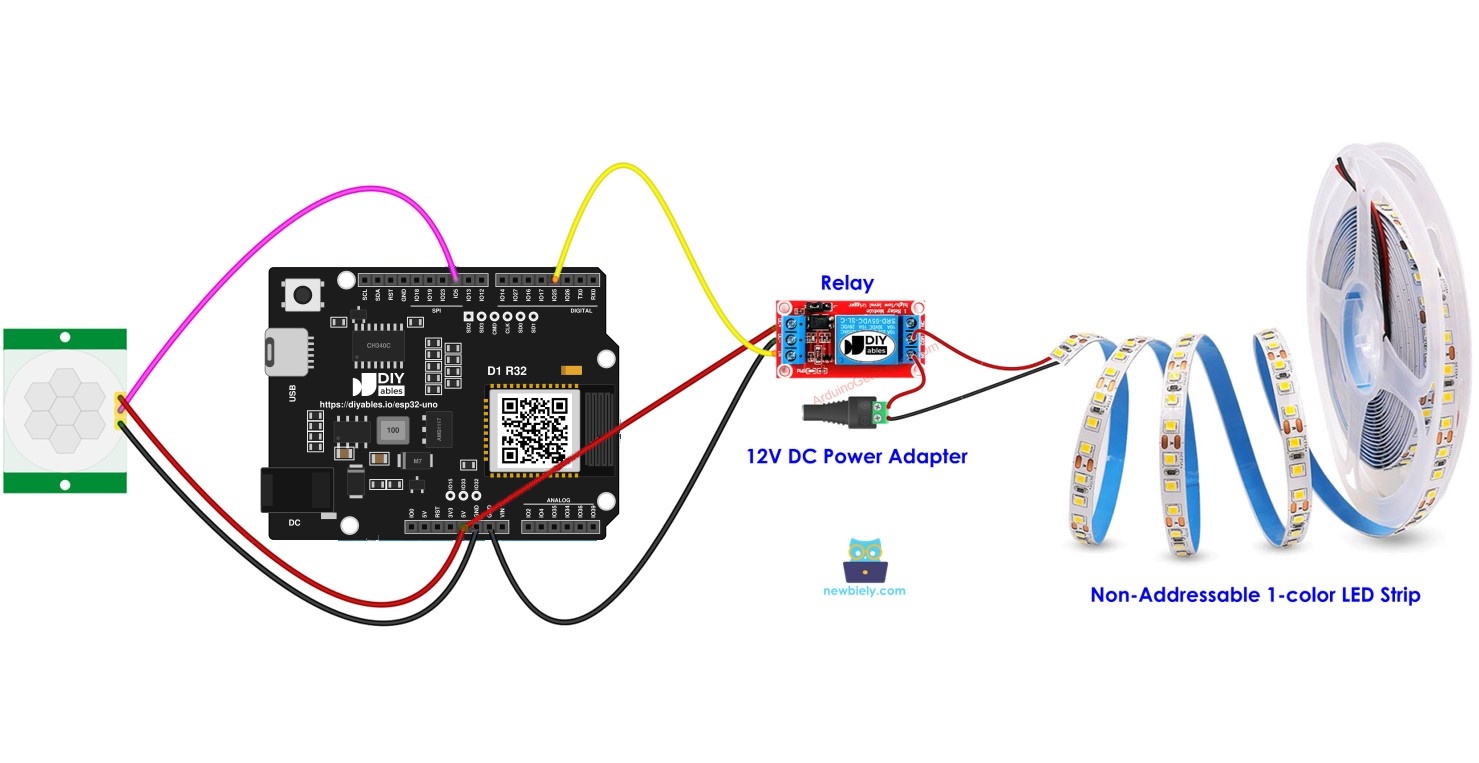
When this part is done, the sensor and relay are on the board, and the 12V loop is wired.
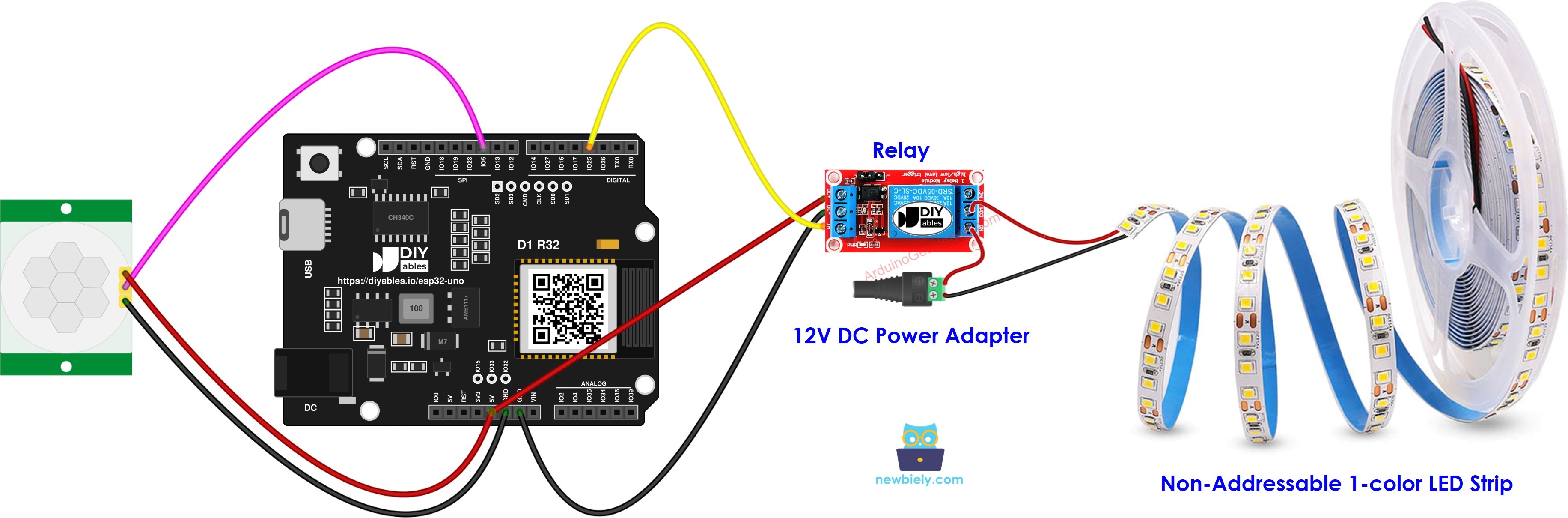
This image is created using Fritzing. Click to enlarge image
| Component Pin | ESP32 Uno Pin |
|---|---|
| Motion sensor VCC | 5V |
| Motion sensor GND | GND |
| Motion sensor OUTPUT | D10 (GPIO5) |
| Relay VCC | 5V |
| Relay GND | GND |
| Relay IN | D3 (GPIO25) |
WARNING
D10 (GPIO5) is a boot strapping pin on the ESP32 Uno. The chip checks its level right at power-on. The HC-SR501 rarely causes trouble here, but if the board will not start or will not take new code while the sensor is attached, pull the OUTPUT wire off D10 during the upload, then put it back.
For the 12V loop: run the positive lead from the DC power jack into the relay COM terminal, and from the relay NO terminal on to the positive pad of the strip. The negative lead of the jack goes straight to the negative pad of the strip.
Good to know: the HC-SR501 runs on 5V, yet its OUTPUT high level is about 3.3V, which suits ESP32 Uno inputs. These pins are NOT 5V tolerant, so never feed a real 5V signal into D10.
WARNING
The 12V leads belong on the relay screw block and nowhere else. A 12V wire touching any header pin destroys the ESP32 Uno at once.
Initial Setting
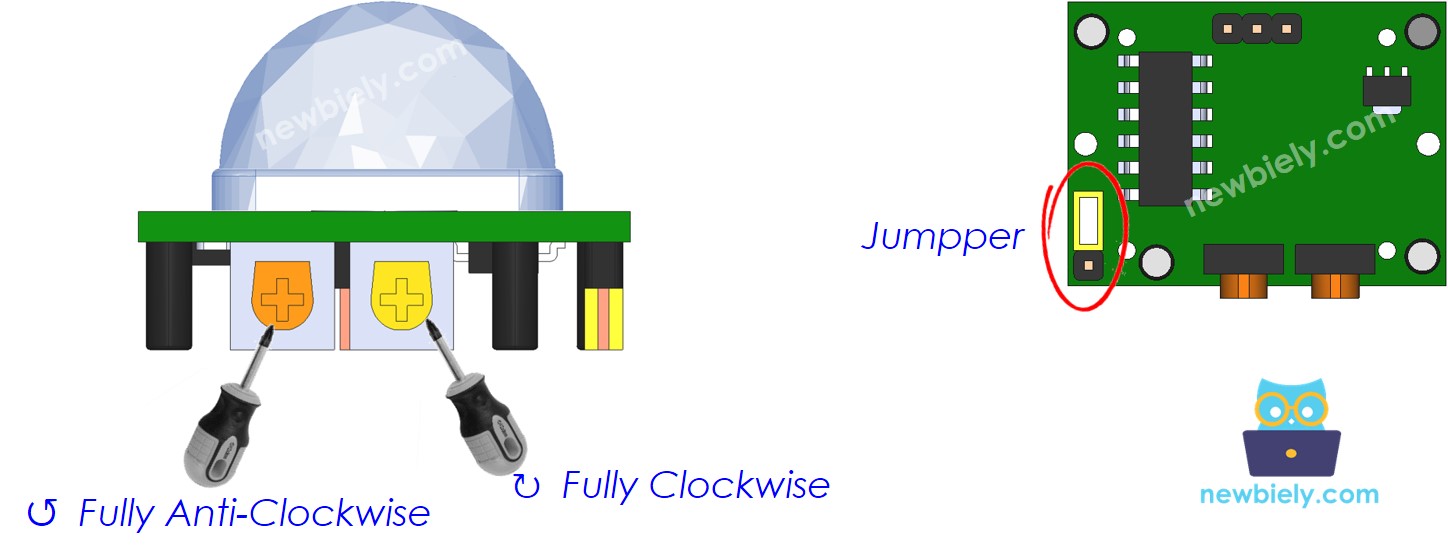
Set the PIR board once, so it reacts fast and the light goes off soon after you step away.
| Time Delay Adjuster | Screw it in anti-clockwise direction fully. |
| Detection Range Adjuster | Screw it in clockwise direction fully. |
| Repeat Trigger Selector | Put jumper as shown on the image. |
ESP32 Uno Code - Motion Sensor Switches the LED Strip
The sketch watches D10 (GPIO5) for a change of state and flips the relay on D3 (GPIO25) to match.
Upload and Test
- First time with this board? Set it up with ESP32 Uno - Getting Started before you continue.
- Build the circuit by following the wiring table above.
- Plug in the USB Type-C cable between the ESP32 Uno and your computer.
- Select the board in Arduino IDE: pick ESP32 Dev Module and the COM port of the board (CH340).
- Paste the sketch into a new Arduino IDE window.
- Press Upload and wait for "Done uploading".
- Connect the 12V adapter to the DC power jack.
- Give the sensor about a minute to settle after power-on.
- Walk in front of the sensor, then step out of its view.
- Watch the strip: it lights when you appear and goes dark a few seconds after you leave.
- Check the event log in the Serial Monitor set to 9600 baud.
- Pro tip: test with the 12V adapter unplugged first. You should hear the relay click on each "Motion detected!" line, which proves the logic side works before any high current flows.
Video Tutorial
See the ESP32 Uno build in action in the video below.
Code Explanation
| Code Part | What It Does |
|---|---|
| #define MOTION_SENSOR_PIN 5 | Sets D10 (GPIO5) as the sensor input |
| #define RELAY_PIN 25 | Sets D3 (GPIO25) as the relay output |
| prev_motion_state and motion_state | Hold the last and the new sensor reading |
| LOW to HIGH check | A person just came in, so the relay closes and the strip turns on |
| HIGH to LOW check | The PIR timer ran out, so the relay opens and the strip turns off |
Because the sketch reacts only to changes, the relay is switched once per event, not on every loop pass.
ESP32 Uno vs UNO R4 for This Project
Here is what changes when this build moves from the UNO R4 to the ESP32 Uno.
| Item | Arduino UNO R4 | ESP32 Uno |
|---|---|---|
| Logic voltage | 5V | 3.3V |
| Sensor pin in code | 10 | 5 (D10 is GPIO5) |
| Relay pin in code | 3 | 25 (D3 is GPIO25) |
| Boot strapping on sensor pin | No | Yes, D10 is GPIO5 |
| Arduino IDE board | Arduino UNO R4 WiFi | ESP32 Dev Module |
| WiFi and Bluetooth | WiFi on the R4 WiFi only | WiFi plus Bluetooth Classic and BLE |
The same wiring works as-is: only the two pin numbers in the sketch change. The 5V relay still switches from a 3.3V signal in most cases.
Go Wireless: Phone Switch for the Strip
This idea lets you light the strip from your phone, not only by walking past.
With WiFi on the ESP32 Uno, a web page can show a button for the relay on D3 (GPIO25). Use it as a manual override: force the light on for a party, or off while you sleep, and let the PIR take over again later. A Bluetooth app can do the same with no router at all.
Wrap-Up
You now have a hands-free light: the ESP32 Uno reads the HC-SR501, and the relay switches the 12V LED strip only when someone is near, so no power is wasted on an empty room. Reuse the circuit for steps, a bed frame or a tree, and tweak the PIR screws or the sketch to suit each spot.
Troubleshooting
| Problem | Possible Cause | Solution |
|---|---|---|
| No COM port appears | CH340 driver not installed or a charge-only cable | Install the CH340 driver and swap to a USB cable that carries data |
| Upload stops at "Waiting for download" | Board did not enter flash mode | Hold the BOOT button as the upload starts, then let go |
| Board does not boot or upload with the sensor attached | D10 (GPIO5) is a strapping pin and the sensor pulls it the wrong way | Unplug the sensor OUTPUT wire while uploading, or move it to another pin |
| Relay clicks yet the strip stays dark | Strip wired to NC, or adapter not powered | Use the NO terminal and check that the 12V adapter is in the wall |
| Relay never clicks | Relay IN not on D3 or relay VCC missing | Put IN on D3 (GPIO25), VCC on 5V and join the grounds |
| Strip turns on with nobody around | Heat sources or air flow in front of the PIR | Aim the sensor away from heaters, sunny windows and fans |
| Light stays on far too long | Time delay screw turned up | Turn the Time Delay Adjuster anti-clockwise |
| Odd symbols in the Serial Monitor | Baud rate mismatch | Pick 9600 baud in the Serial Monitor |
FAQ
Why do I need a relay between the ESP32 Uno and a 12V LED strip?
A board pin gives 3.3V and only a small current. A 12V strip needs far more voltage and current. The relay lets that tiny 3.3V signal close a separate 12V circuit.
Can I use a MOSFET in place of the relay?
Yes. A logic-level N-channel MOSFET (one that fully turns on at 3.3V gate voltage) works and runs silently. It also lets you dim the strip with PWM. A relay is simpler for beginners and only gives on and off.
How far away can the HC-SR501 see a person?
Up to about 7 meters with the range screw turned fully clockwise. It covers a cone of roughly 110 degrees. Turn the screw the other way to shrink the area.
How can the strip stay lit for a few minutes after I leave?
Give the Time Delay Adjuster a clockwise turn. The PIR then holds its OUTPUT HIGH for longer, up to a few minutes. Since the code just mirrors the sensor, the light lasts exactly as long.
Can one board run two PIR sensors and two strips?
Yes. Add a second sensor input and a second relay output, and copy the edge-check code for the new pair. Avoid A2 to A5 for the relays, because those pins are input only.
Why is the pin number 5 in code when I wired the sensor to D10?
On the ESP32 Uno, the D10 label sits on GPIO5, and the Arduino code uses GPIO numbers. In the same way, D3 is GPIO25, so the relay pin is 25.
Does a 5V relay module switch from the 3.3V ESP32 Uno pin?
Most 5V relay modules with an opto or transistor input switch fine from 3.3V on IN. Feed its VCC from the board 5V header. If yours does not click, pick a module rated for 3.3V input.
Do I need the CH340 driver for this board?
On many computers, yes. The ESP32 Uno uses a CH340 USB-to-serial chip. Windows often installs it by itself, but if no COM port shows up, install the driver by hand.
What if this light project needs more pins than the Uno headers give?
The ESP32 Uno has a few extra holes near the power header: GPIO32 and GPIO33 (I/O, PWM, analog on ADC1, so they also work while WiFi is on) and GPIO15 (I/O, PWM, analog on ADC2). Add a pin header strip there by soldering, then put the bare GPIO number in your sketch. For a second PIR or a second relay, GPIO32 or GPIO33 is the best pick. Two warnings: GPIO15 and GPIO0 (the IO0 pin at the unused Uno NC position) are boot strapping pins, and a wrong connection can stop the board from booting or uploading, so use GPIO32/33 first. Also, never use the six holes under the digital header (SD0 to SD3, CMD, CLK, which are GPIO6 to GPIO11). They connect to the flash chip, and using them crashes the board.
Can I see on my phone when motion happens?
Yes. The ESP32 Uno has built-in WiFi and Bluetooth. Send a message to a web page or a Bluetooth app each time the sketch prints "Motion detected!". See the Go Wireless part above for ready-made app pages.