
ESP32 UNO - Water/Liquid Valve
Need to start and stop a water flow from code? An ESP32 Uno water valve setup does it with one relay and a 12V solenoid valve. Wire the liquid valve to the ESP32 Uno form board, upload a short sketch, and water, beer or oil flows on your command.
By the end, you can:
- Connect a 12V solenoid valve through a relay to the ESP32 Uno
- Open and close the valve with digitalWrite() in Arduino IDE
- Swap the relay for a silent MOSFET module
- Protect the board from the valve coil with a flyback diode
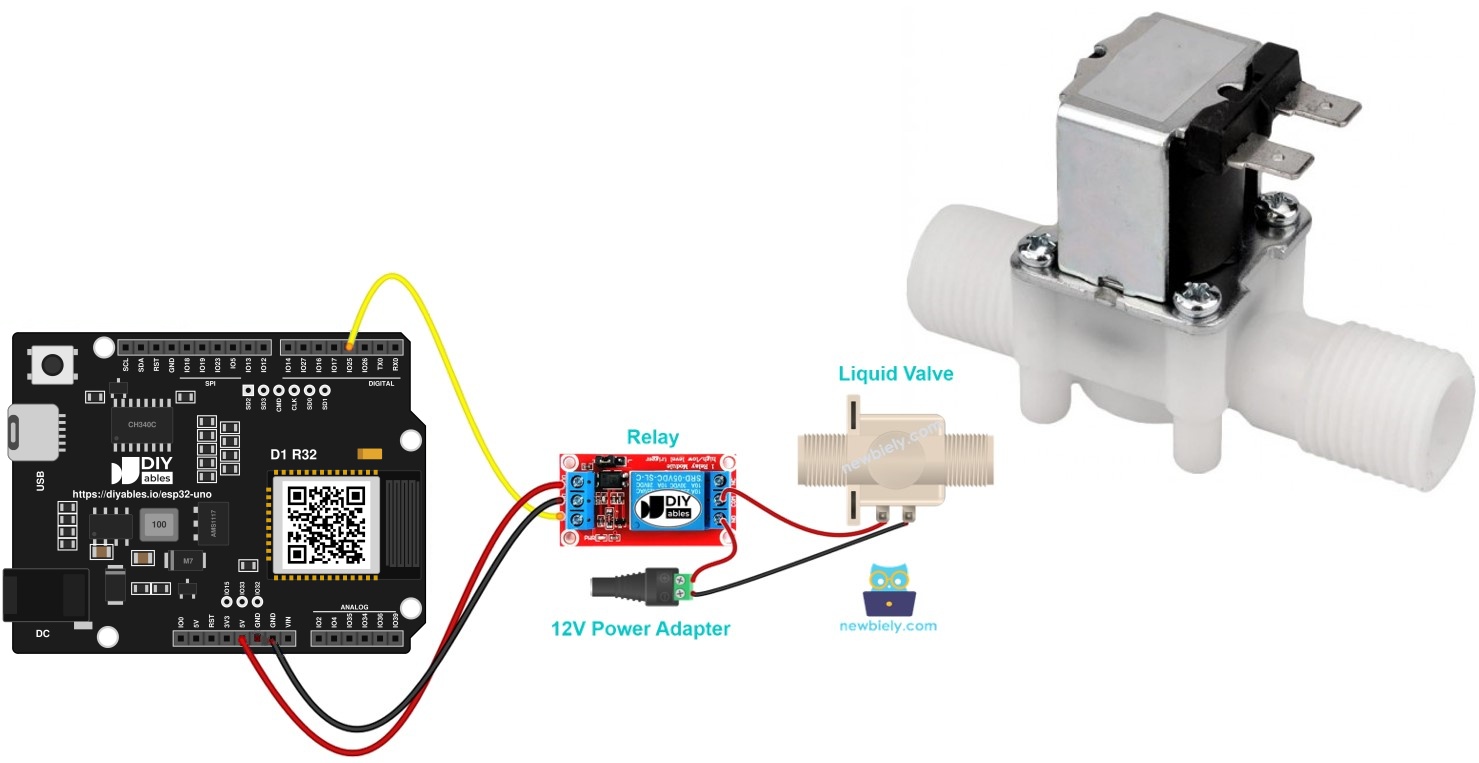
Components You Need
Or you can buy the following kits:
| 1 | × | DIYables Sensor Kit (18 sensors/displays) |
Additionally, some of these links are for products from our own brand, DIYables .
Overview of the Liquid Solenoid Valve
After this part, you know the valve wires and what happens when you power them.
Valve Pinout
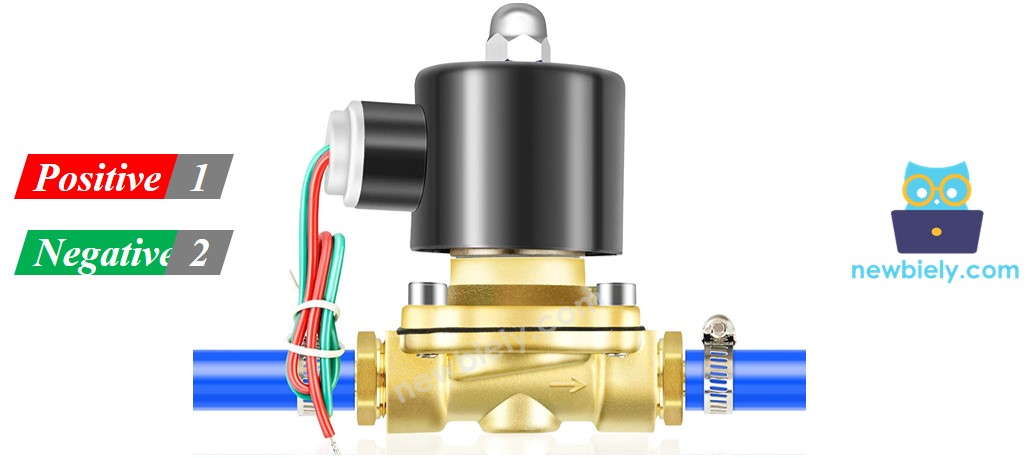
The valve has two wires only.
| Valve Wire | Goes To |
|---|---|
| Positive (+), usually red | 12V of the DC power supply |
| Negative (-), black or another color | GND of the same DC power supply |
How the Valve Works
At rest, the valve is shut. Apply 12V DC to the two wires and the coil pulls it open, so liquid can pass. Remove the 12V and it closes again.
※ NOTE THAT:
Some valves hold a rubber gasket and need a small minimum pressure before they open. The moving liquid often gives that pressure. Many valves also pass liquid in one direction only, so look for the arrow on the valve body.
Why You Need a Relay
The valve wants 12V and a lot of current. An ESP32 Uno pin gives 3.3V and only a few milliamps. So the board flips a relay, and the relay connects the 12V supply to the valve.
New to relays? Read the ESP32 Uno - Relay tutorial for the pins, the trigger modes and the basic code.
A MOSFET module is a second way to switch the valve. Its pins are explained in the ESP32 Uno - MOSFET Module tutorial.
Relay or MOSFET Module?
| Feature | Relay | MOSFET Module |
|---|---|---|
| What it does to the valve | opens or closes | opens or closes (never use PWM on a valve) |
| Noise | clicks each time | silent |
| Speed | a few milliseconds | faster |
| Wear | contacts age after many cycles | nothing moves inside |
| Valve type | AC or DC | DC only |
| Supply needed | any value within the relay rating | about 6V or more |
| Isolation | coil apart from contacts | PC817 optocoupler |
| Best for | AC valves | 12V DC valves with frequent cycles |
Good to know: a valve needs full power or none, so the MOSFET module adds no extra control here. Choose it for quiet and long life. Choose the relay for an AC valve.
ESP32 Uno Pinout
Every Uno label on the ESP32 Uno form board points to one GPIO number, and your sketch uses that number. Find D3 and D9 on the diagram before you place any wire.

How to Connect
When you finish this part, the relay input is wired to the ESP32 Uno and the valve has its own 12V loop.
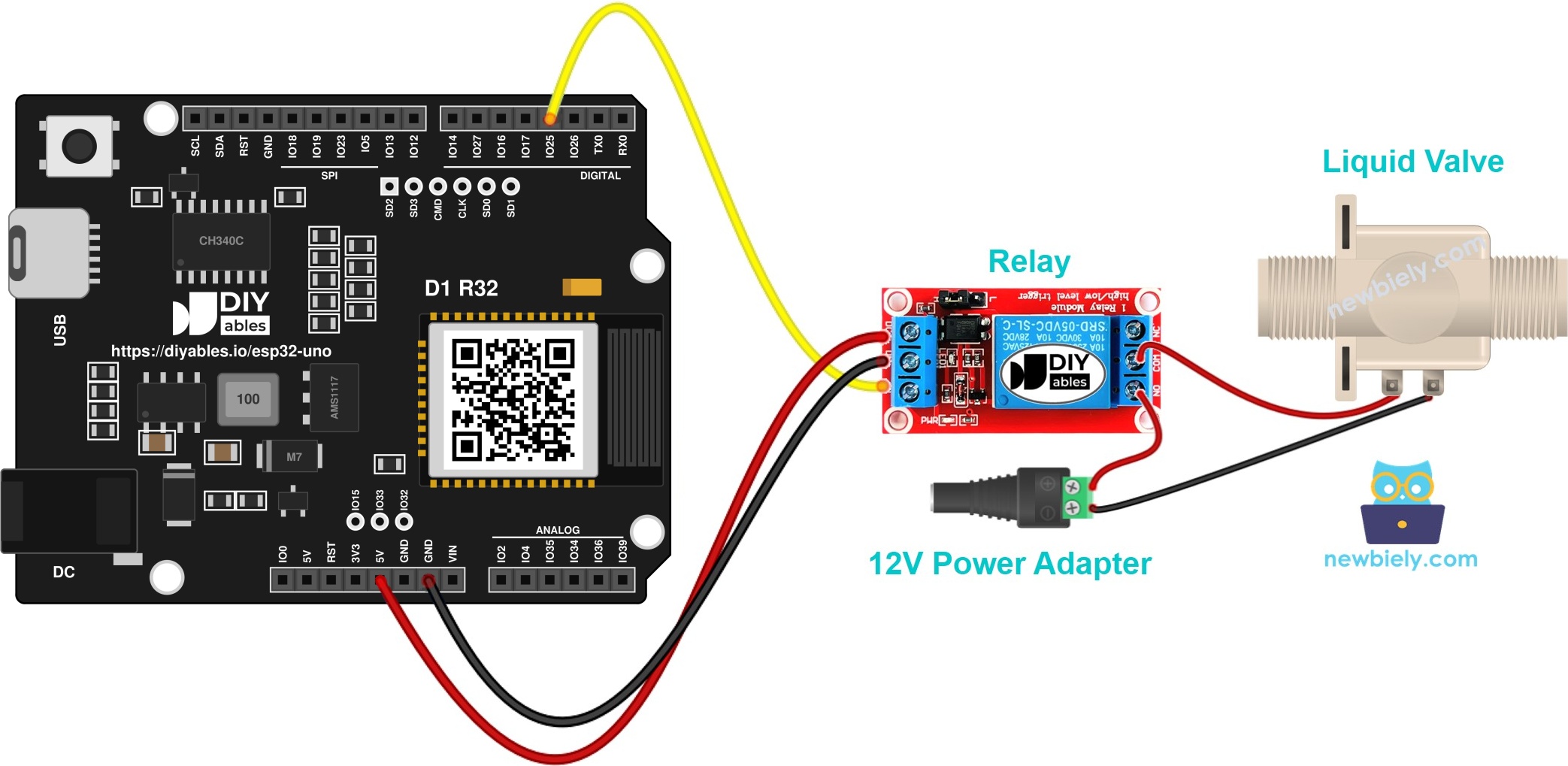
This image is created using Fritzing. Click to enlarge image
| Relay Pin | ESP32 Uno Pin |
|---|---|
| VCC | 5V |
| GND | GND |
| IN | D3 (GPIO25) |
The valve never touches the board. It sits in its own loop with the 12V adapter and the relay contacts (COM and NO).
Good to know: ESP32 Uno pins use 3.3V logic and are NOT 5V tolerant. The signal here only leaves the board, so it is safe. Most relay modules with a transistor or optocoupler input accept 3.3V as HIGH. If yours stays silent, pick a module made for 3.3V logic.
ESP32 Uno Code
This sketch opens the valve for 5 seconds, closes it for 5 seconds, and repeats without end.
Upload and Test
- First time with this board? Set it up with ESP32 Uno - Getting Started before you continue.
- Build the circuit by following the wiring table above.
- Plug in the USB Type-C cable between the ESP32 Uno and your computer.
- Select the board in Arduino IDE: pick ESP32 Dev Module and the COM port of the board (CH340).
- Copy the code above into the Arduino IDE.
- Press Upload to send the sketch to the board.
- Power the valve by connecting the 12V adapter.
- Watch the flow: water runs for 5 seconds, then stops for 5 seconds.
- Pro tip: do the first test over a sink or a bucket, with the board far from any splash.
Video Tutorial
See the ESP32 Uno build in action in the video below.
How the Code Works
| Code Part | What It Does |
|---|---|
| #define RELAY_PIN 25 | names the pin D3 (GPIO25) that feeds the relay IN |
| pinMode(RELAY_PIN, OUTPUT) | makes the pin an output in setup() |
| digitalWrite(RELAY_PIN, HIGH) | closes the relay, so the valve opens |
| delay(5000) | waits 5 seconds before the next step |
| digitalWrite(RELAY_PIN, LOW) | opens the relay, so the valve closes |
The result is a valve that cycles open and closed every 5 seconds. The comments inside the code give more detail.
ESP32 Uno vs UNO R4 for This Project
Moving this valve project from the UNO R4 to the ESP32 Uno changes only the pin numbers and the logic voltage.
| Item | Arduino UNO R4 | ESP32 Uno |
|---|---|---|
| Logic voltage | 5V | 3.3V |
| Relay IN pin | D3 (pin 3) | D3 (GPIO25) |
| MOSFET PWM pin | D9 (pin 9) | D9 (GPIO13) |
| Arduino IDE board | Arduino UNO R4 WiFi | ESP32 Dev Module |
| Extra library | none | none |
| Wireless | WiFi on the WiFi model only | WiFi and Bluetooth built in |
The same wiring works as it is. Only the numbers in the sketch change, from 3 and 9 to 25 and 13. Check that your relay module accepts a 3.3V signal.
Quiet Option: MOSFET Module Instead of the Relay
When you finish this part, the same valve opens and closes with no click.
Each wiring has its own sketch: the relay sits on D3 (GPIO25) and the MOSFET module sits on D9 (GPIO13).
MOSFET Wiring
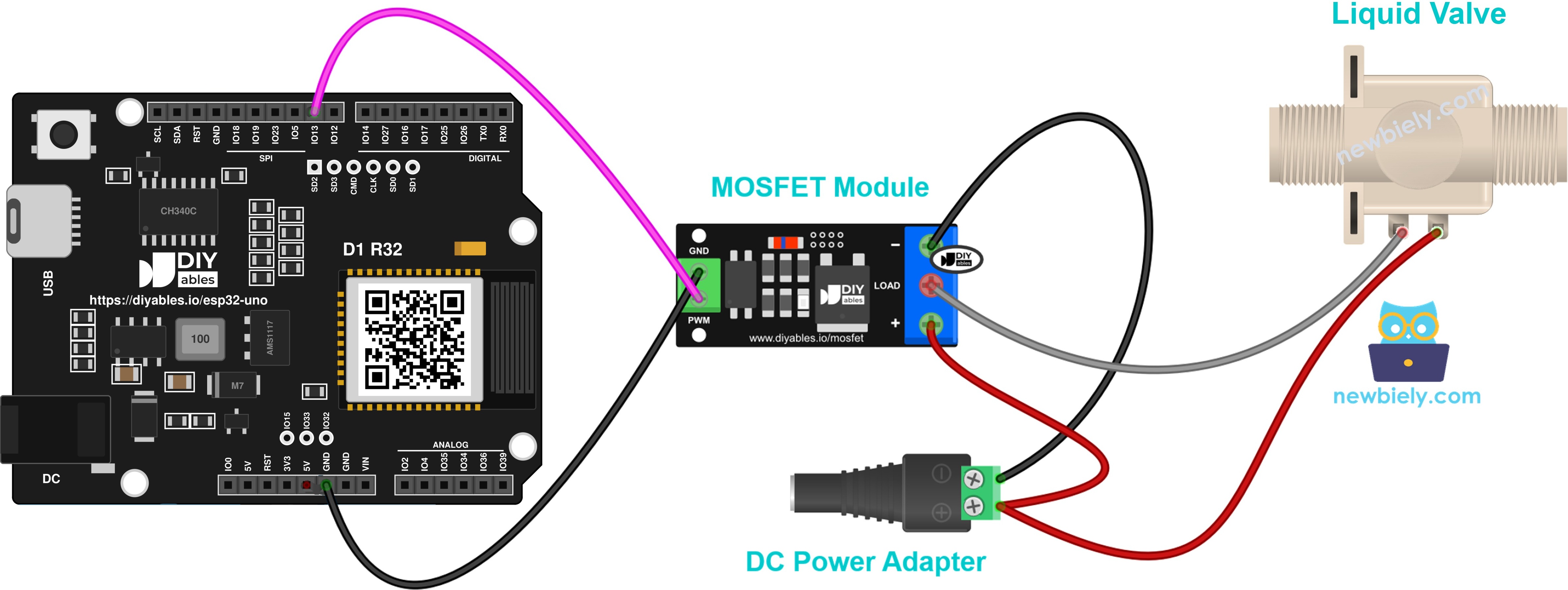
This image is created using Fritzing. Click to enlarge image
| From | To |
|---|---|
| ESP32 Uno D9 (GPIO13) | MOSFET module PWM |
| ESP32 Uno GND | MOSFET module GND pin |
| 12V adapter + | MOSFET module + |
| Valve + (red) | MOSFET module + (joined with the adapter +) |
| Valve - | MOSFET module LOAD |
| 12V adapter - | MOSFET module - |
The valve is a coil, so a flyback diode is a must. Place a 1N4007 or 1N5819 diode over the two valve wires. The striped end (cathode) faces the + wire.
MOSFET Code
HIGH opens the valve and LOW closes it, just like the relay sketch. It opens for 5 seconds, then closes for 5 seconds.
Never send PWM to a solenoid valve. So the fade sketch from the MOSFET module page is not used here.
MOSFET Steps
- Build the MOSFET circuit from the diagram above.
- Connect the ESP32 Uno to your computer with the USB Type-C cable.
- Pick ESP32 Dev Module and the COM port, as in the relay steps.
- Copy the MOSFET code, then click Upload.
- Power the 12V adapter and listen: the valve now works without a click.
※ NOTE THAT:
This module suits DC valves only, and it needs a supply of about 6V or more. With an AC valve, stay with the relay.
Go Wireless: Open the Valve from Your Phone
After this part, you know how to switch the valve without touching the board.
The ESP32 Uno has WiFi and Bluetooth built in. Put the valve on a web page or a phone app, and you can start a watering cycle from the sofa. A button on the screen sets the relay pin HIGH or LOW, so you do not need to change the wiring.
Troubleshooting
| Problem | Possible Cause | Solution |
|---|---|---|
| No COM port appears | CH340 driver missing or a charge-only cable | Install the CH340 driver and use a USB cable that carries data |
| Failed to connect or Waiting for download | the board is not in upload mode | Hold the BOOT button while the upload starts |
| Relay does not click | wrong pin or no power on the relay | Check IN on D3 (GPIO25), VCC on 5V and GND on GND |
| Relay clicks but the valve stays shut | no 12V or valve on the wrong terminals | Check the adapter and the DC jack, and wire the valve to COM and NO |
| Valve works in reverse | NC terminal used or a LOW level trigger relay | Move the wire to NO, or swap HIGH and LOW in the code |
| Valve hums but no water flows | low pressure or flow against the arrow | Raise the tank or add pressure, and follow the arrow on the valve |
| ESP32 Uno restarts at each switch | spikes from the valve coil | Fit a diode across the valve and route the 12V cables away from the board |
| MOSFET valve never opens | supply below 6V or the LOAD wire on the wrong side | Use a 12V supply and check that the valve - goes to LOAD |
| Water drips from a pipe joint | fitting not tight | Seal the thread with tape and keep the board and relay away from the water |
FAQ
Can the ESP32 Uno drive the solenoid valve directly?
No. The valve needs 12V and far more current than a pin can give. Always use a relay or a MOSFET module with a separate 12V adapter. A valve wired straight to a pin can damage the ESP32 Uno.
Does a 5V relay module work with a 3.3V pin?
Most do, because their input uses a transistor or an optocoupler. Power the module from 5V and connect IN to D3 (GPIO25). If the click is weak or missing, use a relay module made for 3.3V logic.
Why does the relay click but no water comes out?
A valve with a gasket may not lift without some line pressure. Confirm the water moves along the printed arrow, and that your 12V adapter can supply the coil current.
Is a flyback diode really needed?
Yes, it is a good habit. When the coil is switched off, it throws a short voltage spike. A 1N4007 or 1N5819 diode across the valve wires, cathode to the + side, protects the switch and cuts noise. The MOSFET module needs it most.
Can I control the valve with PWM to slow the flow?
No. A solenoid valve has two states, open and closed. PWM makes it buzz and heat up. For a variable flow, use a motorized valve or a pump.
Which valve type goes with which switch?
Use the relay for an AC valve or any valve within the relay rating. Pick the MOSFET module for a 12V DC valve that cycles a lot or must stay quiet.
How do I run the valve on a timer in my own sketch?
Replace the two delay(5000) calls with the times you want, in milliseconds. For long times, use millis() so the board can do other work while the valve waits.
Are the ESP32 Uno pins safe for a 5V signal?
No. They are not 5V tolerant, so a 5V signal into a pin can damage the board. In this project the signal only goes out, so you do not need a level shifter.
What if my project needs more pins than the Uno headers give?
The ESP32 Uno has a few extra holes near the power header: GPIO32 and GPIO33 (I/O, PWM, analog on ADC1, so they also work while WiFi is on) and GPIO15 (I/O, PWM, analog on ADC2). Solder pin headers on them, then type the GPIO number in your sketch. For more valves, GPIO32 and GPIO33 are good first choices. Two warnings. First, GPIO15 and GPIO0 (the IO0 pin at the unused Uno NC position) are boot strapping pins, so a wrong connection can stop the board from booting or uploading code. Use GPIO32 and GPIO33 first. Second, never use the six holes under the digital header (SD0 to SD3, CMD, CLK = GPIO6 to GPIO11). They connect to the flash chip, and using them crashes the board.
Can I use the UNO R4 sketch on the ESP32 Uno?
Yes, the program flow stays as it was. Only two numbers differ: 3 turns into 25 and 9 turns into 13.
Can I control the valve over WiFi with the ESP32 Uno?
Yes. The ESP32 Uno has WiFi and Bluetooth, so a web page or a phone app can set the relay pin HIGH or LOW. See the Go Wireless section for ready tutorials.