
ESP32 UNO - Ultrasonic Sensor - Servo Motor
Want a servo that turns by itself when something comes near? Connect an HC-SR04 ultrasonic sensor and a servo to the ESP32 Uno form board, and the servo arm follows your hand distance. Use it as a touchless lid, a small gate or a simple robot reaction.
By the end, you can:
- Connect the HC-SR04 and the servo to the Uno headers
- Make the 5V ECHO signal safe for a 3.3V pin
- Measure distance in centimeters with pulseIn()
- Move a servo with the ESP32Servo library at a distance limit you choose
Components You Need
Or you can buy the following kits:
| 1 | × | DIYables Sensor Kit (18 sensors/displays) |
Additionally, some of these links are for products from our own brand, DIYables .
Buy Note: For controlling multiple servo motors, use the PCA9685 16 Channel PWM Servo Driver Module to save MCU pins and simplify wiring.
How the Sensor and the Servo Work Together
By the end of this part, you know what each piece does in this project.
| Part | Role in This Project |
|---|---|
| Ultrasonic sensor | Sends a sound burst and times the echo to find the distance |
| Servo motor | Turns its arm to an angle you set from 0 to 180 degrees |
| ESP32 Uno | Reads the distance and picks the servo angle |
| Threshold | 50 cm is the limit between near and far |
The rule is simple. Closer than 50 cm, the arm goes to 90 degrees. Farther than 50 cm, the arm goes back to 0 degrees.
New to either part? Try it on its own first:
ESP32 Uno Pinout
Every Uno header pin on the ESP32 Uno form board has its own GPIO number, and the code uses that number. Look at the diagram first, so each wire lands on the right pin.

How to Connect
By the end of this part, the sensor and the servo are wired and ready.
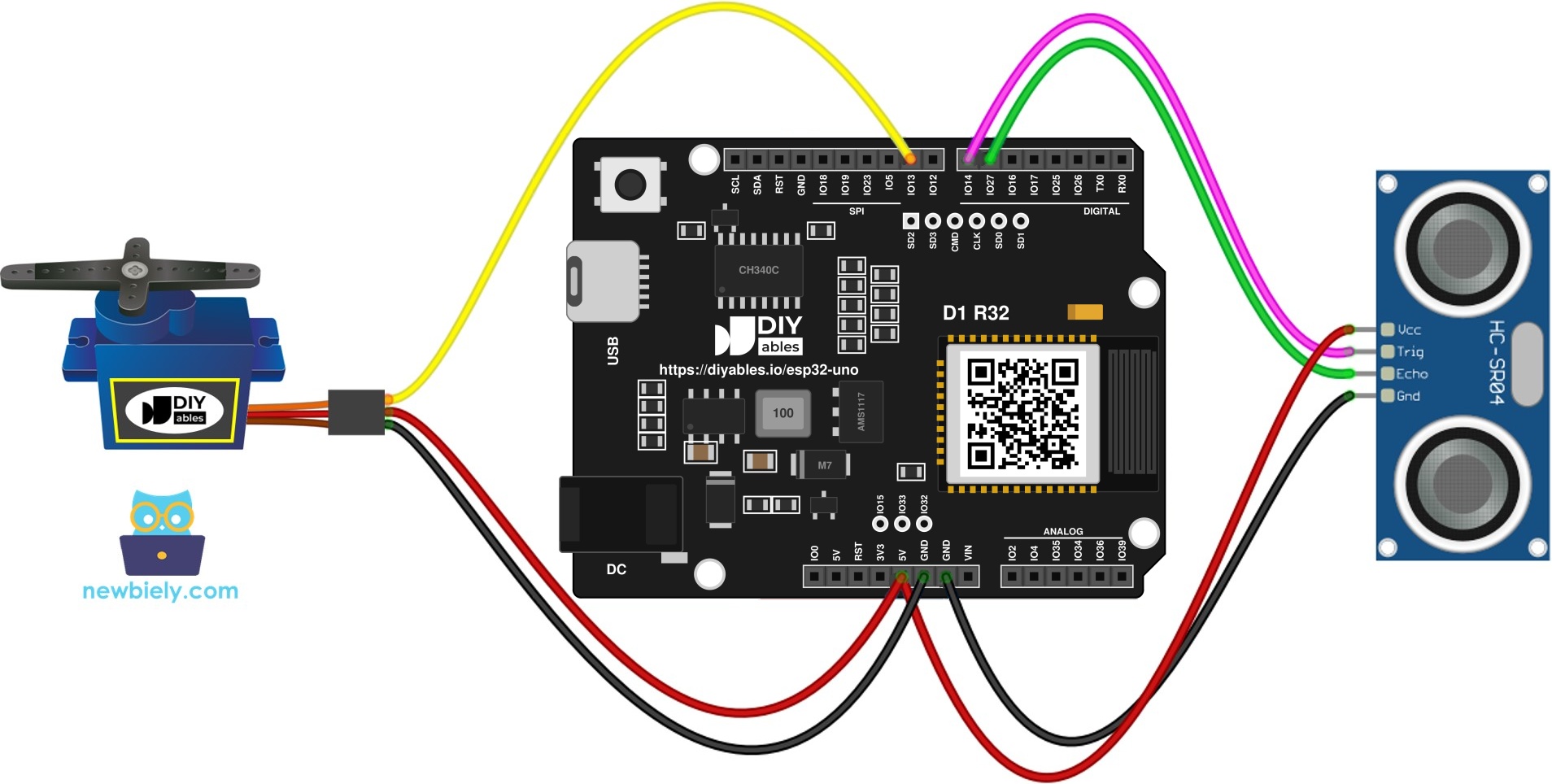
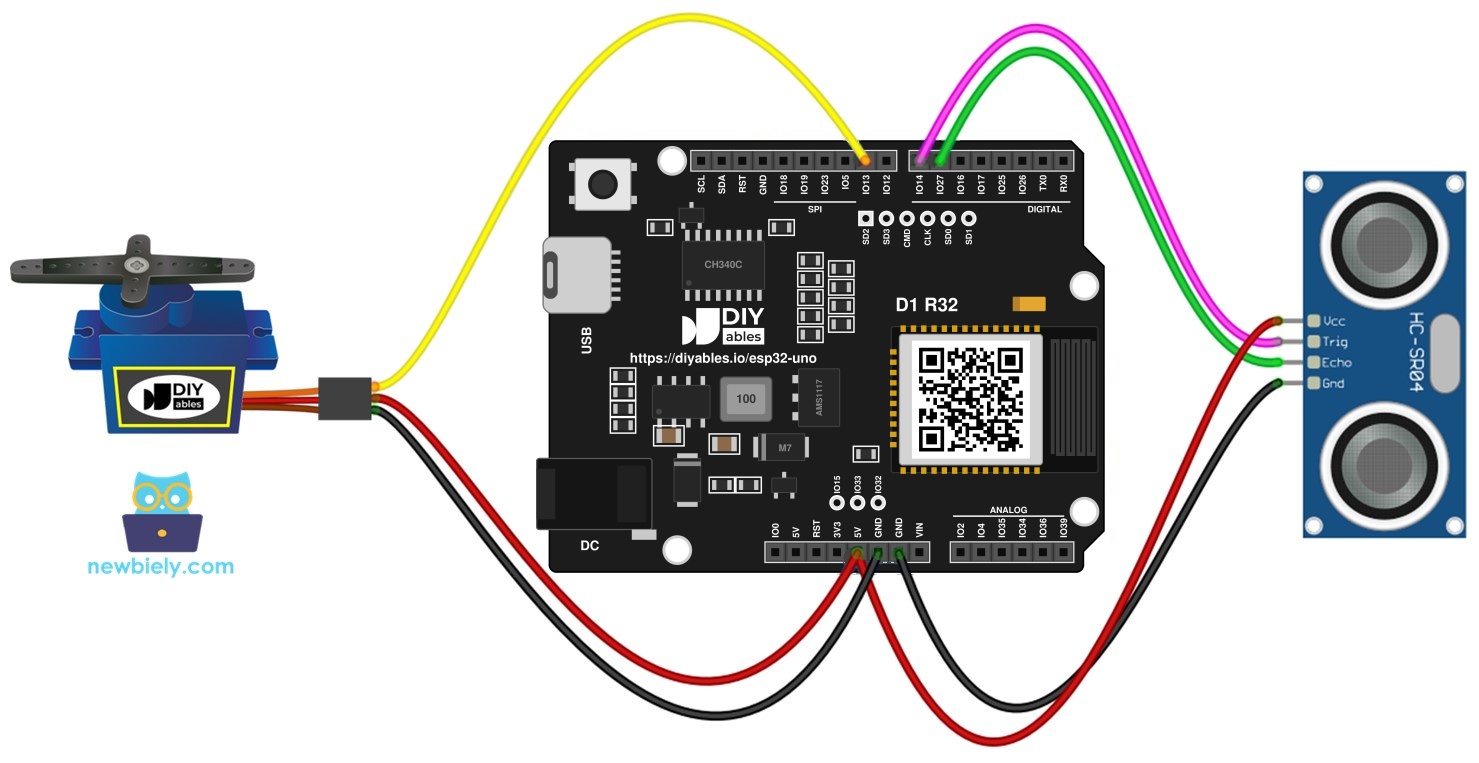
This image is created using Fritzing. Click to enlarge image
※ NOTE THAT:
The wiring diagram may not show the correct wiring for the ESP32 Uno. The HC-SR04 ECHO pin sends a 5V signal, and ESP32 Uno pins are 3.3V only. The picture shows ECHO wired straight to the board. On the ESP32 Uno, put a voltage divider or a level converter on ECHO, as this page shows. We will update the diagram soon. Until then, follow the wiring table and the text on this page, not the picture.
| Component Pin | ESP32 Uno Pin |
|---|---|
| Sensor VCC pin | 5V |
| Sensor TRIG pin | D7 (GPIO14) |
| Sensor ECHO pin (via level converter) | D6 (GPIO27) |
| Sensor GND pin | GND |
| Servo VCC (red) | 5V |
| Servo ground wire (brown or black) | GND |
| Servo control wire (orange or yellow) | D9 (GPIO13) |
WARNING
This sensor is a 5V part, so ECHO outputs 5V. The pins of this board cannot take 5V. Place a level converter in the ECHO line, or build a divider with 1 kΩ and 2 kΩ resistors. Another fix is a 3.3V sensor model like the HC-SR04P. Leave the TRIG wire as it is.
Good to know: The servo is powered by 5V, but the control wire only carries a 3.3V signal out of the board. Most hobby servos accept this.
Sketch: Distance Decides the Servo Angle
By the end of this part, you have a sketch that moves the servo by distance.
| Code Part | What It Does |
|---|---|
| #include | Loads the servo library made for the ESP32 Uno |
| TRIG_PIN, ECHO_PIN, SERVO_PIN | Hold the GPIO numbers 14, 27 and 13 |
| pulseIn(ECHO_PIN, HIGH) | Measures the echo time in microseconds |
| 0.017 * duration_us | Turns the time into centimeters |
| servo.write(90) or servo.write(0) | Sets the arm angle from the 50 cm check |
The Serial Monitor prints the distance twice per second while the servo follows it.
Upload and Test
- First time with this board? Set it up with ESP32 Uno - Getting Started before you continue.
- Build the circuit by following the wiring table above.
- Plug in the USB Type-C cable between the ESP32 Uno and your computer.
- Select the board in Arduino IDE: pick ESP32 Dev Module and the COM port of the board (CH340).
- Add the servo library. In the Library Manager, look up ESP32Servo and install the version from Kevin Harrington.
- Paste the sketch into a new Arduino IDE window.
- Click Upload to send the code to the board.
- Start the Serial Monitor and set it to 9600 baud.
- Move your hand toward the sensor and away from it. Watch the servo arm swing between 0 and 90 degrees.
- Pro tip: Tape a paper flag to the servo arm. The turn is then easy to see from across the room.
※ NOTE THAT:
This code is for learning. A single bad echo can make the arm twitch, because raw readings are noisy. If you want steady values, read how to filter noise for ultrasonic sensor.
Video Tutorial
See the ESP32 Uno build in action in the video below.
ESP32 Uno vs UNO R4 for This Project
By the end of this part, you know what changes when you move this project from the UNO R4 to the ESP32 Uno.
| Item | Arduino UNO R4 | ESP32 Uno |
|---|---|---|
| Logic voltage | 5V | 3.3V |
| TRIG pin | D7 | D7 (GPIO14) |
| ECHO pin | D6 | D6 (GPIO27) |
| Servo pin | D9 | D9 (GPIO13) |
| Servo library | Servo.h | ESP32Servo.h |
| Arduino IDE board | Arduino UNO R4 WiFi | ESP32 Dev Module |
The wiring uses the same header positions. The one extra part is the level converter on the ECHO wire, because the sensor sends 5V. In the code, write the GPIO numbers instead of the Uno pin numbers.
Go Wireless: Control the Servo From Your Phone
By the end of this part, you know how to move the servo over WiFi or Bluetooth.
The ESP32 Uno has WiFi and Bluetooth. You can show the measured distance on a phone, or let a phone set the servo angle when no object is near. This turns the simple distance trigger into a remote control.
Try These Next
- Change DISTANCE_THRESHOLD to 20 for a short-range trigger.
- Make the angle follow the distance with map() instead of a fixed 90 degrees.
- Add a second servo for a two-door gate.
- Add the noise filter to stop the arm from jumping.
Troubleshooting
| Problem | Possible Cause | Solution |
|---|---|---|
| No COM port shows up in Arduino IDE | CH340 driver missing or a charge-only USB cable | Install the CH340 driver and use a data USB cable |
| Failed to connect or Waiting for download | The board is not in upload mode | Hold the BOOT button while the upload starts |
| Compile error "Servo.h - No such file" | The AVR Servo library is not for this board | Install ESP32Servo and use #include |
| Distance is always 0 cm | No echo, wrong wiring or no power | Check VCC on 5V, TRIG on D7 and ECHO on D6 through the level converter |
| Readings jump around | Echo noise, or a soft target that swallows the sound | Point at a flat hard surface and filter the readings |
| Servo does not move | Wrong wiring or no power | Check red on 5V, brown on GND and the signal wire on D9 |
| Servo shakes or the board restarts | USB cannot supply the servo current | Feed the servo from a separate 5V source and tie the grounds together |
| ECHO wire without a level converter | A 5V signal on a 3.3V pin can damage the board | Add a level converter or a voltage divider |
| Garbled text on screen | Baud rate does not match the sketch | Choose 9600 in the monitor drop-down |
FAQ
How does the HC-SR04 measure distance?
It sends a short ultrasonic burst and waits for the echo. The ECHO pin stays HIGH for the round trip time. The code turns that time into centimeters with 0.017 multiplied by the microseconds.
What range does the HC-SR04 cover?
It works from about 2 cm to 400 cm. Flat, hard objects facing the sensor give the best readings. Soft or angled objects can give wrong values.
Why does the code use 14, 27 and 13 instead of 7, 6 and 9?
The board labels are Uno header names, but the code needs GPIO numbers. So TRIG is GPIO14 (D7), ECHO is GPIO27 (D6), and the servo is GPIO13 (D9).
Can I connect the ECHO pin straight to the ESP32 Uno?
No. The sensor sends 5V on ECHO, and ESP32 Uno pins are not 5V tolerant. Fit a converter or a resistor divider. A 3.3V sensor also solves it.
Why use ESP32Servo.h and not Servo.h?
The old Servo library was written for AVR chips. ESP32Servo by Kevin Harrington has the same attach() and write() functions. Only the include line changes.
Is USB power enough for the servo and the sensor?
A small servo like the SG90 and the sensor can run from the 5V pin on USB power. A bigger servo needs its own 5V supply. Connect its ground to the board ground.
Where do I set a different trigger distance or servo angle?
Change DISTANCE_THRESHOLD for the trigger distance. Change the numbers in servo.write(90) and servo.write(0) for the two angles, from 0 to 180.
Can I use an Uno shield with the ESP32 Uno?
The header has the Uno shape, so many shields fit. But the logic is 3.3V and the pins map to different GPIOs. Check the shield before you use it.
Can I see the distance on a web page with the ESP32 Uno?
Yes. The ESP32 Uno has WiFi and Bluetooth. Use the web monitor or plotter tutorials to show the distance on your phone.
What if I run out of header pins for this project?
The ESP32 Uno has a few extra holes near the power header: GPIO32 and GPIO33 (I/O, PWM, analog on ADC1, so they also work while WiFi is on) and GPIO15 (I/O, PWM, analog on ADC2). Add pin headers by soldering, then type the GPIO number in your sketch. For a second servo, GPIO32 or GPIO33 work well. Two warnings. First, GPIO15 and GPIO0 (the IO0 pin at the unused Uno NC position) are boot strapping pins, and a wrong connection can stop the board from booting or uploading code, so use GPIO32 and GPIO33 first. Second, never use the six holes under the digital header (SD0 to SD3, CMD, CLK = GPIO6 to GPIO11). They connect to the flash chip, and using them crashes the board.