
ESP32 UNO - Light Sensor Control LED
Need a lamp that wakes up when the sun goes down? Pair an ESP32 Uno light sensor with one LED, and the lamp switches itself on in the dark. The photoresistor (LDR) sits on the ESP32 Uno form board as a simple voltage divider. A short Arduino sketch checks the light level many times per second and drives the LED.
By the end, you can:
- Wire a photoresistor divider plus an LED on the ESP32 Uno
- Measure brightness with analogRead() on a 12-bit scale
- Set a darkness threshold that turns the LED on
- Tune the threshold for the light in your own room
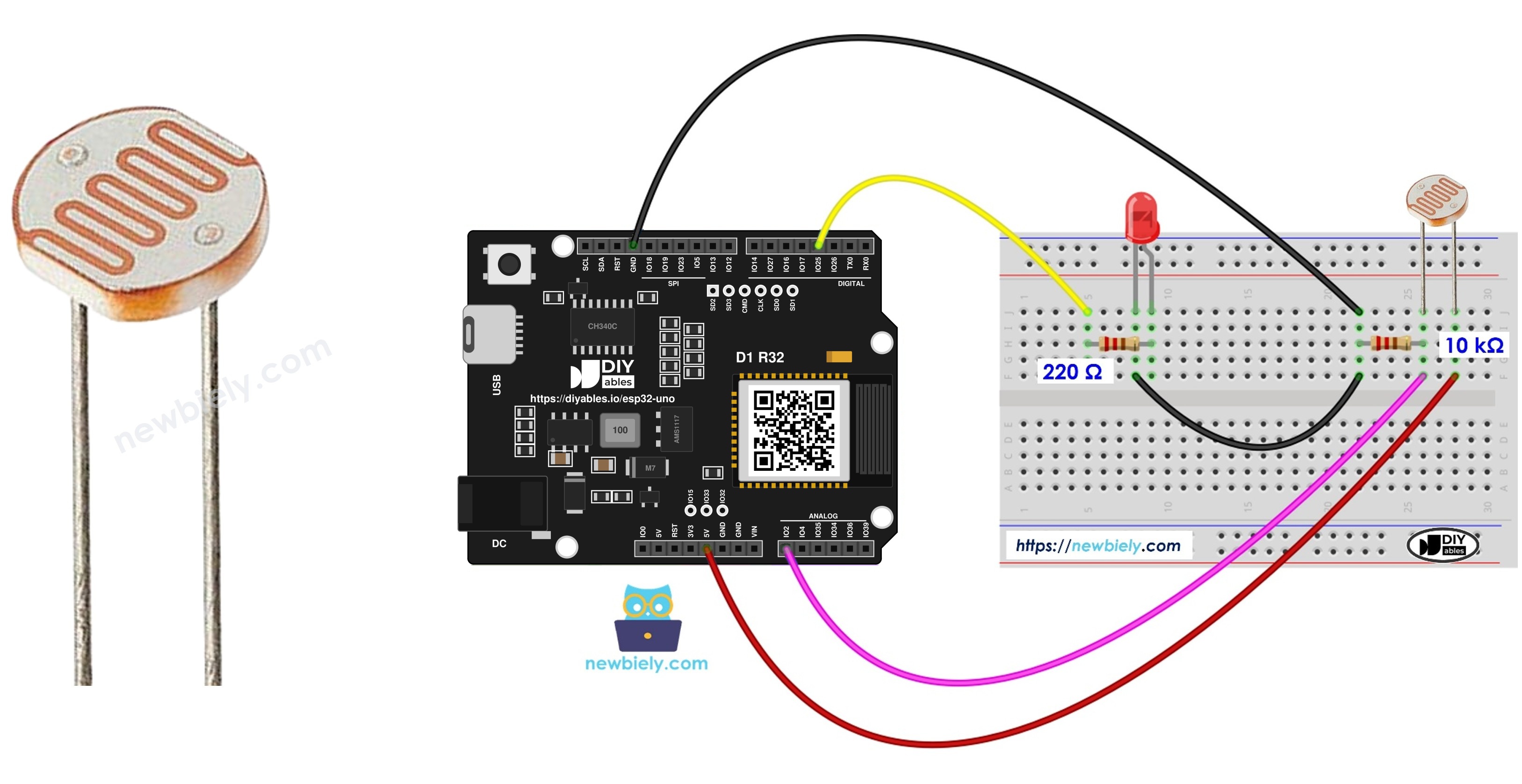
Components You Need
Or you can buy the following kits:
| 1 | × | DIYables Sensor Kit (18 sensors/displays) |
Additionally, some of these links are for products from our own brand, DIYables .
Buy Note: Use the LED Module for easier wiring. It includes an integrated resistor.
Good to know: a plain LDR light sensor is the cheapest pick, yet you must add the 10 kΩ resistor by hand. An LDR light sensor module has that resistor on board, so you save two wires.
The LED and the Light Sensor
Here you get a quick map of the two parts and where to learn each one alone.
| Part | Role in This Project | Key Fact |
|---|---|---|
| LDR (photoresistor) | Input that senses brightness | Resistance drops when light gets stronger |
| 10 kΩ resistor | Turns the LDR change into a voltage | Forms a divider with the LDR |
| LED | Output that acts as the lamp | Needs a 220 ohm series resistor |
For pinouts and single-part sketches, open these guides:
ESP32 Uno Pinout
Every Uno-style header pin on this board links to one GPIO number, and the sketch always talks to that number. Look over the map below before you plug in the first jumper.

How to Connect
After this part, the divider feeds A0 and the LED hangs off D3.
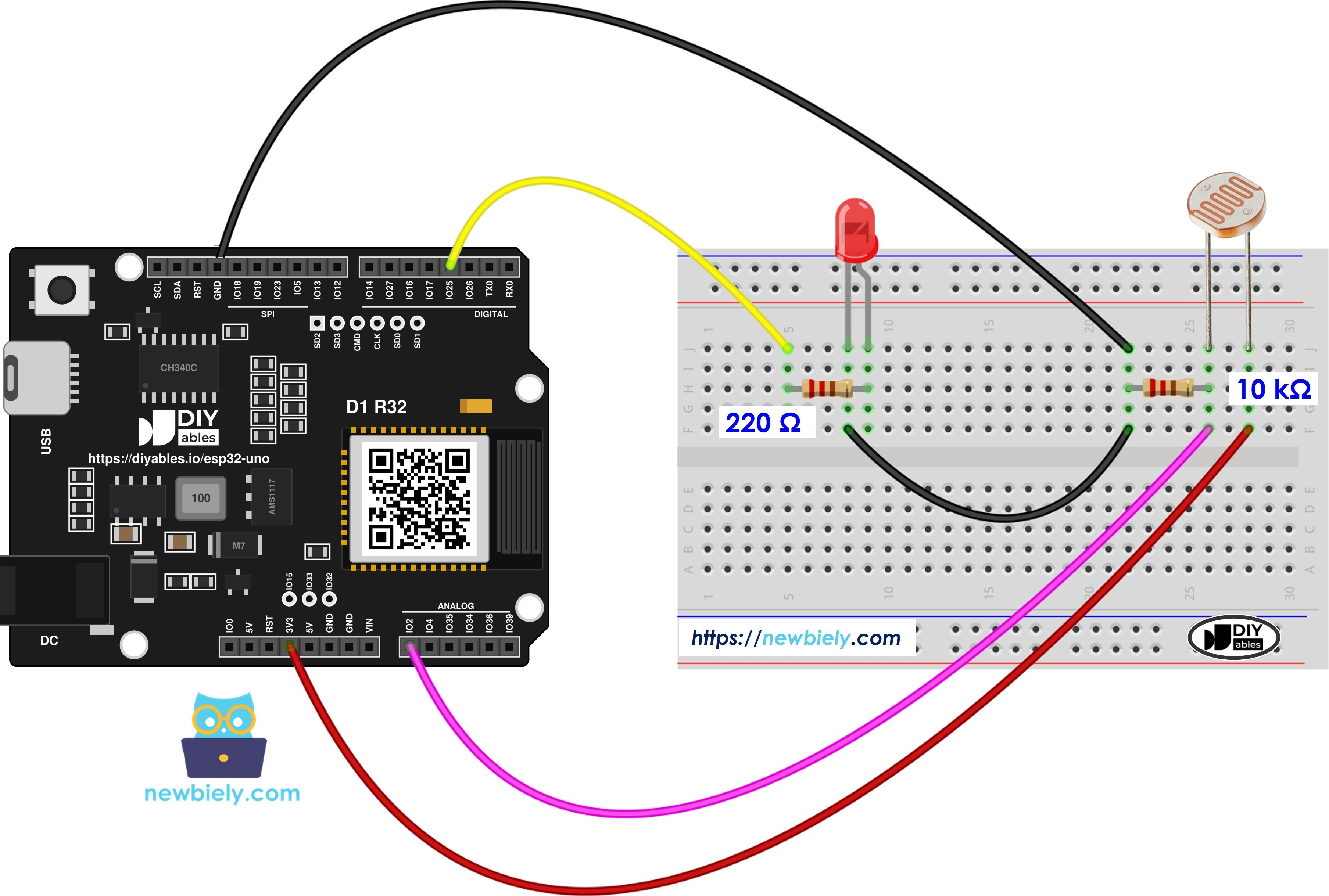
This image is created using Fritzing. Click to enlarge image
| Component Pin | ESP32 Uno Pin |
|---|---|
| LDR leg 1 | 3.3V |
| LDR leg 2 + one end of 10 kΩ resistor | A0 (GPIO2) |
| Free end of 10 kΩ resistor | GND |
| LED long leg (anode), through 220 ohm resistor | D3 (GPIO25) |
| LED short leg (cathode) | GND |
Good to know: ESP32 Uno pins run at 3.3V and are not 5V tolerant. Feed the divider from 3.3V only.
WARNING
A0 is GPIO2, a boot strapping pin on the ESP32 Uno. The divider here is weak, so the board normally boots fine. If an upload or a boot ever fails, pull the A0 wire out, upload, then put it back.
ESP32 Uno Code
This sketch compares the A0 reading with a dark level and sets the LED to match.
Good to know: the line analogSetAttenuation(ADC_11db) opens the ESP32 Uno analog input to the full 0V to about 3.3V span. Leave it out and the reading sticks at 4095 long before the room is really bright.
The ESP32 Uno ADC counts from 0 to 4095. So ANALOG_THRESHOLD is 200, which is about four times the value a 10-bit board would use for the same darkness.
Upload and Test
- First time with this board? Set it up with ESP32 Uno - Getting Started before you continue.
- Build the circuit by following the wiring table above.
- Plug in the USB Type-C cable between the ESP32 Uno and your computer.
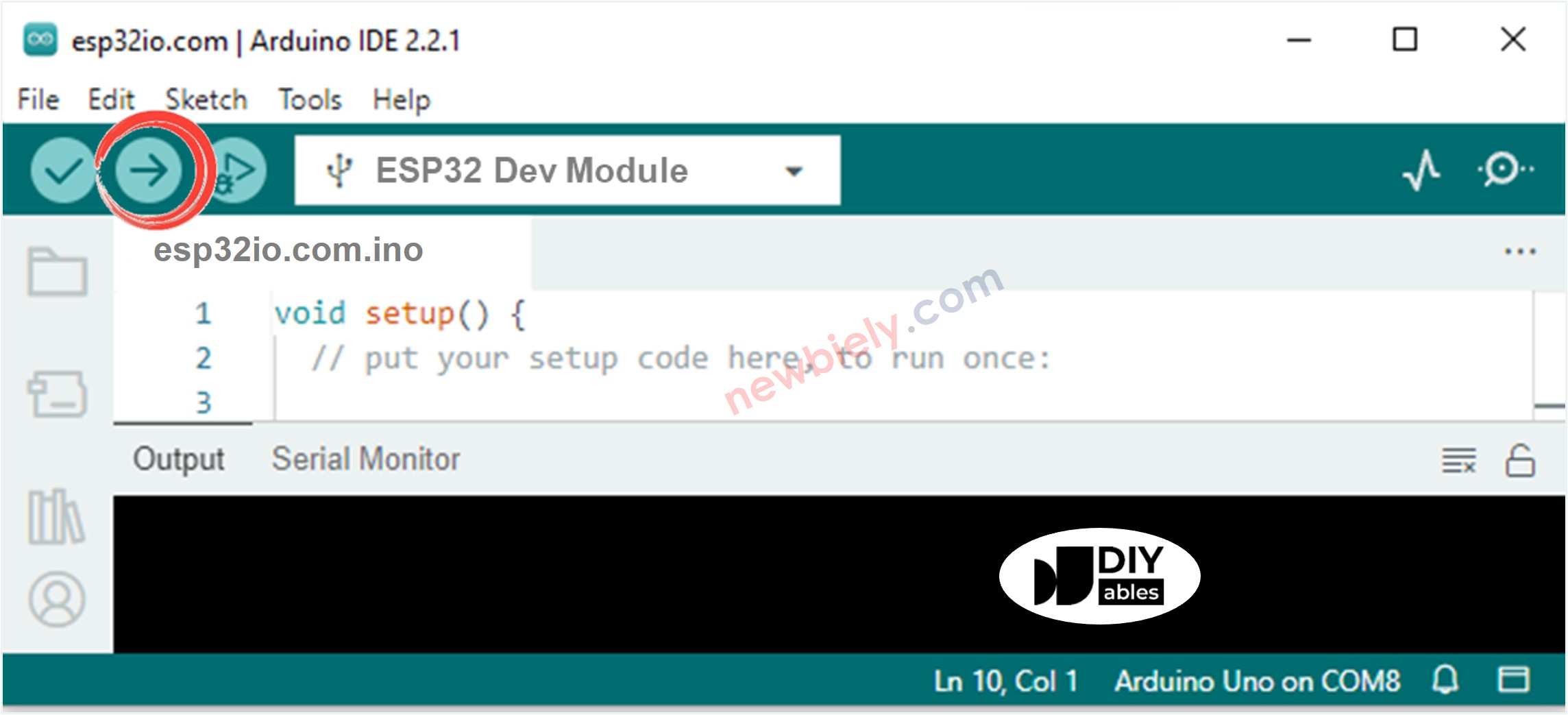
- Select the board in Arduino IDE: pick ESP32 Dev Module and the COM port of the board (CH340).
- Paste the sketch into a new Arduino IDE window.
- Click Upload and wait for "Done uploading".
- Cup your palm over the LDR. The LED should glow.
- Point a phone flashlight at the LDR. The LED should go dark.
- Pro tip: wrap a short paper tube around the LDR. It blocks side light from a nearby window, so the lamp reacts only to the light you aim at it.
To watch the numbers, add Serial.begin(9600); to setup() and Serial.println(analogValue); to loop(). A typical log, going from a desk lamp to a covered sensor, looks like this:
Video Tutorial
See the ESP32 Uno build in action in the video below.
Code Explanation
The loop is short, so one table covers it.
| Code Part | What It Does |
|---|---|
| LIGHT_SENSOR_PIN 2 | Reads the divider on A0 (GPIO2) |
| LED_PIN 25 | Drives the LED on D3 (GPIO25) |
| ANALOG_THRESHOLD 200 | Sets the dark level on the 0 to 4095 scale |
| analogSetAttenuation(ADC_11db) | Lets the ADC measure up to about 3.3V |
| analogRead() in loop() | Gets a bigger number in bright light, a smaller one in shade |
| if / else | Writes HIGH below the threshold and LOW above it |
The result: the LED copies the darkness of the room with no delay.
ESP32 Uno vs UNO R4 for This Project
This table lists what you change when you move this night lamp from the UNO R4 to the ESP32 Uno.
| Item | Arduino UNO R4 | ESP32 Uno |
|---|---|---|
| Logic voltage | 5V | 3.3V |
| Divider supply | 5V | 3.3V |
| Light sensor pin | A0 | A0 (GPIO2) |
| LED pin | D3 | D3 (GPIO25) |
| ADC range and threshold | 0 to 1023, threshold 50 | 0 to 4095, threshold 200 |
| Extra setup line | none | analogSetAttenuation(ADC_11db) |
| Arduino IDE board | Arduino UNO R4 WiFi | ESP32 Dev Module |
The parts stay in the same header holes. Only move the top of the divider from 5V to 3.3V, so A0 never sees more than 3.3V.
Go Wireless: Check the Light Level from Your Phone
This idea lets you see the room brightness without a USB cable.
The ESP32 Uno has WiFi and Bluetooth built in. You can send analogValue to a phone and watch it as a gauge or a live chart, or switch the LED by hand from the same app. Note that A0 is an ADC2 pin, so for the WiFi version move the LDR to A2 (GPIO35) and change LIGHT_SENSOR_PIN. The Bluetooth version can keep A0.
Troubleshooting
| Problem | Possible Cause | Solution |
|---|---|---|
| No port appears in Arduino IDE | CH340 driver not installed or charge-only cable | Install the CH340 driver and swap to a USB data cable |
| Upload stops at "Waiting for download" | Board did not enter download mode | Hold the BOOT button while the upload starts, then let go |
| Board does not boot or upload with the circuit attached | A0 (GPIO2) is a strapping pin pulled the wrong way | Unplug the A0 wire while uploading, then reconnect it |
| LED is dark in every light | LED placed backwards or D3 wire loose | Turn the LED so the long leg faces D3 (GPIO25) through the 220 ohm resistor |
| LED glows even in bright light | Divider wired upside down or threshold too high | Keep the LDR on 3.3V and the resistor on GND, then lower ANALOG_THRESHOLD |
| Reading jumps around at random | A0 is floating because the 10 kΩ resistor is missing | Fit the resistor from A0 to GND |
| Value is pinned at 4095 | Attenuation line removed or divider fed from 5V | Keep analogSetAttenuation(ADC_11db) and use the 3.3V pin |
| LED blinks fast at dusk | Light level sits right on the threshold | Add a second, higher off-threshold so the lamp has a dead band |
FAQ
How does an LDR know how bright it is?
An LDR is a resistor made of a light-sensitive material. Strong light lowers its resistance, and darkness raises it. In the divider, this change becomes a voltage on A0 that the ESP32 Uno can measure.
Do I really need the 10 kΩ resistor with a bare LDR?
Yes. The LDR alone only changes resistance, and the board can only measure voltage. The 10 kΩ resistor and the LDR together form a divider, which turns the resistance into a voltage. Without it, A0 floats and reads noise.
Is it safe to wire the LDR to the 5V pin on this board?
No. In bright light, the divider output would get close to 5V, and ESP32 Uno pins are rated for 3.3V only. Use the 3.3V pin, and the output can never go above 3.3V.
What number should I use for ANALOG_THRESHOLD?
Print analogValue in the Serial Monitor. Note the value with the room light on and with your hand over the sensor. Pick a number about halfway between those two values.
Why is the dark threshold 200 here and not 50?
The ESP32 Uno ADC has 12 bits, so analogRead() returns 0 to 4095. A 10-bit board returns 0 to 1023. Multiply a 10-bit threshold by about 4 to get the same light level.
What is the analogSetAttenuation(ADC_11db) line for in this lamp sketch?
It widens the ESP32 Uno ADC input range to about 0V to 3.3V, so the whole sensor voltage fits into 0 to 4095. With a smaller range, the reading reaches 4095 too early in bright light. The UNO R4 does not have or need this line; only the ESP32 Uno uses it. Keep the sensor output at or below 3.3V.
Can I make the lamp read light while WiFi is on?
Not on A0 as it is. A0 (GPIO2) and A1 (GPIO4) are ADC2 pins, and ADC2 is blocked while WiFi runs. Move the LDR to A2 to A5 (GPIO35, 34, 36, 39) or to GPIO32/33, and change LIGHT_SENSOR_PIN in the code.
Can I drive the LED from A2 to A5 instead of D3?
No. A2 to A5 (GPIO35, 34, 36, 39) are input only on the ESP32 Uno. They can read the LDR, but they cannot drive an LED, relay or buzzer.
Can I fade the LED instead of a hard on and off?
Yes. D3 (GPIO25) supports PWM, so analogWrite() works on it. Map the reading with map(analogValue, 0, 4095, 255, 0) and the LED gets brighter as the room gets darker.
What if my night lamp needs more pins than the Uno headers offer?
The ESP32 Uno has a few extra holes near the power header: GPIO32 and GPIO33 (I/O, PWM, analog on ADC1, so they also work while WiFi is on) and GPIO15 (I/O, PWM, analog on ADC2). Solder pin headers to them and write the GPIO number in code. For a second LDR in a WiFi lamp, pick GPIO32 or GPIO33. Two warnings: GPIO15 and GPIO0 (the IO0 pin at the unused Uno NC position) are boot strapping pins, and a wrong connection can stop the board from booting or uploading code, so use GPIO32/33 first. Also, never use the six holes under the digital header (SD0 to SD3, CMD, CLK = GPIO6 to GPIO11). They are wired to the flash chip, and using them crashes the board.