
ESP32 UNO - Solenoid Lock
Want to lock and unlock a drawer from code? With the ESP32 Uno, a relay and a 12V solenoid lock, you can make the lock tongue move out and back on command. This works for a door, a cabinet or an electric strike lock project on the ESP32 Uno form board.
By the end, you can:
- Wire a solenoid lock and a relay to the ESP32 Uno
- Understand why a lock needs a relay and a 12V supply
- Switch the lock with digitalWrite() in the Arduino IDE
- Check the lock tongue position after the upload
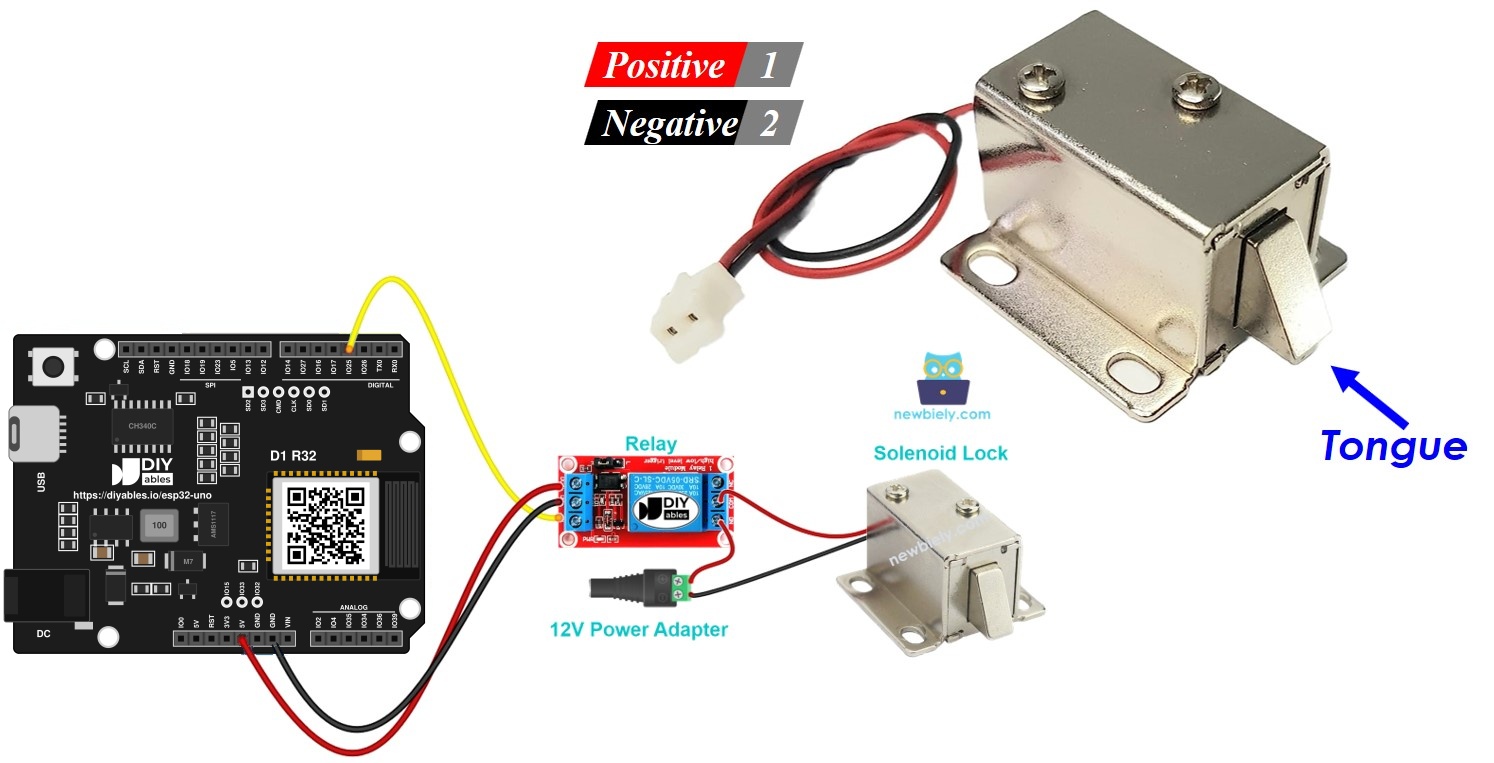
Components You Need
| 1 | × | ESP32 Uno-form Board | |
| 1 | × | USB Cable Type-A to Type-C (for USB-A PC) | |
| 1 | × | USB Cable Type-C to Type-C (for USB-C PC) | |
| 1 | × | Solenoid Lock | |
| 1 | × | Relay | |
| 1 | × | 12V Power Adapter | |
| 1 | × | DC Power Jack |
Or you can buy the following kits:
| 1 | × | DIYables Sensor Kit (18 sensors/displays) |
Additionally, some of these links are for products from our own brand, DIYables .
Solenoid Lock Basics
By the end of this part, you know how the lock moves and how to power it.
A solenoid lock (also called an electric strike lock) is an electric latch. It holds a cabinet, drawer or door shut until you cut or apply power, depending on the wiring.
Lock Wires
By the end of this part, you know which wire goes where.
| Lock Wire | Connect To |
|---|---|
| Red (+) | Positive side of the 12V supply, through the relay |
| Black (-) | Ground side of the 12V supply |
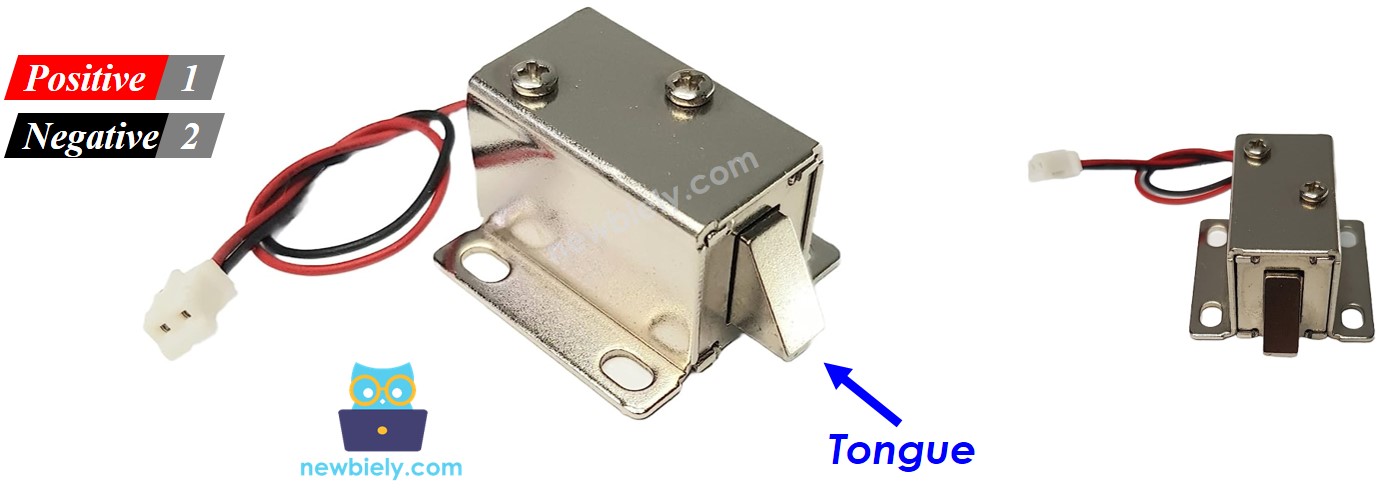
How It Works
By the end of this part, you can predict the lock state from the power state.
| Lock Power | Lock Tongue | Door |
|---|---|---|
| On | Moves out | Locked |
| Off | Pulls back | Unlocked |
※ NOTE THAT:
Most solenoid locks need 12V, 24V or 48V and draw far more current than a pin can give. Never connect the lock to an ESP32 Uno pin. Always switch it with a relay.
Use the NO (normally open) relay terminal for the lock. The relay position then decides the lock state:
| Relay | Lock Has Power | Door |
|---|---|---|
| Open | No | Unlocked |
| Closed | Yes | Locked |
More about relay modules: ESP32 Uno - Relay.
ESP32 Uno Pinout
Every Uno header pin on the ESP32 Uno form board has a GPIO number, and the code uses that number. Look at the picture to find D3 before you add the relay signal wire.

How to Connect
By the end of this part, the relay is wired to the board and the lock is wired to the relay.
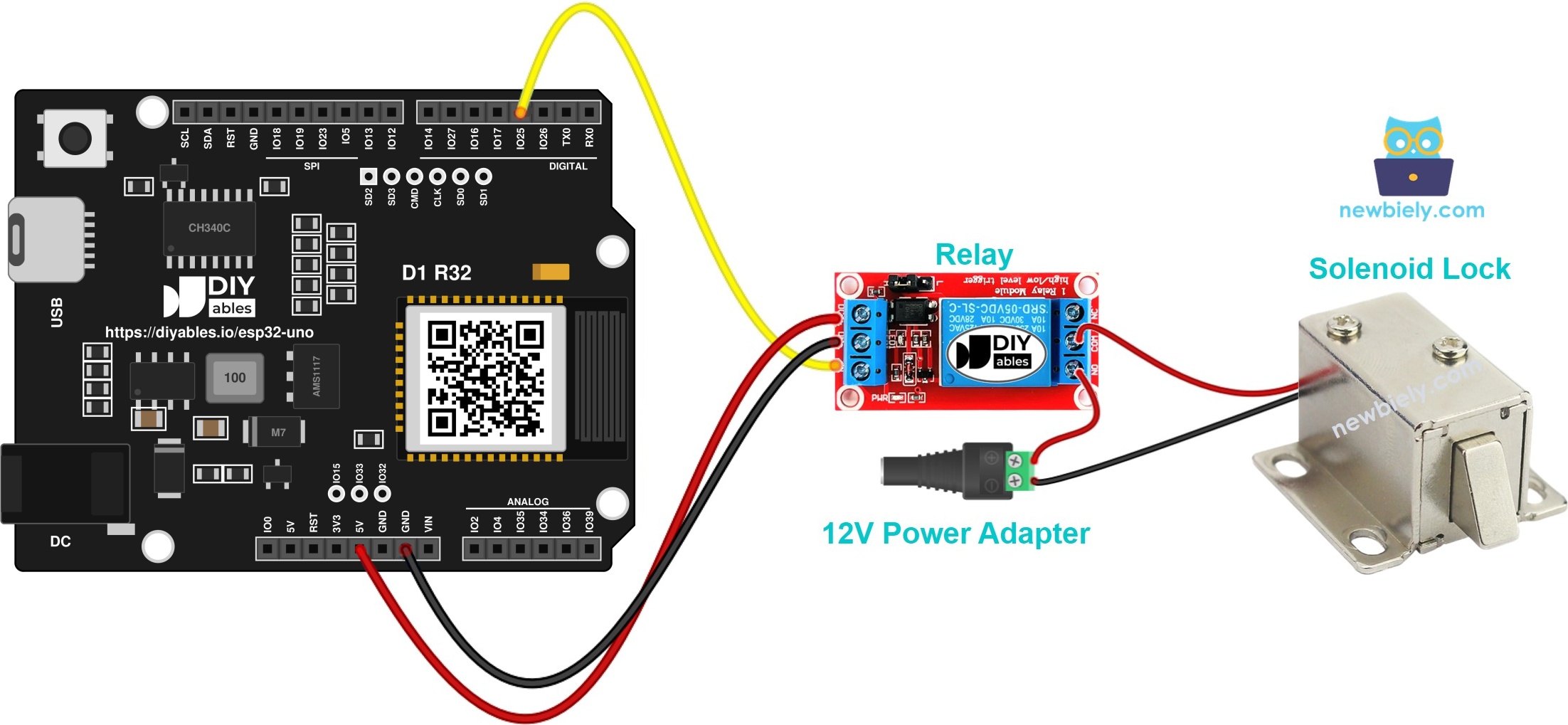
This image is created using Fritzing. Click to enlarge image
| Relay Pin | ESP32 Uno Pin |
|---|---|
| VCC | 5V |
| GND | GND |
| IN | D3 (GPIO25) |
| Relay / Lock Terminal | Connects To |
|---|---|
| Relay COM | Plus (+) of the 12V adapter, via the DC power jack |
| Relay NO | Red wire (+) of the lock |
| Lock black wire (-) | Minus (-) of the 12V adapter, via the DC power jack |
Good to know: ESP32 Uno pins use 3.3V logic and are NOT 5V tolerant. The relay IN pin only receives a signal from the board, so a 3.3V signal is fine for most relay modules. Never send a 5V signal into a board pin.
Code
The sketch closes the relay for 5 seconds (locked), then opens it for 5 seconds (unlocked), and repeats forever.
| Code Part | What It Does |
|---|---|
| #define RELAY_PIN 25 | Names D3 (GPIO25) as the relay signal pin |
| pinMode(RELAY_PIN, OUTPUT) | Makes the pin an output in setup() |
| digitalWrite(RELAY_PIN, HIGH) | Closes the relay, so the lock gets power and locks |
| digitalWrite(RELAY_PIN, LOW) | Opens the relay, so the lock loses power and unlocks |
| delay(5000) | Holds each state for 5 seconds |
The lock tongue now moves out and back every 5 seconds.
Upload and Test
- First time with this board? Set it up with ESP32 Uno - Getting Started before you continue.
- Build the circuit by following the wiring table above.
- Plug in the USB Type-C cable between the ESP32 Uno and your computer.
- Select the board in Arduino IDE: pick ESP32 Dev Module and the COM port of the board (CH340).
- Copy the code into a new sketch.
- Press Upload in the IDE toolbar.
- Watch the lock tongue. It slides out, waits, then slides back in a 5 second rhythm.
- Pro tip: connect the 12V adapter last. Check every wire first, because a short on the 12V side can burn the relay.
Video Tutorial
See the ESP32 Uno build in action in the video below.
ESP32 Uno vs UNO R4 for This Project
By the end of this part, you know what to change when you move this lock project from the UNO R4 to the ESP32 Uno.
| Item | Arduino UNO R4 | ESP32 Uno |
|---|---|---|
| Logic voltage | 5V | 3.3V |
| Relay signal pin | D3 | D3 (GPIO25) |
| Pin number in code | 3 | 25 |
| Arduino IDE board | Arduino UNO R4 WiFi | ESP32 Dev Module |
| USB chip driver | None needed | CH340 driver |
| Wireless | WiFi on R4 WiFi only | WiFi and Bluetooth on board |
The wiring stays on the same header positions. Only the pin number in the code changes. If your relay module does not react to the 3.3V signal, use a module that accepts 3.3V input.
Go Wireless: Open the Lock From Your Phone
By the end of this part, you have an idea to control the lock without a cable.
The lock is an ON-OFF output, so it is easy to switch over WiFi or Bluetooth. You can open the door from a web page on your phone, or from a Bluetooth app. The relay code stays the same. Only the trigger changes.
Try These Next
- Add a push button to unlock the door by hand.
- Lock the door again after 10 seconds with millis() instead of delay().
- Add a keypad or an RFID reader so only the right code opens the lock.
Troubleshooting
| Problem | Possible Cause | Solution |
|---|---|---|
| No COM port appears | CH340 driver missing or charge-only USB cable | Install the CH340 driver and use a data USB cable |
| Failed to connect or Waiting for download | Board not in upload mode | Hold the BOOT button when the upload starts |
| Relay clicks but the lock does not move | 12V adapter off or lock on wrong terminals | Check the adapter and use the COM and NO terminals |
| Relay does not click | Relay VCC unpowered or IN wire on the wrong pin | Connect VCC to 5V and IN to D3 (GPIO25) |
| Relay LED is on but it does not switch | 3.3V signal too weak for this relay | Use a 3.3V compatible relay module or add a transistor driver |
| Lock acts backwards | Lock sits on the NC terminal | Re-wire it to NO or flip HIGH and LOW |
| Lock gets hot | Powered for a long time | Power it only for short moments |
| Board restarts when the lock fires | Lock current drags down a shared supply | Feed the lock from its own 12V adapter |
| Wrong adapter polarity | DC jack plus and minus swapped | Match plus to COM and minus to the lock black wire |
FAQ
Can I power a solenoid lock straight from an ESP32 Uno pin?
No. A lock coil pulls heavy current at 12V or more, but a board pin offers only 3.3V and a tiny current. Put a relay between them and give the lock its own 12V adapter.
Does my 5V relay board accept the 3.3V signal of the ESP32 Uno?
Most do. Power the VCC from the 5V pin and send the IN signal from D3 (GPIO25). If the relay does not click, pick a module that accepts 3.3V input.
Why does HIGH lock the door in this code?
The lock sits on the NO terminal. HIGH closes the relay, so current reaches the coil and the tongue pushes out. LOW cuts that current.
How do I make the lock work the opposite way?
Use the NC terminal for the lock, or exchange the HIGH and LOW lines in the sketch.
Is it safe to keep the lock powered all the time?
Many cheap locks get hot. Check the datasheet of your lock and power it only when needed if it is not made for continuous use.
Is the ESP32 Uno relay code different from the UNO R4 code?
Only the pin number changes. The UNO R4 uses pin 3, and the ESP32 Uno uses GPIO25 for the same D3 header position.
Can I use D3 as a relay pin without any boot problem?
Yes. D3 (GPIO25) is a normal output pin, not a boot strapping pin and not input only. Avoid D8, D10 and A0 for outputs that may pull the pin at boot.
Can I use an UNO shield with this lock project?
The header shape matches, but the ESP32 Uno logic is 3.3V and A4/A5 are not I2C. Check your shield before use.
What if my project needs more pins than the Uno headers give?
The ESP32 Uno has a few extra holes near the power header: GPIO32 and GPIO33 (I/O, PWM, analog on ADC1, so they also work while WiFi is on) and GPIO15 (I/O, PWM, analog on ADC2). Solder pin headers to them first, then use the GPIO number in your sketch. For a second lock relay, GPIO32 or GPIO33 are a good choice. Two warnings: (1) GPIO15 and GPIO0 (the IO0 pin at the unused Uno NC position) are boot strapping pins, so a wrong connection can stop the board from booting or uploading code. Use GPIO32/33 first. (2) Never use the six holes under the digital header (SD0-SD3, CMD, CLK = GPIO6-GPIO11). They are wired to the flash chip and using them crashes the board.
Can I open the lock from my phone with the ESP32 Uno?
Yes. The board has WiFi and Bluetooth. Use a web page or the Bluetooth app to set the relay pin HIGH or LOW.
Can I add a keypad or RFID reader?
Yes. Read the keypad or card in your code and set the relay pin HIGH only when the code is right. The relay part stays the same.