
ESP32 UNO - IR Slotted Optical Speed Sensor
Need to know how fast a wheel spins? Hook an IR slotted optical speed sensor to the ESP32 Uno form board and get a live RPM number from a cheap encoder disc. The same U-shaped photo interrupter can also count every item that drops through its gap, so it doubles as a simple counter or tachometer.
What you will do:
- Find out how an opto interrupter senses a part inside its slot
- Connect the speed sensor wiring to the ESP32 Uno with three jumper wires
- Count objects with digitalRead() and a change check
- Build an RPM meter with an interrupt and an encoder disc
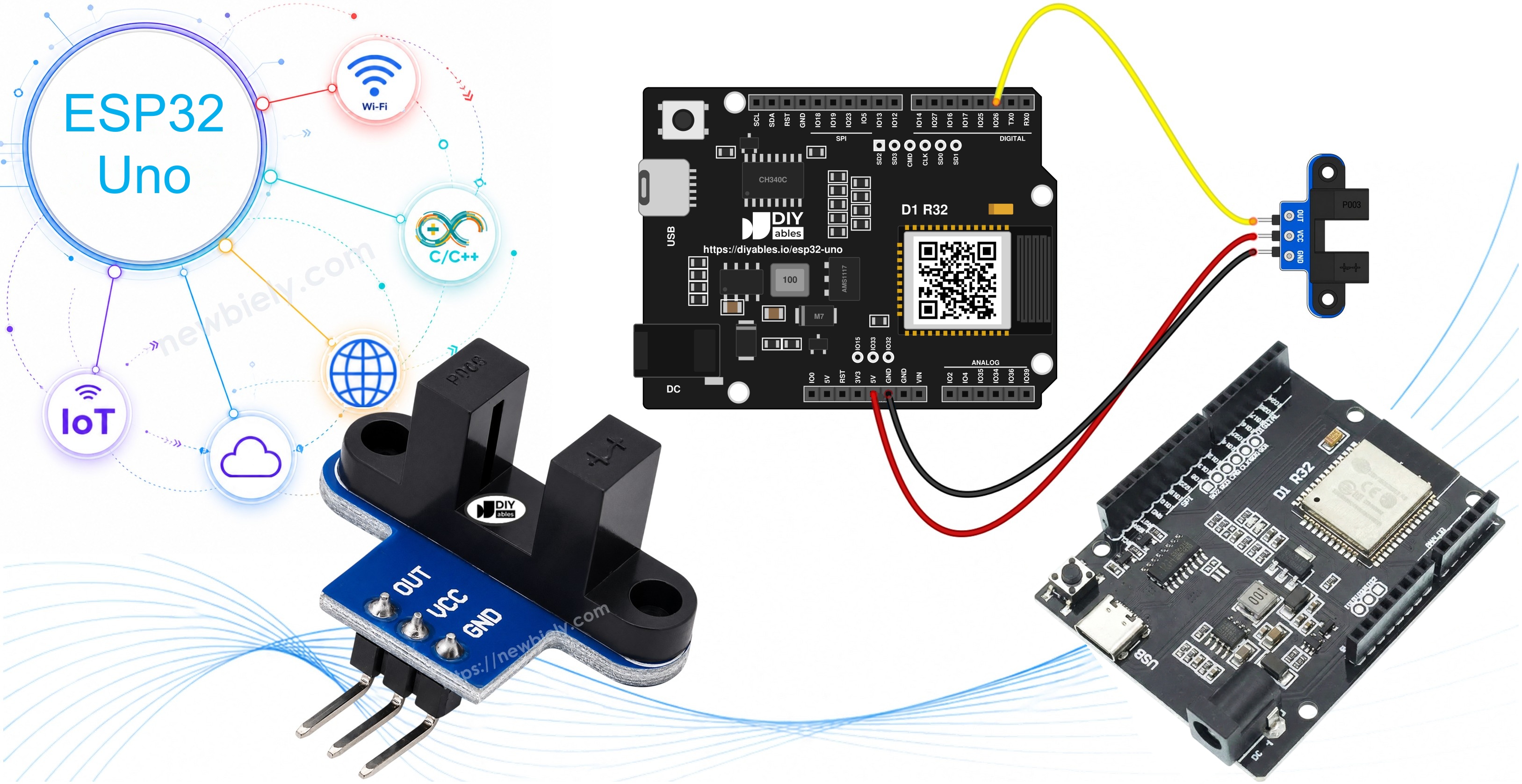
Components You Need
| 1 | × | ESP32 Uno-form Board | |
| 1 | × | USB Cable Type-A to Type-C (for USB-A PC) | |
| 1 | × | USB Cable Type-C to Type-C (for USB-C PC) | |
| 1 | × | IR Slotted Optical Speed Sensor | |
| 1 | × | Jumper Wires | |
| 1 | × | Optionally, Breadboard |
Or you can buy the following kits:
| 1 | × | DIYables Sensor Kit (18 sensors/displays) |
Additionally, some of these links are for products from our own brand, DIYables .
Inside the IR Slotted Optical Speed Sensor
After this part, you know what the sensor measures and where it fits best.
The block has two upright arms with a narrow gap. An infrared LED sits in one arm. An NPN phototransistor sits in the other arm, facing it. The module only reports a yes-or-no answer to the ESP32 Uno: beam passing, or beam cut.
| IR Slotted Optical Speed Sensor | |
|---|---|
| Sensor type | slot-type photoelectric (IR LED + NPN phototransistor) |
| Slot width | 5.9 mm |
| Operating voltage | 3.3V to 5V DC |
| Output | digital (TTL), LOW when blocked, HIGH when clear |
| Signal conditioning | built-in Schmitt trigger |
| Mounting | M3 screw holes at both ends |
| Pins | 3 (VCC, GND, OUT) |
| Typical Job | How the Sensor Helps |
|---|---|
| Motor tachometer | An encoder disc turns each spin into a fixed number of pulses |
| Item counter | Each part that falls through the gap adds one |
| Distance meter | Wheel turns times wheel circumference gives travel |
| Robot wheel feedback | Left and right wheel speeds can be compared |
| Limit or home switch | A flag on a moving part cuts the beam at the end point |
Pinout
Three pins, three wires.
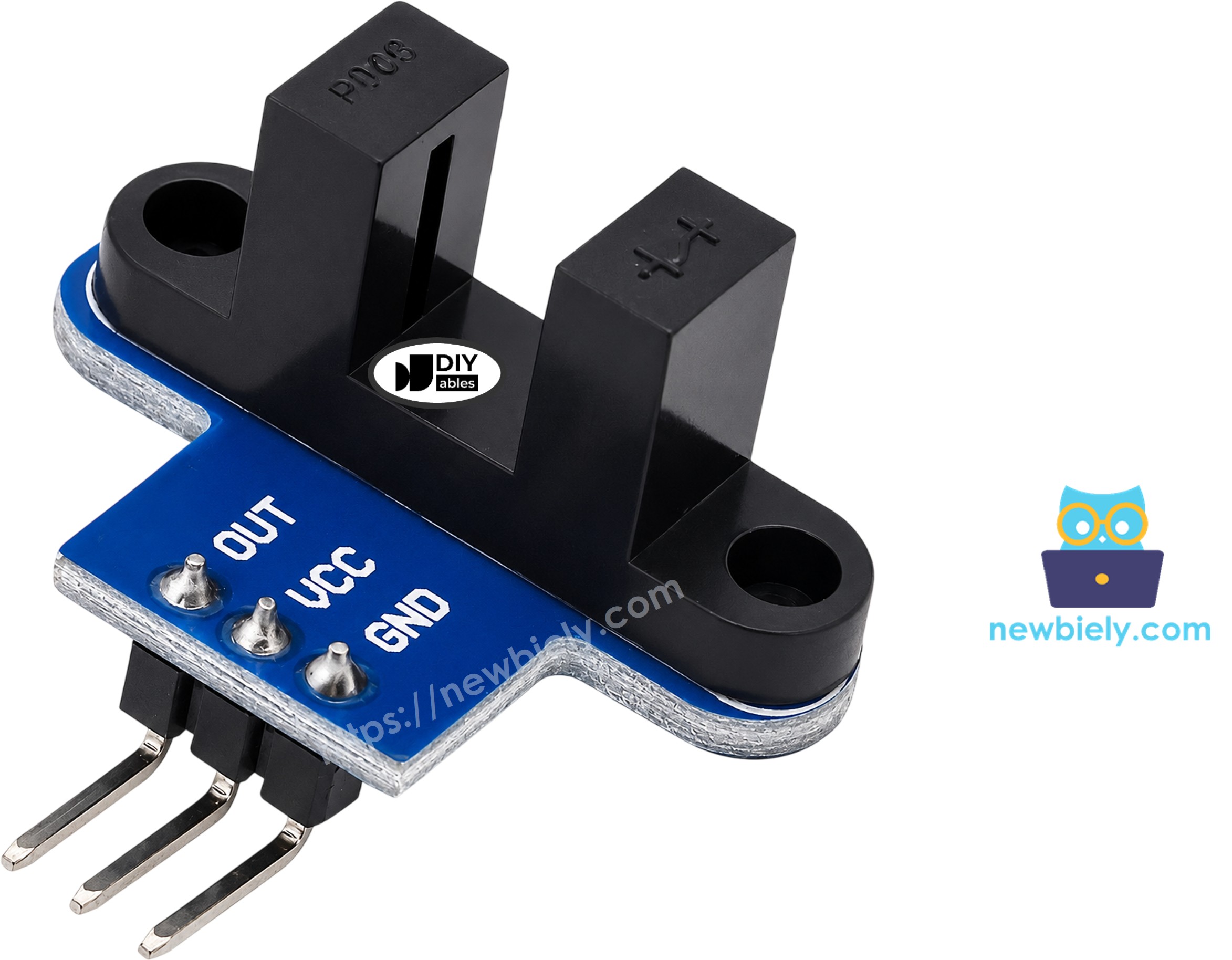
| Pin | Role | Where It Goes |
|---|---|---|
| VCC | Power for the IR LED and the logic | 3.3V on the ESP32 Uno |
| GND | Ground (0V) | GND |
| OUT | Digital signal, LOW when blocked | A digital pin (D2 here) |
Good to know: the label order differs between production runs. Read the print on your own board before you plug in any wire.
How It Works
This part shows why the OUT pin flips between HIGH and LOW.

| Slot State | IR Light | OUT Pin |
|---|---|---|
| Empty | Reaches the phototransistor | HIGH |
| Card, finger or disc tooth inside | Stopped by the object | LOW |
An on-board Schmitt trigger cleans up the light level, so the output switches sharply with no chatter. Your sketch needs no debounce code.
Watch Out For
- Clear plastic and glass can pass infrared light. Test with something solid and opaque.
- A few third-party modules invert the output. If the first sketch says "blocked" with an empty gap, swap LOW and HIGH in it. The RPM sketch counts one edge per tooth, so either type works there.
Programming the Slot Sensor
Here you learn the two reading methods the sketches below rely on.
Method 1 — Poll the Pin (slow objects)
- Make the OUT pin an input:
- Read its level. LOW = beam cut, HIGH = beam open:
- React only when the level differs from the previous read:
Method 2 — Use an Interrupt (fast discs)
- Declare the counter as volatile, since the interrupt writes to it:
- Add a tiny handler. On the ESP32 Uno, tag it with IRAM_ATTR so it lives in internal RAM:
- Fire the handler on every HIGH-to-LOW edge, which is the moment a tooth enters the gap:
- Each second, grab and clear the counter with interrupts off, then work out the RPM:
| Formula Part | Meaning |
|---|---|
| pulses | Teeth counted in one second |
| × 60 | Turns that into teeth per minute |
| ÷ SLOTS_PER_TURN | Teeth per minute divided by teeth per spin = RPM |
Example with a 20-slot disc: 50 pulses in one second → 50 × 60 ÷ 20 = 150 RPM.
ESP32 Uno Pinout
Your sketch talks to GPIO numbers, while the board is printed with Uno labels. Use the chart below to see that D2 on the header is GPIO26 in code.

How to Connect
At the end of this part, the sensor is powered and its signal reaches D2.
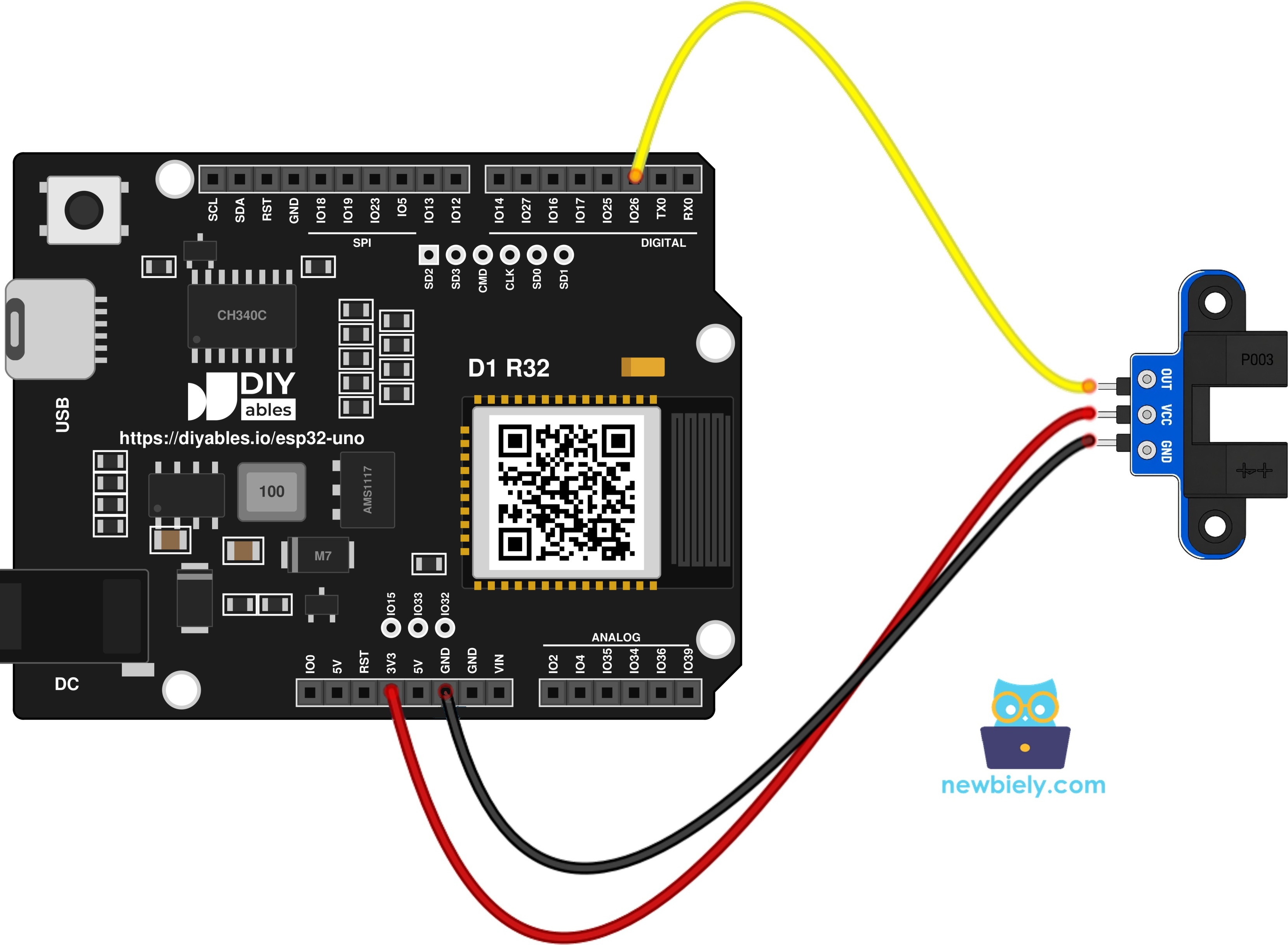
This image is created using Fritzing. Click to enlarge image
| Speed Sensor Pin | ESP32 Uno Pin |
|---|---|
| VCC | 3.3V |
| GND | GND |
| OUT | D2 (GPIO26) |
Good to know: GPIO26 is a plain I/O pin with no boot role, and every ESP32 Uno GPIO can trigger an interrupt, so D2 is a safe choice for the RPM sketch.
WARNING
The ESP32 Uno runs at 3.3V logic and its pins are NOT 5V tolerant. If VCC comes from 5V, the OUT line swings up to 5V and can harm GPIO26. Feed the module from 3.3V (it works well there). If you must use 5V, put a voltage divider or a level shifter on the OUT wire.
ESP32 Uno Code - Detect Object in the Slot
This sketch watches D2, prints a line each time the level flips, and keeps a running total of blocked events.
Upload and Test
- First time with this board? Set it up with ESP32 Uno - Getting Started before you continue.
- Build the circuit by following the wiring table above.
- Plug in the USB Type-C cable between the ESP32 Uno and your computer.
- Select the board in Arduino IDE: pick ESP32 Dev Module and the COM port of the board (CH340).
- Paste the sketch into a new Arduino IDE window.
- Click Upload (Upload) and wait for "Done uploading".
- Open the Serial Monitor and choose 9600 baud.
- Push a strip of cardboard into the gap, then remove it. Repeat four times.
- Read the log in the Serial Monitor:
- Pro tip: hold the cardboard still inside the gap for a few seconds. Only one "blocked" line should appear, which proves the sketch reacts to changes and not to the level itself.
One insert gives two lines: "blocked" on the way in and "clear" on the way out. A still sensor stays silent.
ESP32 Uno Code - Measure Motor Speed (RPM)
A loop that polls the pin can skip teeth when a disc spins fast. This sketch counts with a FALLING-edge interrupt instead, one count per tooth, and prints pulses plus RPM once a second.
SLOTS_PER_TURN is 20, which suits the black encoder disc that ships with most TT gear motors. Count the holes on your disc and edit the number if it differs.
Step 1 — Mount the Encoder Disc
Goal: the disc teeth cut the beam cleanly on every turn.
- Press the disc onto the motor shaft or the wheel hub.
- Line up the sensor so the teeth run through the middle of the gap.
- Spin it once by hand and check that nothing scrapes the arms.
- Turn it by hand or drive the motor. For the motor circuit, see ESP32 Uno - DC Motor.
Step 2 — Upload and Watch the Speed
- Leave the wiring as it is.
- Paste the RPM sketch into Arduino IDE.
- Click Upload (Upload).
- Start the Serial Monitor and set 9600 baud.
- Run the motor for a few seconds, then stop it.
- Read the speed. In this run the motor turns at roughly 220 RPM:
- Pro tip: mark one tooth with a pen and turn the disc exactly one spin by hand within a second. The pulse count should equal SLOTS_PER_TURN, which confirms the setting.
Check a line yourself: 74 × 60 ÷ 20 = 222 RPM. Travel distance is easy too: turns × π × wheel diameter.
※ NOTE THAT:
- Keep the interrupt handler tiny. Never print from inside it.
- Mark every variable the handler changes as volatile.
- To sense an object a few centimeters away instead of inside a gap, see the obstacle avoidance sensor. For a knob that also reports direction, see the rotary encoder.
Video Tutorial
See the ESP32 Uno build in action in the video below.
Code Explanation
This table sums up the key lines of both sketches.
| Code Part | What It Does |
|---|---|
| const int SENSOR_PIN = 26 | Points both sketches at D2 (GPIO26) |
| state != lastState | Reacts only to a level change, so each insert counts once |
| IRAM_ATTR countPulse() | Keeps the handler in internal RAM for safe, fast calls |
| attachInterrupt(... FALLING) | Counts one pulse each time a tooth enters the gap |
| noInterrupts() / interrupts() | Copies and clears the counter without a race |
| pulses * 60.0 / SLOTS_PER_TURN | Turns pulses per second into RPM |
The result is one clean count per object in the first sketch and a speed reading every second in the second.
ESP32 Uno vs UNO R4 for This Project
Moving this build from the UNO R4 to the ESP32 Uno needs only small edits.
| Item | Arduino UNO R4 | ESP32 Uno |
|---|---|---|
| Logic voltage | 5V | 3.3V |
| Sensor power | 5V | 3.3V (pins are not 5V tolerant) |
| OUT pin | D2 (pin 2) | D2 (GPIO26 in code) |
| Interrupt handler | Plain function | Function tagged IRAM_ATTR |
| Arduino IDE board | Arduino UNO R4 WiFi or Minima | ESP32 Dev Module |
| WiFi and Bluetooth | WiFi on the WiFi model only | WiFi plus Bluetooth Classic and BLE |
The wire positions on the header stay the same. The one thing to change is the power wire: move VCC from 5V to 3.3V so the OUT signal never exceeds 3.3V.
Go Wireless: RPM on Your Phone
Goal: read the motor speed without a USB cable.
The ESP32 Uno has WiFi and Bluetooth built in. Send the rpm value to a phone and you get a wireless tachometer for a robot car or a fan test bench. A live plot also makes speed drops under load easy to spot.
Try These Next
- Show the RPM on an LCD or OLED instead of the Serial Monitor.
- Add a second sensor on another wheel and print both speeds side by side.
- Turn on an LED when the speed drops under a set value.
Function References
Troubleshooting
| Problem | Possible Cause | Solution |
|---|---|---|
| No COM port shows up | CH340 driver missing or a charge-only cable | Install the CH340 driver and use a USB cable that carries data |
| Upload stops at "Waiting for download" | Board did not enter download mode | Hold the BOOT button while the upload starts, then let go |
| Count never moves | OUT wire on the wrong pin or VCC not connected | Match VCC, GND and OUT to the module labels and use D2 (GPIO26) |
| Serial Monitor shows garbage text | Baud rate does not match the sketch | Pick 9600 baud in the Serial Monitor |
| Empty gap reads as blocked | Module has an inverted output | Swap LOW and HIGH in the first sketch |
| Some items pass without a count | Item is see-through or narrower than the beam | Use solid items that fully cover the gap |
| RPM stays at zero while spinning | Disc teeth miss the beam | Slide the sensor so the teeth cross the center of the gap |
| RPM is double or half the real value | SLOTS_PER_TURN is wrong for your disc | Count the disc holes and update the constant |
| GPIO26 stops responding | Sensor ran on 5V and pushed 5V into the pin | Power the module from 3.3V or divide down the OUT signal |
FAQ
Does the slotted speed sensor work at 3.3V with the ESP32 Uno?
Yes. The module is rated from 3.3V to 5V, and at 3.3V the OUT pin gives a 3.3V HIGH. That level suits the ESP32 Uno input directly, with no resistor or level shifter.
What is the difference between a photo interrupter and an IR obstacle sensor?
A photo interrupter has the LED and the receiver facing each other across a gap, so it sees only what passes between them. An obstacle sensor looks out in one direction and detects light bouncing back from a nearby object. The slot type is much more exact for counting and speed.
Can I connect OUT to a pin other than D2 on the ESP32 Uno?
Yes. Interrupts are not limited to D2 on this board. D3 (GPIO25), D6 (GPIO27) or D7 (GPIO14) are good picks. Skip D8 (GPIO12), D10 (GPIO5) and A0 (GPIO2), because they are boot strapping pins, and change SENSOR_PIN to the new GPIO number.
Why is IRAM_ATTR added to the interrupt function on the ESP32 Uno?
It stores the handler in internal RAM. If an interrupt fires while the chip is busy reading flash, a handler kept in flash can crash the board. The UNO R4 code works without it.
Can I put the sensor on A2 to A5 of the ESP32 Uno?
Yes, for this sensor. A2 to A5 (GPIO35, 34, 36, 39) are input only and have no internal pull-up, but the module drives OUT high and low by itself. Just remember those pins can never drive an LED or relay.
Will my UNO R4 sketch for this sensor run on the ESP32 Uno as it is?
Almost. Change the pin number from 2 to 26, add IRAM_ATTR to the interrupt function, and pick ESP32 Dev Module in Arduino IDE. The rest of the logic stays the same.
How many pulses per second can the ESP32 Uno count?
The interrupt can count many thousands per second, far more than a hobby motor makes. The sensor speed and the number of disc slots set the real limit, so use a disc with fewer holes for very fast shafts.
How can I get finer RPM steps?
With 20 slots and a 1-second window, each pulse is 3 RPM. Use a disc with more slots, a longer window, or measure the time between pulses with micros() for a finer result.
How do I read two speed sensors at once?
Wire the second OUT to another free pin, such as D3 (GPIO25). Give it its own volatile counter, its own handler, and its own attachInterrupt() line.
What if my project needs more pins than the Uno headers give?
The ESP32 Uno has extra holes near the power header: GPIO32 and GPIO33 (I/O, PWM, analog on ADC1, which also works while WiFi is on) and GPIO15 (I/O, PWM, analog on ADC2). Solder pin headers and write the GPIO number in code. GPIO32 or GPIO33 is a good spot for a second speed sensor. Two warnings: GPIO15 and GPIO0 (the IO0 pin at the unused Uno NC position) are boot strapping pins, and a wrong connection can stop the board from booting or uploading code, so use GPIO32/33 first. Never use the six holes under the digital header (SD0 to SD3, CMD, CLK = GPIO6 to GPIO11), because they are wired to the flash chip and using them crashes the board.
Can I send the motor speed to a web page with the ESP32 Uno?
Yes. The board has WiFi, so you can show the RPM on a phone browser with the DIYables Web Apps library. See the Go Wireless section above for ready examples.