
ESP32 UNO - MP3 Player
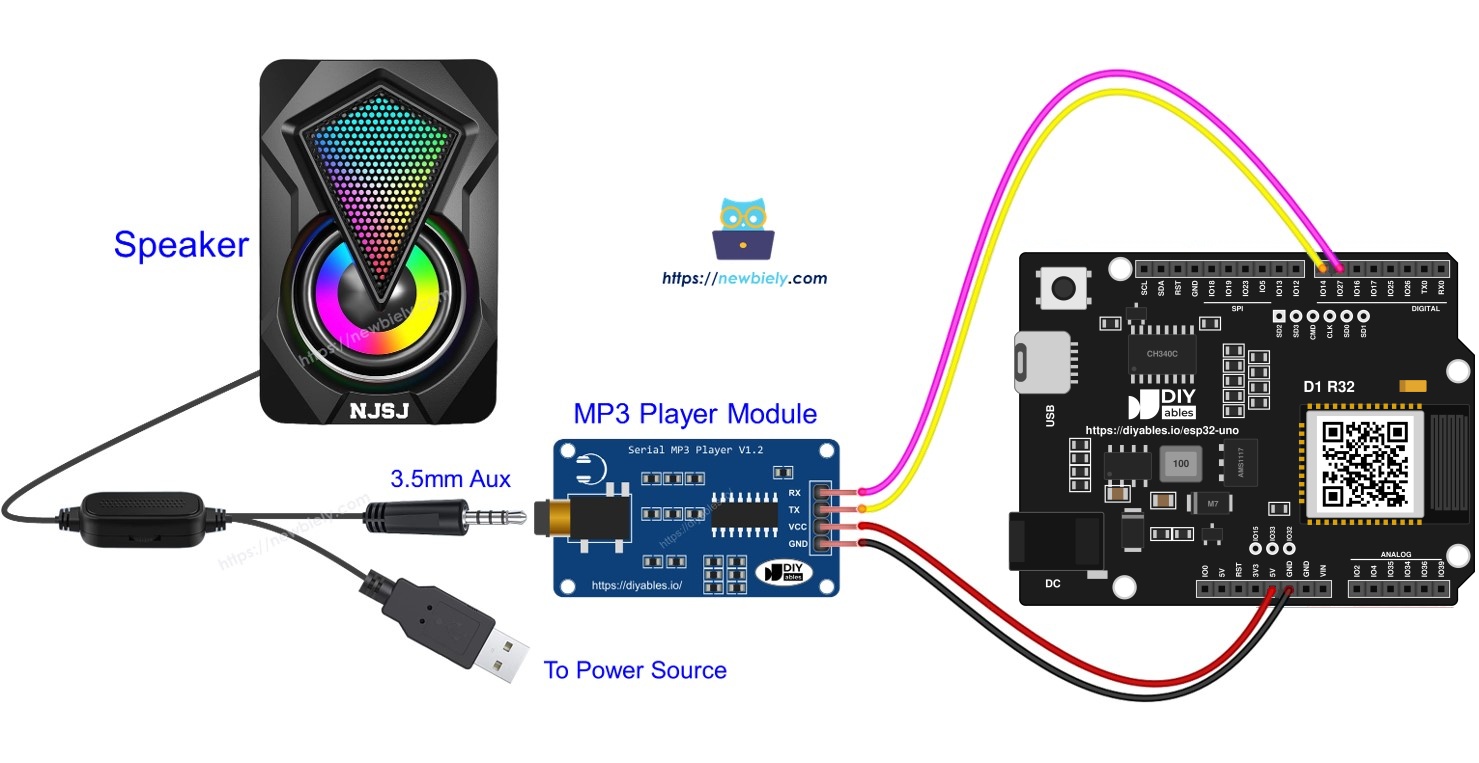
Want your own music box? Build an ESP32 Uno MP3 player that reads songs from a Micro SD card and sends them to a small Aux speaker. The ESP32 Uno form board only sends short serial commands, and the serial MP3 module does the decoding. You start with one song that plays at power-on, then turn it into a real player with four push buttons.
What you will do:
- Connect a serial MP3 module and an Aux speaker to the ESP32 Uno
- Start a song stored on a Micro SD card from an Arduino sketch
- Send play, pause and track commands over the hardware UART
- Control the songs with play, pause, next and back buttons
Components You Need
Or you can buy the following kits:
| 1 | × | DIYables Sensor Kit (18 sensors/displays) |
Additionally, some of these links are for products from our own brand, DIYables .
Meet the Serial MP3 Module and the Speaker
By the end of this part, you know which socket and pin of each part does what.
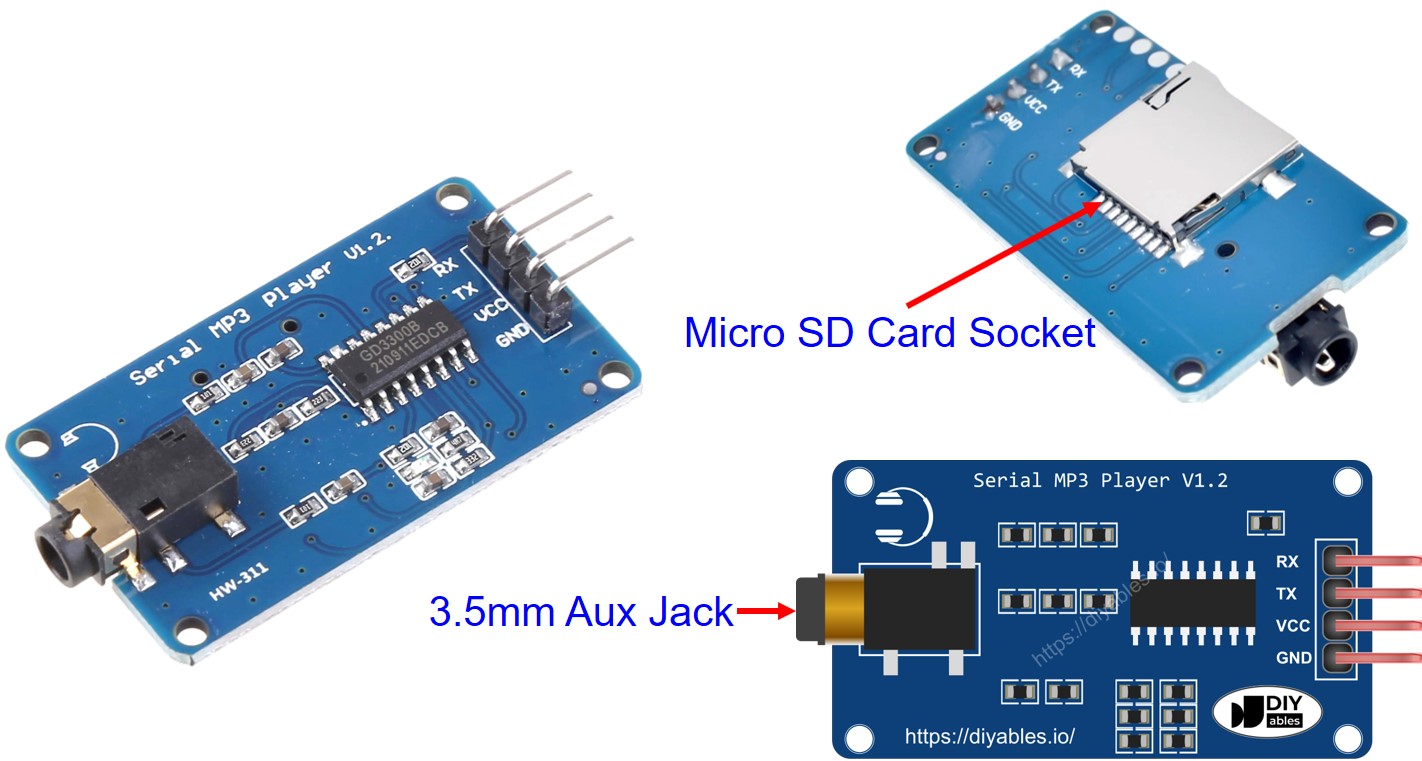
Serial MP3 Player Module Pinout
The module has one header for the board, one jack for sound, and one slot for the card.
| Interface | Part | Role |
|---|---|---|
| Control header | RX pin | Takes commands in. Goes to a TX pin of the ESP32 Uno |
| Control header | TX pin | Sends data out. Goes to an RX pin of the ESP32 Uno |
| Control header | VCC pin | Power input, about 3.2V to 5.2V |
| Control header | GND pin | Ground (0V) |
| Sound output | 3.5mm Aux female jack | Carries the audio to the speaker |
| Storage | Micro SD card socket (back side) | Holds your MP3 files |
Speaker Pinout
| Speaker Connection | Details |
|---|---|
| Audio | 3.5mm Aux male plug, goes into the MP3 module jack |
| Power | USB, a 5V adapter or another power input, based on the speaker model |
Good to know: the speaker gets its power on its own, not from the ESP32 Uno, so loud music does not drain the board.
How It Works
By the end of this part, your card and parts are ready for the code.
Step 1 — Prepare the hardware
- Copy a few MP3 songs or voice clips to the Micro SD card.
- Push the card into the slot on the MP3 module.
- Run the four module wires to the ESP32 Uno headers.
- Plug the speaker Aux cable into the module jack.
- Switch on the speaker power.
Step 2 — Know how the songs are picked
The module gives each MP3 file an index, counting from 0. This index sets the play order.
Step 3 — Know the commands
The ESP32 Uno sends 8-byte frames over a serial line. The module then decodes the chosen file and pushes the sound out of the 3.5mm jack.
| Command | Code In Sketch | Result |
|---|---|---|
| Start playing | CMD_PLAY | Plays the current track |
| Stop | CMD_PAUSE | Pauses the music |
| Play next | CMD_PLAY_NEXT | Jumps one track forward |
| Play previous | CMD_PLAY_PREV | Jumps one track back |
| Adjust volume | CMD_SET_VOLUME | Sets a level from 0 to 30 |
Good to know: the ESP32 Uno has no SoftwareSerial. The sketch uses the hardware port Serial2 and routes it to D7 (GPIO14) for RX and D6 (GPIO27) for TX, the same header spots as the original wiring.
ESP32 Uno Pinout
Your code never uses the D or A labels printed on the headers. It uses the GPIO number behind each one, so match them on the diagram below first.

How to Connect
By the end of this part, the MP3 module talks to the ESP32 Uno over two crossed data wires.
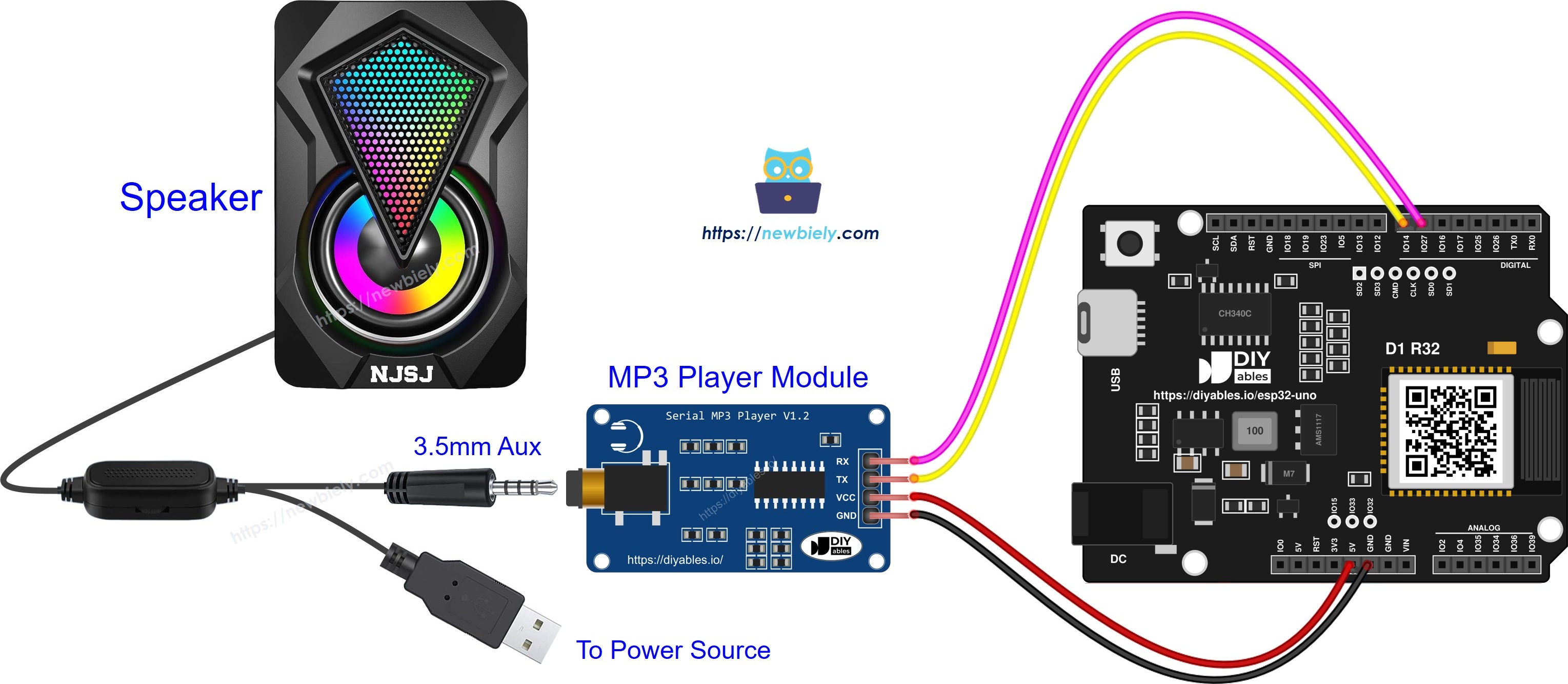
This image is created using Fritzing. Click to enlarge image
| MP3 Module Pin | ESP32 Uno Pin |
|---|---|
| VCC | 5V |
| GND | GND |
| TX | D7 (GPIO14) through a level converter |
| RX | D6 (GPIO27) |
WARNING
ESP32 Uno pins take 3.3V at most. With the module on 5V, its TX line pushes 5V into D7 (GPIO14), which can damage the pin over time. Fix it in one of two ways: place a 5V to 3.3V level converter (or a 1kΩ and 2kΩ divider) on that wire, or feed the module VCC from the 3V3 pin so all its signals stay at 3.3V. The wire from D6 (GPIO27) to the module RX needs nothing extra.
Good to know: D6 (GPIO27) and D7 (GPIO14) are plain I/O pins with no boot role, so the module can stay plugged in while you upload.
ESP32 Uno Code - Play Music
This sketch selects the Micro SD card and plays the first track one time after reset.
Upload and Test
- First time with this board? Set it up with ESP32 Uno - Getting Started before you continue.
- Load the card with MP3 files and insert it, as in How It Works.
- Build the circuit by following the wiring table above.
- Plug in the USB Type-C cable between the ESP32 Uno and your computer.
- Select the board in Arduino IDE: pick ESP32 Dev Module and the COM port of the board (CH340).
- Paste the code into a new sketch. No extra library is needed for this one.
- Press Upload and wait for "Done uploading".
- Listen: the first song starts from the speaker within about one second.
- Pro tip: start with the speaker knob at half. The module output can be loud, and track 0 begins at once after each reset.
Video Tutorial
See the ESP32 Uno build in action in the video below.
Code Explanation - Play Music
| Code Part | What It Does |
|---|---|
| HardwareSerial &mp3 = Serial2 | Gives UART2 the short name mp3 |
| mp3.begin(9600, SERIAL_8N1, 14, 27) | Opens UART2 at 9600 baud on GPIO14 (RX) and GPIO27 (TX) |
| mp3_command(CMD_SEL_DEV, DEV_TF) | Picks the Micro SD card as the music source |
| mp3_command(CMD_PLAY, 0x0000) | Starts the current track |
| mp3_command() function | Builds the 8-byte frame (0x7E start, 0xEF end) and writes it byte by byte |
The result: one song plays, and loop() stays empty. To test other commands, remove the // in front of the pause, next, previous or volume line and upload again.
ESP32 Uno Code - Play Music with Control Buttons
This version keeps the same serial setup and adds four push buttons, so you pick what plays.
Wire the buttons as shown here:
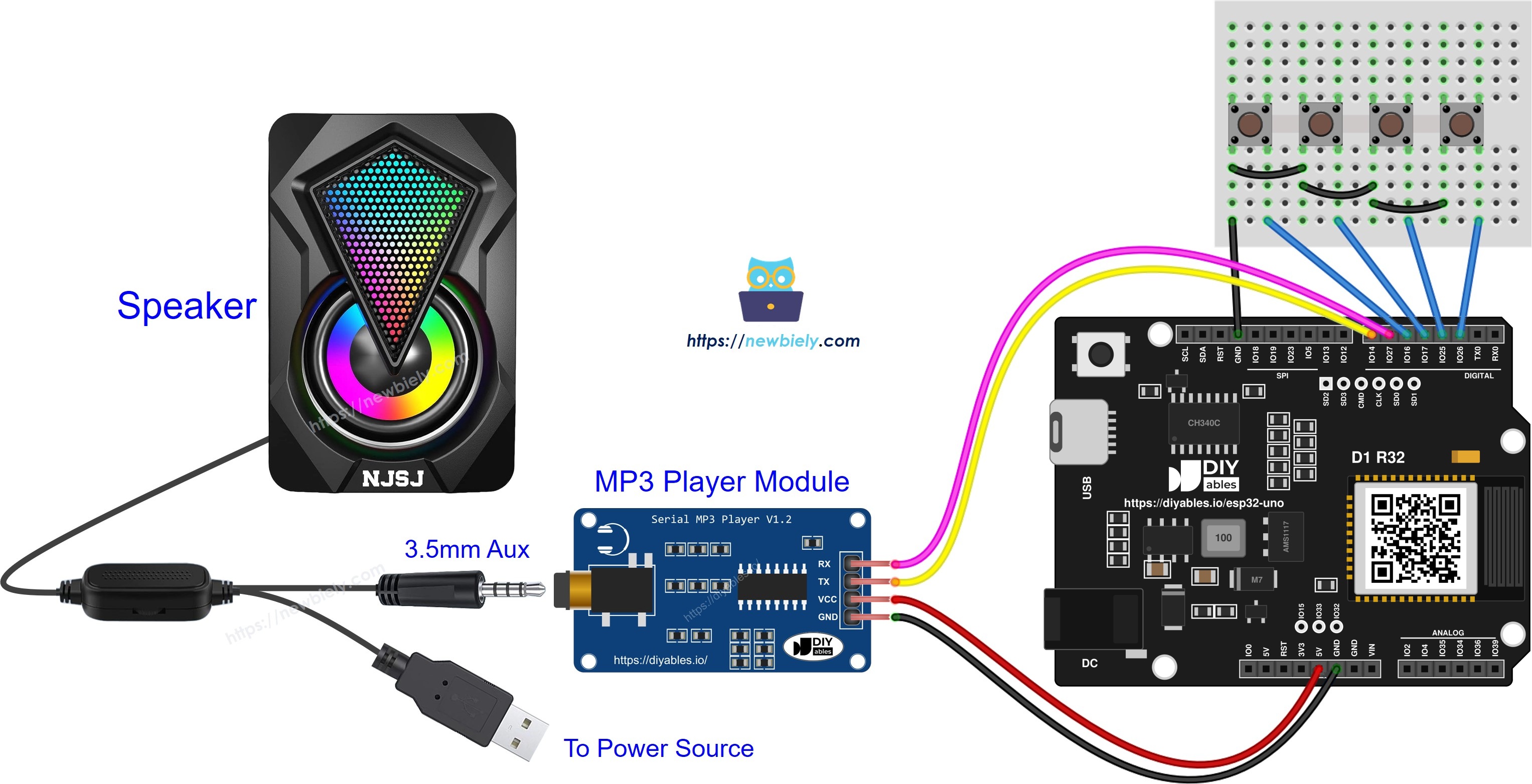
This image is created using Fritzing. Click to enlarge image
| Part | ESP32 Uno Pin |
|---|---|
| MP3 module VCC | 5V |
| MP3 module GND | GND |
| MP3 module TX | D7 (GPIO14) through a level converter |
| MP3 module RX | D6 (GPIO27) |
| Play button | D2 (GPIO26) |
| Pause button | D3 (GPIO25) |
| Next button | D4 (GPIO17) |
| Previous button | D5 (GPIO16) |
| Second leg of every button | GND |
※ NOTE THAT:
D4 (GPIO17) and D5 (GPIO16) are the default Serial2 pins on this board. Here the sketch moves Serial2 to GPIO14 and GPIO27, so these two pins are free for buttons.
| Code Part | What It Does |
|---|---|
| #include | Loads the ezButton library for clean button reads |
| ezButton button_play(26) and the other three | Create one button object per pin, with the internal pull-up on |
| setDebounceTime(50) | Ignores contact noise under 50 ms |
| button_xxx.loop() | Must run first in every loop() pass |
| isPressed() | Is true one time per press, then the sketch sends the matching command |
Each press prints one line and sends one command. Get the ezButton library through the Arduino IDE Library Manager first, or the sketch will not compile. Open the Serial Monitor at 9600 baud and press the buttons:
ESP32 Uno vs UNO R4 for This Project
Moving this player from the UNO R4 to the ESP32 Uno changes the serial library and the voltage, not the wiring spots.
| Item | Arduino UNO R4 | ESP32 Uno |
|---|---|---|
| Logic voltage | 5V | 3.3V |
| Serial to the module | SoftwareSerial on pins 7 and 6 | Serial2 on GPIO14 and GPIO27 |
| Library line | SoftwareSerial.h | none, Serial2 is built in |
| Button pins | 2, 3, 4, 5 | GPIO26, GPIO25, GPIO17, GPIO16 |
| Module TX signal at 5V | Safe | Needs a level converter or 3.3V power |
| Arduino IDE board | Arduino UNO R4 WiFi | ESP32 Dev Module |
| WiFi and Bluetooth | WiFi only on the WiFi model | WiFi plus Bluetooth Classic and BLE |
The wires go to the same header positions as on the UNO R4. Only the module TX line needs care, because a 5V signal must not enter an ESP32 Uno pin.
Add More Features
Pick one of these ideas to grow the player:
- Volume knob: read a potentiometer and send CMD_SET_VOLUME. See ESP32 Uno - Potentiometer. The ADC gives 0 to 4095, so map it to 0 to 30.
- Remote control: add an IR receiver and a small remote, then send a command for each remote key.
- Card-based player: add an RFID reader so each card starts its own song. See ESP32 Uno - RFID.
Go Wireless: Pick Songs from Your Phone
By the end of this part, you have an idea for a player with no buttons at all.
The ESP32 Uno has WiFi and Bluetooth built in. You can type "next" or "pause" into a chat page on your phone, and the sketch turns each word into an MP3 command. A slider on the phone can set the volume from 0 to 30. Keep the same Serial2 setup on GPIO14 and GPIO27.
Function References
Troubleshooting
| Problem | Possible Cause | Solution |
|---|---|---|
| Board has no COM port in Arduino IDE | CH340 driver missing or a charge-only USB cable | Install the CH340 driver and swap to a USB cable that carries data |
| Upload stops at "Failed to connect" or "Waiting for download" | Board did not enter download mode | Hold the BOOT button when the upload starts, release it once writing begins |
| Silence from the speaker | Speaker off, no speaker power, or Aux plug half in | Switch the speaker on, power it, and seat the Aux plug fully |
| Module ignores every command | Data wires not crossed or wrong baud rate | Module TX to D7 (GPIO14), module RX to D6 (GPIO27), both sides at 9600 |
| Module is silent with correct wiring | Card not read or files not MP3 | Format the card as FAT32, copy MP3 files, insert it before power-on |
| ESP32 Uno freezes or GPIO14 stops working | 5V from the module TX on a 3.3V pin | Add the level converter or move module VCC to 3V3 |
| Compile error "SoftwareSerial.h not found" | Sketch made for an AVR board | Use the sketch on this page, which uses Serial2 |
| One button does nothing | ezButton missing or button leg not on GND | Install ezButton and connect the second leg of the button to GND |
| Sound cuts out at high volume | Module power drops when it draws more current | Power the module from 5V and keep the level converter on TX |
FAQ
Does the serial MP3 module need a library on the ESP32 Uno?
No. The sketch builds the 8-byte command frames by hand in mp3_command(). Only the button version needs a library, and that is ezButton for the buttons, not for the module.
Why is there no SoftwareSerial in the ESP32 Uno code?
The esp32 by Espressif Systems core does not ship SoftwareSerial. The ESP32 Uno has spare hardware UARTs, so the code uses Serial2.begin(9600, SERIAL_8N1, 14, 27). A hardware port is also more reliable at sending bytes.
Can I run the MP3 module from the 3V3 pin?
Usually yes, since the module accepts about 3.2V and up. Its TX then sends 3.3V signals, so you can skip the level converter. If the sound crackles or the module resets at high volume, go back to 5V and use the converter.
Will a 5V MP3 module damage the ESP32 Uno?
It can. ESP32 Uno pins are not 5V tolerant, and the module TX wire feeds into D7 (GPIO14). Put a level converter or a resistor divider on that one wire. The wire from the board to the module RX is safe.
Which file plays first?
Index 0, which is normally the first file copied to the card. The module counts by copy order, not by file name. To set your own order, format the card and copy the songs one at a time.
How do I set the volume from code?
Call mp3_command(CMD_SET_VOLUME, 18); with a value from 0 (mute) to 30 (max). For a knob, scale its 0 to 4095 ESP32 Uno reading down to the 0 to 30 volume range with map(). Add analogSetAttenuation(ADC_11db); in setup() so the knob covers the full 0 to 3.3V range.
Can I plug a UNO shield on top of the ESP32 Uno for this project?
The shape fits, but check the shield voltage. Many UNO shields send 5V signals, and the ESP32 Uno pins only take 3.3V. Also check that the shield does not use D6 or D7, which this player uses for the module.
Why do the button pins change from 2 to 5 into 26, 25, 17 and 16?
The ESP32 Uno code uses GPIO numbers, not the header labels. D2, D3, D4 and D5 sit on GPIO26, GPIO25, GPIO17 and GPIO16. The wires stay in the same header holes as on the UNO R4.
Do I need to hold BOOT every time I upload?
Not always. Most of the time the CH340 chip puts the board into download mode by itself. Hold BOOT only if the upload hangs at "Connecting..." and then times out.
What if my project needs more pins than the Uno headers give?
The ESP32 Uno has extra holes near the power header: GPIO32 and GPIO33 (I/O, PWM, analog on ADC1, so they work while WiFi is on) and GPIO15 (I/O, PWM, analog on ADC2). Add pin headers with a soldering iron, then put the plain GPIO number in your sketch. For this player, GPIO32 or GPIO33 is a good spot for a volume knob, even in a WiFi version. Two warnings: (1) GPIO15 and GPIO0 (the IO0 pin at the unused Uno NC position) are boot strapping pins, and a wrong connection can stop the board from booting or uploading code, so use GPIO32/33 first. (2) Never use the six holes under the digital header (SD0 to SD3, CMD, CLK = GPIO6 to GPIO11). They connect to the flash chip, and using them crashes the board.
Can I control the player from my phone?
Yes. The ESP32 Uno has WiFi and Bluetooth, so a phone page or app can send play, pause and next commands. See the Go Wireless part above for links.