
ESP32 UNO - Electromagnetic Lock
Hold a door shut with nothing but magnetism and an ESP32 Uno electromagnetic lock circuit. A 12V maglock is far too hungry for a GPIO pin, so the ESP32 Uno form board flips a relay, and the relay feeds the magnet. Upload the sketch and the magnetic lock grips its steel plate for 5 seconds, drops it for 5 seconds, and repeats.
By the end, you can:
- Explain how a maglock holds a door with an electromagnet and an armature plate
- Wire an EM lock, a relay and a 12V adapter to the ESP32 Uno
- Upload Arduino IDE code that switches the relay with digitalWrite()
- Mount the lock parts so the door closes firmly
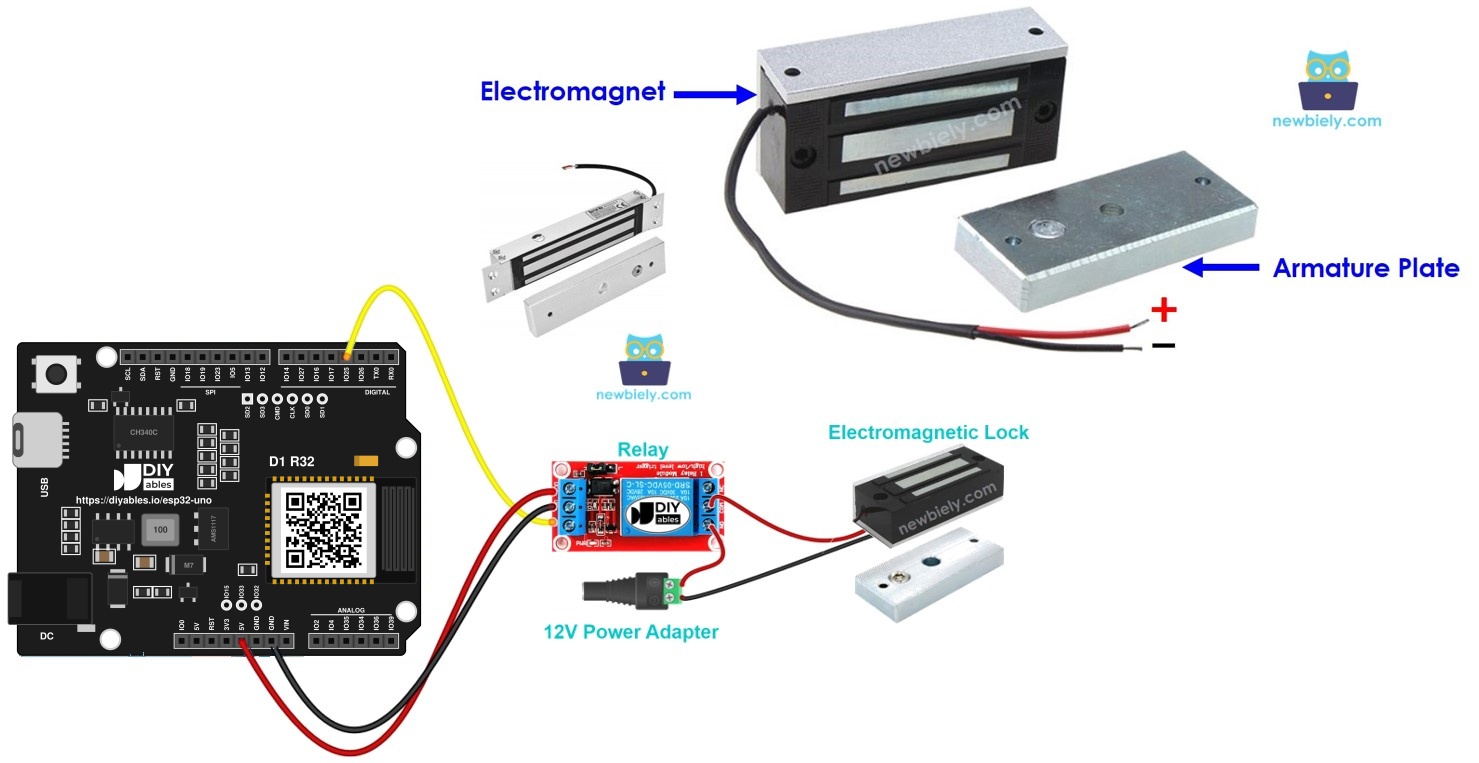
Components You Need
| 1 | × | ESP32 Uno-form Board | |
| 1 | × | USB Cable Type-A to Type-C (for USB-A PC) | |
| 1 | × | USB Cable Type-C to Type-C (for USB-C PC) | |
| 1 | × | Electromagnetic Lock | |
| 1 | × | Relay | |
| 1 | × | 12V Power Adapter | |
| 1 | × | DC Power Jack |
Or you can buy the following kits:
| 1 | × | DIYables Sensor Kit (18 sensors/displays) |
Additionally, some of these links are for products from our own brand, DIYables .
Meet the Electromagnetic Lock
After this part, you know where a maglock is used and what it pairs with.
A maglock keeps doors closed in shops, server rooms, gates and building entrances. On its own it only holds or releases. The decision comes from a controller that reads an access device:
| Access Device | Typical Use |
|---|---|
| Push switch or exit button | Open the door from the inside |
| Keypad | Enter a PIN code |
| RFID / NFC reader | Tap a card or tag |
| Fingerprint reader | Scan a finger |
| PC or phone app | Open the door remotely |
Pinout
By the end of this part, you can tell the two pieces apart before you mount them.
| Part | Wires | Role |
|---|---|---|
| Electromagnet | 2 (power + and power -) | Makes the magnetic field when current flows |
| Armature plate | None | Steel plate that gets pulled onto the magnet |
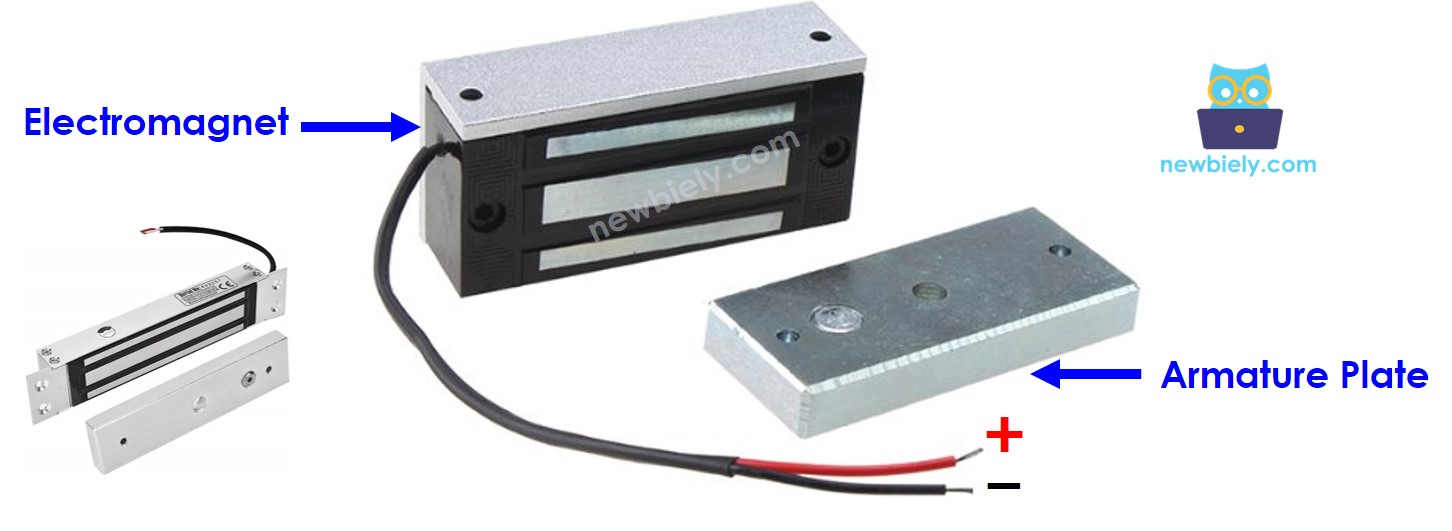
How It Works
After this part, you know which state locks the door and which frees it.
| Electromagnet State | Magnetic Field | Door |
|---|---|---|
| Powered | Strong field pulls the plate tight | Locked |
| Not powered | No field, plate moves freely | Unlocked |
※ NOTE THAT:
Maglocks are made for 12V, 24V or 48V supplies and draw hundreds of milliamps. An ESP32 Uno GPIO outputs 3.3V at a tiny current, so a direct connection can never drive the lock and may damage the board. Put a relay between the ESP32 Uno pin and the lock.
The Relay Between Board and Lock
Here the lock sits on the normally open (NO) contact of the relay:
| Relay Contact State | Lock Power | Door |
|---|---|---|
| Open (relay off) | No 12V | Unlocked |
| Closed (relay on) | 12V on the magnet | Locked |
The ESP32 Uno only switches the relay coil; the relay switches the 12V circuit. New to relays? The ESP32 Uno - Relay guide covers NO, NC and trigger modes in detail.
Where to Fix Each Part
Screw the armature plate onto the moving side (the door leaf or window sash). Screw the electromagnet onto the fixed side (the frame). Line them up so the plate lies flat on the magnet face when the door closes.
ESP32 Uno Pinout
Your code talks to GPIO numbers, not to the printed Uno labels, so find D3 on the diagram and read its GPIO number first.

How to Connect
When this step is done, the relay listens to D3 and the lock hangs on the relay output.
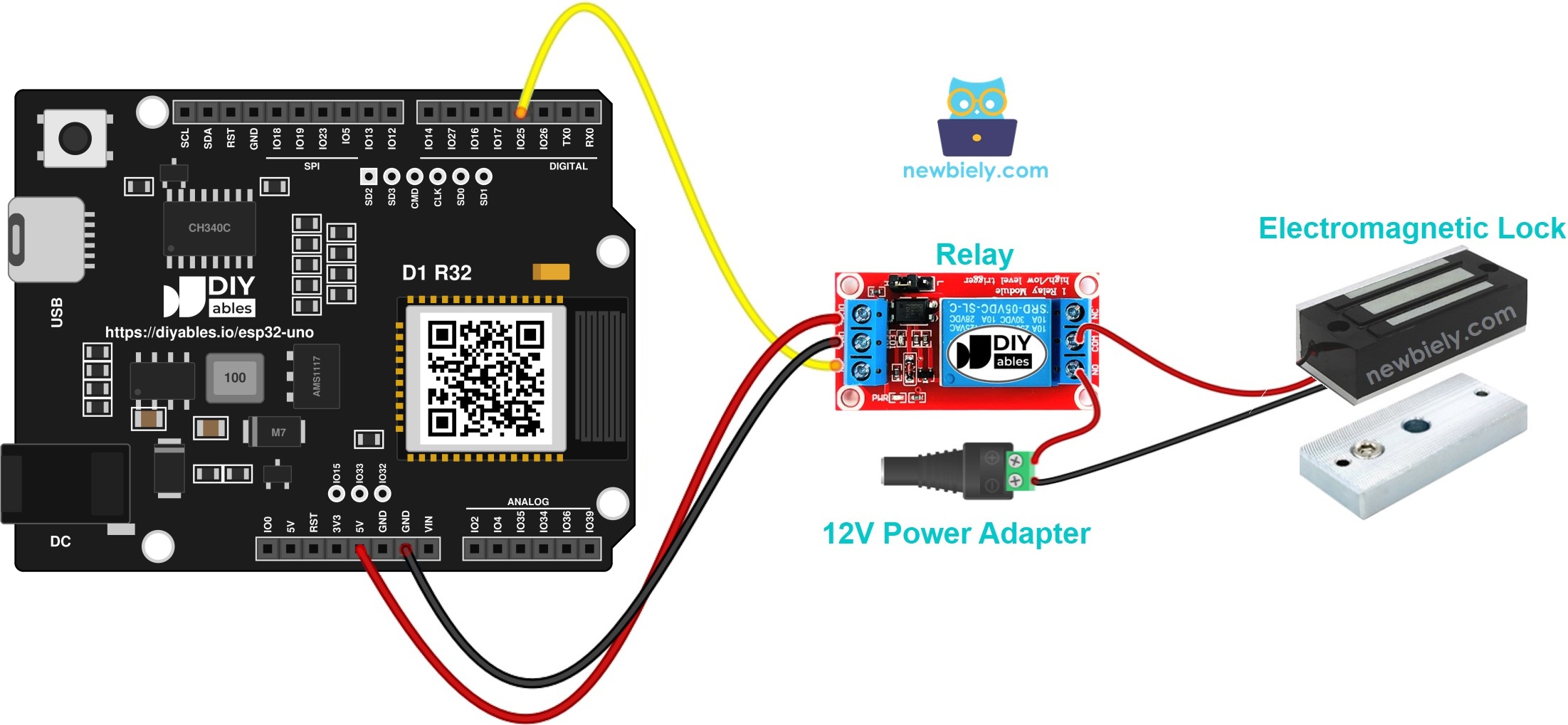
This image is created using Fritzing. Click to enlarge image
| Component Pin | ESP32 Uno Pin |
|---|---|
| Relay DC+ (VCC) | 5V |
| Relay DC- (GND) | GND |
| Relay IN | D3 (GPIO25) |
| Relay COM / NO | 12V adapter (via DC power jack) and electromagnet, no board pin |
Good to know: ESP32 Uno pins use 3.3V logic and are NOT 5V tolerant. That is fine here, because the signal only goes out from GPIO25 into the relay IN pin.
※ NOTE THAT:
Feed the relay coil from the 5V pin, since most relay modules carry a 5V coil. Their IN pin drives a transistor or optocoupler, which a 3.3V HIGH from GPIO25 normally switches without trouble. Keep the whole 12V loop (adapter, jack, lock) on the COM and NO screw terminals only, and never let it touch a board header.
ESP32 Uno Code
The sketch toggles GPIO25 every 5 seconds, so the lock alternates between holding and releasing.
Upload and Test
- First time with this board? Set it up with ESP32 Uno - Getting Started before you continue.
- Build the circuit by following the wiring table above. Leave the 12V adapter unplugged for now.
- Plug in the USB Type-C cable between the ESP32 Uno and your computer.
- Select the board in Arduino IDE: pick ESP32 Dev Module and the COM port of the board (CH340).
- Paste the sketch into a new Arduino IDE window.
- Press Upload (Upload) and wait for "Done uploading".
- Plug in the 12V adapter so the lock gets power through the relay.
- Place the armature plate against the electromagnet face.
- Pull on the plate while the relay LED is on: it should not move. When the relay clicks off, it slides away easily.
- Pro tip: Before you mount the lock on a real door, test the 12V side with a multimeter on the COM and NO terminals. You should read 0V and 12V in turn every 5 seconds.
Video Tutorial
See the ESP32 Uno build in action in the video below.
How the Code Works
After this part, you can change the timing or the pin with confidence.
| Code Part | What It Does |
|---|---|
| #define RELAY_PIN 25 | Names GPIO25, the D3 header, as the relay control pin |
| pinMode(RELAY_PIN, OUTPUT) | Lets GPIO25 drive the relay IN pin |
| digitalWrite(RELAY_PIN, HIGH) | Closes the relay, the magnet gets 12V and the door locks |
| digitalWrite(RELAY_PIN, LOW) | Opens the relay, the magnet loses power and the door unlocks |
| delay(5000) | Keeps each state for 5 seconds |
Change the two delay() values to hold the lock longer or shorter.
ESP32 Uno vs UNO R4 for This Project
Moving this maglock project from the UNO R4 to the ESP32 Uno changes only the pin number in code.
| Item | Arduino UNO R4 | ESP32 Uno |
|---|---|---|
| Logic voltage | 5V | 3.3V |
| Relay control pin | D3 (pin 3) | D3 (GPIO25) |
| Value in #define | 3 | 25 |
| Arduino IDE board | Arduino UNO R4 WiFi or Minima | ESP32 Dev Module |
| USB chip | Built in | CH340 |
| WiFi and Bluetooth | WiFi on the WiFi model only | WiFi plus Bluetooth Classic and BLE |
The same wiring works as-is: the relay stays on D3, 5V and GND. Just check that your relay module accepts a 3.3V signal on IN.
Go Wireless: Open the Door from Your Phone
By the end of this part, you have an idea for remote unlocking.
The ESP32 Uno has WiFi and Bluetooth built in, so you can skip the timer and switch the relay from a phone. Show an ON/OFF control for D3 (GPIO25) in a web page or a Bluetooth app, and tap it to release the lock. Keep a physical exit button too, in case the network goes down.
Troubleshooting
| Problem | Possible Cause | Solution |
|---|---|---|
| Board missing from the port list | CH340 driver not installed or charge-only USB cable | Install the CH340 driver and swap to a data USB Type-C cable |
| Upload stops at "Waiting for download" | Board did not enter download mode | Hold the BOOT button when the upload starts, then release it |
| No click from the relay | Coil power missing or IN wire on another header | Check DC+ on 5V, DC- on GND and IN on D3 (GPIO25) |
| Relay clicks, plate is never held | 12V adapter off or lock wired to the wrong contacts | Plug in the adapter, check the jack polarity and use COM and NO |
| Door locked when it should be open | Relay is low-level trigger or lock sits on NC | Set the jumper to high trigger, move the wire to NO, or swap HIGH and LOW |
| Weak hold force | Plate tilted or supply below the rated voltage | Realign the plate so it sits flat and use the voltage on the lock label |
| ESP32 Uno reboots each time the lock switches | Voltage spike from the magnet coil | Add a flyback diode across the lock and route the 12V wires away from the board |
| Relay ignores the 3.3V signal | Module needs a 5V level on IN | Use a relay module rated for 3.3V logic or add a small transistor driver |
FAQ
Does a maglock stay closed during a power cut?
No. It only holds while current flows, so a power cut releases the door. This "fail-safe" behavior suits emergency exits. Add a backup battery if the door must stay shut during outages.
How much holding force does an electromagnetic lock have?
Small cabinet maglocks hold around 60 kg, while door models are rated from about 180 kg to 500 kg or more. The force is printed on the label and only reached when the plate sits fully flat on the magnet.
Can the ESP32 Uno 5V pin run the lock without a 12V adapter?
No. The lock needs its rated 12V and much more current than the USB-powered 5V pin can give. The 5V pin is only for the relay coil.
Is a diode needed across the electromagnet?
It is a good idea. The magnet is a coil, so it makes a voltage spike when the relay opens. A diode such as a 1N4007 across the lock terminals (stripe to +) absorbs that spike and protects the relay contacts.
Why does HIGH lock the door in this code?
The lock is on the normally open contact. HIGH energizes the relay, the contact closes and 12V reaches the magnet. Use the NC contact or swap HIGH and LOW if you want HIGH to unlock.
Can I run the UNO R4 sketch on the ESP32 Uno without changes?
Only after one edit. On the UNO R4, RELAY_PIN is 3; on the ESP32 Uno, the D3 header is GPIO25, so the define must read 25. The rest of the logic is identical.
Which Arduino IDE board and driver do I need for the ESP32 Uno?
Install the "esp32 by Espressif Systems" core and select ESP32 Dev Module. The board uses a CH340 USB chip, so install the CH340 driver if no COM port appears.
Can I move the relay to D8 or D10?
It may work, but D8 (GPIO12) and D10 (GPIO5) are boot strapping pins. A relay module that pulls them the wrong way at power-on can stop the ESP32 Uno from starting. Stay on D3 (GPIO25), which matches the wiring diagram.
Can I control two maglocks from one ESP32 Uno?
Yes. Give each lock its own relay channel and its own control pin, for example D3 (GPIO25) and D2 (GPIO26), then call digitalWrite() on each pin.
What if my project needs more pins than the Uno headers give?
The ESP32 Uno has a few extra holes near the power header: GPIO32 and GPIO33 (I/O, PWM, analog on ADC1, so they also work with WiFi on) and GPIO15 (I/O, PWM, analog on ADC2). Add pin headers with a soldering iron, then type the plain GPIO number in your sketch. GPIO32 and GPIO33 suit an extra relay or a door sensor. Two warnings: GPIO15 and GPIO0 (the IO0 pin at the unused Uno NC position) are boot strapping pins, and a wrong connection can stop the board from booting or uploading, so use GPIO32/33 first. Also never use the six holes under the digital header (SD0 to SD3, CMD, CLK = GPIO6 to GPIO11), because they go to the flash chip and using them crashes the board.
Can I unlock the door over WiFi with the ESP32 Uno?
Yes. The ESP32 Uno has WiFi and Bluetooth, so a web page or phone app can set the relay pin. See the Go Wireless section above for two ready-made app guides.