
ESP32 UNO - PC817 Optocoupler: Monitor 12V/24V DC Input Signal
Is that 24V pump or 12V gate motor really getting power? Let an ESP32 Uno with a PC817 optocoupler answer it, and keep the high voltage fully away from the board. The ESP32 Uno form board reads only 3.3V, so the photocoupler (opto-isolator) passes the on/off state across a light gap and nothing else. Your sketch then prints LIVE or IDLE twice a second.
What you will do:
- Choose the correct PC817 module variant for a 3.3V, 5V, 12V or 24V line
- Connect the isolation module to the ESP32 Uno and test if it is active LOW or active HIGH
- Tap the module across a load in parallel, so it follows the real device power
- Read the isolated input with digitalRead() and INPUT_PULLUP in Arduino IDE
- Swap the module for a bare PC817 chip and one resistor
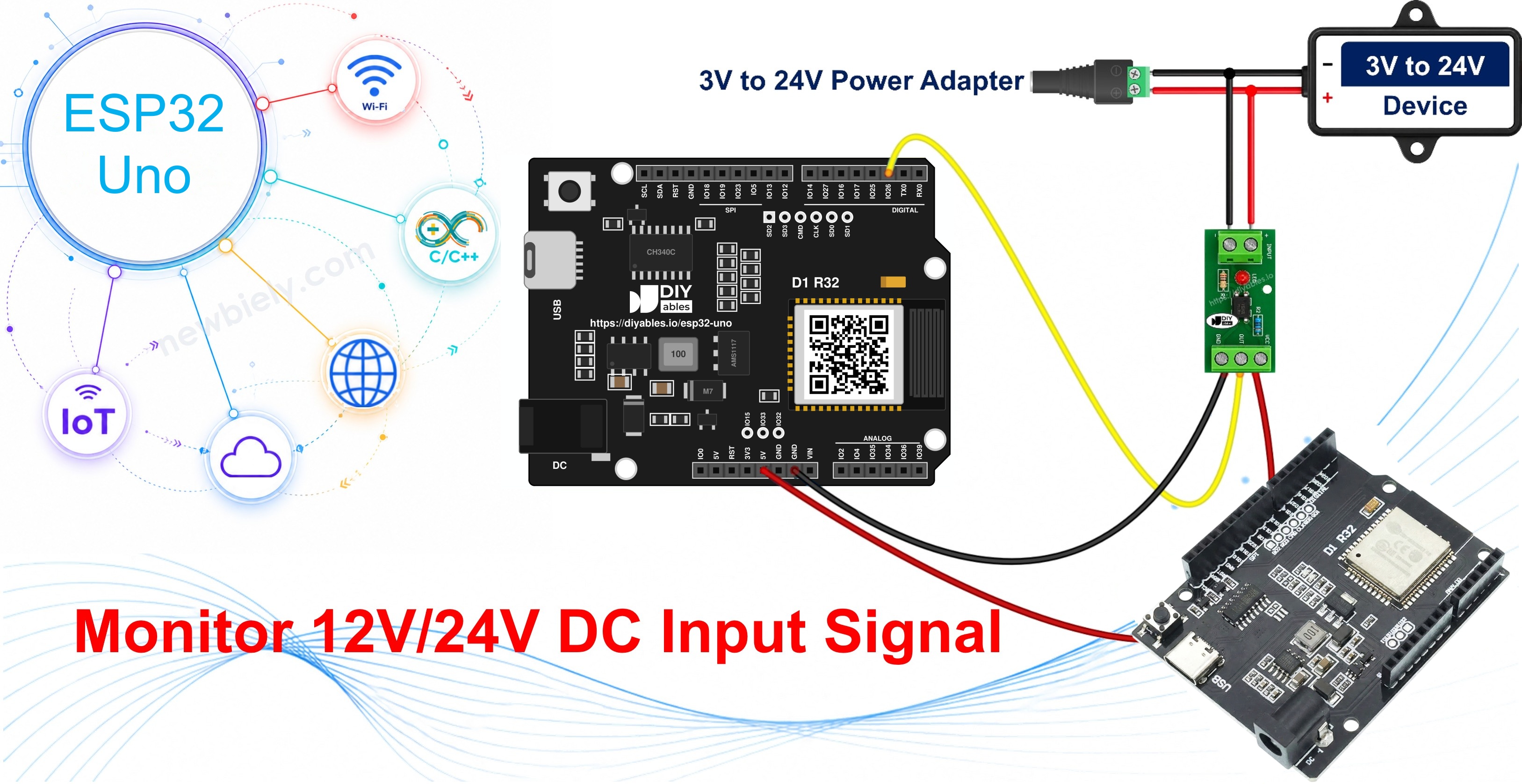
Components You Need
Or you can buy the following kits:
| 1 | × | DIYables Sensor Kit (18 sensors/displays) |
Additionally, some of these links are for products from our own brand, DIYables .
Get only one module: the variant whose label matches the line you will watch. The selection table below tells you which one.
Overview of PC817 Optocoupler
By the end of this part, you know what is inside the PC817 and why it guards your board.
| Item | Detail |
|---|---|
| Other names | photocoupler, opto-isolator |
| Input side | an infrared LED |
| Output side | a phototransistor |
| Link between them | light across an insulating gap - no copper path |
| Result | the signal crosses, the voltage does not |
Current through the LED makes infrared light. That light turns the phototransistor on. So the two halves of the chip never touch electrically.
Good to know: ESP32 Uno pins run at 3.3V and are NOT 5V tolerant. One touch of 12V or 24V on a GPIO kills it. With the PC817 in the middle, the ESP32 Uno only ever sees its own 3.3V.
Real uses on a workbench or in a garage:
| Line you watch | What your sketch learns |
|---|---|
| 12V gate or garage-door motor output | the gate is moving right now |
| 12V car accessory feed | the ignition line is on, so you may draw power |
| 24V power supply enable line | the bench supply is switched on |
| 24V PLC output | the machine step is active |
The true question is never "does this wire carry volts?". It is "is the thing on the far end of the wire on or off at this moment?". The PC817 gives your sketch that yes or no.
On this board the output side of the optocoupler is pulled up to 3.3V. So the input pin sees 3.3V or 0V, nothing more.
Specifications
| Parameter | Value |
|---|---|
| Package | 4-pin DIP |
| Input LED forward voltage (Vf) | about 1.2V typical, 1.4V max |
| Input LED forward current (If) | 5-20 mA normal range, 20 mA continuous max |
| Output collector-emitter voltage (VCEO) | 35V max |
| Output collector current (IC) | 50 mA max |
| Collector power dissipation | 150 mW |
| Isolation voltage | 5000 Vrms for 1 minute |
| Current Transfer Ratio (CTR) | 50% to 600% by rank (A 80-160%, B 130-260%, C 200-400%, D 300-600%) |
| Switching speed | rise time about 4 us, fall time about 3 us |
| Operating temperature | -30 C to +100 C |
The PC817 Optocoupler Module
By the end of this part, you can read the module's terminals and you know why the variant matters.
This guide uses the ready-made module, not the bare chip. It comes with 1, 2, 4 or 8 channels. Every channel has the PC817, a matching series resistor and mostly a status LED, all soldered in. External wires go into screw terminals.
| Module Side | Terminals | Goes To |
|---|---|---|
| Input | + (IN+) and - (IN-) screw terminals | the 12V or 24V device |
| Output | VCC, GND, OUT (or DO / OUT1..OUTn) header pins | the ESP32 Uno |
Good to know: feed VCC from the ESP32 Uno 3.3V pin. Many modules tie OUT to VCC through a pull-up, so 5V on VCC would push 5V into a 3.3V GPIO. This rule is the same for all three variants.
The tricky part: the resistor on the input is fixed, and it fits one input voltage. A universal module does not exist. You buy the 3-5V, the 12V or the 24V variant to suit your signal.
Which PC817 Optocoupler Module Do I Need?
Check the voltage of the line first (label, datasheet or multimeter). Then pick from this table:
| Signal you want to watch | Module variant to buy | Typical source |
|---|---|---|
| 3.3V or 5V logic | 3-5V module | another board's output pin, a 5V control board, a separately powered sensor |
| 12V DC | 12V module | gate and garage-door controllers, automotive accessory lines, alarm panels |
| 24V DC | 24V module | bench power supply enable lines, PLC outputs, industrial sensors |
The variant takes the place of a resistor choice. Get it wrong and this happens:
| Mistake | What Happens | Cost |
|---|---|---|
| 12V module on a 24V line | close to 2x the LED current - the LED fails in seconds | a dead module |
| 24V module on a 12V line | too little LED current - late, random or no switching | hours of hunting a "wiring fault" |
Signal between two labels? Take the closest variant below it, never above. Then watch the status LED on the bench before you rely on the reading.
Why Isolate a 5V or 3.3V Signal?
A 3-5V module next to a 3.3V board can look odd. The point is not the voltage. The point is the ground.
Two circuits with separate supplies, or linked by a long cable, each have their own idea of 0V. Join their grounds and you invite return current, noise and faults to move between them. Through a PC817, only the information crosses; the grounds never meet.
Good to know: the ESP32 Uno has a second reason to like the 3-5V module. A 5V logic output must never go straight into a 3.3V pin, and the module fixes that and the ground problem in one part.
Good places for it: a control board on its own supply, a cable run across a shop, a noisy motor driver close by, or the 5V logic board inside a mains appliance.
The input LED cares about current, not voltage. A 5V rail able to give 20 A is no harsher on the PC817 than a 20 mA rail, since the fitted resistor sets the LED current. A strong supply only makes a wiring slip elsewhere more harmful, and that is another reason to keep it behind the gap.
Active LOW or Active HIGH: Which Way Does Your Module Read?
By the end of this part, you know which pin level means "power present" for your exact module.
Step 1 — Know the Bare Chip Rule
For the bare chip, the logic is fixed. The collector goes to an input pin that a pull-up keeps HIGH. The ESP32 Uno internal pull-up is the simple choice and pulls to 3.3V; a 10 kohm resistor from the pin to 3.3V works the same. The result is inverted:
| Line state | Input LED | Phototransistor | digitalRead() |
|---|---|---|---|
| Powered | lit | on | LOW |
| Unpowered | dark | off | HIGH |
Step 2 — Test Your Module
Modules differ. Most keep the chip logic (power present reads LOW). A few invert it on the PCB, so OUT follows the input. The silkscreen often looks the same. Test it:
- Wire the module (see below), upload the sketch and open the Serial Monitor at 9600 baud.
- Keep the input terminals dead. Write down the printed state.
- Turn the external line on. Write down the new state.
- The state shown while the line is on is your module's active level. LIVE when dead and IDLE when on means an inverting module.
- Look at the module's status LED; it lights when the input has power. LED lit but no change in the printout means the level is wrong in code, not a broken tap.
Want the raw 1 or 0 instead? Put this line in loop() while testing:
Step 3 — Set One Constant
Edit MODULE_ACTIVE_LOW at the top of the sketch. true = normal active-LOW module. false = module whose OUT follows the input. No other line changes. Relay boards often use active LOW as well (see ESP32 Uno - Relay), and the ESP32 Uno - Button guide uses the same INPUT_PULLUP trick.
WARNING
Keep the 12V or 24V circuit ground off the ESP32 Uno GND. Two separate grounds are the only reason the optocoupler is in the circuit. Link them and the PC817 still switches, but isolation is lost, and a fault on the high-voltage side can travel into your board.
ESP32 Uno Pinout
The ESP32 Uno form board prints Uno names (D2, A0, 3.3V…) on its headers, but your sketch needs the GPIO number behind each one. Look up D2 in the diagram below before you plug in the OUT wire.

How to Connect
By the end of this part, the module sits between your 12V/24V line and the ESP32 Uno.
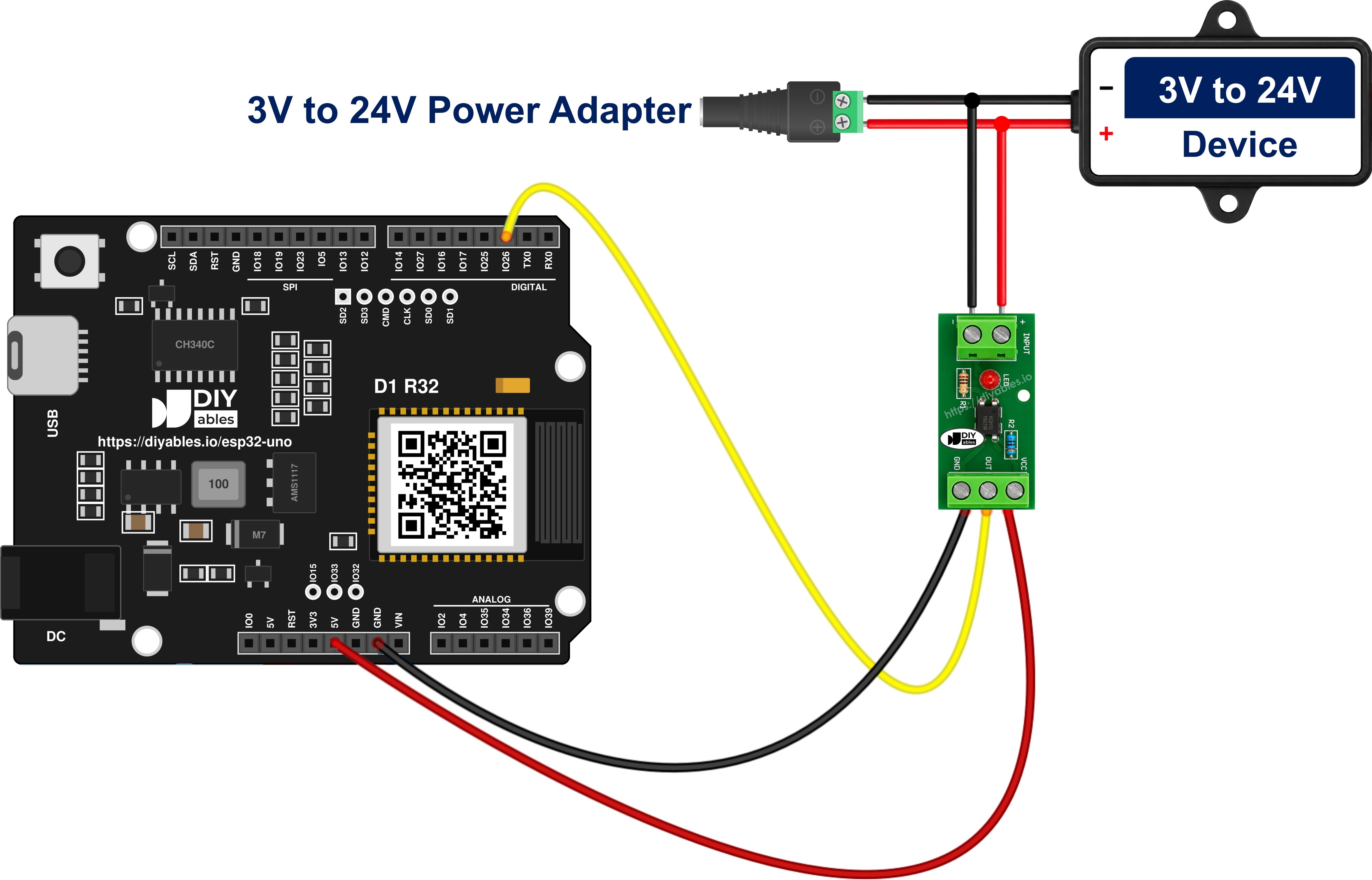
This image is created using Fritzing. Click to enlarge image
| PC817 Module Pin | ESP32 Uno Pin |
|---|---|
| VCC | 3.3V |
| GND | GND |
| OUT | D2 (GPIO26) |
| IN+ | switched positive of the 12V or 24V device (not the board) |
| IN- | return of the 12V or 24V device (not the board) |
Good to know: the series resistor is already on the module, so you add no resistor between the device and IN+.
WARNING
Connect module VCC to 3.3V, not 5V. If the drawing shows the VCC wire on 5V, move it to 3.3V. On many modules OUT is pulled up to VCC, and with 5V there, GPIO26 gets 5V. ESP32 Uno pins are NOT 5V tolerant.
Bare-chip version (last part of this guide): the 12V signal enters pin 1 through 1 kohm (2.2 kohm for 24V), pin 2 returns to the 12V ground, pin 4 goes to D2 (GPIO26), and pin 3 goes to the ESP32 Uno GND.
Connecting the PC817 in Parallel With the Device You Want to Monitor
By the end of this part, the tap sits across the load without changing how the load works.
Example: a gate opener. When the gate runs, its controller puts 12V on two wires that feed the motor relay. The ESP32 Uno must spot that. Put the module input across those two wires, like the probes of a voltmeter. Never break the wire to put it inline.
WARNING
A PC817 input in series with the load gets the full motor, coil or lamp current. Its LED is good for 20 mA, so it burns out the instant the load turns on. Always wire it across the load, in parallel.
You cut nothing in the gate wiring. You add three links:
| From | To | Note |
|---|---|---|
| Device switched positive | module IN+ | no extra resistor - the module has one |
| Device negative / return | module IN- | same device, same pair of wires |
| Module OUT, VCC, GND | D2 (GPIO26), 3.3V, GND | as in the table above |
The tap takes just the few milliamps the input LED needs. A motor, coil, valve or lamp draws amps, so it runs exactly as before. Your reading is read-only.
Check 1 — Polarity
The input is an LED and passes current one way only. Reverse IN+ and IN- and nothing is harmed, but the status LED stays off and the sketch shows IDLE all the time. Use a multimeter to find the positive wire first.
Check 2 — Clamp Diode for Coils and Motors
Motors, relay coils, contactors, solenoids and valves throw a big reverse spike when switched off. The PC817 LED survives only 6V reverse. Solder a plain diode across IN+ and IN-, reversed: cathode on IN+, anode on IN-. It sits idle in normal use and on a spike it conducts, holding the reverse voltage under one volt. Use a 1N4148 for a light tap, a 1N4007 for a heavy one.
Check 3 — Bleeder for Leaky Outputs
PLC transistor outputs, triac outputs and LED lamp drivers can leak a little current while off. That trickle can half-light the input LED, and the sketch reports LIVE on a device that is clearly off. The sign: no return to IDLE plus a dim status LED. Add a 4.7 kohm to 10 kohm bleeder resistor across IN+ and IN- so the leak flows there instead.
Check 4 — DC Only
One LED means one polarity and DC only. For an AC line, use an optocoupler whose input has two LEDs back to back.
Knowing Whether the Device Is Actually Running
By the end of this part, you know what the reading proves and what it cannot prove.
The tap is in parallel with the load, so it tracks the power that truly reaches it, not a single button or controller pin. Remote, wall switch or key switch: all three look identical to the sketch, since it watches the motor and not the trigger. If a command went out but no power arrived, the pin stays IDLE - and that quiet is your fault alarm.
| Idea | How the LIVE/IDLE state helps |
|---|---|
| Run-hour counter | add up time spent in LIVE |
| Slow gate alert | warn if LIVE lasts longer than the usual 20 seconds |
| Machine idle log | record each IDLE period with a time stamp |
| Start check | confirm LIVE a few seconds after a command |
Limit: the PC817 proves the device is powered, not that it works. A jammed motor or a broken heater element still takes power on that line and still shows LIVE.
Optional: Building the Same Input From the Bare PC817 Chip
By the end of this part, you can replace the module with the chip and one resistor.
Here the module variant turns into a resistor value. You fit the resistor the module would carry.
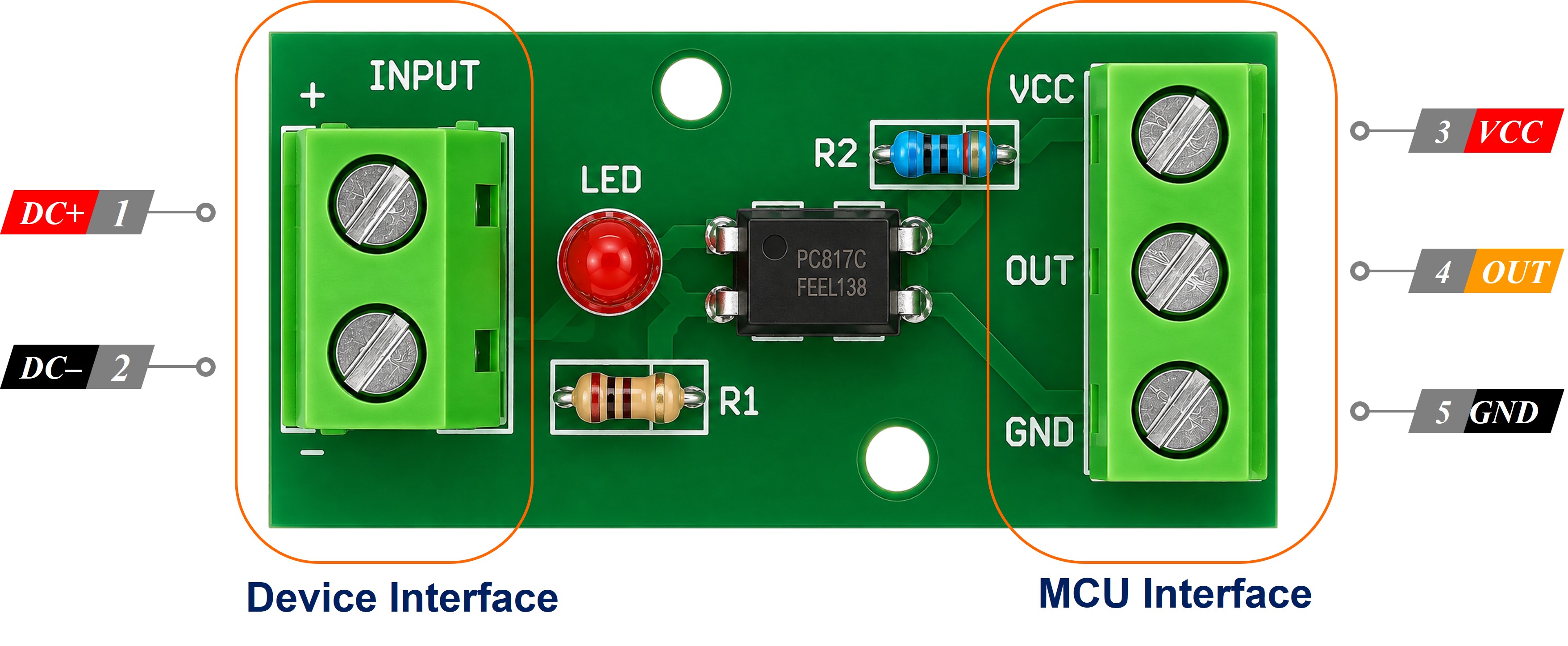
The package is a 4-pin DIP. A dot or notch marks pin 1.
| Pin | Role | Wire To |
|---|---|---|
| 1 - Anode (A) | input LED + | external signal through the series resistor |
| 2 - Cathode (K) | input LED - | external circuit ground, never the ESP32 Uno GND |
| 3 - Emitter (E) | output | ESP32 Uno GND |
| 4 - Collector (C) | output | D2 (GPIO26) |
Aim for about 10 mA in the LED with R = (Vin - 1.2) / 0.01:
| Input voltage | Resistor |
|---|---|
| 3.3V | 220 ohm |
| 5V | 390 ohm |
| 12V | 1 kohm |
| 24V | 2.2 kohm, in a 1/2 W part |
New input voltage means a new resistor. All other advice here still holds: parallel tap, clamp diode, bleeder and split grounds. With INPUT_PULLUP the chip build is truly active LOW, so leave MODULE_ACTIVE_LOW at true.
How To Program
By the end of this part, you know the four lines that do the real work.
| Step | Code Line | Job | |
|---|---|---|---|
| 1 | #define PC817_PIN 26 | names D2, which is GPIO26 on the ESP32 Uno | |
| 2 | pinMode(PC817_PIN, INPUT_PULLUP) | makes D2 an input held HIGH by the internal pull-up | |
| 3 | int raw = digitalRead(PC817_PIN) | takes the HIGH or LOW level | |
| 4 | bool signal_active = MODULE_ACTIVE_LOW ? (raw == LOW) | (raw == HIGH) | turns the level into on / off for your module type |
The same lines as code:
After that, print signal_active or use it to start an action. See digitalRead() for details.
ESP32 Uno Code - PC817 Optocoupler
The sketch checks D2 (GPIO26) every 500 ms and prints LIVE or IDLE for the 12V line. No library is needed.
Upload and Test
- First time with this board? Set it up with ESP32 Uno - Getting Started before you continue.
- Match the module to the line: 3-5V, 12V or 24V variant.
- Build the circuit by following the wiring table above. VCC on 3.3V, 12V ground kept apart from the board GND.
- Plug in the USB Type-C cable between the ESP32 Uno and your computer.
- Select the board in Arduino IDE: pick ESP32 Dev Module and the COM port of the board (CH340).
- Paste the code into a new sketch.
- Click Upload. If it hangs at "Connecting...", hold the BOOT button until the upload starts.
- Open the Serial Monitor at 9600 baud.
- Toggle the 12V line a few times.
- Read the output:
- Pro tip: label the screw terminals with a paint pen (+ and -) the first time you meter the line. Next time you move the module to a new device, the polarity check takes seconds.
Output reversed (LIVE at rest, IDLE when powered)? Your module inverts: set MODULE_ACTIVE_LOW to false and upload. LIVE with nothing on the input? Check the module GND wire and INPUT_PULLUP. Never LIVE? Check IN+/IN- polarity and the module variant. To measure the line voltage instead of just detecting it, see ESP32 Uno - Measure Voltage.
Video Tutorial
See the ESP32 Uno build in action in the video below.
ESP32 Uno vs UNO R4 for This Project
By the end of this part, you know exactly what changes when this project moves from the UNO R4 to the ESP32 Uno.
| Item | Arduino UNO R4 | ESP32 Uno |
|---|---|---|
| Logic voltage | 5V | 3.3V |
| Module VCC | 5V pin | 3.3V pin |
| Input pin | D2 = pin 2 | D2 = GPIO26 |
| Pin value in code | 2 | 26 |
| Pull-up level | 5V | 3.3V |
| Arduino IDE board | Arduino UNO R4 WiFi or Minima | ESP32 Dev Module |
| WiFi and Bluetooth | WiFi only, and only on the WiFi model | WiFi plus Bluetooth Classic and BLE |
The wiring keeps the same header spots, so D2 is still D2. Only two things change: VCC moves to 3.3V, and the pin number in code becomes 26.
Go Wireless: Gate Status on Your Phone
By the end of this part, you have an idea to see LIVE or IDLE from anywhere in the house.
The ESP32 Uno has WiFi and Bluetooth built in. Instead of the Serial Monitor, show the gate state on a phone web page, or light a virtual LED in an app when the 24V machine runs. The PC817 wiring and the D2 (GPIO26) pin stay the same; only the output side of the sketch changes.
Function References
Troubleshooting
| Problem | Possible Cause | Solution |
|---|---|---|
| Board has no COM port in Arduino IDE | CH340 driver not installed, or a charge-only cable | Install the CH340 driver and use a USB Type-C cable that carries data |
| Upload stops at "Failed to connect" or "Waiting for download" | the chip did not enter download mode | Hold the BOOT button while the upload starts, release it when writing begins |
| Output stuck on IDLE | IN+ and IN- reversed, or a 24V module on a 12V line | Meter the polarity and use the variant that matches the line |
| Output stuck on LIVE with the input dead | inverting module, or module GND wire loose | Set MODULE_ACTIVE_LOW to false and check GND between module and board |
| LIVE never clears and the status LED glows dim | leakage from a PLC, triac or LED driver output | Fit a 4.7 kohm to 10 kohm bleeder across IN+ and IN- |
| Module dead after the motor or coil turned off | reverse spike killed the input LED | Replace the module and add a 1N4148 or 1N4007 across IN+ and IN- with the cathode on IN+ |
| GPIO26 acts odd or the board resets | VCC on 5V, or the 12V ground tied to the board GND | Move VCC to 3.3V and keep the two grounds apart |
| Random characters in the Serial Monitor | baud rate mismatch | Choose 9600 baud |
| State flickers while the gate motor runs | long unshielded wires near the motor pick up noise | Shorten the OUT wire, twist it with GND, or add a 100 nF capacitor from D2 to GND |
FAQ
Is it safe to wire 24V straight into an ESP32 Uno GPIO?
No. ESP32 Uno pins take 3.3V at most and are not 5V tolerant. 24V destroys the pin at once and can kill the whole chip. Always place a PC817 module, or another isolation stage, in between.
Do I need a resistor in front of the PC817 module?
No. The module already has the series resistor for its variant. Just pick the 3-5V, 12V or 24V version that matches your line. You only add a resistor for the bare-chip build.
Why 3.3V for the module VCC and not 5V?
Many modules pull OUT up to VCC. With 5V on VCC, OUT would put 5V on GPIO26, which the ESP32 Uno cannot take. The PC817 output transistor works fine at 3.3V.
How do I watch two or more devices with one ESP32 Uno?
Use a 2, 4 or 8 channel module, or several single modules. Wire each OUT to its own digital pin, for example D3 (GPIO25) or D4 (GPIO17), and add a #define and a digitalRead() for each one. Each input pair goes across its own device.
Can I use A2 to A5 for extra optocoupler channels?
Yes, but with care. A2 to A5 (GPIO35, 34, 36, 39) are input only and have no internal pull-up. INPUT_PULLUP does nothing there, so add a 10 kohm resistor from the pin to 3.3V, or use a module with its own pull-up on OUT.
What changes in the code compared with the UNO R4 sketch?
Only the pin number. The UNO R4 code uses pin 2. On the ESP32 Uno the D2 header is GPIO26, so the line is #define PC817_PIN 26. pinMode(), INPUT_PULLUP and digitalRead() behave the same, and no library is needed.
Why does the ESP32 Uno need a CH340 driver?
The board talks to your computer through a CH340 USB-to-serial chip. Windows and macOS do not always include its driver, so install it once if no COM port appears.
Can I fit a UNO shield on top of this project?
Mostly yes, the headers have the Uno layout. Check that the shield works with 3.3V logic and does not use D2, or move the PC817 OUT wire to a free pin and change the number in code.
How fast can the PC817 follow a signal?
Rise time is about 4 us and fall time about 3 us, so it easily follows on/off events like a gate motor or a pump. The sketch itself checks only every 500 ms; lower the delay() if you need faster updates.
What if my project needs more pins than the Uno headers give?
The ESP32 Uno has a few extra holes near the power header: GPIO32 and GPIO33 (I/O, PWM, analog on ADC1, so they still work while WiFi is on) and GPIO15 (I/O, PWM, analog on ADC2). Solder pin headers to them and write the GPIO number in code. For extra optocoupler channels, GPIO32 and GPIO33 are the best choice. Two warnings: GPIO15 and GPIO0 (the IO0 pin at the unused Uno NC spot) are boot strapping pins, and a wrong connection can stop the board from booting or uploading, so use GPIO32/33 first. And never use the six holes under the digital header (SD0-SD3, CMD, CLK = GPIO6-GPIO11): they connect to the flash chip, and using them crashes the board.
Can I send the LIVE / IDLE state to my phone?
Yes. The ESP32 Uno has WiFi and Bluetooth. Keep the same wiring and send the state to a web page or a Bluetooth app (see the Go Wireless part above).