
ESP32 UNO - GPS
Where exactly is your project right now? Hook a NEO-6M module to the ESP32 Uno form board and get a live ESP32 Uno GPS position from the satellites. The board prints GPS coordinates, ground speed and UTC date and time on the Serial Monitor, and a second sketch tells you how many kilometers lie between you and London.
What you will do:
- Learn what each of the four NEO-6M GPS module pins does.
- Wire the GPS module to a hardware UART on the ESP32 Uno.
- Add the TinyGPSPlus parser through the Arduino IDE Library Manager.
- Print latitude, longitude, altitude, speed and time from GPS data.
- Measure the distance between your spot and a fixed place.
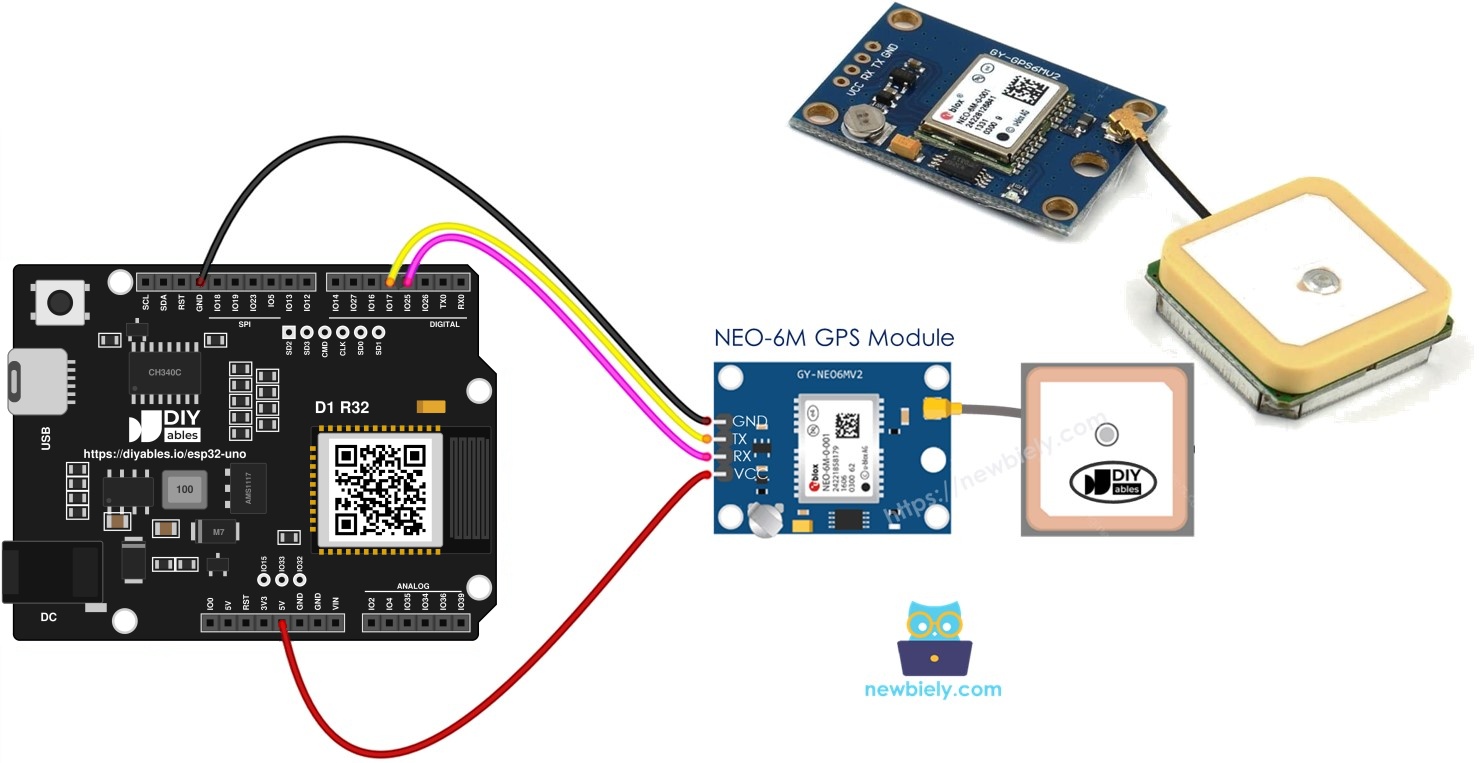
Components You Need
| 1 | × | ESP32 Uno-form Board | |
| 1 | × | USB Cable Type-A to Type-C (for USB-A PC) | |
| 1 | × | USB Cable Type-C to Type-C (for USB-C PC) | |
| 1 | × | NEO-6M GPS module | |
| 1 | × | Jumper Wires |
Or you can buy the following kits:
| 1 | × | DIYables Sensor Kit (18 sensors/displays) |
Additionally, some of these links are for products from our own brand, DIYables .
NEO-6M GPS Module Basics
After this part, you know what the receiver sends and which pin does what.
The NEO-6M is a cheap satellite receiver from u-blox. It streams NMEA text lines (like $GPRMC,...) over a serial link about once per second. The TinyGPSPlus library reads that text and hands you plain numbers.
| Item | Value |
|---|---|
| Receiver chip | u-blox NEO-6M |
| Output format | NMEA text over UART |
| Default baud rate | 9600 |
| Update rate | 1 time per second (default) |
| Position accuracy | about 2.5 m in open sky |
| Cold start time | roughly 27 seconds to a few minutes |
Good to know: the antenna must see the sky. Under a roof or inside a metal box, the module may never lock onto the satellites.
Pinout
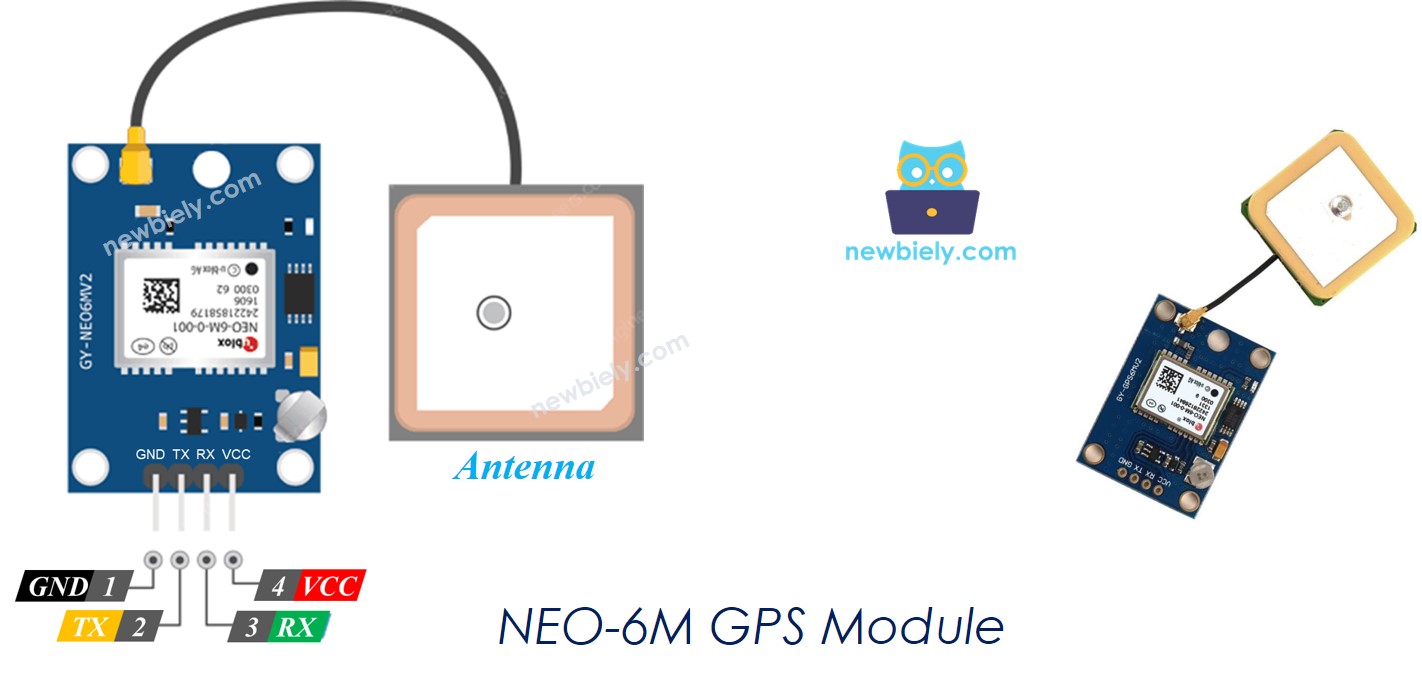
Four pins: two for power and two for data.
| Pin | Role | Connect To |
|---|---|---|
| VCC | Power input | 5V of the board (the module has its own regulator) |
| GND | Ground | GND of the board |
| TX | Sends GPS text out | An RX pin on the ESP32 Uno |
| RX | Takes commands in | A TX pin on the ESP32 Uno |
ESP32 Uno Pinout
On the ESP32 Uno form board, every Uno header label stands for a GPIO number, and the sketch needs that number. Look up D3 and D4 on the picture below before you plug in the wires.

How to Connect
When you finish this part, the GPS module sends its data straight into UART2 of the ESP32 Uno.
The lines cross over: the module's TX goes to the board's receive pin, and the module's RX goes to the board's transmit pin.
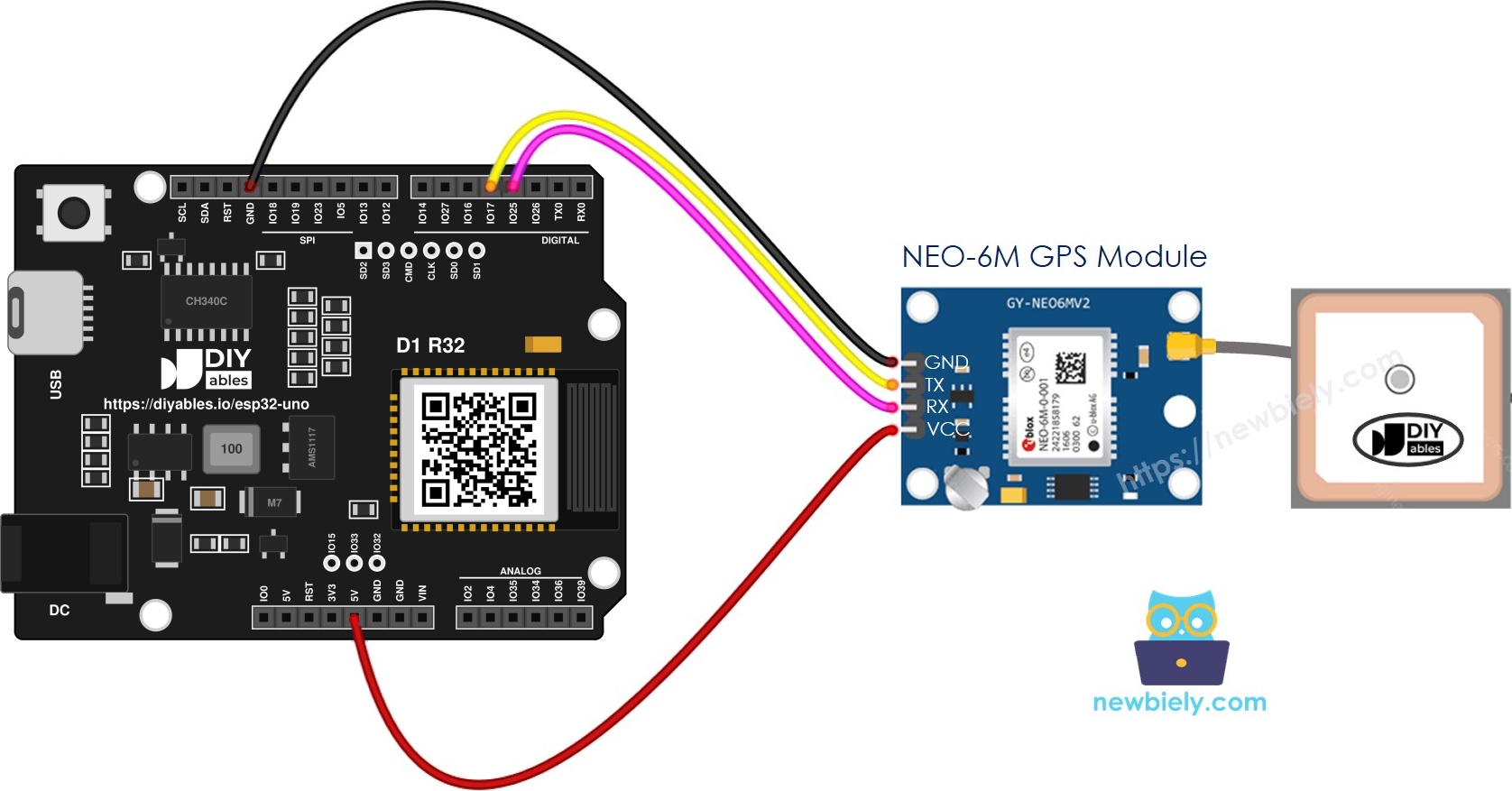
This image is created using Fritzing. Click to enlarge image
| GPS Module Pin | ESP32 Uno Pin |
|---|---|
| VCC | 5V |
| GND | GND |
| TX | D4 (GPIO17) |
| RX | D3 (GPIO25) |
Good to know: ESP32 Uno pins use 3.3V logic, so D3 (GPIO25) already sends a 3.3V signal. That level is safe for the RX pin of the NEO-6M, and no voltage divider is needed.
The second diagram adds a voltage divider on the board's TX line. On the ESP32 Uno it is optional. It does no harm, so you can keep it if your module is already wired that way.
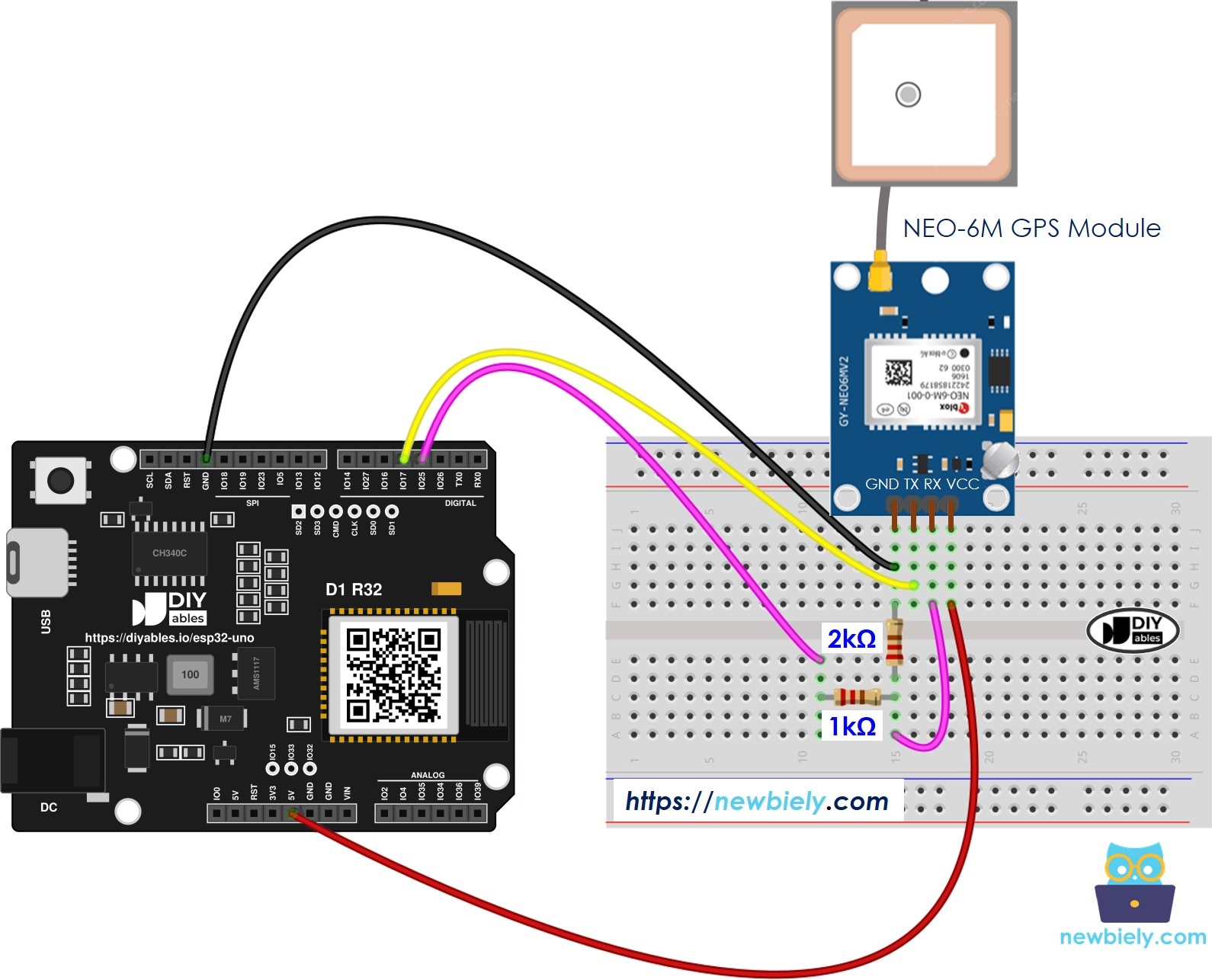
This image is created using Fritzing. Click to enlarge image
WARNING
ESP32 Uno pins are NOT 5V tolerant. The TX pin of most NEO-6M boards sends 3.3V, which is fine. If your module has a 5V level on its TX pin, put a voltage divider (for example 1kΩ and 2kΩ) between GPS TX and D4 (GPIO17).
ESP32 Uno Code
This part gives you two sketches: one prints the position, speed and time, and one prints the distance to London.
The ESP32 Uno has no SoftwareSerial library. The sketches use the hardware port Serial2 instead and route it to GPIO17 (RX) and GPIO25 (TX) with Serial2.begin(9600, SERIAL_8N1, RX_PIN, TX_PIN). A hardware UART does not drop characters, so the GPS text arrives clean.
Sketch 1 - Position, Ground Speed and UTC Clock
The sketch passes every byte from the module to TinyGPSPlus and prints a block of values each time a full NMEA sentence is decoded.
Upload and Test
- First time with this board? Set it up with ESP32 Uno - Getting Started before you continue.
- Build the circuit by following the wiring table above.
- Plug in the USB Type-C cable between the ESP32 Uno and your computer.
- Select the board in Arduino IDE: pick ESP32 Dev Module and the COM port of the board (CH340).
- Open the Library Manager with the Libraries icon in the left bar of the Arduino IDE.
- Find the library: enter TinyGPSPlus in the search field and look for the one by Mikal Hart.
- Click Install and wait until it finishes.
- Search for TinyGPSPlus created by Mikal Hart and click the Install button.
- Paste the code into a new sketch in the Arduino IDE.
- Press Upload and wait for "Done uploading".
- Open the Serial Monitor, set it to 9600 baud, and put the antenna by a window or outdoors.
- Pro tip: watch the small LED on the NEO-6M. It stays dark or solid while searching and starts blinking once per second when it has a fix, so you know when to expect real numbers.
The first blocks often say INVALID. That is normal until the module locks onto enough satellites.
Sketch 2 - How Far Away Is London?
This sketch takes your current position and works out how far it is to London (latitude 51.508131, longitude -0.128002).
Upload and Test
- Paste the code into the Arduino IDE.
- Press Upload to flash it to the ESP32 Uno.
- Check the result in the Serial Monitor (9600 baud).
- Pro tip: keep the board still for a minute after the first fix. The position settles, and the distance stops jumping by a few hundred meters.
Video Tutorial
See the ESP32 Uno build in action in the video below.
Code Explanation
Both sketches share the same core. The table lists the main parts.
| Code Part | What It Does | ||
|---|---|---|---|
| HardwareSerial &gpsSerial = Serial2 | Gives UART2 the name gpsSerial, so the rest of the code stays short | ||
| gpsSerial.begin(9600, SERIAL_8N1, RX_PIN, TX_PIN) | Starts UART2 at 9600 baud on GPIO17 (RX) and GPIO25 (TX) | ||
| gps.encode(gpsSerial.read()) | Feeds one character to TinyGPSPlus and returns true when a sentence is complete | ||
| gps.location.isValid() | Tells you if the module has a real position fix | ||
| TinyGPSPlus | distanceBetween() | Returns the great-circle distance in meters, which the code divides by 1000 | |
| gps.charsProcessed() < 10 | After 5 seconds with almost no data, it prints a wiring warning |
The result is a new block of values in the Serial Monitor about once per second.
Good to know: Serial.println() shows a double with two decimals. Write Serial.println(gps.location.lat(), 6) to see six decimals.
ESP32 Uno vs UNO R4 for This Project
Here is what changes when you move this GPS project from the UNO R4 to the ESP32 Uno.
| Item | Arduino UNO R4 | ESP32 Uno |
|---|---|---|
| Logic voltage | 5V | 3.3V |
| GPS TX wire | D4 | D4 (GPIO17) |
| GPS RX wire | D3 | D3 (GPIO25) |
| Serial port for GPS | SoftwareSerial | Hardware Serial2 on any pins |
| Voltage divider on board TX | Recommended | Not needed |
| Arduino IDE board | Arduino UNO R4 WiFi or Minima | ESP32 Dev Module |
| WiFi and Bluetooth | WiFi only on the WiFi model | WiFi plus Bluetooth Classic and BLE |
The wires stay on the same header positions, so the same circuit works. Only the code changes, from SoftwareSerial to Serial2.
Go Wireless: Track Your Position on a Phone
After this part, you have an idea for viewing GPS data without a USB cable.
The ESP32 Uno has WiFi and Bluetooth built in. Send the latitude, longitude, speed and time to a phone or browser and you get a small tracker you can carry around. A table view fits GPS well, because you have several values that change together.
Useful guides:
Troubleshooting
| Problem | Possible Cause | Solution |
|---|---|---|
| No COM port shows up in the Arduino IDE | CH340 driver missing or a charge-only USB cable | Install the CH340 driver and try a USB cable that carries data |
| Upload stops at "Failed to connect" or "Waiting for download" | Board did not enter download mode | Hold the BOOT button when the upload starts, then let go |
| "No GPS data received - check wiring" appears | TX and RX lines swapped or loose | GPS TX must go to D4 (GPIO17) and GPS RX to D3 (GPIO25), then check VCC and GND |
| Module LED never lights up | No power on VCC | Feed VCC from the 5V pin and check the GND wire |
| Values stay INVALID for over 10 minutes | Antenna cannot see the satellites | Move outdoors, keep the patch antenna facing up and away from metal |
| Random symbols instead of numbers | Baud rate mismatch | Keep the GPS port at 9600 and set the Serial Monitor to 9600 too |
| Error "SoftwareSerial.h - No such file" | Sketch written for another board | Use the ESP32 Uno sketch above with Serial2 |
| Error "TinyGPS++.h - No such file" | TinyGPSPlus not installed | Install TinyGPSPlus by Mikal Hart in the Library Manager |
FAQ
Which serial port should the NEO-6M use on the ESP32 Uno?
Use Serial2 (UART2). The ESP32 Uno can route a hardware UART to almost any GPIO, so the code puts it on GPIO17 and GPIO25. Leave Serial (D0/D1) free, because it handles uploads and the Serial Monitor.
Can I power the NEO-6M from the 3.3V pin instead of 5V?
Many NEO-6M boards accept 3.3V to 5V, because they have their own regulator. Check the label on your module. If you are not sure, use 5V, since the data pins still work at 3.3V levels.
How accurate is the NEO-6M position?
In open sky, it is about 2 to 3 meters. Near tall buildings or trees, the error can grow to 10 meters or more, because the signals bounce.
Why does the GPS show a time that is hours off?
GPS gives UTC time. Add your time zone offset to gps.time.hour() in the code, and handle the day change when the hour goes past 23.
How can I print more decimals for latitude and longitude?
Pass a second number to Serial.println(), for example Serial.println(gps.location.lat(), 6). Six decimals is the usual format for maps.
Can I change the London coordinates to another place?
Yes. Edit LONDON_LAT and LONDON_LON with the latitude and longitude of any place, for example your home. The sketch then prints the distance to that point in kilometers.
Is the CH340 driver needed for the ESP32 Uno?
This board uses a CH340 USB-to-serial chip. Windows and macOS often install the driver by themselves, but if no COM port appears, install the CH340 driver by hand.
Can I use a GPS shield made for the Uno on the ESP32 Uno?
Often yes, because the header shape is the same. Check that the shield does not send 5V signals into the board, and change the TX and RX pins in the code to the GPIO numbers of the pins the shield uses.
What if this GPS build needs more pins than the Uno headers offer?
The ESP32 Uno has extra holes near the power header: GPIO32 and GPIO33 (I/O, PWM, analog on ADC1, so they also work while WiFi is on) and GPIO15 (I/O, PWM, analog on ADC2). Solder pin headers to them and use the GPIO number in code. For a GPS tracker, GPIO32 and GPIO33 are good for a button or a battery voltage reading. Two warnings: GPIO15 and GPIO0 (the IO0 pin at the unused Uno NC position) are boot strapping pins, and a wrong connection can stop the board from booting or uploading, so use GPIO32 and GPIO33 first. Also never use the six holes under the digital header (SD0 to SD3, CMD, CLK = GPIO6 to GPIO11). They connect to the flash chip, and using them crashes the board.
Can I show my GPS position on a web page with the ESP32 Uno?
Yes. The ESP32 Uno has WiFi, so it can serve a page with the latitude and longitude. See the Go Wireless section above for ready guides.