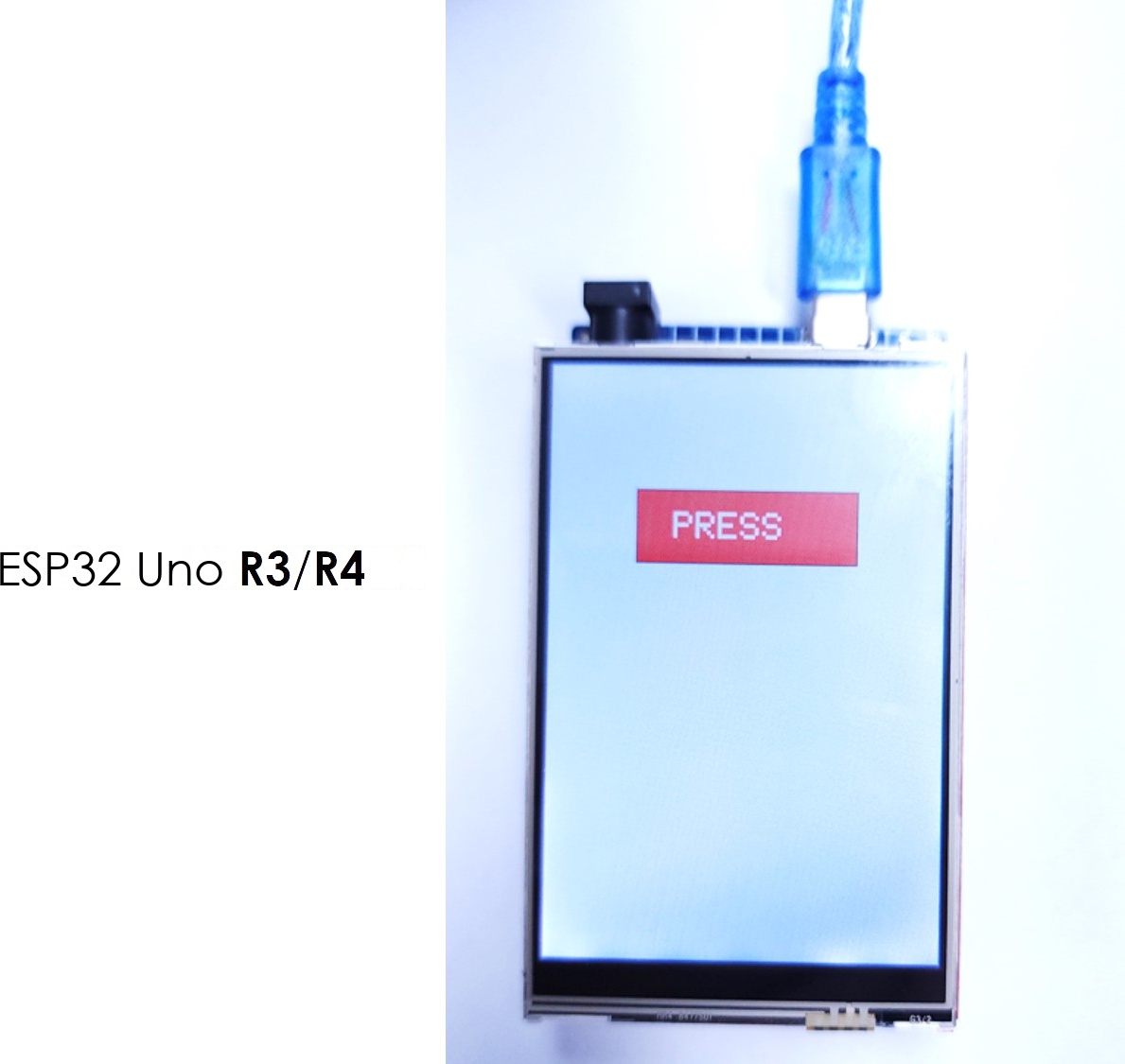
ESP32 UNO - TFT LCD Touch Screen Display

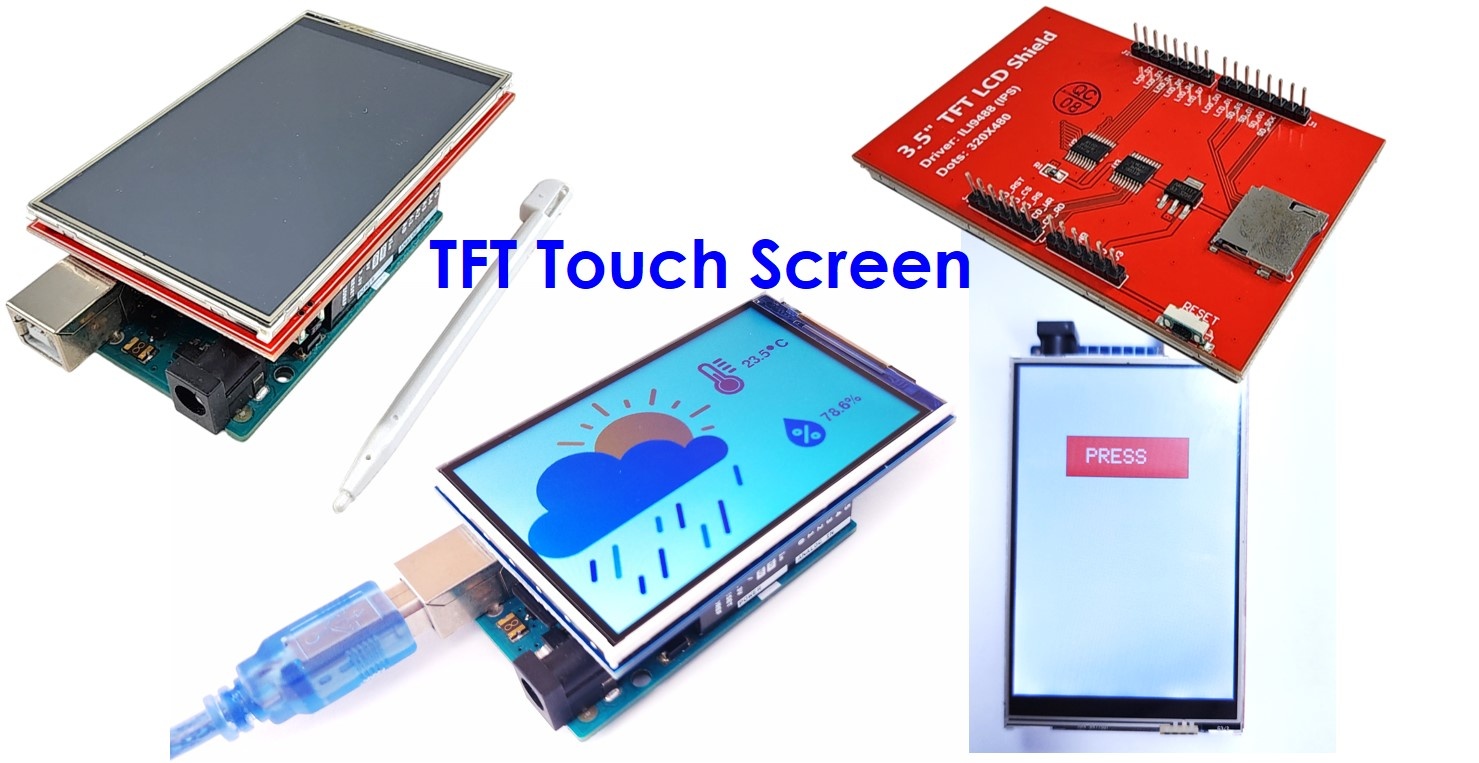
Want a color touch screen on the ESP32 Uno? Press a 3.5-inch TFT LCD touch display shield onto the ESP32 Uno form board, and you get a 320x480 screen that shows text, shapes and pictures, and also answers to your finger. This guide covers wiring, the Arduino IDE library, a MicroSD image, and touch calibration.

By the end, you can:

  1. Mount the 3.5-inch TFT touch shield on the ESP32 Uno
  2. Print text and numbers, with the default font or a custom font
  3. Draw shapes and show images from code or from a MicroSD card
  4. Calibrate the touch panel and read the touch point
  5. Draw with a pen and build a touch button
ESP32 Uno TFT LCD Touch display

WARNING

This parallel TFT shield cannot work on the ESP32 Uno as it is. The shield must use three input-only pins (A2, A3 and A4) as outputs, and the ESP32 cannot do that. We cannot fix this by moving a pin, because the shield sits on the headers. We will update this tutorial soon. For a display that works today, use the SPI display: ESP32 Uno - TFT LCD Touch Display (SPI).

※ NOTE THAT:

This page fits one product only: the DIYables 3.5" RM68140 or HX8357D touchscreen display. Does your screen lack touch? Then follow the ESP32 Uno - TFT LCD Display (ILI9486) guide instead.

Components You Need

1×ESP32 Uno-form Board
1×USB Cable Type-A to Type-C (for USB-A PC)
1×USB Cable Type-C to Type-C (for USB-C PC)
1×3.5 Inch 320x480 RM68140 or HX8357D TFT LCD Touch Display Shield
1×Optionally, Micro SD Card

Or you can buy the following kits:

1×DIYables Sensor Kit (18 sensors/displays)
Disclosure: Some of the links provided in this section are Amazon affiliate links. We may receive a commission for any purchases made through these links at no additional cost to you.
Additionally, some of these links are for products from our own brand, DIYables .

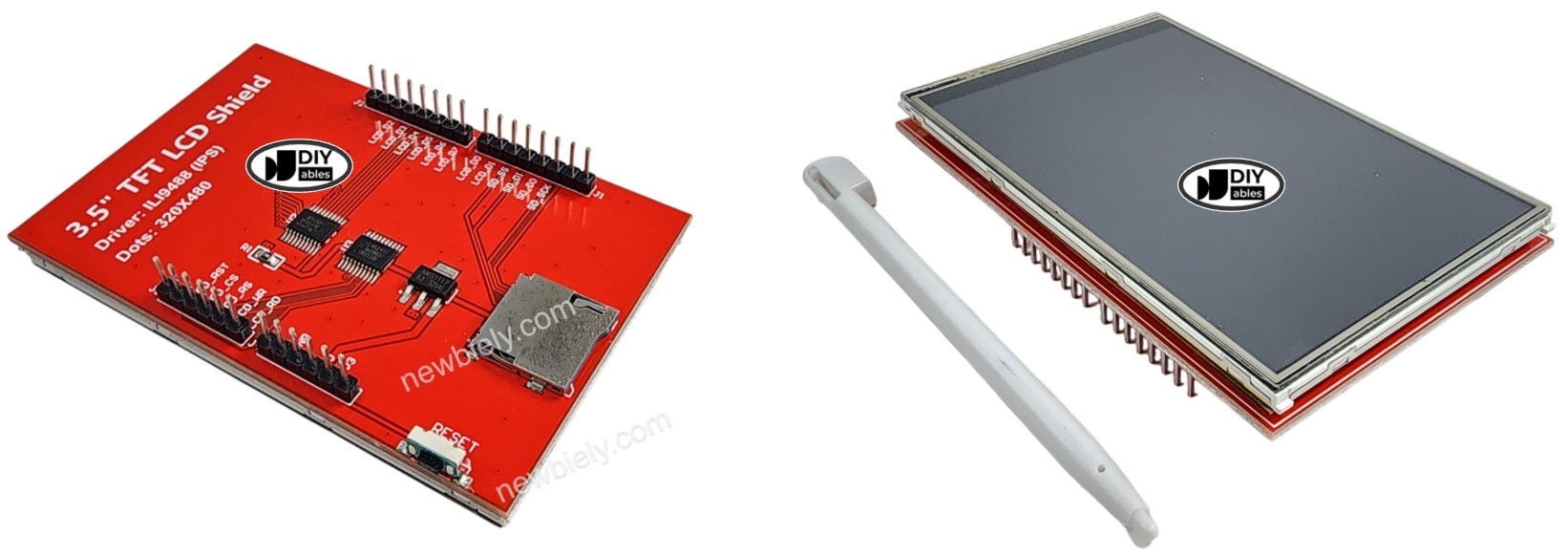
Overview of the TFT LCD Touch Display Shield

By the end of this part, you know what the shield contains and which version you own.

Part What It Gives You
Screen 3.5 inch color panel, 320 x 480 pixels
Touch Resistive layer, works with a finger or a stylus
Data link 8-bit parallel bus, fast screen updates
Storage Card socket for microSD images and data
Shape Uno form, plugs straight into the header

The shield was made in two versions. Compare them here.

Compare Older Shield Newer Shield
Controller chip ILI9488 RM68140 or HX8357D
Resolution in pixels 320 x 480 320 x 480
Touch type Resistive Resistive
Data bus 8 bits in parallel 8 bits in parallel
Rotation Some rotations come out mirrored All four rotations are correct
Speed Pixel by pixel, slow Uses hardware acceleration, fast
Library DIYables_TFT_Touch_Shield 1.0.0 DIYables_TFT_Touch_Shield 2.0.0 or newer

※ NOTE THAT:

This page covers the new version (RM68140 or HX8357D) and the DIYables_TFT_Touch_Shield library v2.0.0 or newer. Read the driver IC on the package or on the PCB, then pick the matching class in your sketch:

  • Chip RM68140: class DIYables_TFT_RM68140_Shield
  • Chip HX8357D: class DIYables_TFT_HX8357D_Shield

The two classes offer the same functions, so each sketch below runs with either. You edit just the class name.

TFT LCD Touch display Pinout

Header pins taken by the shield

Each Uno header pin has a GPIO number on the ESP32 Uno. The shield uses most of them.

Shield Function Uno Header GPIO Shared With Touch
Data bit 0 (DB0) D8 GPIO12 No
Data bit 1 (DB1) D9 GPIO13 No
Data bit 2 (DB2) D2 GPIO26 No
Data bit 3 (DB3) D3 GPIO25 No
Data bit 4 (DB4) D4 GPIO17 No
Data bit 5 (DB5) D5 GPIO16 No
Data bit 6 (DB6) D6 GPIO27 Yes, touch X+
Data bit 7 (DB7) D7 GPIO14 Yes, touch Y-
Read strobe (RD) A0 GPIO2 No
Write strobe (WR) A1 GPIO4 Yes, touch Y+
Command or data (CD) A2 GPIO35 Yes, touch X-
Chip select (CS) A3 GPIO34 No
Reset (RST) A4 GPIO36 No
SD card CS D10 GPIO5 No, free without a card
SD card MOSI D11 GPIO23 No, free without a card
SD card MISO D12 GPIO19 No, free without a card
SD card SCK D13 GPIO18 No, free without a card
Not used A5 GPIO39 Free for your project

※ NOTE THAT:

D6, D7, A1 and A2 carry both display data and the touch signals. The library switches them between the two jobs for you. Nothing is wired to A5 (GPIO39) on the shield. On this board A4 and A5 are not I2C pins, so the shield's reset line on A4 does not block I2C. Use the SDA (GPIO21) and SCL (GPIO22) header pins for I2C modules.

Good to know: the ESP32 Uno pins work at 3.3V logic and are not 5V tolerant. The touch panel is read with the 12-bit ADC (0–4095) of the board, but the touch library expects 10-bit numbers (0–1023). The touch sketches below set this for you with analogReadResolution(10).

ESP32 Uno Pinout

Match each Uno header label to its GPIO number in this picture before you plug in the shield. Your sketch uses the GPIO numbers.

ESP32 Uno pinout diagram

How to Connect

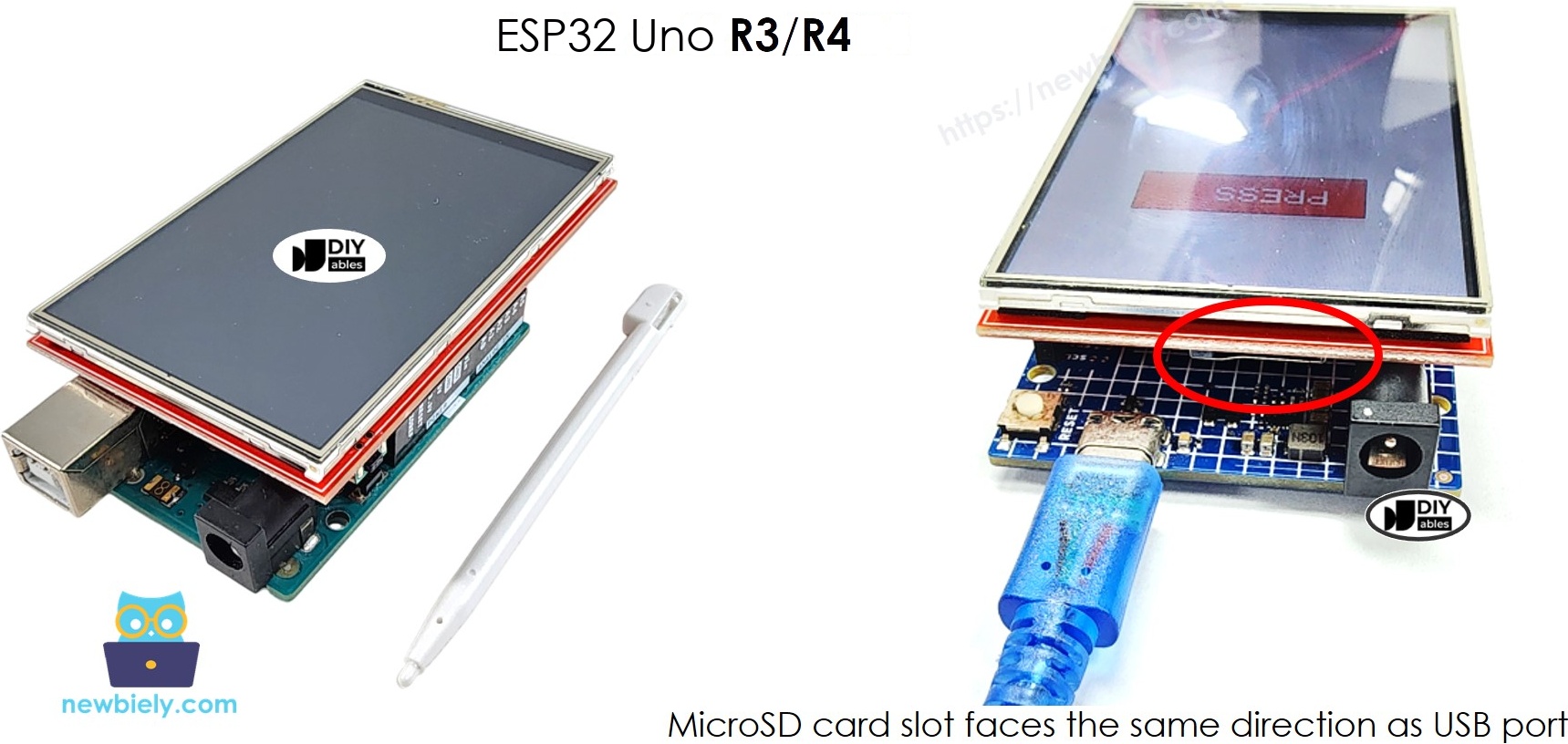
Goal: the shield sits on the board and no wire is needed. Set it on the ESP32 Uno with the microSD slot above the USB port side, and push down softly. No jumper wires and no soldering.

The wiring diagram between ESP32 Uno TFT LCD Touch

This image is created using Fritzing. Click to enlarge image

※ NOTE THAT:

The wiring diagram may not show a working wiring for the ESP32 Uno. With the shield stacked on the headers, RS, CS and RST land on input-only pins, so the screen will not work. We will update the diagram and this tutorial soon.

ESP32 Uno Pin Shield Signal
D8 (GPIO12) DB0
D9 (GPIO13) DB1
D2 (GPIO26) DB2
D3 (GPIO25) DB3
D4 (GPIO17) DB4
D5 (GPIO16) DB5
D6 (GPIO27) DB6 and touch X+
D7 (GPIO14) DB7 and touch Y-
A0 (GPIO2) LCD RD
A1 (GPIO4) LCD WR and touch Y+
A2 (GPIO35) LCD CD and touch X-
A3 (GPIO34) LCD CS
A4 (GPIO36) LCD RST
D10 (GPIO5) SD CS
D11 (GPIO23) SD MOSI
D12 (GPIO19) SD MISO
D13 (GPIO18) SD SCK
5V 5V
3V3 3.3V
GND GND

WARNING

A2 (GPIO35), A3 (GPIO34) and A4 (GPIO36) are input-only pins on the ESP32 Uno. They cannot drive an output and have no internal pull-up. The shield uses these three lines as outputs (command/data, chip select and reset), so check that the DIYables_TFT_Touch_Shield library version you install supports the ESP32 Uno before you rely on this wiring.

WARNING

Three shield lines sit on boot strapping pins: D8 (GPIO12, DB0), A0 (GPIO2, RD) and D10 (GPIO5, SD CS). The chip reads these pins at power-on, and the shield may pull them. GPIO12 must be LOW at boot. If the board does not start or the upload fails with the shield on, remove the shield, upload the sketch, put the shield back and press RESET.

WARNING

The ESP32 Uno pins are NOT 5V tolerant. The shield takes its power from the 5V header pin, but its signals are driven by the board at 3.3V. Do not connect 5V signals to the free pins.

Sketch 1: Text, Integer and Float Numbers

This first sketch is a quick screen test. It switches to landscape, fills the screen with white and prints a temperature and a humidity value in magenta with one decimal place. The display object gets the ESP32 Uno touch pins: TFT_display(27, 4, 35, 14).

/* * This ESP32 Uno code was developed by newbiely.com * * This ESP32 Uno code is made available for public use without any restriction * * For comprehensive instructions and wiring diagrams, please visit: * https://newbiely.com/tutorials/esp32-uno/esp32-uno-tft-lcd-touch-screen-display */ /* Created by DIYables This example code is in the public domain Product page: - https://diyables.io/tft-touch-shield - https://www.amazon.com/dp/B0DQ3NQ3LW */ #include <DIYables_TFT_Touch_Shield.h> #define MAGENTA DIYables_TFT::colorRGB(255, 0, 255) #define WHITE DIYables_TFT::colorRGB(255, 255, 255) // Pick the class that matches the driver chip printed on your shield label: // - RM68140 chip -> DIYables_TFT_RM68140_Shield // - HX8357D chip -> DIYables_TFT_HX8357D_Shield // ESP32 Uno touch pins as GPIO numbers: XP = 27 (D6), YP = 4, XM = 35, YM = 14 (D7) DIYables_TFT_RM68140_Shield TFT_display(27, 4, 35, 14); // DIYables_TFT_HX8357D_Shield TFT_display(27, 4, 35, 14); void setup() { Serial.println(F("ESP32 Uno TFT Touch LCD Display - show text and float number")); TFT_display.begin(); // rotation 1 turns the screen to landscape TFT_display.setRotation(1); TFT_display.fillScreen(WHITE); // magenta text, three times the base size TFT_display.setTextColor(MAGENTA); TFT_display.setTextSize(3); // two made-up sensor readings float temperature = 23.5; float humidity = 78.6; // first line: temperature with the degree sign TFT_display.setCursor(20, 20); // x = 20, y = 20 TFT_display.print("Temperature: "); TFT_display.print(temperature, 1); // one digit after the dot TFT_display.print(char(247)); TFT_display.println("C"); // second line: humidity TFT_display.setCursor(20, 60); // x = 20, y = 60 TFT_display.print("Humidity: "); TFT_display.print(humidity, 1); // one digit after the dot TFT_display.print("%"); } void loop(void) { }
Code Part What It Does
TFT_display(27, 4, 35, 14) Sets the touch pins XP, YP, XM, YM as GPIO numbers
TFT_display.begin() Starts the screen driver
setRotation(1) Turns the screen to landscape
setTextSize(3) Makes the text three times bigger
print(value, 1) Prints a float with one decimal digit

The screen shows two lines of text and numbers.

※ NOTE THAT:

In every sketch on this page, the line DIYables_TFT_RM68140_Shield TFT_display(27, 4, 35, 14); gives the library the touch pins as GPIO numbers: X+ = GPIO27 (D6), Y+ = GPIO4 (A1), X- = GPIO35 (A2), Y- = GPIO14 (D7). With an HX8357D shield, comment this line out and use the HX8357D line under it.

Upload and Test

  1. First time with this board? Set it up with ESP32 Uno - Getting Started before you continue.
  2. Seat the shield on the ESP32 Uno like the picture above.
  3. Plug in the USB Type-C cable between the ESP32 Uno and your computer.
  4. Select the board in Arduino IDE: pick ESP32 Dev Module and the COM port of the board (CH340).
  5. Click the Libraries icon in the left toolbar of Arduino IDE.
  6. Type “DIYables TFT Touch Shield” in the search box and look for the library of the same name by DIYables.
  7. Install it with the Install button. Pick the latest version.
  • Search for DIYables TFT Touch Shield created by DIYables.io and click the Install button.
∞
Newbiely | Arduino IDE 2.3.8
──
☐
✕
File
Edit
Sketch
Tools
Help
ESP32 Dev Module
Library Manager
Type:
All
Topic:
All
DIYables TFT Touch Shield by DIYables.io
This library is designed for use with the 3.5-inch Color TFT LCD Touch Display Shield on Arduino boards such as the Uno R3, Uno R4 WiFi/Minima, Mega, Giga, and other compatible models. More info
2.2.1
INSTALL
Newbiely.ino
···
1 void setup() {
Output
Serial Monitor
Ln 1, Col 1
ESP32 Dev Module on COM15
1
  1. Say yes to the dependencies: click Install All in the prompt. The Adafruit GFX Library comes with it.
  2. Paste the sketch above into a new Arduino IDE window.
  3. Upload it with the Upload button. If the upload does not start, hold the BOOT button while the IDE says "Connecting...".
  4. Pro tip: a white or noisy screen almost always means the wrong driver class. Check the chip name on your shield and switch between RM68140 and HX8357D.

The text appears in the built-in font. It is readable but blocky. The next sketch shows how to use a nicer font.

Sketch 2: Custom Fonts

The Adafruit GFX Library, installed as a dependency, ships with many fonts. You switch to one with two extra lines.

Step 1 — Pick a font

Open the folder of the Adafruit GFX Library and look in its Fonts folder. Take one you like, such as FreeSansBold12pt7b.h.

Step 2 — Include it

Add this line at the top of your code:

#include <Fonts/FreeSansBold12pt7b.h>

Step 3 — Select it

Call this line inside setup():

tft.setFont(&FreeSansBold12pt7b);

This full sketch prints the same two values with the bold sans font.

/* * This ESP32 Uno code was developed by newbiely.com * * This ESP32 Uno code is made available for public use without any restriction * * For comprehensive instructions and wiring diagrams, please visit: * https://newbiely.com/tutorials/esp32-uno/esp32-uno-tft-lcd-touch-screen-display */ /* Created by DIYables This example code is in the public domain Product page: - https://diyables.io/tft-touch-shield - https://www.amazon.com/dp/B0DQ3NQ3LW */ #include <DIYables_TFT_Touch_Shield.h> #include <Fonts/FreeSansBold12pt7b.h> #define MAGENTA DIYables_TFT::colorRGB(255, 0, 255) #define WHITE DIYables_TFT::colorRGB(255, 255, 255) // Pick the class that matches the driver chip printed on your shield label: // - RM68140 chip -> DIYables_TFT_RM68140_Shield // - HX8357D chip -> DIYables_TFT_HX8357D_Shield // ESP32 Uno touch pins as GPIO numbers: XP = 27 (D6), YP = 4, XM = 35, YM = 14 (D7) DIYables_TFT_RM68140_Shield TFT_display(27, 4, 35, 14); // DIYables_TFT_HX8357D_Shield TFT_display(27, 4, 35, 14); void setup() { Serial.println(F("ESP32 Uno TFT Touch LCD Display - Use external font")); TFT_display.begin(); // switch from the plain built-in font to the bold sans font TFT_display.setFont(&FreeSansBold12pt7b); // portrait mode (rotation 0) TFT_display.setRotation(0); TFT_display.fillScreen(WHITE); // magenta text at its natural font size TFT_display.setTextColor(MAGENTA); TFT_display.setTextSize(1); // two made-up sensor readings float temperature = 23.5; float humidity = 78.6; // first line: temperature with the degree sign TFT_display.setCursor(20, 20); // x = 20, y = 20 TFT_display.print("Temperature: "); TFT_display.print(temperature, 1); // one digit after the dot TFT_display.print(char(247)); TFT_display.println("C"); // second line: humidity TFT_display.setCursor(20, 60); // x = 20, y = 60 TFT_display.print("Humidity: "); TFT_display.print(humidity, 1); // one digit after the dot TFT_display.print("%"); } void loop(void) { }

Good to know: some custom fonts have no special characters such as the degree sign (°). The default font has it.

Sketch 3: Draw Shapes

Shapes are the base of gauges, icons and buttons. The sketch paints outline and solid versions of circles, triangles, rectangles, rounded rectangles and diamonds, each in its own color. It uses landscape mode (480x320) and redraws the picture every 10 seconds.

/* * This ESP32 Uno code was developed by newbiely.com * * This ESP32 Uno code is made available for public use without any restriction * * For comprehensive instructions and wiring diagrams, please visit: * https://newbiely.com/tutorials/esp32-uno/esp32-uno-tft-lcd-touch-screen-display */ /* Created by DIYables This example code is in the public domain Product page: - https://diyables.io/tft-touch-shield - https://www.amazon.com/dp/B0DQ3NQ3LW */ #include <DIYables_TFT_Touch_Shield.h> #define BLACK DIYables_TFT::colorRGB(0, 0, 0) #define BLUE DIYables_TFT::colorRGB(0, 0, 255) #define RED DIYables_TFT::colorRGB(255, 0, 0) #define GREEN DIYables_TFT::colorRGB(0, 255, 0) #define ORANGE DIYables_TFT::colorRGB(255, 165, 0) #define PINK DIYables_TFT::colorRGB(255, 192, 203) #define VIOLET DIYables_TFT::colorRGB(148, 0, 211) #define TURQUOISE DIYables_TFT::colorRGB(64, 224, 208) #define WHITE DIYables_TFT::colorRGB(255, 255, 255) // Pick the class that matches the driver chip printed on your shield label: // - RM68140 chip -> DIYables_TFT_RM68140_Shield // - HX8357D chip -> DIYables_TFT_HX8357D_Shield // ESP32 Uno touch pins as GPIO numbers: XP = 27 (D6), YP = 4, XM = 35, YM = 14 (D7) DIYables_TFT_RM68140_Shield TFT_display(27, 4, 35, 14); // DIYables_TFT_HX8357D_Shield TFT_display(27, 4, 35, 14); // a diamond is just two triangles that share one edge void fillDiamond(int cx, int cy, int h, int v, uint16_t color) { int x0 = cx, y0 = cy - v; int x1 = cx + h, y1 = cy; int x2 = cx, y2 = cy + v; int x3 = cx - h, y3 = cy; TFT_display.fillTriangle(x0, y0, x1, y1, x2, y2, color); TFT_display.fillTriangle(x0, y0, x2, y2, x3, y3, color); } void setup() { TFT_display.begin(); TFT_display.setRotation(1); // landscape, 480 x 320 pixels } void loop() { TFT_display.fillScreen(BLACK); // circle outline, top left TFT_display.drawCircle(70, 60, 40, RED); // solid circle, next to it TFT_display.fillCircle(180, 60, 40, RED); // triangle outline TFT_display.drawTriangle(260, 30, 340, 30, 300, 100, BLUE); // solid triangle, far right TFT_display.fillTriangle(370, 30, 450, 30, 410, 100, GREEN); // rectangle outline, middle row left TFT_display.drawRect(30, 130, 80, 50, ORANGE); // solid rectangle TFT_display.fillRect(140, 130, 80, 50, TURQUOISE); // rounded rectangle outline TFT_display.drawRoundRect(260, 130, 80, 50, 15, VIOLET); // solid rounded rectangle, far right TFT_display.fillRoundRect(370, 130, 80, 50, 15, PINK); // diamond outline made from four lines, bottom left int cx1 = 120, cy1 = 250, h1 = 40, v1 = 50; TFT_display.drawLine(cx1, cy1 - v1, cx1 + h1, cy1, GREEN); TFT_display.drawLine(cx1 + h1, cy1, cx1, cy1 + v1, GREEN); TFT_display.drawLine(cx1, cy1 + v1, cx1 - h1, cy1, GREEN); TFT_display.drawLine(cx1 - h1, cy1, cx1, cy1 - v1, GREEN); // solid diamond, bottom right int cx2 = 355, cy2 = 250, h2 = 40, v2 = 50; fillDiamond(cx2, cy2, h2, v2, BLUE); delay(10000); // wait 10 s, then draw everything again }

Upload and Test

  1. Paste the sketch above into a new Arduino IDE window.
  2. Upload it to the ESP32 Uno with the Upload button.
  3. Pro tip: the fillDiamond() helper joins two triangles. Reuse the trick to build other solid shapes.

Circles, triangles, rectangles, rounded rectangles and diamonds now fill the screen.

Sketch 4: Show Images

You can keep a picture in two places.

Method Where The Picture Lives Good Side Weak Side
Bitmap array Inside your sketch Very fast drawing Takes flash space, so few and small pictures
BMP file On a microSD card Many large pictures Slower drawing, needs a card

The shield already has a microSD socket, so no extra adapter is needed. Both methods follow.

Bitmap Arrays in the Code

This sketch puts the DIYables logo in the center of the screen. Every two seconds the loop inverts the colors.

/* * This ESP32 Uno code was developed by newbiely.com * * This ESP32 Uno code is made available for public use without any restriction * * For comprehensive instructions and wiring diagrams, please visit: * https://newbiely.com/tutorials/esp32-uno/esp32-uno-tft-lcd-touch-screen-display */ /* Created by DIYables This example code is in the public domain Product page: - https://diyables.io/tft-touch-shield - https://www.amazon.com/dp/B0DQ3NQ3LW */ #include <DIYables_TFT_Touch_Shield.h> #include "bitmap.h" #define WHITE DIYables_TFT::colorRGB(255, 255, 255) // Pick the class that matches the driver chip printed on your shield label: // - RM68140 chip -> DIYables_TFT_RM68140_Shield // - HX8357D chip -> DIYables_TFT_HX8357D_Shield // ESP32 Uno touch pins as GPIO numbers: XP = 27 (D6), YP = 4, XM = 35, YM = 14 (D7) DIYables_TFT_RM68140_Shield TFT_display(27, 4, 35, 14); // DIYables_TFT_HX8357D_Shield TFT_display(27, 4, 35, 14); // size of the picture stored in bitmap.h int img_width = 120; int img_height = 53; uint16_t SCREEN_WIDTH; uint16_t SCREEN_HEIGHT; void setup() { Serial.begin(9600); Serial.println(F("ESP32 Uno TFT Touch LCD Display")); TFT_display.begin(); SCREEN_WIDTH = TFT_display.width(); SCREEN_HEIGHT = TFT_display.height(); // top-left corner that puts the picture in the screen center int x = (SCREEN_WIDTH - img_width) / 2; int y = (SCREEN_HEIGHT - img_height) / 2; TFT_display.fillScreen(WHITE); TFT_display.drawRGBBitmap(x, y, myBitmap, img_width, img_height); } void loop(void) { // flip the colors on, then off, every two seconds delay(2000); TFT_display.invertDisplay(true); delay(2000); TFT_display.invertDisplay(false); }

Step 1 — Create bitmap.h

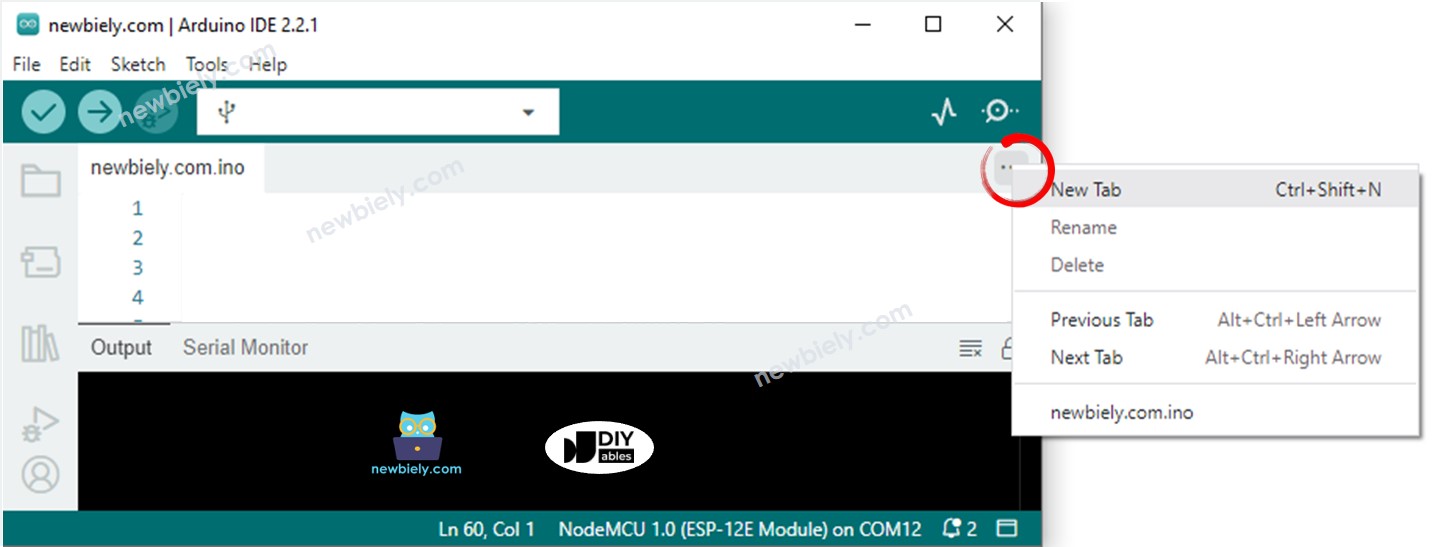
In Arduino IDE, add a tab with the New Tab entry of the small menu under the Serial Monitor icon, or hit Ctrl+Shift+N.

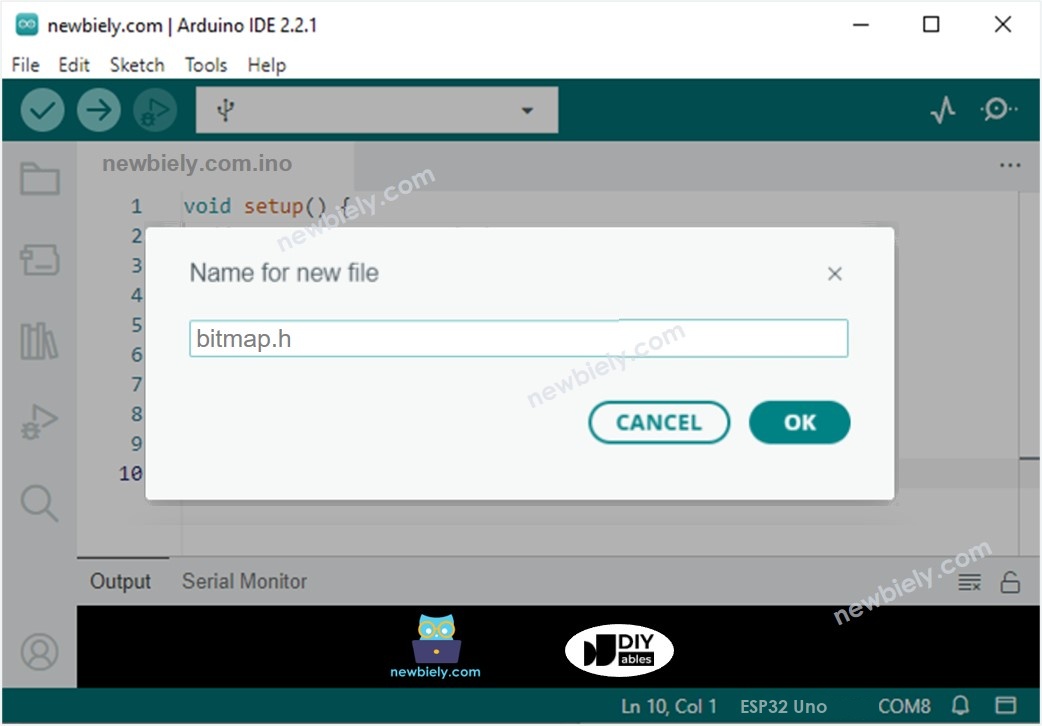
Arduino IDE 2 adds file

Step 2 — Name the file

Enter the name bitmap.h, then press OK.

Arduino IDE 2 adds file bitmap.h

Step 3 — Paste the picture data

Paste the data below into bitmap.h. The array is the DIYables logo.

const uint16_t myBitmap[] PROGMEM = {0xffff, 0xffff, 0xffff, 0xffff, 0xffff, 0xffff, 0xffff, 0xffff, 0xffff, 0xffff, 0xffff, 0xffff, 0xffff, 0xffff, 0xffff, 0xffff, 0xffff, 0xffff, 0xffff, 0xffff, 0xef5d, 0x0000, 0x0000, 0x0000, 0x0000, 0x0000, 0x0000, 0x0000, 0x0000, 0x0000, 0x0000, 0x0000, 0x0000, 0x0000, 0x0000, 0x0000, 0x0000, 0x0000, 0x0000, 0x0000, 0x0000, 0x0000, 0x0000, 0x0000, 0x0000, 0x0000, 0x0000, 0x0000, 0x0000, 0x0000, 0x0000, 0x0000, 0x0000, 0x0000, 0x0000, 0xffff, 0xffff, 0xffff, 0xffff, 0xbdf7, 0x0000, 0x0000, 0x0000, 0x0000, 0x0000, 0x0000, 0x0000, 0x0000, 0x0000, 0x0000, 0x0000, 0x0000, 0x0000, 0x18c3, 0xbdf7, 0xbdf7, 0xe73c, 0xffff, 0xffff, 0xffff, 0xffff, 0xffff, 0xffff, 0xffff, 0xffff, 0xffff, 0xffff, 0xffdf, 0x0000, 0x0000, 0x0000, 0x0000, 0x0000, 0xffdf, 0xffff, 0xffff, 0x2124, 0x0000, 0x0000, 0x0000, 0x0000, 0x0000, 0xdedb, 0xffff, 0xffff, 0xffff, 0xffff, 0xffff, 0xffff, 0xffff, 0xffff, 0xffff, 0xffff, 0xffff, 0x0841, 0x0000, 0x0000, 0x0000, 0x0000, 0x3186, 0xffff, 0xffff, 0xffff, 0xffff, 0xffff, 0xffff, 0xffff, 0xffff, 0xffff, 0xffff, 0xffff, 0xffff, 0xffff, 0xffff, 0xffff, 0xffff, 0xffff, 0xffff, 0xffff, 0xffff, 0xef5d, 0x0000, 0x0000, 0x0000, 0x0000, 0x0000, 0x0000, 0x0000, 0x0000, 0x0000, 0x0000, 0x0000, 0x0000, 0x0000, 0x0000, 0x0000, 0x0000, 0x0000, 0x0000, 0x0000, 0x0000, 0x0000, 0x0000, 0x0000, 0x0000, 0x0000, 0x0000, 0x0000, 0x0000, 0x0000, 0x0000, 0x0000, 0x0000, 0x0000, 0x0000, 0xffff, 0xffff, 0xffff, 0xffff, 0xbdf7, 0x0000, 0x0000, 0x0000, 0x0000, 0x0000, 0x0000, 0x0000, 0x0000, 0x0000, 0x0000, 0x0000, 0x0000, 0x0000, 0x0000, 0x0000, 0x0000, 0x2124, 0x528a, 0xffff, 0xffff, 0xffff, 0xffff, 0xffff, 0xffff, 0xffff, 0xffff, 0xffff, 0xffdf, 0x0000, 0x0000, 0x0000, 0x0000, 0x0000, 0xffdf, 0xffff, 0xffff, 0x8c71, 0x0000, 0x0000, 0x0000, 0x0000, 0x0000, 0x632c, 0xffff, 0xffff, 0xffff, 0xffff, 0xffff, 0xffff, 0xffff, 0xffff, 0xffff, 0xffff, 0x630c, 0x0000, 0x0000, 0x0000, 0x0000, 0x3186, 0xf79e, 0xffff, 0xffff, 0xffff, 0xffff, 0xffff, 0xffff, 0xffff, 0xffff, 0xffff, 0xffff, 0xffff, 0xffff, 0xffff, 0xffff, 0xffff, 0xffff, 0xffff, 0xffff, 0xffff, 0xffff, 0xef5d, 0x0000, 0x0000, 0x0000, 0x0000, 0x0000, 0x0000, 0x0000, 0x0000, 0x0000, 0x0000, 0x0000, 0x0000, 0x0000, 0x0000, 0x0000, 0x0000, 0x0000, 0x0000, 0x0000, 0x0000, 0x0000, 0x0000, 0x0000, 0x0000, 0x0000, 0x0000, 0x0000, 0x0000, 0x0000, 0x0000, 0x0000, 0x0000, 0x0000, 0x0000, 0xffff, 0xffff, 0xffff, 0xffff, 0xbdf7, 0x0000, 0x0000, 0x0000, 0x0000, 0x0000, 0x0000, 0x0000, 0x0000, 0x0000, 0x0000, 0x0000, 0x0000, 0x0000, 0x0000, 0x0000, 0x0000, 0x0000, 0x0000, 0x0000, 0xbdf7, 0xffff, 0xffff, 0xffff, 0xffff, 0xffff, 0xffff, 0xffff, 0xffdf, 0x0000, 0x0000, 0x0000, 0x0000, 0x0000, 0xffdf, 0xffff, 0xffff, 0xffff, 0x528a, 0x0000, 0x0000, 0x0000, 0x0000, 0x0000, 0xe71c, 0xffff, 0xffff, 0xffff, 0xffff, 0xffff, 0xffff, 0xffff, 0xffff, 0xef5d, 0x2124, 0x0000, 0x0000, 0x0000, 0x0000, 0x73ae, 0xffff, 0xffff, 0xffff, 0xffff, 0xffff, 0xffff, 0xffff, 0xffff, 0xffff, 0xffff, 0xffff, 0xffff, 0xffff, 0xffff, 0xffff, 0xffff, 0xffff, 0xffff, 0xffff, 0xffff, 0xffff, 0xef5d, 0x0000, 0x0000, 0x0000, 0x0000, 0x0000, 0x0000, 0x0000, 0x0000, 0x0000, 0x0000, 0x0000, 0x0000, 0x0000, 0x0000, 0x0000, 0x0000, 0x0000, 0x0000, 0x0000, 0x0000, 0x0000, 0x0000, 0x0000, 0x0000, 0x0000, 0x0000, 0x0000, 0x0000, 0x0000, 0x0000, 0x0000, 0x0000, 0x0000, 0x0000, 0xffff, 0xffff, 0xffff, 0xffff, 0xbdf7, 0x0000, 0x0000, 0x0000, 0x0000, 0x0000, 0x0000, 0x0000, 0x0000, 0x0000, 0x0000, 0x0000, 0x0000, 0x0000, 0x0000, 0x0000, 0x0000, 0x0000, 0x0000, 0x0000, 0x0020, 0xad55, 0xffff, 0xffff, 0xffff, 0xffff, 0xffff, 0xffff, 0xffdf, 0x0000, 0x0000, 0x0000, 0x0000, 0x0000, 0xffdf, 0xffff, 0xffff, 0xffff, 0xffff, 0x0000, 0x0000, 0x0000, 0x0000, 0x0000, 0x3186, 0xffff, 0xffff, 0xffff, 0xffff, 0xffff, 0xffff, 0xffff, 0xffff, 0x4a69, 0x0000, 0x0000, 0x0000, 0x0000, 0x0000, 0xffff, 0xffff, 0xffff, 0xffff, 0xffff, 0xffff, 0xffff, 0xffff, 0xffff, 0xffff, 0xffff, 0xffff, 0xffff, 0xffff, 0xffff, 0xffff, 0xffff, 0xffff, 0xffff, 0xffff, 0xffff, 0xffff, 0xef5d, 0x0000, 0x0000, 0x0000, 0x0000, 0x0000, 0x0000, 0x0000, 0x0000, 0x0000, 0x0000, 0x0000, 0x0000, 0x0000, 0x0000, 0x0000, 0x0000, 0x0000, 0x0000, 0x0000, 0x0000, 0x0000, 0x0000, 0x0000, 0x0000, 0x0000, 0x0000, 0x0000, 0x0000, 0x0000, 0x0000, 0x0000, 0x0000, 0x0000, 0x0000, 0xffff, 0xffff, 0xffff, 0xffff, 0xbdf7, 0x0000, 0x0000, 0x0000, 0x0000, 0x0000, 0x4a49, 0x4a49, 0x4a49, 0x4a49, 0x4a49, 0x4a49, 0x4a49, 0x4a49, 0x0000, 0x0000, 0x0000, 0x0000, 0x0000, 0x0000, 0x0000, 0x0000, 0xbdd7, 0xffff, 0xffff, 0xffff, 0xffff, 0xffff, 0xffdf, 0x0000, 0x0000, 0x0000, 0x0000, 0x0000, 0xffdf, 0xffff, 0xffff, 0xffff, 0xffff, 0x9492, 0x0000, 0x0000, 0x0000, 0x0000, 0x0000, 0x630c, 0xffff, 0xffff, 0xffff, 0xffff, 0xffff, 0xffff, 0xc618, 0x0000, 0x0000, 0x0000, 0x0000, 0x10a2, 0xd6ba, 0xffff, 0xffff, 0xffff, 0xffff, 0xffff, 0xffff, 0xffff, 0xffff, 0xffff, 0xffff, 0xffff, 0xffff, 0xffff, 0xffff, 0xffff, 0xffff, 0xffff, 0xffff, 0xffff, 0xffff, 0xffff, 0xffff, 0xef5d, 0x0000, 0x0000, 0x0000, 0x0000, 0x0000, 0x0000, 0x0000, 0x0000, 0x0000, 0x0000, 0x0000, 0x0000, 0x0000, 0x0000, 0x0000, 0x0000, 0x0000, 0x0000, 0x0000, 0x0000, 0x0000, 0x0000, 0x0000, 0x0000, 0x0000, 0x0000, 0x0000, 0x0000, 0x0000, 0x0000, 0x0000, 0x0000, 0x0000, 0x0000, 0xffff, 0xffff, 0xffff, 0xffff, 0xbdf7, 0x0000, 0x0000, 0x0000, 0x0000, 0x0000, 0xffff, 0xffff, 0xffff, 0xffff, 0xffff, 0xffff, 0xffff, 0xffff, 0xce79, 0xb596, 0x0000, 0x0000, 0x0000, 0x0000, 0x0000, 0x0000, 0x1082, 0xffff, 0xffff, 0xffff, 0xffff, 0xffff, 0xffdf, 0x0000, 0x0000, 0x0000, 0x0000, 0x0000, 0xffdf, 0xffff, 0xffff, 0xffff, 0xffff, 0xef5d, 0x1082, 0x0000, 0x0000, 0x0000, 0x0000, 0x1082, 0xe73c, 0xffff, 0xffff, 0xffff, 0xffff, 0xffff, 0x2965, 0x0000, 0x0000, 0x0000, 0x0000, 0x4228, 0xffff, 0xffff, 0xffff, 0xffff, 0xffff, 0xffff, 0xffff, 0xffff, 0xffff, 0xffff, 0xffff, 0xffff, 0xffff, 0xffff, 0xffff, 0xffff, 0xffff, 0xffff, 0xffff, 0xffff, 0xffff, 0xffff, 0xffff, 0xef5d, 0x0000, 0x0000, 0x0000, 0x0000, 0x0000, 0x0000, 0x0000, 0x0000, 0x0000, 0x0000, 0x0000, 0x0000, 0x0000, 0x0000, 0x0000, 0x0000, 0x0000, 0x0000, 0x0000, 0x0000, 0x0000, 0x0000, 0x0000, 0x0000, 0x0000, 0x0000, 0x0000, 0x0000, 0x0000, 0x0000, 0x0000, 0x0000, 0x0000, 0x0000, 0xffff, 0xffff, 0xffff, 0xffff, 0xbdf7, 0x0000, 0x0000, 0x0000, 0x0000, 0x0000, 0xffff, 0xffff, 0xffff, 0xffff, 0xffff, 0xffff, 0xffff, 0xffff, 0xffff, 0xffff, 0xef5d, 0x18e3, 0x0000, 0x0000, 0x0000, 0x0000, 0x0000, 0x8c71, 0xffff, 0xffff, 0xffff, 0xffff, 0xffdf, 0x0000, 0x0000, 0x0000, 0x0000, 0x0000, 0xffdf, 0xffff, 0xffff, 0xffff, 0xffff, 0xffff, 0xffff, 0x0000, 0x0000, 0x0000, 0x0000, 0x0000, 0x9cd3, 0xffff, 0xffff, 0xffff, 0xffff, 0x9cf3, 0x0000, 0x0000, 0x0000, 0x0000, 0x0000, 0xffff, 0xffff, 0xffff, 0xffff, 0xffff, 0xffff, 0xffff, 0xffff, 0xffff, 0xffff, 0xffff, 0xffff, 0xffff, 0xffff, 0xffff, 0xffff, 0xffff, 0xffff, 0xffff, 0xffff, 0xffff, 0xffff, 0xffff, 0xffff, 0xef5d, 0x0000, 0x0000, 0x0000, 0x0000, 0x0000, 0x0000, 0x0000, 0x0000, 0x0000, 0x0000, 0x0000, 0x0000, 0x0000, 0x0000, 0x0000, 0x0000, 0x0000, 0x0000, 0x0000, 0x0000, 0x0000, 0x0000, 0x0000, 0x0000, 0x0000, 0x0000, 0x0000, 0x0000, 0x0000, 0x0000, 0x0000, 0x0000, 0x0000, 0x0000, 0xffff, 0xffff, 0xffff, 0xffff, 0xbdf7, 0x0000, 0x0000, 0x0000, 0x0000, 0x0000, 0xffff, 0xffff, 0xffff, 0xffff, 0xffff, 0xffff, 0xffff, 0xffff, 0xffff, 0xffff, 0xffff, 0xe71c, 0x0000, 0x0000, 0x0000, 0x0000, 0x0000, 0x18c3, 0xffff, 0xffff, 0xffff, 0xffff, 0xffdf, 0x0000, 0x0000, 0x0000, 0x0000, 0x0000, 0xffdf, 0xffff, 0xffff, 0xffff, 0xffff, 0xffff, 0xffff, 0x7bcf, 0x0000, 0x0000, 0x0000, 0x0000, 0x0000, 0x7bef, 0xffff, 0xffff, 0xffff, 0x10a2, 0x0000, 0x0000, 0x0000, 0x0000, 0xa534, 0xffff, 0xffff, 0xffff, 0xffff, 0xffff, 0xffff, 0xffff, 0xffff, 0xffff, 0xffff, 0xffff, 0xffff, 0xffff, 0xffff, 0xffff, 0xffff, 0xffff, 0xffff, 0xffff, 0xffff, 0xffff, 0xffff, 0xffff, 0xffff, 0xef5d, 0x0000, 0x0000, 0x0000, 0x0000, 0x0000, 0x0000, 0x0000, 0x0000, 0x0000, 0x0000, 0x0000, 0x0000, 0x0000, 0x0000, 0x0000, 0x0000, 0x0000, 0x0000, 0x0000, 0x0000, 0x0000, 0x0000, 0x0000, 0x0000, 0x0000, 0x0000, 0x0000, 0x0000, 0x0000, 0x0000, 0x0000, 0x0000, 0x0000, 0x0000, 0xffff, 0xffff, 0xffff, 0xffff, 0xbdf7, 0x0000, 0x0000, 0x0000, 0x0000, 0x0000, 0xffff, 0xffff, 0xffff, 0xffff, 0xffff, 0xffff, 0xffff, 0xffff, 0xffff, 0xffff, 0xffff, 0xffff, 0x4a69, 0x0000, 0x0000, 0x0000, 0x0000, 0x0000, 0xffff, 0xffff, 0xffff, 0xffff, 0xffdf, 0x0000, 0x0000, 0x0000, 0x0000, 0x0000, 0xffdf, 0xffff, 0xffff, 0xffff, 0xffff, 0xffff, 0xffff, 0xbdd7, 0x0841, 0x0000, 0x0000, 0x0000, 0x0000, 0x39e7, 0xf79e, 0xffff, 0x2945, 0x0000, 0x0000, 0x0000, 0x0000, 0x4a69, 0xffff, 0xffff, 0xffff, 0xffff, 0xffff, 0xffff, 0xffff, 0xffff, 0xffff, 0xffff, 0xffff, 0xffff, 0xffff, 0xffff, 0xffff, 0xffff, 0xffff, 0xffff, 0xffff, 0xffff, 0xffff, 0xffff, 0xffff, 0xffff, 0xffff, 0xef5d, 0x0000, 0x0000, 0x0000, 0x0000, 0x0000, 0x0000, 0x0000, 0x0000, 0x0000, 0x0000, 0x0000, 0x0000, 0x0000, 0x0000, 0x0000, 0x0000, 0x0000, 0x0000, 0x0000, 0x0000, 0x0000, 0x0000, 0x0000, 0x0000, 0x0000, 0x0000, 0x0000, 0x0000, 0x0000, 0x0000, 0x0000, 0x0000, 0x0000, 0x0000, 0xffff, 0xffff, 0xffff, 0xffff, 0xbdf7, 0x0000, 0x0000, 0x0000, 0x0000, 0x0000, 0xffff, 0xffff, 0xffff, 0xffff, 0xffff, 0xffff, 0xffff, 0xffff, 0xffff, 0xffff, 0xffff, 0xffff, 0xe73c, 0x0000, 0x0000, 0x0000, 0x0000, 0x0000, 0x31a6, 0xffff, 0xffff, 0xffff, 0xffdf, 0x0000, 0x0000, 0x0000, 0x0000, 0x0000, 0xffdf, 0xffff, 0xffff, 0xffff, 0xffff, 0xffff, 0xffff, 0xffff, 0xdedb, 0x0000, 0x0000, 0x0000, 0x0000, 0x0000, 0xdedb, 0xb5b6, 0x0020, 0x0000, 0x0000, 0x0000, 0x0000, 0xe71c, 0xffff, 0xffff, 0xffff, 0xffff, 0xffff, 0xffff, 0xffff, 0xffff, 0xffff, 0xffff, 0xffff, 0xffff, 0xffff, 0xffff, 0xffff, 0xffff, 0xffff, 0xffff, 0xffff, 0xffff, 0xffff, 0xffff, 0xffff, 0xffff, 0xffff, 0xef5d, 0x0000, 0x0000, 0x0000, 0x0000, 0x0000, 0x0000, 0x0000, 0x0000, 0x0000, 0x0000, 0x0000, 0x0000, 0x0000, 0x0000, 0x0000, 0x0000, 0x0000, 0x0000, 0x0000, 0x0000, 0x0000, 0x0000, 0x0000, 0x0000, 0x0000, 0x0000, 0x0000, 0x0000, 0x0000, 0x0000, 0x0000, 0x0000, 0x0000, 0x0000, 0xffff, 0xffff, 0xffff, 0xffff, 0xbdf7, 0x0000, 0x0000, 0x0000, 0x0000, 0x0000, 0xffff, 0xffff, 0xffff, 0xffff, 0xffff, 0xffff, 0xffff, 0xffff, 0xffff, 0xffff, 0xffff, 0xffff, 0xe73c, 0x0841, 0x0000, 0x0000, 0x0000, 0x0000, 0x0861, 0xffff, 0xffff, 0xffff, 0xffdf, 0x0000, 0x0000, 0x0000, 0x0000, 0x0000, 0xffdf, 0xffff, 0xffff, 0xffff, 0xffff, 0xffff, 0xffff, 0xffff, 0xffff, 0x31a6, 0x0000, 0x0000, 0x0000, 0x0000, 0x0000, 0x6b6d, 0x0000, 0x0000, 0x0000, 0x0000, 0x4a49, 0xffff, 0xffff, 0xffff, 0xffff, 0xffff, 0xffff, 0x2124, 0x2124, 0x2124, 0x2124, 0xffff, 0xffff, 0xffff, 0xffff, 0xffff, 0xffff, 0xffff, 0xffff, 0xffff, 0xffff, 0xffff, 0xffff, 0xffff, 0xffff, 0xffff, 0xffff, 0xef5d, 0x0000, 0x0000, 0x0000, 0x0000, 0x0000, 0x0000, 0x0000, 0x0000, 0x0000, 0x0000, 0x0000, 0x0000, 0x0000, 0x0000, 0x0000, 0x0000, 0x0000, 0x0000, 0x0000, 0x0000, 0x0000, 0x0000, 0x0000, 0x0000, 0x0000, 0x0000, 0x0000, 0x0000, 0x0000, 0x0000, 0x0000, 0x0000, 0x0000, 0x0000, 0xffff, 0xffff, 0xffff, 0xffff, 0xbdf7, 0x0000, 0x0000, 0x0000, 0x0000, 0x0000, 0xffff, 0xffff, 0xffff, 0xffff, 0xffff, 0xffff, 0xffff, 0xffff, 0xffff, 0xffff, 0xffff, 0xffff, 0xffff, 0x5aeb, 0x0000, 0x0000, 0x0000, 0x0000, 0x0861, 0xffff, 0xffff, 0xffff, 0xffdf, 0x0000, 0x0000, 0x0000, 0x0000, 0x0000, 0xffdf, 0xffff, 0xffff, 0xffff, 0xffff, 0xffff, 0xffff, 0xffff, 0xffff, 0x9cd3, 0x0000, 0x0000, 0x0000, 0x0000, 0x0000, 0x0000, 0x0000, 0x0000, 0x0000, 0x4228, 0xffdf, 0xffff, 0xffff, 0xffff, 0xffff, 0xffff, 0xffff, 0x0000, 0x0000, 0x0000, 0x0000, 0x0000, 0x0000, 0x2104, 0xa514, 0xffff, 0xffff, 0xffff, 0xffff, 0xffff, 0xffff, 0xffff, 0xffff, 0xffff, 0xffff, 0xffff, 0xffff, 0xef5d, 0x0000, 0x0000, 0x0000, 0x0000, 0x0000, 0x0000, 0x0000, 0x0000, 0x0000, 0x0000, 0x0000, 0x0000, 0x0000, 0x0000, 0x0000, 0x0000, 0x0000, 0x0000, 0x0000, 0x0000, 0x0000, 0x0000, 0x0000, 0x0000, 0x0000, 0x0000, 0x0000, 0x0000, 0x0000, 0x0000, 0x0000, 0x0000, 0x0000, 0x0000, 0xffff, 0xffff, 0xffff, 0xffff, 0xbdf7, 0x0000, 0x0000, 0x0000, 0x0000, 0x0000, 0xffff, 0xffff, 0xffff, 0xffff, 0xffff, 0xffff, 0xffff, 0xffff, 0xffff, 0xffff, 0xffff, 0xffff, 0xffdf, 0x528a, 0x0000, 0x0000, 0x0000, 0x0000, 0x0861, 0xffff, 0xffff, 0xffff, 0xffdf, 0x0000, 0x0000, 0x0000, 0x0000, 0x0000, 0xffdf, 0xffff, 0xffff, 0xffff, 0xffff, 0xffff, 0xffff, 0xffff, 0xffff, 0xffff, 0x6b6d, 0x0000, 0x0000, 0x0000, 0x0000, 0x0000, 0x0000, 0x0000, 0x0000, 0x9492, 0xffff, 0xffff, 0xffff, 0xffff, 0xffff, 0xffff, 0xffff, 0x0000, 0x0000, 0x0000, 0x0000, 0x0000, 0x0000, 0x0000, 0x0000, 0x18e3, 0xb5b6, 0xffff, 0xffff, 0xffff, 0xffff, 0xffff, 0xffff, 0xffff, 0xffff, 0xffff, 0xffff, 0xef5d, 0x0000, 0x0000, 0x0000, 0x0000, 0x0000, 0x0000, 0x0000, 0x0000, 0x0000, 0x0000, 0x0000, 0x0000, 0x0000, 0x0000, 0x0000, 0x0000, 0x0000, 0x0000, 0x0000, 0x0000, 0x0000, 0x0000, 0x0000, 0x0000, 0x0000, 0x0000, 0x0000, 0x0000, 0x0000, 0x0000, 0x0000, 0x0000, 0x0000, 0x0000, 0xffff, 0xffff, 0xffff, 0xffff, 0xbdf7, 0x0000, 0x0000, 0x0000, 0x0000, 0x0000, 0xffff, 0xffff, 0xffff, 0xffff, 0xffff, 0xffff, 0xffff, 0xffff, 0xffff, 0xffff, 0xffff, 0xffff, 0xe73c, 0x0020, 0x0000, 0x0000, 0x0000, 0x0000, 0x0861, 0xffff, 0xffff, 0xffff, 0xffdf, 0x0000, 0x0000, 0x0000, 0x0000, 0x0000, 0xffdf, 0xffff, 0xffff, 0xffff, 0xffff, 0xffff, 0xffff, 0xffff, 0xffff, 0xffff, 0xffff, 0x0000, 0x0000, 0x0000, 0x0000, 0x0000, 0x0000, 0x0000, 0x0000, 0xffff, 0xffff, 0xffff, 0xffff, 0xffff, 0xffff, 0xffff, 0xffff, 0x0000, 0x0000, 0x0000, 0x0000, 0x0000, 0x0000, 0x0000, 0x0000, 0x0000, 0x0000, 0x18c3, 0xdefb, 0xffff, 0xffff, 0xffff, 0xffff, 0xffff, 0xffff, 0xffff, 0xffff, 0xef5d, 0x0000, 0x0000, 0x0000, 0x0000, 0x0000, 0x0000, 0x0000, 0x0000, 0x0000, 0x0000, 0x0000, 0x0000, 0x0000, 0x0000, 0x0000, 0x0000, 0x0000, 0x0000, 0x0000, 0x0000, 0x0000, 0x0000, 0x0000, 0x0000, 0x0000, 0x0000, 0x0000, 0x0000, 0x0000, 0x0000, 0x0000, 0x0000, 0x0000, 0x0000, 0xffff, 0xffff, 0xffff, 0xffff, 0xbdf7, 0x0000, 0x0000, 0x0000, 0x0000, 0x0000, 0xffff, 0xffff, 0xffff, 0xffff, 0xffff, 0xffff, 0xffff, 0xffff, 0xffff, 0xffff, 0xffff, 0xffff, 0xe73c, 0x0000, 0x0000, 0x0000, 0x0000, 0x0000, 0x6b6d, 0xffff, 0xffff, 0xffff, 0xffdf, 0x0000, 0x0000, 0x0000, 0x0000, 0x0000, 0xffdf, 0xffff, 0xffff, 0xffff, 0xffff, 0xffff, 0xffff, 0xffff, 0xffff, 0xffff, 0xffff, 0x9cf3, 0x0000, 0x0000, 0x0000, 0x0000, 0x0000, 0x18e3, 0xe71c, 0xffff, 0xffff, 0xffff, 0xffff, 0xffff, 0xffff, 0xffff, 0xffff, 0x0000, 0x0000, 0x0000, 0x0000, 0x0000, 0x0000, 0x0000, 0x0000, 0x0000, 0x0000, 0x0000, 0x1082, 0x39e7, 0xffff, 0xffff, 0xffff, 0xffff, 0xffff, 0xffff, 0xffff, 0xef5d, 0x0000, 0x0000, 0x0000, 0x0000, 0x0000, 0x0000, 0x0000, 0x0000, 0x0000, 0x0000, 0x0000, 0x0000, 0x0000, 0x0000, 0x0000, 0x0000, 0x0000, 0x0000, 0x0000, 0x0000, 0x0000, 0x0000, 0x0000, 0x0000, 0x0000, 0x0000, 0x0000, 0x0000, 0x0000, 0x0000, 0x0000, 0x0000, 0x0000, 0x0000, 0xffff, 0xffff, 0xffff, 0xffff, 0xbdf7, 0x0000, 0x0000, 0x0000, 0x0000, 0x0000, 0xffff, 0xffff, 0xffff, 0xffff, 0xffff, 0xffff, 0xffff, 0xffff, 0xffff, 0xffff, 0xffff, 0xffff, 0x18c3, 0x0000, 0x0000, 0x0000, 0x0000, 0x0000, 0xffff, 0xffff, 0xffff, 0xffff, 0xffdf, 0x0000, 0x0000, 0x0000, 0x0000, 0x0000, 0xffdf, 0xffff, 0xffff, 0xffff, 0xffff, 0xffff, 0xffff, 0xffff, 0xffff, 0xffff, 0xffff, 0xf7be, 0x18e3, 0x0000, 0x0000, 0x0000, 0x0000, 0x528a, 0xffff, 0xffff, 0xffff, 0xffff, 0xffff, 0xffff, 0xffff, 0xffff, 0xffff, 0x0000, 0x0000, 0x0000, 0x0000, 0x0000, 0x0000, 0x0000, 0x0000, 0x0000, 0x0000, 0x0000, 0x0000, 0x0000, 0x630c, 0xffff, 0xffff, 0xffff, 0xffff, 0xffff, 0xffff, 0xef5d, 0x0000, 0x0000, 0x0000, 0x0000, 0x0000, 0x0000, 0x0000, 0x0000, 0x0000, 0x0000, 0x0000, 0x0000, 0x0000, 0x0000, 0x0000, 0x0000, 0x0000, 0x0000, 0x0000, 0x0000, 0x0000, 0x0000, 0x0000, 0x0000, 0x0000, 0x0000, 0x0000, 0x0000, 0x0000, 0x0000, 0x0000, 0x0000, 0x0000, 0x0000, 0xffff, 0xffff, 0xffff, 0xffff, 0xbdf7, 0x0000, 0x0000, 0x0000, 0x0000, 0x0000, 0xffff, 0xffff, 0xffff, 0xffff, 0xffff, 0xffff, 0xffff, 0xffff, 0xffff, 0xffff, 0xffff, 0xbdf7, 0x0000, 0x0000, 0x0000, 0x0000, 0x0000, 0x18e3, 0xffff, 0xffff, 0xffff, 0xffff, 0xffdf, 0x0000, 0x0000, 0x0000, 0x0000, 0x0000, 0xffdf, 0xffff, 0xffff, 0xffff, 0xffff, 0xffff, 0xffff, 0xffff, 0xffff, 0xffff, 0xffff, 0xffff, 0x2104, 0x0000, 0x0000, 0x0000, 0x0000, 0x52aa, 0xffff, 0xffff, 0xffff, 0xffff, 0xffff, 0xffff, 0xffff, 0xffff, 0xffff, 0x0000, 0x0000, 0x0000, 0x0000, 0x0000, 0x0000, 0x0000, 0x0000, 0x0000, 0x0000, 0x0000, 0x0000, 0x0000, 0x0000, 0x31a6, 0xffff, 0xffff, 0xffff, 0xffff, 0xffff, 0xef5d, 0x0000, 0x0000, 0x0000, 0x0000, 0x0000, 0x0000, 0x0000, 0x0000, 0x0000, 0x0000, 0x0000, 0x0000, 0x0000, 0x0000, 0x0000, 0x0000, 0x0000, 0x0000, 0x0000, 0x0000, 0x0000, 0x0000, 0x0000, 0x0000, 0x0000, 0x0000, 0x0000, 0x0000, 0x0000, 0x0000, 0x0000, 0x0000, 0x0000, 0x0000, 0xffff, 0xffff, 0xffff, 0xffff, 0xbdf7, 0x0000, 0x0000, 0x0000, 0x0000, 0x0000, 0xffff, 0xffff, 0xffff, 0xffff, 0xffff, 0xffff, 0xffff, 0xffff, 0xffff, 0xffff, 0xe71c, 0x0841, 0x0000, 0x0000, 0x0000, 0x0000, 0x0000, 0x8c51, 0xffff, 0xffff, 0xffff, 0xffff, 0xffdf, 0x0000, 0x0000, 0x0000, 0x0000, 0x0000, 0xffdf, 0xffff, 0xffff, 0xffff, 0xffff, 0xffff, 0xffff, 0xffff, 0xffff, 0xffff, 0xffff, 0xffff, 0x2104, 0x0000, 0x0000, 0x0000, 0x0000, 0x52aa, 0xffff, 0xffff, 0xffff, 0xffff, 0xffff, 0xffff, 0xffff, 0xffff, 0xffff, 0x0000, 0x0000, 0x0000, 0x0000, 0x0000, 0x0000, 0x0000, 0x0000, 0x0000, 0x0000, 0x0000, 0x0000, 0x0000, 0x0000, 0x0000, 0x5acb, 0xffff, 0xffff, 0xffff, 0xffff, 0xef5d, 0x0000, 0x0000, 0x0000, 0x0000, 0x0000, 0x0000, 0x0000, 0x0000, 0x0000, 0x0000, 0x0000, 0x0000, 0x0000, 0x0000, 0x0000, 0x0000, 0x0000, 0x0000, 0x0000, 0x0000, 0x0000, 0x0000, 0x0000, 0x0000, 0x0000, 0x0000, 0x0000, 0x0000, 0x0000, 0x0000, 0x0000, 0x0000, 0x0000, 0x0000, 0xffff, 0xffff, 0xffff, 0xffff, 0xbdf7, 0x0000, 0x0000, 0x0000, 0x0000, 0x0000, 0xffff, 0xffff, 0xffff, 0xffff, 0xffff, 0xffff, 0xffff, 0xffff, 0xc618, 0x9492, 0x0000, 0x0000, 0x0000, 0x0000, 0x0000, 0x0000, 0x1082, 0xffff, 0xffff, 0xffff, 0xffff, 0xffff, 0xffdf, 0x0000, 0x0000, 0x0000, 0x0000, 0x0000, 0xffdf, 0xffff, 0xffff, 0xffff, 0xffff, 0xffff, 0xffff, 0xffff, 0xffff, 0xffff, 0xffff, 0xffff, 0x2104, 0x0000, 0x0000, 0x0000, 0x0000, 0x52aa, 0xffff, 0xffff, 0xffff, 0xffff, 0xffff, 0xffff, 0xffff, 0xffff, 0xffff, 0x0000, 0x0000, 0x0000, 0x0000, 0x0000, 0x0000, 0x0000, 0x0000, 0x0000, 0x0000, 0x0000, 0x0000, 0x0000, 0x0000, 0x0000, 0x0000, 0xffff, 0xffff, 0xffff, 0xffff, 0xef5d, 0x0000, 0x0000, 0x0000, 0x0000, 0x0000, 0x0000, 0x0000, 0x0000, 0x0000, 0x0000, 0x0000, 0x0000, 0x0000, 0x0000, 0x0000, 0x0000, 0x0000, 0x0000, 0x0000, 0x0000, 0x0000, 0x0000, 0x0000, 0x0000, 0x0000, 0x0000, 0x0000, 0x0000, 0x0000, 0x0000, 0x0000, 0x0000, 0x0000, 0x0000, 0xffff, 0xffff, 0xffff, 0xffff, 0xbdf7, 0x0000, 0x0000, 0x0000, 0x0000, 0x0000, 0x1082, 0x1082, 0x1082, 0x1082, 0x1082, 0x1082, 0x1082, 0x1082, 0x0020, 0x0000, 0x0000, 0x0000, 0x0000, 0x0000, 0x0000, 0x0000, 0xef7d, 0xffff, 0xffff, 0xffff, 0xffff, 0xffff, 0xffdf, 0x0000, 0x0000, 0x0000, 0x0000, 0x0000, 0xffdf, 0xffff, 0xffff, 0xffff, 0xffff, 0xffff, 0xffff, 0xffff, 0xffff, 0xffff, 0xffff, 0xffff, 0x2104, 0x0000, 0x0000, 0x0000, 0x0000, 0x52aa, 0xffff, 0xffff, 0xffff, 0xffff, 0xffff, 0xffff, 0xffff, 0xffff, 0xffff, 0x0000, 0x0000, 0x0000, 0x0000, 0x0000, 0x0000, 0x0000, 0x0000, 0x0000, 0x0000, 0x0000, 0x0000, 0x0000, 0x0000, 0x0000, 0x0000, 0x1082, 0xd69a, 0xffff, 0xffff, 0xef5d, 0x0000, 0x0000, 0x0000, 0x0000, 0x0000, 0x0000, 0x0000, 0x0000, 0x0000, 0x0000, 0x0000, 0x0000, 0x0000, 0x0000, 0x0000, 0x0000, 0x0000, 0x0000, 0x0000, 0x0000, 0x0000, 0x0000, 0x0000, 0x0000, 0x0000, 0x0000, 0x0000, 0x0000, 0x0000, 0x0000, 0x0000, 0x0000, 0x0000, 0x0000, 0xffff, 0xffff, 0xffff, 0xffff, 0xbdf7, 0x0000, 0x0000, 0x0000, 0x0000, 0x0000, 0x0000, 0x0000, 0x0000, 0x0000, 0x0000, 0x0000, 0x0000, 0x0000, 0x0000, 0x0000, 0x0000, 0x0000, 0x0000, 0x0000, 0x0841, 0xc618, 0xffff, 0xffff, 0xffff, 0xffff, 0xffff, 0xffff, 0xffdf, 0x0000, 0x0000, 0x0000, 0x0000, 0x0000, 0xffdf, 0xffff, 0xffff, 0xffff, 0xffff, 0xffff, 0xffff, 0xffff, 0xffff, 0xffff, 0xffff, 0xffff, 0x2104, 0x0000, 0x0000, 0x0000, 0x0000, 0x52aa, 0xffff, 0xffff, 0xffff, 0xffff, 0xffff, 0xffff, 0xffff, 0xffff, 0xffff, 0x0000, 0x0000, 0x0000, 0x0000, 0x0000, 0x0000, 0x0000, 0x0000, 0x0000, 0x0000, 0x0000, 0x0000, 0x0000, 0x0000, 0x0000, 0x0000, 0x0000, 0x9cd3, 0xffff, 0xffff, 0xef5d, 0x0000, 0x0000, 0x0000, 0x0000, 0x0000, 0x0000, 0x0000, 0x0000, 0x0000, 0x0000, 0x0000, 0x0000, 0x0000, 0x0000, 0x0000, 0x0000, 0x0000, 0x0000, 0x0000, 0x0000, 0x0000, 0x0000, 0x0000, 0x0000, 0x0000, 0x0000, 0x0000, 0x0000, 0x0000, 0x0000, 0x0000, 0x0000, 0x0000, 0x0000, 0xffff, 0xffff, 0xffff, 0xffff, 0xbdf7, 0x0000, 0x0000, 0x0000, 0x0000, 0x0000, 0x0000, 0x0000, 0x0000, 0x0000, 0x0000, 0x0000, 0x0000, 0x0000, 0x0000, 0x0000, 0x0000, 0x0000, 0x0000, 0x0000, 0xf7be, 0xffff, 0xffff, 0xffff, 0xffff, 0xffff, 0xffff, 0xffff, 0xffdf, 0x0000, 0x0000, 0x0000, 0x0000, 0x0000, 0xffdf, 0xffff, 0xffff, 0xffff, 0xffff, 0xffff, 0xffff, 0xffff, 0xffff, 0xffff, 0xffff, 0xffff, 0x2104, 0x0000, 0x0000, 0x0000, 0x0000, 0x52aa, 0xffff, 0xffff, 0xffff, 0xffff, 0xffff, 0xffff, 0xffff, 0xffff, 0xffff, 0x0000, 0x0000, 0x0000, 0x0000, 0x0000, 0x0000, 0x0000, 0x0000, 0x0000, 0x0000, 0x0000, 0x0000, 0x0000, 0x0000, 0x0000, 0x0000, 0x0000, 0x0000, 0xffff, 0xffff, 0xef5d, 0x0000, 0x0000, 0x0000, 0x0000, 0x0000, 0x0000, 0x0000, 0x0000, 0x0000, 0x0000, 0x0000, 0x0000, 0x0000, 0x0000, 0x0000, 0x0000, 0x0000, 0x0000, 0x0000, 0x0000, 0x0000, 0x0000, 0x0000, 0x0000, 0x0000, 0x0000, 0x0000, 0x0000, 0x0000, 0x0000, 0x0000, 0x0000, 0x0000, 0x0000, 0xffff, 0xffff, 0xffff, 0xffff, 0xbdf7, 0x0000, 0x0000, 0x0000, 0x0000, 0x0000, 0x0000, 0x0000, 0x0000, 0x0000, 0x0000, 0x0000, 0x0000, 0x0000, 0x0000, 0x0000, 0x0000, 0x4a49, 0x8430, 0xffff, 0xffff, 0xffff, 0xffff, 0xffff, 0xffff, 0xffff, 0xffff, 0xffff, 0xffdf, 0x0000, 0x0000, 0x0000, 0x0000, 0x0000, 0xffdf, 0xffff, 0xffff, 0xffff, 0xffff, 0xffff, 0xffff, 0xffff, 0xffff, 0xffff, 0xffff, 0xffff, 0x2104, 0x0000, 0x0000, 0x0000, 0x0000, 0x52aa, 0xffff, 0xffff, 0xffff, 0xffff, 0xffff, 0xffff, 0xffff, 0xffff, 0xffff, 0x0000, 0x0000, 0x0000, 0x0000, 0x0000, 0x0000, 0x0000, 0x0000, 0x0000, 0x0000, 0x0000, 0x0000, 0x0000, 0x0000, 0x0000, 0x0000, 0x0000, 0x0000, 0x18e3, 0xffff, 0xef5d, 0x0000, 0x0000, 0x0000, 0x0000, 0x0000, 0x0000, 0x0000, 0x0000, 0x0000, 0x0000, 0x0000, 0x0000, 0x0000, 0x0000, 0x0000, 0x0000, 0x0000, 0x0000, 0x0000, 0x0000, 0x0000, 0x0000, 0x0000, 0x0000, 0x0000, 0x0000, 0x0000, 0x0000, 0x0000, 0x0000, 0x0000, 0x0000, 0x0000, 0x0000, 0xffff, 0xffff, 0xffff, 0xffff, 0xbdf7, 0x0000, 0x0000, 0x0000, 0x0000, 0x0000, 0x0000, 0x0000, 0x0000, 0x0000, 0x0000, 0x0000, 0x0000, 0x0000, 0x0000, 0x9cf3, 0xffdf, 0xffff, 0xffff, 0xffff, 0xffff, 0xffff, 0xffff, 0xffff, 0xffff, 0xffff, 0xffff, 0xffff, 0xffdf, 0x0000, 0x0000, 0x0000, 0x0000, 0x0000, 0xffdf, 0xffff, 0xffff, 0xffff, 0xffff, 0xffff, 0xffff, 0xffff, 0xffff, 0xffff, 0xffff, 0xffff, 0x2104, 0x0000, 0x0000, 0x0000, 0x0000, 0x52aa, 0xffff, 0xffff, 0xffff, 0xffff, 0xffff, 0xffff, 0xffff, 0xffff, 0xffff, 0x0000, 0x0000, 0x0000, 0x0000, 0x0000, 0x0000, 0x0000, 0x0000, 0x0000, 0x0000, 0x0000, 0x0000, 0x0000, 0x0000, 0x0000, 0x0000, 0x0000, 0x0000, 0x0861, 0xce79, 0xef5d, 0x0000, 0x0000, 0x0000, 0x0000, 0x0000, 0x0000, 0x0000, 0x0000, 0x0000, 0x0000, 0x0000, 0x0000, 0x0000, 0x0000, 0x0000, 0x0000, 0x0000, 0x0000, 0x0000, 0x0000, 0x0000, 0x0000, 0x0000, 0x0000, 0x0000, 0x0000, 0x0000, 0x0000, 0x0000, 0x0000, 0x0000, 0x0000, 0x0000, 0x0000, 0xffff, 0xffff, 0xffff, 0xffff, 0xffff, 0xffff, 0xffff, 0xffff, 0xffff, 0xffff, 0xffff, 0xffff, 0xffff, 0xffff, 0xffff, 0xffff, 0xffff, 0xffff, 0xffff, 0xffff, 0xffff, 0xffff, 0xffff, 0xffff, 0xffff, 0xffff, 0xffff, 0xffff, 0xffff, 0xffff, 0xffff, 0xffff, 0xffff, 0xffff, 0xffff, 0xffff, 0xffff, 0xffff, 0xffff, 0xffff, 0xffff, 0xffff, 0xffff, 0xffff, 0xffff, 0xffff, 0xffff, 0xffff, 0xffff, 0xffff, 0xffff, 0xffff, 0xffff, 0xffff, 0xffff, 0xffff, 0xffff, 0xffff, 0xffff, 0xffff, 0xffff, 0xffff, 0xffff, 0xffff, 0xffff, 0x0000, 0x0000, 0x0000, 0x0000, 0x0000, 0x0000, 0x0000, 0x0000, 0x0000, 0x0000, 0x0000, 0x0000, 0x0000, 0x0000, 0x0000, 0x0000, 0x0000, 0x0000, 0x0000, 0x94b2, 0xef5d, 0x0000, 0x0000, 0x0000, 0x0000, 0x0000, 0x0000, 0x0000, 0x0000, 0x0000, 0x0000, 0x0000, 0x0000, 0x0000, 0x0000, 0x0000, 0x0000, 0x0000, 0x0000, 0x0000, 0x0000, 0x0000, 0x0000, 0x0000, 0x0000, 0x0000, 0x0000, 0x0000, 0x0000, 0x0000, 0x0000, 0x0000, 0x0000, 0x0000, 0x0000, 0xffff, 0xffff, 0xffff, 0xffff, 0xffff, 0xffff, 0xffff, 0xffff, 0xffff, 0xffff, 0xffff, 0xffff, 0xffff, 0xffff, 0xffff, 0xffff, 0xffff, 0xffff, 0xffff, 0xffff, 0xffff, 0xffff, 0xffff, 0xffff, 0xffff, 0xffff, 0xffff, 0xffff, 0xffff, 0xffff, 0xffff, 0xffff, 0xffff, 0xffff, 0xffff, 0xffff, 0xffff, 0xffff, 0xffff, 0xffff, 0xffff, 0xffff, 0xffff, 0xffff, 0xffff, 0xffff, 0xffff, 0xffff, 0xffff, 0xffff, 0xffff, 0xffff, 0xffff, 0xffff, 0xffff, 0xffff, 0xffff, 0xffff, 0xffff, 0xffff, 0xffff, 0xffff, 0xffff, 0xffff, 0xffff, 0x0000, 0x0000, 0x0000, 0x0000, 0x0000, 0x0000, 0x0000, 0x0000, 0x0000, 0x0000, 0x0000, 0x0000, 0x0000, 0x0000, 0x0000, 0x0000, 0x0000, 0x0000, 0x0000, 0x4a49, 0xef5d, 0x0000, 0x0000, 0x0000, 0x0000, 0x0000, 0x0000, 0x0000, 0x0000, 0x0000, 0x0000, 0x0000, 0x0000, 0x0000, 0x0000, 0x0000, 0x0000, 0x0000, 0x0000, 0x0000, 0x0000, 0x0000, 0x0000, 0x0000, 0x0000, 0x0000, 0x0000, 0x0000, 0x0000, 0x0000, 0x0000, 0x0000, 0x0000, 0x0000, 0x0000, 0xffff, 0xffff, 0xffff, 0xffff, 0xffff, 0xffff, 0xffff, 0xffff, 0xffff, 0xffff, 0xffff, 0xffff, 0xffff, 0xffff, 0xffff, 0xffff, 0xffff, 0xffff, 0xffff, 0xffff, 0xffff, 0xffff, 0xffff, 0xffff, 0xffff, 0xffff, 0xffff, 0xffff, 0xffff, 0xffff, 0xffff, 0xffff, 0xffff, 0xffff, 0xffff, 0xffff, 0xffff, 0xffff, 0xffff, 0xffff, 0xffff, 0xffff, 0xffff, 0xffff, 0xffff, 0xffff, 0xffff, 0xffff, 0xffff, 0xffff, 0xffff, 0xffff, 0xffff, 0xffff, 0xffff, 0xffff, 0xffff, 0xffff, 0xffff, 0xffff, 0xffff, 0xffff, 0xffff, 0xffff, 0xffff, 0x0000, 0x0000, 0x0000, 0x0000, 0x0000, 0x0000, 0x0000, 0x0000, 0x0000, 0x0000, 0x0000, 0x0000, 0x0000, 0x0000, 0x0000, 0x0000, 0x0000, 0x0000, 0x0000, 0x0000, 0xef5d, 0x0000, 0x0000, 0x0000, 0x0000, 0x0000, 0x0000, 0x0000, 0x0000, 0x0000, 0x0000, 0x0000, 0x0000, 0x0000, 0x0000, 0x0000, 0x0000, 0x0000, 0x0000, 0x0000, 0x0000, 0x0000, 0x0000, 0x0000, 0x0000, 0x0000, 0x0000, 0x0000, 0x0000, 0x0000, 0x0000, 0x0000, 0x0000, 0x0000, 0x0000, 0xffff, 0xffff, 0xffff, 0xffff, 0xffff, 0xffff, 0xffff, 0xffff, 0xffff, 0xffff, 0xffff, 0xffff, 0xffff, 0xffff, 0xffff, 0xffff, 0xffff, 0xffff, 0xffff, 0xffff, 0xffff, 0xffff, 0xffff, 0xffff, 0xffff, 0xffff, 0xffff, 0xffff, 0xffff, 0xffff, 0xffff, 0xffff, 0xffff, 0xffff, 0xffff, 0xffff, 0xffff, 0xffff, 0xffff, 0xffff, 0xffff, 0xffff, 0xffff, 0xffff, 0xffff, 0xffff, 0xffff, 0xffff, 0xffff, 0xffff, 0xffff, 0xffff, 0xffff, 0xffff, 0xffff, 0xffff, 0xffff, 0xffff, 0xffff, 0xffff, 0xffff, 0xffff, 0xffff, 0xffff, 0xffff, 0x0000, 0x0000, 0x0000, 0x0000, 0x0000, 0x0000, 0x0000, 0x0000, 0x0000, 0x0000, 0x0000, 0x0000, 0x0000, 0x0000, 0x0000, 0x0000, 0x0000, 0x0000, 0x0000, 0x0000, 0xef5d, 0x0000, 0x0000, 0x0000, 0x0000, 0x0000, 0x0000, 0x0000, 0x0000, 0x0000, 0x0000, 0x0000, 0x0000, 0x0000, 0x0000, 0x0000, 0x0000, 0x0000, 0x0000, 0x0000, 0x0000, 0x0000, 0x0000, 0x0000, 0x0000, 0x0000, 0x0000, 0x0000, 0x0000, 0x0000, 0x0000, 0x0000, 0x0000, 0x0000, 0x0000, 0xffff, 0xffff, 0xffff, 0xffff, 0xffff, 0xffff, 0xffff, 0xffff, 0xffff, 0xffff, 0xffff, 0xffff, 0xffff, 0xffff, 0xffff, 0xffff, 0xffff, 0xffff, 0xffff, 0xffff, 0xffff, 0xffff, 0xffff, 0xffff, 0xffff, 0xffff, 0xffff, 0xffff, 0xffff, 0xffff, 0xffff, 0xffff, 0xffff, 0xffff, 0xffff, 0xffff, 0xffff, 0xffff, 0xffff, 0xffff, 0xffff, 0xffff, 0xffff, 0xffff, 0xffff, 0xffff, 0xffff, 0xffff, 0xffff, 0xffff, 0xffff, 0xffff, 0xffff, 0xffff, 0xffff, 0xffff, 0xffff, 0xffff, 0xffff, 0xffff, 0xffff, 0xffff, 0xffff, 0xffff, 0xffff, 0x0000, 0x0000, 0x0000, 0x0000, 0x0000, 0x0000, 0x0000, 0x0000, 0x0000, 0x0000, 0x0000, 0x0000, 0x0000, 0x0000, 0x0000, 0x0000, 0x0000, 0x0000, 0x0000, 0x0000, 0xef5d, 0x0000, 0x0000, 0x0000, 0x0000, 0x0000, 0x0000, 0x0000, 0x0000, 0x0000, 0x0000, 0x0000, 0x0000, 0x0000, 0x0000, 0x0000, 0x0000, 0x0000, 0x0000, 0x0000, 0x0000, 0x0000, 0x0000, 0x0000, 0x0000, 0x0000, 0x0000, 0x0000, 0x0000, 0x0000, 0x0000, 0x0000, 0x0000, 0x0000, 0x0000, 0xffff, 0xffff, 0xffff, 0xffff, 0xbdf7, 0x0000, 0x0000, 0x0000, 0x0000, 0x0000, 0x0000, 0x0000, 0x0000, 0x0000, 0x0000, 0x0000, 0x0000, 0x0000, 0x0000, 0x0000, 0x0000, 0x0000, 0x0000, 0x0000, 0x0000, 0x0000, 0x0000, 0x0000, 0x0000, 0x0000, 0x0000, 0x0000, 0x0000, 0x0000, 0x0000, 0x0000, 0x0000, 0x0000, 0x0000, 0x0000, 0x0000, 0x0000, 0x0000, 0x0000, 0x0000, 0x0000, 0x0000, 0x0000, 0x0000, 0x0000, 0x0000, 0x0000, 0x0000, 0x0000, 0x0000, 0x0000, 0x0000, 0x0000, 0x0000, 0x0000, 0x0000, 0x0000, 0x0000, 0x0000, 0x0000, 0x0000, 0x0000, 0x0000, 0x0000, 0x0000, 0x0000, 0x0000, 0x0000, 0x0000, 0x0000, 0x0000, 0x0000, 0x0000, 0x0000, 0x0000, 0x0000, 0x0000, 0x0000, 0x0000, 0x0000, 0xef5d, 0x0000, 0x0000, 0x0000, 0x0000, 0x0000, 0x0000, 0x0000, 0x0000, 0x0000, 0x0000, 0x0000, 0x0000, 0x0000, 0x0000, 0x0000, 0x0000, 0x0000, 0x0000, 0x0000, 0x0000, 0x0000, 0x0000, 0x0000, 0x0000, 0x0000, 0x0000, 0x0000, 0x0000, 0x0000, 0x0000, 0x0000, 0x0000, 0x0000, 0x0000, 0xffff, 0xffff, 0xffff, 0xffff, 0xbdf7, 0x0000, 0x0000, 0x0000, 0x0000, 0x0000, 0x0000, 0x0000, 0x0000, 0x0000, 0x0000, 0x0000, 0x0000, 0x0000, 0x0000, 0x0000, 0x0000, 0x0000, 0x0000, 0x0000, 0x0000, 0x0000, 0x0000, 0x0000, 0x0000, 0x0000, 0x0000, 0x0000, 0x0000, 0x0000, 0x0000, 0x0000, 0x0000, 0x0000, 0x0000, 0x0000, 0x0000, 0x0000, 0x0000, 0x0000, 0x0000, 0x0000, 0x0000, 0x0000, 0x0000, 0x0000, 0x0000, 0x0000, 0x0000, 0x0000, 0x0000, 0x0000, 0x0000, 0x0000, 0x0000, 0x0000, 0x0000, 0x0000, 0x0000, 0x0000, 0x0000, 0x0000, 0x0000, 0x0000, 0x0000, 0x0000, 0x0000, 0x0000, 0x0000, 0x0000, 0x0000, 0x0000, 0x0000, 0x0000, 0x0000, 0x0000, 0x0000, 0x0000, 0x0000, 0x0000, 0x0000, 0x0000, 0x0000, 0x0000, 0x0000, 0x0000, 0x0000, 0x0000, 0x0000, 0x0000, 0x0000, 0x0000, 0x0000, 0x0000, 0x0000, 0x0000, 0x0000, 0x0000, 0x0000, 0x0000, 0x0000, 0x0000, 0x0000, 0x0000, 0x0000, 0x0000, 0x0000, 0x0000, 0x0000, 0x0000, 0x0000, 0x0000, 0x0000, 0x0000, 0x0000, 0x18e3, 0xffff, 0xffff, 0xffff, 0xffff, 0xbdf7, 0x0000, 0x0000, 0x0000, 0x0000, 0x0000, 0x0000, 0x0000, 0x0000, 0x0000, 0x0000, 0x0000, 0x0000, 0x0000, 0x0000, 0x0000, 0x0000, 0x0000, 0x0000, 0x0000, 0x0000, 0x0000, 0x0000, 0x0000, 0x0000, 0x0000, 0x0000, 0x0000, 0x0000, 0x0000, 0x0000, 0x0000, 0x0000, 0x0000, 0x0000, 0x0000, 0x0000, 0x0000, 0x0000, 0x0000, 0x0000, 0x0000, 0x0000, 0x0000, 0x0000, 0x0000, 0x0000, 0x0000, 0x0000, 0x0000, 0x0000, 0x0000, 0x0000, 0x0000, 0x0000, 0x0000, 0x0000, 0x0000, 0x0000, 0x0000, 0x0000, 0x0000, 0x0000, 0x0000, 0x0000, 0x0000, 0x0000, 0x0000, 0x0000, 0x0000, 0x0000, 0x0000, 0x0000, 0x0000, 0x0000, 0x0000, 0x0000, 0x0000, 0x0000, 0x0000, 0x0000, 0x0000, 0x0000, 0x0000, 0x0000, 0x0000, 0x0000, 0x0000, 0x0000, 0x0000, 0x0000, 0x0000, 0x0000, 0x0000, 0x0000, 0x0000, 0x0000, 0x0000, 0x0000, 0x0000, 0x0000, 0x0000, 0x0000, 0x0000, 0x0000, 0x0000, 0x0000, 0x0000, 0x0000, 0x0000, 0x0000, 0x0000, 0x0000, 0x0000, 0x0000, 0xce59, 0xffff, 0xffff, 0xffff, 0xffff, 0xbdf7, 0x0000, 0x0000, 0x0000, 0x0000, 0x0000, 0x0000, 0x0000, 0x0000, 0x0000, 0x0000, 0x0000, 0x0000, 0x0000, 0x0000, 0x0000, 0x0000, 0x0000, 0x0000, 0x0000, 0x0000, 0x0000, 0x0000, 0x0000, 0x0000, 0x0000, 0x0000, 0x0000, 0x0000, 0x0000, 0x0000, 0x0000, 0x0000, 0x0000, 0x0000, 0x0000, 0x0000, 0x0000, 0x0000, 0x0000, 0x0000, 0x0000, 0x0000, 0x0000, 0x0000, 0x0000, 0x0000, 0x0000, 0x0000, 0x0000, 0x0000, 0x0000, 0x0000, 0x0000, 0x0000, 0x0000, 0x0000, 0x0000, 0x0000, 0x0000, 0x0000, 0x0000, 0x0000, 0x0000, 0x0000, 0x0000, 0x0000, 0x0000, 0x0000, 0x0000, 0x0000, 0x0000, 0x0000, 0x0000, 0x0000, 0x0000, 0x0000, 0x0000, 0x0000, 0x0000, 0x0000, 0xef5d, 0x0000, 0x0000, 0x0000, 0x0000, 0x0000, 0x0000, 0x0000, 0x0000, 0x0000, 0x0000, 0x0000, 0x0000, 0x0000, 0x0000, 0x0000, 0x0000, 0x0000, 0x0000, 0x0000, 0x0000, 0x0000, 0x0000, 0x0000, 0x0000, 0x0000, 0x0000, 0x0000, 0x0000, 0x0000, 0x0000, 0x0000, 0x0000, 0x0000, 0xce59, 0xffff, 0xffff, 0xffff, 0xffff, 0xbdf7, 0x0000, 0x0000, 0x0000, 0x0000, 0x0000, 0x0000, 0x0000, 0x0000, 0x0000, 0x0000, 0x0000, 0x0000, 0x0000, 0x0000, 0x0000, 0x0000, 0x0000, 0x1082, 0x1082, 0x0000, 0x0000, 0x0000, 0x0000, 0x0000, 0x0000, 0x0000, 0x0000, 0x0000, 0x0000, 0x0000, 0x1082, 0x1082, 0x0841, 0x0000, 0x0000, 0x0000, 0x0000, 0x0000, 0x0000, 0x0000, 0x0000, 0x0000, 0x0000, 0x0000, 0x0000, 0x0000, 0x0000, 0x0000, 0x0000, 0x0000, 0x0000, 0x0000, 0x0000, 0x0000, 0x0000, 0x0000, 0x0000, 0x0000, 0x0000, 0x0000, 0x0000, 0x0000, 0x0000, 0x0000, 0x0000, 0x0000, 0x0000, 0x0000, 0x0000, 0x0000, 0x0000, 0x0000, 0x0000, 0x0000, 0x0000, 0x0000, 0x0000, 0x0000, 0x0000, 0x0000, 0xef5d, 0x0000, 0x0000, 0x0000, 0x0000, 0x0000, 0x0000, 0x0000, 0x0000, 0x0000, 0x0000, 0x0000, 0x0000, 0x0000, 0x0000, 0x0000, 0x0000, 0x0000, 0x0000, 0x0000, 0x0000, 0x0000, 0x0000, 0x0000, 0x0000, 0x0000, 0x0000, 0x0000, 0x0000, 0x0000, 0x0000, 0x0000, 0x0000, 0x0000, 0xce59, 0xffff, 0xffff, 0xffff, 0xffff, 0xbdf7, 0x0000, 0x0000, 0x0000, 0x0000, 0x0000, 0x0000, 0x0000, 0x0000, 0x0000, 0x0000, 0x0000, 0x0000, 0x0000, 0x0000, 0x0000, 0x0000, 0x0000, 0xffff, 0xffff, 0x0000, 0x0000, 0x0000, 0x0000, 0x0000, 0x0000, 0x0000, 0x0000, 0x0000, 0x0000, 0x0000, 0xffff, 0xffff, 0x8430, 0x0000, 0x0000, 0x0000, 0x0000, 0x0000, 0x0000, 0x0000, 0x0000, 0x0000, 0x0000, 0x0000, 0x0000, 0x0000, 0x0000, 0x0000, 0x0000, 0x0000, 0x0000, 0x0000, 0x0000, 0x0000, 0x0000, 0x0000, 0x0000, 0x0000, 0x0000, 0x0000, 0x0000, 0x0000, 0x0000, 0x0000, 0x0000, 0x0000, 0x0000, 0x0000, 0x0000, 0x0000, 0x0000, 0x0000, 0x0000, 0x0000, 0x0000, 0x0000, 0x0000, 0x0000, 0x0000, 0x0000, 0xef5d, 0x0000, 0x0000, 0x0000, 0x0000, 0x0000, 0x0000, 0x0000, 0x0000, 0x0000, 0x0000, 0x0000, 0x0000, 0x0000, 0x0000, 0x0000, 0x0000, 0x0000, 0x0000, 0x0000, 0x0000, 0x0000, 0x0000, 0x0000, 0x0000, 0x0000, 0x0000, 0x0000, 0x0000, 0x0000, 0x0000, 0x0000, 0x0000, 0x0020, 0xce79, 0xffff, 0xffff, 0xffff, 0xffff, 0xbdf7, 0x0000, 0x0000, 0x0000, 0x0000, 0x0000, 0x0000, 0x0000, 0x0000, 0x0000, 0x0000, 0x0000, 0x0000, 0x0000, 0x0000, 0x0000, 0x0000, 0x0000, 0xffff, 0xffff, 0x0000, 0x0000, 0x0000, 0x0000, 0x0000, 0x0000, 0x0000, 0x0000, 0x0000, 0x0000, 0x0000, 0xffff, 0xffff, 0x8430, 0x0000, 0x0000, 0x0000, 0x0000, 0x0000, 0x0000, 0x0000, 0x0000, 0x0000, 0x0000, 0x0000, 0x0000, 0x0000, 0x0000, 0x0000, 0x0000, 0x0000, 0x0000, 0x0000, 0x0000, 0x0000, 0x0000, 0x0000, 0x0000, 0x0000, 0x0000, 0x0000, 0x0000, 0x0000, 0x0000, 0x0000, 0x0000, 0x0000, 0x0000, 0x0000, 0x0000, 0x0000, 0x0000, 0x0000, 0x0000, 0x0000, 0x0000, 0x0000, 0x0000, 0x0000, 0x0000, 0x0000, 0xef5d, 0x0000, 0x0000, 0x0000, 0x0000, 0x0000, 0x0000, 0x0000, 0x0000, 0x0000, 0x0000, 0x0000, 0x0000, 0x0000, 0x0000, 0x0000, 0x0000, 0x0000, 0x0000, 0x0000, 0x0000, 0x0000, 0x0000, 0x0000, 0x0000, 0x0000, 0x0000, 0x0000, 0x0000, 0x0000, 0x0000, 0x0000, 0x0000, 0x4a69, 0xffff, 0xffff, 0xffff, 0xffff, 0xffff, 0xbdf7, 0x0000, 0x0000, 0x0000, 0x0000, 0x0000, 0x0000, 0x0000, 0x0000, 0x0000, 0x0000, 0x0000, 0x0000, 0x0000, 0x0000, 0x0000, 0x0000, 0x0000, 0xffff, 0xffff, 0x0000, 0x0000, 0x0000, 0x0000, 0x0000, 0x0000, 0x0000, 0x0000, 0x0000, 0x0000, 0x0000, 0xffff, 0xffff, 0x8430, 0x0000, 0x0000, 0x0000, 0x0000, 0x0000, 0x0000, 0x0000, 0x0000, 0x0000, 0x0000, 0x0000, 0x0000, 0x0000, 0x0000, 0x0000, 0x0000, 0x0000, 0x0000, 0x0000, 0x0000, 0x0000, 0x0000, 0x0000, 0x0000, 0x0000, 0x0000, 0x0000, 0x0000, 0x0000, 0x0000, 0x0000, 0x0000, 0x0000, 0x0000, 0x0000, 0x0000, 0x0000, 0x0000, 0x0000, 0x0000, 0x0000, 0x0000, 0x0000, 0x0000, 0x0000, 0x0000, 0x1082, 0xef5d, 0x0000, 0x0000, 0x0000, 0x0000, 0x0000, 0x0000, 0x0000, 0x0000, 0x0000, 0x0000, 0x0000, 0x0000, 0x0000, 0x0000, 0x0000, 0x0000, 0x0000, 0x0000, 0x0000, 0x0000, 0x0000, 0x0000, 0x0000, 0x0000, 0x0000, 0x0000, 0x0000, 0x0000, 0x0000, 0x0000, 0x0000, 0x0000, 0x630c, 0xffff, 0xffff, 0xffff, 0xffff, 0xffff, 0xbdf7, 0x0000, 0x0000, 0x0000, 0x0000, 0x0000, 0x0000, 0x0000, 0x18c3, 0x18c3, 0x18c3, 0x18c3, 0x10a2, 0x0000, 0x0000, 0x0000, 0x0000, 0x0000, 0xffff, 0xffff, 0x0000, 0x0861, 0x18c3, 0x18c3, 0x18c3, 0x0861, 0x0000, 0x0000, 0x0000, 0x0000, 0x0000, 0xffff, 0xffff, 0x8430, 0x0000, 0x0000, 0x0000, 0x0000, 0x0000, 0x18c3, 0x18c3, 0x18c3, 0x18c3, 0x0000, 0x0000, 0x0000, 0x0000, 0x0000, 0x0000, 0x0841, 0x18c3, 0x18c3, 0x18c3, 0x18c3, 0x0020, 0x0000, 0x0000, 0x0000, 0x0000, 0x0000, 0x0000, 0x0000, 0x0000, 0x0000, 0x0000, 0x0000, 0x0000, 0x0000, 0x0000, 0x0000, 0x0000, 0x0000, 0x0000, 0x0000, 0x0000, 0x0000, 0x0000, 0x0000, 0x0000, 0x0000, 0x94b2, 0xef5d, 0x0000, 0x0000, 0x0000, 0x0000, 0x0000, 0x0000, 0x0000, 0x0000, 0x0000, 0x0000, 0x0000, 0x0000, 0x0000, 0x0000, 0x0000, 0x0000, 0x0000, 0x0000, 0x0000, 0x0000, 0x0000, 0x0000, 0x0000, 0x0000, 0x0000, 0x0000, 0x0000, 0x0000, 0x0000, 0x0000, 0x0000, 0x0000, 0xffff, 0xffff, 0xffff, 0xffff, 0xffff, 0xffff, 0xbdf7, 0x0000, 0x0000, 0x0000, 0x0000, 0x0000, 0x2104, 0x9cf3, 0xffff, 0xffff, 0xffff, 0xffff, 0xf79e, 0x9cf3, 0x0000, 0x0000, 0x0000, 0x0000, 0xffff, 0xffff, 0x0861, 0xce59, 0xffff, 0xffff, 0xffff, 0xce59, 0x94b2, 0x0000, 0x0000, 0x0000, 0x0000, 0xffff, 0xffff, 0x8430, 0x0000, 0x0000, 0x0000, 0x4228, 0x9cf3, 0xffff, 0xffff, 0xffff, 0xffff, 0x9cf3, 0x1082, 0x0000, 0x0000, 0x0000, 0x8430, 0xbdf7, 0xffff, 0xffff, 0xffff, 0xffff, 0xad75, 0x6b6d, 0x0000, 0x0000, 0x0000, 0x0000, 0x0000, 0x0000, 0x0000, 0x0000, 0x0000, 0x0000, 0x0000, 0x0000, 0x0000, 0x0000, 0x0000, 0x0000, 0x0000, 0x0000, 0x0000, 0x0000, 0x0000, 0x0000, 0x0000, 0x0000, 0xa514, 0xef5d, 0x0000, 0x0000, 0x0000, 0x0000, 0x0000, 0x0000, 0x0000, 0x0000, 0x0000, 0x0000, 0x0000, 0x0000, 0x0000, 0x0000, 0x0000, 0x0000, 0x0000, 0x0000, 0x0000, 0x0000, 0x0000, 0x0000, 0x0000, 0x0000, 0x0000, 0x0000, 0x0000, 0x0000, 0x0000, 0x0000, 0x0000, 0xce79, 0xffff, 0xffff, 0xffff, 0xffff, 0xffff, 0xffff, 0xbdf7, 0x0000, 0x0000, 0x0000, 0x0000, 0x0000, 0x8430, 0xffff, 0xe71c, 0xe71c, 0xe71c, 0xe71c, 0xffff, 0xffff, 0x18c3, 0x0000, 0x0000, 0x0000, 0xffff, 0xffff, 0xffff, 0xffff, 0xe71c, 0xe71c, 0xe71c, 0xffff, 0xffff, 0x8c51, 0x0000, 0x0000, 0x0000, 0xffff, 0xffff, 0x8430, 0x0000, 0x0000, 0x18e3, 0xffff, 0xffff, 0xe73c, 0xe71c, 0xe71c, 0xffdf, 0xffff, 0xffff, 0x1082, 0x0000, 0x5aeb, 0xffff, 0xffff, 0xe73c, 0xe71c, 0xe71c, 0xe71c, 0xffdf, 0x0000, 0x0000, 0x0000, 0x0000, 0x0000, 0x0000, 0x0000, 0x0000, 0x0000, 0x0000, 0x0000, 0x0000, 0x0000, 0x0000, 0x0000, 0x0000, 0x0000, 0x0000, 0x0000, 0x0000, 0x0000, 0x0000, 0x0000, 0x0000, 0x18c3, 0xffff, 0xef5d, 0x0000, 0x0000, 0x0000, 0x0000, 0x0000, 0x0000, 0x0000, 0x0000, 0x0000, 0x0000, 0x0000, 0x0000, 0x0000, 0x0000, 0x0000, 0x0000, 0x0000, 0x0000, 0x0000, 0x0000, 0x0000, 0x0000, 0x0000, 0x0000, 0x0000, 0x0000, 0x0000, 0x0000, 0x0000, 0x0000, 0x2965, 0xef5d, 0xffff, 0xffff, 0xffff, 0xffff, 0xffff, 0xffff, 0xbdf7, 0x0000, 0x0000, 0x0000, 0x0000, 0x0000, 0x1082, 0x5aeb, 0x0000, 0x0000, 0x0000, 0x0000, 0xe73c, 0xffff, 0xdefb, 0x0000, 0x0000, 0x0000, 0xffff, 0xffff, 0xf79e, 0x5aeb, 0x0000, 0x0000, 0x0020, 0xb5b6, 0xffff, 0xffff, 0x0000, 0x0000, 0x0000, 0xffff, 0xffff, 0x8430, 0x0000, 0x0000, 0xf79e, 0xffff, 0x6b4d, 0x10a2, 0x0000, 0x0000, 0x4a69, 0xef7d, 0xffff, 0x94b2, 0x0000, 0x5aeb, 0xffff, 0xc638, 0x0861, 0x0000, 0x0000, 0x0000, 0x4a69, 0x0000, 0x0000, 0x0000, 0x0000, 0x0000, 0x0000, 0x0000, 0x0000, 0x0000, 0x0000, 0x0000, 0x0000, 0x0000, 0x0000, 0x0000, 0x0000, 0x0000, 0x0000, 0x0000, 0x0000, 0x0000, 0x0000, 0x0000, 0x0000, 0xffff, 0xffff, 0xef5d, 0x0000, 0x0000, 0x0000, 0x0000, 0x0000, 0x0000, 0x0000, 0x0000, 0x0000, 0x0000, 0x0000, 0x0000, 0x0000, 0x0000, 0x0000, 0x0000, 0x0000, 0x0000, 0x0000, 0x0000, 0x0000, 0x0000, 0x0000, 0x0000, 0x0000, 0x0000, 0x0000, 0x0000, 0x0000, 0x0000, 0x6b4d, 0xffff, 0xffff, 0xffff, 0xffff, 0xffff, 0xffff, 0xffff, 0xbdf7, 0x0000, 0x0000, 0x0000, 0x0000, 0x0000, 0x0000, 0x0000, 0x0000, 0x18e3, 0x2124, 0x2124, 0x4228, 0xffff, 0xdefb, 0x0000, 0x0000, 0x0000, 0xffff, 0xffff, 0xd69a, 0x0000, 0x0000, 0x0000, 0x0000, 0x0000, 0xffff, 0xffff, 0xffdf, 0x0000, 0x0000, 0xffff, 0xffff, 0x8430, 0x0000, 0x73ae, 0xffff, 0xffff, 0x2124, 0x10a2, 0x10a2, 0x10a2, 0x10a2, 0x738e, 0xffff, 0xad55, 0x0020, 0x5aeb, 0xffff, 0xffff, 0x4a49, 0x2124, 0x0020, 0x0000, 0x0000, 0x0000, 0x0000, 0x0000, 0x0000, 0x0000, 0x0000, 0x0000, 0x0000, 0x0000, 0x0000, 0x0000, 0x0000, 0x0000, 0x0000, 0x0000, 0x0000, 0x0000, 0x0000, 0x0000, 0x0000, 0x0000, 0x0000, 0x0000, 0x632c, 0xffff, 0xffff, 0xef5d, 0x0000, 0x0000, 0x0000, 0x0000, 0x0000, 0x0000, 0x0000, 0x0000, 0x0000, 0x0000, 0x0000, 0x0000, 0x0000, 0x0000, 0x0000, 0x0000, 0x0000, 0x0000, 0x0000, 0x0000, 0x0000, 0x0000, 0x0000, 0x0000, 0x0000, 0x0000, 0x0000, 0x0000, 0x0000, 0x0000, 0xffff, 0xffff, 0xffff, 0xffff, 0xffff, 0xffff, 0xffff, 0xffff, 0xbdf7, 0x0000, 0x0000, 0x0000, 0x0000, 0x0000, 0x2104, 0xa534, 0xad75, 0xef5d, 0xffff, 0xffff, 0xffff, 0xffff, 0xdefb, 0x0000, 0x0000, 0x0000, 0xffff, 0xffff, 0x10a2, 0x0000, 0x0000, 0x0000, 0x0000, 0x0000, 0xffff, 0xffff, 0xffdf, 0x0000, 0x0000, 0xffff, 0xffff, 0x8430, 0x0000, 0x73ae, 0xffff, 0xffff, 0xe71c, 0xe71c, 0xe71c, 0xe71c, 0xe71c, 0xef7d, 0xffff, 0xffff, 0x2104, 0x2104, 0xe73c, 0xffff, 0xffff, 0xffff, 0xb5b6, 0xa534, 0xa534, 0x0000, 0x0000, 0x0000, 0x0000, 0x0000, 0x0000, 0x0000, 0x0000, 0x0000, 0x0000, 0x0000, 0x0000, 0x0000, 0x0000, 0x0000, 0x0000, 0x0000, 0x0000, 0x0000, 0x0000, 0x0000, 0x0000, 0x0020, 0xad55, 0xffff, 0xffff, 0xef5d, 0x0000, 0x0000, 0x0000, 0x0000, 0x0000, 0x0000, 0x0000, 0x0000, 0x0000, 0x0000, 0x0000, 0x0000, 0x0000, 0x0000, 0x0000, 0x0000, 0x0000, 0x0000, 0x0000, 0x0000, 0x0000, 0x0000, 0x0000, 0x0000, 0x0000, 0x0000, 0x0000, 0x0000, 0x0861, 0xdedb, 0xffff, 0xffff, 0xffff, 0xffff, 0xffff, 0xffff, 0xffff, 0xffff, 0xbdf7, 0x0000, 0x0000, 0x0000, 0x0000, 0x0000, 0xffff, 0xffff, 0xf7be, 0xd6ba, 0xd6ba, 0xd6ba, 0xdefb, 0xffff, 0xdefb, 0x0000, 0x0000, 0x0000, 0xffff, 0xffff, 0x2124, 0x0000, 0x0000, 0x0000, 0x0000, 0x0000, 0xffff, 0xffff, 0xffdf, 0x0000, 0x0000, 0xffff, 0xffff, 0x8430, 0x0000, 0x73ae, 0xffff, 0xffff, 0xdedb, 0xd6ba, 0xd6ba, 0xd6ba, 0xd6ba, 0xd6ba, 0xd6ba, 0xd6ba, 0x18e3, 0x0000, 0x0000, 0xd6ba, 0xd6ba, 0xd6ba, 0xffdf, 0xffff, 0xffff, 0xb596, 0x0000, 0x0000, 0x0000, 0x0000, 0x0000, 0x0000, 0x0000, 0x0000, 0x0000, 0x0000, 0x0000, 0x0000, 0x0000, 0x0000, 0x0000, 0x0000, 0x0000, 0x0000, 0x0000, 0x0000, 0x0000, 0xb5b6, 0xffff, 0xffff, 0xffff, 0xef5d, 0x0000, 0x0000, 0x0000, 0x0000, 0x0000, 0x0000, 0x0000, 0x0000, 0x0000, 0x0000, 0x0000, 0x0000, 0x0000, 0x0000, 0x0000, 0x0000, 0x0000, 0x0000, 0x0000, 0x0000, 0x0000, 0x0000, 0x0000, 0x0000, 0x0000, 0x0000, 0x0000, 0x0000, 0xc638, 0xffff, 0xffff, 0xffff, 0xffff, 0xffff, 0xffff, 0xffff, 0xffff, 0xffff, 0xbdf7, 0x0000, 0x0000, 0x0000, 0x0000, 0x0000, 0xffff, 0xffff, 0x4228, 0x0000, 0x0000, 0x0000, 0x2124, 0xffff, 0xdefb, 0x0000, 0x0000, 0x0000, 0xffff, 0xffff, 0xef5d, 0x0000, 0x0000, 0x0000, 0x0000, 0x0000, 0xffff, 0xffff, 0x6b6d, 0x0000, 0x0000, 0xffff, 0xffff, 0x8430, 0x0000, 0x2124, 0xf7be, 0xffff, 0x1082, 0x0000, 0x0000, 0x0000, 0x0000, 0x0000, 0x0000, 0x0000, 0x0000, 0x0000, 0x0000, 0x0000, 0x0000, 0x0000, 0x4228, 0x8c51, 0xffff, 0xbdd7, 0x0000, 0x0000, 0x0000, 0x0000, 0x0000, 0x0000, 0x0000, 0x0000, 0x0000, 0x0000, 0x0000, 0x0000, 0x0000, 0x0000, 0x0000, 0x0000, 0x0000, 0x0000, 0x0000, 0x0000, 0x18e3, 0xffff, 0xffff, 0xffff, 0xffff, 0xef5d, 0x0000, 0x0000, 0x0000, 0x0000, 0x0000, 0x0000, 0x0000, 0x0000, 0x0000, 0x0000, 0x0000, 0x0000, 0x0000, 0x0000, 0x0000, 0x0000, 0x0000, 0x0000, 0x0000, 0x0000, 0x0000, 0x0000, 0x0000, 0x0000, 0x0000, 0x0000, 0x0000, 0x2124, 0xffff, 0xffff, 0xffff, 0xffff, 0xffff, 0xffff, 0xffff, 0xffff, 0xffff, 0xffff, 0xbdf7, 0x0000, 0x0000, 0x0000, 0x0000, 0x0000, 0xffff, 0xffff, 0x2124, 0x0000, 0x0000, 0x18e3, 0xffff, 0xffff, 0xdefb, 0x0000, 0x0000, 0x0000, 0xffff, 0xffff, 0xffff, 0x8430, 0x2965, 0x2965, 0x2965, 0xa514, 0xffff, 0xef5d, 0x0000, 0x0000, 0x0000, 0xffff, 0xffff, 0x8430, 0x0000, 0x0000, 0xc638, 0xffff, 0xffff, 0x2965, 0x2965, 0x18c3, 0x2965, 0x8410, 0x4228, 0x0000, 0x0000, 0x5aeb, 0x4a69, 0x2965, 0x0841, 0x0000, 0x2104, 0x738e, 0xffff, 0xb596, 0x0000, 0x0000, 0x0000, 0x0000, 0x0000, 0x0000, 0x0000, 0x0000, 0x0000, 0x0000, 0x0000, 0x0000, 0x0000, 0x0000, 0x0000, 0x0000, 0x0000, 0x0000, 0x0000, 0x10a2, 0xe71c, 0xffff, 0xffff, 0xffff, 0xffff, 0xef5d, 0x0000, 0x0000, 0x0000, 0x0000, 0x0000, 0x0000, 0x0000, 0x0000, 0x0000, 0x0000, 0x0000, 0x0000, 0x0000, 0x0000, 0x0000, 0x0000, 0x0000, 0x0000, 0x0000, 0x0000, 0x0000, 0x0000, 0x0000, 0x0000, 0x0000, 0x0000, 0x39e7, 0xf79e, 0xffff, 0xffff, 0xffff, 0xffff, 0xffff, 0xffff, 0xffff, 0xffff, 0xffff, 0xffff, 0xbdf7, 0x0000, 0x0000, 0x0000, 0x0000, 0x0000, 0xa534, 0xffff, 0xf79e, 0xad75, 0xad75, 0xe73c, 0xffff, 0xffff, 0xdefb, 0x0000, 0x0000, 0x0000, 0xffff, 0xffff, 0xffff, 0xffff, 0xffff, 0xffff, 0xffff, 0xffff, 0xffff, 0x7bef, 0x0000, 0x0000, 0x0000, 0xffff, 0xffff, 0x8430, 0x0000, 0x0000, 0x0000, 0x9cf3, 0xffff, 0xffff, 0xffff, 0xdedb, 0xffff, 0xffff, 0xffff, 0x0000, 0x0000, 0xce79, 0xffff, 0xffff, 0xbdf7, 0xad75, 0xef5d, 0xffff, 0xffff, 0x632c, 0x0000, 0x0000, 0x0000, 0x0000, 0x0000, 0x0000, 0x0000, 0x0000, 0x0000, 0x0000, 0x0000, 0x0000, 0x0000, 0x0000, 0x0000, 0x0000, 0x0000, 0x0000, 0x2104, 0xffff, 0xffff, 0xffff, 0xffff, 0xffff, 0xffff, 0xef5d, 0x0000, 0x0000, 0x0000, 0x0000, 0x0000, 0x0000, 0x0000, 0x0000, 0x0000, 0x0000, 0x0000, 0x0000, 0x0000, 0x0000, 0x0000, 0x0000, 0x0000, 0x0000, 0x0000, 0x0000, 0x0000, 0x0000, 0x0000, 0x0000, 0x1082, 0x6b4d, 0xffff, 0xffff, 0xffff, 0xffff, 0xffff, 0xffff, 0xffff, 0xffff, 0xffff, 0xffff, 0xffff, 0xffff, 0xbdf7, 0x0000, 0x0000, 0x0000, 0x0000, 0x0000, 0x0000, 0x8c71, 0xce79, 0xf79e, 0xce79, 0xce79, 0x18e3, 0xce79, 0xb596, 0x0000, 0x0000, 0x0000, 0xce79, 0xce79, 0x0020, 0x94b2, 0xce79, 0xef7d, 0xce79, 0xce79, 0x0000, 0x0000, 0x0000, 0x0000, 0x0000, 0xce79, 0xce79, 0x6b4d, 0x0000, 0x0000, 0x0000, 0x0000, 0xbdf7, 0xce79, 0xd69a, 0xef7d, 0xce79, 0xce79, 0x10a2, 0x0000, 0x0000, 0x2104, 0xbdf7, 0xce79, 0xd69a, 0xf7be, 0xd69a, 0xce79, 0x2945, 0x0000, 0x0000, 0x0000, 0x0000, 0x0000, 0x0000, 0x0000, 0x0000, 0x0000, 0x0000, 0x0000, 0x0000, 0x0000, 0x0000, 0x0000, 0x0000, 0x0000, 0x0000, 0x2104, 0xe73c, 0xffff, 0xffff, 0xffff, 0xffff, 0xffff, 0xffff, 0xef5d, 0x0000, 0x0000, 0x0000, 0x0000, 0x0000, 0x0000, 0x0000, 0x0000, 0x0000, 0x0000, 0x0000, 0x0000, 0x0000, 0x0000, 0x0000, 0x0000, 0x0000, 0x0000, 0x0000, 0x0000, 0x0000, 0x0000, 0x0000, 0x0000, 0xd69a, 0xffff, 0xffff, 0xffff, 0xffff, 0xffff, 0xffff, 0xffff, 0xffff, 0xffff, 0xffff, 0xffff, 0xffff, 0xffff, 0xbdf7, 0x0000, 0x0000, 0x0000, 0x0000, 0x0000, 0x0000, 0x0000, 0x0000, 0x31a6, 0x0000, 0x0000, 0x0000, 0x0000, 0x0000, 0x0000, 0x0000, 0x0000, 0x0000, 0x0000, 0x0000, 0x0000, 0x0000, 0x3186, 0x0000, 0x0000, 0x0000, 0x0000, 0x0000, 0x0000, 0x0000, 0x0000, 0x0000, 0x0000, 0x0000, 0x0000, 0x0000, 0x0000, 0x0000, 0x0000, 0x0841, 0x2965, 0x0000, 0x0000, 0x0000, 0x0000, 0x0000, 0x0000, 0x0000, 0x0000, 0x0020, 0x39e7, 0x0020, 0x0000, 0x0000, 0x0000, 0x0000, 0x0000, 0x0000, 0x0000, 0x0000, 0x0000, 0x0000, 0x0000, 0x0000, 0x0000, 0x0000, 0x0000, 0x0000, 0x0000, 0x0000, 0x0841, 0xbdd7, 0xffff, 0xffff, 0xffff, 0xffff, 0xffff, 0xffff, 0xffff, 0xffff, 0xef5d, 0x0000, 0x0000, 0x0000, 0x0000, 0x0000, 0x0000, 0x0000, 0x0000, 0x0000, 0x0000, 0x0000, 0x0000, 0x0000, 0x0000, 0x0000, 0x0000, 0x0000, 0x0000, 0x0000, 0x0000, 0x0000, 0x0000, 0x528a, 0xf79e, 0xffff, 0xffff, 0xffff, 0xffff, 0xffff, 0xffff, 0xffff, 0xffff, 0xffff, 0xffff, 0xffff, 0xffff, 0xffff, 0xffff, 0xbdf7, 0x0000, 0x0000, 0x0000, 0x0000, 0x0000, 0x0000, 0x0000, 0x0000, 0x0000, 0x0000, 0x0000, 0x0000, 0x0000, 0x0000, 0x0000, 0x0000, 0x0000, 0x0000, 0x0000, 0x0000, 0x0000, 0x0000, 0x0000, 0x0000, 0x0000, 0x0000, 0x0000, 0x0000, 0x0000, 0x0000, 0x0000, 0x0000, 0x0000, 0x0000, 0x0000, 0x0000, 0x0000, 0x0000, 0x0000, 0x0000, 0x0000, 0x0000, 0x0000, 0x0000, 0x0000, 0x0000, 0x0000, 0x0000, 0x0000, 0x0000, 0x0000, 0x0000, 0x0000, 0x0000, 0x0000, 0x0000, 0x0000, 0x0000, 0x0000, 0x0000, 0x0000, 0x0000, 0x0000, 0x0000, 0x0000, 0x0000, 0x0000, 0x0000, 0x0000, 0x7bef, 0xc638, 0xffff, 0xffff, 0xffff, 0xffff, 0xffff, 0xffff, 0xffff, 0xffff, 0xffff, 0xef5d, 0x0000, 0x0000, 0x0000, 0x0000, 0x0000, 0x0000, 0x0000, 0x0000, 0x0000, 0x0000, 0x0000, 0x0000, 0x0000, 0x0000, 0x0000, 0x0000, 0x0000, 0x0000, 0x0000, 0x0000, 0x4a49, 0xbdd7, 0xffff, 0xffff, 0xffff, 0xffff, 0xffff, 0xffff, 0xffff, 0xffff, 0xffff, 0xffff, 0xffff, 0xffff, 0xffff, 0xffff, 0xffff, 0xffff, 0xbdf7, 0x0000, 0x0000, 0x0000, 0x0000, 0x0000, 0x0000, 0x0000, 0x0000, 0x0000, 0x0000, 0x0000, 0x0000, 0x0000, 0x0000, 0x0000, 0x0000, 0x0000, 0x0000, 0x0000, 0x0000, 0x0000, 0x0000, 0x0000, 0x0000, 0x0000, 0x0000, 0x0000, 0x0000, 0x0000, 0x0000, 0x0000, 0x0000, 0x0000, 0x0000, 0x0000, 0x0000, 0x0000, 0x0000, 0x0000, 0x0000, 0x0000, 0x0000, 0x0000, 0x0000, 0x0000, 0x0000, 0x0000, 0x0000, 0x0000, 0x0000, 0x0000, 0x0000, 0x0000, 0x0000, 0x0000, 0x0000, 0x0000, 0x0000, 0x0000, 0x0000, 0x0000, 0x0000, 0x0000, 0x0000, 0x0000, 0x0000, 0x39e7, 0x39e7, 0xffff, 0xffff, 0xffff, 0xffff, 0xffff, 0xffff, 0xffff, 0xffff, 0xffff, 0xffff, 0xffff, 0xffff, 0xef5d, 0x0000, 0x0000, 0x0000, 0x0000, 0x0000, 0x0000, 0x0000, 0x0000, 0x0000, 0x0000, 0x0000, 0x0000, 0x0000, 0x0000, 0x0000, 0x0000, 0x0000, 0x39c7, 0x39e7, 0xef7d, 0xffff, 0xffff, 0xffff, 0xffff, 0xffff, 0xffff, 0xffff, 0xffff, 0xffff, 0xffff, 0xffff, 0xffff, 0xffff, 0xffff, 0xffff, 0xffff, 0xffff, 0xffff, 0xbdf7, 0x0000, 0x0000, 0x0000, 0x0000, 0x0000, 0x0000, 0x0000, 0x0000, 0x0000, 0x0000, 0x0000, 0x0000, 0x0000, 0x0000, 0x0000, 0x0000, 0x0000, 0x0000, 0x0000, 0x0000, 0x0000, 0x0000, 0x0000, 0x0000, 0x0000, 0x0000, 0x0000, 0x0000, 0x0000, 0x0000, 0x0000, 0x0000, 0x0000, 0x0000, 0x0000, 0x0000, 0x0000, 0x0000, 0x0000, 0x0000, 0x0000, 0x0000, 0x0000, 0x0000, 0x0000, 0x0000, 0x0000, 0x0000, 0x0000, 0x0000, 0x0000, 0x0000, 0x0000, 0x0000, 0x0000, 0x0000, 0x0000, 0x0000, 0x0000, 0x0000, 0x0000, 0x0000, 0x0000, 0x8c51, 0xbdf7, 0xbdf7, 0xffff, 0xffff, 0xffff, 0xffff, 0xffff, 0xffff, 0xffff, 0xffff, 0xffff, 0xffff, 0xffff, 0xffff, 0xffff, 0xffff, 0xef5d, 0x0000, 0x0000, 0x0000, 0x0000, 0x0000, 0x0000, 0x0000, 0x0000, 0x0000, 0x0000, 0x0000, 0x0000, 0x0000, 0x0000, 0x8410, 0xbdf7, 0xbdf7, 0xffdf, 0xffff, 0xffff, 0xffff, 0xffff, 0xffff, 0xffff, 0xffff, 0xffff, 0xffff, 0xffff, 0xffff, 0xffff, 0xffff, 0xffff, 0xffff, 0xffff, 0xffff, 0xffff, 0xffff, 0xffff, 0xbdf7, 0x0000, 0x0000, 0x0000, 0x0000, 0x0000, 0x0000, 0x0000, 0x0000, 0x0000, 0x0000, 0x0000, 0x0000, 0x0000, 0x0000, 0x0000, 0x0000, 0x0000, 0x0000, 0x0000, 0x0000, 0x0000, 0x0000, 0x0000, 0x0000, 0x0000, 0x0000, 0x0000, 0x0000, 0x0000, 0x0000, 0x0000, 0x0000, 0x0000, 0x0000, 0x0000, 0x0000, 0x0000, 0x0000, 0x0000, 0x0000, 0x0000, 0x0000, 0x0000, 0x0000, 0x0000, 0x0000, 0x0000, 0x0000, 0x0000, 0x0000, 0x0000, 0x0000, 0x0000, 0x0000, 0x0000, 0x0000, 0x0000, 0x0000, 0x0000, 0x0000, };

Step 4 — Upload

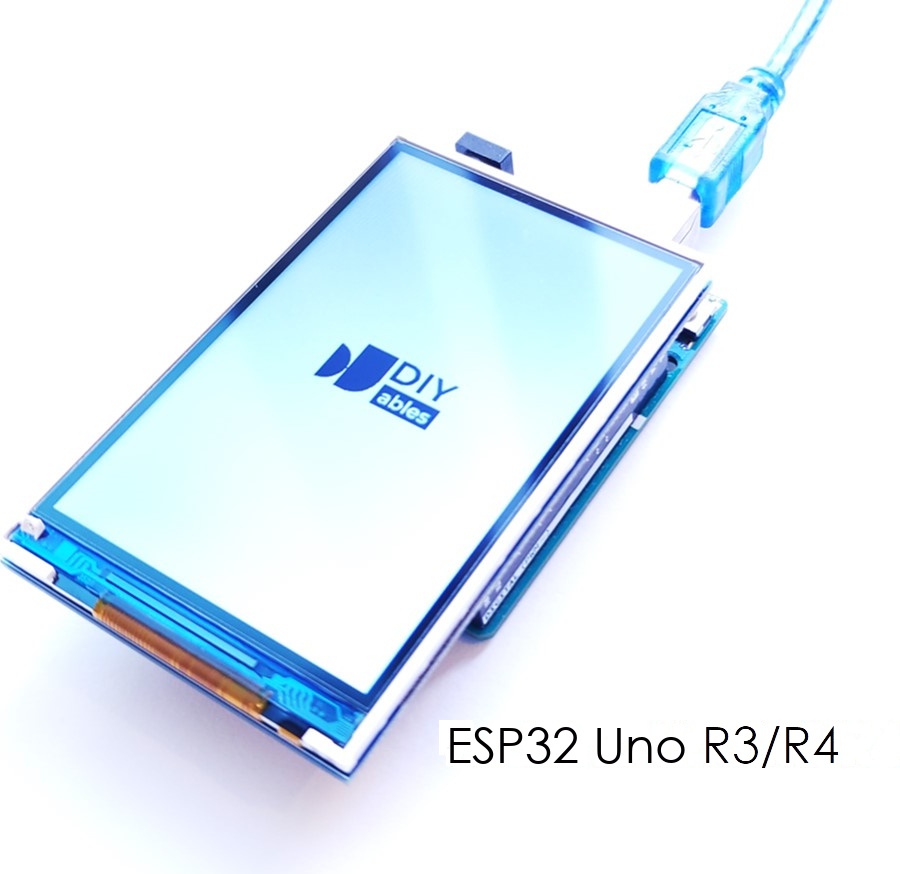
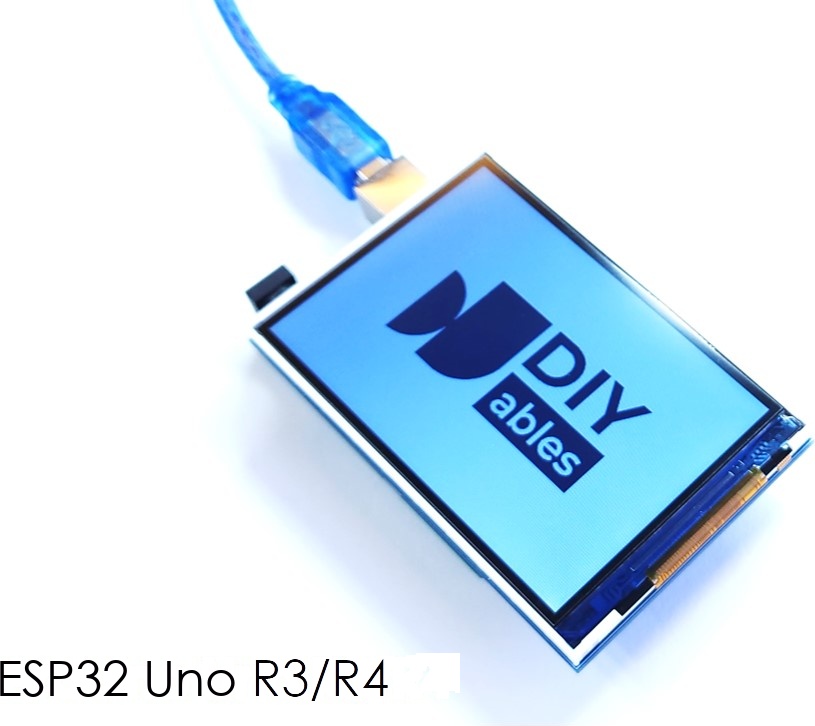
Click Upload to send the sketch to the ESP32 Uno. The DIYables logo appears on the screen.

ESP32 Uno display image on TFT LCD Touch display

Pro tip: when you edit only the .h file, add a space to the .ino file too. The Arduino IDE then notices the change and compiles again.

Show your own picture

  1. Prepare a JPEG or PNG image.
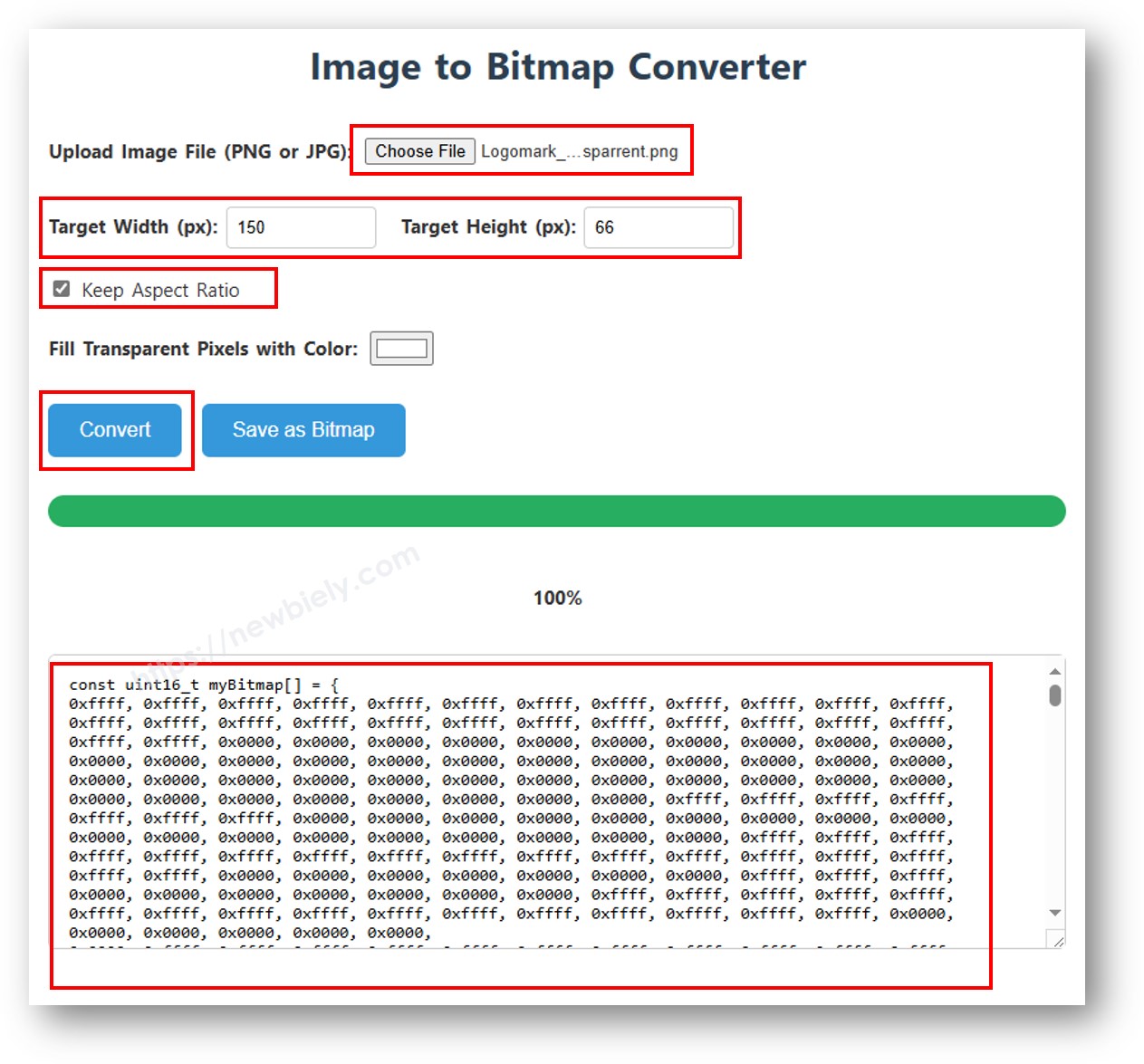
  2. Open the Image to Bitmap Converter and upload it.
  3. Set the width so the image is smaller than the screen.
  4. Using a PNG with see-through parts? Pick a fill color, because the conversion drops transparency.
  5. Click Convert and wait.
  6. Copy the new bitmap array into bitmap.h.
image to bitmap array
  1. Edit img_width and img_height in the .ino file so they equal the scaled picture size.
  2. Upload the sketch again.

※ NOTE THAT:

The image must be the same size as the screen or smaller.

Pictures from a MicroSD Card

The microSD socket of the shield uses D10 (GPIO5) for chip select and D11 (GPIO23), D12 (GPIO19), D13 (GPIO18) for SPI. These are the default SPI pins of the ESP32 Uno, so SD.begin(5) needs no extra wire. On this board, file names must begin with a slash, so the sketch opens "/diyables.bmp".

Good to know: D10 (GPIO5) is a boot strapping pin. If the board does not boot with the shield and a card inserted, remove the shield for the upload.

Step 1 — Get the picture

Download diyables.bmp and copy it to the microSD card.

Step 2 — Insert the card

Push the card into the SD socket of the TFT display.

Step 3 — Upload the sketch

/* * This ESP32 Uno code was developed by newbiely.com * * This ESP32 Uno code is made available for public use without any restriction * * For comprehensive instructions and wiring diagrams, please visit: * https://newbiely.com/tutorials/esp32-uno/esp32-uno-tft-lcd-touch-screen-display */ /* Created by DIYables This example code is in the public domain Product page: - https://diyables.io/tft-touch-shield - https://www.amazon.com/dp/B0DQ3NQ3LW NOTE: The shield SD socket sits on the SPI header pins D10 (GPIO5), D11 (GPIO23), D12 (GPIO19) and D13 (GPIO18) of the ESP32 Uno, which are its default SPI pins, so SD.begin(5) needs no extra wires. File names on the ESP32 Uno must start with "/" (for example "/diyables.bmp"). */ #include <DIYables_TFT_Touch_Shield.h> #include <SD.h> #define WHITE DIYables_TFT::colorRGB(255, 255, 255) #define BUFFPIXEL 20 // number of pixels read from the card at a time // Pick the class that matches the driver chip printed on your shield label: // - RM68140 chip -> DIYables_TFT_RM68140_Shield // - HX8357D chip -> DIYables_TFT_HX8357D_Shield // ESP32 Uno touch pins as GPIO numbers: XP = 27 (D6), YP = 4, XM = 35, YM = 14 (D7) DIYables_TFT_RM68140_Shield TFT_display(27, 4, 35, 14); // DIYables_TFT_HX8357D_Shield TFT_display(27, 4, 35, 14); #define SD_CS 5 // D10 (GPIO5) is the SD card chip select File bmpFile; uint16_t SCREEN_WIDTH; uint16_t SCREEN_HEIGHT; void setup() { Serial.begin(9600); if (!SD.begin(SD_CS)) { Serial.println("SD card initialization failed!"); return; } Serial.println("SD card initialized successfully."); Serial.println(F("ESP32 Uno TFT Touch LCD Display")); TFT_display.begin(); // landscape mode (rotation 1) TFT_display.setRotation(1); // read the screen size again, because rotation swaps width and height SCREEN_WIDTH = TFT_display.width(); SCREEN_HEIGHT = TFT_display.height(); TFT_display.fillScreen(WHITE); // read the picture size from the BMP header uint32_t imgWidth, imgHeight; if (getBMPDimensions("/diyables.bmp", imgWidth, imgHeight)) { Serial.print("BMP Image Width: "); Serial.println(imgWidth); Serial.print("BMP Image Height: "); Serial.println(imgHeight); } else { Serial.println("Failed to get BMP dimensions"); } // find the corner that centers the picture int x = (SCREEN_WIDTH - imgWidth) / 2; int y = (SCREEN_HEIGHT - imgHeight) / 2; drawBMP("/diyables.bmp", x, y); // draw the picture there } void loop(void) { } // small helpers that read numbers from the BMP header uint16_t read16(File &f) { uint16_t result; result = f.read(); result |= (f.read() << 8); return result; } uint32_t read32(File &f) { uint32_t result; result = f.read(); result |= ((uint32_t)f.read() << 8); result |= ((uint32_t)f.read() << 16); result |= ((uint32_t)f.read() << 24); return result; } // reads a signed 32-bit number int32_t readS32(File &f) { int32_t result; result = f.read(); result |= ((uint32_t)f.read() << 8); result |= ((uint32_t)f.read() << 16); result |= ((uint32_t)f.read() << 24); return result; } // draws a BMP file from the SD card void drawBMP(const char *filename, int x, int y) { bmpFile = SD.open(filename); if (!bmpFile) { Serial.println("File not found"); return; } if (read16(bmpFile) != 0x4D42) { // the first two bytes must say BM Serial.println("Not a BMP file"); bmpFile.close(); return; } // the signature is fine, now read the rest of the header Serial.println("BMP signature OK"); uint32_t fileSize = read32(bmpFile); Serial.print("File Size: "); Serial.println(fileSize); read32(bmpFile); // reserved bytes, not needed uint32_t imageOffset = read32(bmpFile); // where the pixel data begins Serial.print("Image Data Offset: "); Serial.println(imageOffset); uint32_t dibHeaderSize = read32(bmpFile); // size of the DIB header Serial.print("DIB Header Size: "); Serial.println(dibHeaderSize); // next come the width and height uint32_t bmpWidth = read32(bmpFile); int32_t bmpHeight = readS32(bmpFile); // signed, a negative value means top-down Serial.print("Image Width: "); Serial.println(bmpWidth); Serial.print("Image Height: "); Serial.println(bmpHeight); bool topDown = false; // true when rows are stored top to bottom if (bmpHeight < 0) { bmpHeight = -bmpHeight; // use the positive height from here on topDown = true; } if (read16(bmpFile) != 1) { // the planes field must be 1 Serial.println("Invalid BMP file"); bmpFile.close(); return; } uint16_t depth = read16(bmpFile); // bits per pixel Serial.print("Bit Depth: "); Serial.println(depth); if (depth != 24) { // only 24-bit BMP files work here Serial.println("Only 24-bit BMP is supported"); bmpFile.close(); return; } if (read32(bmpFile) != 0) { // compressed files are not supported Serial.println("Unsupported BMP compression"); bmpFile.close(); return; } // jump to the first pixel bmpFile.seek(imageOffset); uint8_t sdbuffer[3 * BUFFPIXEL]; // room for 20 pixels, 3 bytes each uint32_t rowSize = (bmpWidth * 3 + 3) & ~3; // every BMP row is padded to a multiple of 4 bytes // stop if the start point is outside the screen if (x >= SCREEN_WIDTH || y >= SCREEN_HEIGHT) { Serial.println("Image position out of screen bounds"); return; } uint32_t maxRow = min(bmpHeight, SCREEN_HEIGHT - y); uint32_t maxCol = min(bmpWidth, SCREEN_WIDTH - x); // draw one row at a time and stream its pixels to the screen uint16_t colorbuf[BUFFPIXEL]; // converted 16-bit colors for pushColors for (uint32_t row = 0; row < maxRow; row++) { int32_t rowPos = topDown ? row : bmpHeight - 1 - row; // flip the row order for normal bottom-up BMPs uint32_t filePosition = imageOffset + rowPos * rowSize; bmpFile.seek(filePosition); // go to the start of this row // tell the screen where this row goes TFT_display.setAddrWindow(x, y + row, x + maxCol - 1, y + row); for (uint32_t col = 0; col < maxCol; col += BUFFPIXEL) { uint32_t pixelsToRead = min(BUFFPIXEL, maxCol - col); // never read past the end of the row bmpFile.read(sdbuffer, 3 * pixelsToRead); // read a block of pixels in one go for (uint32_t i = 0; i < pixelsToRead; i++) { uint8_t b = sdbuffer[i * 3]; uint8_t g = sdbuffer[i * 3 + 1]; uint8_t r = sdbuffer[i * 3 + 2]; colorbuf[i] = DIYables_TFT::colorRGB(r, g, b); } // send the whole block to the display TFT_display.pushColors(colorbuf, pixelsToRead); } } bmpFile.close(); // done with the file Serial.println("Finished drawing BMP"); } // reads only the width and height of a BMP file bool getBMPDimensions(const char *filename, uint32_t &width, uint32_t &height) { File bmpFile = SD.open(filename); if (!bmpFile) { Serial.println("File not found"); return false; } if (read16(bmpFile) != 0x4D42) { // the first two bytes must say BM Serial.println("Not a BMP file"); bmpFile.close(); return false; } read32(bmpFile); // skip the file size read32(bmpFile); // skip the reserved bytes uint32_t imageOffset = read32(bmpFile); // where the pixel data begins uint32_t dibHeaderSize = read32(bmpFile); // size of the DIB header // width and height come next width = read32(bmpFile); int32_t bmpHeight = readS32(bmpFile); // negative for top-down pictures height = (bmpHeight < 0) ? -bmpHeight : bmpHeight; bmpFile.close(); // close the file return true; // all good }

Keep the Serial Monitor open at 9600 baud. It reports if the card or the file is missing.

∞
Newbiely | Arduino IDE 2.3.8
──
☐
✕
File
Edit
Sketch
Tools
Help
ESP32 Dev Module
Newbiely.ino
···
8 Serial.println("Hello World!");
Output
Serial Monitor
Message (Enter to send message to 'ESP32 Dev Module' on 'COM15')
New Line
9600 baud
SD card initialized successfully. ESP32 Uno TFT Touch LCD Display BMP Image Width: 120 BMP Image Height: 53 BMP signature OK Image Data Offset: 54 Bit Depth: 24 Finished drawing BMP
Ln 11, Col 1
ESP32 Dev Module on COM15
2

The logo is read from the card and drawn on the screen.

ESP32 Uno display image from SD Card on TFT LCD Touch display

Show another picture from the card

  1. Prepare a JPG or PNG image.
  2. Use the Image to Bitmap Converter: click Convert, then Save as Bitmap to download the file.
  3. Use a file name of 8 characters or fewer, without the extension.
  4. Copy the file to the card and put the card back in the socket.
  5. Change the name in the sketch and keep the leading slash, for example "/logo.bmp".
  6. Upload again.

You can change the code to draw several pictures at once.

Sketch 5: Read the Touch Point

Every touch project starts with knowing where the finger is. This sketch sends the X and Y of each touch to the Serial Monitor and marks the spot on the screen with a red dot.

Touch works with the default calibration numbers. If the dot is not under your finger, run the calibration sketch and use your own values.

/* * This ESP32 Uno code was developed by newbiely.com * * This ESP32 Uno code is made available for public use without any restriction * * For comprehensive instructions and wiring diagrams, please visit: * https://newbiely.com/tutorials/esp32-uno/esp32-uno-tft-lcd-touch-screen-display */ /* Touch Get Point Example ----------------------- Reads the touch position from the DIYables TFT Touch Shield. Each touch prints its screen X and Y to the Serial Monitor and puts a red dot at that spot on the display. **Note:** Touch works with the default calibration numbers. If it is not accurate, run the `TouchCalibration` example and give your values to `setTouchCalibration()`. Provided by DIYables This example code is in the public domain Product page: - https://diyables.io/tft-touch-shield - https://www.amazon.com/dp/B0DQ3NQ3LW */ #include <DIYables_TFT_Touch_Shield.h> #define RED DIYables_TFT::colorRGB(255, 0, 0) #define WHITE DIYables_TFT::colorRGB(255, 255, 255) // (Optional) Calibration numbers. If touch is off target, // run the TouchCalibration example and paste your values here. #define LEFT_X 136 #define RIGHT_X 907 #define TOP_Y 942 #define BOT_Y 139 // Pick the class that matches the driver chip printed on your shield label: // - RM68140 chip -> DIYables_TFT_RM68140_Shield // - HX8357D chip -> DIYables_TFT_HX8357D_Shield // ESP32 Uno touch pins as GPIO numbers: XP = 27 (D6), YP = 4, XM = 35, YM = 14 (D7) DIYables_TFT_RM68140_Shield TFT_display(27, 4, 35, 14); // DIYables_TFT_HX8357D_Shield TFT_display(27, 4, 35, 14); void setup() { Serial.begin(9600); // the touch library works with 10-bit ADC numbers (0-1023), like its default calibration values analogReadResolution(10); // set the ADC attenuation to 11 dB (up to ~3.3V input) analogSetAttenuation(ADC_11db); TFT_display.begin(); // portrait mode (rotation 0) TFT_display.setRotation(0); TFT_display.fillScreen(WHITE); TFT_display.setTouchCalibration(LEFT_X, RIGHT_X, TOP_Y, BOT_Y); Serial.println("Touch the screen to see coordinates."); } void loop() { int x, y; if (TFT_display.getTouch(x, y)) { Serial.print("Touch at: "); Serial.print(x); Serial.print(", "); Serial.println(y); TFT_display.fillCircle(x, y, 4, RED); // red dot under the finger delay(200); // short pause between reads } }

Why does setup() have two ADC lines?

The touch sketches start with two extra lines. analogReadResolution(10) makes the ESP32 Uno ADC report 0–1023 instead of its default 0–4095, because the touch library and the default calibration numbers (136, 907, 942, 139) use the 10-bit range.

analogSetAttenuation(ADC_11db) opens the analog input window from 0V up to roughly 3.3V. With a narrower window, readings hit the maximum early and touch points land in the wrong place.

Upload and Test

  1. Paste the sketch above into a new Arduino IDE window.
  2. Upload it with the Upload button.
  3. Open the Serial Monitor and choose 9600 baud.
  4. Touch the screen in several places.
  5. Read the coordinates printed in the Serial Monitor.
  6. Pro tip: press with a stylus or a fingernail. A resistive panel needs a bit of force.
∞
Newbiely | Arduino IDE 2.3.8
──
☐
✕
File
Edit
Sketch
Tools
Help
ESP32 Dev Module
Newbiely.ino
···
8 Serial.println("Hello World!");
Output
Serial Monitor
Message (Enter to send message to 'ESP32 Dev Module' on 'COM15')
New Line
9600 baud
Touch the screen to see coordinates. Touch at: 203, 118 Touch at: 205, 120 Touch at: 52, 391 Touch at: 267, 33
Ln 11, Col 1
ESP32 Dev Module on COM15
2

Sketch 6: Draw with a Pen

Make the display work like a sketch pad. Each touch point gets a red dot, and a moving pen leaves a trail of dots.

Touch works with the default calibration numbers. If the line is not under the pen, run the calibration sketch.

/* * This ESP32 Uno code was developed by newbiely.com * * This ESP32 Uno code is made available for public use without any restriction * * For comprehensive instructions and wiring diagrams, please visit: * https://newbiely.com/tutorials/esp32-uno/esp32-uno-tft-lcd-touch-screen-display */ /* Touch Draw Lines Example ------------------------ Turns the screen into a drawing pad that follows the pen. - Touch and drag to draw. - Lift the pen to stop. - Touch again to start a new stroke. Touch works with the default calibration numbers. If the drawing is not under the pen, run the TouchCalibration example. Provided by DIYables This example code is in the public domain Product page: - https://diyables.io/tft-touch-shield - https://www.amazon.com/dp/B0DQ3NQ3LW */ #include <DIYables_TFT_Touch_Shield.h> #define RED DIYables_TFT::colorRGB(255, 0, 0) #define WHITE DIYables_TFT::colorRGB(255, 255, 255) // (Optional) Calibration numbers. If touch is off target, // run the TouchCalibration example and paste your values here. #define LEFT_X 136 #define RIGHT_X 907 #define TOP_Y 942 #define BOT_Y 139 // Pick the class that matches the driver chip printed on your shield label: // - RM68140 chip -> DIYables_TFT_RM68140_Shield // - HX8357D chip -> DIYables_TFT_HX8357D_Shield // ESP32 Uno touch pins as GPIO numbers: XP = 27 (D6), YP = 4, XM = 35, YM = 14 (D7) DIYables_TFT_RM68140_Shield TFT_display(27, 4, 35, 14); // DIYables_TFT_HX8357D_Shield TFT_display(27, 4, 35, 14); #define PEN_RADIUS 3 // dot size in pixels, drawn at every touch point void setup() { // the touch library works with 10-bit ADC numbers (0-1023), like its default calibration values analogReadResolution(10); // set the ADC attenuation to 11 dB (up to ~3.3V input) analogSetAttenuation(ADC_11db); TFT_display.begin(); TFT_display.setRotation(0); TFT_display.setTouchCalibration(LEFT_X, RIGHT_X, TOP_Y, BOT_Y); TFT_display.fillScreen(WHITE); } void loop() { int x, y; if (TFT_display.getTouch(x, y)) { TFT_display.fillCircle(x, y, PEN_RADIUS, RED); } }

Upload and Test

  1. Paste the sketch above into a new Arduino IDE window.
  2. Upload it with the Upload button.
  3. Drag your finger or pen over the screen to draw.
  4. Take the pen off the glass to stop.
  5. Pro tip: raise PEN_RADIUS for a thick marker, lower it for a thin pen.

Sketch 7: Touch Button

Touch buttons replace physical switches. The sketch paints a red "PRESS" box. While you touch it, the box goes gray and reads "PRESSED". After you let go, it returns to red. A short debounce delay stops flicker.

Touch works with the default calibration numbers. If the button reacts in the wrong place, run the calibration sketch.

/* * This ESP32 Uno code was developed by newbiely.com * * This ESP32 Uno code is made available for public use without any restriction * * For comprehensive instructions and wiring diagrams, please visit: * https://newbiely.com/tutorials/esp32-uno/esp32-uno-tft-lcd-touch-screen-display */ /* Touch Button Press/Release Example ---------------------------------- Shows how to catch press and release events on a rectangle button with the DIYables TFT Touch Shield. A touch inside the button turns it gray and shows "PRESSED". Letting go brings back the red button. Touch works with the default calibration numbers. If the button reacts in the wrong place, run the TouchCalibration example. Provided by DIYables This example code is in the public domain Product page: - https://diyables.io/tft-touch-shield - https://www.amazon.com/dp/B0DQ3NQ3LW */ #include <DIYables_TFT_Touch_Shield.h> // Pick the class that matches the driver chip printed on your shield label: // - RM68140 chip -> DIYables_TFT_RM68140_Shield // - HX8357D chip -> DIYables_TFT_HX8357D_Shield // ESP32 Uno touch pins as GPIO numbers: XP = 27 (D6), YP = 4, XM = 35, YM = 14 (D7) DIYables_TFT_RM68140_Shield TFT_display(27, 4, 35, 14); // DIYables_TFT_HX8357D_Shield TFT_display(27, 4, 35, 14); #define BLACK DIYables_TFT::colorRGB(0, 0, 0) #define WHITE DIYables_TFT::colorRGB(255, 255, 255) #define GRAY DIYables_TFT::colorRGB(128, 128, 128) #define RED DIYables_TFT::colorRGB(255, 0, 0) // (Optional) Calibration numbers. If touch is off target, // run the TouchCalibration example and paste your values here. #define LEFT_X 136 #define RIGHT_X 907 #define TOP_Y 942 #define BOT_Y 139 // position and size of the button, in pixels #define BUTTON_X 70 #define BUTTON_Y 100 #define BUTTON_W 180 #define BUTTON_H 60 #define DEBOUNCE_DELAY 50 // milliseconds bool lastPressed = false; bool stablePressed = false; unsigned long lastDebounceTime = 0; void setup() { Serial.begin(9600); // the touch library works with 10-bit ADC numbers (0-1023), like its default calibration values analogReadResolution(10); // set the ADC attenuation to 11 dB (up to ~3.3V input) analogSetAttenuation(ADC_11db); TFT_display.begin(); TFT_display.setRotation(0); TFT_display.setTouchCalibration(LEFT_X, RIGHT_X, TOP_Y, BOT_Y); TFT_display.fillScreen(WHITE); // clean white background // paint the red button with a black frame and a white label TFT_display.fillRect(BUTTON_X, BUTTON_Y, BUTTON_W, BUTTON_H, RED); TFT_display.drawRect(BUTTON_X, BUTTON_Y, BUTTON_W, BUTTON_H, BLACK); TFT_display.setTextColor(WHITE); TFT_display.setTextSize(3); TFT_display.setCursor(BUTTON_X + 30, BUTTON_Y + 18); TFT_display.print("PRESS"); } void loop() { int x, y; bool pressed = false; if (TFT_display.getTouch(x, y)) { if (x >= BUTTON_X && x < (BUTTON_X + BUTTON_W) && y >= BUTTON_Y && y < (BUTTON_Y + BUTTON_H)) { pressed = true; } } // any change in the raw reading restarts the debounce timer if (pressed != lastPressed) { lastDebounceTime = millis(); } lastPressed = pressed; // wait until the reading has been steady for the debounce time if ((millis() - lastDebounceTime) < DEBOUNCE_DELAY) { return; } if (stablePressed == pressed) { // steady state did not change, nothing to do return; } // the button was just pressed if (pressed && !stablePressed) { Serial.println("Button PRESSED"); TFT_display.drawRect(BUTTON_X, BUTTON_Y, BUTTON_W, BUTTON_H, BLACK); TFT_display.fillRect(BUTTON_X, BUTTON_Y, BUTTON_W, BUTTON_H, GRAY); TFT_display.setTextColor(BLACK); TFT_display.setCursor(BUTTON_X + 30, BUTTON_Y + 18); TFT_display.print("PRESSED"); } // the button was just released if (!pressed && stablePressed) { Serial.println("Button RELEASED"); TFT_display.drawRect(BUTTON_X, BUTTON_Y, BUTTON_W, BUTTON_H, BLACK); TFT_display.fillRect(BUTTON_X, BUTTON_Y, BUTTON_W, BUTTON_H, RED); TFT_display.setTextColor(WHITE); TFT_display.setCursor(BUTTON_X + 30, BUTTON_Y + 18); TFT_display.print("PRESS"); } stablePressed = pressed; }
Code Part What It Does
BUTTON_X, BUTTON_Y, BUTTON_W, BUTTON_H Position and size of the button in pixels
DEBOUNCE_DELAY Time in ms the touch must stay steady before the state changes
lastPressed / stablePressed Raw reading and debounced state
getTouch(x, y) Returns true while the panel is pressed and gives the position

Upload and Test

  1. Paste the sketch above into a new Arduino IDE window.
  2. Upload it with the Upload button.
  3. Open the Serial Monitor (9600 baud) if you want to log each press and release.
  4. Tap the red box and see the color flip.
  5. Pro tip: to move or resize the button, change the four BUTTON_ values at the top.
∞
Newbiely | Arduino IDE 2.3.8
──
☐
✕
File
Edit
Sketch
Tools
Help
ESP32 Dev Module
Newbiely.ino
···
8 Serial.println("Hello World!");
Output
Serial Monitor
Message (Enter to send message to 'ESP32 Dev Module' on 'COM15')
New Line
9600 baud
Button PRESSED Button RELEASED Button PRESSED Button RELEASED Button PRESSED
Ln 11, Col 1
ESP32 Dev Module on COM15
2

The button looks like this.

ESP32 Uno Touch Button pressed/released event on TFT LCD Touch display

Touch Calibration Sketch

The sketches above use default calibration numbers and often work right away. Is the touch point off? Calibrate one time.

The touch layer is never glued exactly on the pixels, so raw readings differ a little from one display to the next. The calibration sketch reads your own panel and converts its raw numbers into screen positions.

Step 1 — Upload the calibration sketch

/* Touch Screen Calibration Example --------------------------------- This sketch reads the raw touch values at the four screen corners and prints calibration numbers you can use right away. It calls readTouchRaw() directly. It does not depend on getTouch() or on old calibration numbers, so it still works when touch looks broken. INSTRUCTIONS: 1. Upload this sketch to the ESP32 Uno. 2. Open the Serial Monitor (Ctrl+Shift+M) at 9600 baud. 3. A blinking red dot shows in each corner, numbered 1 to 4: 1 = Top-left 2 = Top-right 3 = Bottom-right 4 = Bottom-left 4. Press and HOLD the blinking dot with some force. Keep holding until the Serial Monitor shows "Captured!" for the corner. 5. Let go, wait for the next dot, and do the same again. 6. After the fourth corner, the Serial Monitor prints the numbers and a finished setTouchCalibration() line. Copy that line into your sketch. NOTE: While you wait, the live raw Z/X/Y values keep printing, so you can check that touch is detected. Provided by DIYables This example code is in the public domain */ #include <DIYables_TFT_Touch_Shield.h> // Pick the class that matches the driver chip printed on your shield label: // - RM68140 chip -> DIYables_TFT_RM68140_Shield // - HX8357D chip -> DIYables_TFT_HX8357D_Shield // ESP32 Uno touch pins as GPIO numbers: XP = 27 (D6), YP = 4, XM = 35, YM = 14 (D7) DIYables_TFT_RM68140_Shield TFT_display(27, 4, 35, 14); // DIYables_TFT_HX8357D_Shield TFT_display(27, 4, 35, 14); // Smallest pressure value that counts as a touch. There is no upper limit, // because the raw Z value changes a lot with finger force. #define TOUCH_Z_MIN 10 // Number of good readings in a row needed to accept a corner. // This ignores light brushes and one-off noisy readings. #define SAMPLES_NEEDED 10 // Pause between two readings, in milliseconds. #define SAMPLE_DELAY_MS 30 #define DOT_RADIUS 12 // Pixel position of each corner dot (set in setup() after the screen size is known). // Index: 0=top-left, 1=top-right, 2=bottom-right, 3=bottom-left int cx[4], cy[4]; // Average raw reading saved for each corner. int cap_x[4], cap_y[4]; // ----------------------------------------------------------------------- void drawDot(int corner, bool on) { uint16_t color = on ? 0xF800 /* red */ : 0xFFFF /* white */; TFT_display.fillCircle(cx[corner], cy[corner], DOT_RADIUS, color); TFT_display.setTextSize(2); TFT_display.setTextColor(0x0000, color); TFT_display.setCursor(cx[corner] - 6, cy[corner] - 8); TFT_display.print(corner + 1); } // Waits here until a steady touch is read at the chosen corner. void captureCorner(int corner) { const char* names[] = { "Top-left", "Top-right", "Bottom-right", "Bottom-left" }; Serial.println(); Serial.print("Corner "); Serial.print(corner + 1); Serial.print(" ("); Serial.print(names[corner]); Serial.println(")"); Serial.println(" Press and HOLD firmly on the blinking dot."); Serial.println(" Keep holding until you see 'Captured!'"); unsigned long lastBlink = 0; unsigned long lastPrint = 0; bool dotOn = false; int goodSamples = 0; long sumX = 0, sumY = 0; while (true) { // make the dot blink if (millis() - lastBlink > 400) { lastBlink = millis(); dotOn = !dotOn; drawDot(corner, dotOn); } int raw_x, raw_y, z; TFT_display.readTouchRaw(raw_x, raw_y, z); // show live readings so you can see that touch is detected if (millis() - lastPrint > 500) { lastPrint = millis(); Serial.print(" Z="); Serial.print(z); Serial.print(" X="); Serial.print(raw_x); Serial.print(" Y="); Serial.println(raw_y); } if (z > TOUCH_Z_MIN) { sumX += raw_x; sumY += raw_y; goodSamples++; if (goodSamples >= SAMPLES_NEEDED) { // enough good readings: save the average cap_x[corner] = (int)(sumX / goodSamples); cap_y[corner] = (int)(sumY / goodSamples); Serial.print(" Captured! avg X="); Serial.print(cap_x[corner]); Serial.print(" avg Y="); Serial.println(cap_y[corner]); drawDot(corner, false); // remove the dot delay(900); // give time to lift the finger return; } } else { // touch lost: clear the sums and start counting again if (goodSamples > 0) { goodSamples = 0; sumX = 0; sumY = 0; } } delay(SAMPLE_DELAY_MS); } } // ----------------------------------------------------------------------- void setup() { Serial.begin(9600); // the touch library works with 10-bit ADC numbers (0-1023), like its default calibration values analogReadResolution(10); // set the ADC attenuation to 11 dB (up to ~3.3V input) analogSetAttenuation(ADC_11db); TFT_display.begin(); TFT_display.setRotation(0); TFT_display.fillScreen(0xFFFF); // work out the corner positions from the real screen size int w = TFT_display.width(); int h = TFT_display.height(); int m = DOT_RADIUS + 6; // gap to the screen edge cx[0] = m; cy[0] = m; cx[1] = w - m; cy[1] = m; cx[2] = w - m; cy[2] = h - m; cx[3] = m; cy[3] = h - m; Serial.println("=== Touch Screen Calibration ==="); Serial.println("A blinking dot appears in each corner in order 1 to 4."); Serial.println("Press and HOLD each dot until the Serial Monitor shows 'Captured!'"); Serial.println("The live Z/X/Y readings are printed every 0.5 s so you can"); Serial.println("verify that touch is being detected."); Serial.println(); } void loop() { static int corner = 0; if (corner < 4) { captureCorner(corner); corner++; return; } // all four corners are done: calculate the final numbers int left_x = (cap_x[0] + cap_x[3]) / 2; int right_x = (cap_x[1] + cap_x[2]) / 2; int top_y = (cap_y[0] + cap_y[1]) / 2; int bot_y = (cap_y[2] + cap_y[3]) / 2; Serial.println(); Serial.println("=== Calibration Complete! ==="); Serial.println("Update your sketch with these values:"); Serial.println(); Serial.print(" #define LEFT_X "); Serial.println(left_x); Serial.print(" #define RIGHT_X "); Serial.println(right_x); Serial.print(" #define TOP_Y "); Serial.println(top_y); Serial.print(" #define BOT_Y "); Serial.println(bot_y); Serial.println(); Serial.println("And paste this line into setup() before using getTouch():"); Serial.print(" TFT_display.setTouchCalibration("); Serial.print(left_x); Serial.print(", "); Serial.print(right_x); Serial.print(", "); Serial.print(top_y); Serial.print(", "); Serial.print(bot_y); Serial.println(");"); // tell the user on the screen TFT_display.fillScreen(0xFFFF); TFT_display.setTextColor(0x0000); TFT_display.setTextSize(2); TFT_display.setCursor(10, 20); TFT_display.print("Done!"); TFT_display.setCursor(10, 50); TFT_display.print("See Serial Monitor"); TFT_display.setCursor(10, 80); TFT_display.print("for values."); while (1); // halt here }

Step 2 — Open the Serial Monitor

Press Ctrl+Shift+M and choose 9600 baud.

Step 3 — Touch the four corners

A blinking red dot shows in each corner, numbered 1 to 4:

  • 1: top-left
  • 2: top-right
  • 3: bottom-right
  • 4: bottom-left

Press and hold each dot with some force until the Serial Monitor prints "Captured!". Let go, then do the next corner.

Step 4 — Copy the result

After corner 4, the Serial Monitor prints four numbers and a ready line such as TFT_display.setTouchCalibration(131, 910, 944, 141);. Paste the numbers into the LEFT_X, RIGHT_X, TOP_Y and BOT_Y defines, or put the line in setup() before you call any touch function.

∞
Newbiely | Arduino IDE 2.3.8
──
☐
✕
File
Edit
Sketch
Tools
Help
ESP32 Dev Module
Newbiely.ino
···
8 Serial.println("Hello World!");
Output
Serial Monitor
Message (Enter to send message to 'ESP32 Dev Module' on 'COM15')
New Line
9600 baud
=== Calibration Complete! === Update your sketch with these values: #define LEFT_X 131 #define RIGHT_X 910 #define TOP_Y 944 #define BOT_Y 141 And paste this line into setup() before using getTouch(): TFT_display.setTouchCalibration(131, 910, 944, 141);
Ln 11, Col 1
ESP32 Dev Module on COM15
2

Calibrate once per display. Do it again only if you change the hardware.

※ NOTE THAT:

This sketch uses the 10-bit ADC setting too. Keep analogReadResolution(10) in both the calibration sketch and your own sketch, or the numbers will not match.

Video Tutorial

See the ESP32 Uno build in action in the video below.

ESP32 Uno vs UNO R4 for This Project

Moving this display from the UNO R4 to the ESP32 Uno changes the touch pin numbers and a few lines of setup code.

Item Arduino UNO R4 ESP32 Uno
Logic voltage 5V 3.3V
Touch pins in code Default, no arguments TFT_display(27, 4, 35, 14) as GPIO numbers
ADC range 10-bit, 0–1023 12-bit, 0–4095, set to 10-bit with analogReadResolution(10)
Extra setup lines None analogReadResolution(10) and analogSetAttenuation(ADC_11db)
SD card chip select SD.begin(10) SD.begin(5)
SD file names diyables.bmp /diyables.bmp
Arduino IDE board Arduino UNO R4 WiFi ESP32 Dev Module

The shield fits the Uno headers on both boards, so the stacking is the same. Pin numbers in the code are GPIOs on the ESP32 Uno. Remember that A2, A3 and A4 are input-only pins on this board.

Go Wireless: A Phone Screen Next to the TFT

Goal: send the text from your phone to the touch display.

The ESP32 Uno has WiFi and Bluetooth, so the shield does not have to show fixed text only. Type a message in a web page or in a Bluetooth app, and let the sketch print it on the screen with TFT_display.print(). You can also send the touch coordinates to a phone to check them while you test.

Idea Page To Try
Type text on the phone, show it on the TFT ESP32 Uno - DIYables Web Apps Chat
Watch touch values from the phone ESP32 Uno - DIYables Web Apps Web Monitor
Same idea with Bluetooth text ESP32 Uno - DIYables Bluetooth App Chat
Bluetooth monitor for sensor values ESP32 Uno - DIYables Bluetooth App Monitor

Good to know: the analog touch readings use A1 (GPIO4), which is an ADC2 pin. ADC2 cannot be read while WiFi is on, so a WiFi version of the touch sketches needs another way to read touch, for example with Bluetooth only.

Try These Next

  • Save the calibration values in your sketch and test touch in all four rotations.
  • Draw a slider with fillRect() and move it with getTouch().
  • Build a two-button menu: one button changes the screen color, the other shows a picture from the microSD card.
  • Make a tiny paint tool with color boxes at the top of the screen.

Troubleshooting

Problem Possible Cause Solution
No COM port or upload fails CH340 driver missing or a charge-only USB cable Install the CH340 driver and use a data USB cable. If you see "Failed to connect" or "Waiting for download", hold the BOOT button while the upload starts
Upload or boot fails only with the shield on The shield pulls a boot strapping pin such as D8 (GPIO12), A0 (GPIO2) or D10 (GPIO5) at power-on Remove the shield, upload the sketch, plug the shield back and press RESET
Screen stays dark Shield not fully seated or no power Press the shield firmly into all headers and check that the USB cable is connected
Screen stays white or shows noise Wrong driver class Read the driver chip on your shield and use the RM68140 or HX8357D class
Screen does not work at all on A2, A3 or A4 These pins are input-only on the ESP32 Uno but the shield needs outputs Use a library version that supports the ESP32 Uno and check the library notes
Touch does nothing Display object created without the touch pins Create it with TFT_display(27, 4, 35, 14)
Touch lands far from the finger ADC bits and calibration numbers disagree Leave analogReadResolution(10) in setup() and run the calibration sketch
Touch is mirrored after rotation Calibration was done in another rotation Run the calibration in rotation 0, then set the rotation you want
SD card initialization failed Card missing, wrong file system or not seated Format the card as FAT32 and push it all the way in
File not found on the SD card Missing slash or a long file name Use a short name with a slash in front, for example "/diyables.bmp"

FAQ

Does the 3.5-inch TFT touch shield fit the ESP32 Uno?

Yes, the shield has the Uno shape and plugs into the headers. Install the DIYables_TFT_Touch_Shield library v2.0.0 or newer and create the display object with the ESP32 Uno touch pins. Check the library notes for ESP32 Uno support.

What do the numbers 27, 4, 35, 14 mean in the display object?

They list the touch lines as GPIOs, in the order XP, YP, XM, YM: D6 is GPIO27, A1 is GPIO4, A2 is GPIO35 and D7 is GPIO14. The library falls back to Uno header numbers when you pass nothing, so on this board you hand it the GPIOs yourself.

What do analogReadResolution(10) and analogSetAttenuation(ADC_11db) do in the touch sketches?

The ESP32 Uno ADC gives 0–4095 by default, but the touch library and its default calibration numbers use 0–1023. analogReadResolution(10) fixes the range. analogSetAttenuation(ADC_11db) widens the input window to roughly 0–3.3V, which lets the whole touch signal be read. Those lines are extra work that only the ESP32 Uno needs.

Which pins are left for my own parts while the shield is mounted?

Pin A5 (GPIO39) stays unused by the shield, but it can only read, not write. The SDA (GPIO21) and SCL (GPIO22) header pins are free for I2C modules, because I2C is not on A4/A5 on this board. D10 to D13 become free too when you leave the microSD card out.

My project needs extra pins beyond the Uno headers. Where do I find them?

The shield takes almost every header pin, so the extra holes are useful. The ESP32 Uno has GPIO32 and GPIO33 (I/O, PWM, analog on ADC1, so they also work while WiFi is on) and GPIO15 (I/O, PWM, analog on ADC2) near the power header. Solder pin headers to use them and write the GPIO number in code. For an analog sensor, pick GPIO32 or GPIO33. Two warnings: GPIO15 and GPIO0 (the IO0 pin at the unused Uno NC position) are boot strapping pins, and a wrong connection can stop the board from booting or uploading code, so use GPIO32/33 first. Never use the six holes under the digital header (SD0–SD3, CMD, CLK = GPIO6–GPIO11), because they are wired to the flash chip and using them crashes the board.

Why are A2, A3 and A4 a problem for this shield?

On the ESP32 Uno, A2 (GPIO35), A3 (GPIO34) and A4 (GPIO36) are input-only pins. The shield uses them for command/data, chip select and reset, which are outputs. The wiring is fixed by the shield, so use a library version that handles this on the ESP32 Uno.

Can the ESP32 Uno boot with the shield plugged in?

Usually yes, but D8 (GPIO12), A0 (GPIO2) and D10 (GPIO5) are boot strapping pins and the shield is connected to them. If the upload or the boot fails, take the shield off, upload, and put it back.

How do I use an HX8357D shield instead of an RM68140 one?

Change the class name from DIYables_TFT_RM68140_Shield to DIYables_TFT_HX8357D_Shield. The functions are the same, so the rest of the sketch stays as it is.

Do I need to calibrate the touch screen?

Not always. The default numbers (136, 907, 942, 139) work on many panels. Run the calibration sketch when the touch point is not under your finger.

Can I use any microSD card?

Use a FAT32 card. Name the picture with fewer than 9 characters, start the name with a slash, and save it as a 24-bit BMP.

Can I show the touch position on a web page with the ESP32 Uno?

Yes, the ESP32 Uno has WiFi and Bluetooth. Send the X and Y values to a web page or phone app with the DIYables web apps, but remember that the touch panel is read on A1 (GPIO4), an ADC2 pin, which cannot be read while WiFi is on. Bluetooth does not have this limit.

※ OUR MESSAGES

  • As freelancers, We are AVAILABLE for HIRE. See how to outsource your project to us
  • Please feel free to share the link of this tutorial. However, Please do not use our content on any other websites. We invested a lot of effort and time to create the content, please respect our work!